light PEUGEOT 5008 2017 User Guide
[x] Cancel search | Manufacturer: PEUGEOT, Model Year: 2017, Model line: 5008, Model: PEUGEOT 5008 2017Pages: 404, PDF Size: 15.31 MB
Page 29 of 404
27
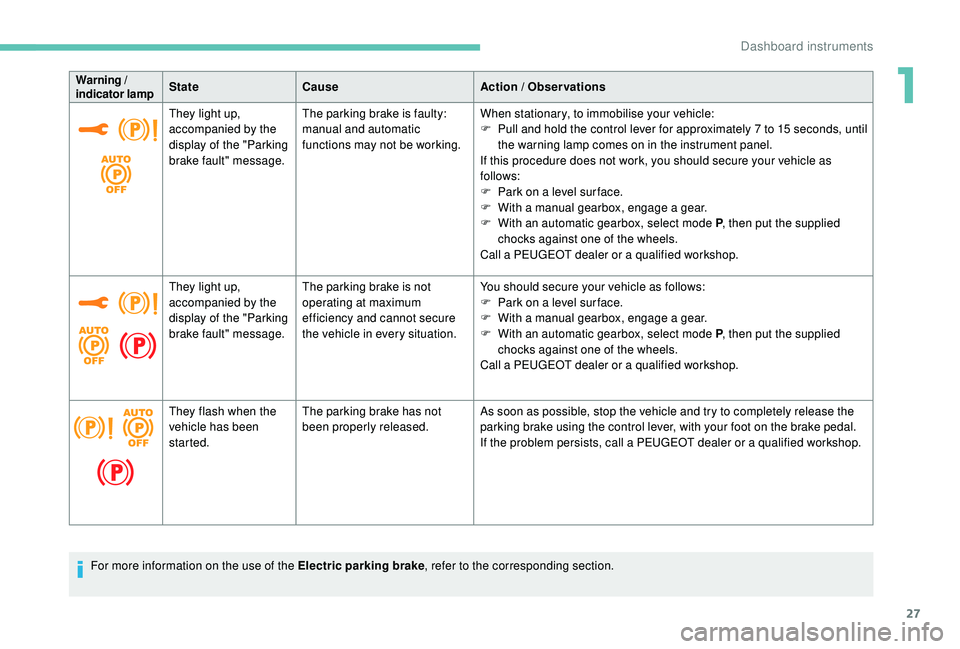
Warning /
indicator lampState
Cause Action / Observations
They light up,
accompanied by the
display of the "Parking
brake fault" message. The parking brake is faulty:
manual and automatic
functions may not be working.
When stationary, to immobilise your vehicle:
F
P
ull and hold the control lever for approximately 7 to 15 seconds, until
the warning lamp comes on in the instrument panel.
If this procedure does not work, you should secure your vehicle as
follows:
F
P
ark on a level sur face.
F
W
ith a manual gearbox, engage a gear.
F
W
ith an automatic gearbox, select mode P, then put the supplied
chocks against one of the wheels.
Call a PEUGEOT dealer or a qualified workshop.
They light up,
accompanied by the
display of the "Parking
brake fault" message. The parking brake is not
operating at maximum
efficiency and cannot secure
the vehicle in every situation. You should secure your vehicle as follows:
F
P
ark on a level sur face.
F
W
ith a manual gearbox, engage a gear.
F
W
ith an automatic gearbox, select mode P, then put the supplied
chocks against one of the wheels.
Call a PEUGEOT dealer or a qualified workshop.
They flash when the
vehicle has been
started. The parking brake has not
been properly released.
As soon as possible, stop the vehicle and try to completely release the
parking brake using the control lever, with your foot on the brake pedal.
If the problem persists, call a PEUGEOT dealer or a qualified workshop.
For more information on the use of the Electric parking brake , refer to the corresponding section.
1
Dashboard instruments
Page 37 of 404
35
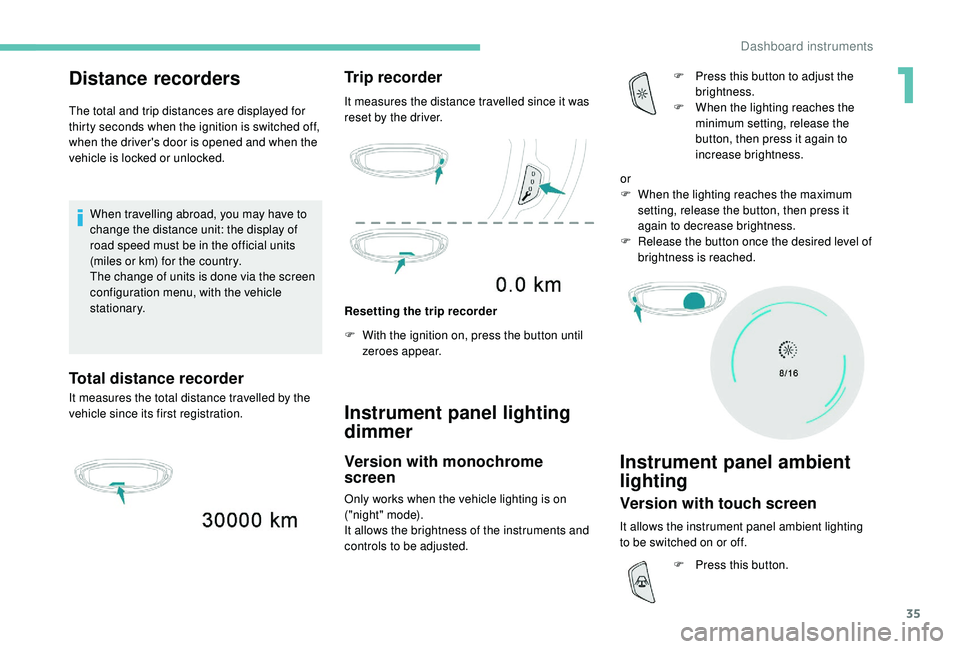
Distance recorders
The total and trip distances are displayed for
thirty seconds when the ignition is switched off,
when the driver's door is opened and when the
vehicle is locked or unlocked.When travelling abroad, you may have to
change the distance unit: the display of
road speed must be in the official units
(miles or km) for the country.
The change of units is done via the screen
configuration menu, with the vehicle
stationary.
Total distance recorder
It measures the total distance travelled by the
vehicle since its first registration.
Trip recorder
It measures the distance travelled since it was
reset by the driver.
Resetting the trip recorder
F
W
ith the ignition on, press the button until
zeroes appear.
Instrument panel lighting
dimmer
Version with monochrome
screen
Only works when the vehicle lighting is on
("night" mode).
It allows the brightness of the instruments and
controls to be adjusted. F
P
ress this button to adjust the
brightness.
F
W
hen the lighting reaches the
minimum setting, release the
button, then press it again to
increase brightness.
Instrument panel ambient
lighting
Version with touch screen
It allows the instrument panel ambient lighting
to be switched on or off. or
F
W
hen the lighting reaches the maximum
setting, release the button, then press it
again to decrease brightness.
F
R
elease the button once the desired level of
brightness is reached.
F
P
ress this button.
1
Dashboard instruments
Page 38 of 404
36
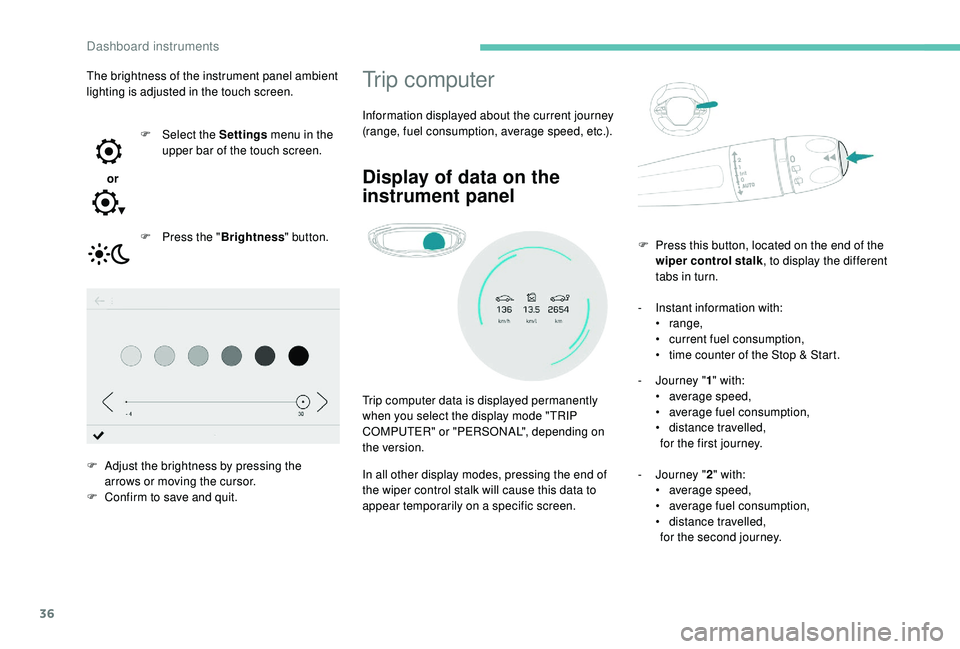
Trip computer
Information displayed about the current journey
(range, fuel consumption, average speed, etc.).
Display of data on the
instrument panel
Trip computer data is displayed permanently
when you select the display mode "TRIP
COMPUTER" or "PERSONAL", depending on
the version.
In all other display modes, pressing the end of
the wiper control stalk will cause this data to
appear temporarily on a specific screen.-
I
nstant information with:
•
range,
•
c
urrent fuel consumption,
•
t
ime counter of the Stop & Start.
-
J
ourney "
1" with:
• a verage speed,
• a verage fuel consumption,
•
d
istance travelled,
for the first journey.
-
J
ourney "2" with:
•
a
verage speed,
•
a
verage fuel consumption,
•
d
istance travelled,
for the second journey.
F
P
ress this button, located on the end of the
wiper control stalk , to display the different
tabs in turn.
The brightness of the instrument panel ambient
lighting is adjusted in the touch screen.
or F
Sel
ect the Settings
menu in the
upper bar of the touch screen.
F
P
ress the "
Brightness " button.
F
A
djust the brightness by pressing the
arrows or moving the cursor.
F
C
onfirm to save and quit.
Dashboard instruments
Page 41 of 404
39
"Connections" menu
With the audio system on, this
menu allows a Bluetooth device
(telephone, media player) to be
paired and the connection mode
to be defined (hands-free, playing
audio files).
For more information on the "Connections"
application, refer to the "Audio equipment and
telematics" section.
"Personalisation-
configuration" menu
This menu gives access to the
following functions:
-
"
Define the vehicle parameters",
-
"
Choice of language",
-
"
Display configuration".
Define the vehicle parameters
This menu allows the activation or deactivation
of the following equipment, depending on
version:
-
"
Access to the vehicle" :
•
"
Plip action".
For more information on the Remote control
and driver door selective unlocking in
particular, refer to the "Access" section. -
"
Comfort"
:
•
"
Rear wipe in reverse gear".
For more information on the Wipers , refer
to the "Lighting and visibility" section.
•
"
Parking assistance".
For more information on Parking
assistance , refer to the "Driving" section.
•
"
Fatigue Detection System".
For more information on the Fatigue
detection system , refer to the "Driving"
section.
-
"
Driving assistance"
:
•
"
Auto. emergency braking".
For more information on the Active Safety
Brake , refer to the "Driving" section.
•
"
Speed recommendation".
For more information on Speed limit
recognition , refer to the "Driving" section.
•
"
Tyre inflation".
For more information on Under-inflation
detection and reinitialisation in particular,
refer to the "Driving" section.
Choice of language
This menu allows selection of the language
used by the screen and the instrument panel.
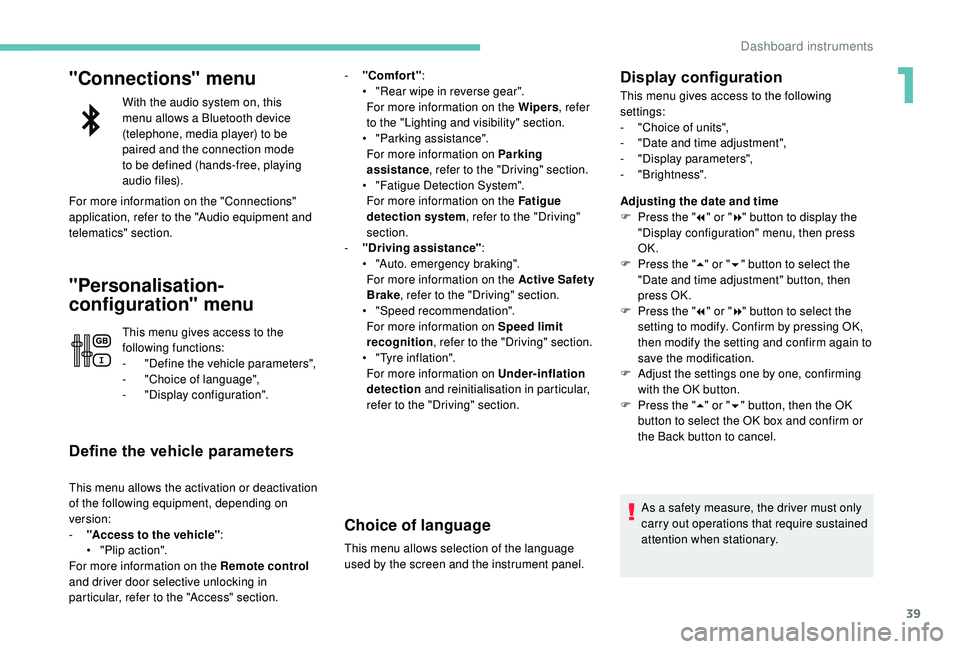
Display configuration
This menu gives access to the following
settings:
-
"
Choice of units",
-
"
Date and time adjustment",
-
"
Display parameters",
-
"Brightness".
Adjusting the date and time
F
P
ress the " 7" or " 8" button to display the
"Display configuration" menu, then press
OK.
F
P
ress the " 5" or " 6" button to select the
"Date and time adjustment" button, then
press OK.
F
P
ress the " 7" or " 8" button to select the
setting to modify. Confirm by pressing OK,
then modify the setting and confirm again to
save the modification.
F
A
djust the settings one by one, confirming
with the OK button.
F
P
ress the " 5" or " 6" button, then the OK
button to select the OK box and confirm or
the Back button to cancel.
As a safety measure, the driver must only
carry out operations that require sustained
attention when stationary.
1
Dashboard instruments
Page 44 of 404
42
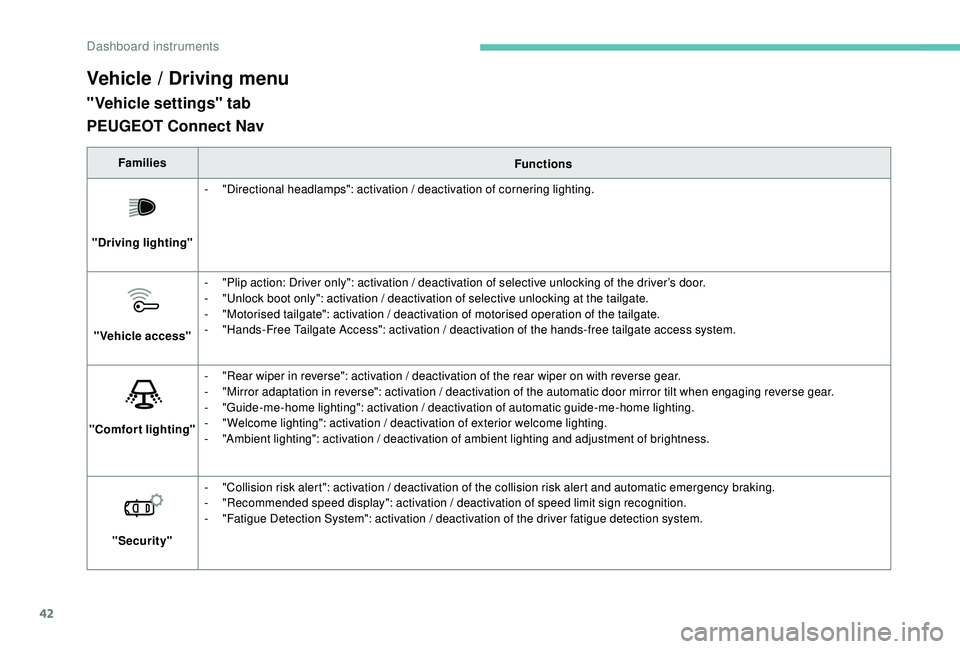
Vehicle / Driving menu
"Vehicle settings" tab
FamiliesFunctions
"Driving lighting" -
"
Directional headlamps": activation / deactivation of cornering lighting.
"Vehicle access" -
"
Plip action: Driver only": activation / deactivation of selective unlocking of the driver’s door.
-
"
Unlock boot only": activation / deactivation of selective unlocking at the tailgate.
-
"
Motorised tailgate": activation / deactivation of motorised operation of the tailgate.
-
"
Hands-Free Tailgate Access": activation / deactivation of the hands-free tailgate access system.
"Comfort lighting" -
"
Rear wiper in reverse": activation / deactivation of the rear wiper on with reverse gear.
-
"
Mirror adaptation in reverse": activation / deactivation of the automatic door mirror tilt when engaging reverse gear.
-
"
Guide-me-home lighting": activation / deactivation of automatic guide-me-home lighting.
-
"
Welcome lighting": activation / deactivation of exterior welcome lighting.
-
"
Ambient lighting": activation / deactivation of ambient lighting and adjustment of brightness.
"Security" -
"
Collision risk alert": activation / deactivation of the collision risk alert and automatic emergency braking.
-
"
Recommended speed display": activation / deactivation of speed limit sign recognition.
-
"
Fatigue Detection System": activation / deactivation of the driver fatigue detection system.
PEUGEOT Connect Nav
Dashboard instruments
Page 45 of 404
43
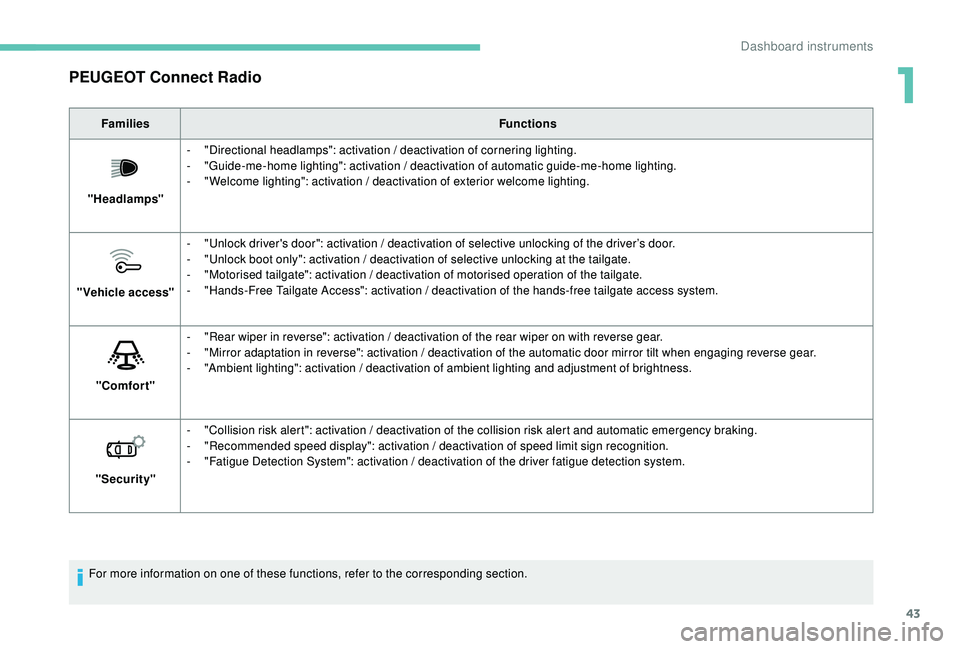
PEUGEOT Connect Radio
FamiliesFunctions
"Headlamps" -
"
Directional headlamps": activation / deactivation of cornering lighting.
-
"
Guide-me-home lighting": activation / deactivation of automatic guide-me-home lighting.
-
"
Welcome lighting": activation / deactivation of exterior welcome lighting.
"Vehicle access" -
"
Unlock driver's door": activation / deactivation of selective unlocking of the driver’s door.
-
"
Unlock boot only": activation / deactivation of selective unlocking at the tailgate.
-
"
Motorised tailgate": activation / deactivation of motorised operation of the tailgate.
-
"
Hands-Free Tailgate Access": activation / deactivation of the hands-free tailgate access system.
"Comfort" -
"
Rear wiper in reverse": activation / deactivation of the rear wiper on with reverse gear.
-
"
Mirror adaptation in reverse": activation / deactivation of the automatic door mirror tilt when engaging reverse gear.
-
"
Ambient lighting": activation / deactivation of ambient lighting and adjustment of brightness.
"Security" -
"
Collision risk alert": activation / deactivation of the collision risk alert and automatic emergency braking.
-
"
Recommended speed display": activation / deactivation of speed limit sign recognition.
-
"
Fatigue Detection System": activation / deactivation of the driver fatigue detection system.
For more information on one of these functions, refer to the corresponding section.
1
Dashboard instruments
Page 49 of 404
47
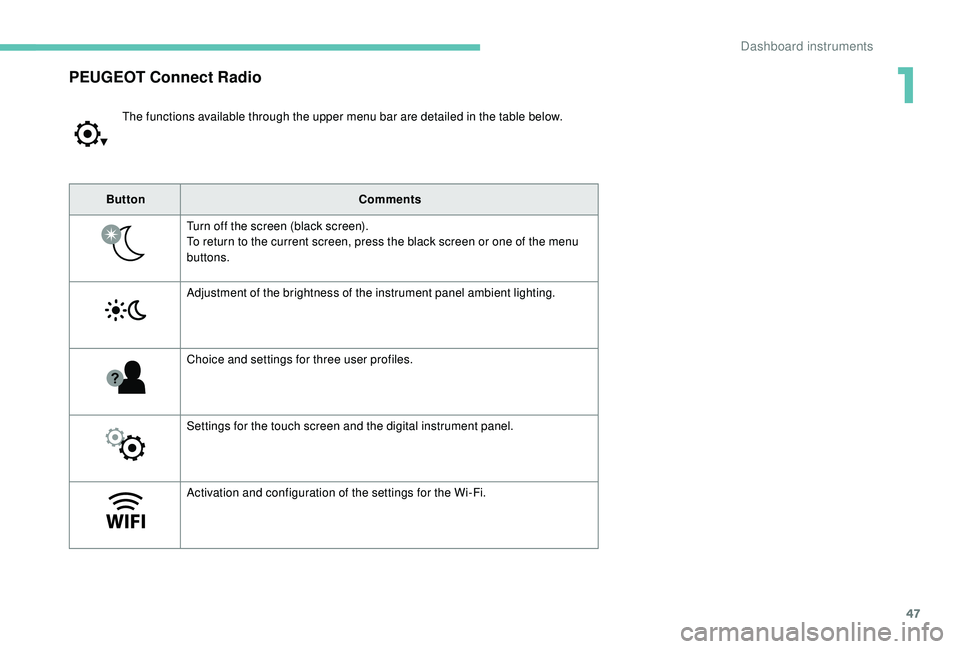
PEUGEOT Connect Radio
The functions available through the upper menu bar are detailed in the table below.
Button Comments
Turn off the screen (black screen).
To return to the current screen, press the black screen or one of the menu
buttons.
Adjustment of the brightness of the instrument panel ambient lighting.
Choice and settings for three user profiles.
Settings for the touch screen and the digital instrument panel.
Activation and configuration of the settings for the Wi-Fi.
1
Dashboard instruments
Page 51 of 404
49
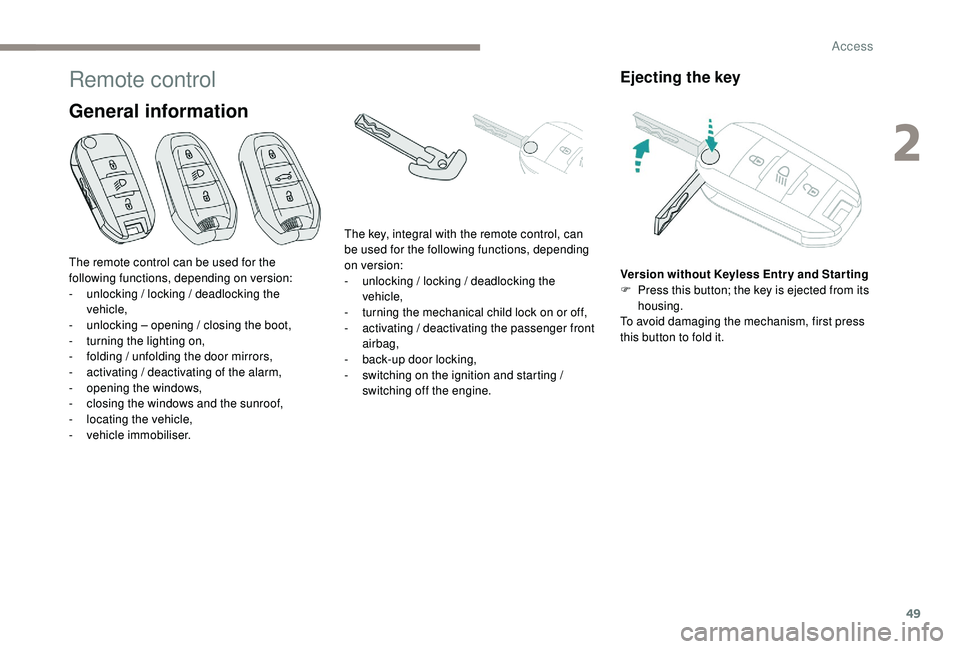
Remote control
General information
Ejecting the key
Version without Keyless Entr y and Star ting
F P ress this button; the key is ejected from its
housing.
To avoid damaging the mechanism, first press
this button to fold it.
The remote control can be used for the
following functions, depending on version:
-
u
nlocking / locking / deadlocking the
vehicle,
-
u
nlocking – opening / closing the boot,
-
t
urning the lighting on,
-
f
olding / unfolding the door mirrors,
-
a
ctivating / deactivating of the alarm,
-
o
pening the windows,
-
c
losing the windows and the sunroof,
-
l
ocating the vehicle,
-
v
ehicle immobiliser. The key, integral with the remote control, can
be used for the following functions, depending
on version:
-
u
nlocking / locking / deadlocking the
vehicle,
-
t
urning the mechanical child lock on or off,
-
a
ctivating / deactivating the passenger front
airbag,
-
b
ack-up door locking,
-
s
witching on the ignition and starting /
switching off the engine.
2
Access
Page 53 of 404
51
Deadlocking
F Within five seconds, press this button again to deadlock the
vehicle.
For versions without alarm, deadlocking is
confirmed by illumination of the direction
indicators for few seconds on the second press
of the locking button. Closing the windows and sunroof
Maintaining pressure on the locking
button allows the windows and,
depending on version, the sunroof to
be closed to the desired position.
This operation also closes the
sunroof blind.
Locating your vehicle
This function allows you to identify your vehicle
from a distance, particularly in poor light. Your
vehicle must be locked.
F
P
ress this button. This will switch on the courtesy lamps and door
mirror spot lamps and the direction indicators
will flash for around ten seconds.
Welcome lighting
Availability of this function depends on version.
F
M
ake a short press on this
remote control button.
Pressing again before the end of the timed
period switches off the lighting immediately. The sidelamps, dipped beam headlamps,
number plate lamps and door mirror spotlamps
come on for 30
seconds.
The automatic folding and unfolding of the
door mirrors with the remote control can
be deactivated by a PEUGEOT dealer or a
qualified workshop.
Deadlocking renders the interior door
controls inoperative.
It also deactivates the interior central
locking button on the dashboard.
Therefore, never leave anyone inside the
vehicle when it is deadlocked. Ensure that nothing could prevent the
correct closing of the windows and
sunroof.
If, on versions with alarm, you want to
leave the windows and/or sunroof partly
open, you must first deactivate the
volumetric alarm protection.
For more information on the Alarm
, refer
to the corresponding section.
2
Access
Page 76 of 404
74
Driving position
Adopting a good driving position helps improve
your comfort and protection.
It also optimises interior and exterior visibility
as well as access to controls.
Sitting comfortably
Whether or not your vehicle has certain seat
adjustments described in this section depends
on the trim level and country of sale.
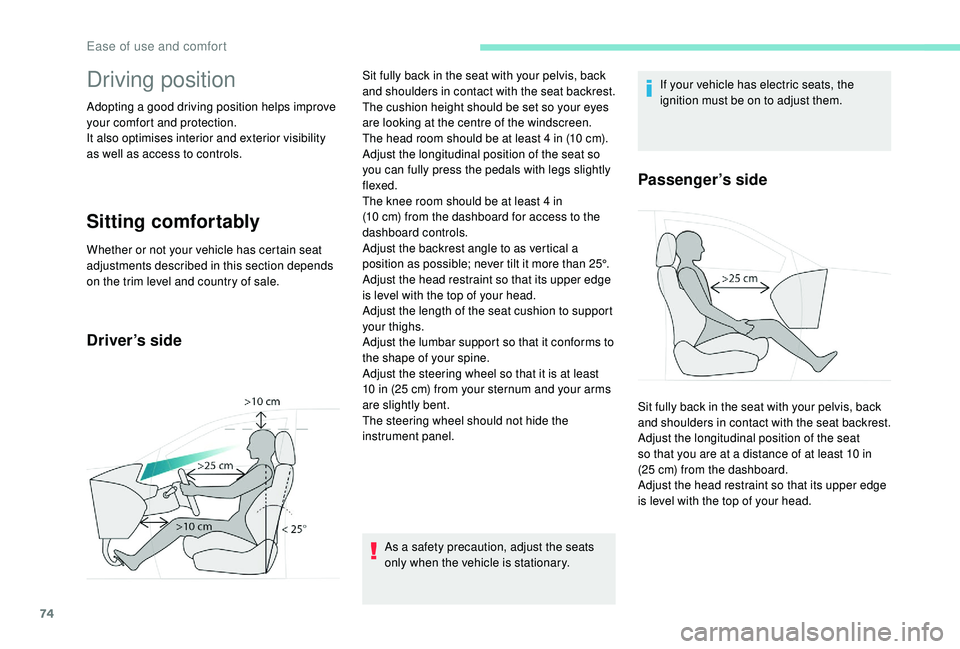
Driver’s side
As a safety precaution, adjust the seats
only when the vehicle is stationary.If your vehicle has electric seats, the
ignition must be on to adjust them.
Passenger’s side
Sit fully back in the seat with your pelvis, back
and shoulders in contact with the seat backrest.
The cushion height should be set so your eyes
are looking at the centre of the windscreen.
The head room should be at least 4
in (10 cm).
Adjust the longitudinal position of the seat so
you can fully press the pedals with legs slightly
flexed.
The knee room should be at least 4
in
(10
cm) from the dashboard for access to the
dashboard controls.
Adjust the backrest angle to as vertical a
position as possible; never tilt it more than 25°.
Adjust the head restraint so that its upper edge
is level with the top of your head.
Adjust the length of the seat cushion to support
your thighs.
Adjust the lumbar support so that it conforms to
the shape of your spine.
Adjust the steering wheel so that it is at least
10
in (25 cm) from your sternum and your arms
are slightly bent.
The steering wheel should not hide the
instrument panel. Sit fully back in the seat with your pelvis, back
and shoulders in contact with the seat backrest.
Adjust the longitudinal position of the seat
so that you are at a distance of at least 10
in
(25
cm) from the dashboard.
Adjust the head restraint so that its upper edge
is level with the top of your head.
Ease of use and comfort