reset PEUGEOT 5008 2017 Owner's Manual
[x] Cancel search | Manufacturer: PEUGEOT, Model Year: 2017, Model line: 5008, Model: PEUGEOT 5008 2017Pages: 404, PDF Size: 15.31 MB
Page 369 of 404
25
Settings
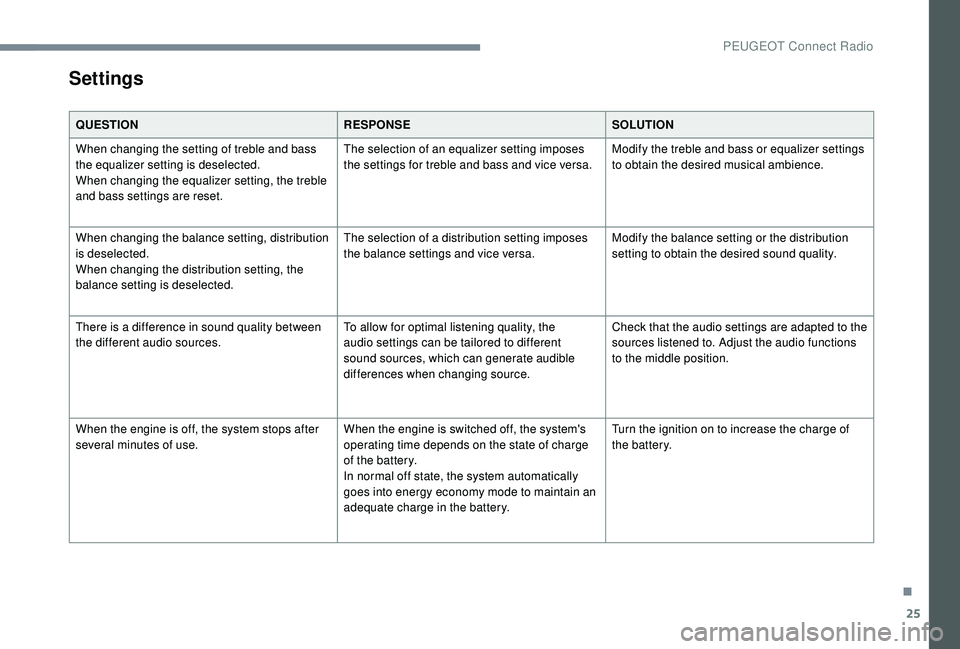
QUESTIONRESPONSESOLUTION
When changing the setting of treble and bass
the equalizer setting is deselected.
When changing the equalizer setting, the treble
and bass settings are reset. The selection of an equalizer setting imposes
the settings for treble and bass and vice versa.
Modify the treble and bass or equalizer settings
to obtain the desired musical ambience.
When changing the balance setting, distribution
is deselected.
When changing the distribution setting, the
balance setting is deselected. The selection of a distribution setting imposes
the balance settings and vice versa.
Modify the balance setting or the distribution
setting to obtain the desired sound quality.
There is a difference in sound quality between
the different audio sources. To allow for optimal listening quality, the
audio settings can be tailored to different
sound sources, which can generate audible
differences when changing source.Check that the audio settings are adapted to the
sources listened to. Adjust the audio functions
to the middle position.
When the engine is off, the system stops after
several minutes of use. When the engine is switched off, the system's
operating time depends on the state of charge
of the battery.
In normal off state, the system automatically
goes into energy economy mode to maintain an
adequate charge in the battery.Turn the ignition on to increase the charge of
the battery.
.
PEUGEOT Connect Radio
Page 374 of 404
2
First steps
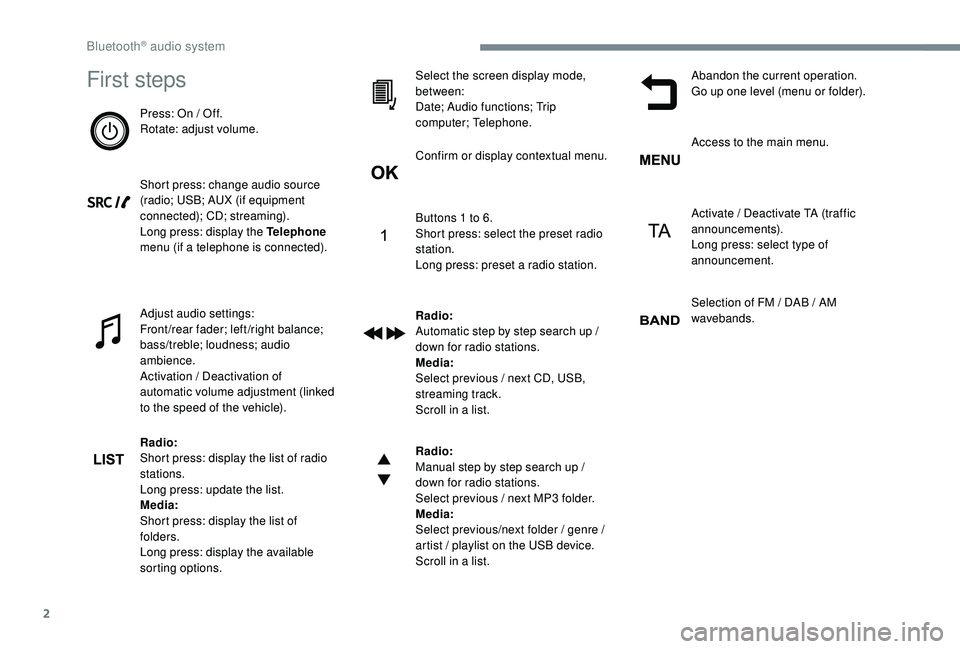
Press: On / Off.
Rotate: adjust volume.
Short press: change audio source
(radio; USB; AUX (if equipment
connected); CD; streaming).
Long press: display the Telephone
menu (if a telephone is connected).
Adjust audio settings:
Front/rear fader; left/right balance;
bass/treble; loudness; audio
ambience.
Activation / Deactivation of
automatic volume adjustment (linked
to the speed of the vehicle).
Radio:
Short press: display the list of radio
stations.
Long press: update the list.
Media:
Short press: display the list of
folders.
Long press: display the available
sorting options.Select the screen display mode,
between:
Date; Audio functions; Trip
computer; Telephone.
Confirm or display contextual menu.
Buttons 1
to 6.
Short press: select the preset radio
station.
Long press: preset a radio station.
Radio:
Automatic step by step search up /
down for radio stations.
Media:
Select previous / next CD, USB,
streaming track.
Scroll in a list.
Radio:
Manual step by step search up /
down for radio stations.
Select previous / next MP3
folder.
Media:
Select previous/next folder / genre /
artist / playlist on the USB device.
Scroll in a list. Abandon the current operation.
Go up one level (menu or folder).
Access to the main menu.
Activate / Deactivate TA (traffic
announcements).
Long press: select type of
announcement.
Selection of FM / DAB / AM
wavebands.
Bluetooth® audio system
Page 375 of 404
3
Steering mounted controls
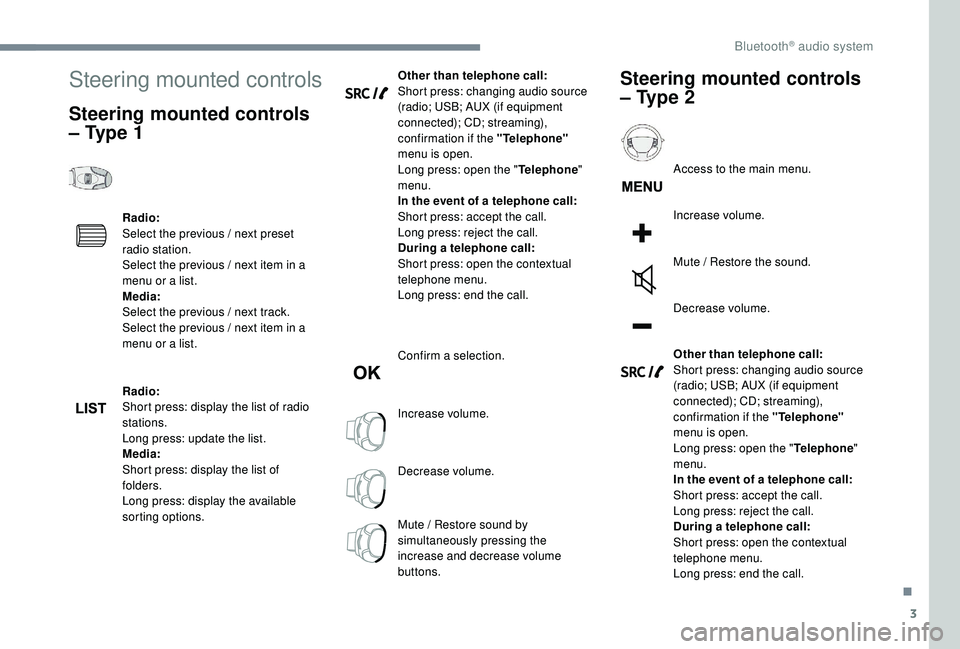
Steering mounted controls
– Type 1
Radio:
Select the previous / next preset
radio station.
Select the previous / next item in a
menu or a list.
Media:
Select the previous / next track.
Select the previous / next item in a
menu or a list.
Radio:
Short press: display the list of radio
stations.
Long press: update the list.
Media:
Short press: display the list of
folders.
Long press: display the available
sorting options.Other than telephone call:
Short press: changing audio source
(radio; USB; AUX (if equipment
connected); CD; streaming),
confirmation if the "Telephone"
menu is open.
Long press: open the " Telephone"
menu.
In the event of a telephone call:
Short press: accept the call.
Long press: reject the call.
During a telephone call:
Short press: open the contextual
telephone menu.
Long press: end the call.
Confirm a selection.
Increase volume.
Decrease volume.
Mute / Restore sound by
simultaneously pressing the
increase and decrease volume
buttons.
Steering mounted controls
– Type 2
Access to the main menu.
Increase volume.
Mute / Restore the sound.
Decrease volume.
Other than telephone call:
Short press: changing audio source
(radio; USB; AUX (if equipment
connected); CD; streaming),
confirmation if the "Telephone"
menu is open.
Long press: open the " Telephone"
menu.
In the event of a telephone call:
Short press: accept the call.
Long press: reject the call.
During a telephone call:
Short press: open the contextual
telephone menu.
Long press: end the call.
.
Bluetooth® audio system
Page 376 of 404
4
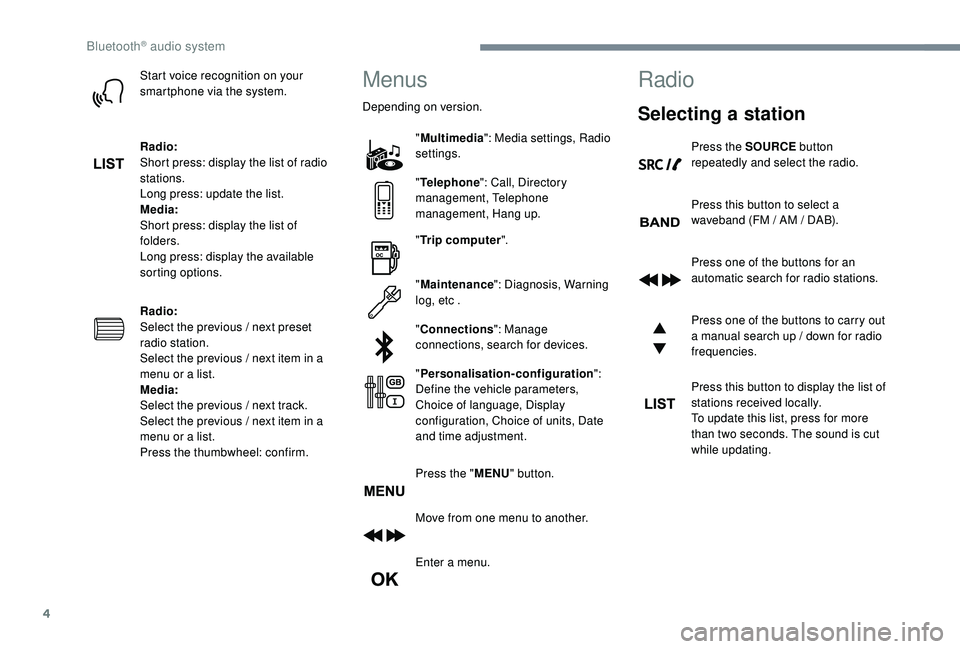
Start voice recognition on your
smartphone via the system.
Radio:
Short press: display the list of radio
stations.
Long press: update the list.
Media:
Short press: display the list of
folders.
Long press: display the available
sorting options.
Radio:
Select the previous / next preset
radio station.
Select the previous / next item in a
menu or a list.
Media:
Select the previous / next track.
Select the previous / next item in a
menu or a list.
Press the thumbwheel: confirm.Menus
Depending on version."Multimedia ": Media settings, Radio
settings.
" Telephone ": Call, Directory
management, Telephone
management, Hang up.
" Trip computer ".
" Maintenance ": Diagnosis, Warning
log, etc .
" Connections ": Manage
connections, search for devices.
" Personalisation-configuration ":
Define the vehicle parameters,
Choice of language, Display
configuration, Choice of units, Date
and time adjustment.
Press the " MENU" button.
Move from one menu to another.
Enter a menu.
Radio
Selecting a station
Press the SOURCE button
repeatedly and select the radio.
Press this button to select a
waveband (FM / AM / DAB).
Press one of the buttons for an
automatic search for radio stations.
Press one of the buttons to carry out
a manual search up / down for radio
frequencies.
Press this button to display the list of
stations received locally.
To update this list, press for more
than two seconds. The sound is cut
while updating.
Bluetooth® audio system
Page 378 of 404
6
Receiving INFO messages
The INFO function gives priority to TA
alert messages. To be active, this function
needs good reception of a radio station
that transmits this type of message. When
a message is transmitted, the current
audio source (Radio, CD, USB, etc.) is
interrupted automatically to receive the
INFO message. Normal play of the media
previously playing is resumed at the end
of the message.Make a long press on this button to
display the list of categories.
Select or deselect categories.
Activate or deactivate the reception
of the corresponding messages.
Display TEXT INFOS
Radio text is information transmitted by
the radio station related to the station's
current programme or song.When the radio station is displayed
in the screen, press OK to display
the contextual menu.
Select " RadioText (TXT) display "
and confirm OK to save.
DAB (Digital Audio
Broadcasting) radio
According to version
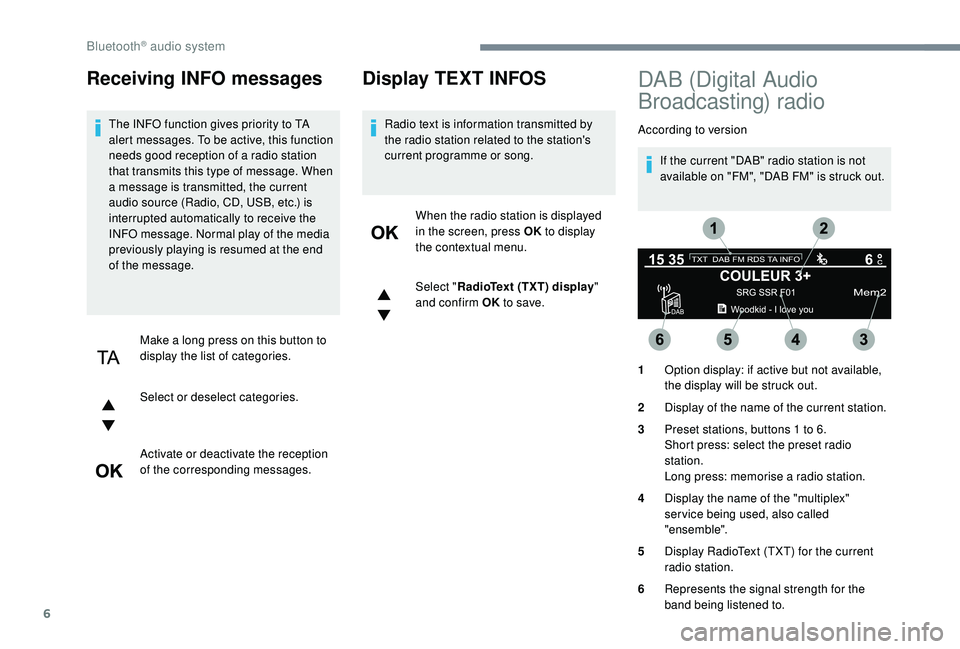
If the current "DAB" radio station is not
available on "FM", "DAB FM" is struck out.
1 Option display: if active but not available,
the display will be struck out.
2 Display of the name of the current station.
3 Preset stations, buttons 1
to 6.
Short press: select the preset radio
station.
Long press: memorise a radio station.
4 Display the name of the "multiplex"
ser vice being used, also called
"ensemble".
5 Display RadioText (TXT) for the current
radio station.
6 Represents the signal strength for the
band being listened to.
Bluetooth® audio system
Page 379 of 404
7
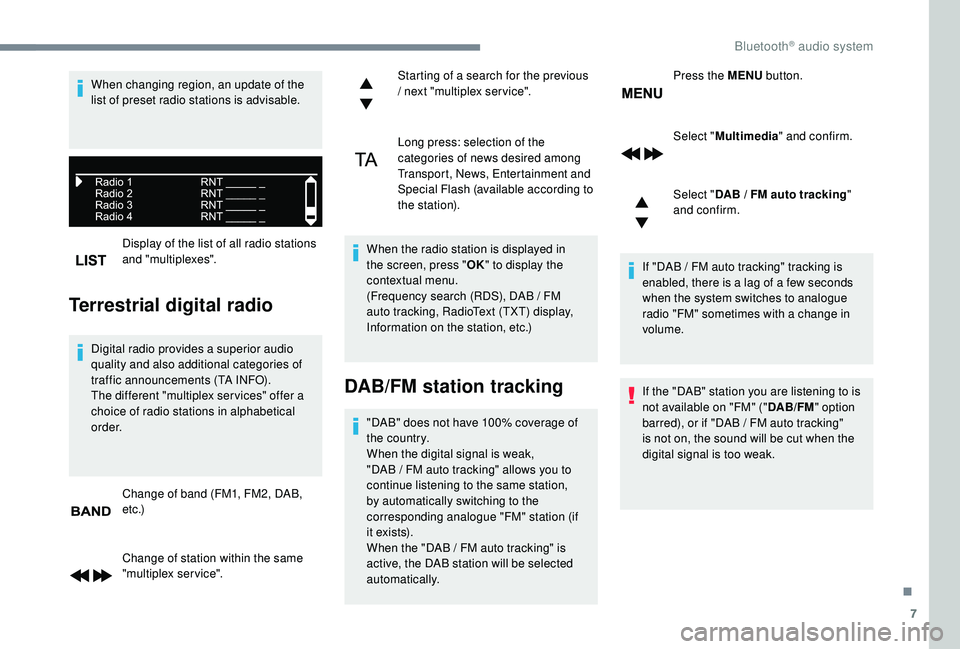
Display of the list of all radio stations
and "multiplexes".
Terrestrial digital radio
Digital radio provides a superior audio
quality and also additional categories of
traffic announcements (TA INFO).
The different "multiplex ser vices" offer a
choice of radio stations in alphabetical
o r d e r.Change of band (FM1, FM2, DAB,
e t c .)
Change of station within the same
"multiplex service". Starting of a search for the previous
/ next "multiplex service".
Long press: selection of the
categories of news desired among
Transport, News, Entertainment and
Special Flash (available according to
the station).
When the radio station is displayed in
the screen, press " OK" to display the
contextual menu.
(Frequency search (RDS), DAB / FM
auto tracking, RadioText (TXT) display,
Information on the station, etc.)
DAB/FM station tracking
"DAB" does not have 100% coverage of
the country.
When the digital signal is weak,
"DAB
/ FM auto tracking" allows you to
continue listening to the same station,
by automatically switching to the
corresponding analogue "FM" station (if
i t ex i st s).
When the "DAB
/ FM auto tracking" is
active, the DAB station will be selected
automatically. Press the MENU
button.
Select " Multimedia " and confirm.
Select " DAB / FM auto tracking
"
and confirm.
If "DAB / FM auto tracking" tracking is
enabled, there is a lag of a few seconds
when the system switches to analogue
radio "FM" sometimes with a change in
volume.
If the "DAB" station you are listening to is
not available on "FM" (" DAB/FM" option
barred), or if "DAB / FM auto tracking"
is not on, the sound will be cut when the
digital signal is too weak.
When changing region, an update of the
list of preset radio stations is advisable.
.
Bluetooth® audio system
Page 389 of 404
17
Radio
QUESTIONRESPONSE SOLUTION
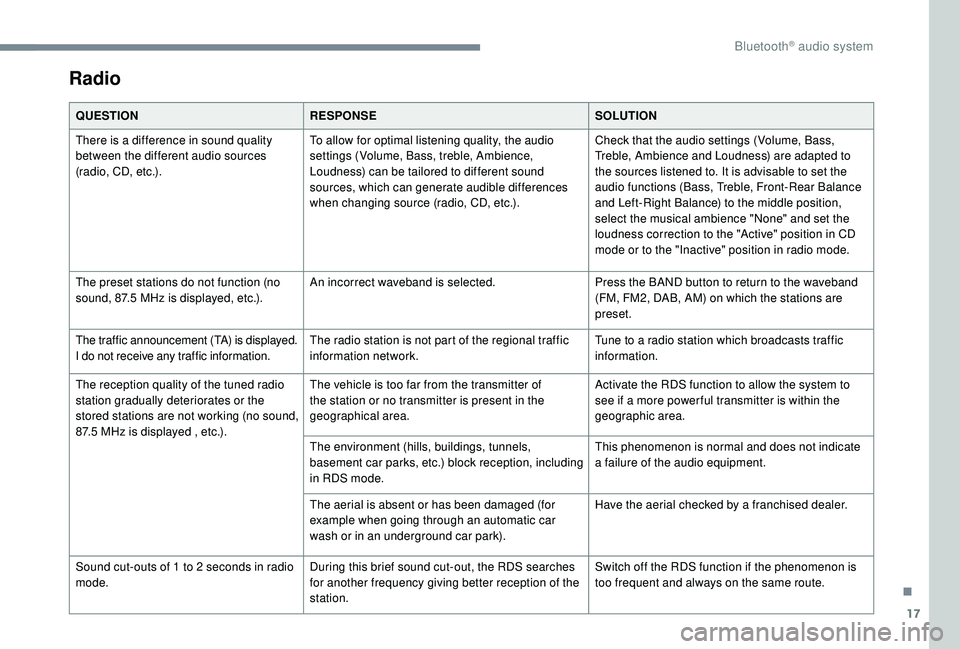
There is a difference in sound quality
between the different audio sources
(radio, CD, etc.). To allow for optimal listening quality, the audio
settings (Volume, Bass, treble, Ambience,
Loudness) can be tailored to different sound
sources, which can generate audible differences
when changing source (radio, CD, etc.). Check that the audio settings (Volume, Bass,
Treble, Ambience and Loudness) are adapted to
the sources listened to. It is advisable to set the
audio functions (Bass, Treble, Front-Rear Balance
and Left-Right Balance) to the middle position,
select the musical ambience "None" and set the
loudness correction to the "Active" position in CD
mode or to the "Inactive" position in radio mode.
The preset stations do not function (no
sound, 87.5
MHz is displayed, etc.). An incorrect waveband is selected.
Press the BAND button to return to the waveband
(FM, FM2, DAB, AM) on which the stations are
preset.
The traffic announcement (TA) is displayed.
I do not receive any traffic information. The radio station is not part of the regional traffic
information network. Tune to a radio station which broadcasts traffic
information.
The reception quality of the tuned radio
station gradually deteriorates or the
stored stations are not working (no sound,
87.5
MHz is displayed , etc.). The vehicle is too far from the transmitter of
the station or no transmitter is present in the
geographical area.
Activate the RDS function to allow the system to
see if a more power ful transmitter is within the
geographic area.
The environment (hills, buildings, tunnels,
basement car parks, etc.) block reception, including
in RDS mode. This phenomenon is normal and does not indicate
a failure of the audio equipment.
The aerial is absent or has been damaged (for
example when going through an automatic car
wash or in an underground car park). Have the aerial checked by a franchised dealer.
Sound cut-outs of 1
to 2 seconds in radio
mode. During this brief sound cut-out, the RDS searches
for another frequency giving better reception of the
station. Switch off the RDS function if the phenomenon is
too frequent and always on the same route.
.
Bluetooth® audio system
Page 398 of 404
300
S
Safety, children ..............15 3 -15 4, 157-15 8, 162,
16 4, 166 -168, 170
Saturation of the particle filter (Diesel)
.........261
Scented air freshener
............................114 -115
Screen menu map
........................................... 13
Screen, monochrome
...............................38-39
Screens, very cold conditions
.....................25
3
Screenwash, front
......................................... 13 5
Screenwash, rear
.......................................... 13 5
SCR (Selective Catalytic Reduction) system
...................................... 262
Seat belts
....................................... 14 9 -152, 163
Seat belts, rear
....................................... 14 9 -15 0
Seats, additional
....................................... 8
8 -91
Seats, electric
................................................. 81
RRadio .......................................... 23 -24, 2 7, 7, 11
Radio, digital (Digital Audio Broadcasting - DAB)
.................................25
, 9
Range, AdBlue
................................................ 32
RDS
................
....................................... 24-25, 7
Rear air blower
...............................
...............102
Rear screen, demisting – defrosting .....104 -105
Recharging the battery
..........................287-288
Reduction of electrical load
..........................252
Regeneration of the particle filter
.................261
Pads, brake
...........................................
261-262
Paint
..............................................................
296
Paint colour code ..........................................
296
Parcel shelf, rear
...........................................
11 9
Park Assist
...............................
.............
2 3 7, 239
Parking brake
........................................
261-262
Parking brake, electric
..................... 2
6,
181-18 4
Parking sensors, front
...........................
230-231
Parking sensors, rear .................................... 230
Personalisation
............................................
9 -10
PEUGEOT Connect Nav ...................................
1
PEUGEOT Connect Radio
...............................
1
P
lates, identification
...................................... 296
Player, Apple
® ........................................... 2 7, 11
Player, MP3 CD ............................... ................26
Player, USB
....................................... 112 , 26, 10
Port, USB
.......................................... 112 , 26, 10
Pre-heater, Diesel
........................................... 22
Pressures, tyres
.................................... 272, 296
Pre-tensioning seat belts
.............................. 152
Priming the fuel system
........................ 266-267
Profiles
...................................................... 34, 18
Protecting children
......... 15 3 -15 4, 157-15 8, 162,
16 4, 166 -168, 170
Puncture
........................................ 269-270, 272
PReinitialisation of the under-
inflation detection system ...........................19 6
Reinitialising the remote control
..................... 58
R
eminder, key in ignition
...............................17
8
Remote control
.........................4 9 - 51, 53, 55-56
Removing a wheel
................................ 275 -278
Removing the mat
......................................... 11 6
Replacing bulbs
..................... 2
78-279, 281-283
Replacing fuses
.................................... 284-285
Replacing the air filter
................................... 2
61
Replacing the oil filter
................................... 2
61
Replacing the passenger compartment filter ......261
Reservoir, screenwash
......................... 259-260
Resetting the service indicator
....................... 30
Resetting the trip recorder
........................ 35 -37
Rev counter
................................................... 8-9
Reversing lamps
..............................
......281-282
Roof bars
....................................................... 255
Running out of fuel (Diesel)
.................. 266-267 Seats, front
...............................
.................
76, 81
Seats, heated
............................................
81- 82
Seats, rear
.................................................
85 -91
Selector, gear
.........................................
185 -189
Serial number, vehicle
..................................
296
Service indicator
.......................................
28, 34
Servicing
......................................................... 28
S
ettings, equipment
............................
38 - 42, 45
Settings, system
........................................
35, 19
Sidelamps
.............................. 12
6 -127,
279, 281
Side repeater ................................................
281
Snow chains .......................................... 195, 254
Snow screen
................................................. 253
Socket, 12 V
.................................................. 271
Socket, 12 V accessory
.........111, 11 9 , 123, 271
Socket, 230 V
...............................
.................11 8
Socket, auxiliary
........................................ 2
6, 10
Socket, JACK
............................................ 26, 10
Speakers
....................................................... 112
Speed limiter
.......................... 19
7-198, 200-203
Speed limit recognition
......................... 19
8 -19 9
Speedometer
................................................ 8-9
Stability control (ESC).................... 142, 14 4 -14 6
Starting a Diesel engine
............................... 2
47
Starting the engine
....................................... 17
7
Starting the vehicle
....26, 175 , 17 7-179, 185 -189
Starting using another battery
.......18 0 -181, 286
Station, radio
...............................
..........23-25, 7
Stay, bonnet
.................................................. 256
Steering mounted controls, audio
................ 3,
3
Steering wheel, adjustment
............................ 83
S
topping the vehicle
....26, 175 , 17 7-179, 185 -189
Stop & Start
.................22, 3 7, 95, 103, 192-195,
245, 256, 260, 289
Storage
............................................ 11 0 -111, 114
Storage boxes
............................................... 120
Storage compartments
.................................11 0
Storing driving positions
................................. 81
S
unroof, panoramic
........................................ 70
S
un visor
...............................
........................111
Alphabetical index