warning PEUGEOT 5008 2017 Manual Online
[x] Cancel search | Manufacturer: PEUGEOT, Model Year: 2017, Model line: 5008, Model: PEUGEOT 5008 2017Pages: 404, PDF Size: 15.31 MB
Page 247 of 404
245
Fuel
Fuel tank capacity: approximately 56 litres.
R eser ve level: 6 litres.
Low fuel level
When the low fuel level is reached
in the fuel tank, this warning lamp
comes on in the instrument panel,
accompanied by the display of a
message and an audible signal.
When it first comes on, about
6
litres of fuel is left in the tank.
Until sufficient fuel is added, this warning lamp
appears every time the ignition is switched on,
accompanied by the display of a message and
an audible signal. When driving, this message
and audible signal are repeated with increasing
frequency as the fuel level drops towards 0 .
Refuel as soon as possible to avoid running out
of fuel.
For more information on Running out of fuel
(Diesel) , refer to the corresponding section.
If your vehicle is fitted with Stop & Start,
never refuel with the engine in STOP
mode; you must switch off the ignition
using the key, or the START/STOP button
if your vehicle has
K
eyless Entry and
Starting.
Refuelling
If you have put in the wrong fuel for your
vehicle, you must have the fuel tank
drained and filled with the correct fuel
before starting the engine.
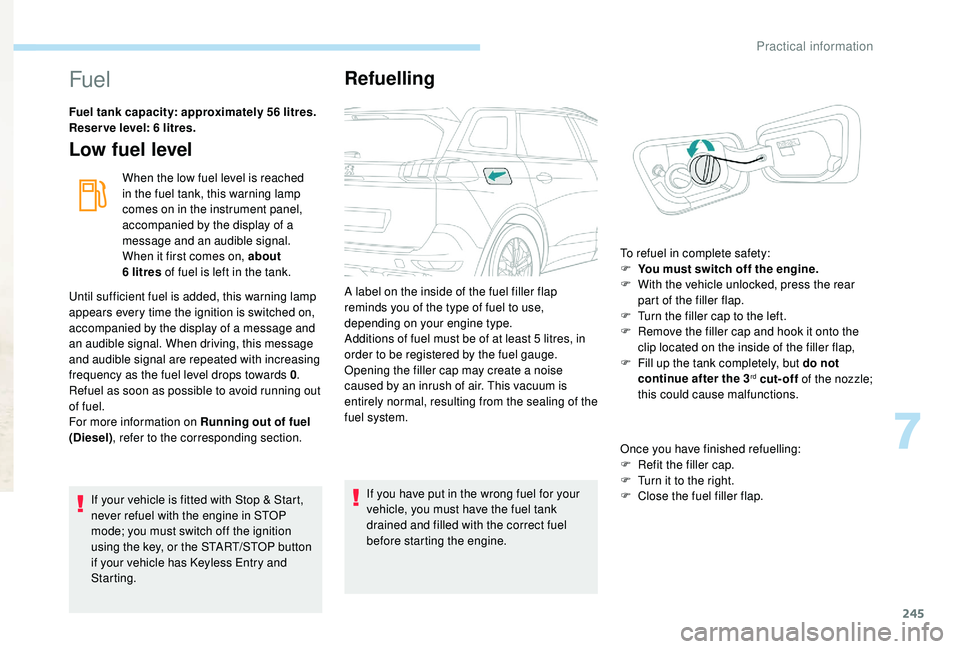
A label on the inside of the fuel filler flap
reminds you of the type of fuel to use,
depending on your engine type.
Additions of fuel must be of at least 5
litres, in
order to be registered by the fuel gauge.
Opening the filler cap may create a noise
caused by an inrush of air. This vacuum is
entirely normal, resulting from the sealing of the
fuel system.
Once you have finished refuelling:
F
R
efit the filler cap.
F T urn it to the right.
F C lose the fuel filler flap.
To refuel in complete safety:
F
Y
ou must switch off the engine.
F
W
ith the vehicle unlocked, press the rear
part of the filler flap.
F
T
urn the filler cap to the left.
F
R
emove the filler cap and hook it onto the
clip located on the inside of the filler flap,
F
F
ill up the tank completely, but do not
continue after the 3
rd cut-off of the nozzle;
this could cause malfunctions.
7
Practical information
Page 262 of 404
260
The screenwash fluid must be topped up with a
ready for use mix.
In winter (temperatures below zero), a liquid
with antifreeze must be used that is appropriate
for the prevailing conditions, in order to
preser ve the elements of the system (pump,
tank, ducts, etc.).
Filling with pure water is prohibited under all
circumstances (risk of freezing, limestone
deposits, etc.).
Diesel fuel additive level
(Diesel with particle filter)
The additive reser voir low level is
indicated by fixed illumination of this
warning lamp, accompanied by an
audible signal and a message that
the particle filter additive level is
too low.
To p p i n g u p
The reser voir must be topped up without delay
by a PEUGEOT dealer or a qualified workshop.
AdBlue level
An alert is triggered once the reser ve level is
reached.
To avoid the vehicle being immobilised as per
regulations, you must top up with AdBlue.
For more information on AdBlue
® and the SCR
system, and in particular topping it up, refer to
the corresponding section.
Fluid specificationChecks
Unless otherwise indicated, check these
components in accordance with the
manufacturer's service schedule and according
to your engine.
Other wise, have them checked by a PEUGEOT
dealer or a qualified workshop.
12 V battery
The battery does not require any
maintenance.
However, check regularly that the
terminals are correctly tightened
(versions without quick release
terminals) and that the connections
are clean.
For more information and the precautions to
take before starting work on the 12
V batter y,
refer to the corresponding section.
Versions equipped with Stop & Start are
fitted with a 12
V lead-acid battery of
specific technology and specification.
Its replacement should be carried out
only by a PEUGEOT dealer or a qualified
workshop.
Practical information
Page 263 of 404
261
Air filter and passenger compartment filter
Refer to the manufacturer's
ser vice schedule for details of the
replacement intervals for these
components.
Depending on the environment (e.g. dusty
atmosphere) and the use of the vehicle (e.g.
city driving), replace them twice as often if
necessary .
A clogged passenger compartment filter may
have an adverse effect on the per formance
of the air conditioning system and generate
undesirable odours.
Oil filter
Change the oil filter each time the
engine oil is changed.
Refer to the manufacturer's
ser vice schedule for details of
the replacement inter val for this
component.
Particle filter (Diesel)
The start of saturation of the particle
filter is indicated by the temporary
illumination of this warning lamp
accompanied by a message about
the risk of the filter clogging up. As soon as the traffic conditions permit,
regenerate the filter by driving at a speed
of at least 40
mph (60 km/h) until the
warning lamp goes off.
If the warning lamp stays on, this indicates
a low Diesel additive level.
For more information on Checking levels ,
refer to the corresponding section.
On a new vehicle, the first particle
filter regeneration operations may be
accompanied by a "burning" smell, which
is per fectly normal.
Following prolonged operation of the
vehicle at very low speed or at idle,
you may, in exceptional circumstances,
notice the emission of water vapour at the
exhaust on acceleration. This does not
affect the behaviour of the vehicle or the
environment.
Manual gearbox
The gearbox does not require any
maintenance (no oil change).
Refer to the manufacturer's service
schedule for the checking inter val
for this component.
Automatic gearbox
The gearbox does not require any
maintenance (no oil change).
Refer to the manufacturer’s service
schedule for the checking inter val
for this component.
Brake pads
Brake wear depends on the style
of driving, particularly in the case
of vehicles used in town, over short
distances. It may be necessary to
have the condition of the brakes
checked, even between vehicle
services.
Unless there is a leak in the circuit, a drop in
the brake fluid level indicates that the brake
pads are worn.
7
Practical information
Page 265 of 404
263
Once the AdBlue® tank is empty, a system
required by regulations prevents starting
of the engine.
If the SCR system is defective, the level of
emissions from your vehicle will no longer
meet the Euro 6
standard: your vehicle
becomes polluting.
In the event of a confirmed fault with the
SCR system, you must go to a PEUGEOT
dealer or a qualified workshop as soon
as possible: after a running distance of
685
miles (1,100
km), a system will be
triggered automatically to prevent engine
starting.
In either case, a range indicator gives you
the distance you can travel before the
vehicle is immobilised.
For more information on the warning
lamps and the associated alerts, refer to
the corresponding section.
Freezing of the AdBlue
®
AdBlue® freezes at temperatures below
around -11°C.
The SCR system includes a heater for the
AdBlue
® tank, allowing you to continue
driving in all weather conditions.
Topping up with AdBlue®
Before topping up, please read the
following warnings carefully.
Precautions for use
AdBlue® is a urea-based solution. This liquid
is non-flammable, colourless and odourless
(store in a cool place).
In the event of contact with the skin, wash the
affected area with soap and running water. In
the event of contact with the eyes, immediately
rinse the eyes with large amounts of water
or with an eye wash solution for at least
15
minutes. If a burning sensation or irritation
persists, get medical attention.
If swallowed, immediately wash out the mouth
with clean water and then drink plenty of water.
In certain conditions (high exterior temperature,
for example), the risk of releasing ammonia
cannot be discounted: do not inhale the fluid.
Ammonia vapour has an irritant effect on
mucous membranes (eyes, nose and throat). Keep AdBlue
® out of the reach of children,
in its original container or bottle.
Never transfer AdBlue
® to another
container: it would lose its purity.
Never dilute AdBlue
® with water.
Never pour AdBlue® into the Diesel fuel
tank.
Containers are available from a PEUGEOT
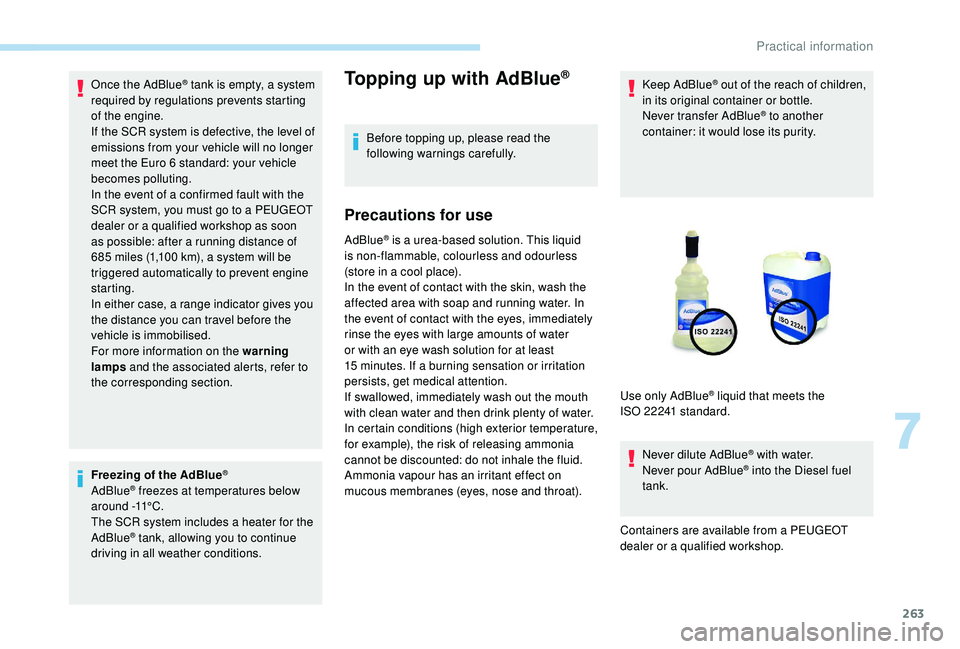
dealer or a qualified workshop. Use only AdBlue
® liquid that meets the
ISO 22241
standard.
7
Practical information
Page 268 of 404
266
Warning triangle
As a safety precaution, before leaving your
vehicle to set up and install the triangle, switch
on the hazard warning lamps and put on your
high visibility vest.
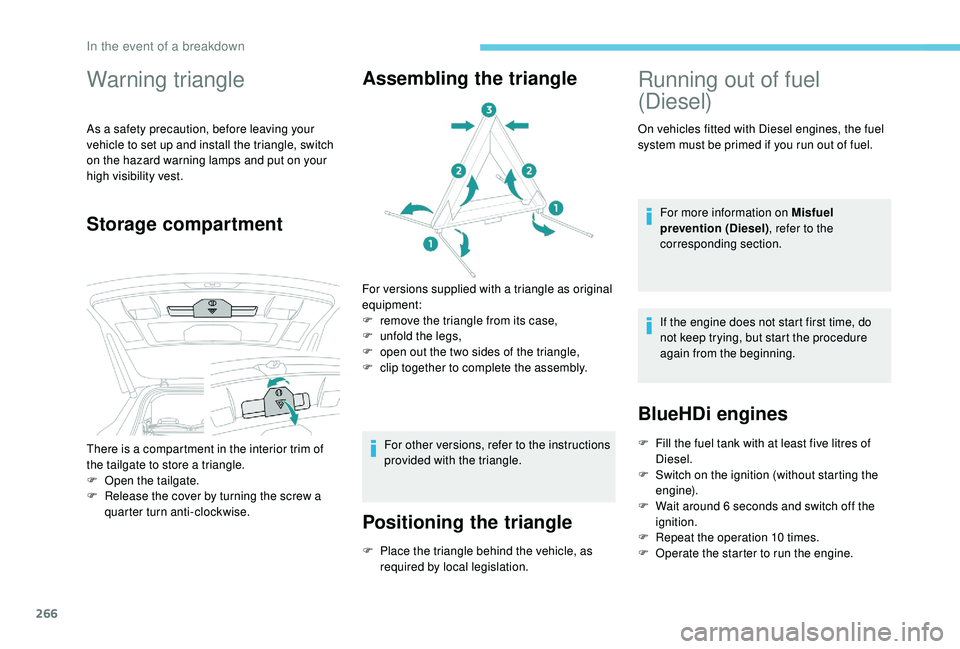
Storage compartmentAssembling the triangle
For versions supplied with a triangle as original
equipment:
F
r
emove the triangle from its case,
F
u
nfold the legs,
F
o
pen out the two sides of the triangle,
F
c
lip together to complete the assembly.
For other versions, refer to the instructions
provided with the triangle.
Positioning the triangle
F Place the triangle behind the vehicle, as required by local legislation.
There is a compartment in the interior trim of
the tailgate to store a triangle.
F
O
pen the tailgate.
F
R
elease the cover by turning the screw a
quarter turn anti-clockwise.
Running out of fuel
(Diesel)
On vehicles fitted with Diesel engines, the fuel
system must be primed if you run out of fuel.
For more information on Misfuel
prevention (Diesel) , refer to the
corresponding section.
If the engine does not start first time, do
not keep trying, but start the procedure
again from the beginning.
BlueHDi engines
F Fill the fuel tank with at least five litres of Diesel.
F
S
witch on the ignition (without starting the
engine).
F
W
ait around 6 seconds and switch off the
ignition.
F
R
epeat the operation 10
times.
F
O
perate the starter to run the engine.
In the event of a breakdown
Page 277 of 404
275
Removing a wheel
Wheel with wheel trim
When removing the wheel, first remove
the wheel trim by pulling at the valve
aperture using the wheelbrace.
When refitting the wheel , after tightening
the wheel bolts, refit the wheel trim,
starting by placing its aperture in line with
the valve and then pushing it into place all
round its edge with the palm of your hand.
*
position P for the automatic gearbox
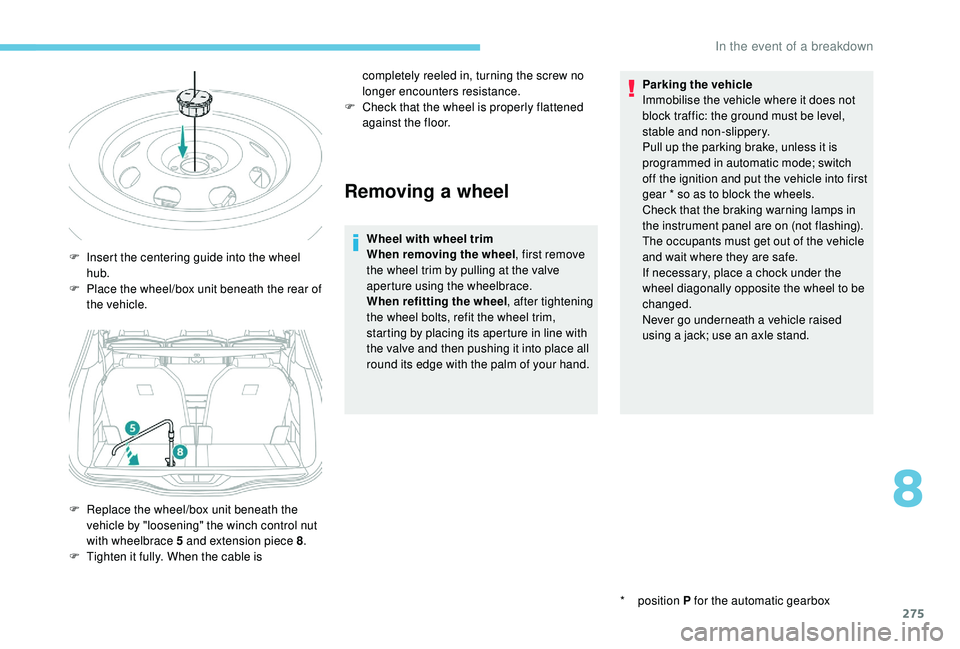
F
I
nsert the centering guide into the wheel
hub.
F
P
lace the wheel/box unit beneath the rear of
the vehicle.
F
R
eplace the wheel/box unit beneath the
vehicle by "loosening" the winch control nut
with wheelbrace 5
and extension piece 8 .
F
T
ighten it fully. When the cable is completely reeled in, turning the screw no
longer encounters resistance.
F
C
heck that the wheel is properly flattened
against the floor. Parking the vehicle
Immobilise the vehicle where it does not
block traffic: the ground must be level,
stable and non-slippery.
Pull up the parking brake, unless it is
programmed in automatic mode; switch
off the ignition and put the vehicle into first
gear * so as to block the wheels.
Check that the braking warning lamps in
the instrument panel are on (not flashing).
The occupants must get out of the vehicle
and wait where they are safe.
If necessary, place a chock under the
wheel diagonally opposite the wheel to be
changed.
Never go underneath a vehicle raised
using a jack; use an axle stand.
8
In the event of a breakdown
Page 292 of 404
290
F Move the gear lever into neutral (N mode with an automatic gearbox).
Failure to follow this instruction may cause
damage to some components (braking,
transmission, etc.) and the absence of
braking assistance when the engine is
restarted. F
S
witch on the hazard warning lamps on
both vehicles.
F
S
et off gently and drive slowly for a short
distance.
Towing another vehicle
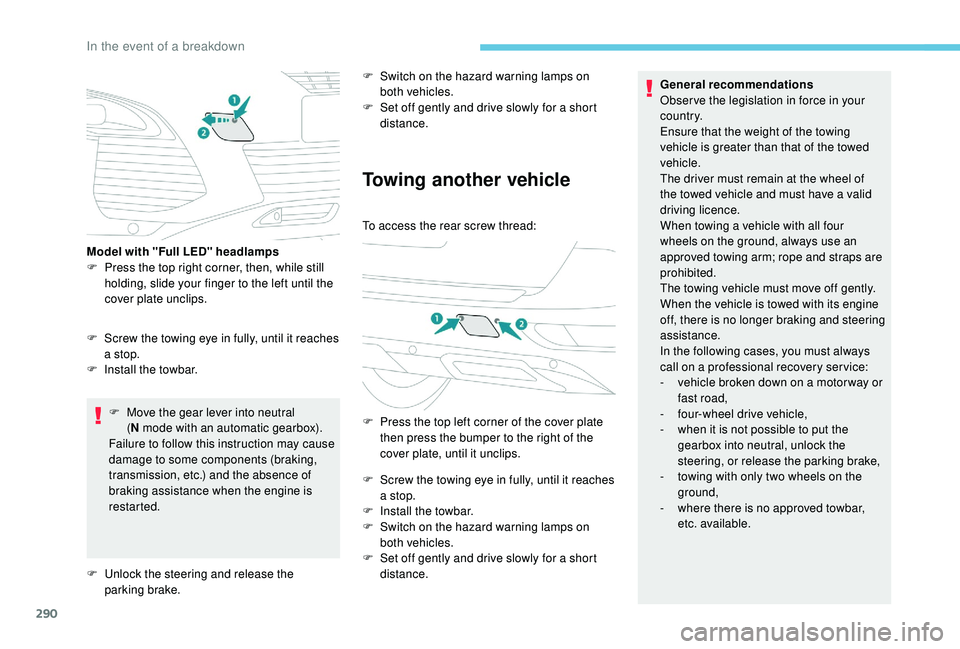
To access the rear screw thread:
F
P
ress the top left corner of the cover plate
then press the bumper to the right of the
cover plate, until it unclips.
F
S
crew the towing eye in fully, until it reaches
a stop.
F
I
nstall the towbar.
F
S
witch on the hazard warning lamps on
both vehicles.
F
S
et off gently and drive slowly for a short
distance. General recommendations
Obser ve the legislation in force in your
c o u nt r y.
Ensure that the weight of the towing
vehicle is greater than that of the towed
vehicle.
The driver must remain at the wheel of
the towed vehicle and must have a valid
driving licence.
When towing a vehicle with all four
wheels on the ground, always use an
approved towing arm; rope and straps are
prohibited.
The towing vehicle must move off gently.
When the vehicle is towed with its engine
off, there is no longer braking and steering
assistance.
In the following cases, you must always
call on a professional recovery ser vice:
-
v
ehicle broken down on a motor way or
fast road,
-
f
our-wheel drive vehicle,
-
w
hen it is not possible to put the
gearbox into neutral, unlock the
steering, or release the parking brake,
-
t
owing with only two wheels on the
ground,
-
w
here there is no approved towbar,
etc. available.
F
S
crew the towing eye in fully, until it reaches
a stop.
F
I
nstall the towbar.
Model with "Full LED" headlamps
F
P
ress the top right corner, then, while still
holding, slide your finger to the left until the
cover plate unclips.
F
U
nlock the steering and release the
parking brake.
In the event of a breakdown
Page 314 of 404
16
The ser vices offered with connected
navigation are as follows.
A Connected Services pack:
-
Weather,
-
F
illing stations,
-
C
ar park,
-
Tr a f f i c ,
-
P
OI local search.
A Danger zone pack (option).
The principles and standards
are constantly changing; for the
communication process between the
smartphone and the system to work
correctly, we recommend that you
update the operating system of the
smar tphone as well as the date and
time of the smar tphone and the
system.Settings specific to
connected navigation
In the "Settings" menu you can create
a profile for just one person or a group
of people with common points, with the
possibility of entering a multitude of
settings (radio presets, audio settings,
navigation history, contact favourites,
etc.); these settings are taken into account
automatically.
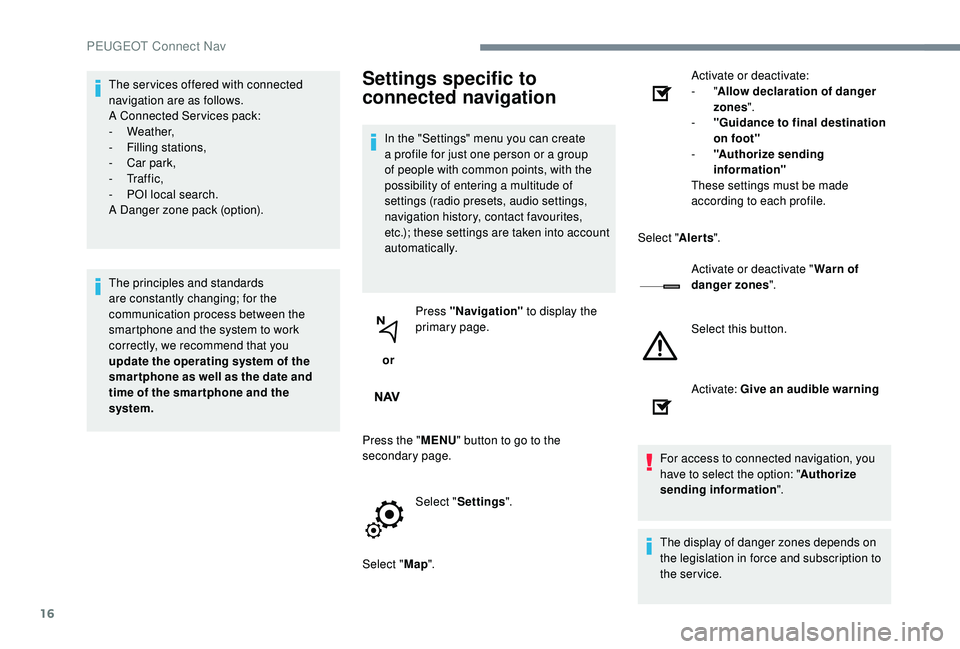
or Press "Navigation"
to display the
primary page.
Press the " MENU" button to go to the
secondary page.
Select "Settings ".
Select " Map". Activate or deactivate:
-
"
Allow declaration of danger
zones ".
- " Guidance to final destination
on foot"
- " Authorize sending
information"
These settings must be made
according to each profile.
Select " Alerts".
Activate or deactivate " Warn of
danger zones ".
Select this button.
Activate: Give an audible warning
For access to connected navigation, you
have to select the option: " Authorize
sending information ".
The display of danger zones depends on
the legislation in force and subscription to
the service.
PEUGEOT Connect Nav
Page 336 of 404
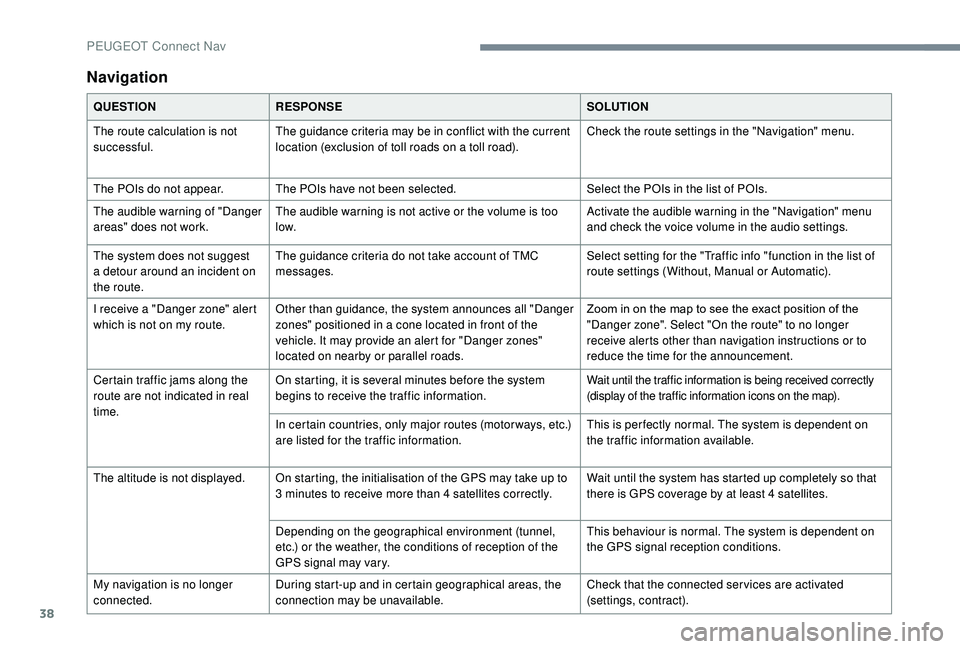
38
Navigation
QUESTIONRESPONSE SOLUTION
The route calculation is not
successful. The guidance criteria may be in conflict with the current
location (exclusion of toll roads on a toll road). Check the route settings in the "Navigation" menu.
The POIs do not appear. The POIs have not been selected. Select the POIs in the list of POIs.
The audible warning of "Danger
areas" does not work. The audible warning is not active or the volume is too
low. Activate the audible warning in the "Navigation" menu
and check the voice volume in the audio settings.
The system does not suggest
a detour around an incident on
the route. The guidance criteria do not take account of TMC
messages.
Select setting for the "Traffic info "function in the list of
route settings (Without, Manual or Automatic).
I receive a "Danger zone" alert
which is not on my route. Other than guidance, the system announces all "Danger
zones" positioned in a cone located in front of the
vehicle. It may provide an alert for "Danger zones"
located on nearby or parallel roads. Zoom in on the map to see the exact position of the
"Danger zone". Select "On the route" to no longer
receive alerts other than navigation instructions or to
reduce the time for the announcement.
Certain traffic jams along the
route are not indicated in real
time. On starting, it is several minutes before the system
begins to receive the traffic information.
Wait until the traffic information is being received correctly
(display of the traffic information icons on the map).
In certain countries, only major routes (motor ways, etc.)
are listed for the traffic information. This is per fectly normal. The system is dependent on
the traffic information available.
The altitude is not displayed. On starting, the initialisation of the GPS may take up to 3
minutes to receive more than 4 satellites correctly.Wait until the system has started up completely so that
there is GPS coverage by at least 4
satellites.
Depending on the geographical environment (tunnel,
etc.) or the weather, the conditions of reception of the
GPS signal may vary. This behaviour is normal. The system is dependent on
the GPS signal reception conditions.
My navigation is no longer
connected. During start-up and in certain geographical areas, the
connection may be unavailable. Check that the connected ser vices are activated
(settings, contract).
PEUGEOT Connect Nav
Page 376 of 404
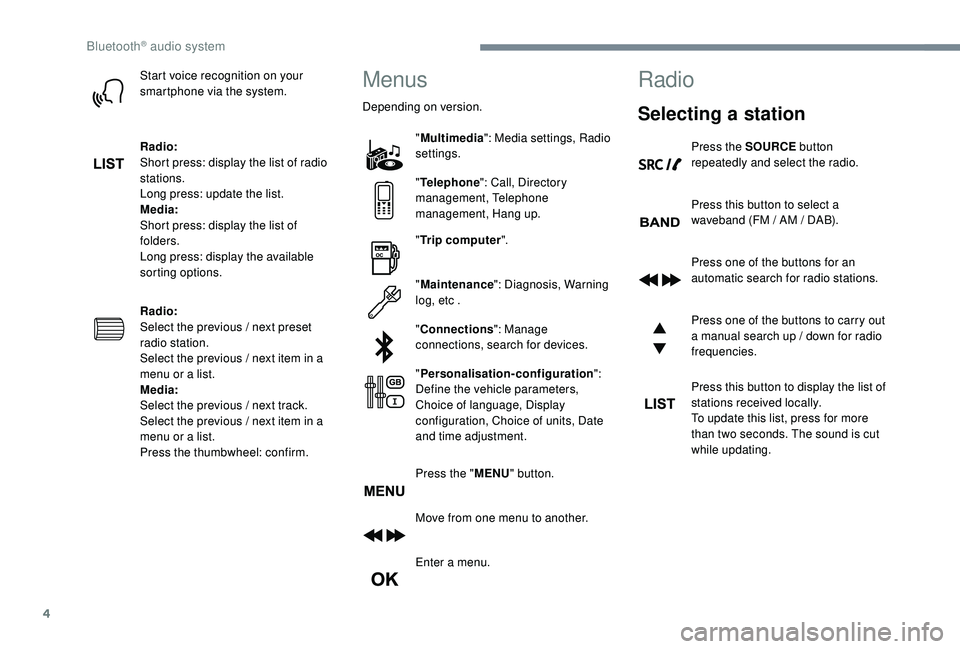
4
Start voice recognition on your
smartphone via the system.
Radio:
Short press: display the list of radio
stations.
Long press: update the list.
Media:
Short press: display the list of
folders.
Long press: display the available
sorting options.
Radio:
Select the previous / next preset
radio station.
Select the previous / next item in a
menu or a list.
Media:
Select the previous / next track.
Select the previous / next item in a
menu or a list.
Press the thumbwheel: confirm.Menus
Depending on version."Multimedia ": Media settings, Radio
settings.
" Telephone ": Call, Directory
management, Telephone
management, Hang up.
" Trip computer ".
" Maintenance ": Diagnosis, Warning
log, etc .
" Connections ": Manage
connections, search for devices.
" Personalisation-configuration ":
Define the vehicle parameters,
Choice of language, Display
configuration, Choice of units, Date
and time adjustment.
Press the " MENU" button.
Move from one menu to another.
Enter a menu.
Radio
Selecting a station
Press the SOURCE button
repeatedly and select the radio.
Press this button to select a
waveband (FM / AM / DAB).
Press one of the buttons for an
automatic search for radio stations.
Press one of the buttons to carry out
a manual search up / down for radio
frequencies.
Press this button to display the list of
stations received locally.
To update this list, press for more
than two seconds. The sound is cut
while updating.
Bluetooth® audio system