mirror PEUGEOT 5008 2017 Owners Manual
[x] Cancel search | Manufacturer: PEUGEOT, Model Year: 2017, Model line: 5008, Model: PEUGEOT 5008 2017Pages: 404, PDF Size: 15.31 MB
Page 4 of 404
2
.
.
Head-up digital screen 8
I ndicator and warning lamps 1 2
Indicators
28
Manual test
3
4
Distance recorders
3
5
Lighting dimmer
3
5
Trip computer
3
6
Monochrome screen C
3
8
Touch screen
4
0
Remote control
4
9
K
eyless Entry and Starting
5
2
Back-up procedures
5
7
Anti-intrusion security
6
0
Central locking
6
0
Alarm
61
Doors
63
Boot
64
Hands-free tailgate
6
5
Electric windows
6
9
Panoramic opening sunroof
7
0Driving position
7
4
Front seats
7
6
Steering wheel adjustment
8
3
Mirrors 83
Second row seats
8
5
Third row seats
8
8
Seat modularity
9
2
i- Cockpit Amplify function
9
3
Heating and Ventilation 9 4
Manual air conditioning 9 6
Semi-automatic mono-zone air conditioning
9
7
Automatic dual-zone air conditioning
9
9
Recirculation of interior air
1
03
Front demist – defrost
1
03
Heated windscreen
1
04
Rear screen demist – defrost
1
04
Programmable heating
1
05
Front fittings
1
10
Courtesy lamps
1
16
Interior ambient lighting
1
17
Rear fittings
1
18
Boot fittings
1
20Exterior lighting control stalk
1
24
Direction indicators
1
27
Headlamp adjustment
1
28
Automatic illumination of headlamps
1
28
Automatic headlamp dipping
1
31
Cornering lighting
1
33
Wiper control stalk
1
34
Automatic rain sensitive wipers
1
36
General safety recommendations
1
38
Hazard warning lamps
1
39
H or n
13
9
Emergency or assistance call
1
39
Electronic stability control (ESC)
1
42
Advanced Grip Control
1
45
Hill Assist Descent Control
1
47
Seat belts
1
48
Airbags
1
53
Child seats
1
57
Deactivating the passenger front airbag
1
58
ISOFIX mountings and child seats
1
66
i-Size child seats
1
70
Manual child lock
1
73
Electric child lock
1
74
Over view
Dashboard instruments Ease of use and comfort
Safety
Access Lighting and visibility
Eco-driving
Contents
Page 6 of 404
4
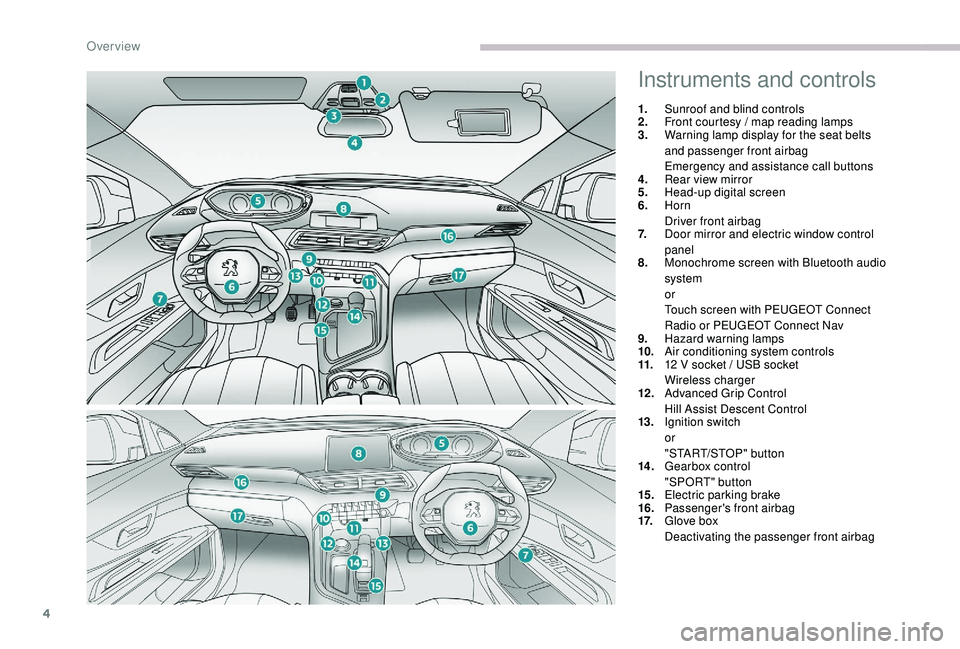
Instruments and controls
1.Sunroof and blind controls
2. Front courtesy / map reading lamps
3. Warning lamp display for the seat belts
and passenger front airbag
Emergency and assistance call buttons
4. Rear view mirror
5. Head-up digital screen
6. Horn
Driver front airbag
7. Door mirror and electric window control
panel
8. Monochrome screen with Bluetooth audio
system
or
Touch screen with PEUGEOT Connect
Radio or PEUGEOT Connect Nav
9. Hazard warning lamps
10. Air conditioning system controls
11. 12
V socket / USB socket
Wireless charger
12 . Advanced Grip Control
Hill Assist Descent Control
13. Ignition switch
or
"START/STOP" button
14 . Gearbox control
"SPORT" button
15. Electric parking brake
16. Passenger's front airbag
17. Glove box
Deactivating the passenger front airbag
Over view
Page 43 of 404
41
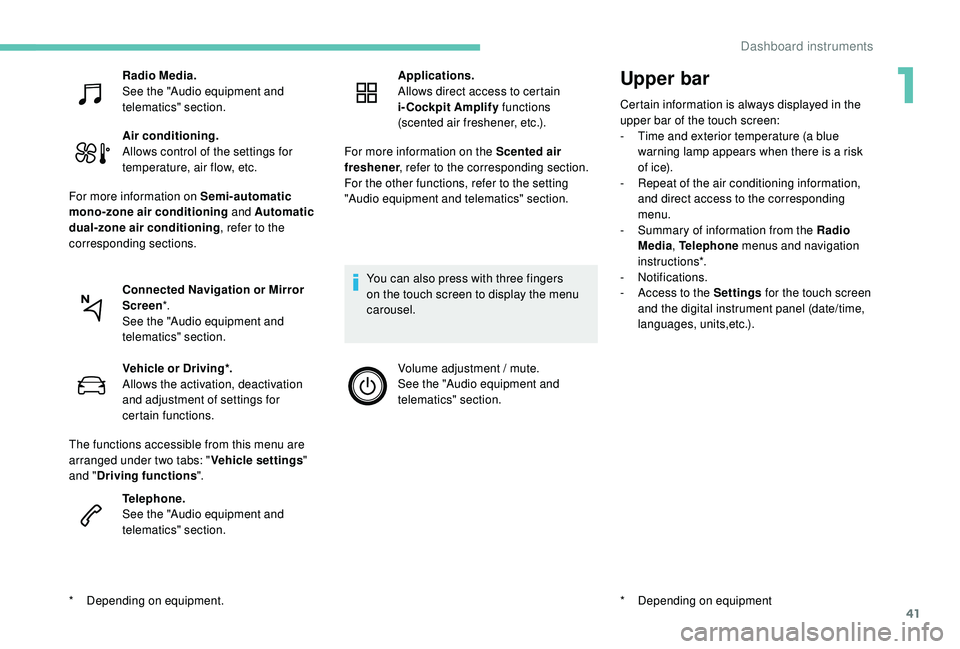
Upper bar
Certain information is always displayed in the
upper bar of the touch screen:
-
T
ime and exterior temperature (a blue
warning lamp appears when there is a risk
of i c e).
-
R
epeat of the air conditioning information,
and direct access to the corresponding
menu.
-
S
ummary of information from the Radio
Media , Telephone menus and navigation
instructions*.
-
Notifications.
-
A
ccess to the Settings for the touch screen
and the digital instrument panel (date/time,
languages, units,etc.).
*
D
epending on equipment
Radio Media.
See the "Audio equipment and
telematics" section.
Air conditioning.
Allows control of the settings for
temperature, air flow, etc.
For more information on Semi-automatic
mono-zone air conditioning and Automatic
dual-zone air conditioning , refer to the
corresponding sections.
Connected Navigation or Mirror
Screen *.
See the "Audio equipment and
telematics" section.
*
D
epending on equipment. Vehicle or Driving*.
Allows the activation, deactivation
and adjustment of settings for
certain functions.
The functions accessible from this menu are
arranged under two tabs: " Vehicle settings"
and " Driving functions ".
Telephone.
See the "Audio equipment and
telematics" section. Applications.
Allows direct access to certain
i-Cockpit Amplify
functions
(scented air freshener, etc.).
For more information on the Scented air
freshener , refer to the corresponding section.
For the other functions, refer to the setting
"Audio equipment and telematics" section.
You can also press with three fingers
on the touch screen to display the menu
carousel. Volume adjustment / mute.
See the "Audio equipment and
telematics" section.
1
Dashboard instruments
Page 44 of 404
42
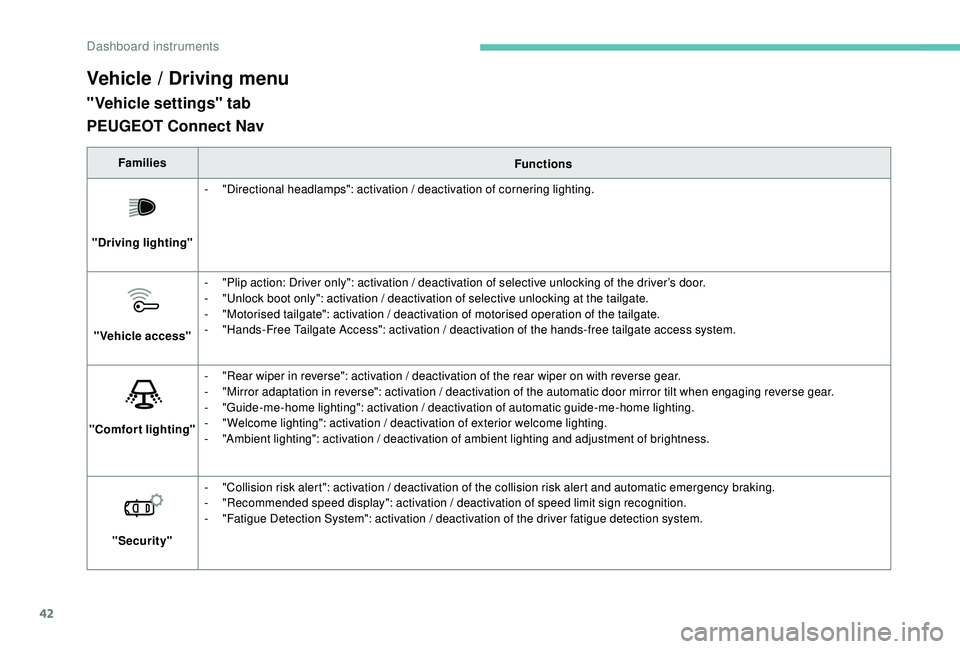
Vehicle / Driving menu
"Vehicle settings" tab
FamiliesFunctions
"Driving lighting" -
"
Directional headlamps": activation / deactivation of cornering lighting.
"Vehicle access" -
"
Plip action: Driver only": activation / deactivation of selective unlocking of the driver’s door.
-
"
Unlock boot only": activation / deactivation of selective unlocking at the tailgate.
-
"
Motorised tailgate": activation / deactivation of motorised operation of the tailgate.
-
"
Hands-Free Tailgate Access": activation / deactivation of the hands-free tailgate access system.
"Comfort lighting" -
"
Rear wiper in reverse": activation / deactivation of the rear wiper on with reverse gear.
-
"
Mirror adaptation in reverse": activation / deactivation of the automatic door mirror tilt when engaging reverse gear.
-
"
Guide-me-home lighting": activation / deactivation of automatic guide-me-home lighting.
-
"
Welcome lighting": activation / deactivation of exterior welcome lighting.
-
"
Ambient lighting": activation / deactivation of ambient lighting and adjustment of brightness.
"Security" -
"
Collision risk alert": activation / deactivation of the collision risk alert and automatic emergency braking.
-
"
Recommended speed display": activation / deactivation of speed limit sign recognition.
-
"
Fatigue Detection System": activation / deactivation of the driver fatigue detection system.
PEUGEOT Connect Nav
Dashboard instruments
Page 45 of 404
43
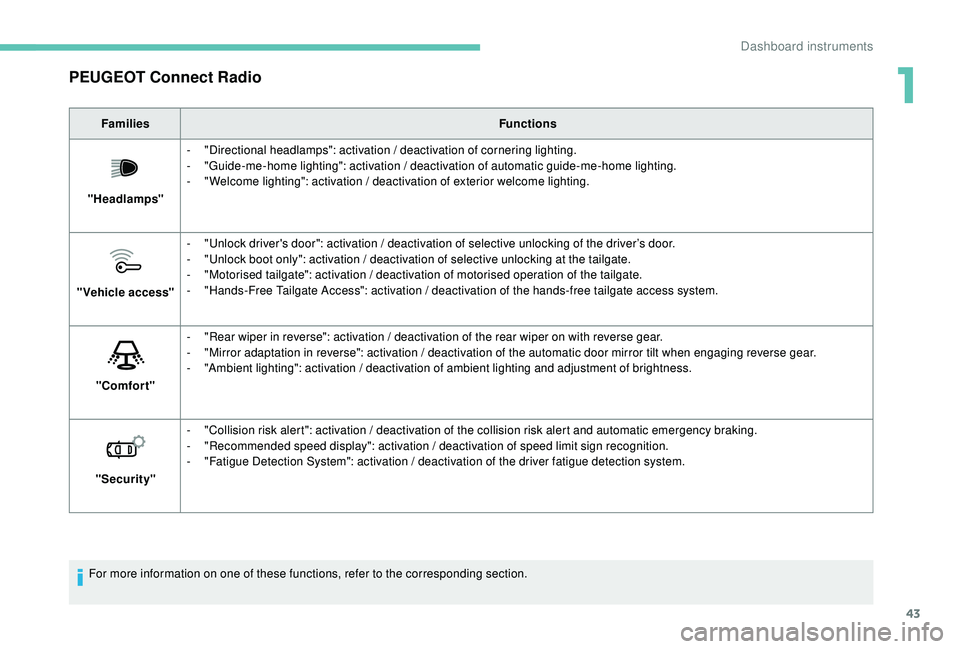
PEUGEOT Connect Radio
FamiliesFunctions
"Headlamps" -
"
Directional headlamps": activation / deactivation of cornering lighting.
-
"
Guide-me-home lighting": activation / deactivation of automatic guide-me-home lighting.
-
"
Welcome lighting": activation / deactivation of exterior welcome lighting.
"Vehicle access" -
"
Unlock driver's door": activation / deactivation of selective unlocking of the driver’s door.
-
"
Unlock boot only": activation / deactivation of selective unlocking at the tailgate.
-
"
Motorised tailgate": activation / deactivation of motorised operation of the tailgate.
-
"
Hands-Free Tailgate Access": activation / deactivation of the hands-free tailgate access system.
"Comfort" -
"
Rear wiper in reverse": activation / deactivation of the rear wiper on with reverse gear.
-
"
Mirror adaptation in reverse": activation / deactivation of the automatic door mirror tilt when engaging reverse gear.
-
"
Ambient lighting": activation / deactivation of ambient lighting and adjustment of brightness.
"Security" -
"
Collision risk alert": activation / deactivation of the collision risk alert and automatic emergency braking.
-
"
Recommended speed display": activation / deactivation of speed limit sign recognition.
-
"
Fatigue Detection System": activation / deactivation of the driver fatigue detection system.
For more information on one of these functions, refer to the corresponding section.
1
Dashboard instruments
Page 51 of 404
49
Remote control
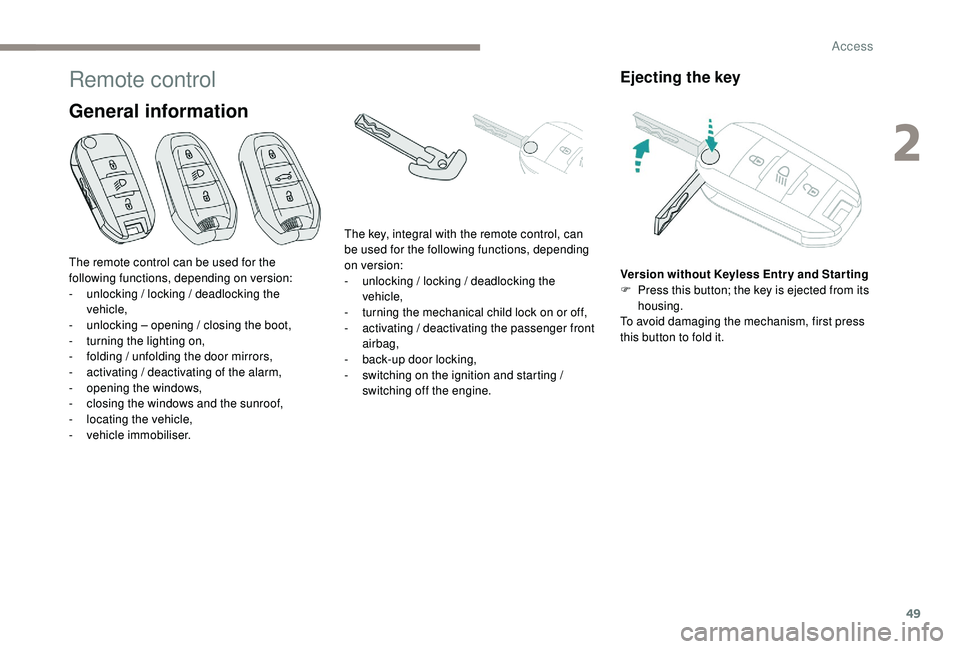
General information
Ejecting the key
Version without Keyless Entr y and Star ting
F P ress this button; the key is ejected from its
housing.
To avoid damaging the mechanism, first press
this button to fold it.
The remote control can be used for the
following functions, depending on version:
-
u
nlocking / locking / deadlocking the
vehicle,
-
u
nlocking – opening / closing the boot,
-
t
urning the lighting on,
-
f
olding / unfolding the door mirrors,
-
a
ctivating / deactivating of the alarm,
-
o
pening the windows,
-
c
losing the windows and the sunroof,
-
l
ocating the vehicle,
-
v
ehicle immobiliser. The key, integral with the remote control, can
be used for the following functions, depending
on version:
-
u
nlocking / locking / deadlocking the
vehicle,
-
t
urning the mechanical child lock on or off,
-
a
ctivating / deactivating the passenger front
airbag,
-
b
ack-up door locking,
-
s
witching on the ignition and starting /
switching off the engine.
2
Access
Page 52 of 404

50
Locking the vehicle
Normal locking
F Press this button.
On the first press of the locking button,
illumination of the direction indicators for a few
seconds indicates:
-
l
ocking of the vehicle for versions without
alarm,
-
a
ctivation of the alarm for other versions.
Depending on version, the door mirrors fold.
Unlocking the vehicle
Version with K eyless Entr y and Star ting
F P ull on this button to remove the key from
the housing.
To return it to the housing, first pull on this
button.
Complete unlocking
F Press this button.
Selective unlocking
Driver door and fuel flap
The setting is done in the vehicle configuration
menu.
Opening the windows F
P
ress this button.
F
T
o unlock the other doors and
the boot, press this button again.
On the first press of the unlocking button,
flashing of the direction indicators for a few
seconds signals:
-
c
omplete or selective unlocking of the
vehicle for versions without alarm,
-
d
eactivation of the alarm for other versions.
Depending on version, the door mirrors unfold.
Depending on version, pressing and
holding the unlocking buttons opens
the windows to the desired position.
The windows stop when you release
the button. An access that is not properly closed
(door or tailgate) prevents locking of the
vehicle. However, if your vehicle has an
alarm, this will be fully activated after
about 45
seconds.
If the vehicle is unlocked inadvertently
and there is then no action on the doors
or boot, the vehicle will automatically lock
itself again after about 30
seconds. If the
alarm was previously activated, it will be
reactivated automatically.
Access
Page 53 of 404
51
Deadlocking
F Within five seconds, press this button again to deadlock the
vehicle.
For versions without alarm, deadlocking is
confirmed by illumination of the direction
indicators for few seconds on the second press
of the locking button. Closing the windows and sunroof
Maintaining pressure on the locking
button allows the windows and,
depending on version, the sunroof to
be closed to the desired position.
This operation also closes the
sunroof blind.
Locating your vehicle
This function allows you to identify your vehicle
from a distance, particularly in poor light. Your
vehicle must be locked.
F
P
ress this button. This will switch on the courtesy lamps and door
mirror spot lamps and the direction indicators
will flash for around ten seconds.
Welcome lighting
Availability of this function depends on version.
F
M
ake a short press on this
remote control button.
Pressing again before the end of the timed
period switches off the lighting immediately. The sidelamps, dipped beam headlamps,
number plate lamps and door mirror spotlamps
come on for 30
seconds.
The automatic folding and unfolding of the
door mirrors with the remote control can
be deactivated by a PEUGEOT dealer or a
qualified workshop.
Deadlocking renders the interior door
controls inoperative.
It also deactivates the interior central
locking button on the dashboard.
Therefore, never leave anyone inside the
vehicle when it is deadlocked. Ensure that nothing could prevent the
correct closing of the windows and
sunroof.
If, on versions with alarm, you want to
leave the windows and/or sunroof partly
open, you must first deactivate the
volumetric alarm protection.
For more information on the Alarm
, refer
to the corresponding section.
2
Access
Page 55 of 404
53
Opening the windows
Depending on version, keeping your hand
behind the door handle or pressing the tailgate
control allows the windows to be opened to the
desired position.
Flashing of the direction indicators for a few
seconds signals:
-
t
he unlocking of the vehicle for versions
without alarm,
-
t
he deactivation of the alarm for other
versions.
Depending on version, the door mirrors unfold.
Selective unlocking
Driver door and fuel flap
F
P
ass your hand behind the driver's door
handle.
F
T
o unlock the complete vehicle, pass your
hand behind the front passenger door
handle with the electronic key close to
the passenger door, or press the tailgate
opening control (middle button) with the
electronic key close to the rear of the
vehicle.
The setting for selective unlocking of
the driver's door is done in the vehicle
configuration menu. When unlocking the driver's door, flashing
of the direction indicators for a few seconds
signals:
-
t
he selective unlocking of the vehicle for
versions without alarm,
-
t
he deactivation of the alarm for other
versions.
Depending on version, the door mirrors unfold.
Selective unlocking of the
tailgate
F Press the tailgate opening button to unlock just the boot.
The doors remain locked.
If selective unlocking of the tailgate is
deactivated, pressing this control also
unlocks the doors. Activation or deactivation of selective
unlocking of the tailgate is done in
the Vehicle / Driving menu of the
touch screen. If one of the doors or the boot is still open
or if the electronic key for the
K
eyless
Entry and Starting system has been left
inside the vehicle, the central locking does
not take place.
However, the alarm (if fitted) will be fully
activated after about 45
seconds.
If the vehicle is unlocked inadvertently
and there is then no action on the doors
or boot, the vehicle will automatically lock
itself again after about 30
seconds.
If fitted to your vehicle, the alarm will also
be reactivated automatically.
The automatic folding and unfolding of
the door mirrors can be deactivated by a
PEUGEOT dealer or a qualified workshop.
2
Access
Page 56 of 404
54
Locking the vehicle
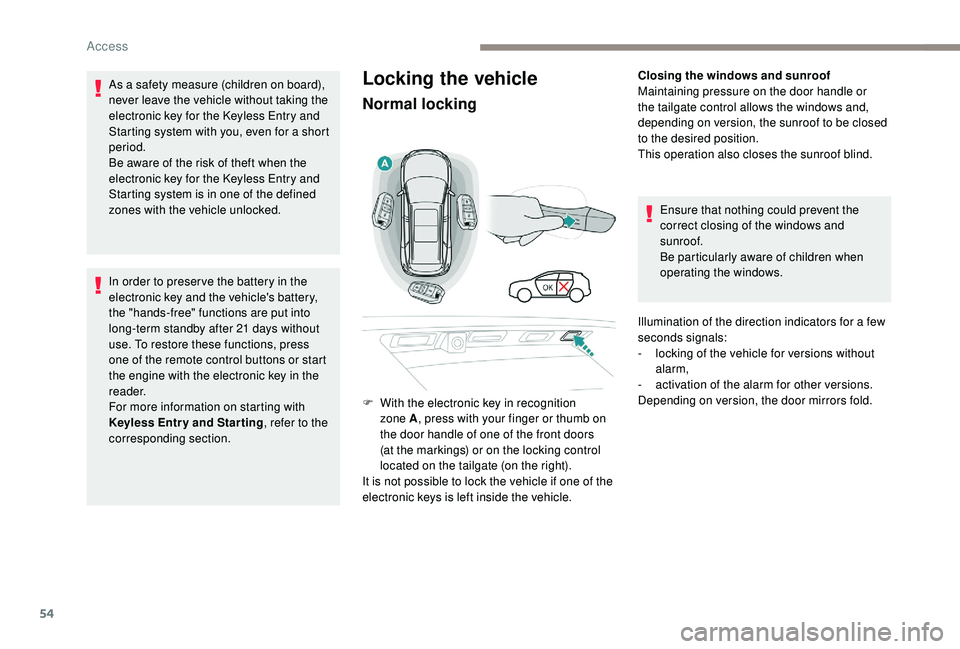
Normal locking
Closing the windows and sunroof
Maintaining pressure on the door handle or
the tailgate control allows the windows and,
depending on version, the sunroof to be closed
to the desired position.
This operation also closes the sunroof blind.
Illumination of the direction indicators for a few
seconds signals:
-
l
ocking of the vehicle for versions without
alarm,
-
a
ctivation of the alarm for other versions.
Depending on version, the door mirrors fold.
F
W
ith the electronic key in recognition
zone A , press with your finger or thumb on
the door handle of one of the front doors
(at the markings) or on the locking control
located on the tailgate (on the right).
It is not possible to lock the vehicle if one of the
electronic keys is left inside the vehicle.
As a safety measure (children on board),
never leave the vehicle without taking the
electronic key for the
K
eyless Entry and
Starting system with you, even for a short
period.
Be aware of the risk of theft when the
electronic key for the
K
eyless Entry and
Starting system is in one of the defined
zones with the vehicle unlocked.
In order to preser ve the battery in the
electronic key and the vehicle's battery,
the "hands-free" functions are put into
long-term standby after 21
days without
use. To restore these functions, press
one of the remote control buttons or start
the engine with the electronic key in the
reader.
For more information on starting with
K
eyless Entr y and Star ting , refer to the
corresponding section. Ensure that nothing could prevent the
correct closing of the windows and
sunroof.
Be particularly aware of children when
operating the windows.
Access