seats PEUGEOT 5008 2017 Owners Manual
[x] Cancel search | Manufacturer: PEUGEOT, Model Year: 2017, Model line: 5008, Model: PEUGEOT 5008 2017Pages: 404, PDF Size: 15.31 MB
Page 4 of 404
2
.
.
Head-up digital screen 8
I ndicator and warning lamps 1 2
Indicators
28
Manual test
3
4
Distance recorders
3
5
Lighting dimmer
3
5
Trip computer
3
6
Monochrome screen C
3
8
Touch screen
4
0
Remote control
4
9
K
eyless Entry and Starting
5
2
Back-up procedures
5
7
Anti-intrusion security
6
0
Central locking
6
0
Alarm
61
Doors
63
Boot
64
Hands-free tailgate
6
5
Electric windows
6
9
Panoramic opening sunroof
7
0Driving position
7
4
Front seats
7
6
Steering wheel adjustment
8
3
Mirrors 83
Second row seats
8
5
Third row seats
8
8
Seat modularity
9
2
i- Cockpit Amplify function
9
3
Heating and Ventilation 9 4
Manual air conditioning 9 6
Semi-automatic mono-zone air conditioning
9
7
Automatic dual-zone air conditioning
9
9
Recirculation of interior air
1
03
Front demist – defrost
1
03
Heated windscreen
1
04
Rear screen demist – defrost
1
04
Programmable heating
1
05
Front fittings
1
10
Courtesy lamps
1
16
Interior ambient lighting
1
17
Rear fittings
1
18
Boot fittings
1
20Exterior lighting control stalk
1
24
Direction indicators
1
27
Headlamp adjustment
1
28
Automatic illumination of headlamps
1
28
Automatic headlamp dipping
1
31
Cornering lighting
1
33
Wiper control stalk
1
34
Automatic rain sensitive wipers
1
36
General safety recommendations
1
38
Hazard warning lamps
1
39
H or n
13
9
Emergency or assistance call
1
39
Electronic stability control (ESC)
1
42
Advanced Grip Control
1
45
Hill Assist Descent Control
1
47
Seat belts
1
48
Airbags
1
53
Child seats
1
57
Deactivating the passenger front airbag
1
58
ISOFIX mountings and child seats
1
66
i-Size child seats
1
70
Manual child lock
1
73
Electric child lock
1
74
Over view
Dashboard instruments Ease of use and comfort
Safety
Access Lighting and visibility
Eco-driving
Contents
Page 9 of 404
7
Limit the causes of excess
consumption
Spread loads throughout the vehicle; place
the heaviest items in the bottom of the boot,
as close as possible to the rear seats.
Limit the loads carried in the vehicle and
reduce wind resistance (roof bars, roof rack,
bicycle carrier, trailer, etc.). Preferably use a
roof box.
Remove roof bars and roof racks after use.
At the end of winter, remove snow tyres and
refit your summer tyres.
Observe the recommendations
on maintenance
Check the tyre pressures regularly, when cold,
referring to the label in the door aperture,
driver's side.
Carry out this check in particular:
-
b
efore a long journey,
-
a
t each change of season,
-
a
fter a long period out of use.
Do not forget the spare wheel and the tyres on
any trailer or caravan. Have your vehicle ser viced regularly
(engine oil, oil filter, air filter, passenger
compartment filter, etc.) and obser ve the
schedule of operations recommended in the
manufacturer's service schedule.
When filling the tank, do not continue after the
3
rd cut-off of the nozzle to avoid over flow.
At the wheel of your new vehicle, it is only
after the first 1,800
miles (3,000 kilometres)
that you will see the fuel consumption settle
down to a consistent average. With a BlueHDi Diesel engine, if the SCR
system is faulty, your vehicle becomes
polluting. Visit a PEUGEOT or a qualified
workshop as soon as possible to make your
vehicle’s level of nitrogen oxide emissions
compliant to the standard.
.
Eco-driving
Page 71 of 404
69
Electric windows
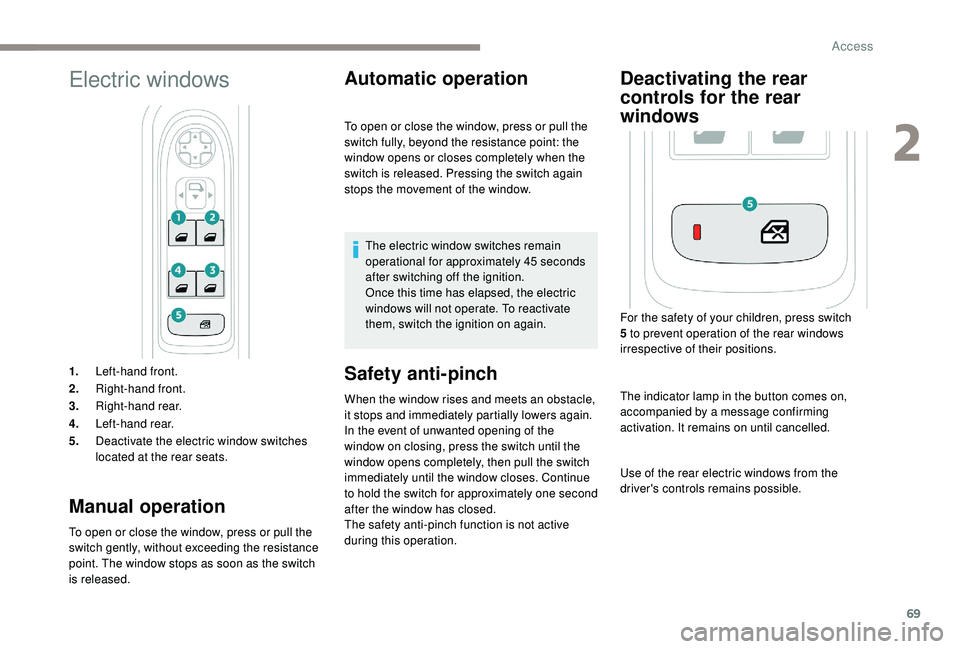
1.Left-hand front.
2. Right-hand front.
3. Right-hand rear.
4. Left-hand rear.
5. Deactivate the electric window switches
located at the rear seats.
Manual operation
To open or close the window, press or pull the
switch gently, without exceeding the resistance
point. The window stops as soon as the switch
is released.
Automatic operation
Safety anti-pinch
When the window rises and meets an obstacle,
it stops and immediately partially lowers again.
In the event of unwanted opening of the
window on closing, press the switch until the
window opens completely, then pull the switch
immediately until the window closes. Continue
to hold the switch for approximately one second
after the window has closed.
The safety anti-pinch function is not active
during this operation. To open or close the window, press or pull the
switch fully, beyond the resistance point: the
window opens or closes completely when the
switch is released. Pressing the switch again
stops the movement of the window.
The electric window switches remain
operational for approximately 45
seconds
after switching off the ignition.
Once this time has elapsed, the electric
windows will not operate. To reactivate
them, switch the ignition on again.
Deactivating the rear
controls for the rear
windows
For the safety of your children, press switch
5 to prevent operation of the rear windows
irrespective of their positions.
The indicator lamp in the button comes on,
accompanied by a message confirming
activation. It remains on until cancelled.
Use of the rear electric windows from the
driver's controls remains possible.
2
Access
Page 76 of 404
74
Driving position
Adopting a good driving position helps improve
your comfort and protection.
It also optimises interior and exterior visibility
as well as access to controls.
Sitting comfortably
Whether or not your vehicle has certain seat
adjustments described in this section depends
on the trim level and country of sale.
Driver’s side
As a safety precaution, adjust the seats
only when the vehicle is stationary.If your vehicle has electric seats, the
ignition must be on to adjust them.
Passenger’s side
Sit fully back in the seat with your pelvis, back
and shoulders in contact with the seat backrest.
The cushion height should be set so your eyes
are looking at the centre of the windscreen.
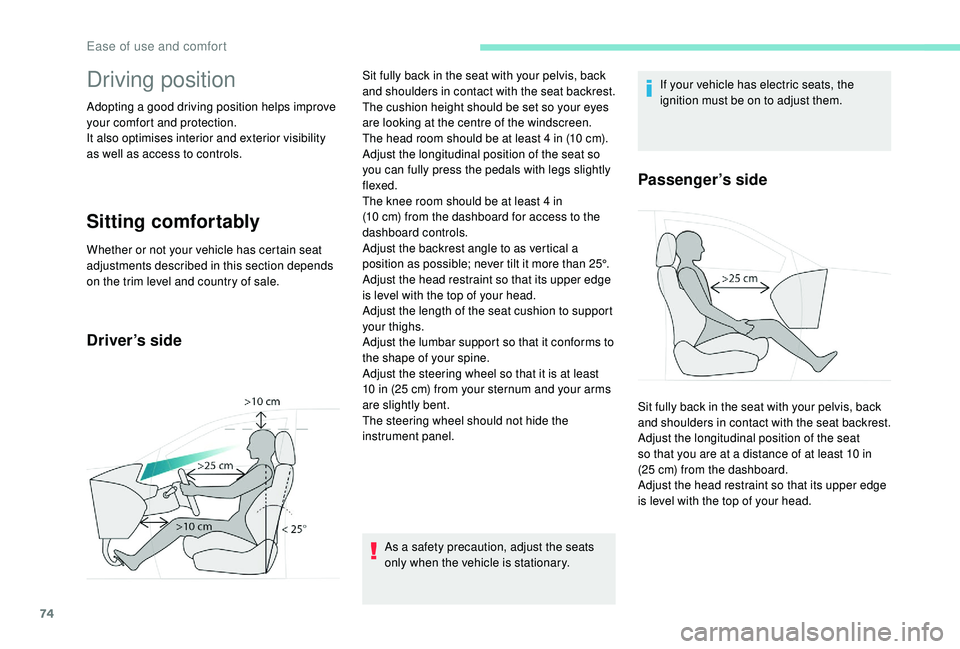
The head room should be at least 4
in (10 cm).
Adjust the longitudinal position of the seat so
you can fully press the pedals with legs slightly
flexed.
The knee room should be at least 4
in
(10
cm) from the dashboard for access to the
dashboard controls.
Adjust the backrest angle to as vertical a
position as possible; never tilt it more than 25°.
Adjust the head restraint so that its upper edge
is level with the top of your head.
Adjust the length of the seat cushion to support
your thighs.
Adjust the lumbar support so that it conforms to
the shape of your spine.
Adjust the steering wheel so that it is at least
10
in (25 cm) from your sternum and your arms
are slightly bent.
The steering wheel should not hide the
instrument panel. Sit fully back in the seat with your pelvis, back
and shoulders in contact with the seat backrest.
Adjust the longitudinal position of the seat
so that you are at a distance of at least 10
in
(25
cm) from the dashboard.
Adjust the head restraint so that its upper edge
is level with the top of your head.
Ease of use and comfort
Page 77 of 404
75
Before moving off
If your vehicle has electric door mirrors,
the ignition must be on to adjust them.
When driving
Never adjust the seats or steering wheel
when driving.
Always keep your feet on the floor.
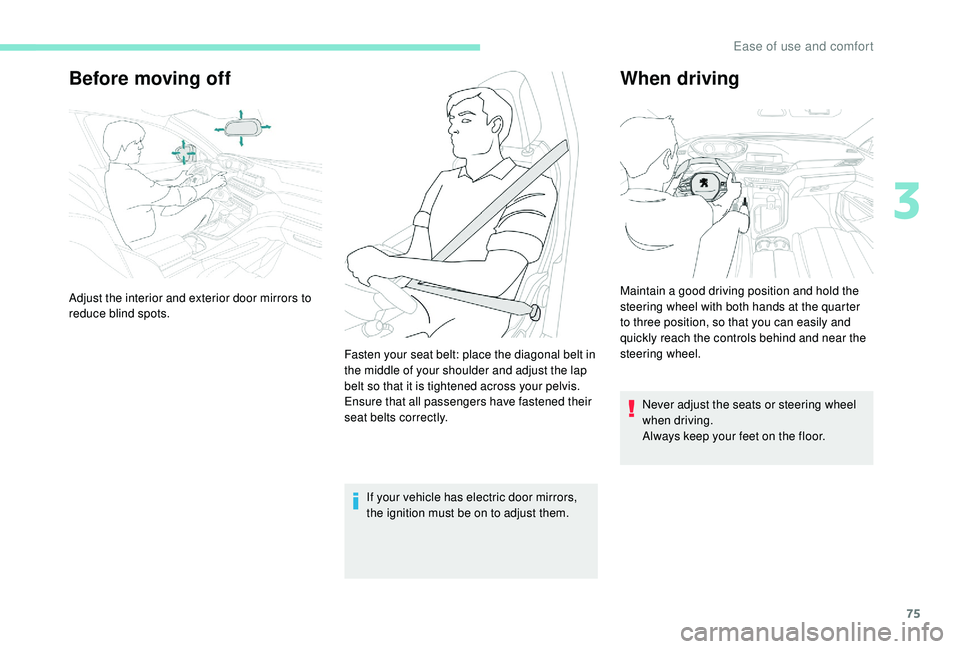
Adjust the interior and exterior door mirrors to
reduce blind spots.
Fasten your seat belt: place the diagonal belt in
the middle of your shoulder and adjust the lap
belt so that it is tightened across your pelvis.
Ensure that all passengers have fastened their
seat belts correctly. Maintain a good driving position and hold the
steering wheel with both hands at the quarter
to three position, so that you can easily and
quickly reach the controls behind and near the
steering wheel.
3
Ease of use and comfort
Page 78 of 404
76
Front seats
Manual seats
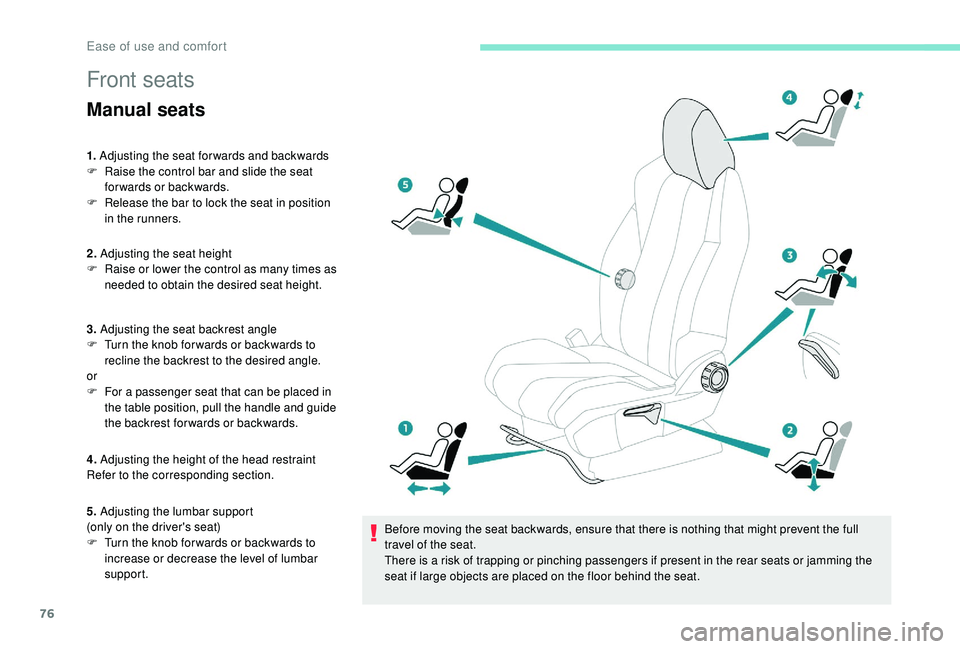
1. Adjusting the seat forwards and backwards
F R aise the control bar and slide the seat
forwards or backwards.
F
R
elease the bar to lock the seat in position
in the runners.
2. Adjusting the seat height
F
R
aise or lower the control as many times as
needed to obtain the desired seat height.
3. Adjusting the seat backrest angle
F
T
urn the knob for wards or backwards to
recline the backrest to the desired angle.
or
F
F
or a passenger seat that can be placed in
the table position, pull the handle and guide
the backrest for wards or backwards.
4. Adjusting the height of the head restraint
Refer to the corresponding section.
5. Adjusting the lumbar support
(only on the driver's seat)
F
T
urn the knob for wards or backwards to
increase or decrease the level of lumbar
support. Before moving the seat backwards, ensure that there is nothing that might prevent the full
travel of the seat.
There is a risk of trapping or pinching passengers if present in the rear seats or jamming the
seat if large objects are placed on the floor behind the seat.
Ease of use and comfort
Page 79 of 404
77
"AGR" certified seats
Additional adjustments
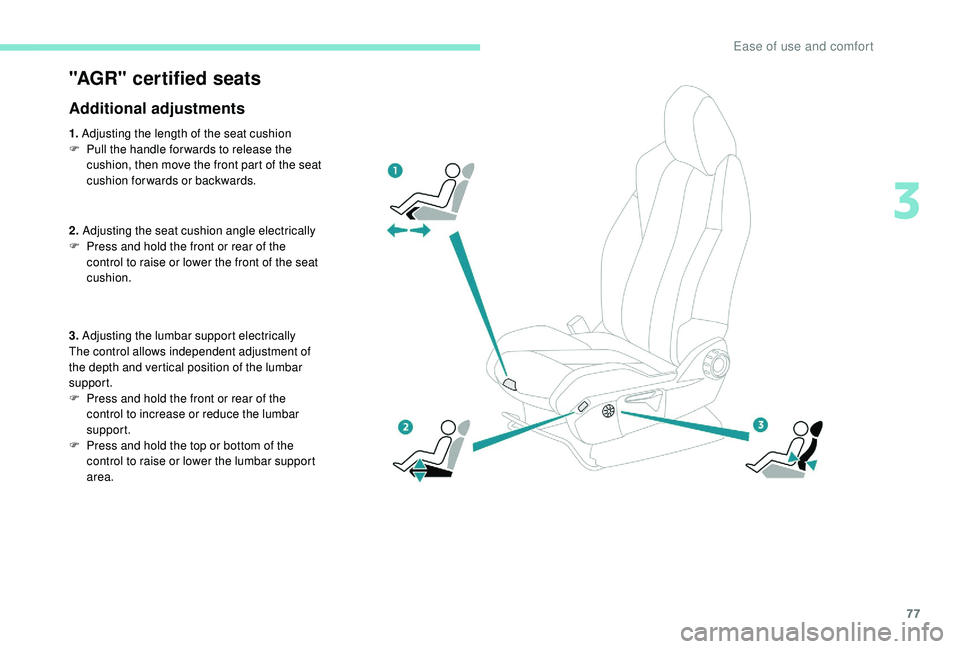
1. Adjusting the length of the seat cushion
F P ull the handle for wards to release the
cushion, then move the front part of the seat
cushion forwards or backwards.
2. Adjusting the seat cushion angle electrically
F
P
ress and hold the front or rear of the
control to raise or lower the front of the seat
cushion.
3. Adjusting the lumbar support electrically
The control allows independent adjustment of
the depth and vertical position of the lumbar
support.
F
P
ress and hold the front or rear of the
control to increase or reduce the lumbar
support.
F
P
ress and hold the top or bottom of the
control to raise or lower the lumbar support
area.
3
Ease of use and comfort
Page 80 of 404
78
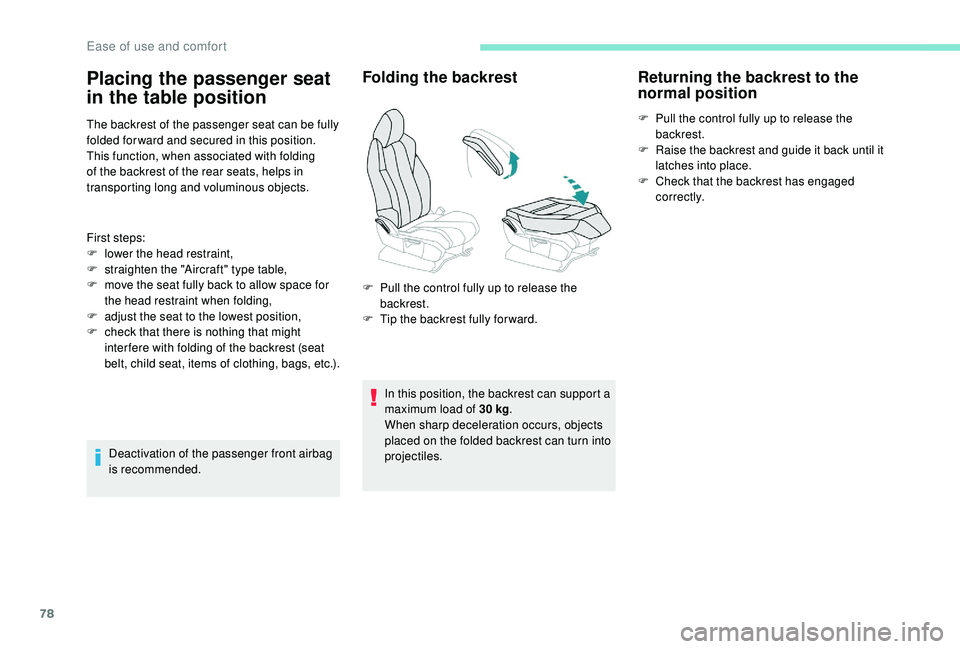
The backrest of the passenger seat can be fully
folded for ward and secured in this position.
This function, when associated with folding
of the backrest of the rear seats, helps in
transporting long and voluminous objects.
First steps:
F
l
ower the head restraint,
F
s
traighten the "Aircraft" type table,
F
m
ove the seat fully back to allow space for
the head restraint when folding,
F
a
djust the seat to the lowest position,
F
c
heck that there is nothing that might
inter fere with folding of the backrest (seat
belt, child seat, items of clothing, bags, etc.).
Deactivation of the passenger front airbag
is recommended.
Folding the backrest
In this position, the backrest can support a
maximum load of 30 kg.
When sharp deceleration occurs, objects
placed on the folded backrest can turn into
projectiles.
Returning the backrest to the
normal position
F Pull the control fully up to release the backrest.
F
R
aise the backrest and guide it back until it
latches into place.
F
C
heck that the backrest has engaged
c o r r e c t l y.
Placing the passenger seat
in the table position
F Pull the control fully up to release the backrest.
F
T
ip the backrest fully for ward.
Ease of use and comfort
Page 83 of 404
81
Before moving the seat backwards,
ensure that there is nothing that might
prevent the full travel of the seat.
There is a risk of trapping or pinching
passengers if present in the rear seats
or jamming the seat if large objects are
placed on the floor behind the seat.
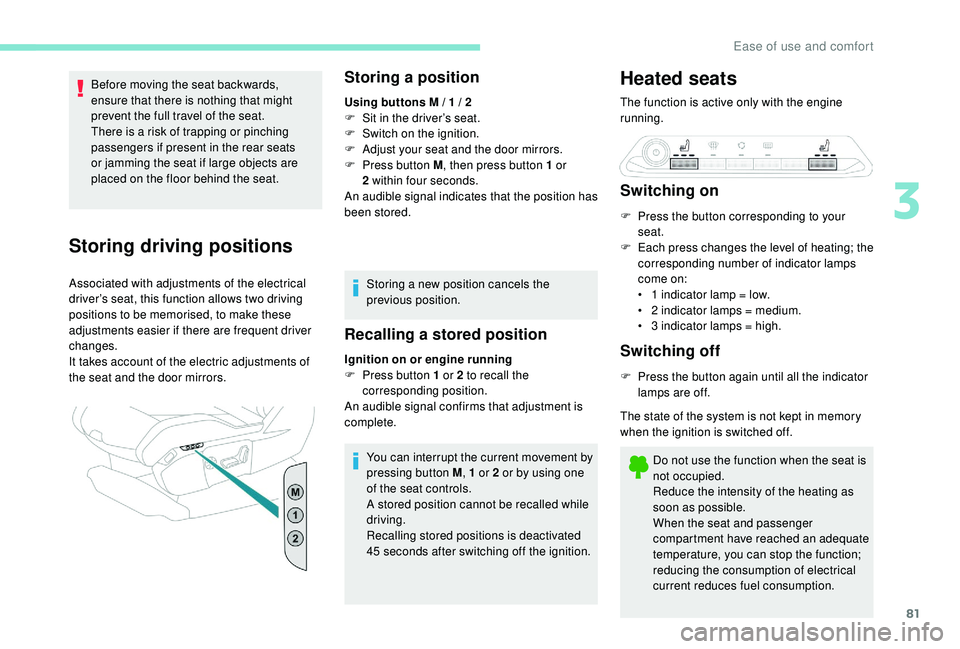
Storing driving positions
Associated with adjustments of the electrical
driver’s seat, this function allows two driving
positions to be memorised, to make these
adjustments easier if there are frequent driver
changes.
It takes account of the electric adjustments of
the seat and the door mirrors.
Storing a position
Using buttons M / 1 / 2
F S it in the driver’s seat.
F
S
witch on the ignition.
F
A
djust your seat and the door mirrors.
F
P
ress button M , then press button 1
or
2
within four seconds.
An audible signal indicates that the position has
been stored.
Storing a new position cancels the
previous position.
Recalling a stored position
Ignition on or engine running
F P ress button 1 or 2 to recall the
corresponding position.
An audible signal confirms that adjustment is
complete.
You can interrupt the current movement by
pressing button M , 1
or 2 or by using one
of the seat controls.
A stored position cannot be recalled while
driving.
Recalling stored positions is deactivated
45
seconds after switching off the ignition.
Heated seats
The function is active only with the engine
running.
Switching on
F Press the button corresponding to your seat.
F
E
ach press changes the level of heating; the
corresponding number of indicator lamps
come on:
•
1
indicator lamp = low.
•
2
indicator lamps = medium.
•
3
indicator lamps = high.
Switching off
F Press the button again until all the indicator lamps are off.
The state of the system is not kept in memory
when the ignition is switched off.
Do not use the function when the seat is
not occupied.
Reduce the intensity of the heating as
soon as possible.
When the seat and passenger
compartment have reached an adequate
temperature, you can stop the function;
reducing the consumption of electrical
current reduces fuel consumption.
3
Ease of use and comfort
Page 84 of 404
82
Prolonged use is not recommended for
those with sensitive skin.
There is a risk of burns for people whose
perception of heat is impaired (illness,
taking medication, etc.).
There is a risk of overheating the system if
material with insulating properties is used,
such as cushions or seat covers.
Do not use the system:
-
i
f wearing damp clothing,
-
i
f child seats are fitted.
To avoid breaking the heating element in
the seat:
-
d
o not place heavy objects on the seat,
-
d
o not kneel or stand on the seat,
-
d
o not place sharp objects on the seat,
-
d
o not spill liquids onto the seat.
To avoid the risk of short-circuit:
-
d
o not use liquid products for cleaning
the seat,
-
n
ever use the heating function when
the seat is damp.Multipoint massage
System with a choice of type of massage and
adjustment of its intensity.
This system operates with the engine running,
as well as in STOP mode of Stop & Start.
Activation / Settings
The massage settings are adjusted in the touch
screen.
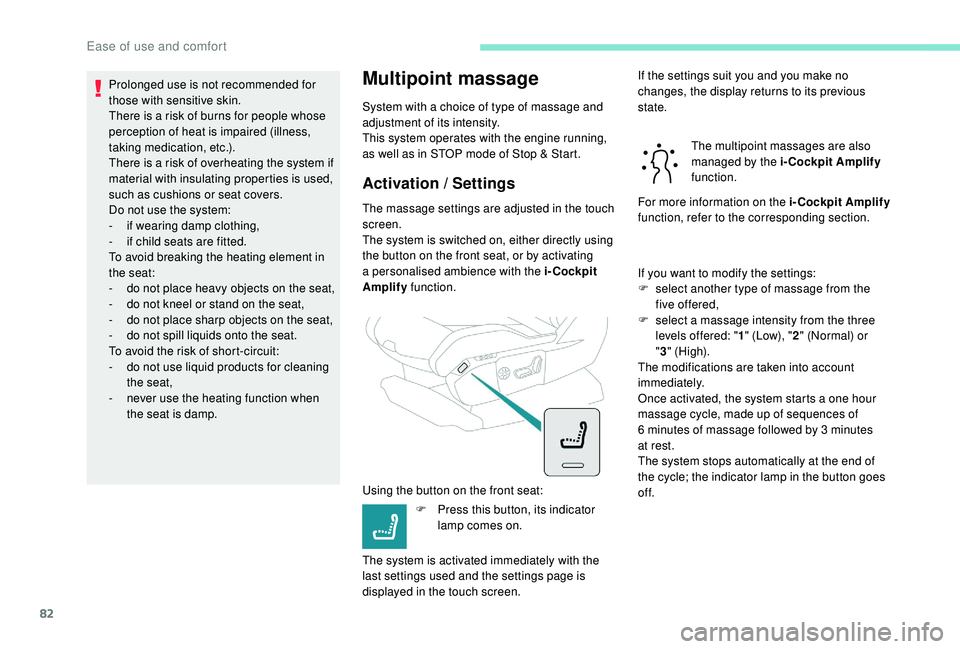
The system is switched on, either directly using
the button on the front seat, or by activating
a personalised ambience with the i-Cockpit
Amplify function.
Using the button on the front seat: F
P
ress this button, its indicator
lamp comes on.
The system is activated immediately with the
last settings used and the settings page is
displayed in the touch screen. If the settings suit you and you make no
changes, the display returns to its previous
state.
The multipoint massages are also
managed by the i-Cockpit Amplify
function.
For more information on the i-Cockpit Amplify
function, refer to the corresponding section.
If you want to modify the settings:
F
s
elect another type of massage from the
five offered,
F
s
elect a massage intensity from the three
levels offered: " 1" (Low), " 2" (Normal) or
" 3 " (High).
The modifications are taken into account
immediately.
Once activated, the system starts a one hour
massage cycle, made up of sequences of
6
minutes of massage followed by 3 minutes
at rest.
The system stops automatically at the end of
the cycle; the indicator lamp in the button goes
of f.
Ease of use and comfort