buttons PEUGEOT 5008 2018 User Guide
[x] Cancel search | Manufacturer: PEUGEOT, Model Year: 2018, Model line: 5008, Model: PEUGEOT 5008 2018Pages: 364, PDF Size: 13.03 MB
Page 74 of 364
72
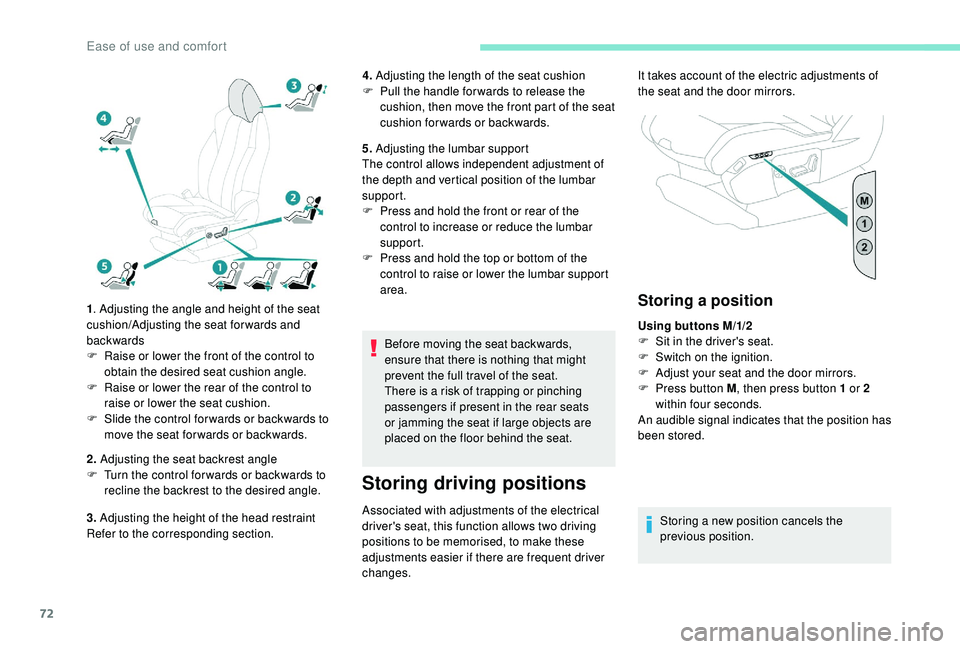
1. Adjusting the angle and height of the seat
cushion/Adjusting the seat forwards and
backwards
F
R
aise or lower the front of the control to
obtain the desired seat cushion angle.
F
R
aise or lower the rear of the control to
raise or lower the seat cushion.
F
S
lide the control for wards or backwards to
move the seat for wards or backwards.
2. Adjusting the seat backrest angle
F
T
urn the control for wards or backwards to
recline the backrest to the desired angle.
3. Adjusting the height of the head restraint
Refer to the corresponding section. 4.
Adjusting the length of the seat cushion
F
P
ull the handle for wards to release the
cushion, then move the front part of the seat
cushion forwards or backwards.
5. Adjusting the lumbar support
The control allows independent adjustment of
the depth and vertical position of the lumbar
support.
F
P
ress and hold the front or rear of the
control to increase or reduce the lumbar
support.
F
P
ress and hold the top or bottom of the
control to raise or lower the lumbar support
area.
Before moving the seat backwards,
ensure that there is nothing that might
prevent the full travel of the seat.
There is a
risk of trapping or pinching
passengers if present in the rear seats
or jamming the seat if large objects are
placed on the floor behind the seat.
Storing driving positions
Associated with adjustments of the electrical
driver's seat, this function allows two driving
positions to be memorised, to make these
adjustments easier if there are frequent driver
changes.
Storing a position
Using buttons M/1/2
F
S it in the driver's seat.
F
S
witch on the ignition.
F
A
djust your seat and the door mirrors.
F
P
ress button M , then press button 1
or 2
within four seconds.
An audible signal indicates that the position has
been stored.
Storing a
new position cancels the
previous position.
It takes account of the electric adjustments of
the seat and the door mirrors.
Ease of use and comfort
Page 86 of 364
84
Personalising an ambience
From the home page:
F S elect an ambience to activate it.
F
P
ress " Settings " to display the settings
page for the ambience.
F
S
elect a system for which you wish to
modify the settings.
F
A
fter making the modifications, press any
area of the screen outside the system
settings window to return to the ambience
settings page.
F
A
fter making all of the desired modifications
to settings, press " Save settings".
The modifications are taken into account
immediately.
It is possible to temporarily modify an
ambience at any time, by modifying the
settings for one or more of the systems
managed in the ambience, without going
via the i- Cockpit Amplify function.
For example, you can deactivate or modify
the intensity of the current massage by
pressing the massage activation button
on your seat or activate/deactivate
the ambient lighting in the passenger
compartment from the Vehicle/Driving
menu.
In this case, the new settings will not be
saved as part of the current ambience.Heating and Ventilation
Air intake
The air circulating in the passenger
compartment is filtered and originates either
from the outside via the grille located at the
base of the windscreen or from the inside in air
recirculation mode.
Controls
The incoming air follows various routes
depending on the controls selected by
the driver, the front passenger and rear
passengers, depending on the level of
equipment.
The temperature control enables you to obtain
the level of comfort required by mixing the air of
the various circuits.
The air distribution control enables you to
select the air vents used in the passenger
compartment by the combined use of the
associated buttons.
The air flow control enables you to increase or
reduce the speed of the ventilation fan.
Depending on your vehicle, the controls are
accessible in the Air conditioning menu of the
touch screen or are grouped together on the
control panel of the centre console.
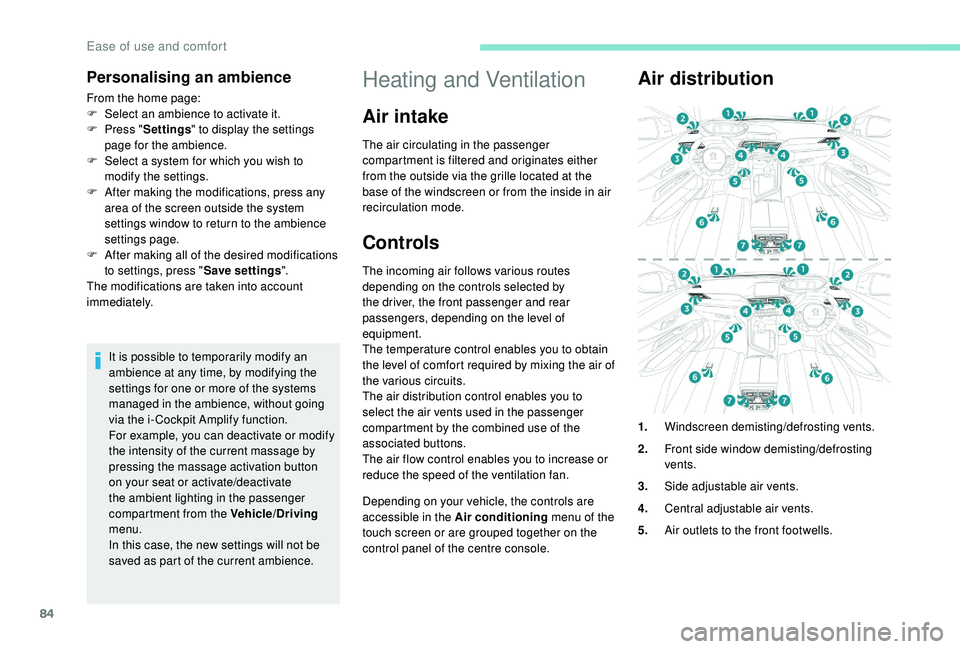
Air distribution
1. Windscreen demisting/defrosting vents.
2. Front side window demisting/defrosting
vents.
3. Side adjustable air vents.
4. Central adjustable air vents.
5. Air outlets to the front footwells.
Ease of use and comfort
Page 89 of 364
87
The air conditioning does not operate
when the air flow adjustment is set to off.
To obtain cool air more quickly, you can
activate recirculation of the interior air for
a few moments.
Switching off
F Press this button again; its indicator lamp goes off.
Switching off the air conditioning may result in
some discomfort (humidity, condensation).
Semi-automatic mono-
zone air conditioning
Press the Air conditioning menu
button to display the system controls
page. The air conditioning system operates only with
the engine running.
The temperature at the nozzles and vents
is regulated by the system according to the
temperature in the passenger compartment
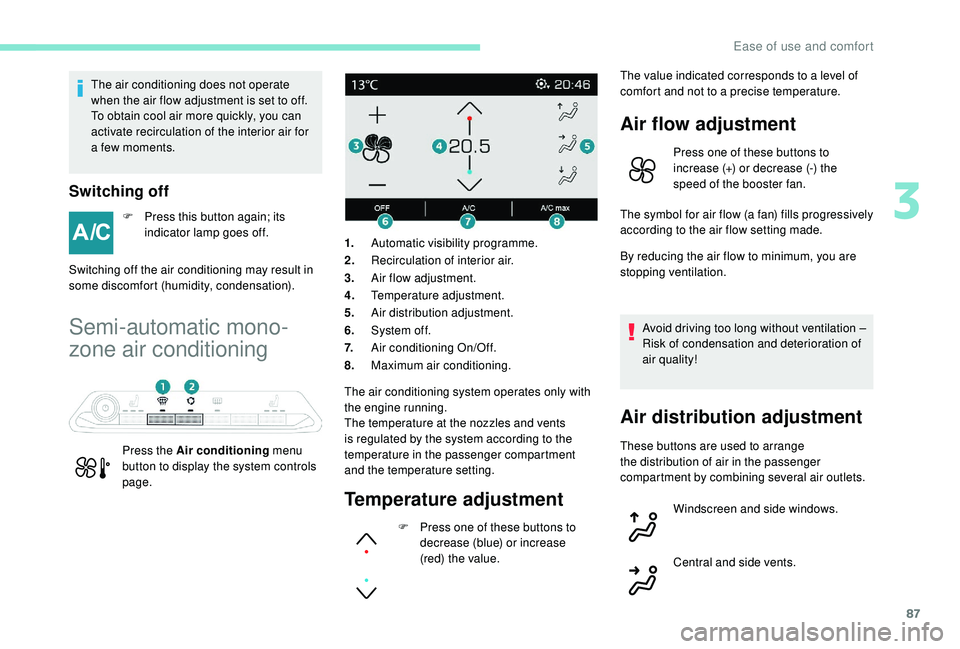
and the temperature setting.1.
Automatic visibility programme.
2. Recirculation of interior air.
3. Air flow adjustment.
4. Temperature adjustment.
5. Air distribution adjustment.
6. System of f.
7. Air conditioning On/Off.
8. Maximum air conditioning.
Temperature adjustment
F Press one of these buttons to
decrease (blue) or increase
(red) the value. The value indicated corresponds to a
level of
comfort and not to a precise temperature.
Air flow adjustment
Press one of these buttons to
increase (+) or decrease (-) the
speed of the booster fan.
The symbol for air flow (a fan) fills progressively
according to the air flow setting made.
By reducing the air flow to minimum, you are
stopping ventilation.
Avoid driving too long without ventilation –
Risk of condensation and deterioration of
air quality!
Air distribution adjustment
These buttons are used to arrange
the distribution of air in the passenger
compartment by combining several air outlets. Windscreen and side windows.
Central and side vents.
3
Ease of use and comfort
Page 90 of 364
88
Air conditioning On/Off
The air conditioning is designed to operate
effectively in all seasons, with the windows
closed.
It enables you to:
-
l
ower the temperature, in summer,
-
i
ncrease the effectiveness of the demisting
in winter, above 3°C.
Switching on
F Press this button, its indicator lamp comes on. The air conditioning does not operate
when the air flow adjustment is set to off.
To obtain cool air more quickly, you can
use recirculation of the interior air for
a
few moments. Then return to the intake
of exterior air.
Switching off
F Press this button again, its indicator lamp goes off.
Switching off the air conditioning may result in
some discomfort (humidity, condensation).
Maximum air conditioning
This function allows faster cooling of the air in
the passenger compartment.
The system automatically adjusts the
temperature setting to the lowest possible, air
distribution towards the centre and outer vents,
air flow to maximum and activates recirculation
of interior air.
F
P
ress this button to activate
the function; its indicator lamp
comes on.
Automatic visibility
programme
For more information on Front demist -
defrost , refer to the corresponding section.
Switching off the system
F Press this button; its indicator
lamp comes on and all other
indicator lamps of the system
go of f.
Avoid driving for too long with the system
switched off – Risk of condensation and
deterioration of air quality!
Pressing any button reactivates the
system with the settings that were
previously in use.
Footwells.
The air distribution can be adapted by using
several buttons: illumination of the indicator
lamp confirms the presence of fan boosted air
in the direction indicated, the indicator lamp off
indicates the absence of fan boosted air in the
direction indicated.
For a
uniform distribution of air in the
passenger compartment, the three buttons can
be activated simultaneously.
F
P
ress this button again to deactivate the
function and return to the previous settings;
its indicator lamp goes off. This action deactivates all functions of the air
conditioning system.
Temperature is no longer regulated. However,
a slight flow of air can still be felt, resulting from
the for ward movement of the vehicle.
Ease of use and comfort
Page 91 of 364
89
Automatic dual-zone air
conditioning
Press the Air conditioning menu
button to display the system controls
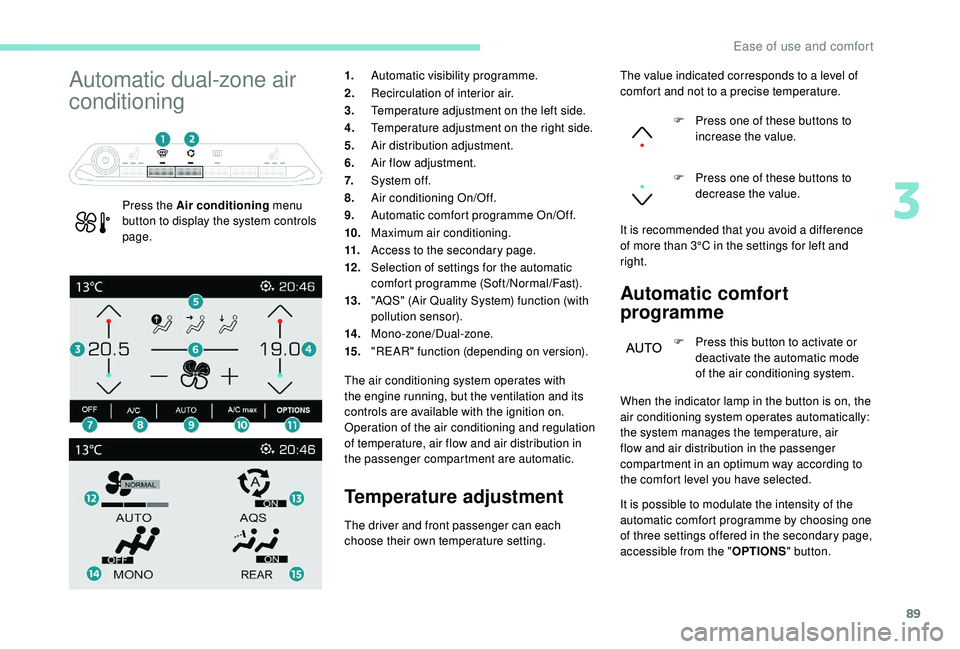
page. 1.
Automatic visibility programme.
2. Recirculation of interior air.
3. Temperature adjustment on the left side.
4. Temperature adjustment on the right side.
5. Air distribution adjustment.
6. Air flow adjustment.
7. System of f.
8. Air conditioning On/Off.
9. Automatic comfort programme On/Off.
10. Maximum air conditioning.
11. Access to the secondary page.
12 . Selection of settings for the automatic
comfort programme (Soft/Normal/Fast).
13. "AQS" (Air Quality System) function (with
pollution sensor).
14 . Mono-zone/Dual-zone.
15. "REAR" function (depending on version).
The air conditioning system operates with
the engine running, but the ventilation and its
controls are available with the ignition on.
Operation of the air conditioning and regulation
of temperature, air flow and air distribution in
the passenger compartment are automatic.
Temperature adjustment Automatic comfort
programme
F Press this button to activate or
deactivate the automatic mode
of the air conditioning system.
The driver and front passenger can each
choose their own temperature setting. The value indicated corresponds to a
level of
comfort and not to a precise temperature.
F
P
ress one of these buttons to
increase the value.
F
P
ress one of these buttons to
decrease the value.
It is recommended that you avoid a difference
of more than 3°C in the settings for left and
right.
When the indicator lamp in the button is on, the
air conditioning system operates automatically:
the system manages the temperature, air
flow and air distribution in the passenger
compartment in an optimum way according to
the comfort level you have selected.
It is possible to modulate the intensity of the
automatic comfort programme by choosing one
of three settings offered in the secondary page,
accessible from the " OPTIONS" button.
3
Ease of use and comfort
Page 93 of 364
91
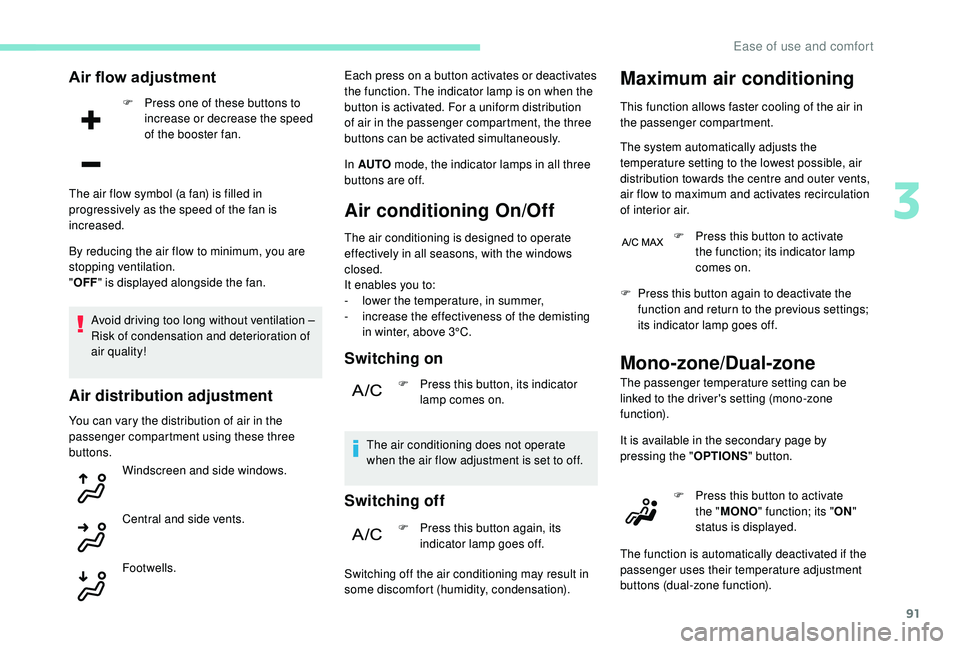
Air flow adjustment
F Press one of these buttons to increase or decrease the speed
of the booster fan.
By reducing the air flow to minimum, you are
stopping ventilation.
" OFF " is displayed alongside the fan.
Avoid driving too long without ventilation –
Risk of condensation and deterioration of
air quality!
Air distribution adjustment
You can vary the distribution of air in the
passenger compartment using these three
buttons. Windscreen and side windows.
Central and side vents.
The air flow symbol (a fan) is filled in
progressively as the speed of the fan is
increased.
Footwells. Each press on a
button activates or deactivates
the function. The indicator lamp is on when the
button is activated. For a uniform distribution
of air in the passenger compartment, the three
buttons can be activated simultaneously.
In AUTO mode, the indicator lamps in all three
buttons are off.
Air conditioning On/Off
The air conditioning is designed to operate
effectively in all seasons, with the windows
closed.
It enables you to:
-
l
ower the temperature, in summer,
-
i
ncrease the effectiveness of the demisting
in winter, above 3°C.
Switching on
F Press this button, its indicator lamp comes on.
The air conditioning does not operate
when the air flow adjustment is set to off.
Switching off
F Press this button again, its indicator lamp goes off.
Switching off the air conditioning may result in
some discomfort (humidity, condensation).
Maximum air conditioning
This function allows faster cooling of the air in
the passenger compartment.
The system automatically adjusts the
temperature setting to the lowest possible, air
distribution towards the centre and outer vents,
air flow to maximum and activates recirculation
of interior air. F
P
ress this button to activate
the function; its indicator lamp
comes on.
F
P
ress this button again to deactivate the
function and return to the previous settings;
its indicator lamp goes off.
Mono-zone/Dual-zone
The passenger temperature setting can be
linked to the driver's setting (mono-zone
function).
It is available in the secondary page by
pressing the " OPTIONS" button.
F
P
ress this button to activate
the " MONO " function; its " ON"
status is displayed.
The function is automatically deactivated if the
passenger uses their temperature adjustment
buttons (dual-zone function).
3
Ease of use and comfort
Page 97 of 364
95
The volumetric alarm movement detector
may be disrupted by the programmable
heating air flows when it is operating.
To avoid any untimely triggering of the
alarm when using the programmable
heating, it is advisable that the volumetric
monitoring is deactivated.
Adapting the programmable heating
enables you to use it to preheat the
passenger compartment of your vehicle.
Contact a PEUGEOT dealer or a qualified
workshop.
Operating indicator lamp
Always switch off the programmable
heating when refuelling to avoid any risk of
fire or explosion.
The programmable heating is supplied by
the vehicle's fuel tank. Before use, ensure
that there is enough fuel left in the tank. If
the fuel in the tank is at the reser ve level,
we strongly recommend that you do not
programme the heating.
To avoid the risks of poisoning or
asphyxia, the programmable heating must
not be used, even for short periods, in
a
closed environment such as a garage or
workshop which are not equipped with an
exhaust gas extraction system.
Do not park the vehicle on a
flammable
sur face (dry grass, dead leaves, paper,
etc.) – Risk of fire!
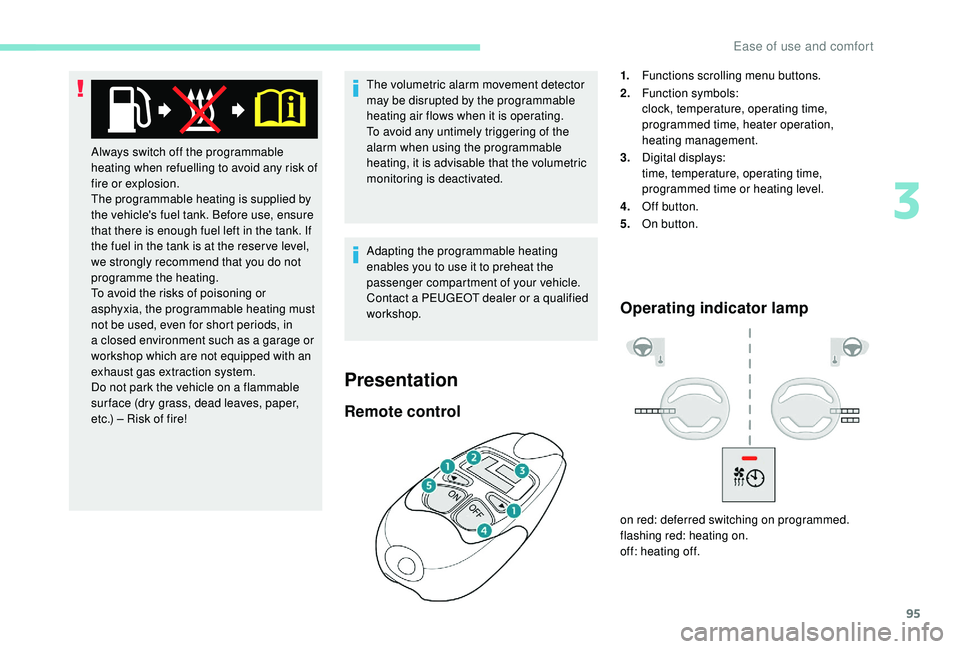
Remote control
1. Functions scrolling menu buttons.
2. Function symbols:
clock, temperature, operating time,
programmed time, heater operation,
heating management.
3. Digital displays:
time, temperature, operating time,
programmed time or heating level.
4. Off button.
5. On button.
on red: deferred switching on programmed.
flashing red: heating on.
off: heating off.
Presentation
3
Ease of use and comfort
Page 98 of 364
96
Function display
The passenger compartment temperature
information is only available when the
engine is off.
Setting the time
F Set the time with the buttons 1.
F P ress simultaneously on buttons 4 and 5 to
save it.
Immediate switching on
The heater starts and this symbol is
displayed.
This red indicator flashes during
heating.
F
T
o deactivate the function, press button
4
until the message " OK" is displayed.
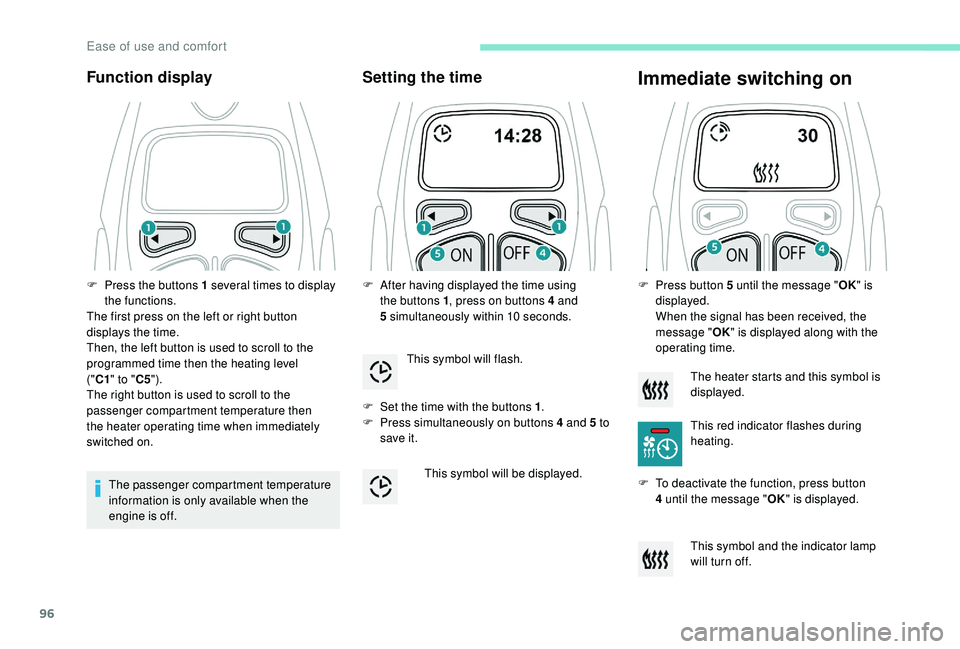
F
P
ress the buttons 1
several times to display
the functions.
The first press on the left or right button
displays the time.
Then, the left button is used to scroll to the
programmed time then the heating level
("C1 " to " C5").
The right button is used to scroll to the
passenger compartment temperature then
the heater operating time when immediately
switched on. F
A
fter having displayed the time using
the buttons 1 , press on buttons 4
and
5
simultaneously within 10
seconds.
This symbol will flash.
This symbol will be displayed. F
P
ress button 5 until the message "
OK" is
displayed.
When the signal has been received, the
message " OK" is displayed along with the
operating time.
This symbol and the indicator lamp
will turn off.
Ease of use and comfort
Page 99 of 364
97
During these operations, if the message
"FA I L " is displayed, it means that the
signal has not been received. Restart the
procedure after having changed position.
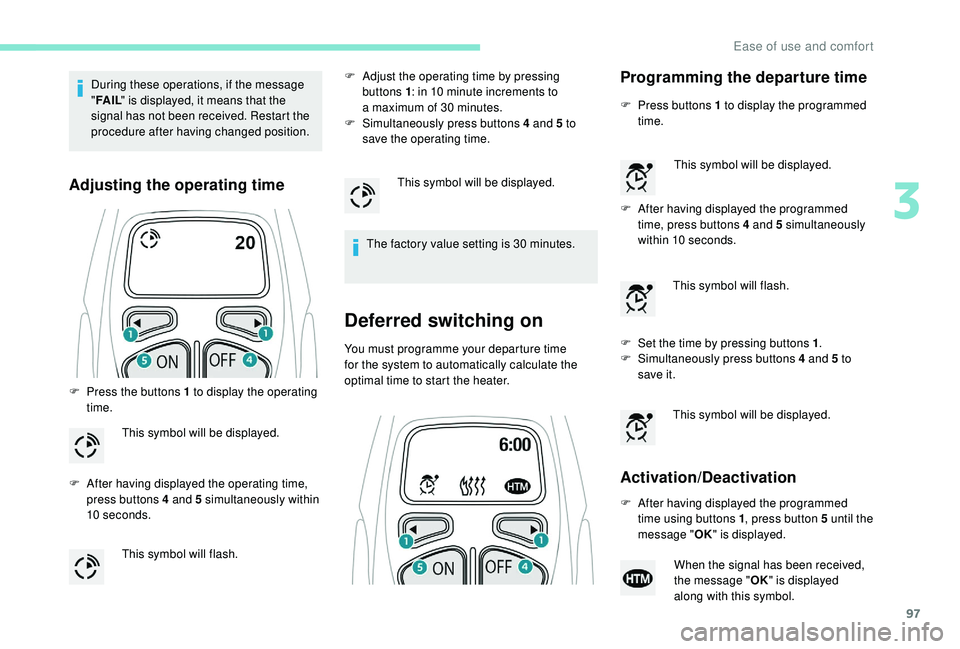
Adjusting the operating time
F Press the buttons 1 to display the operating
time.
F
A
fter having displayed the operating time,
press buttons 4
and 5 simultaneously within
10
seconds. F
A
djust the operating time by pressing
buttons 1 : in 10 minute increments to
a maximum of 30 minutes.
F
S
imultaneously press buttons 4 and 5 to
save the operating time.
The factory value setting is 30 minutes.
Deferred switching on
You must programme your departure time
for the system to automatically calculate the
optimal time to start the heater.
This symbol will be displayed.
This symbol will flash. This symbol will be displayed.
Programming the departure time
F Press buttons 1
to display the programmed
time.
F
A
fter having displayed the programmed
time, press buttons 4
and 5 simultaneously
within 10
seconds.
F
S
et the time by pressing buttons 1 .
F
S
imultaneously press buttons 4 and 5 to
save it.
Activation/Deactivation
This symbol will be displayed.
This symbol will flash.
This symbol will be displayed.
F
A
fter having displayed the programmed
time using buttons 1 , press button 5
until the
message " OK" is displayed.
When the signal has been received,
the message " OK" is displayed
along with this symbol.
3
Ease of use and comfort
Page 100 of 364
98
HTM: Heat Thermo Management
F
T
o deactivate the programming, press
button 4
until the message " OK" is
displayed.
During these operations, if the message
" FA I L " is displayed, it means that the
signal has not been received. Restart the
procedure after having changed position.
Stopping the heating
F Press button 5 .
Changing the heating level
The system has 5 heating levels: C1 ( lowest
level) to C5 (highest level).
F
A
fter having displayed the heating level
using buttons 1 , press simultaneously on
buttons 4
and 5.
The letter " C" will flash.
F
A
djust the heating level by pressing
buttons 1 .
F
S
imultaneously press buttons 4 and 5 to
save the selected level.
The letter " C" will be displayed.
The presets are replaced by the new
entries. The programmed times are
memorised until the next change.
When the start time is activated, it is not
possible to change the heating level. You
must first deactivate the start time.
Operating fault
In the event of a fault with the programmable
h eating, contact a PEUGEOT dealer or
a
qualified workshop.
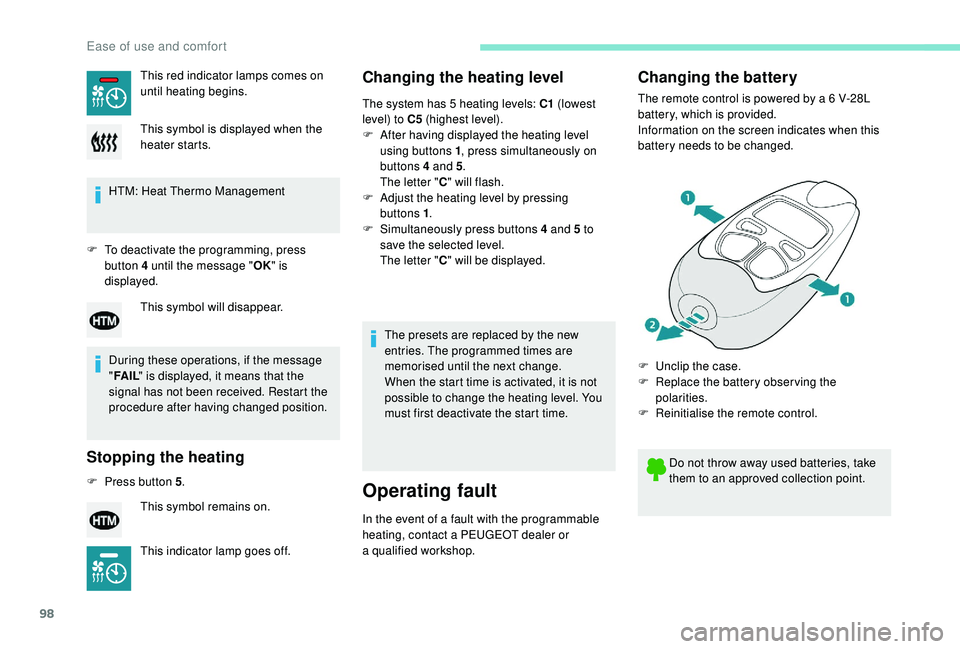
Changing the battery
The remote control is powered by a 6 V-28L
b attery, which is provided.
Information on the screen indicates when this
battery needs to be changed.
This red indicator lamps comes on
until heating begins.
This symbol is displayed when the
heater starts.
This symbol will disappear.
This symbol remains on.
This indicator lamp goes off. Do not throw away used batteries, take
them to an approved collection point.
F
U
nclip the case.
F
R
eplace the battery observing the
polarities.
F
R
einitialise the remote control.
Ease of use and comfort