buttons PEUGEOT 5008 2018 Owners Manual
[x] Cancel search | Manufacturer: PEUGEOT, Model Year: 2018, Model line: 5008, Model: PEUGEOT 5008 2018Pages: 364, PDF Size: 13.03 MB
Page 6 of 364
4
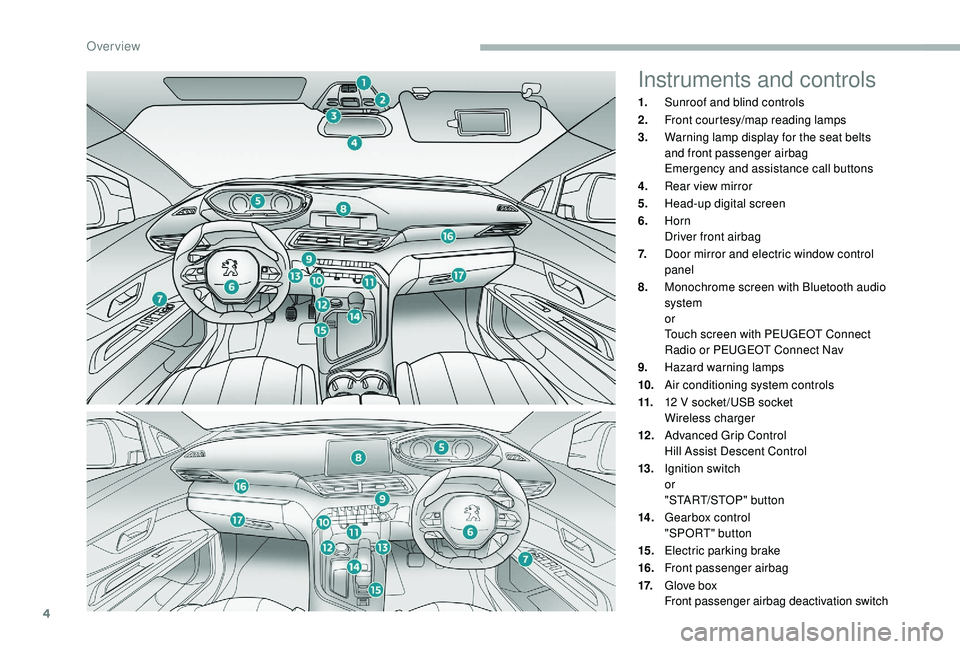
Instruments and controls
1.Sunroof and blind controls
2. Front courtesy/map reading lamps
3. Warning lamp display for the seat belts
and front passenger airbag
Emergency and assistance call buttons
4. Rear view mirror
5. Head-up digital screen
6. Horn
Driver front airbag
7. Door mirror and electric window control
panel
8. Monochrome screen with Bluetooth audio
system
or
Touch screen with PEUGEOT Connect
Radio or PEUGEOT Connect Nav
9. Hazard warning lamps
10. Air conditioning system controls
11. 12
V socket /USB socket
Wireless charger
12 . Advanced Grip Control
Hill Assist Descent Control
13. Ignition switch
or
"START/STOP" button
14 . Gearbox control
"SPORT" button
15. Electric parking brake
16. Front passenger airbag
17. Glove box
Front passenger airbag deactivation switch
Over view
Page 10 of 364
8
Head-up digital screen
Customisable digital instrument panel.
Depending on the selected display mode,
some information may be hidden or shown in
a different way.
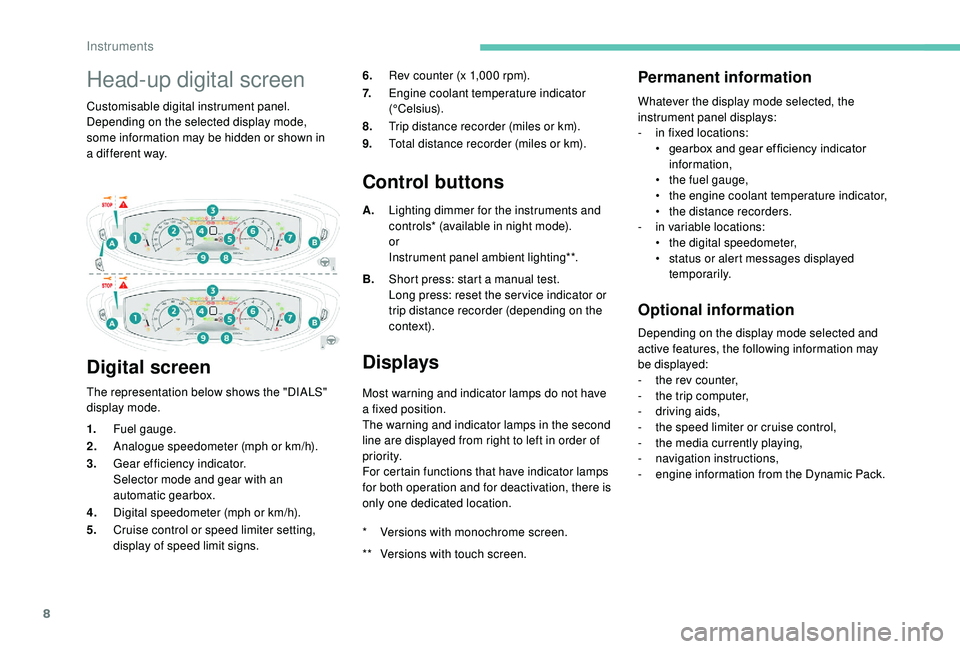
Digital screen
The representation below shows the "DIALS"
display mode. 6.
Rev counter (x 1,000 rpm).
7. Engine coolant temperature indicator
(°Celsius).
8. Trip distance recorder (miles or km).
9. Total distance recorder (miles or km).
Control buttons
A.Lighting dimmer for the instruments and
controls* (available in night mode).
or
Instrument panel ambient lighting**.
B. Short press: start a
manual test.
Long press: reset the ser vice indicator or
trip distance recorder (depending on the
contex t).
Displays
Most warning and indicator lamps do not have
a fixed position.
The warning and indicator lamps in the second
line are displayed from right to left in order of
priority.
For certain functions that have indicator lamps
for both operation and for deactivation, there is
only one dedicated location.
Permanent information
Whatever the display mode selected, the
instrument panel displays:
-
i
n fixed locations:
•
g
earbox and gear ef ficiency indicator
information,
•
t
he fuel gauge,
•
t
he engine coolant temperature indicator,
•
t
he distance recorders.
-
i
n variable locations:
•
t
he digital speedometer,
•
s
tatus or alert messages displayed
temporarily.
Optional information
Depending on the display mode selected and
active features, the following information may
be displayed:
-
t
he rev counter,
-
t
he trip computer,
-
d
riving aids,
-
t
he speed limiter or cruise control,
-
t
he media currently playing,
-
n
avigation instructions,
-
e
ngine information from the Dynamic Pack.
1.
Fuel gauge.
2. Analogue speedometer (mph or km/h).
3. Gear efficiency indicator.
Selector mode and gear with an
automatic gearbox.
4. Digital speedometer (mph or km/h).
5. Cruise control or speed limiter setting,
display of speed limit signs. *
V
ersions with monochrome screen.
**
V
ersions with touch screen.
Instruments
Page 41 of 364
39
Controls
From the audio system control panel, press:
F t he "MENU " button to access the main
menu ,
F
t
he "5" or " 6" buttons to scroll through the
items in the screen,
F
t
he "7" or " 8" buttons to change a
setting
value,
F
t
he "OK" button to confirm,
or
F
t
he "Back " button to abandon the operation
in progress.
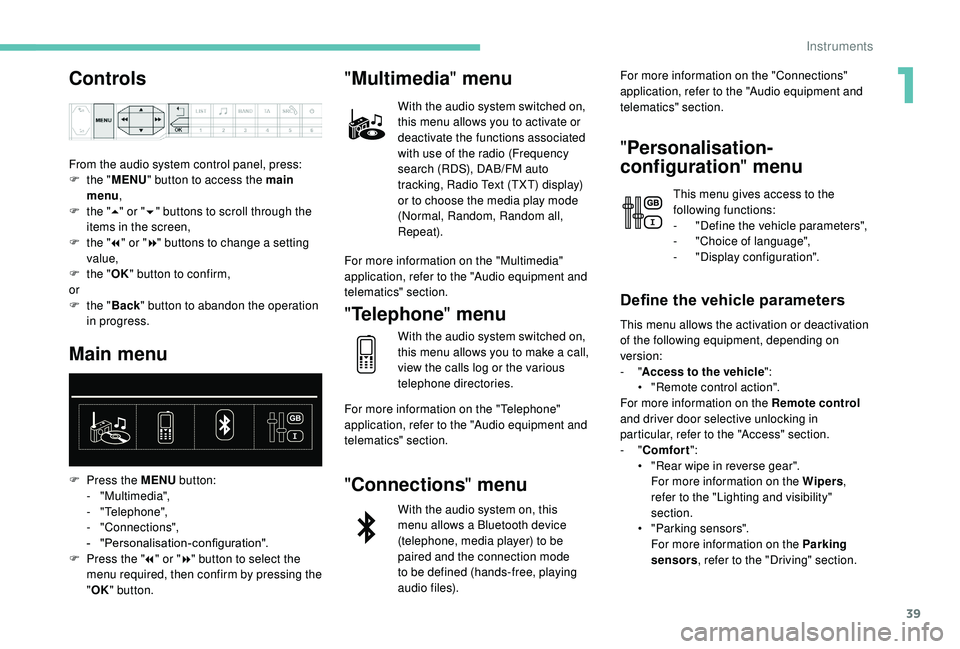
Main menu
F Press the MENU button:
- "Multimedia",
-
"Telephone",
-
"Connections",
-
"
Personalisation-configuration".
F
P
ress the " 7" or " 8" button to select the
menu required, then confirm by pressing the
" OK " button.
"Multimedia " menu
With the audio system switched on,
this menu allows you to activate or
deactivate the functions associated
with use of the radio (Frequency
search (RDS), DAB/FM auto
tracking, Radio Text (TXT) display)
or to choose the media play mode
(Normal, Random, Random all,
Repeat).
For more information on the "Multimedia"
application, refer to the "Audio equipment and
telematics" section.
" Telephone " menu
With the audio system switched on,
this menu allows you to make a
call,
view the calls log or the various
telephone directories.
For more information on the "Telephone"
application, refer to the "Audio equipment and
telematics" section.
" Connections " menu
With the audio system on, this
menu allows a
Bluetooth device
(telephone, media player) to be
paired and the connection mode
to be defined (hands-free, playing
audio files). For more information on the "Connections"
application, refer to the "Audio equipment and
telematics" section.
"
Personalisation-
configuration " menu
This menu gives access to the
following functions:
-
"
Define the vehicle parameters",
-
"
Choice of language",
-
"
Display configuration".
Define the vehicle parameters
This menu allows the activation or deactivation
of the following equipment, depending on
version:
- "Access to the vehicle ":
•
"
Remote control action".
For more information on the Remote control
and driver door selective unlocking in
particular, refer to the "Access" section.
-
"Comfort ":
•
"
Rear wipe in reverse gear".
For more information on the Wipers ,
refer to the "Lighting and visibility"
section.
•
"
Parking sensors".
For more information on the Parking
sensors , refer to the "Driving" section.
1
Instruments
Page 43 of 364
41
Principles
Use the buttons below the touch screen for
access to the menus, then press the virtual
buttons in the touch screen.
Some menus may display across two pages:
press the "OPTIONS" button to access the
second page.
After a
few moments with no action on the
second page, the first page is displayed
automatically.
To deactivate or activate a
function, select
" OFF " or " ON".
Use this button to adjust the settings
for a
function.
Use this button for access to
additional information on the
function.
Use this button to confirm.
Use this button to return to the
previous page.
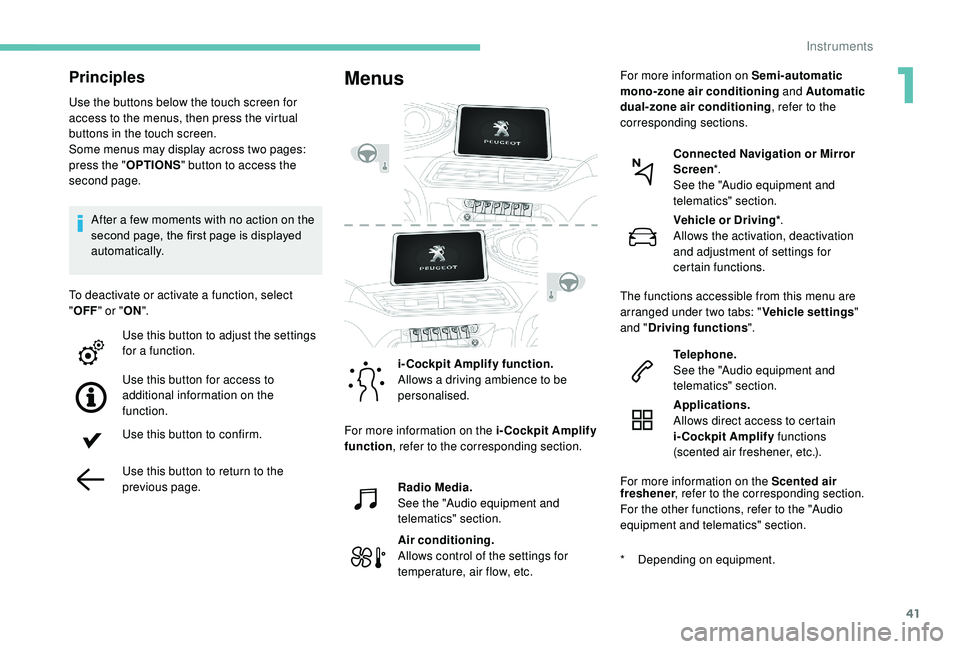
Menus
i-Cockpit Amplify function.
Allows a driving ambience to be
personalised.
Radio Media.
See the "Audio equipment and
telematics" section.
Air conditioning.
Allows control of the settings for
temperature, air flow, etc. Connected Navigation or Mirror
Screen
*.
See the "Audio equipment and
telematics" section.
Telephone.
See the "Audio equipment and
telematics" section.
Applications.
Allows direct access to certain
i-Cockpit Amplify functions
(scented air freshener, etc.).
For more information on the Scented air
*
D
epending on equipment.Vehicle or Driving*
.
Allows the activation, deactivation
and adjustment of settings for
certain functions.
The functions accessible from this menu are
arranged under two tabs: " Vehicle settings"
and " Driving functions ".
For more information on the i-Cockpit Amplify
function , refer to the corresponding section. For more information on
Semi-automatic
mono-zone air conditioning and Automatic
dual-zone air conditioning , refer to the
corresponding sections.
freshener , refer to the corresponding section.
For the other functions, refer to the "Audio
equipment and telematics" section.
1
Instruments
Page 47 of 364
45
PEUGEOT Connect Radio
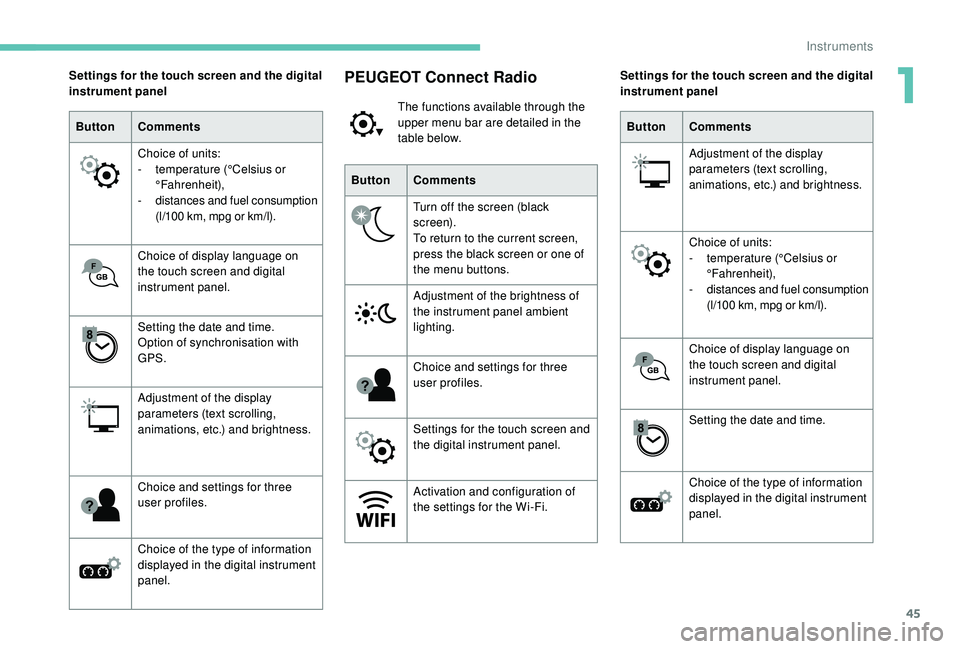
The functions available through the
upper menu bar are detailed in the
table below.
Button Comments
Turn off the screen (black
screen).
To return to the current screen,
press the black screen or one of
the menu buttons.
Adjustment of the brightness of
the instrument panel ambient
lighting.
Choice and settings for three
user profiles.
Settings for the touch screen and
the digital instrument panel.
Activation and configuration of
the settings for the Wi-Fi.
Settings for the touch screen and the digital
instrument panel
Button Comments
Choice of units:
-
t
emperature (°Celsius or
°Fahrenheit),
-
d
istances and fuel consumption
(l/100
km, mpg or km/l).
Choice of display language on
the touch screen and digital
instrument panel.
Setting the date and time.
Option of synchronisation with
GPS.
Adjustment of the display
parameters (text scrolling,
animations, etc.) and brightness.
Choice and settings for three
user profiles.
Choice of the type of information
displayed in the digital instrument
panel. Settings for the touch screen and the digital
instrument panel
Button Comments
Adjustment of the display
parameters (text scrolling,
animations, etc.) and brightness.
Choice of units:
-
t
emperature (°Celsius or
°Fahrenheit),
-
d
istances and fuel consumption
(l/100
km, mpg or km/l).
Choice of display language on
the touch screen and digital
instrument panel.
Setting the date and time.
Choice of the type of information
displayed in the digital instrument
panel.
1
Instruments
Page 49 of 364
47
Opening the windows
Locking the vehicle
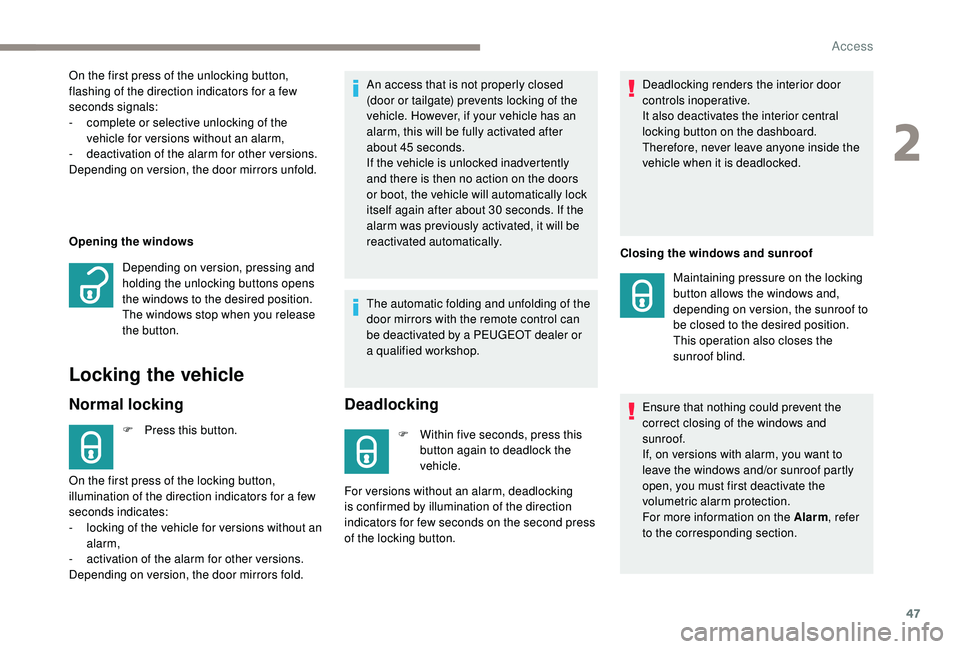
Normal locking
F Press this button.An access that is not properly closed
(door or tailgate) prevents locking of the
vehicle. However, if your vehicle has an
alarm, this will be fully activated after
about 45
seconds.
If the vehicle is unlocked inadvertently
and there is then no action on the doors
or boot, the vehicle will automatically lock
itself again after about 30 seconds. If the
alarm was previously activated, it will be
reactivated automatically.
The automatic folding and unfolding of the
door mirrors with the remote control can
be deactivated by a PEUGEOT dealer or
a
qualified workshop.
Deadlocking
F Within five seconds, press this
button again to deadlock the
vehicle. Deadlocking renders the interior door
controls inoperative.
It also deactivates the interior central
locking button on the dashboard.
Therefore, never leave anyone inside the
vehicle when it is deadlocked.
Closing the windows and sunroof
Ensure that nothing could prevent the
correct closing of the windows and
sunroof.
If, on versions with alarm, you want to
leave the windows and/or sunroof partly
open, you must first deactivate the
volumetric alarm protection.
For more information on the Alarm , refer
to the corresponding section.
On the first press of the unlocking button,
flashing of the direction indicators for a
few
seconds signals:
-
c
omplete or selective unlocking of the
vehicle for versions without an alarm,
-
d
eactivation of the alarm for other versions.
Depending on version, the door mirrors unfold.
Depending on version, pressing and
holding the unlocking buttons opens
the windows to the desired position.
The windows stop when you release
the button.
On the first press of the locking button,
illumination of the direction indicators for a
few
seconds indicates:
-
l
ocking of the vehicle for versions without an
alarm,
-
a
ctivation of the alarm for other versions.
Depending on version, the door mirrors fold. For versions without an alarm, deadlocking
is confirmed by illumination of the direction
indicators for few seconds on the second press
of the locking button. Maintaining pressure on the locking
button allows the windows and,
depending on version, the sunroof to
be closed to the desired position.
This operation also closes the
sunroof blind.
2
Access
Page 52 of 364
50
In order to preser ve the battery in the
electronic key and the vehicle's battery,
the "hands-free" functions are put into
long-term standby after 21 days without
use. To restore these functions, press
one of the remote control buttons or start
the engine with the electronic key in the
reader.
For more information on starting with
K
eyless Entr y and Star ting , refer to the
corresponding section.
Locking the vehicle
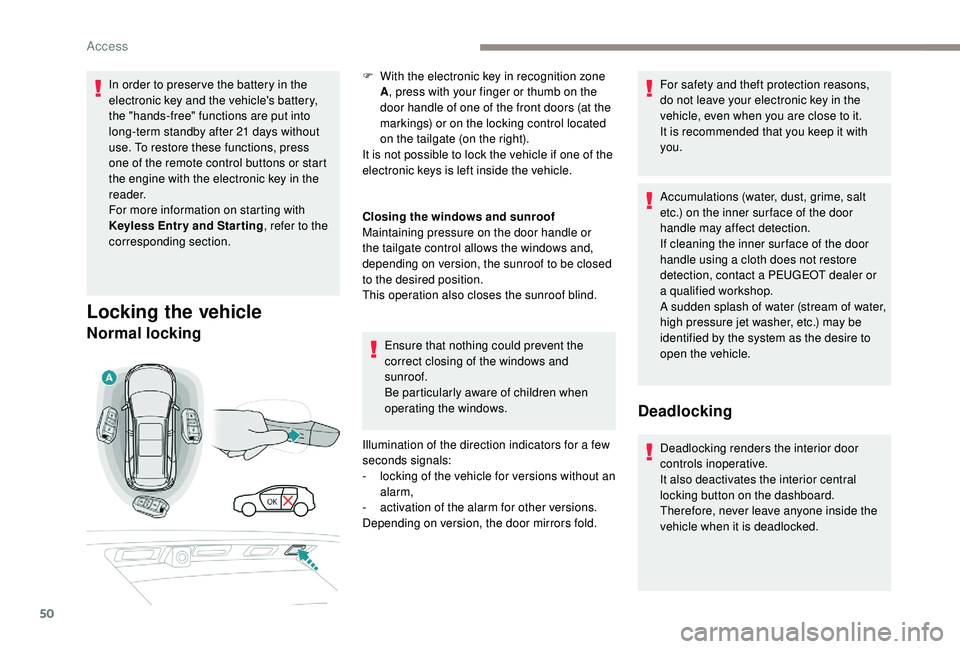
Normal locking
Closing the windows and sunroof
Maintaining pressure on the door handle or
the tailgate control allows the windows and,
depending on version, the sunroof to be closed
to the desired position.
This operation also closes the sunroof blind.
Ensure that nothing could prevent the
correct closing of the windows and
sunroof.
Be particularly aware of children when
operating the windows.
Illumination of the direction indicators for a
few
seconds signals:
-
l
ocking of the vehicle for versions without an
alarm,
-
a
ctivation of the alarm for other versions.
Depending on version, the door mirrors fold. For safety and theft protection reasons,
do not leave your electronic key in the
vehicle, even when you are close to it.
It is recommended that you keep it with
you.
Accumulations (water, dust, grime, salt
etc.) on the inner sur face of the door
handle may affect detection.
If cleaning the inner sur face of the door
handle using a
cloth does not restore
detection, contact a
PEUGEOT dealer or
a
qualified workshop.
A sudden splash of water (stream of water,
high pressure jet washer, etc.) may be
identified by the system as the desire to
open the vehicle.
Deadlocking
Deadlocking renders the interior door
controls inoperative.
It also deactivates the interior central
locking button on the dashboard.
Therefore, never leave anyone inside the
vehicle when it is deadlocked.
F
W
ith the electronic key in recognition zone
A , press with your finger or thumb on the
door handle of one of the front doors (at the
markings) or on the locking control located
on the tailgate (on the right).
It is not possible to lock the vehicle if one of the
electronic keys is left inside the vehicle.
Access
Page 54 of 364
52
Lost keys, remote control, electronic key
Visit a PEUGEOT dealer with the vehicle's
registration certificate, your personal
identification documents and if possible, the
label bearing the key code.
The PEUGEOT dealer will be able to retrieve
the key code and the transponder code
required to order a
new key. Do not throw away the remote control
batteries, they contain metals which are
harmful to the environment.
Take them to an approved collection
point.
Electrical interference
The
K eyless Entry and Starting electronic
key may not operate if close to certain
electronic devices: telephone, laptop
computer, strong magnetic fields, etc.
Remote control
The high frequency remote control is
a
sensitive system; do not operate it while it
is in your pocket as there is a
possibility that
it may unlock the vehicle, without you being
aware of it.
Do not repeatedly press the buttons of your
remote control out of range and out of sight
of your vehicle. The remote control may stop
working and need to be reinitialised.
The remote control does not operate when
the key is in the ignition, even when the
ignition is switched off.
Locking the vehicle
Driving with the doors locked may make
access to the passenger compartment by
the emergency ser vices more difficult in an
emergency.
As a
safety precaution (with children on board),
remove the key from the ignition or take the
electronic key when you leave the vehicle, even
for a
short time. Anti-theft protection
Do not make any modifications to the
electronic engine immobiliser system; this
could cause malfunctions.
For vehicles with an ignition switch, do
not forget to remove the key and turn the
steering to engage the steering lock.
When purchasing a
second-hand vehicle
Have the key codes memorised by
a
PEUGEOT dealer, to ensure that the keys
in your possession are the only ones which
can start the vehicle.
Back-up procedures
Complete unlocking/locking
of the vehicle with the key
These procedures should be used in the
following cases:
-
r
emote control cell battery flat,
-
r
emote control fault,
-
v
ehicle in an area subject to strong
electromagnetic interference.
In the first case, you can also replace the
remote control cell battery.
Refer to the corresponding section.
In the second case, you can also reinitialise the
remote control.
Refer to the corresponding section.
Access
Page 66 of 364
64
Deactivating the rear
controls for the rear
windows
after the window has closed.
The safety anti-pinch function is not active
during this operation.
The red indicator lamp in the button comes
on, accompanied by a message confirming
activation of the system. It remains on for as
long as the deactivation is maintained.
Use of the rear electric windows from the
driver's controls remains possible.
Reinitialising the electric
windows
Following reconnection of the battery, the
safety anti-pinch function must be reinitialised.
The safety anti-pinch function is not active
during these operations. In the event of contact (pinching) during
operation of the windows, you must
reverse the movement of the window. To
do this, press the switch concerned.
When operating the passenger electric
window switches, the driver must ensure
that nothing is preventing correct closing
of the windows.
The driver must ensure that the
passengers use the electric windows
c o r r e c t l y.
Be particularly aware of children when
operating the windows.
Be aware of passengers or other persons
present when closing the windows using
the electronic key or the
K
eyless Entry
and Starting system.
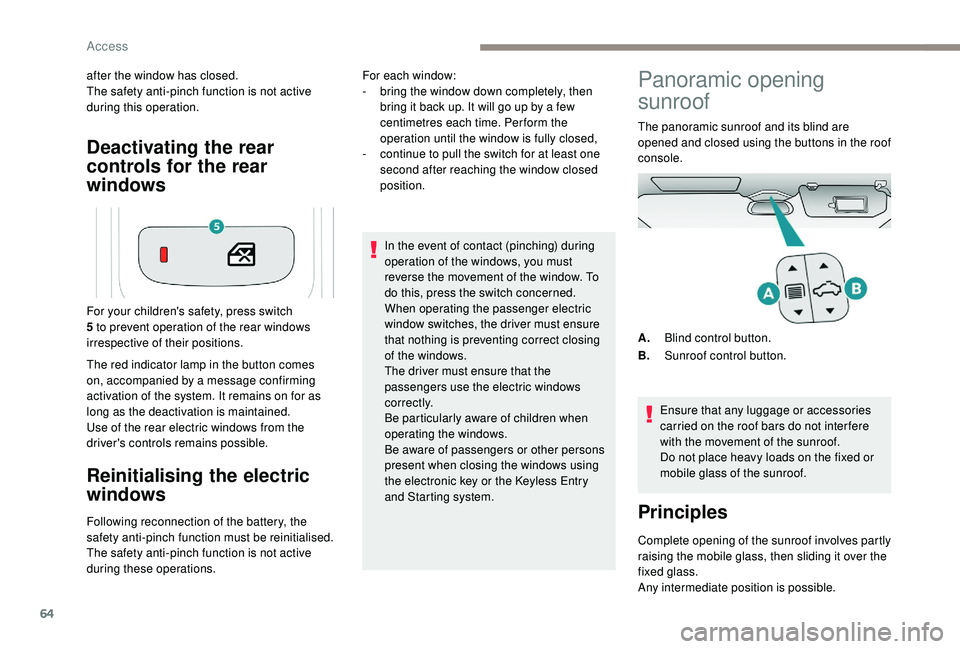
For your children's safety, press switch
5 to prevent operation of the rear windows
irrespective of their positions. For each window:
-
b
ring the window down completely, then
bring it back up. It will go up by a few
centimetres each time. Per form the
operation until the window is fully closed,
-
c
ontinue to pull the switch for at least one
second after reaching the window closed
position.
Panoramic opening
sunroof
The panoramic sunroof and its blind are
opened and closed using the buttons in the roof
console.
Ensure that any luggage or accessories
carried on the roof bars do not inter fere
with the movement of the sunroof.
Do not place heavy loads on the fixed or
mobile glass of the sunroof.
Principles
Complete opening of the sunroof involves partly
raising the mobile glass, then sliding it over the
fixed glass.
Any intermediate position is possible. A. Blind control button.
B. Sunroof control button.
Access
Page 67 of 364
65
The control buttons for the sunroof and blind
can be used:
-
w
ith the ignition on, if the state of charge of
the battery is adequate,
-
w
ith the engine running,
-
i
n STOP mode with Stop & Start,
-
d
uring the 45 seconds after switching off
the ignition,
-
d
uring the 45 seconds after locking the
vehicle.
Before operating the sunroof or blind
control buttons, ensure that no object or
person might prevent the movement.
Operating the sunroof
Opening
With the sunroof fully closed or partly
raised:
F
p
ress and release the rear of
button B without going beyond
the point of resistance to fully
raise the sunroof. F
P
ress and hold the rear of button B without
going beyond the point of resistance; the
sunroof opens and stops when you release
the button.
If the sunroof is wet, following a shower
or washing the vehicle, wait until it is
completely dry before opening.
Do not operate the sunroof if it is covered
by snow or ice – Risk of damage!
Use only plastic scrapers to remove snow
or ice.
Do not extend your head or arms through
the open sunroof when driving – Risk of
serious injury!
Closing
With the sunroof partially or fully
open:
F
p
ress beyond the point of
resistance and release the front
of button B to fully close the
sunroof.
Any new action on this button
interrupts the movement.
F
p
ress and hold the front of button B without
going beyond the point of resistance; the
sunroof closes and stops when you release
the button.
Never leave the vehicle with the sunroof
open.
With the sunroof opened beyond the raised
position:
F
p
ress and release the rear of button B
without going beyond the point of resistance
to open the sunroof.
With the sunroof partly or fully closed:
F
p
ress beyond the point of resistance and
release the rear of button B to fully open the
sunroof.
Any new action on this button interrupts the
movement. With the sunroof partially or fully open:
F
p
ress and release the front of button B
without going beyond the point of resistance
to close the sunroof to its raised position.
F
p
ress and release the front of button B
again to fully close the sunroof.
With the sunroof fully or partly raised:
F
p
ress and release the front of button B
without going beyond the point of resistance
to fully close the sunroof.
Opening the roof involves opening the blind. By
contrast, the blind can remain open when the
roof is closed.
2
Access