mirror PEUGEOT 5008 2018 User Guide
[x] Cancel search | Manufacturer: PEUGEOT, Model Year: 2018, Model line: 5008, Model: PEUGEOT 5008 2018Pages: 364, PDF Size: 13.03 MB
Page 55 of 364
53
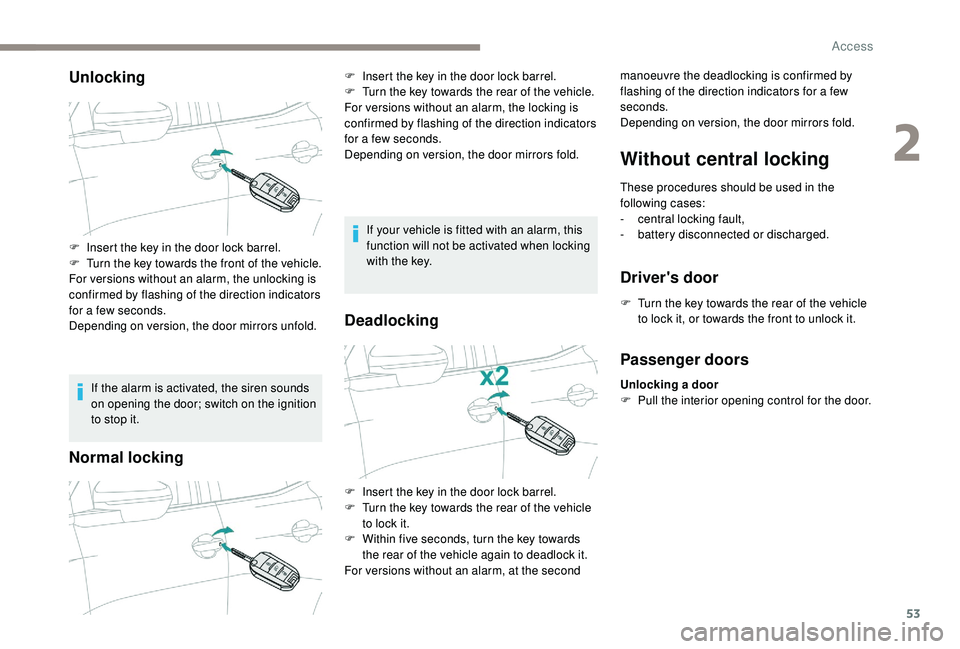
Unlocking
If the alarm is activated, the siren sounds
on opening the door; switch on the ignition
to stop it.
Normal locking
If your vehicle is fitted with an alarm, this
function will not be activated when locking
with the key.
Deadlocking
Without central locking
These procedures should be used in the
following cases:
-
c
entral locking fault,
-
b
attery disconnected or discharged.
Driver's door
F Turn the key towards the rear of the vehicle to lock it, or towards the front to unlock it.
F
I
nsert the key in the door lock barrel.
F
T
urn the key towards the front of the vehicle.
For versions without an alarm, the unlocking is
confirmed by flashing of the direction indicators
for a
few seconds.
Depending on version, the door mirrors unfold. F
I
nsert the key in the door lock barrel.
F
T
urn the key towards the rear of the vehicle.
For versions without an alarm, the locking is
confirmed by flashing of the direction indicators
for a
few seconds.
Depending on version, the door mirrors fold. manoeuvre the deadlocking is confirmed by
flashing of the direction indicators for a few
seconds.
Depending on version, the door mirrors fold.
F
I
nsert the key in the door lock barrel.
F
T
urn the key towards the rear of the vehicle
to lock it.
F
W
ithin five seconds, turn the key towards
the rear of the vehicle again to deadlock it.
For versions without an alarm, at the second
Passenger doors
Unlocking a door
F P ull the interior opening control for the door.
2
Access
Page 71 of 364
69
Before moving off
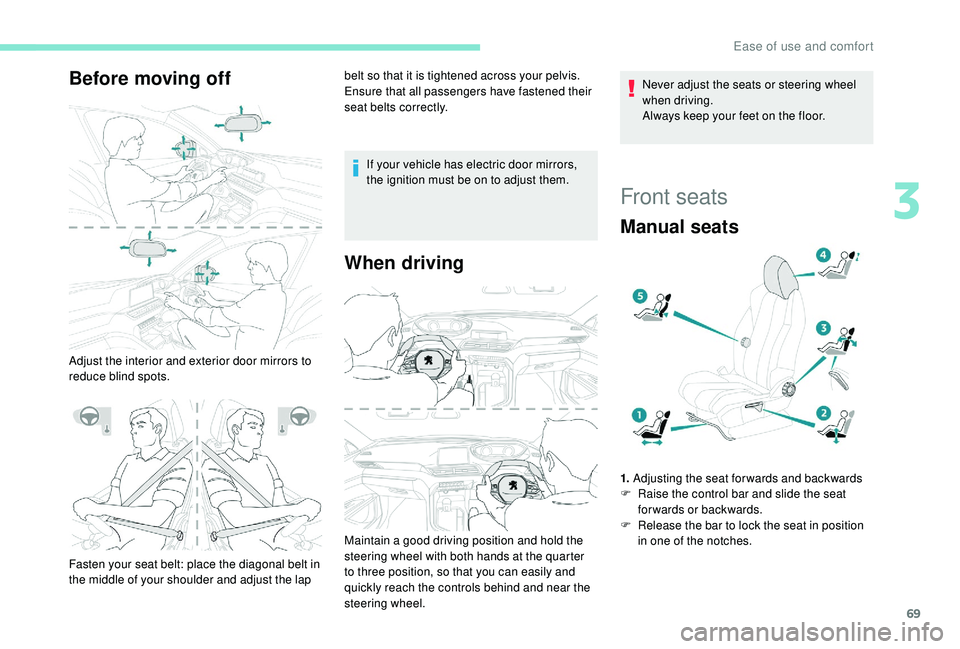
Adjust the interior and exterior door mirrors to
reduce blind spots.belt so that it is tightened across your pelvis.
Ensure that all passengers have fastened their
seat belts correctly.
If your vehicle has electric door mirrors,
the ignition must be on to adjust them.
When driving
Fasten your seat belt: place the diagonal belt in
the middle of your shoulder and adjust the lap Maintain a
good driving position and hold the
steering wheel with both hands at the quarter
to three position, so that you can easily and
quickly reach the controls behind and near the
steering wheel. Never adjust the seats or steering wheel
when driving.
Always keep your feet on the floor.
Front seats
Manual seats
1.
Adjusting the seat forwards and backwards
F R aise the control bar and slide the seat
forwards or backwards.
F
R
elease the bar to lock the seat in position
in one of the notches.
3
Ease of use and comfort
Page 74 of 364
72
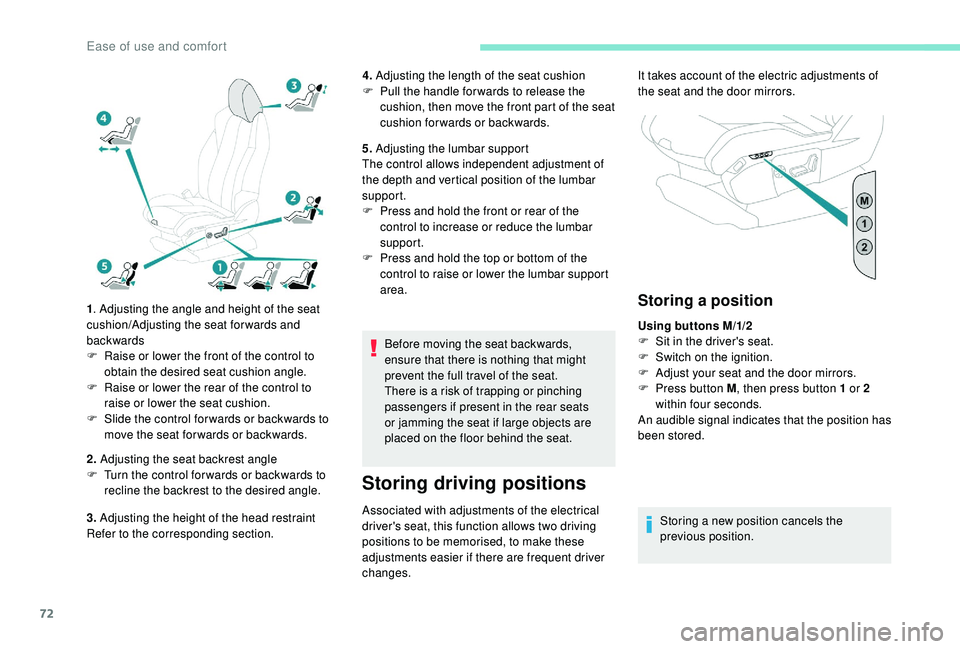
1. Adjusting the angle and height of the seat
cushion/Adjusting the seat forwards and
backwards
F
R
aise or lower the front of the control to
obtain the desired seat cushion angle.
F
R
aise or lower the rear of the control to
raise or lower the seat cushion.
F
S
lide the control for wards or backwards to
move the seat for wards or backwards.
2. Adjusting the seat backrest angle
F
T
urn the control for wards or backwards to
recline the backrest to the desired angle.
3. Adjusting the height of the head restraint
Refer to the corresponding section. 4.
Adjusting the length of the seat cushion
F
P
ull the handle for wards to release the
cushion, then move the front part of the seat
cushion forwards or backwards.
5. Adjusting the lumbar support
The control allows independent adjustment of
the depth and vertical position of the lumbar
support.
F
P
ress and hold the front or rear of the
control to increase or reduce the lumbar
support.
F
P
ress and hold the top or bottom of the
control to raise or lower the lumbar support
area.
Before moving the seat backwards,
ensure that there is nothing that might
prevent the full travel of the seat.
There is a
risk of trapping or pinching
passengers if present in the rear seats
or jamming the seat if large objects are
placed on the floor behind the seat.
Storing driving positions
Associated with adjustments of the electrical
driver's seat, this function allows two driving
positions to be memorised, to make these
adjustments easier if there are frequent driver
changes.
Storing a position
Using buttons M/1/2
F
S it in the driver's seat.
F
S
witch on the ignition.
F
A
djust your seat and the door mirrors.
F
P
ress button M , then press button 1
or 2
within four seconds.
An audible signal indicates that the position has
been stored.
Storing a
new position cancels the
previous position.
It takes account of the electric adjustments of
the seat and the door mirrors.
Ease of use and comfort
Page 76 of 364
74
Multipoint massage
System with a choice of type of massage and
ad justment of its intensity.
This system operates with the engine running,
as well as in STOP mode of Stop & Start.
Activation/Settings
The massage settings are adjusted in the touch
screen.
The system is switched on, either directly using
the button on the front seat, or by activating
a
personalised ambience with the i-Cockpit
Amplify function.
Using the button on the front seat: The multipoint massages are also
managed by the i-Cockpit Amplify
function.
If you want to modify the settings:
F
s
elect another type of massage from the
five offered,
F
s
elect a massage intensity from the three
levels offered: " 1" (Low), " 2" (Normal) or " 3"
(High).
The modifications are taken into account
immediately.
Once activated, the system starts a
one hour
massage cycle, made up of sequences of
6
minutes of massage followed by 3 minutes at
rest.
The system stops automatically at the end of the
cycle; the indicator lamp in the button goes off.
Steering wheel
adjustment
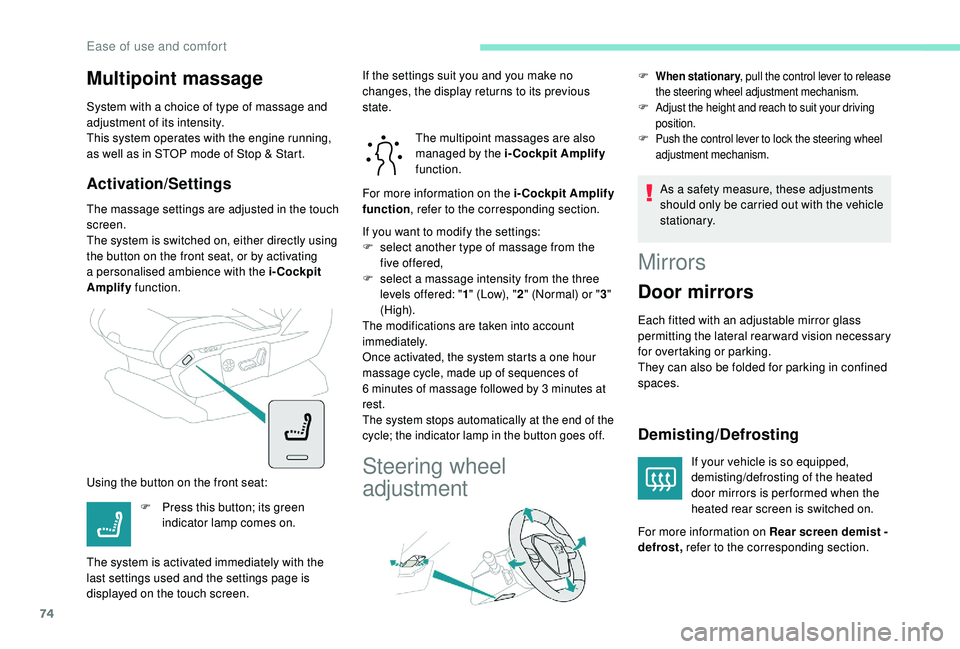
F When stationary , pull the control lever to release
the steering wheel adjustment mechanism.
F Adjust the height and reach to suit your driving position.
F Push the control lever to lock the steering wheel adjustment mechanism.
As a safety measure, these adjustments
s hould only be carried out with the vehicle
stationary.
F
P
ress this button; its green
indicator lamp comes on.
The system is activated immediately with the
last settings used and the settings page is
displayed on the touch screen. If the settings suit you and you make no
changes, the display returns to its previous
state.
For more information on the i-Cockpit Amplify
function
, refer to the corresponding section.
Mirrors
Door mirrors
Each fitted with an adjustable mirror glass
permitting the lateral rearward vision necessary
for overtaking or parking.
They can also be folded for parking in confined
spaces.
Demisting/Defrosting
If your vehicle is so equipped,
demisting/defrosting of the heated
door mirrors is per formed when the
heated rear screen is switched on.
For more information on Rear screen demist -
defrost, refer to the corresponding section.
Ease of use and comfort
Page 77 of 364
75
Adjustment
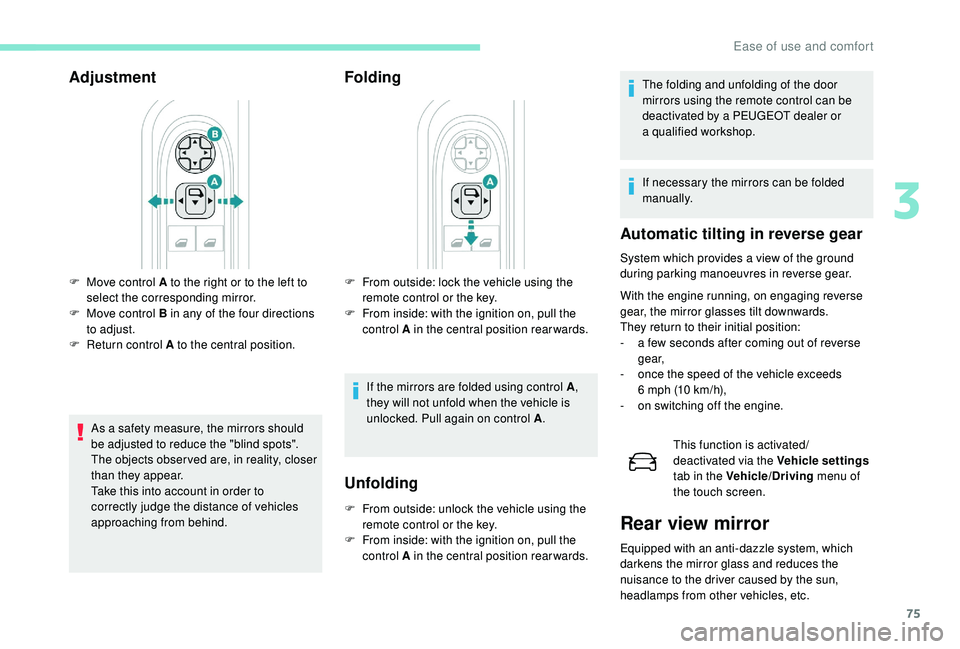
As a safety measure, the mirrors should
b e adjusted to reduce the "blind spots".
The objects obser ved are, in reality, closer
than they appear.
Take this into account in order to
correctly judge the distance of vehicles
approaching from behind.
Folding
F From outside: lock the vehicle using the remote control or the key.
F
F
rom inside: with the ignition on, pull the
control A in the central position rearwards.
If the mirrors are folded using control A ,
they will not unfold when the vehicle is
unlocked. Pull again on control A .
F
M
ove control A to the right or to the left to
select the corresponding mirror.
F
M
ove control B in any of the four directions
to adjust.
F
R
eturn control A to the central position.
Unfolding
F From outside: unlock the vehicle using the remote control or the key.
F
F
rom inside: with the ignition on, pull the
control A in the central position rearwards. The folding and unfolding of the door
mirrors using the remote control can be
deactivated by a
PEUGEOT dealer or
a
qualified workshop.
If necessary the mirrors can be folded
manually.
Automatic tilting in reverse gear
System which provides a view of the ground
d uring parking manoeuvres in reverse gear.
With the engine running, on engaging reverse
gear, the mirror glasses tilt downwards.
They return to their initial position:
-
a f
ew seconds after coming out of reverse
g e a r,
-
o
nce the speed of the vehicle exceeds
6
mph (10 km/h),
-
o
n switching off the engine. This function is activated/
deactivated via the Vehicle settings
tab in the Vehicle/Driving menu of
the touch screen.
Rear view mirror
Equipped with an anti-dazzle system, which
darkens the mirror glass and reduces the
nuisance to the driver caused by the sun,
headlamps from other vehicles, etc.
3
Ease of use and comfort
Page 78 of 364
76
Manual model
Adjustment
F A djust the mirror so that the glass is
directed correctly in the "day" position.
Day/night position
F
P
ull the lever to change to the "night" anti-
dazzle position.
F
P
ush the lever to change to the normal
"day" position.
Automatic "electrochrome " model
In order to ensure optimum visibility during
your manoeuvres, the mirror lightens
automatically when reverse gear is
engaged.
This system automatically and progressively
changes between day and night use by means
of a
s
ensor measuring the light coming from the
rear of the vehicle.
Second row seats
Rear head restraints
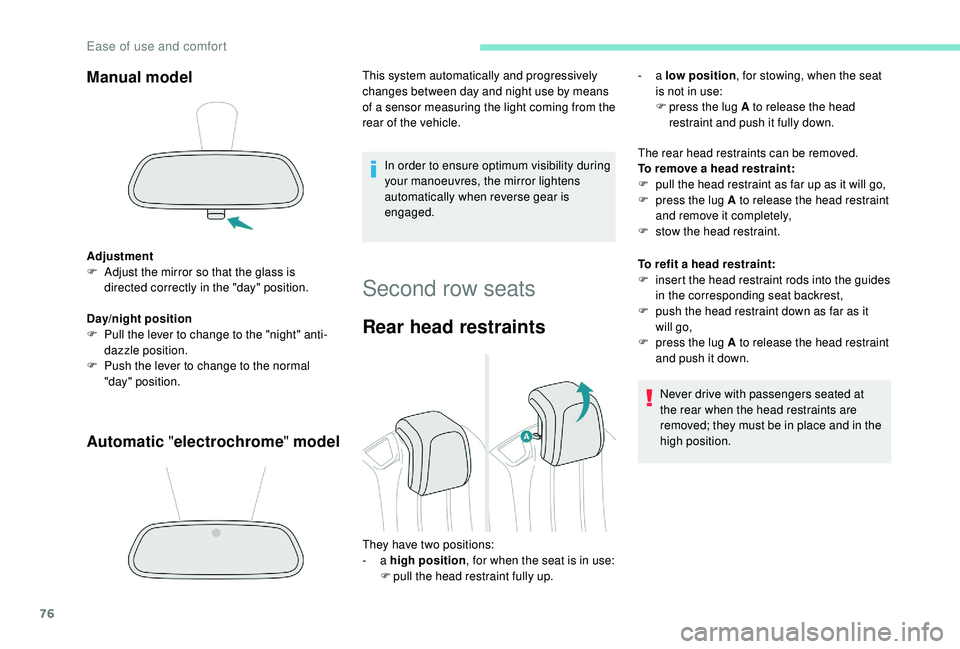
The rear head restraints can be removed.
To remove a head restraint:
F
p
ull the head restraint as far up as it will go,
F
p
ress the lug A to release the head restraint
and remove it completely,
F
s
tow the head restraint.
To refit a
head restraint:
F
i
nsert the head restraint rods into the guides
in the corresponding seat backrest,
F
p
ush the head restraint down as far as it
will go,
F
p
ress the lug A to release the head restraint
and push it down.
Never drive with passengers seated at
the rear when the head restraints are
removed; they must be in place and in the
high position.
They have two positions:
-
a high position , for when the seat is in use:
F
p
ull the head restraint fully up. -
a
low position , for stowing, when the seat
is not in use:
F
p
ress the lug A to release the head
restraint and push it fully down.
Ease of use and comfort
Page 96 of 364
94
Switching on/off
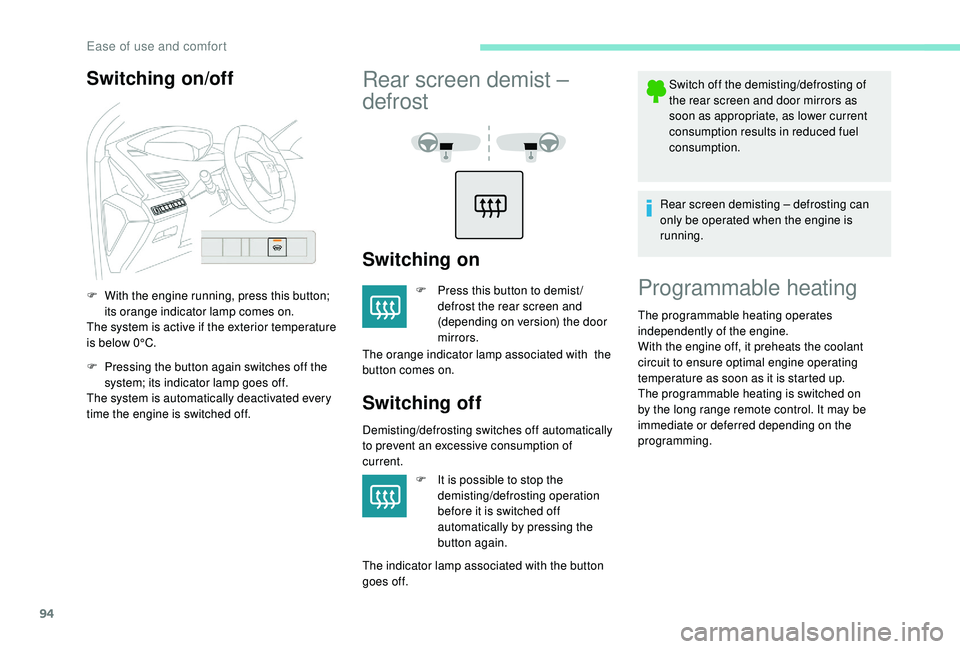
F With the engine running, press this button; its orange indicator lamp comes on.
The system is active if the exterior temperature
is below 0°C.
F
P
ressing the button again switches off the
system; its indicator lamp goes off.
The system is automatically deactivated every
time the engine is switched off.
Rear screen demist –
defrost
Switching on
F Press this button to demist / defrost the rear screen and
(depending on version) the door
mirrors.
The orange indicator lamp associated with the
button comes on.
Switching off
Demisting/defrosting switches off automatically
to prevent an excessive consumption of
current.
F
I
t is possible to stop the
demisting/defrosting operation
before it is switched off
automatically by pressing the
button again.
The indicator lamp associated with the button
goes off. Switch off the demisting/defrosting of
the rear screen and door mirrors as
soon as appropriate, as lower current
consumption results in reduced fuel
consumption.
Rear screen demisting – defrosting can
only be operated when the engine is
running.
Programmable heating
The programmable heating operates
independently of the engine.
With the engine off, it preheats the coolant
circuit to ensure optimal engine operating
temperature as soon as it is started up.
The programmable heating is switched on
by the long range remote control. It may be
immediate or deferred depending on the
programming.
Ease of use and comfort
Page 101 of 364
99
Reinitialising the remote control
If the battery is disconnected or when changing
the battery, the remote control must be
reinitialised.
F
A
fter turning on the power, within the next
5
seconds, press button 4 for 1 second.
If the operation is successful, the message
" OK " will be displayed on the remote
control's screen.
If there is a
fault, the message " FA I L" will
appear.
F
St
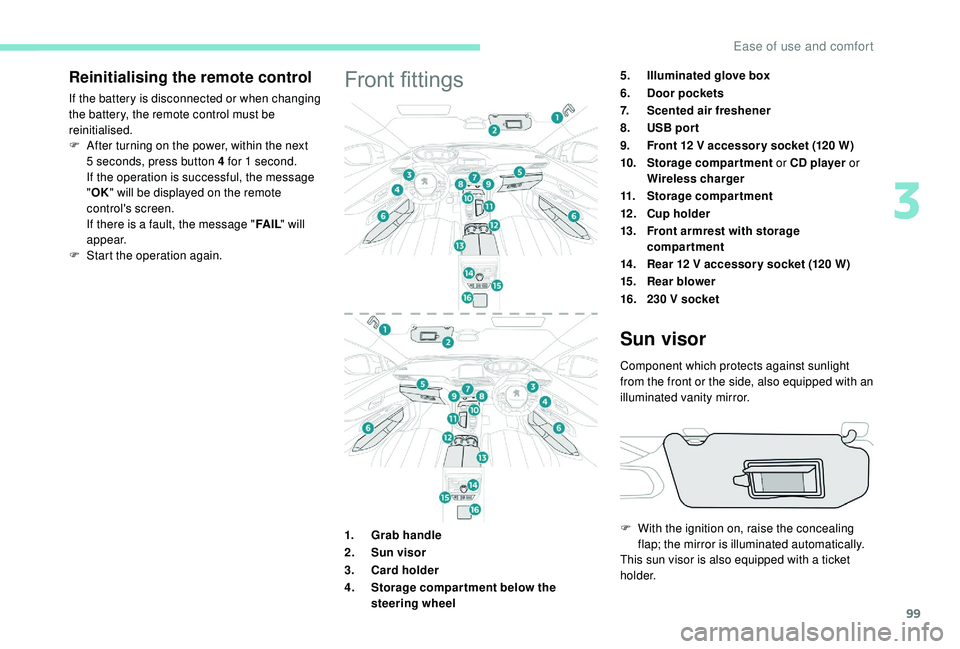
art the operation again.Front fittings5.Illuminated glove box
6. Door pockets
7. Scented air freshener
8. USB por t
9. Front 12
V accessor y socket (120 W)
10. Storage compartment or CD player or
Wireless charger
11. Storage compartment
12 . Cup holder
13. Front armrest with storage
compartment
14 . Rear 12
V accessor y socket (120 W)
15. Rear blower
16. 230
V socket
1. Grab handle
2. Sun visor
3. Card holder
4. Storage compar tment below the
steering wheel
Sun visor
Component which protects against sunlight
from the front or the side, also equipped with an
illuminated vanity mirror.
F
W
ith the ignition on, raise the concealing
flap; the mirror is illuminated automatically.
This sun visor is also equipped with a
ticket
h o l d e r.
3
Ease of use and comfort
Page 103 of 364
101
The USB port also allows a smartphone to be
c onnected by MirrorLinkTM, Android Auto® or
CarPlay®, so that certain applications on the
smartphone can be used on the touch screen.
FOCAL® premium Hi-Fi
system
- TNF tweeters: Inverted dome aluminium
technology giving optimum sound
dispersion and very detailed treble.
-
S
ub-woofer: 200 mm triple coil Power
Flower™ technology for defined and
dynamic reproduction of low frequencies.
-
1
2-way active amplification – 515 Watts:
Hybrid Class AB/Class D technology
providing breadth and finesse in the high
frequency signals, as well as real power in
the bass.
Wireless charger
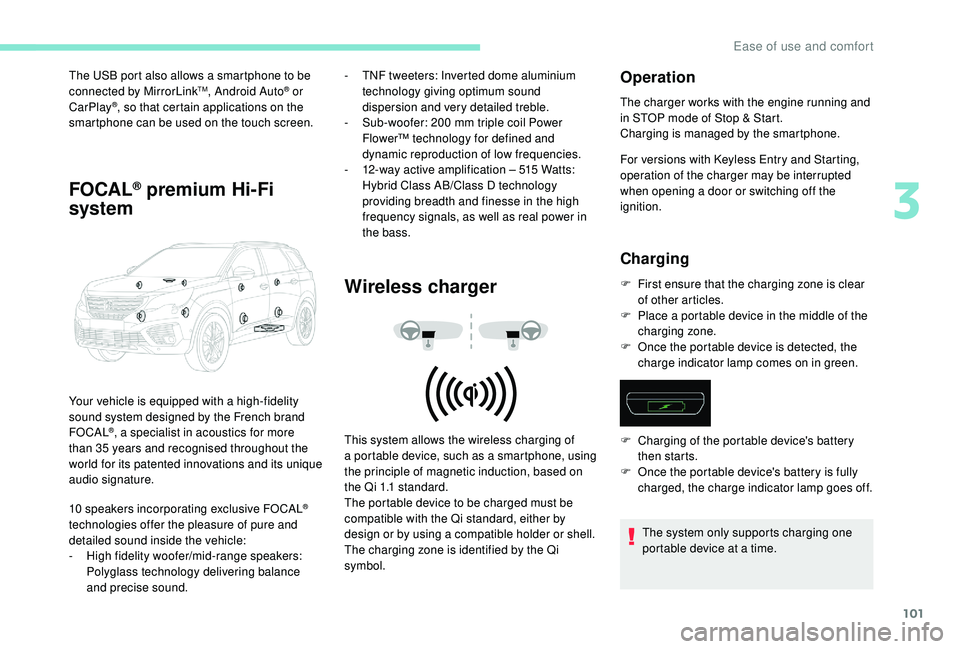
Your vehicle is equipped with a high-fidelity
s ound system designed by the French brand
FOCAL
®, a specialist in acoustics for more
than 35
years and recognised throughout the
world for its patented innovations and its unique
audio signature.
10
speakers incorporating exclusive FOCAL
®
technologies offer the pleasure of pure and
detailed sound inside the vehicle:
-
H
igh fidelity woofer/mid-range speakers:
Polyglass technology delivering balance
and precise sound. This system allows the wireless charging of
a
portable device, such as a smartphone, using
the principle of magnetic induction, based on
the Qi 1.1 standard.
The portable device to be charged must be
compatible with the Qi standard, either by
design or by using a
compatible holder or shell.
The charging zone is identified by the Qi
symbol.
Operation
The charger works with the engine running and
in STOP mode of Stop & Start.
Charging is managed by the smartphone.
For versions with
K
eyless Entry and Starting,
operation of the charger may be interrupted
when opening a
door or switching off the
ignition.
Charging
F First ensure that the charging zone is clear of other articles.
F
P
lace a portable device in the middle of the
charging zone.
F
O
nce the portable device is detected, the
charge indicator lamp comes on in green.
The system only supports charging one
portable device at a
time.
F
C
harging of the portable device's battery
then starts.
F
O
nce the portable device's battery is fully
charged, the charge indicator lamp goes off.
3
Ease of use and comfort
Page 117 of 364
115
Switching off
F Turn the ring to another position.
Deactivation of the function is accompanied by
the display of a
message.
Operating fault
In the event of a malfunction of the
s unshine sensor, the lighting comes
on, this warning lamp is displayed in
the instrument panel accompanied
by an audible signal and/or
a
message.
Contact a
PEUGEOT dealer or
a
qualified workshop.
Do not cover the sunshine sensor,
combined with the rain sensor and located
at the top centre of the windscreen behind
the rear view mirror; the associated
functions would no longer be controlled.
In fog or snow, the sunshine sensor may
detect sufficient light. In this case, the
lighting will not come on automatically.
Automatic guide-me-home
lighting
With the "Automatic illumination of headlamps"
function activated, under low ambient light, the
sidelamps, dipped beam headlamps and door
mirror spotlamps come on automatically when
the ignition is switched off.
Activation, deactivation and the duration of the
guide-me-home lighting are set in the vehicle
parameters menu in the screen.
Manual guide-me-home
lighting
The temporary illumination of the dipped beam
headlamps after the vehicle's ignition has been
switched off makes the driver's exit easier
when the light is poor.
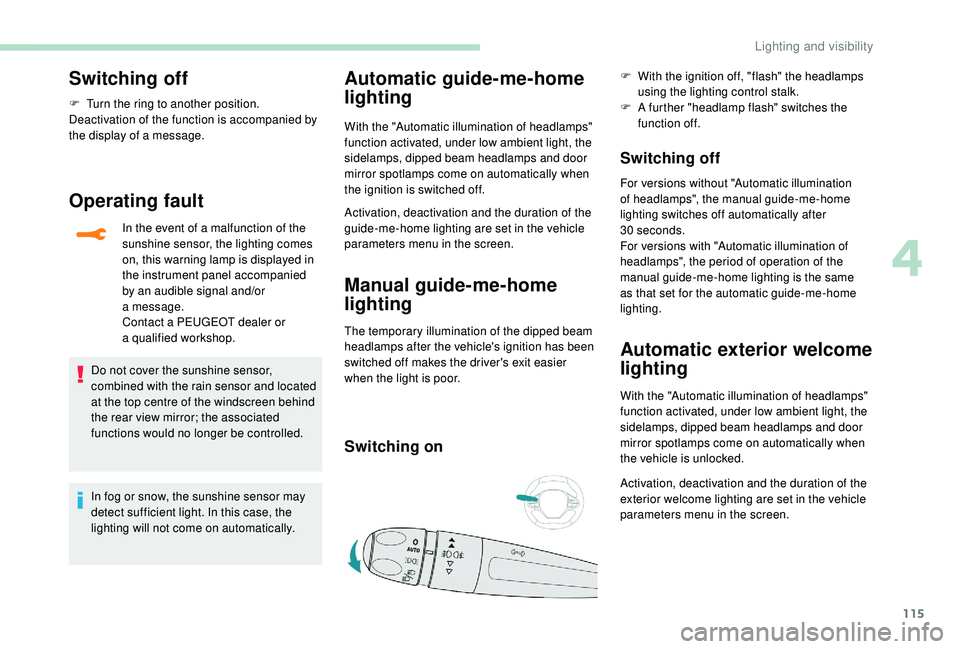
Switching on
F With the ignition off, "flash" the headlamps using the lighting control stalk.
F
A f
urther "headlamp flash" switches the
function off.
Switching off
For versions without "Automatic illumination
of headlamps", the manual guide-me-home
lighting switches off automatically after
30
seconds.
For versions with "Automatic illumination of
headlamps", the period of operation of the
manual guide-me-home lighting is the same
as that set for the automatic guide-me-home
lighting.
Automatic exterior welcome
lighting
With the "Automatic illumination of headlamps"
function activated, under low ambient light, the
sidelamps, dipped beam headlamps and door
mirror spotlamps come on automatically when
the vehicle is unlocked.
Activation, deactivation and the duration of the
exterior welcome lighting are set in the vehicle
parameters menu in the screen.
4
Lighting and visibility