towing PEUGEOT 5008 2018 User Guide
[x] Cancel search | Manufacturer: PEUGEOT, Model Year: 2018, Model line: 5008, Model: PEUGEOT 5008 2018Pages: 364, PDF Size: 13.03 MB
Page 166 of 364
164
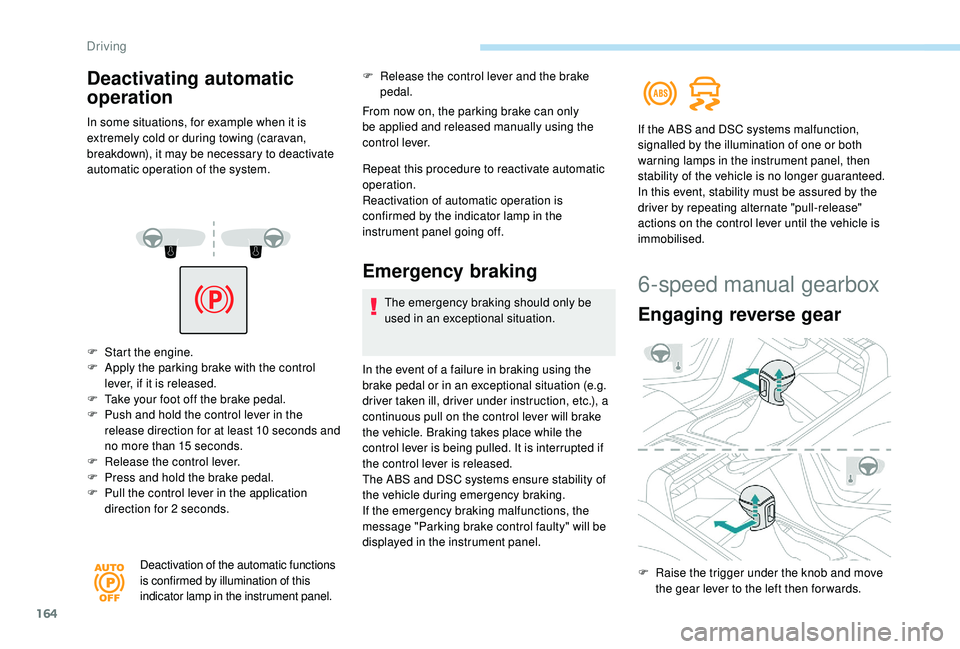
F Start the engine.
F A pply the parking brake with the control
lever, if it is released.
F
T
ake your foot off the brake pedal.
F
P
ush and hold the control lever in the
release direction for at least 10
seconds and
no more than 15
seconds.
F
R
elease the control lever.
F
P
ress and hold the brake pedal.
F
P
ull the control lever in the application
direction for 2
seconds.
Deactivation of the automatic functions
is confirmed by illumination of this
indicator lamp in the instrument panel.
F Release the control lever and the brake pedal.
From now on, the parking brake can only
be applied and released manually using the
control lever.
Repeat this procedure to reactivate automatic
operation.
Reactivation of automatic operation is
confirmed by the indicator lamp in the
instrument panel going off.
Emergency braking
The emergency braking should only be
used in an exceptional situation.
In the event of a
failure in braking using the
brake pedal or in an exceptional situation (e.g.
driver taken ill, driver under instruction, etc.), a
continuous pull on the control lever will brake
the vehicle. Braking takes place while the
control lever is being pulled. It is interrupted if
the control lever is released.
The ABS and DSC systems ensure stability of
the vehicle during emergency braking.
If the emergency braking malfunctions, the
message "Parking brake control faulty" will be
displayed in the instrument panel. If the ABS and DSC systems malfunction,
signalled by the illumination of one or both
warning lamps in the instrument panel, then
stability of the vehicle is no longer guaranteed.
In this event, stability must be assured by the
driver by repeating alternate "pull-release"
actions on the control lever until the vehicle is
immobilised.
Deactivating automatic
operation
In some situations, for example when it is
extremely cold or during towing (caravan,
breakdown), it may be necessary to deactivate
automatic operation of the system.
6-speed manual gearbox
Engaging reverse gear
F Raise the trigger under the knob and move
the gear lever to the left then for wards.
Driving
Page 167 of 364
165
Only engage reverse gear when the
vehicle is stationary with the engine at
idle.
As a safety precaution and to facilitate
starting of the engine, always select
neutral and depress the clutch pedal.
Engaging 5th or 6th gear
F Move the lever fully to the right to engage 5th
or 6th g e a r.
Failure to follow this advice may cause
permanent damage to the gearbox
(engagement of 3
rd or 4th gear by mistake).
Automatic gearbox (EAT6/
E AT 8)
Six or eight-speed automatic gearbox with push
selector. It also offers a manual mode with gear
changes via steering mounted paddles, located
behind the steering wheel.
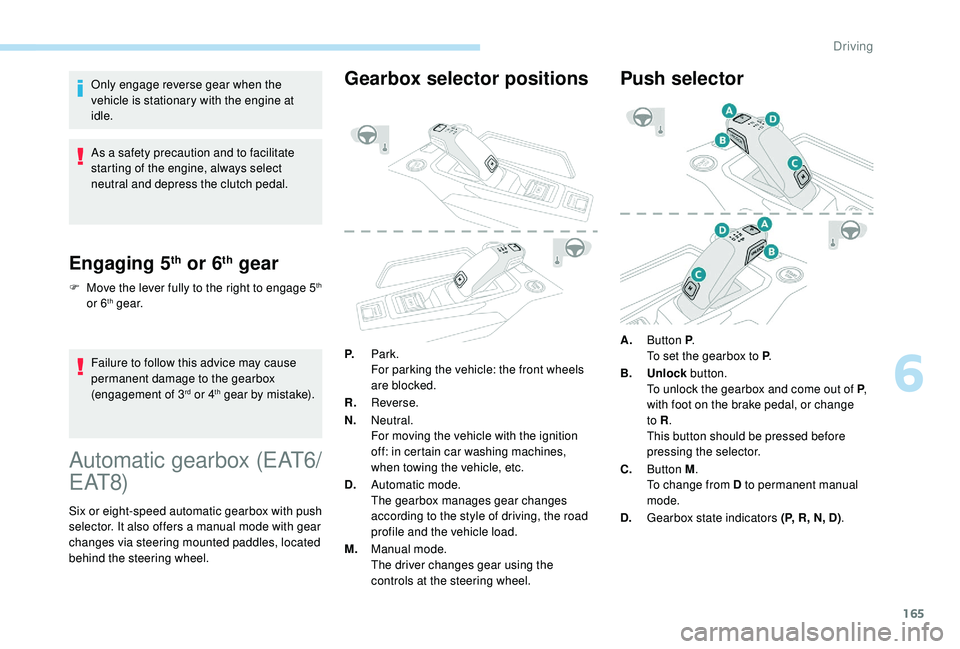
Gearbox selector positions
P. Park.
For parking the vehicle: the front wheels
are blocked.
R. Reverse.
N. Neutral.
For moving the vehicle with the ignition
off: in certain car washing machines,
when towing the vehicle, etc.
D. Automatic mode.
The gearbox manages gear changes
according to the style of driving, the road
profile and the vehicle load.
M. Manual mode.
The driver changes gear using the
controls at the steering wheel.
Push selector
A.Button P .
To set the gearbox to P .
B. Unlock button.
To unlock the gearbox and come out of P ,
with foot on the brake pedal, or change
to R .
This button should be pressed before
pressing the selector.
C. Button M .
To change from D to permanent manual
mode.
D. Gearbox state indicators (P, R, N, D) .
6
Driving
Page 186 of 364
184
Use the cruise control only where the
driving conditions allow running at
a constant speed and at an adequate safe
distance.
Do not activate the cruise control in urban
areas, in heavy traffic, on winding or steep
roads, on slippery or flooded roads, or in
conditions of poor visibility (heavy rain,
fog, falling snow, etc.).
In some circumstances, it may not be
possible to maintain or reach the cruise
speed set: towing, vehicle heavily loaded,
steep climb.
The use of mats not approved by
PEUGEOT may inter fere with the
operation of the cruise control.
To avoid any risk of jamming the pedals:
-
e
nsure that the mat is positioned
c o r r e c t l y,
-
d
o not fit one mat on top of another.Adaptive cruise control
It manages the acceleration and deceleration
of the vehicle by automatically acting on the
engine and the braking system. Primarily designed for driving on main
roads and motor ways, this system only
works on moving vehicles
, driving in the
same direction as your vehicle.
Principle of operation
The system automatically adapts the speed of
your vehicle to that of the vehicle in front, to
maintain a
constant distance.
If the vehicle in front is driving more slowly, the
system slows, or even stops your vehicle, using
engine braking and the braking system (for
versions fitted with an automatic gearbox).
If the vehicle in front accelerates or changes
lane, the cruise control progressively
accelerates your vehicle to return to the
programmed speed.
If the driver operates a
direction indicator to
overtake a
slower vehicle, the cruise control
allows your vehicle to temporarily approach
the vehicle in front to assist the overtaking
manoeuvre, though never exceeding the
programmed speed.
The brake lamps illuminate as soon as
the braking system is activated with
deceleration of the vehicle.
This system provides the following
functions:
-
A
utomatic regulation of the
vehicle speed at the value
programmed by the driver.
-
W
ith a
manual gearbox,
automatic adjustment of the
distance between your vehicle
and the one in front.
-
W
ith an automatic gearbox,
automatic adjustment of the
distance between your vehicle
and the one in front, which may
cause your vehicle to come to
a
complete stop.
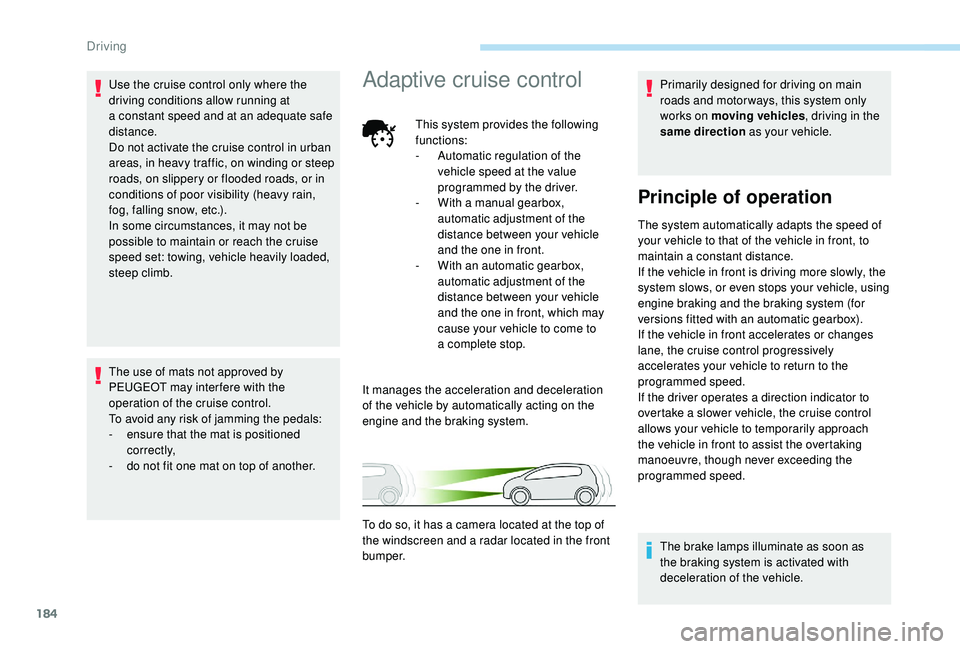
To do so, it has a
camera located at the top of
the windscreen and a
radar located in the front
b u m p e r.
Driving
Page 195 of 364
193
- Active Safety Brake (automatic emergency b r ak ing).
Distance Alert: it warns the driver if their
vehicle is at risk of collision with the vehicle in
front or a
pedestrian present in their traffic lane.
Intelligent emergency braking assistance:
it supplements the braking action taken by the
driver if this is inadequate.
Active Safety Brake : it intervenes following
the alert if the driver does not react quickly
enough and does not operate the vehicle's
brakes.
If the driver fails to act, it contributes
towards avoiding a
collision or limiting
its severity by reducing the speed of your
vehicle.
Activation and operating
conditions
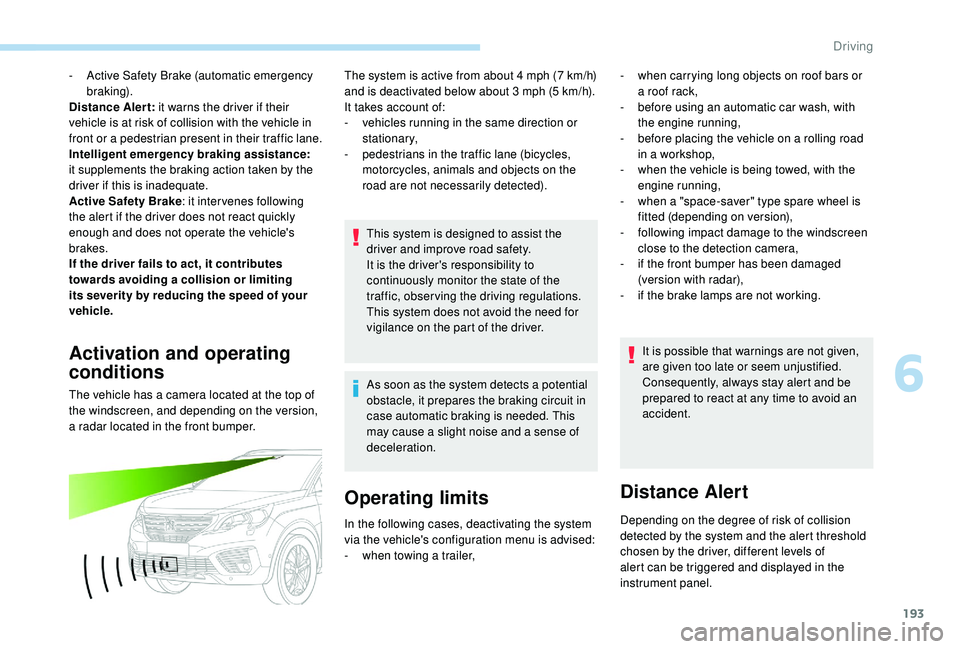
The vehicle has a camera located at the top of
t he windscreen, and depending on the version,
a radar located in the front bumper. The system is active from about 4
mph (7 km/h)
and is deactivated below about 3 mph (5 km/h).
It takes account of:
-
v
ehicles running in the same direction or
stationary,
-
p
edestrians in the traffic lane (bicycles,
motorcycles, animals and objects on the
road are not necessarily detected).
This system is designed to assist the
driver and improve road safety.
It is the driver's responsibility to
continuously monitor the state of the
traffic, observing the driving regulations.
This system does not avoid the need for
vigilance on the part of the driver.
As soon as the system detects a potential
obstacle, it prepares the braking circuit in
case automatic braking is needed. This
may cause a
slight noise and a sense of
deceleration.
Operating limits
- when carrying long objects on roof bars or a roof rack,
-
b
efore using an automatic car wash, with
the engine running,
-
b
efore placing the vehicle on a rolling road
in a
workshop,
-
w
hen the vehicle is being towed, with the
engine running,
-
w
hen a "space-saver" type spare wheel is
fitted (depending on version),
-
fo
llowing impact damage to the windscreen
close to the detection camera,
-
i
f the front bumper has been damaged
(version with radar),
-
i
f the brake lamps are not working.It is possible that warnings are not given,
are given too late or seem unjustified.
Consequently, always stay alert and be
prepared to react at any time to avoid an
accident.
Distance Alert
Depending on the degree of risk of collision
detected by the system and the alert threshold
chosen by the driver, different levels of
alert can be triggered and displayed in the
instrument panel.
In the following cases, deactivating the system
via the vehicle's configuration menu is advised:
-
w
hen towing a
trailer,
6
Driving
Page 205 of 364
203
Blind Spot Monitoring
System
This driving aid system is designed to
improve safety when driving and is in no
circumstances a substitute for the use
of the interior rear view mirror and door
mirrors. It is the driver's responsibility to
constantly check the traffic, to assess the
distances and relative speeds of other
vehicles and to predict their movements
before deciding whether to change lane.
This system is a
driving aid which cannot,
in any circumstances, replace the need for
vigilance on the part of the driver.
Activation/Deactivation
Activation and deactivation of the
system is done in the Vehicle/
Driving menu of the touch screen.
Select the " Driving functions " then the "Blind
spot sensors " tab.
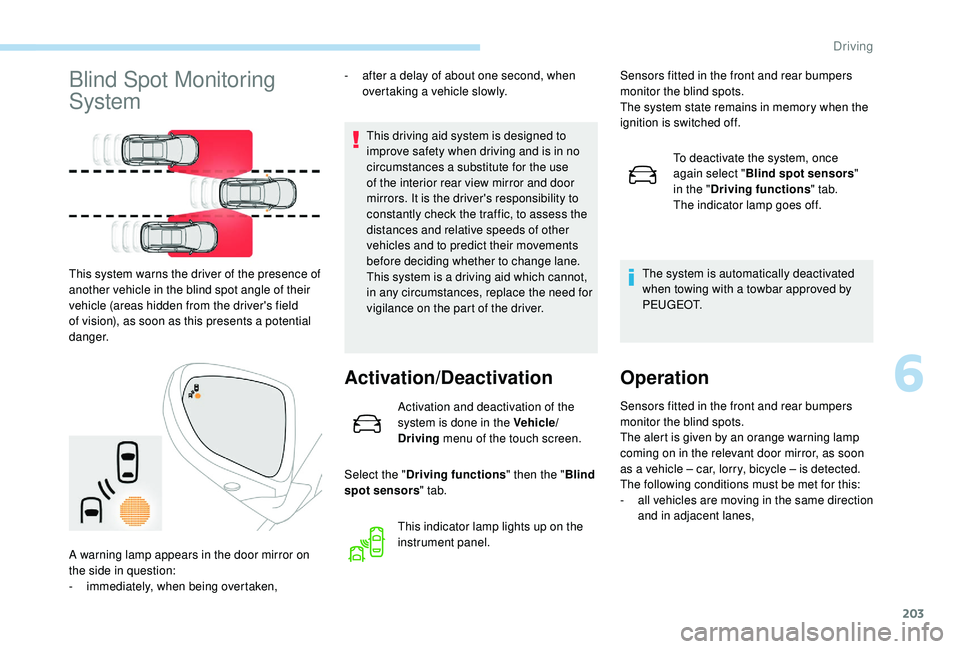
This system warns the driver of the presence of
another vehicle in the blind spot angle of their
vehicle (areas hidden from the driver's field
of vision), as soon as this presents a
potential
danger. -
a
fter a
delay of about one second, when
overtaking a vehicle slowly.
This indicator lamp lights up on the
instrument panel.
A warning lamp appears in the door mirror on
the side in question:
-
i
mmediately, when being overtaken, Sensors fitted in the front and rear bumpers
monitor the blind spots.
The system state remains in memory when the
ignition is switched off.
To deactivate the system, once
again select " Blind spot sensors "
in the " Driving functions " tab.
The indicator lamp goes off.
The system is automatically deactivated
when towing with a towbar approved by
P E U G E O T.
Operation
Sensors fitted in the front and rear bumpers
monitor the blind spots.
The alert is given by an orange warning lamp
coming on in the relevant door mirror, as soon
as a
vehicle – car, lorry, bicycle – is detected.
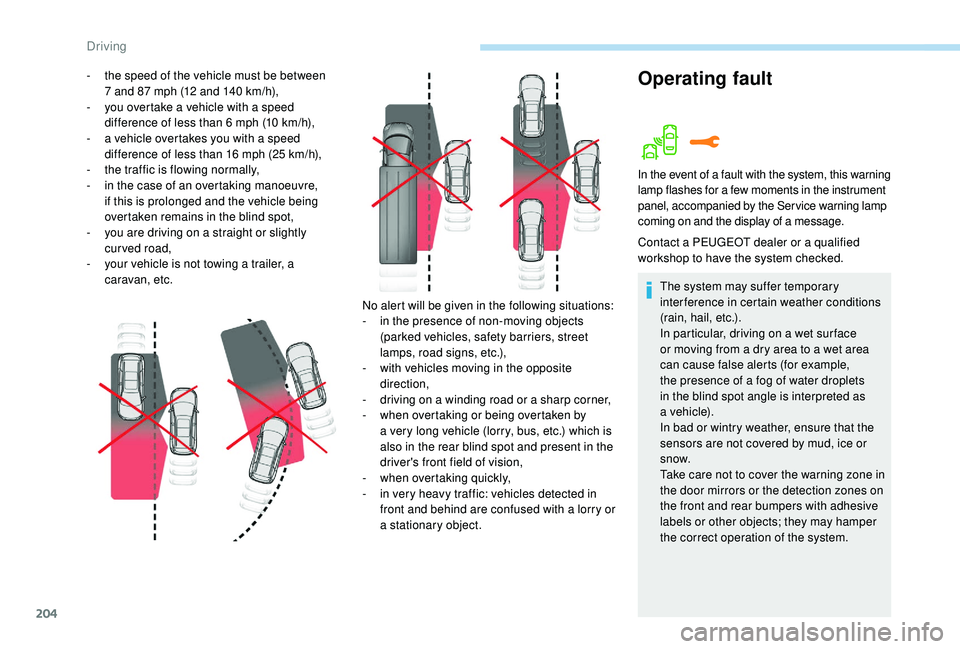
The following conditions must be met for this:
-
a
ll vehicles are moving in the same direction
and in adjacent lanes,
6
Driving
Page 206 of 364
204
Operating fault- the speed of the vehicle must be between 7 and 87 mph (12 and 140 km/h),
-
y
ou overtake a vehicle with a speed
difference of less than 6
mph (10 km/h),
-
a v
ehicle overtakes you with a speed
difference of less than 16
mph (25 km/h),
-
t
he traffic is flowing normally,
-
i
n the case of an overtaking manoeuvre,
if this is prolonged and the vehicle being
overtaken remains in the blind spot,
-
y
ou are driving on a straight or slightly
curved road,
-
y
our vehicle is not towing a trailer, a
caravan, etc.
No alert will be given in the following situations:
-
i
n the presence of non-moving objects
(parked vehicles, safety barriers, street
lamps, road signs, etc.),
-
w
ith vehicles moving in the opposite
direction,
-
d
riving on a winding road or a sharp corner,
-
w
hen overtaking or being overtaken by
a
very long vehicle (lorry, bus, etc.) which is
also in the rear blind spot and present in the
driver's front field of vision,
-
w
hen overtaking quickly,
-
i
n very heavy traffic: vehicles detected in
front and behind are confused with a
lorry or
a
stationary object.
In the event of a fault with the system, this warning
l amp flashes for a few moments in the instrument
panel, accompanied by the Service warning lamp
coming on and the display of a
message.
Contact a PEUGEOT dealer or a qualified
w orkshop to have the system checked.
The system may suffer temporary
interference in certain weather conditions
(rain, hail, etc.).
In particular, driving on a
wet sur face
or moving from a
dry area to a wet area
can cause false alerts (for example,
the presence of a
fog of water droplets
in the blind spot angle is interpreted as
a
vehicle).
In bad or wintry weather, ensure that the
sensors are not covered by mud, ice or
snow.
Take care not to cover the warning zone in
the door mirrors or the detection zones on
the front and rear bumpers with adhesive
labels or other objects; they may hamper
the correct operation of the system.
Driving
Page 207 of 364
205
Active Blind Spot
Monitoring System
In addition to the fixed warning lamp in the door
mirror on the side in question, a correction of
trajectory will be felt if you cross a lane marking
with the direction indicators on, to help you
avoid a
collision.
Conditions for operation
The following systems must be activated:The system is automatically deactivated
when towing with a
towbar approved by
P E U G E O T.
High pressure jet wash
When washing your vehicle, direct the
lance at least 30 cm away from the
sensors.
-
B
lind Spot Monitoring System,
-
A
ctive Lane Departure Warning System.
Parking sensors
This function is a manoeuvring aid which
c annot, in any circumstances, replace the
need for vigilance on the part of the driver.
The driver must remain attentive and stay
in control of their vehicle.
They must always check the vehicle's
surroundings before undertaking
a
manoeuvre.
During the entire manoeuvre, the driver
must ensure that the space remains clear.
Rear parking sensors
The system is switched on by engaging reverse
g e a r.
This is confirmed by an audible signal.
The system is switched off when you come out
of reverse gear.
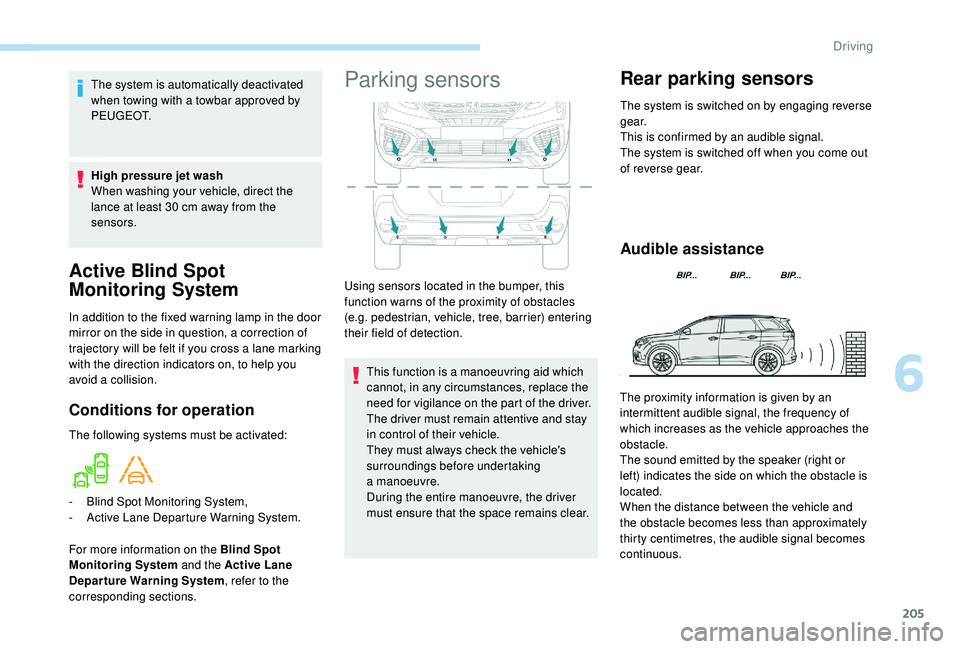
Audible assistance
Using sensors located in the bumper, this
function warns of the proximity of obstacles
(e.g. pedestrian, vehicle, tree, barrier) entering
their field of detection.
For more information on the Blind Spot
Monitoring System and the Active Lane
Departure Warning System , refer to the
corresponding sections. The proximity information is given by an
intermittent audible signal, the frequency of
which increases as the vehicle approaches the
obstacle.
The sound emitted by the speaker (right or
left) indicates the side on which the obstacle is
located.
When the distance between the vehicle and
the obstacle becomes less than approximately
thirty centimetres, the audible signal becomes
continuous.
6
Driving
Page 208 of 364
206
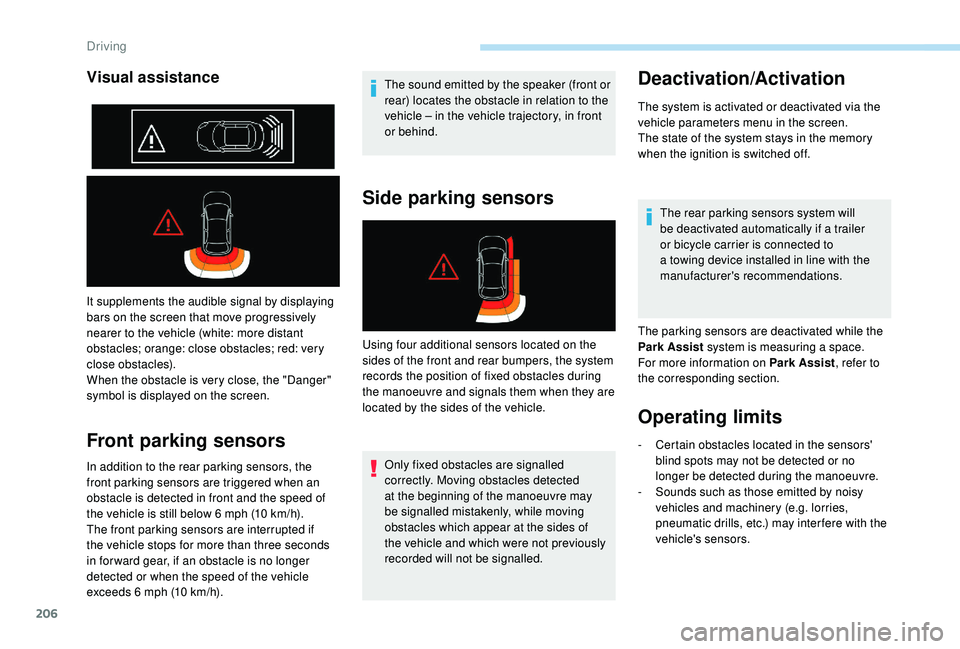
It supplements the audible signal by displaying
bars on the screen that move progressively
nearer to the vehicle (white: more distant
obstacles; orange: close obstacles; red: very
close obstacles).
When the obstacle is very close, the "Danger"
symbol is displayed on the screen.
Front parking sensors
In addition to the rear parking sensors, the
front parking sensors are triggered when an
obstacle is detected in front and the speed of
the vehicle is still below 6 mph (10 km/h).
The front parking sensors are interrupted if
the vehicle stops for more than three seconds
in for ward gear, if an obstacle is no longer
detected or when the speed of the vehicle
exceeds 6
mph (10 km/h). The sound emitted by the speaker (front or
rear) locates the obstacle in relation to the
vehicle – in the vehicle trajectory, in front
or behind.
Side parking sensors
Only fixed obstacles are signalled
correctly. Moving obstacles detected
at the beginning of the manoeuvre may
be signalled mistakenly, while moving
obstacles which appear at the sides of
the vehicle and which were not previously
recorded will not be signalled.
Deactivation/Activation
The system is activated or deactivated via the
vehicle parameters menu in the screen.
The state of the system stays in the memory
when the ignition is switched off.
The rear parking sensors system will
be deactivated automatically if a
trailer
or bicycle carrier is connected to
a
towing device installed in line with the
manufacturer's recommendations.
The parking sensors are deactivated while the
Park Assist system is measuring a
space.
For more information on Park Assist , refer to
the corresponding section.
Operating limits
Visual assistance
Using four additional sensors located on the
sides of the front and rear bumpers, the system
records the position of fixed obstacles during
the manoeuvre and signals them when they are
located by the sides of the vehicle.
-
C
ertain obstacles located in the sensors'
blind spots may not be detected or no
longer be detected during the manoeuvre.
-
S
ounds such as those emitted by noisy
vehicles and machinery (e.g. lorries,
pneumatic drills, etc.) may inter fere with the
vehicle's sensors.
Driving
Page 219 of 364
217
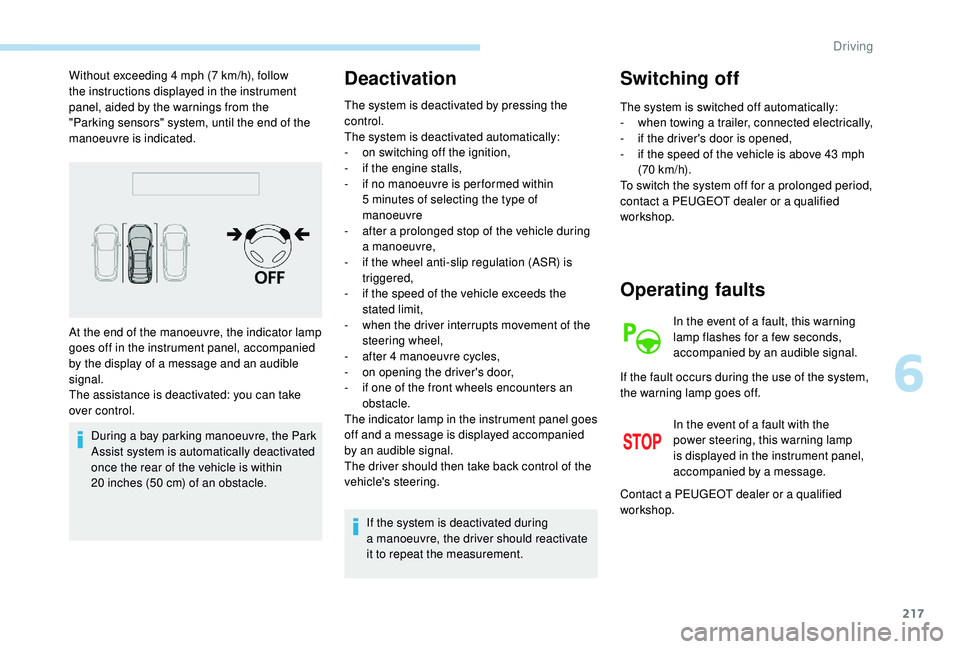
Without exceeding 4 mph (7 km/h), follow
t he instructions displayed in the instrument
panel, aided by the warnings from the
"Parking sensors" system, until the end of the
manoeuvre is indicated.
During a
bay parking manoeuvre, the Park
Assist system is automatically deactivated
once the rear of the vehicle is within
20
inches (50 cm) of an obstacle.Deactivation
The system is deactivated by pressing the
control.
The system is deactivated automatically:
-
o
n switching off the ignition,
-
i
f the engine stalls,
-
i
f no manoeuvre is per formed within
5
minutes of selecting the type of
manoeuvre
-
a
fter a prolonged stop of the vehicle during
a
manoeuvre,
-
i
f the wheel anti-slip regulation (ASR) is
triggered,
-
i
f the speed of the vehicle exceeds the
stated limit,
-
w
hen the driver interrupts movement of the
steering wheel,
-
a
fter 4 manoeuvre cycles,
-
o
n opening the driver's door,
-
i
f one of the front wheels encounters an
obstacle.
The indicator lamp in the instrument panel goes
off and a
message is displayed accompanied
by an audible signal.
The driver should then take back control of the
vehicle's steering.
If the system is deactivated during
a
manoeuvre, the driver should reactivate
it to repeat the measurement.
Switching off
The system is switched off automatically:
- w hen towing a trailer, connected electrically,
-
i
f the driver's door is opened,
-
i
f the speed of the vehicle is above 43 mph
(70
km/h).
To switch the system off for a
prolonged period,
contact a
PEUGEOT dealer or a qualified
workshop.
At the end of the manoeuvre, the indicator lamp
goes off in the instrument panel, accompanied
by the display of a
message and an audible
signal.
The assistance is deactivated: you can take
over control.
Operating faults
In the event of a fault, this warning
l amp flashes for a few seconds,
accompanied by an audible signal.
In the event of a
fault with the
power steering, this warning lamp
is displayed in the instrument panel,
accompanied by a
message.
If the fault occurs during the use of the system,
the warning lamp goes off.
Contact a
PEUGEOT dealer or a qualified
workshop.
6
Driving
Page 225 of 364
223
Travelling abroad
Cer tain fuels could damage the engine of
your vehicle.
In cer tain countries, the use of a par ticular
fuel may be required (specific octane
rating, specific trade name, etc.) to ensure
correct operation of the engine.
For any additional information, contact a
dealer.
Towing device
Load distribution
F D istribute the load in the trailer so that the
heaviest items are as close as possible to
the axle and the nose weight approaches
the maximum permitted without exceeding
it.
Air density decreases with altitude, thus
reducing engine performance. The maximum
towed load must be reduced by 10% for every
1,000
metres of altitude. Use towing devices and their genuine
harnesses approved by PEUGEOT. It
is recommended that the installation
be per formed by a
PEUGEOT dealer or
a
qualified workshop.
If the towbar is not fitted by a PEUGEOT
dealer, it must still be fitted in accordance
with the vehicle manufacturer's
instructions.
Important: for versions equipped with
the motorised tailgate with Hands-Free
Tailgate Access function, if a towing
device other than a genuine PEUGEOT
one is installed, it is imperative to visit
a
PEUGEOT dealer or a qualified
workshop to recalibrate the detection
system: risk of Hands-Free Tailgate
Access function failure.
Certain driving assistance or manoeuvring
assistance functions are automatically
disabled if an approved towbar is used. Obser ve the maximum authorised towable
weight, indicated on your vehicle's
registration certificate, the manufacturer's
label as well as in the Technical data
section of this guide.
Complying with the maximum
authorised nose weight (ball joint)
also includes the use of accessories
(bicycle carriers, tow boxes, etc.).
Obser ve the legislation in force in the
country in which you are driving.
Vehicle equipped with motorised tailgate
with "Hands-Free Tailgate Access "
function
To avoid unwanted opening of the tailgate
when using the towing device:
-
d
eactivate the Hands-Free Tailgate
Access function in advance in your
vehicle's configuration menu,
-
o
r remove the electronic key from the
recognition zone, with the tailgate closed.
7
Practical information