trailer PEUGEOT 5008 2018 User Guide
[x] Cancel search | Manufacturer: PEUGEOT, Model Year: 2018, Model line: 5008, Model: PEUGEOT 5008 2018Pages: 364, PDF Size: 13.03 MB
Page 206 of 364
204
Operating fault- the speed of the vehicle must be between 7 and 87 mph (12 and 140 km/h),
-
y
ou overtake a vehicle with a speed
difference of less than 6
mph (10 km/h),
-
a v
ehicle overtakes you with a speed
difference of less than 16
mph (25 km/h),
-
t
he traffic is flowing normally,
-
i
n the case of an overtaking manoeuvre,
if this is prolonged and the vehicle being
overtaken remains in the blind spot,
-
y
ou are driving on a straight or slightly
curved road,
-
y
our vehicle is not towing a trailer, a
caravan, etc.
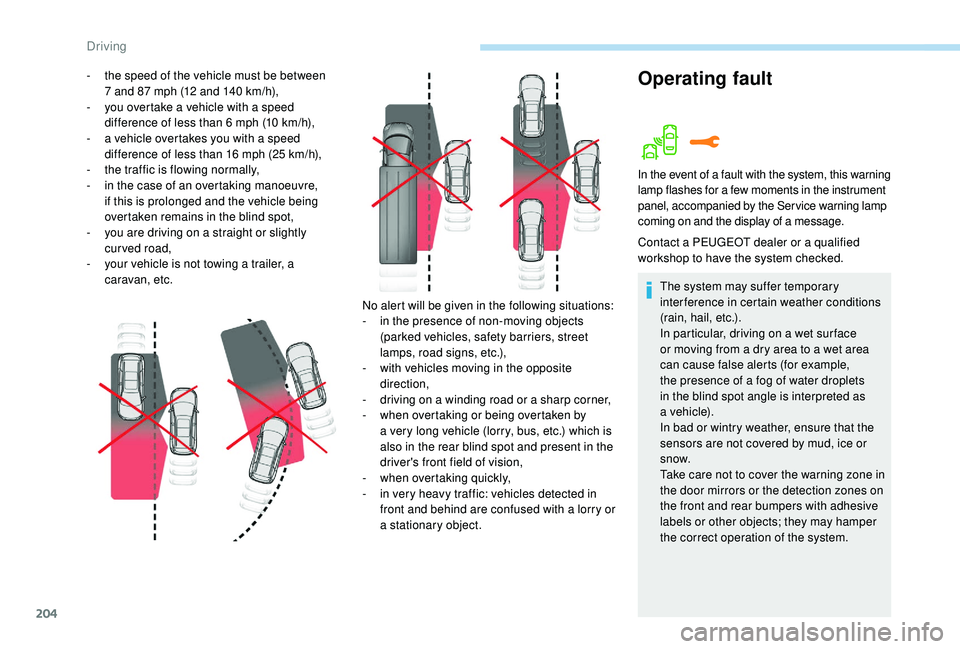
No alert will be given in the following situations:
-
i
n the presence of non-moving objects
(parked vehicles, safety barriers, street
lamps, road signs, etc.),
-
w
ith vehicles moving in the opposite
direction,
-
d
riving on a winding road or a sharp corner,
-
w
hen overtaking or being overtaken by
a
very long vehicle (lorry, bus, etc.) which is
also in the rear blind spot and present in the
driver's front field of vision,
-
w
hen overtaking quickly,
-
i
n very heavy traffic: vehicles detected in
front and behind are confused with a
lorry or
a
stationary object.
In the event of a fault with the system, this warning
l amp flashes for a few moments in the instrument
panel, accompanied by the Service warning lamp
coming on and the display of a
message.
Contact a PEUGEOT dealer or a qualified
w orkshop to have the system checked.
The system may suffer temporary
interference in certain weather conditions
(rain, hail, etc.).
In particular, driving on a
wet sur face
or moving from a
dry area to a wet area
can cause false alerts (for example,
the presence of a
fog of water droplets
in the blind spot angle is interpreted as
a
vehicle).
In bad or wintry weather, ensure that the
sensors are not covered by mud, ice or
snow.
Take care not to cover the warning zone in
the door mirrors or the detection zones on
the front and rear bumpers with adhesive
labels or other objects; they may hamper
the correct operation of the system.
Driving
Page 208 of 364
206
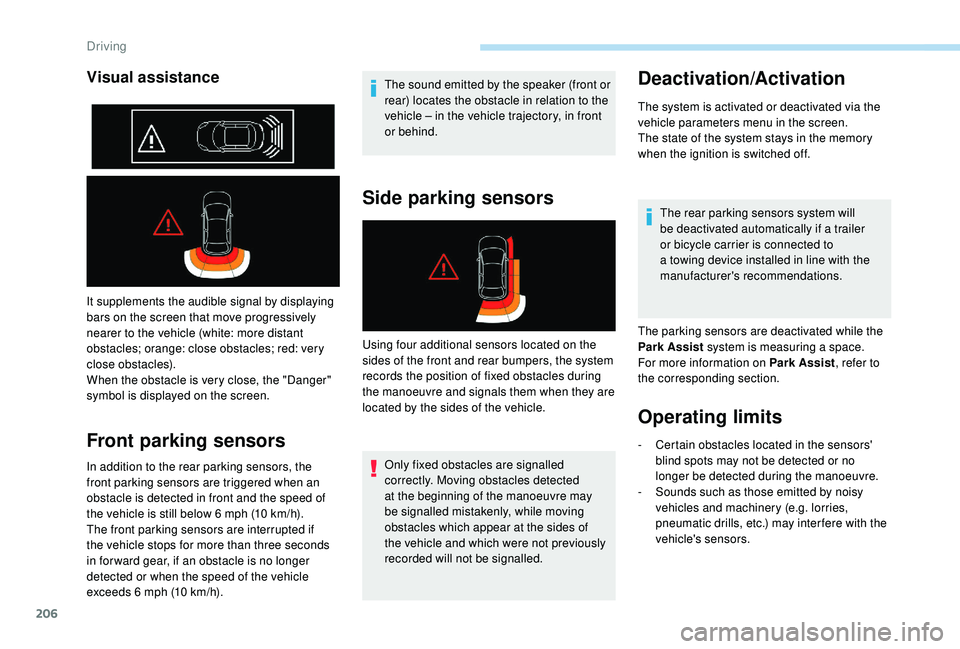
It supplements the audible signal by displaying
bars on the screen that move progressively
nearer to the vehicle (white: more distant
obstacles; orange: close obstacles; red: very
close obstacles).
When the obstacle is very close, the "Danger"
symbol is displayed on the screen.
Front parking sensors
In addition to the rear parking sensors, the
front parking sensors are triggered when an
obstacle is detected in front and the speed of
the vehicle is still below 6 mph (10 km/h).
The front parking sensors are interrupted if
the vehicle stops for more than three seconds
in for ward gear, if an obstacle is no longer
detected or when the speed of the vehicle
exceeds 6
mph (10 km/h). The sound emitted by the speaker (front or
rear) locates the obstacle in relation to the
vehicle – in the vehicle trajectory, in front
or behind.
Side parking sensors
Only fixed obstacles are signalled
correctly. Moving obstacles detected
at the beginning of the manoeuvre may
be signalled mistakenly, while moving
obstacles which appear at the sides of
the vehicle and which were not previously
recorded will not be signalled.
Deactivation/Activation
The system is activated or deactivated via the
vehicle parameters menu in the screen.
The state of the system stays in the memory
when the ignition is switched off.
The rear parking sensors system will
be deactivated automatically if a
trailer
or bicycle carrier is connected to
a
towing device installed in line with the
manufacturer's recommendations.
The parking sensors are deactivated while the
Park Assist system is measuring a
space.
For more information on Park Assist , refer to
the corresponding section.
Operating limits
Visual assistance
Using four additional sensors located on the
sides of the front and rear bumpers, the system
records the position of fixed obstacles during
the manoeuvre and signals them when they are
located by the sides of the vehicle.
-
C
ertain obstacles located in the sensors'
blind spots may not be detected or no
longer be detected during the manoeuvre.
-
S
ounds such as those emitted by noisy
vehicles and machinery (e.g. lorries,
pneumatic drills, etc.) may inter fere with the
vehicle's sensors.
Driving
Page 212 of 364
210
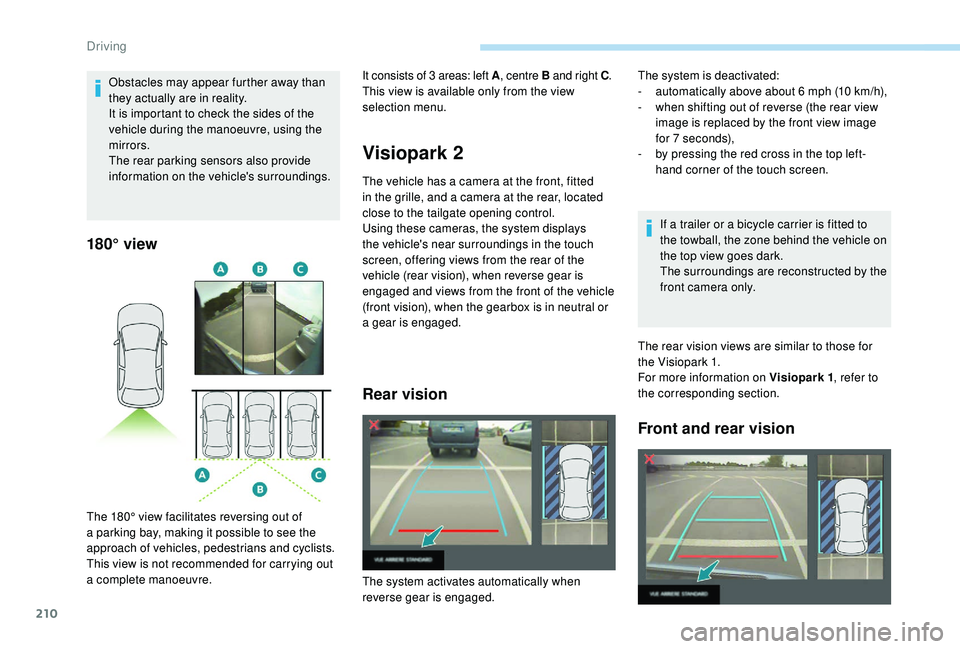
180° view
Visiopark 2
The vehicle has a camera at the front, fitted
i n the grille, and a camera at the rear, located
close to the tailgate opening control.
Using these cameras, the system displays
the vehicle's near surroundings in the touch
screen, offering views from the rear of the
vehicle (rear vision), when reverse gear is
engaged and views from the front of the vehicle
(front vision), when the gearbox is in neutral or
a
gear is engaged.
Rear vision
If a trailer or a bicycle carrier is fitted to
t he towball, the zone behind the vehicle on
the top view goes dark.
The surroundings are reconstructed by the
front camera only.
The rear vision views are similar to those for
the Visiopark 1.
For more information on Visiopark 1 , refer to
the corresponding section.
Front and rear vision
Obstacles may appear further away than
they actually are in reality.
It is important to check the sides of the
vehicle during the manoeuvre, using the
mirrors.
The rear parking sensors also provide
information on the vehicle's surroundings.
The 180° view facilitates reversing out of
a
parking bay, making it possible to see the
approach of vehicles, pedestrians and cyclists.
This view is not recommended for carrying out
a
complete manoeuvre. It consists of 3
areas: left A
, centre B and right C .
This view is available only from the view
selection menu. The system is deactivated:
-
a utomatically above about 6 mph (10 km/h),
-
w
hen shifting out of reverse (the rear view
image is replaced by the front view image
for 7
seconds),
-
b
y pressing the red cross in the top left-
hand corner of the touch screen.
The system activates automatically when
reverse gear is engaged.
Driving
Page 219 of 364
217
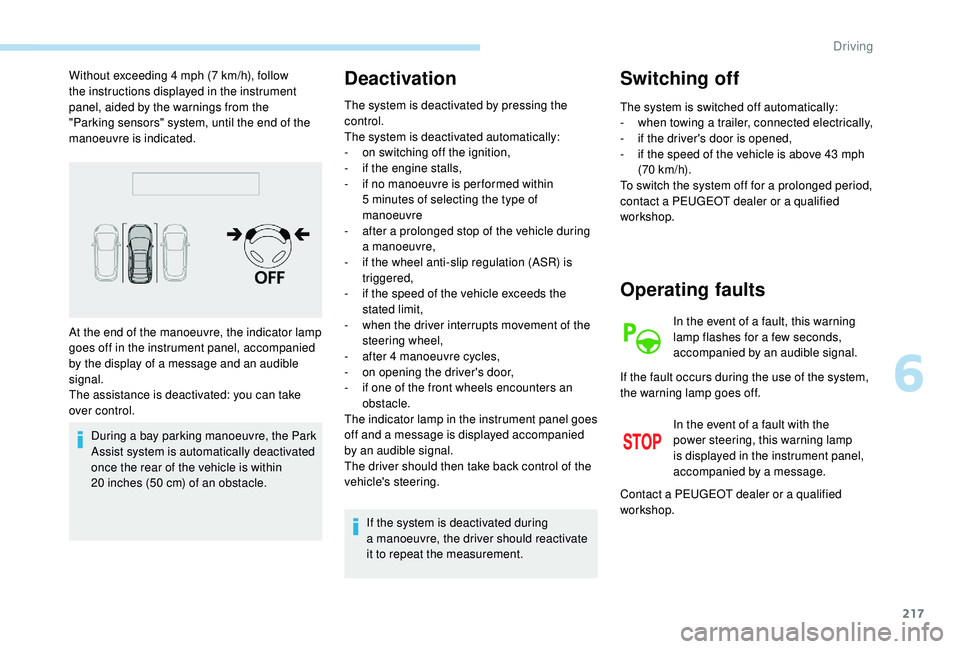
Without exceeding 4 mph (7 km/h), follow
t he instructions displayed in the instrument
panel, aided by the warnings from the
"Parking sensors" system, until the end of the
manoeuvre is indicated.
During a
bay parking manoeuvre, the Park
Assist system is automatically deactivated
once the rear of the vehicle is within
20
inches (50 cm) of an obstacle.Deactivation
The system is deactivated by pressing the
control.
The system is deactivated automatically:
-
o
n switching off the ignition,
-
i
f the engine stalls,
-
i
f no manoeuvre is per formed within
5
minutes of selecting the type of
manoeuvre
-
a
fter a prolonged stop of the vehicle during
a
manoeuvre,
-
i
f the wheel anti-slip regulation (ASR) is
triggered,
-
i
f the speed of the vehicle exceeds the
stated limit,
-
w
hen the driver interrupts movement of the
steering wheel,
-
a
fter 4 manoeuvre cycles,
-
o
n opening the driver's door,
-
i
f one of the front wheels encounters an
obstacle.
The indicator lamp in the instrument panel goes
off and a
message is displayed accompanied
by an audible signal.
The driver should then take back control of the
vehicle's steering.
If the system is deactivated during
a
manoeuvre, the driver should reactivate
it to repeat the measurement.
Switching off
The system is switched off automatically:
- w hen towing a trailer, connected electrically,
-
i
f the driver's door is opened,
-
i
f the speed of the vehicle is above 43 mph
(70
km/h).
To switch the system off for a
prolonged period,
contact a
PEUGEOT dealer or a qualified
workshop.
At the end of the manoeuvre, the indicator lamp
goes off in the instrument panel, accompanied
by the display of a
message and an audible
signal.
The assistance is deactivated: you can take
over control.
Operating faults
In the event of a fault, this warning
l amp flashes for a few seconds,
accompanied by an audible signal.
In the event of a
fault with the
power steering, this warning lamp
is displayed in the instrument panel,
accompanied by a
message.
If the fault occurs during the use of the system,
the warning lamp goes off.
Contact a
PEUGEOT dealer or a qualified
workshop.
6
Driving
Page 225 of 364
223
Travelling abroad
Cer tain fuels could damage the engine of
your vehicle.
In cer tain countries, the use of a par ticular
fuel may be required (specific octane
rating, specific trade name, etc.) to ensure
correct operation of the engine.
For any additional information, contact a
dealer.
Towing device
Load distribution
F D istribute the load in the trailer so that the
heaviest items are as close as possible to
the axle and the nose weight approaches
the maximum permitted without exceeding
it.
Air density decreases with altitude, thus
reducing engine performance. The maximum
towed load must be reduced by 10% for every
1,000
metres of altitude. Use towing devices and their genuine
harnesses approved by PEUGEOT. It
is recommended that the installation
be per formed by a
PEUGEOT dealer or
a
qualified workshop.
If the towbar is not fitted by a PEUGEOT
dealer, it must still be fitted in accordance
with the vehicle manufacturer's
instructions.
Important: for versions equipped with
the motorised tailgate with Hands-Free
Tailgate Access function, if a towing
device other than a genuine PEUGEOT
one is installed, it is imperative to visit
a
PEUGEOT dealer or a qualified
workshop to recalibrate the detection
system: risk of Hands-Free Tailgate
Access function failure.
Certain driving assistance or manoeuvring
assistance functions are automatically
disabled if an approved towbar is used. Obser ve the maximum authorised towable
weight, indicated on your vehicle's
registration certificate, the manufacturer's
label as well as in the Technical data
section of this guide.
Complying with the maximum
authorised nose weight (ball joint)
also includes the use of accessories
(bicycle carriers, tow boxes, etc.).
Obser ve the legislation in force in the
country in which you are driving.
Vehicle equipped with motorised tailgate
with "Hands-Free Tailgate Access "
function
To avoid unwanted opening of the tailgate
when using the towing device:
-
d
eactivate the Hands-Free Tailgate
Access function in advance in your
vehicle's configuration menu,
-
o
r remove the electronic key from the
recognition zone, with the tailgate closed.
7
Practical information
Page 226 of 364
224
Towbar with quickly
detachable towball
No tools are required to install or remove the
towball on this genuine towbar system.
Presentation
Trailers with LED lamps are not
compatible with the wiring harness of this
device.
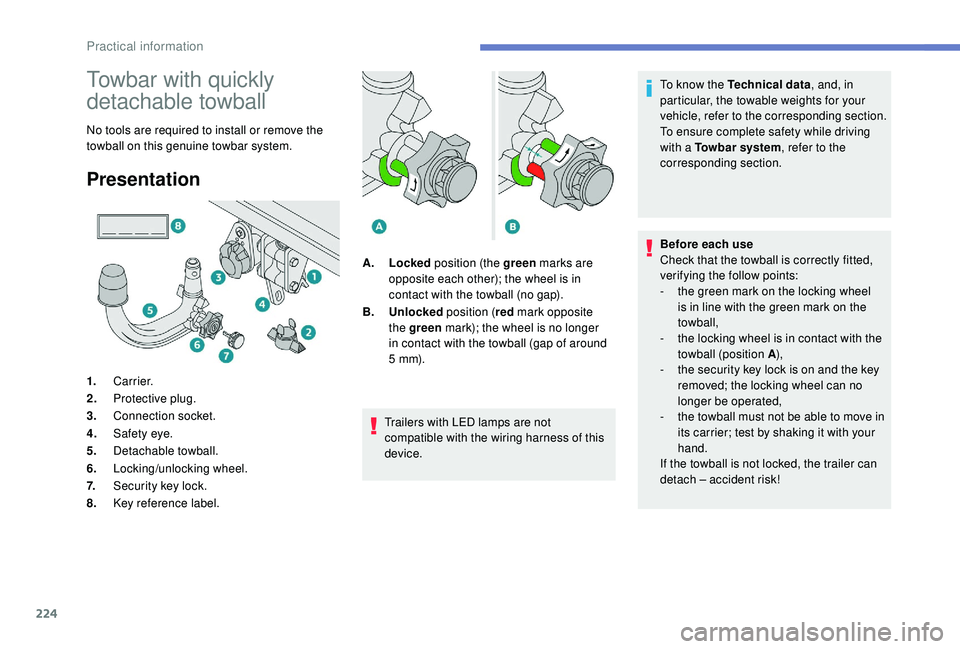
1.
Carrier.
2. Protective plug.
3. Connection socket.
4. Safety eye.
5. Detachable towball.
6. Locking/unlocking wheel.
7. Security key lock.
8. Key reference label. A.
Locked position (the green marks are
opposite each other); the wheel is in
contact with the towball (no gap).
B. Unlocked position (red mark opposite
the green mark); the wheel is no longer
in contact with the towball (gap of around
5
m m). To know the Technical data
, and, in
particular, the towable weights for your
vehicle, refer to the corresponding section.
To ensure complete safety while driving
with a Towbar system
, refer to the
corresponding section.
Before each use
Check that the towball is correctly fitted,
verifying the follow points:
-
t
he green mark on the locking wheel
is in line with the green mark on the
towball,
-
t
he locking wheel is in contact with the
towball (position A ),
-
t
he security key lock is on and the key
removed; the locking wheel can no
longer be operated,
- t he towball must not be able to move in
its carrier; test by shaking it with your
hand.
If the towball is not locked, the trailer can
detach – accident risk!
Practical information
Page 227 of 364
225
Following use
When travelling without a trailer or load
on a
towbar-mounted carrier, the towball
must be removed and the protective plug
inserted in the carrier. This measure
applies particularly where the towball
might obscure visibility of the number
plate or its lighting.
Fitting the towballDuring use
Never release the locking system with
a
trailer or load carrier on the towball.
Never exceed the maximum authorised
weight for the vehicle – the Gross Train
Weight or GTW.
It is essential that the maximum
authorised load be complied with on the
towing device: if it is exceeded, this device
may detach from the vehicle, which is
a
serious accident risk.
Check that the trailer lamps work
c o r r e c t l y.
Before setting off, check the adjustment of
the headlamp beam height.
For more information on Headlamp
adjustment , refer to the corresponding
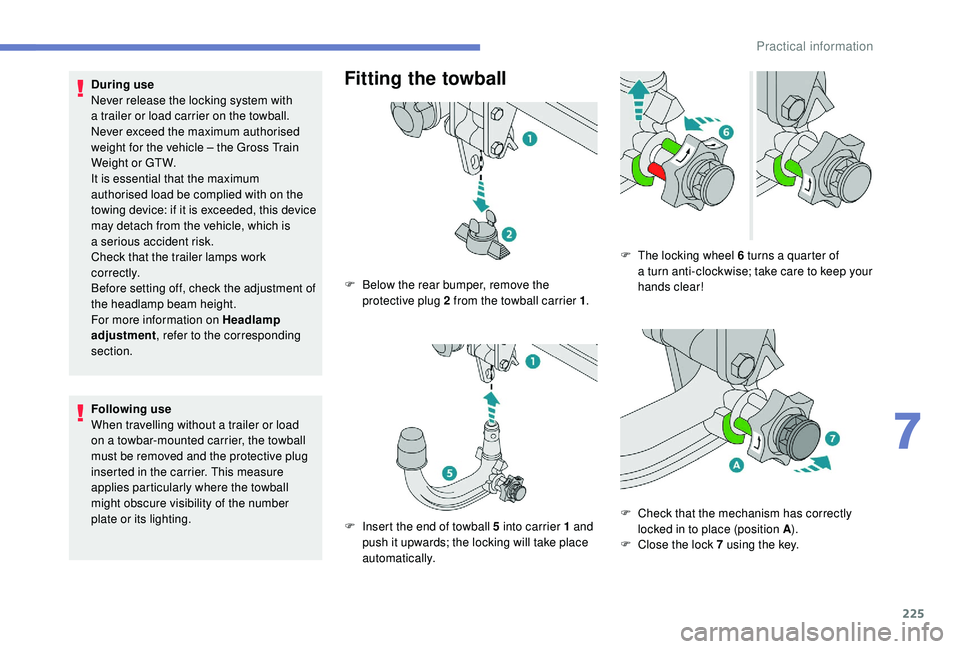
section. F
B
elow the rear bumper, remove the
protective plug 2
from the towball carrier 1.
F
I
nsert the end of towball 5 into carrier 1 and
push it upwards; the locking will take place
automatically. F
T
he locking wheel 6 turns a quarter of
a
turn anti-clockwise; take care to keep your
hands clear!
F
C
heck that the mechanism has correctly
locked in to place (position A ).
F
C
lose the lock 7 using the key.
7
Practical information
Page 228 of 364
226
Removing the towball
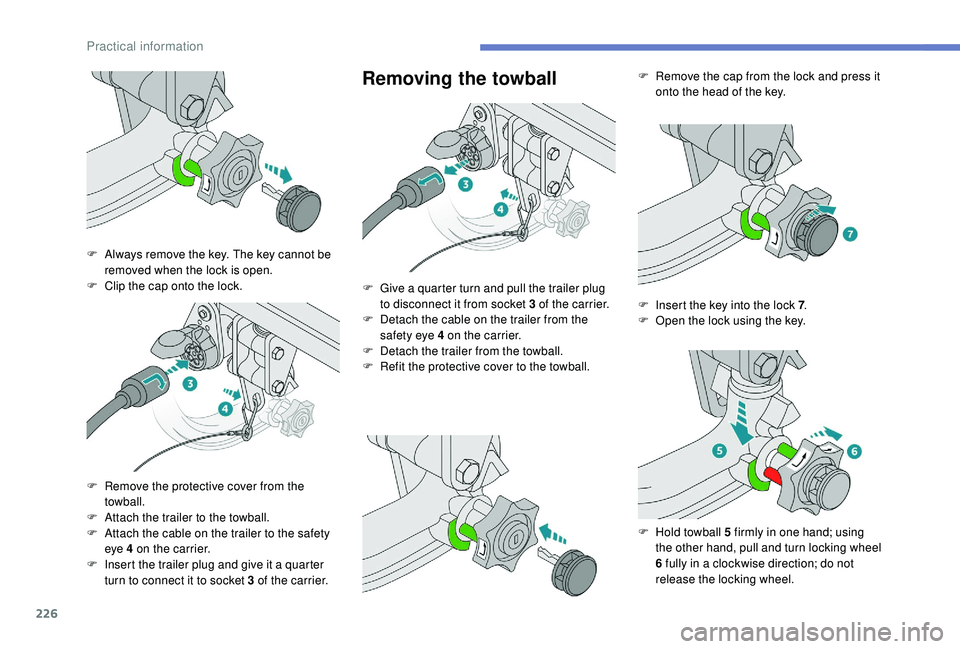
F Always remove the key. The key cannot be removed when the lock is open.
F
C
lip the cap onto the lock.
F
R
emove the protective cover from the
towball.
F
A
ttach the trailer to the towball.
F
A
ttach the cable on the trailer to the safety
eye 4
on the carrier.
F
I
nsert the trailer plug and give it a quarter
turn to connect it to socket 3
of the carrier.F
G
ive a quarter turn and pull the trailer plug
to disconnect it from socket 3
of the carrier.
F
D
etach the cable on the trailer from the
safety eye 4
on the carrier.
F
D
etach the trailer from the towball.
F
R
efit the protective cover to the towball.F
R
emove the cap from the lock and press it
onto the head of the key.
F
I
nsert the key into the lock 7.
F
O
pen the lock using the key.
F
H
old towball 5 firmly in one hand; using
the other hand, pull and turn locking wheel
6
fully in a clockwise direction; do not
release the locking wheel.
Practical information
Page 269 of 364
267
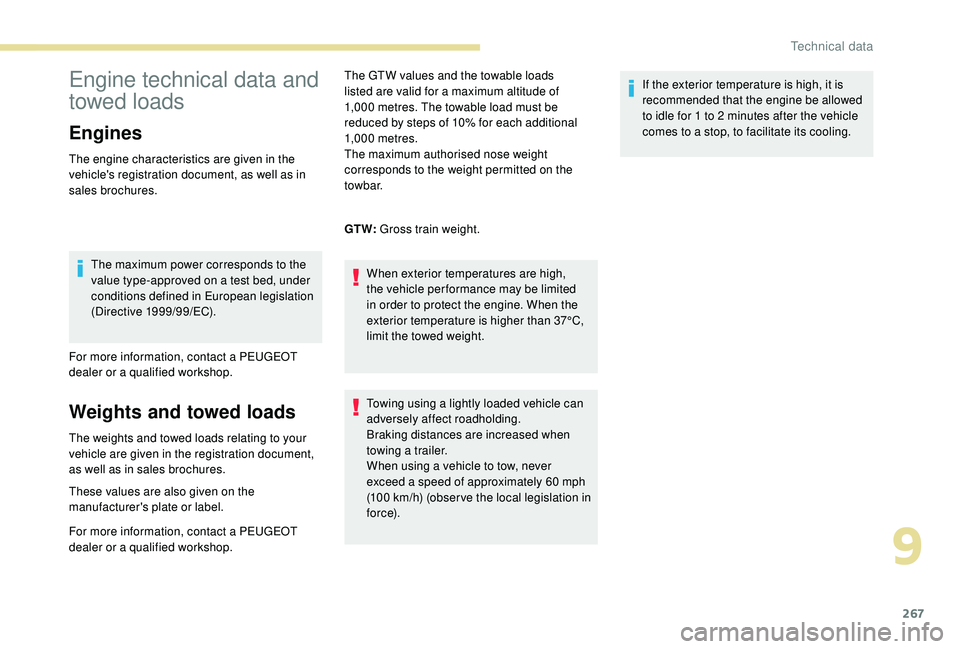
Engine technical data and
towed loads
Engines
The engine characteristics are given in the
vehicle's registration document, as well as in
sales brochures.The maximum power corresponds to the
value type-approved on a
test bed, under
conditions defined in European legislation
(Directive 1999/99/EC).
For more information, contact a
PEUGEOT
dealer or a
qualified workshop.
Weights and towed loads
The weights and towed loads relating to your
vehicle are given in the registration document,
as well as in sales brochures.
These values are also given on the
manufacturer's plate or label.
For more information, contact a PEUGEOT
dealer or a
qualified workshop. The GTW values and the towable loads
listed are valid for a
maximum altitude of
1,000 metres. The towable load must be
reduced by steps of 10% for each additional
1,000
metres.
The maximum authorised nose weight
corresponds to the weight permitted on the
towbar.
GT W: Gross train weight.
When exterior temperatures are high,
the vehicle per formance may be limited
in order to protect the engine. When the
exterior temperature is higher than 37°C,
limit the towed weight.
Towing using a lightly loaded vehicle can
adversely affect roadholding.
Braking distances are increased when
towing a trailer.
When using a
vehicle to tow, never
exceed a
speed of approximately 60 mph
(100
km/h) (obser ve the local legislation in
f o r c e). If the exterior temperature is high, it is
recommended that the engine be allowed
to idle for 1
to 2 minutes after the vehicle
comes to a stop, to facilitate its cooling.
9
Technical data
Page 270 of 364
268
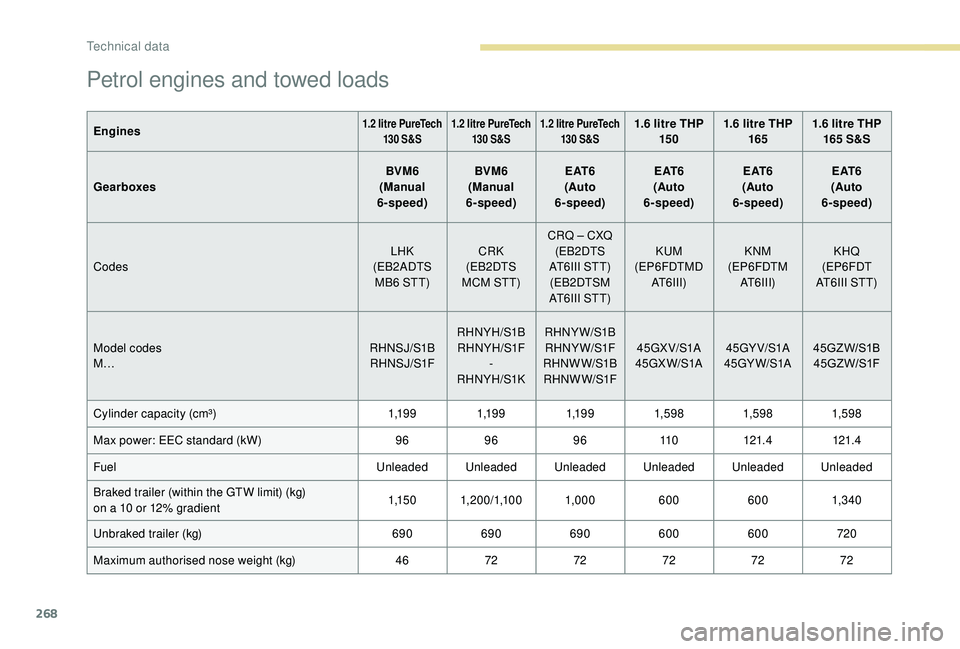
Petrol engines and towed loads
Engines1.2 litre PureTech
130 S&S 1.2
litre PureTech
130 S&S1.2
litre PureTech
130 S&S1.6 litre THP 15 0 1.6
litre THP
165 1.6
litre THP
165 S&S
Gearboxes BVM6
(Manual
6-speed) BVM6
(Manual
6-speed) E AT 6
(Auto
6-speed) E AT 6
(Auto
6-speed) E AT 6
(Auto
6-speed) E AT 6
(Auto
6-speed)
Codes LHK
(EB2ADTS MB6
STT) CRK
(EB2DTS
MCM STT) CRQ – CXQ
(EB2DTS
AT6III STT) (EB2DTSM
AT6III STT) KUM
(EP6FDTMD AT6III) KNM
(EP6FDTM AT6III) KHQ
(EP6FDT
AT6III STT)
Model codes
M… RHNSJ/S1B
RH NS J/S1F RHNYH/S1B
RHNYH/S1F -
RHNYH/S1K RHNYW/S1B
RHNYW/S1F
RHNW W/S1B RH NW W/S1F 45GX V/S1A
45GX W/S1A 45GY V/S1A
45GY W/S1A 45GZ W/S1B
45G Z W/S1F
Cylinder capacity (cm³) 1,1 9 91,1 9 91,1 9 91,59 8 1,59 81,59 8
Max power: EEC standard (kW) 96969611 0121.4 121.4
Fuel Unleaded Unleaded Unleaded Unleaded Unleaded Unleaded
Braked trailer (within the GTW limit) (kg)
on a
10
or 12% gradient 1,1 5 0
1, 20 0/1,10 0 1,0006006001,3 4 0
Unbraked trailer (kg) 690690690600 600 720
Maximum authorised nose weight (kg) 467272727272
Technical data