ECU PEUGEOT 5008 2018 Owner's Manual
[x] Cancel search | Manufacturer: PEUGEOT, Model Year: 2018, Model line: 5008, Model: PEUGEOT 5008 2018Pages: 364, PDF Size: 13.03 MB
Page 243 of 364
241
With 2.0 HDi engines
F Fill the fuel tank with at least five litres of Diesel.
F
O
pen the bonnet.
F
I
f necessary, unclip the cover to access the
priming pump.
F
L
oosen the degassing screw.
F
U
se the priming pump until fuel appears in
the transparent tube.
F
R
etighten the degassing screw.
F
O
perate the starter until the engine starts (if
the engine does not start at the first attempt,
wait around 15
seconds before trying
again).
F
I
f the engine does not start after a few
attempts, operate the priming pump again
then start the engine.
F
P
ut it back in place, clip in the cover and
ensure it is clipped in.
F
C
lose the bonnet.
Tool kit
This is a set of tools provided with the vehicle.
I ts content depends on your vehicle's
equipment:
-
t
emporary puncture repair kit,
-
spar
e wheel.
List of tools
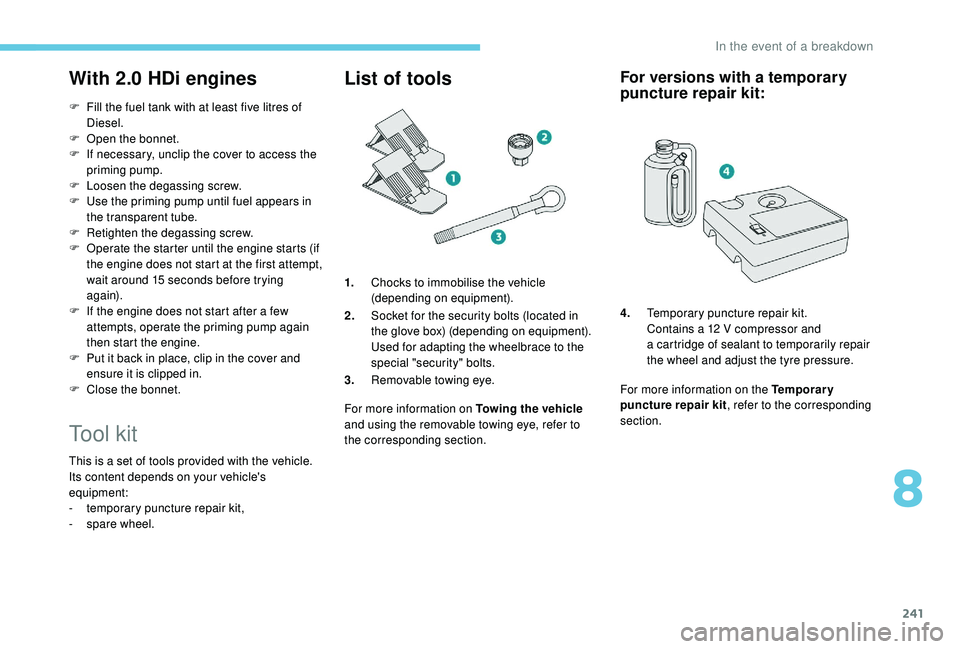
1.Chocks to immobilise the vehicle
(depending on equipment).
2. Socket for the security bolts (located in
the glove box) (depending on equipment).
Used for adapting the wheelbrace to the
special "security" bolts.
3. Removable towing eye.
For more information on Towing the vehicle
and using the removable towing eye, refer to
the corresponding section.
For versions with a temporary
p uncture repair kit:
4. Temporary puncture repair kit.
Contains a
12 V compressor and
a
cartridge of sealant to temporarily repair
the wheel and adjust the tyre pressure.
For more information on the Temporary
puncture repair kit , refer to the corresponding
section.
8
In the event of a breakdown
Page 246 of 364
244
Avoid removing any foreign bodies which
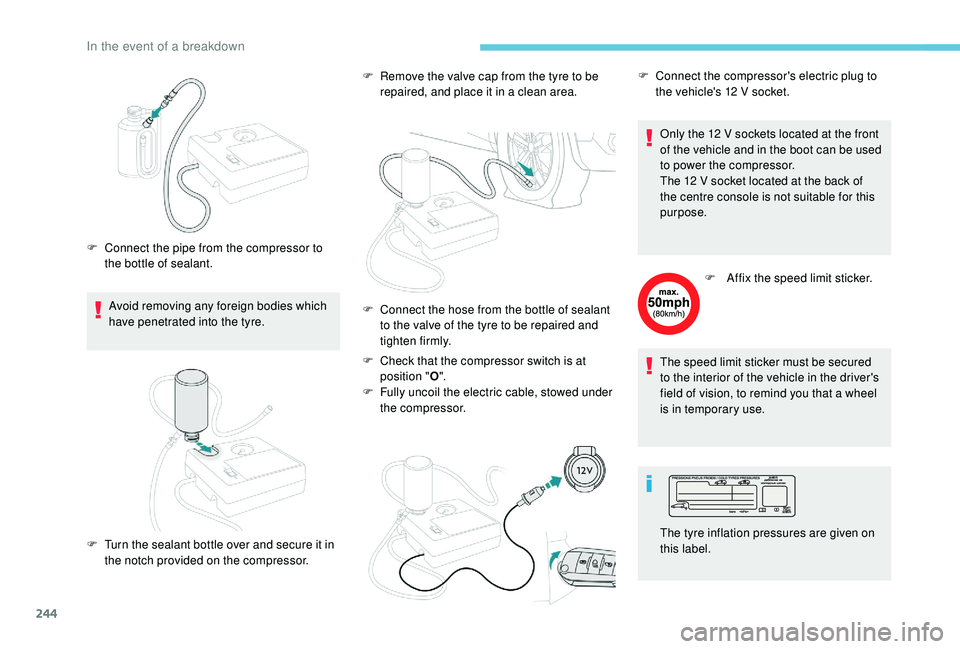
have penetrated into the tyre.
F
C
onnect the pipe from the compressor to
the bottle of sealant. F
R
emove the valve cap from the tyre to be
repaired, and place it in a
clean area.
F
C
heck that the compressor switch is at
position " O".
F
F
ully uncoil the electric cable, stowed under
the compressor. Only the 12
V sockets located at the front
of the vehicle and in the boot can be used
to power the compressor.
The 12 V socket located at the back of
the centre console is not suitable for this
purpose.
F
A
ffix the speed limit sticker.
The speed limit sticker must be secured
to the interior of the vehicle in the driver's
field of vision, to remind you that a
wheel
is in temporary use.
F
T
urn the sealant bottle over and secure it in
the notch provided on the compressor. F
C onnect the hose from the bottle of sealant
to the valve of the tyre to be repaired and
tighten firmly. F
C
onnect the compressor's electric plug to
the vehicle's 12 V socket.
The tyre inflation pressures are given on
this label.
In the event of a breakdown
Page 251 of 364
249
Removing a wheel
Wheel with wheel trim
When removing the wheel, first remove
the wheel trim by pulling at the valve
aperture using the wheelbrace.
When refitting the wheel , after tightening
the wheel bolts, refit the wheel trim,
starting by placing its aperture in line with
the valve and then pushing it into place all
round its edge with the palm of your hand. Parking the vehicle
Immobilise the vehicle where it does not
block traffic: the ground must be level,
stable and non-slippery.
Apply the parking brake, unless it is
programmed to be in automatic mode;
switch off the ignition and with a
manual
gearbox, engage first gear so as to lock
the wheels.
Apply the parking brake, unless it is
programmed to be in automatic mode;
switch off the ignition and with an
automatic gearbox, select mode P so as to
lock the wheels.
Check that the parking brake warning
lamps in the instrument panel are on fixed
(not flashing).
The occupants must get out of the vehicle
and wait where they are safe.
If necessary, place a
chock under the
wheel diagonally opposite the wheel to be
changed.
Never go underneath a
vehicle raised
using a
jack; use an axle stand.
F
T
ighten it fully. When the cable is
completely reeled in, turning the nut no
longer encounters resistance.
F
C
heck that the wheel is properly flattened
against the floor.
F
T
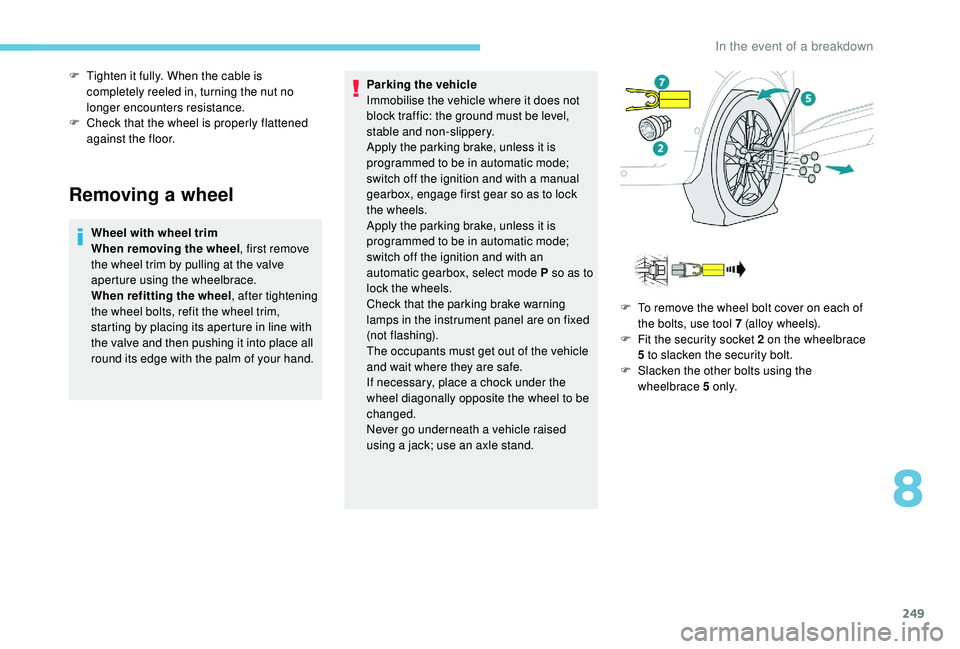
o remove the wheel bolt cover on each of
the bolts, use tool 7 (alloy wheels).
F
F
it the security socket 2 on the wheelbrace
5
to slacken the security bolt.
F
S
lacken the other bolts using the
wheelbrace 5
o n l y.
8
In the event of a breakdown
Page 252 of 364
250
Ensure that the jack is stable. If the
ground is slippery or loose, the jack may
slip or drop – Risk of injury!
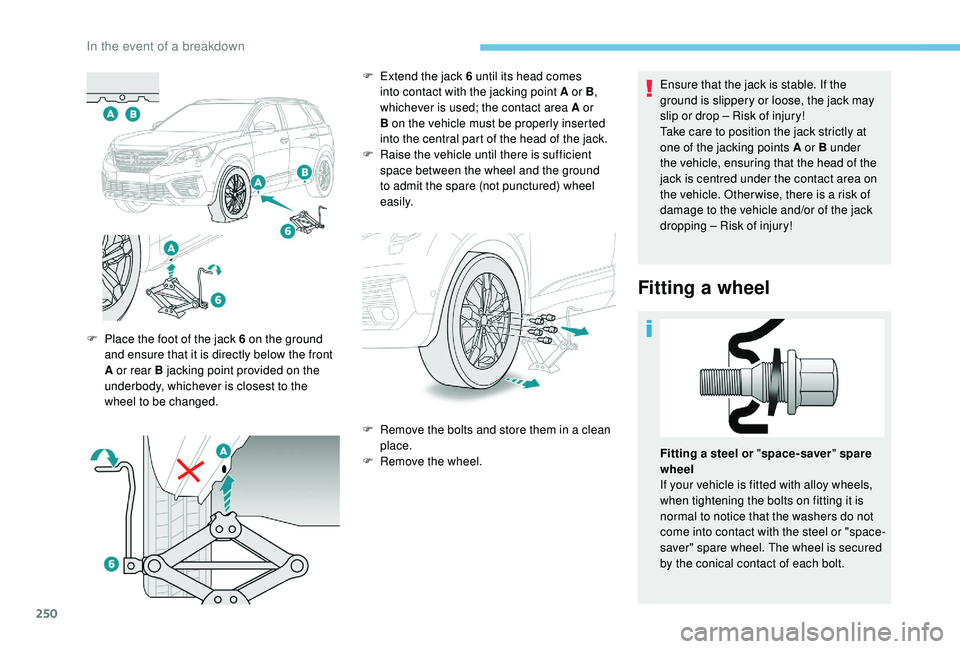
Take care to position the jack strictly at
one of the jacking points A or B under
the vehicle, ensuring that the head of the
jack is centred under the contact area on
the vehicle. Other wise, there is a risk of
damage to the vehicle and/or of the jack
dropping – Risk of injury!
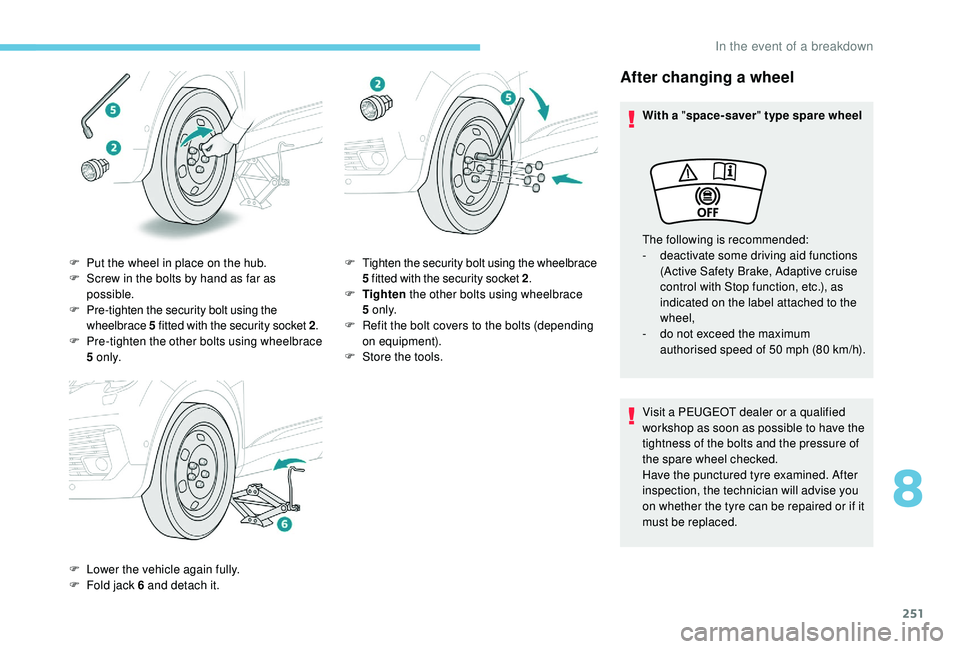
Fitting a wheel
F Place the foot of the jack 6 on the ground
and ensure that it is directly below the front
A or rear B jacking point provided on the
underbody, whichever is closest to the
wheel to be changed. F
E
xtend the jack 6 until its head comes
into contact with the jacking point A or B ,
whichever is used; the contact area A or
B on the vehicle must be properly inserted
into the central part of the head of the jack.
F
Ra
ise the vehicle until there is sufficient
space between the wheel and the ground
to admit the spare (not punctured) wheel
easily.
F
R
emove the bolts and store them in a clean
place.
F
R
emove the wheel.Fitting a
steel or "space-saver " spare
wheel
If your vehicle is fitted with alloy wheels,
when tightening the bolts on fitting it is
normal to notice that the washers do not
come into contact with the steel or "space-
saver" spare wheel. The wheel is secured
by the conical contact of each bolt.
In the event of a breakdown
Page 253 of 364
251
After changing a wheel
With a "space-saver " type spare wheel
Visit a PEUGEOT dealer or a qualified
workshop as soon as possible to have the
tightness of the bolts and the pressure of
the spare wheel checked.
Have the punctured tyre examined. After
inspection, the technician will advise you
on whether the tyre can be repaired or if it
must be replaced. The following is recommended:
-
d
eactivate some driving aid functions
(Active Safety Brake, Adaptive cruise
control with Stop function, etc.), as
indicated on the label attached to the
wheel,
-
d
o not exceed the maximum
authorised speed of 50
mph (80 km/h).
F
P
ut the wheel in place on the hub.
F
S
crew in the bolts by hand as far as
possible.
F
P
re-tighten the security bolt using the
wheelbrace 5
fitted with the security socket 2 .
F
P
re-tighten the other bolts using wheelbrace
5
o n l y.
F
L
ower the vehicle again fully.
F
F
old jack 6
and detach it. F
T
ighten the security bolt using the wheelbrace
5
fitted with the security socket 2 .
F
T
ighten the other bolts using wheelbrace
5
o n l y.
F
R
efit the bolt covers to the bolts (depending
on equipment).
F
S
tore the tools.
8
In the event of a breakdown
Page 260 of 364
258
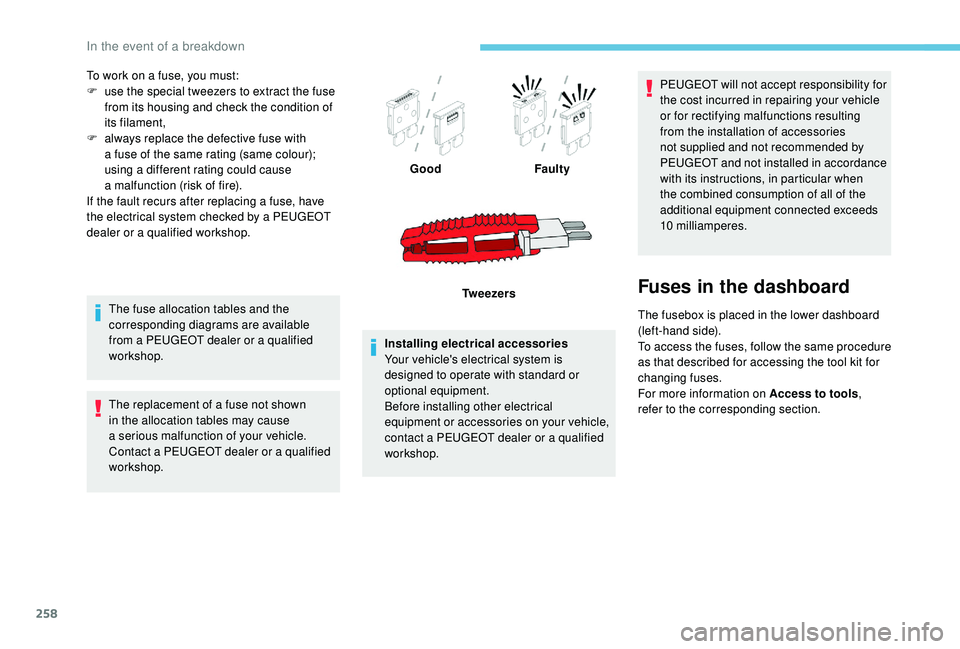
To work on a fuse, you must:
F u se the special tweezers to extract the fuse
from its housing and check the condition of
its filament,
F
a
lways replace the defective fuse with
a
fuse of the same rating (same colour);
using a
different rating could cause
a
malfunction (risk of fire).
If the fault recurs after replacing a
fuse, have
the electrical system checked by a
PEUGEOT
dealer or a
qualified workshop.
The fuse allocation tables and the
corresponding diagrams are available
from a
PEUGEOT dealer or a qualified
workshop.
The replacement of a
fuse not shown
in the allocation tables may cause
a
serious malfunction of your vehicle.
Contact a
PEUGEOT dealer or a qualified
workshop. Installing electrical accessories
Your vehicle's electrical system is
designed to operate with standard or
optional equipment.
Before installing other electrical
equipment or accessories on your vehicle,
contact a
PEUGEOT dealer or a qualified
workshop. PEUGEOT will not accept responsibility for
the cost incurred in repairing your vehicle
or for rectifying malfunctions resulting
from the installation of accessories
not supplied and not recommended by
PEUGEOT and not installed in accordance
with its instructions, in particular when
the combined consumption of all of the
additional equipment connected exceeds
10
milliamperes.
Fuses in the dashboard
The fusebox is placed in the lower dashboard
(left-hand side).
To access the fuses, follow the same procedure
as that described for accessing the tool kit for
changing fuses.
For more information on Access to tools,
refer to the corresponding section.
Good
Faulty
Tw e e z e r s
In the event of a breakdown
Page 296 of 364
20
The "Mobile internet data " profile
must be activated for connected
navigation (where the vehicle does not
have "Emergency and assistance call"
services), having first activated sharing of
this connection on your smartphone.
Select one or more profiles.
Press " OK" to confirm.
Wi-Fi connection
Network connection by the smartphone's Wi-Fi.
or Press Applications
to display the
primary page.
Press the " OPTIONS" button to go to the
secondary page.
Select "Wi- Fi network
connection ". Select the "
Secured" or "Not
secured " or "Stored " tab.
Select a
network.
Using the virtual keypad, enter the
" Key " for the Wi-Fi network and the
" Password ".
Press " OK" to start the connection.
The Wi-Fi connection and the sharing of
the Wi-Fi connection are exclusive.Wi-Fi connection sharing
Creation of a local Wi-Fi network by the
s ystem.
or Press Applications
to display the
primary page.
Press the " OPTIONS" button to go to the
secondary page.
Select "Share Wi-Fi connection ".Select the "
Activation" tab to activate or
deactivate sharing of the Wi-Fi connection.
And/Or
Select the " Settings" tab to change the name
of the system network and the password.
Press "OK" to confirm.
To protect against unauthorised access
and make your systems as secure as
possible, the use of a complex security
code or password is recommended.
Manage connections
or Press Applications
to display the
primary page.
Press the " OPTIONS" button to go to the
secondary page.
Select "Manage connection ".
With this function you can view the access
to connected ser vices, the availability of
connected services and modify the connection
mode.
PEUGEOT Connect Nav