MIRROR PEUGEOT 5008 2018 Owner's Guide
[x] Cancel search | Manufacturer: PEUGEOT, Model Year: 2018, Model line: 5008, Model: PEUGEOT 5008 2018Pages: 364, PDF Size: 13.03 MB
Page 290 of 364
14
Network connection provided by
the user
Connect a USB cable.
T he smartphone charges when
connected by a
USB cable.
Bluetooth connection
Wi-Fi connection Restrictions of use:
-
W
ith CarPlay
®, connection sharing is
only with a
Wi-Fi connection.
-
W
ith MirrorLink
TM, connection sharing
is only with a
USB connection.
The quality of ser vices depends on the
quality of the network connection.
Network connection provided by
the vehicle
The system is automatically
connected to the modem included
for the "Emergency or assistance
calls" ser vices and does not require
a
connection provided by the user
via their smartphone.
With the arrival of "TOMTOM
TR AFFIC", the ser vices are
available.
The ser vices offered with connected
navigation are as follows.
A Connected Services pack:
-
Weather,
-
F
illing stations,
-
C
ar park,
-
Tr a f f i c ,
-
P
OI local search.
A Danger zone pack (option). The processes and standards are
constantly changing; for the communication
process between the smartphone and the
system to work correctly, we recommend
that you update the operating system of
the smar tphone as well as the date and
time of the smar tphone and the system.
Settings specific to
connected navigation
In the "Settings" menu you can create
a
profile for just one person or a group
of people with shared interests, with
the possibility of entering a
multitude of
settings (radio presets, audio settings,
navigation history, contact favourites,
etc.); these settings are taken into account
automatically.
or Press Navigation
to display the
primary page.
Press the " MENU" button to go to the
secondary page.
USB connection
Activate the Bluetooth function on
the telephone and ensure that it is
visible to all (see the "Applications"
section).
Select a
Wi-Fi network found by the
system and connect to it (see the
"Applications" section).
PEUGEOT Connect Nav
Page 292 of 364
16
Display the weather
or Press Navigation
to display the
primary page.
Press this button to display the list of
services.
Select " View map ".
Select " Weather ".
Press this button to display primary
information.
Press this button to display the
detailed weather information.
The temperature displayed at 6
a.m. will
be the maximum temperature for the day.
The temperature displayed at 6
p.m. will
be the minimum temperature for the night.
Applications
Internet Browser
or Press Applications
to display the
primary page.
Press " Connectivity " to go to the " Internet
Browser " function.
Press " Internet Browser " to display the
browser home page.
Select your country of residence.
Press "OK" to save and start the
browser.
Connection to the internet is via one of
the network connections provided by the
vehicle or the user.
Connectivity
or Press Applications
to display the
primary page. Press "
Connectivity " to go to the CarPlay
®,
MirrorLinkTM or Android Auto functions.
Applications
or Press Applications
to display the
primary page.
Press " Applications " to display the
applications home page.
CarPlay® smartphone
connection
As a safety measure and because it
r equires sustained attention by the driver,
using a
smartphone when driving is
prohibited.
All operations must be done with the
vehicle stationary .
PEUGEOT Connect Nav
Page 293 of 364
17
The synchronisation of a personal
sm artphone allows users to display
applications compatible with the
smartphone's CarPlay
® technology on the
vehicle screen when the smartphone's
CarPlay
® function has been previously
activated.
As the processes and standards are
constantly changing, it is recommended
that you keep your smar tphone's
operating system updated .
For the list of eligible smartphones, go
to the Brand's internet website in your
c o u nt r y.
Connect a
USB cable. The
smartphone charges when
connected by a
USB cable.
or Press on "
Telephone " to display the
CarPlay
® inter face.
Or Connect a
USB cable. The
smartphone charges when
connected by a
USB cable. or
From the system, press
"
Applications " to display the
primary page.
Press " Connectivity " to go to the CarPlay
®
function.
Press "CarPlay " to display the
CarPlay
® inter face.
On connecting the USB cable, the
CarPlay
® function deactivates the
system's Bluetooth® mode.
MirrorLinkTM smartphone
connection
As a safety measure and because it
r equires sustained attention by the driver,
using a
smartphone when driving is
prohibited.
All operations must be done with the
vehicle stationary . The synchronisation of a
personal
smartphone allows users to display
applications adapted for the smartphone's
MirrorLink
TM technology on the vehicle
screen.
The processes and standards
are constantly changing. For the
communication process between the
smartphone and the system to operate,
it is essential that the smartphone be
unlocked; update the operating system
of the smar tphone as well as the date
and time of the smar tphone and the
system .
For the list of eligible smartphones, go
to the Brand's internet website in your
c o u nt r y.
As a
safety measure, applications can
only be viewed with the vehicle stationary;
display is interrupted once the vehicle is
moving.
The MirrorLink
TM function requires the
use of a
compatible smartphone and
applications.
When connecting a
smartphone
to the system, it is recommended
that Bluetooth
® be started on the
smartphone.
.
PEUGEOT Connect Nav
Page 294 of 364
18
Connect a USB cable. The
sm artphone charges when
connected by a
USB cable.
or From the system, press
"
Applications " to display the
primary page.
Press " Connectivity " to go to the MirrorLink
TM
function.
Press "MirrorLink
TM" to start the
application in the system.
Depending on the smartphone, it may be
necessary to activate the MirrorLink
TM
function. In the process, several screen
pages relating to certain functions
are displayed.
Accept to start and complete the
connection.
Once connection is established, a page
is displayed with the applications already
downloaded to your smartphone and adapted
to MirrorLink
TM technology.
Access to the different audio sources remains
accessible in the margin of the MirrorLink
TM
display, using touch buttons in the upper bar.
Access to the menus for the system is possible
at any time using the dedicated buttons. There may be a
wait for the availability of
applications, depending on the quality of
your network.
Android Auto smartphone
connection
As a safety measure and because it
r equires sustained attention by the driver,
using a
smartphone when driving is
prohibited.
All operations must be done with the
vehicle stationary .
The synchronisation of a
personal
smartphone allows users to display
applications adapted for the smartphone's
Android Auto technology on the vehicle
screen.
The processes and standards
are constantly changing. For the
communication process between the
smartphone and the system to operate,
it is essential that the smartphone be
unlocked; update the operating system
of the smar tphone as well as the date
and time of the smar tphone and the
system .
For the list of eligible smartphones, go
to the Brand's internet website in your
c o u nt r y. As a
safety measure, applications can
only be viewed with the vehicle stationary;
display is interrupted once the vehicle is
moving.
The " Android Auto " function requires
the use of a compatible smartphone and
applications.
Connect a USB cable. The
smartphone charges when
connected by a
USB cable.
or From the system, press
"
Applications " to display the
primary page.
Press " Connectivity " to go to the "Android
Auto" function.
Press "Android Auto " to start the
application in the system.
In the process, several screen
pages relating to certain functions
are displayed.
Accept to start and complete the
connection.
PEUGEOT Connect Nav
Page 318 of 364
4
21,518,5
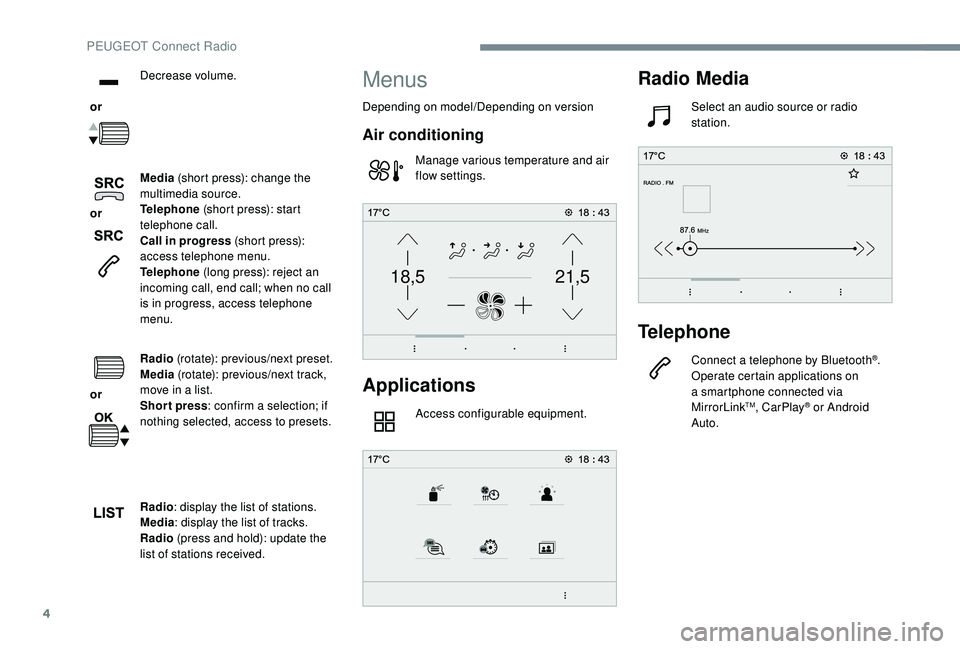
or Decrease volume.
or Media
(short press): change the
multimedia source.
Telephone (short press): start
telephone call.
Call in progress (short press):
access telephone menu.
Telephone (long press): reject an
incoming call, end call; when no call
is in progress, access telephone
menu.
or Radio
(rotate): previous/next preset.
Media (rotate): previous/next track,
move in a
list.
Short press : confirm a
selection; if
nothing selected, access to presets.
Radio : display the list of stations.
Media : display the list of tracks.
Radio (press and hold): update the
list of stations received.
Menus
Depending on model/Depending on version
Air conditioning
Manage various temperature and air
flow settings.
Applications
Access configurable equipment.
Radio Media
Select an audio source or radio
station.
Telephone
Connect a telephone by Bluetooth®.
Operate certain applications on
a
smartphone connected via
MirrorLink
TM, CarPlay® or Android
Auto.
PEUGEOT Connect Radio
Page 319 of 364
5
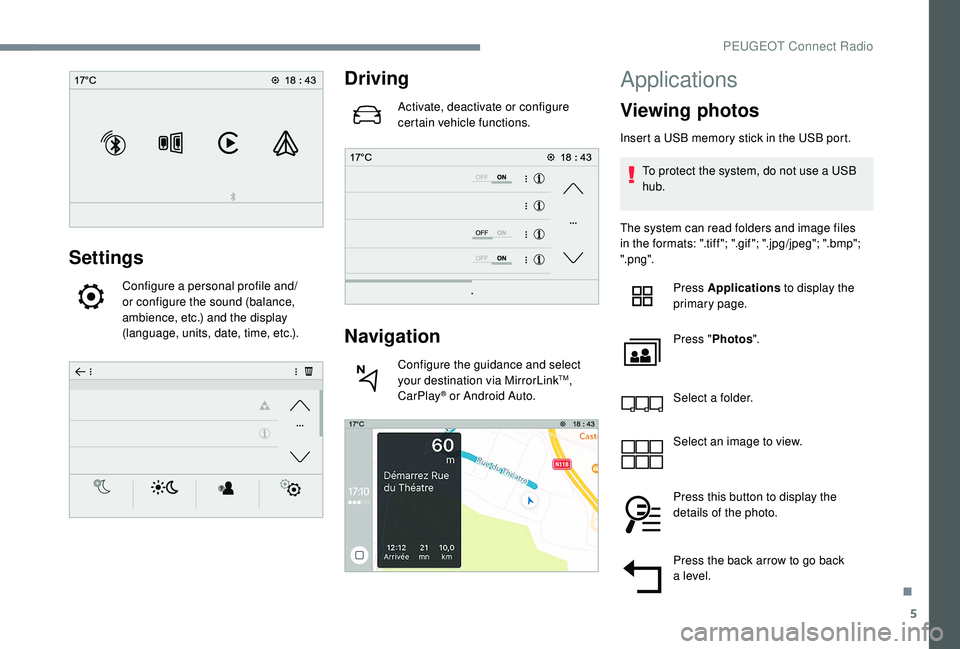
Settings
Configure a personal profile and/
o r configure the sound (balance,
ambience, etc.) and the display
(language, units, date, time, etc.).
Driving
Activate, deactivate or configure
certain vehicle functions.
Navigation
Configure the guidance and select
your destination via MirrorLinkTM,
CarPlay® or Android Auto.
Applications
Viewing photos
Insert a USB memory stick in the USB port.
T o protect the system, do not use a USB
hub.
The system can read folders and image files
in the formats: ".tiff "; ".gif "; ".jpg/jpeg"; ".bmp";
".png". Press Applications to display the
primary page.
Press " Photos ".
Select a
folder.
Select an image to view.
Press this button to display the
details of the photo.
Press the back arrow to go back
a
level.
.
PEUGEOT Connect Radio
Page 325 of 364
11
Telephone
MirrorLinkTM smartphone
connection
As a safety measure and because it
r equires sustained attention by the driver,
using a
smartphone when driving is
prohibited.
All operations must be done with the
vehicle stationary .
The synchronisation of a
personal
smartphone allows users to display
applications adapted for the smartphone's
MirrorLink
TM technology on the vehicle
screen.
The processes and standards
are constantly changing. For the
communication process between the
smartphone and the system to operate,
it is essential that the smartphone be
unlocked; update the operating system
of the smar tphone as well as the date
and time of the smar tphone and the
system .
For the list of eligible smartphones, go
to the Brand's internet website in your
c o u nt r y. As a
safety measure, applications can
only be viewed with the vehicle stationary;
display is interrupted once the vehicle is
moving.
The "MirrorLink
TM" function requires
a
compatible smartphone and
applications.
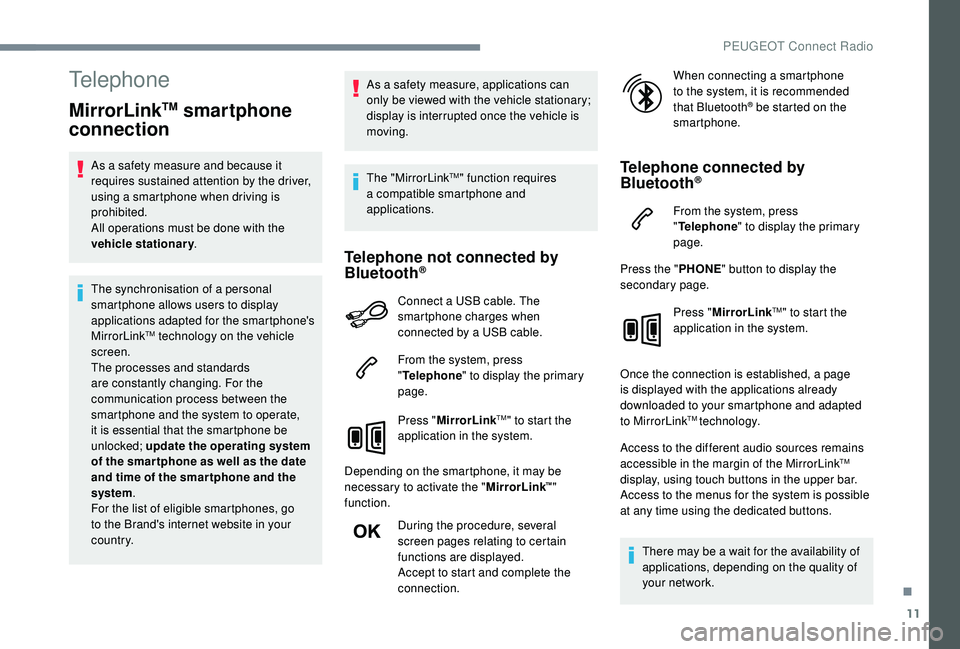
Telephone not connected by
Bluetooth®
Connect a USB cable. The
sm artphone charges when
connected by a
USB cable.
From the system, press
" Telephone " to display the primary
page.
Press " MirrorLink
TM" to start the
application in the system.
Depending on the smartphone, it may be
necessary to activate the " MirrorLink
™"
function.
During the procedure, several
screen pages relating to certain
functions are displayed.
Accept to start and complete the
connection. When connecting a
smartphone
to the system, it is recommended
that Bluetooth
® be started on the
smartphone.
Telephone connected by
Bluetooth®
From the system, press
" Telephone " to display the primary
page.
Press the " PHONE" button to display the
secondary page.
Press "MirrorLink
TM" to start the
application in the system.
Once the connection is established, a page
is displayed with the applications already
downloaded to your smartphone and adapted
to MirrorLink
TM technology.
Access to the different audio sources remains
accessible in the margin of the MirrorLink
TM
display, using touch buttons in the upper bar.
Access to the menus for the system is possible
at any time using the dedicated buttons.
There may be a
wait for the availability of
applications, depending on the quality of
your network.
.
PEUGEOT Connect Radio
Page 355 of 364
275
Accessories .......................................... 12 2, 16 0
Active Safety Brake..................... 16 -17, 19 2-19 5
AdBlue
® ............................................. 2 0, 32, 237
Additive, Diesel ............................................. 235
Adjusting headlamps
.................................... 114
Adjusting head restraints
................................ 71
Adjusting seats
................................ 69 -71, 77-78
Adjusting the air distribution
.....................89-92
Adjusting the air flow
................................. 8
9-92
Adjusting the date
......................... 38 - 40, 31, 18
Adjusting the height and reach of the steering wheel
.................................... 74
Adjusting the lumbar support
.................... 6
9 -71
Adjusting the seat belt height
................ 13
0 -131
Adjusting the temperature
........................89-92
Adjusting the time
......................... 38 - 40, 31, 17
Advanced Grip Control
.......................... 128 -12 9
Advice on driving
................................... 15 5 -15 6
Airbags
...............................
.............18, 13 4, 13 9
Airbags, curtain
...................................... 13 5 -137
Airbags, front .................................. 13 4 -13 5, 137
Airbags, lateral
...................................... 13 5, 137
Air conditioning
......................................... 86-88
Air conditioning, automatic
.............................85
Air conditioning, dual-zone automatic
......89, 93
Air conditioning, manual
............... 8
5 - 86, 92-93
Air conditioning, mono-zone
...............87- 88, 93
Air intake
................................................... 89-92
Air vents
.......................................................... 84
Alarm
............................................................... 56
Amplifier, audio
...............................
..............101
Anti-lock braking system (ABS)
..............15, 125
Apple CarPlay connection
........................16, 12
Armrest, front
......................................... 102-103
Assistance call
...............................
........123 -124 Assistance, emergency braking
...........
125, 19 4
Audio streaming (Bluetooth)
...................
24, 9, 9
Cable, audio
................................................23, 9
Cable, Jack
.................................................23, 9
Capacity, fuel tank
........................................220
Cartridge, fragrance
............................. 10
3 -104
A
B
C
Backrest, folding ........................................7 0 -71
Battery ..................... 13, 227, 235, 262, 264-265
Battery charge (warning lamp)
.......................13
Battery, charging
................................... 263-264
Battery, remote control
.............................52, 54
Blind
..............................
..................................64
Blind spot monitoring system
..........24, 203-205
Blind spot monitoring system, active
......24, 205
Blind spot sensors
..........................24, 203-204
Blinds, side
.................................................... 107
BlueHDi
..................................... 32, 35, 237, 240
Bluetooth (hands-free)
........ 2
5 -2 6 , 13 -14, 10 -11
Bluetooth (telephone)
...................... 2
5 - 2 7, 1 3 -1 5
Bonnet
................................................... 230-231
Boot
............................................. 59 - 60, 62, 110
Boot (fittings)
................................................. 108
Brake discs
............................................ 236-237
Brake lamps
...............................
...................255
Brakes
........................................ 14-15, 236-237
Braking assistance system
...........................125
Braking, automatic emergency
...16 -17, 19 2-19 5
Braking, emergency
...................................... 16
4
Brightness
....................................................... 16
Bulbs
............................................................. 252
Bulbs (changing)
...........................252, 255-256
180° rear vision
.....................................
209 -210 CD
.....................................................
23 -24, 9, 9
CD, MP3
............................................
23 -24, 9, 9
Central locking
.......................................... 4
9, 55
Changing a
bulb
............................
25
2, 255-256
Changing a
fuse
............................
25
7-258, 261
Changing a
wheel
..................
24
1-243, 246 -248
Changing a wiper blade ........................
12 0, 257
Changing the remote control battery ..............
54
Charger, induction ..................................101-102
Charger, wireless
................................... 10
1-102
Checking the engine oil level
..........................31
Checking the levels
..............................232, 234
Checking tyre pressures (using the kit)
......................................243, 245
Checks
...................................231-232, 235-237
Child lock
................................................15 3 -15 4
Children
.................................14 4, 14 6 -148, 15 0
Children (safety)
.....................................15 3 -15 4
Child seats
............1
33, 138 -139, 142, 144, 152
Child seats, conventional
......................142, 14 4
Child seats, i-Size
.........................................15 0
Child seats, ISOFIX
.......................14 6 -148, 15 0
Cigarette lighter
............................................10 0
Closing the boot
..................................47, 50, 59
Closing the doors
..........................47, 49 -50, 59
Configurations, seats
......................................82
Configuration, vehicle
......................... 3
8 - 42, 44
Connection, Bluetooth
........ 1
9, 25 -27, 13 -15, 11
Connection, MirrorLink
.........................17, 11 -1 2
Connection, Wi-Fi network
.............................20
Connectivity
..................................................101
Container, AdBlue
® ....................................... 23 8
Control, emergency door ................................ 52
C
ontrol, heated seats
...................................... 73
Controls, steering mounted
.................. 165 -169
Control stalk, lighting
................. 2 5 - 2 6 , 111, 113
Control stalk, wipers
.............................. 11
9 -12 1
Courtesy lamps
..................................... 104 -105
Cruise control
... 175 -176, 178, 181-187, 191-192
Cruise control by speed limit recognition
.....178
.
Alphabetical index
Page 357 of 364
277
Key ............................................................ 46, 52
Key, electronic ........................................... 49-50
Keyless Entry and Starting
.............................. 49 - 5 0, 52, 15 8 -159
Key not recognised
................................ 16
0 -161
Key with remote control
................................15
6
Kit, hands-free
.................... 2
5 -2 6 , 13 -14, 10 -11
Kit, temporary puncture repair
....... 24
1-243, 245Map reading lamps
............................... 10
4 -105
Markings, identification
.................................273
Massage function
...........................................74
Massage, multi-point
......................................74
Mat
................................................................104
Memorising a
speed
..............................17
5 -176
Menu
...............................................................12K
J
L
M
Labels, identification ..................................... 273
Lamp, boot .................................................... 11 0
Lamps, parking
............................................. 113
Jack
...............................
......
242, 246 -248, 23, 9
Jump starting
................................................
262
Ii-Cockpit amplify function ...7 4, 83 - 84, 103, 170
Ignition ................ ............................. 158, 160, 28
Ignition on ...................................................... 160
Immobiliser, electronic
............................52, 15 6
Indicator, AdBlue
® range ................................. 32
Indicator, coolant temperature ........................ 32
Indicator, engine oil level
.......................... 31, 3 5
Indicator lamps, operation
........................ 11
, 15
Indicators, direction
.............................. 113 , 2 5 3
Inflating tyres
................................................ 236
Inflating tyres (using the kit)
.................. 24
3, 245
Instrument panel
................................ 8 -9, 35 -37
Intelligent Traction Control
............................ 126
Internet browser
.............................................. 16
I
SOFIX
.......................................................... 147
ISOFIX mountings ......................................... 14 6Lamps, rear
...................................................
255
Lane Departure Warning System (LDWS), Active
.........
17, 198 -19 9, 205
Lane Departure Warning System (LDWS) ....................................17, 1 9 8
LEDs – Light-emitting diodes
..................................112, 252-253, 255
Level, brake fluid
...........................................234
Level, Diesel additive
............................234-235
Level, engine coolant
..............................32, 234
Level, engine oil
..............................31, 233-234
Levels and checks
........................23
1-232, 234
Level, screenwash fluid
........................1
20, 234
Light-emitting diodes – LEDs
...............................
.....112, 252-253, 255
Lighting
............................................................26
Lighting, cornering
........................................11 8
Lighting dimmer
..............................................36
Lighting, exterior
...........................................111
Lighting, guide-me home
.................4 8 , 115 -11 6
Lighting, interior
...............................
.....104 -105
Lighting, mood
........................................36, 105
Lighting, welcome
.........................................115
Loading
..................................109 -110, 229 -230
Load reduction mode
....................................227
Locating your vehicle
......................................48
Locking
...............................
.................47, 50, 52
Locking from the inside
...................................55
Locking the doors
........................................... 60
L
ow fuel level
................................................2
20Menu, main
.......................................................
4
M
enus (audio)
........................................
3-5, 4-5
Messages
........................................................
28
Messages, quick ............................................. 28
M irror, rear view ........................................75 -76
Mirrors, door ......................... 74-75, 94, 203 -204
Mirror, vanity
...................................................99
Misfuel prevention
.........................................221
Modularity, seats
.............................................82
Motorised tailgate
..................................... 6
0-62
Mountings, ISOFIX
.......................................14 6
MP3
CD .............................................................9
N
Net ......................................................... 108 -109
Net, high load retaining ..........................109 -110
Number plate lamps
...................................... 256
O
Obstacle detection ........................................ 205
Oil change ............................................. 23
3-234
Oil consumption
.................................... 233-234
Oil, engine
....................................... 12, 233-234
On-board tools
....................................... 241-243
Opening the bonnet
..............................230-231
Opening the boot
...................................... 49, 59
Opening the doors
.................................... 49, 58
Opening the fuel filler flap
.............................220
Opening the windows
..................................... 46
P
ads, brake
........................................... 236-237
Paint
.............................................................. 273
Paint colour code
.......................................... 273
Parcel shelf, rear
........................................... 107
Park Assist
...............................
..............212-213
P
.
Alphabetical index