wheel PEUGEOT 5008 2018 Manual PDF
[x] Cancel search | Manufacturer: PEUGEOT, Model Year: 2018, Model line: 5008, Model: PEUGEOT 5008 2018Pages: 364, PDF Size: 13.03 MB
Page 249 of 364
247
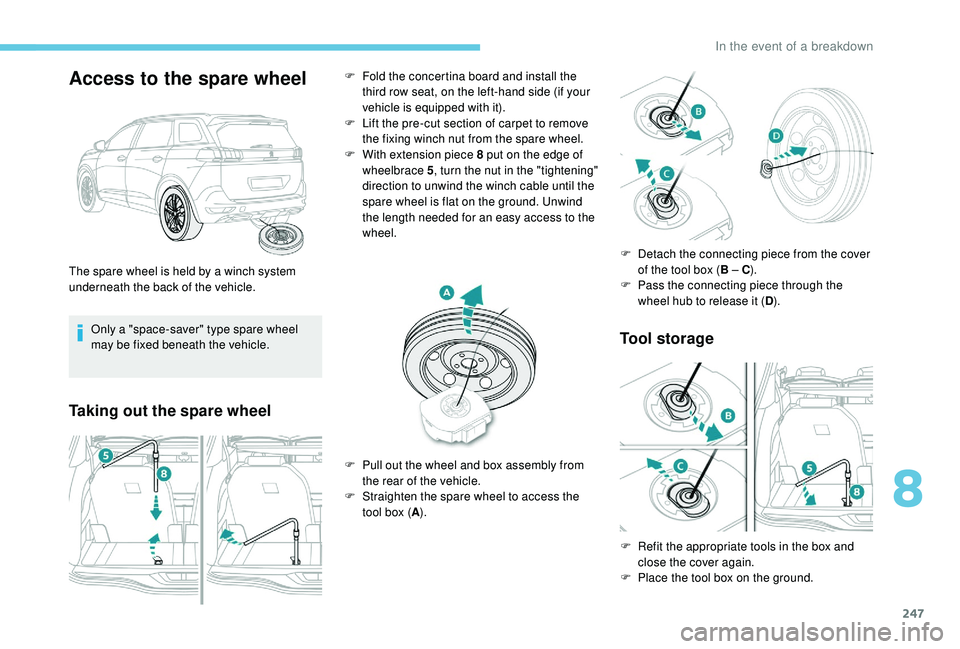
Access to the spare wheel
Only a "space-saver" type spare wheel
may be fixed beneath the vehicle.
Taking out the spare wheelTool storage
The spare wheel is held by a winch system
u nderneath the back of the vehicle. F
F
old the concertina board and install the
third row seat, on the left-hand side (if your
vehicle is equipped with it).
F
L
ift the pre-cut section of carpet to remove
the fixing winch nut from the spare wheel.
F
W
ith extension piece 8 put on the edge of
wheelbrace 5, turn the nut in the "tightening"
direction to unwind the winch cable until the
spare wheel is flat on the ground. Unwind
the length needed for an easy access to the
wheel.
F
P
ull out the wheel and box assembly from
the rear of the vehicle.
F
S
traighten the spare wheel to access the
tool box ( A). F
D
etach the connecting piece from the cover
of the tool box ( B – C).
F P ass the connecting piece through the
wheel hub to release it ( D).
F
R
efit the appropriate tools in the box and
close the cover again.
F
P
lace the tool box on the ground.
8
In the event of a breakdown
Page 250 of 364
248
The punctured wheel cannot be stored
beneath the vehicle.
It must be placed in the boot. Use a pad to
protect the inside of the boot.
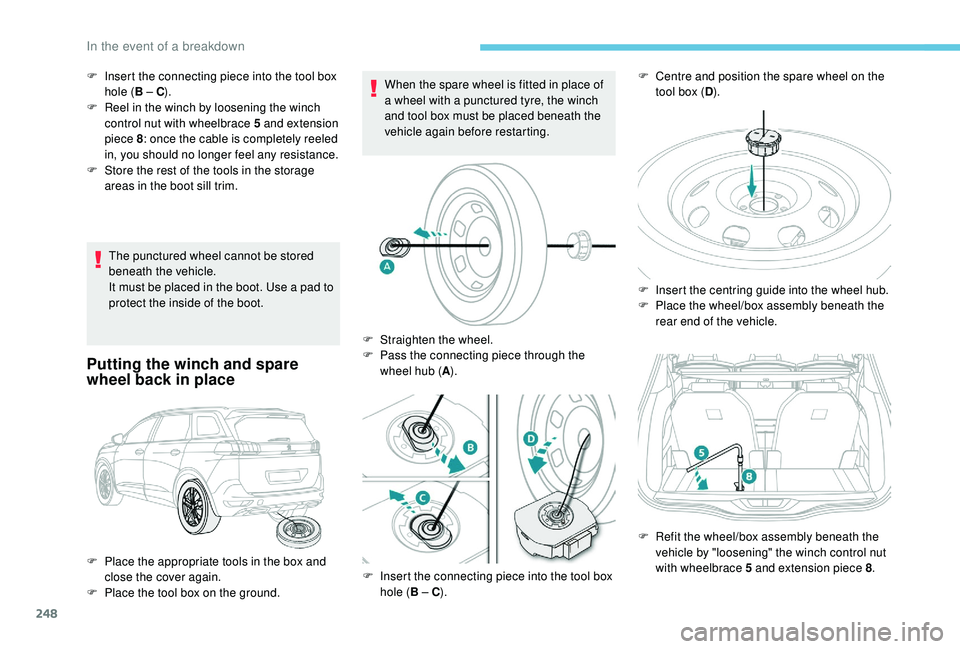
Putting the winch and spare
wheel back in place
When the spare wheel is fitted in place of
a wheel with a punctured tyre, the winch
and tool box must be placed beneath the
vehicle again before restarting.
F
I
nsert the connecting piece into the tool box
hole ( B – C).
F
R
eel in the winch by loosening the winch
control nut with wheelbrace 5
and extension
piece 8 : once the cable is completely reeled
in, you should no longer feel any resistance.
F
S
tore the rest of the tools in the storage
areas in the boot sill trim.
F
P
lace the appropriate tools in the box and
close the cover again.
F
P
lace the tool box on the ground. F
S
traighten the wheel.
F
P
ass the connecting piece through the
wheel hub ( A).
F
I
nsert the connecting piece into the tool box
hole ( B – C). F
C entre and position the spare wheel on the
tool box ( D).
F
I
nsert the centring guide into the wheel hub.
F
P
lace the wheel/box assembly beneath the
rear end of the vehicle.
F
R
efit the wheel/box assembly beneath the
vehicle by "loosening" the winch control nut
with wheelbrace 5
and extension piece 8.
In the event of a breakdown
Page 251 of 364
249
Removing a wheel
Wheel with wheel trim
When removing the wheel, first remove
the wheel trim by pulling at the valve
aperture using the wheelbrace.
When refitting the wheel , after tightening
the wheel bolts, refit the wheel trim,
starting by placing its aperture in line with
the valve and then pushing it into place all
round its edge with the palm of your hand. Parking the vehicle
Immobilise the vehicle where it does not
block traffic: the ground must be level,
stable and non-slippery.
Apply the parking brake, unless it is
programmed to be in automatic mode;
switch off the ignition and with a
manual
gearbox, engage first gear so as to lock
the wheels.
Apply the parking brake, unless it is
programmed to be in automatic mode;
switch off the ignition and with an
automatic gearbox, select mode P so as to
lock the wheels.
Check that the parking brake warning
lamps in the instrument panel are on fixed
(not flashing).
The occupants must get out of the vehicle
and wait where they are safe.
If necessary, place a
chock under the
wheel diagonally opposite the wheel to be
changed.
Never go underneath a
vehicle raised
using a
jack; use an axle stand.
F
T
ighten it fully. When the cable is
completely reeled in, turning the nut no
longer encounters resistance.
F
C
heck that the wheel is properly flattened
against the floor.
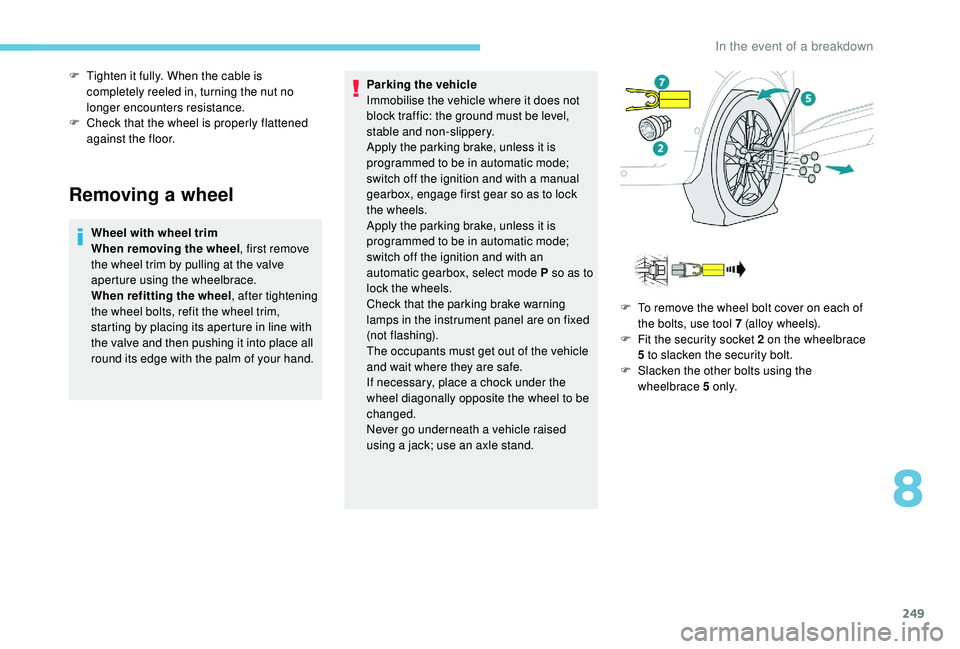
F
T
o remove the wheel bolt cover on each of
the bolts, use tool 7 (alloy wheels).
F
F
it the security socket 2 on the wheelbrace
5
to slacken the security bolt.
F
S
lacken the other bolts using the
wheelbrace 5
o n l y.
8
In the event of a breakdown
Page 252 of 364
250
Ensure that the jack is stable. If the
ground is slippery or loose, the jack may
slip or drop – Risk of injury!
Take care to position the jack strictly at
one of the jacking points A or B under
the vehicle, ensuring that the head of the
jack is centred under the contact area on
the vehicle. Other wise, there is a risk of
damage to the vehicle and/or of the jack
dropping – Risk of injury!
Fitting a wheel
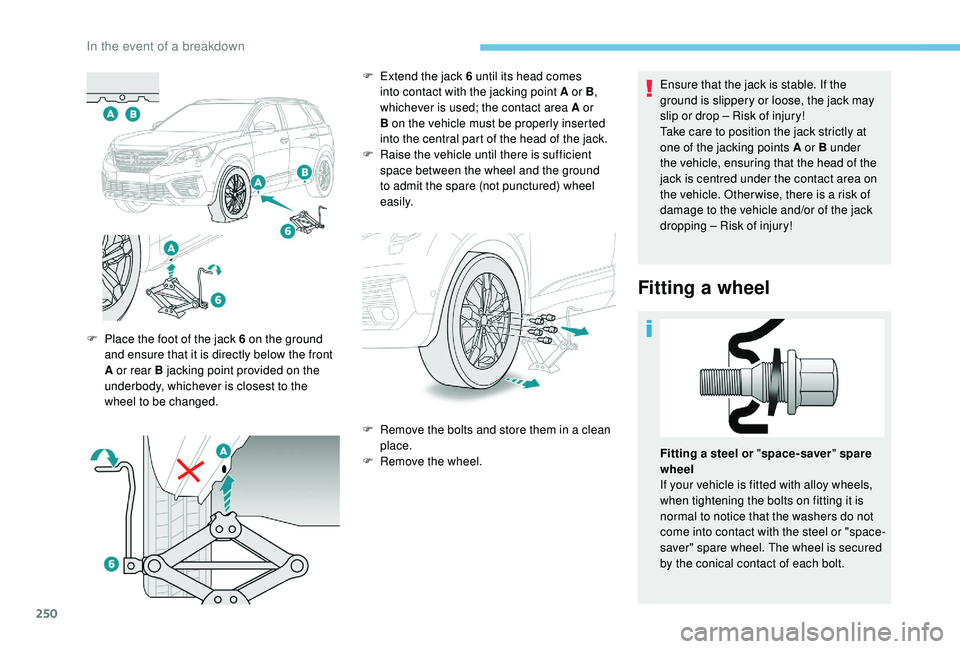
F Place the foot of the jack 6 on the ground
and ensure that it is directly below the front
A or rear B jacking point provided on the
underbody, whichever is closest to the
wheel to be changed. F
E
xtend the jack 6 until its head comes
into contact with the jacking point A or B ,
whichever is used; the contact area A or
B on the vehicle must be properly inserted
into the central part of the head of the jack.
F
Ra
ise the vehicle until there is sufficient
space between the wheel and the ground
to admit the spare (not punctured) wheel
easily.
F
R
emove the bolts and store them in a clean
place.
F
R
emove the wheel.Fitting a
steel or "space-saver " spare
wheel
If your vehicle is fitted with alloy wheels,
when tightening the bolts on fitting it is
normal to notice that the washers do not
come into contact with the steel or "space-
saver" spare wheel. The wheel is secured
by the conical contact of each bolt.
In the event of a breakdown
Page 253 of 364
251
After changing a wheel
With a "space-saver " type spare wheel
Visit a PEUGEOT dealer or a qualified
workshop as soon as possible to have the
tightness of the bolts and the pressure of
the spare wheel checked.
Have the punctured tyre examined. After
inspection, the technician will advise you
on whether the tyre can be repaired or if it
must be replaced. The following is recommended:
-
d
eactivate some driving aid functions
(Active Safety Brake, Adaptive cruise
control with Stop function, etc.), as
indicated on the label attached to the
wheel,
-
d
o not exceed the maximum
authorised speed of 50
mph (80 km/h).
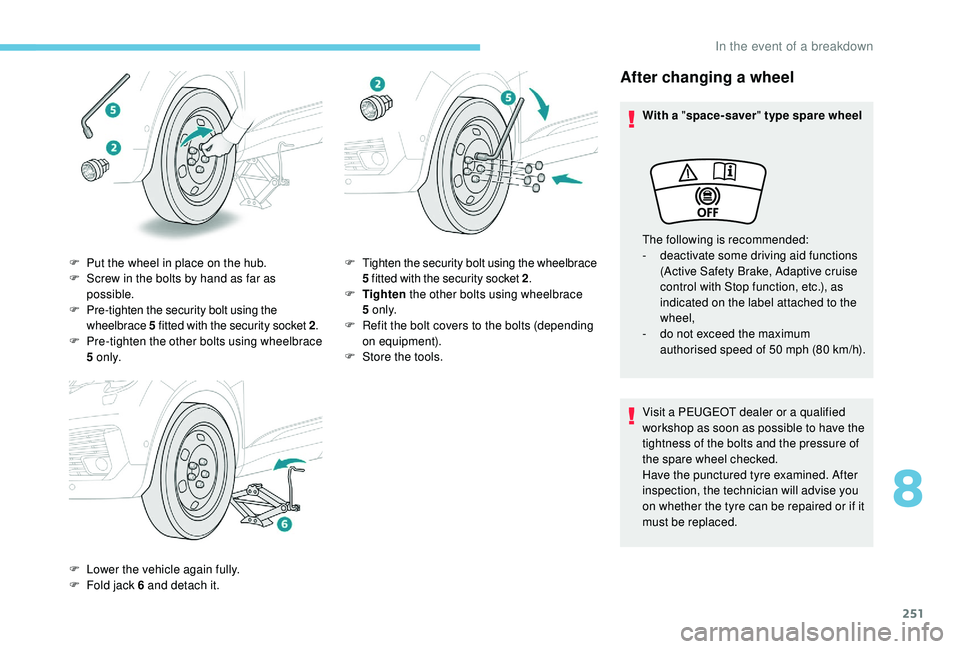
F
P
ut the wheel in place on the hub.
F
S
crew in the bolts by hand as far as
possible.
F
P
re-tighten the security bolt using the
wheelbrace 5
fitted with the security socket 2 .
F
P
re-tighten the other bolts using wheelbrace
5
o n l y.
F
L
ower the vehicle again fully.
F
F
old jack 6
and detach it. F
T
ighten the security bolt using the wheelbrace
5
fitted with the security socket 2 .
F
T
ighten the other bolts using wheelbrace
5
o n l y.
F
R
efit the bolt covers to the bolts (depending
on equipment).
F
S
tore the tools.
8
In the event of a breakdown
Page 268 of 364
266
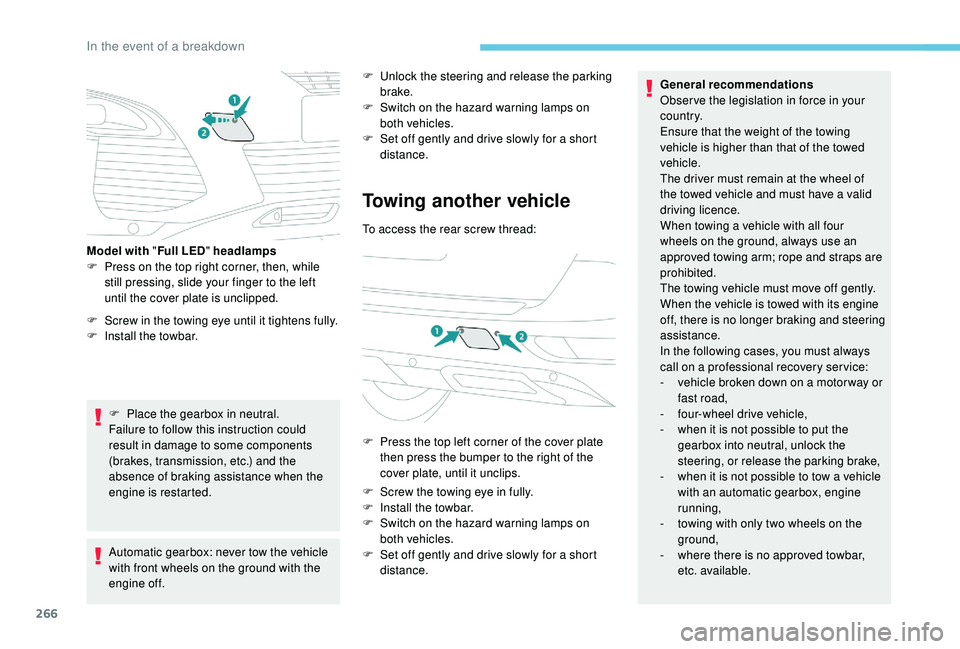
F Screw in the towing eye until it tightens fully.
F I nstall the towbar.
F
P
lace the gearbox in neutral.
Failure to follow this instruction could
result in damage to some components
(brakes, transmission, etc.) and the
absence of braking assistance when the
engine is restarted.
Model with "
Full LED" headlamps
F
P
ress on the top right corner, then, while
still pressing, slide your finger to the left
until the cover plate is unclipped.
Automatic gearbox: never tow the vehicle
with front wheels on the ground with the
engine off. F
U
nlock the steering and release the parking
brake.
F
S
witch on the hazard warning lamps on
both vehicles.
F
S
et off gently and drive slowly for a short
distance.
Towing another vehicle
To access the rear screw thread:
F
P
ress the top left corner of the cover plate
then press the bumper to the right of the
cover plate, until it unclips.
F
S
crew the towing eye in fully.
F
I
nstall the towbar.
F
S
witch on the hazard warning lamps on
both vehicles.
F
S
et off gently and drive slowly for a short
distance. General recommendations
Obser ve the legislation in force in your
c o u nt r y.
Ensure that the weight of the towing
vehicle is higher than that of the towed
vehicle.
The driver must remain at the wheel of
the towed vehicle and must have a
valid
driving licence.
When towing a vehicle with all four
wheels on the ground, always use an
approved towing arm; rope and straps are
prohibited.
The towing vehicle must move off gently.
When the vehicle is towed with its engine
off, there is no longer braking and steering
assistance.
In the following cases, you must always
call on a
professional recovery ser vice:
-
v
ehicle broken down on a motor way or
fast road,
-
f
our-wheel drive vehicle,
-
w
hen it is not possible to put the
gearbox into neutral, unlock the
steering, or release the parking brake,
-
w
hen it is not possible to tow a vehicle
with an automatic gearbox, engine
running,
-
t
owing with only two wheels on the
ground,
-
w
here there is no approved towbar,
etc. available.
In the event of a breakdown
Page 279 of 364
3
21,518,5
12:1323 °C
In the "Settings" menu you can create
a profile for just one person or a group
of people with shared interests, with
the possibility of entering multiple
settings (radio presets, audio settings,
navigation history, contact favourites,
etc.); these settings are taken into account
automatically.
In very hot conditions, the volume may
be limited to protect the system. It may go
into standby (screen and sound off) for at
least 5
minutes.
The return to normal takes place after
the temperature in the passenger
compartment drops.
Steering mounted controls
Depending on model.
Voice commands :
This control is located on the
steering wheel or at the end of the
lighting control stalk (depending on
model).
Short press, system voice
commands.
Long press, smartphone voice
commands via the system. or
Increase volume.
or Mute/Restore the sound.
Or
Mute by pressing the volume
increase and decrease buttons
simultaneously.
Restore the sound by pressing one
of the two volume buttons.
or Decrease volume.
or Media
(short press): change the
multimedia source.
Telephone (short press): start
telephone call.
Call in progress (short press):
access telephone menu.
Telephone (long press): reject an
incoming call, end call; when no call
is in progress, access telephone
menu. or
Radio
(rotate): automatic search for
the previous/next station.
Media (rotate): previous/next track,
move in a list.
Short press : confirm a selection; if
nothing selected, access to presets.
Radio : display the list of stations.
Media : display the list of tracks.
Radio (press and hold): update the
list of stations received.
Menus
Depending on model/Depending on version
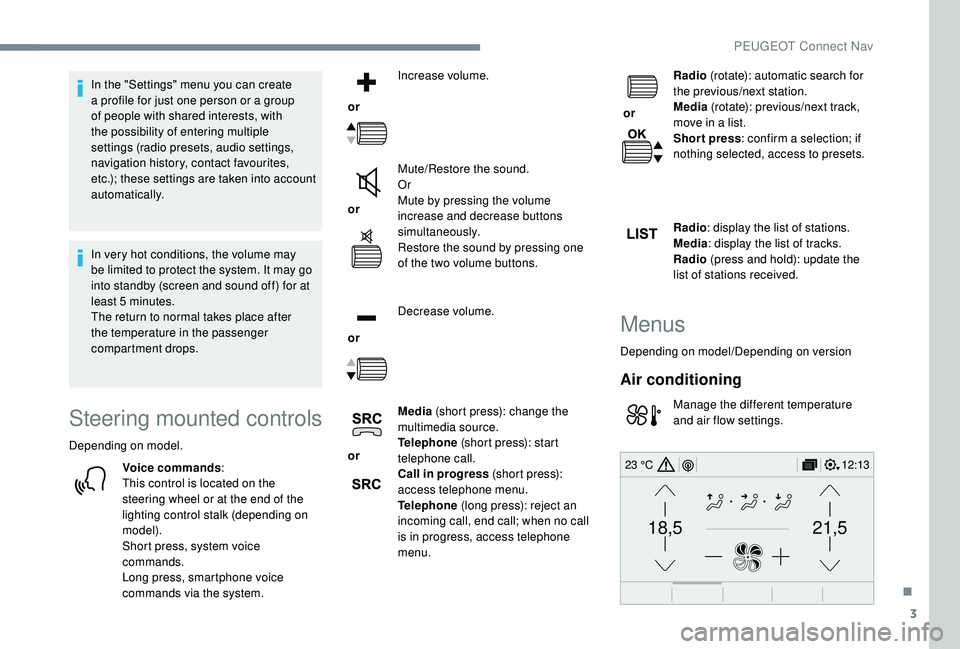
Air conditioning
Manage the different temperature
and air flow settings.
.
PEUGEOT Connect Nav
Page 282 of 364
6
Information – Using the system
Press the Push To Talk voice
command button and tell me
what you'd like after the tone.
Remember you can interrupt
me at any time by pressing
this button. If you press it
again while I'm waiting for
you to speak, it'll end the
conversation. If you need to
start over, say "cancel". If you
want to undo something, say
"undo". And to get information
and tips at any time, just say
"help". If you ask me to do
something and there's some
information missing that I need,
I'll give you some examples
or take you through it step by
step. There's more information
available in "beginner" mode.
You can set the dialogue mode
to "expert" when you feel
comfortable.
Global voice commands
These commands can be made from any
screen page after pressing the " Voice
command" or "Telephone" button located
on the steering wheel, as long as there is
no telephone call in progress.Voice commands Help messages
Help There are lots of topics I can help you with.
You can say: "help with phone", "help with
navigation", "help with media" or "help with
radio". For an over view on how to use voice
controls, you can say "help with voice controls".
Voice command help
Navigation help
Radio help
Media help
Telephone help
Set dialogue mode as <…>
Choose "beginner" or "expert" mode.
Select profile <…> Select profile 1, 2
or 3.
Ye s Say "yes" if I got that right. Other wise, say "no"
and we'll start that again.
No
PEUGEOT Connect Nav
Page 283 of 364
7
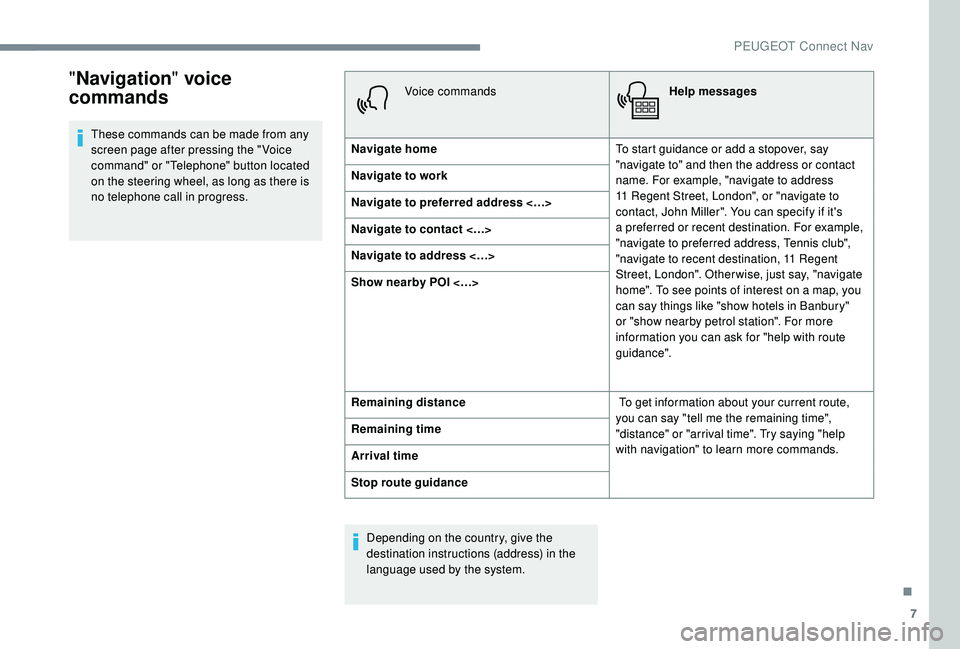
"Navigation " voice
commands
These commands can be made from any
screen page after pressing the " Voice
command" or "Telephone" button located
on the steering wheel, as long as there is
no telephone call in progress. Voice commands
Help messages
Navigate home To start guidance or add a
stopover, say
"navigate to" and then the address or contact
name. For example, "navigate to address
11
Regent Street, London", or "navigate to
contact, John Miller". You can specify if it's
a
preferred or recent destination. For example,
"navigate to preferred address, Tennis club",
"navigate to recent destination, 11
Regent
Street, London". Other wise, just say, "navigate
home". To see points of interest on a
map, you
can say things like "show hotels in Banbury"
or "show nearby petrol station". For more
information you can ask for "help with route
guidance".
Navigate to work
Navigate to preferred address <…>
Navigate to contact <…>
Navigate to address <…>
Show nearby POI <…>
Remaining distance
To get information about your current route,
you can say "tell me the remaining time",
"distance" or "arrival time". Try saying "help
with navigation" to learn more commands.
Remaining time
Arrival time
Stop route guidance
Depending on the country, give the
destination instructions (address) in the
language used by the system.
.
PEUGEOT Connect Nav
Page 284 of 364
8
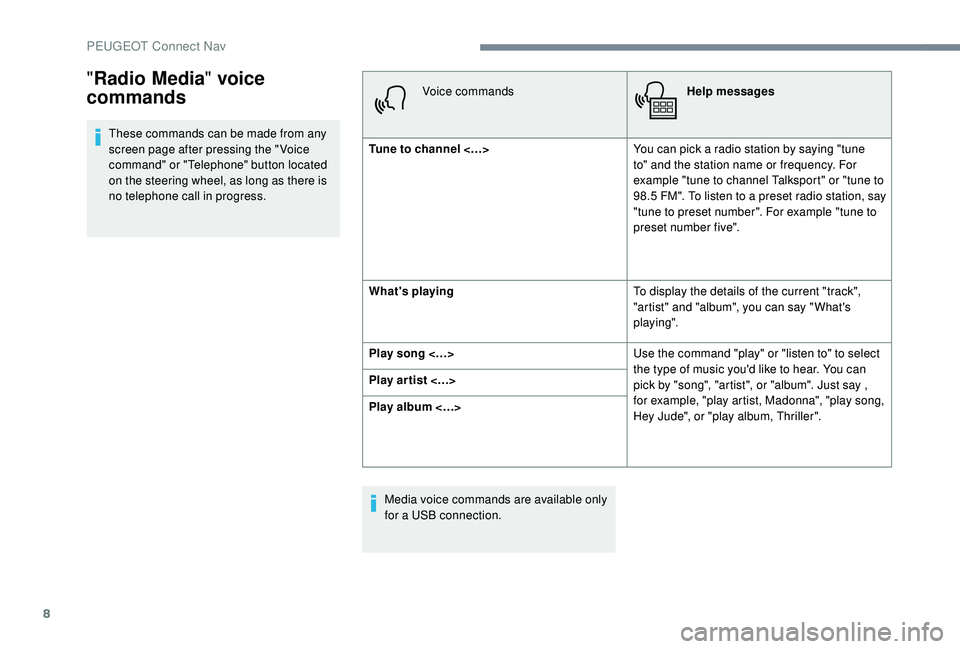
These commands can be made from any
screen page after pressing the " Voice
command" or "Telephone" button located
on the steering wheel, as long as there is
no telephone call in progress.Voice commands
Help messages
Tune to channel <…> You can pick a
radio station by saying "tune
to" and the station name or frequency. For
example "tune to channel Talksport" or "tune to
98.5
FM". To listen to a preset radio station, say
"tune to preset number". For example "tune to
preset number five".
What's playing To display the details of the current "track",
"artist" and "album", you can say " What's
playing".
Play song <…> Use the command "play" or "listen to" to select
the type of music you'd like to hear. You can
pick by "song", "artist", or "album". Just say ,
for example, "play artist, Madonna", "play song,
Hey Jude", or "play album, Thriller".
Play ar tist <…>
Play album <…>
Media voice commands are available only
for a
USB connection.
"Radio Media " voice
commands
PEUGEOT Connect Nav