wheel PEUGEOT 5008 2018 Owner's Guide
[x] Cancel search | Manufacturer: PEUGEOT, Model Year: 2018, Model line: 5008, Model: PEUGEOT 5008 2018Pages: 364, PDF Size: 13.03 MB
Page 167 of 364
165
Only engage reverse gear when the
vehicle is stationary with the engine at
idle.
As a safety precaution and to facilitate
starting of the engine, always select
neutral and depress the clutch pedal.
Engaging 5th or 6th gear
F Move the lever fully to the right to engage 5th
or 6th g e a r.
Failure to follow this advice may cause
permanent damage to the gearbox
(engagement of 3
rd or 4th gear by mistake).
Automatic gearbox (EAT6/
E AT 8)
Six or eight-speed automatic gearbox with push
selector. It also offers a manual mode with gear
changes via steering mounted paddles, located
behind the steering wheel.
Gearbox selector positions
P. Park.
For parking the vehicle: the front wheels
are blocked.
R. Reverse.
N. Neutral.
For moving the vehicle with the ignition
off: in certain car washing machines,
when towing the vehicle, etc.
D. Automatic mode.
The gearbox manages gear changes
according to the style of driving, the road
profile and the vehicle load.
M. Manual mode.
The driver changes gear using the
controls at the steering wheel.
Push selector
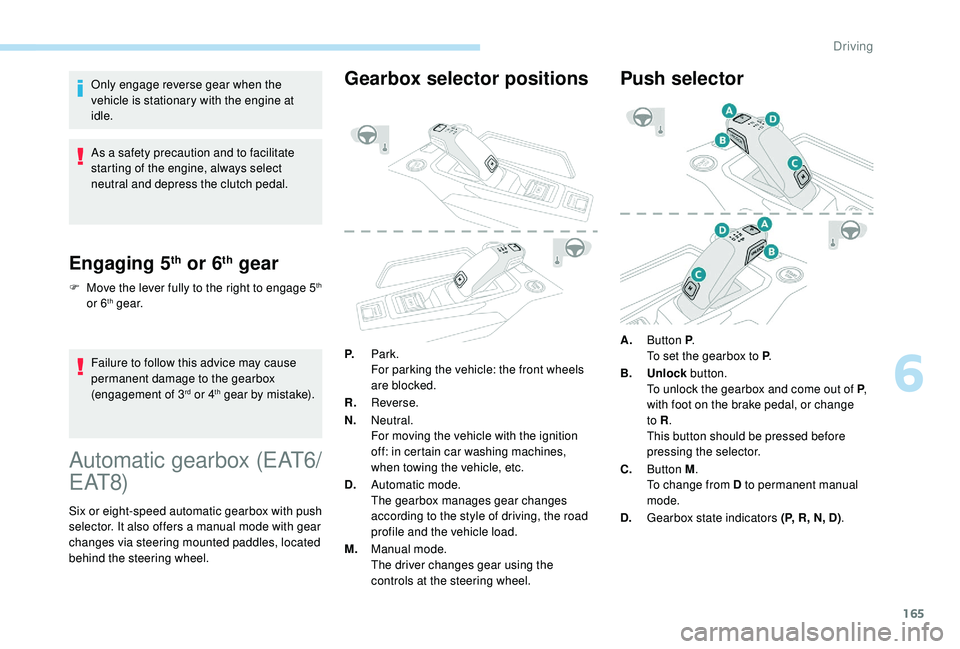
A.Button P .
To set the gearbox to P .
B. Unlock button.
To unlock the gearbox and come out of P ,
with foot on the brake pedal, or change
to R .
This button should be pressed before
pressing the selector.
C. Button M .
To change from D to permanent manual
mode.
D. Gearbox state indicators (P, R, N, D) .
6
Driving
Page 169 of 364
167
Displays in the instrument
panel
If the driver's door is opened with the
ignition on, a message is displayed asking
you to put the gearbox into mode P.
The state of the gearbox is displayed in
the instrument panel for a
few moments
after switching off the ignition.
Operation
You can activate or deactivate the function:
- b y pressing this button,
or
-
v
ia the i-Cockpit Amplify function, by
modifying the setting for an ambience in the
touch screen.
For more information on the Dynamic Pack
and the i-Cockpit Amplify function, refer to
the corresponding section.
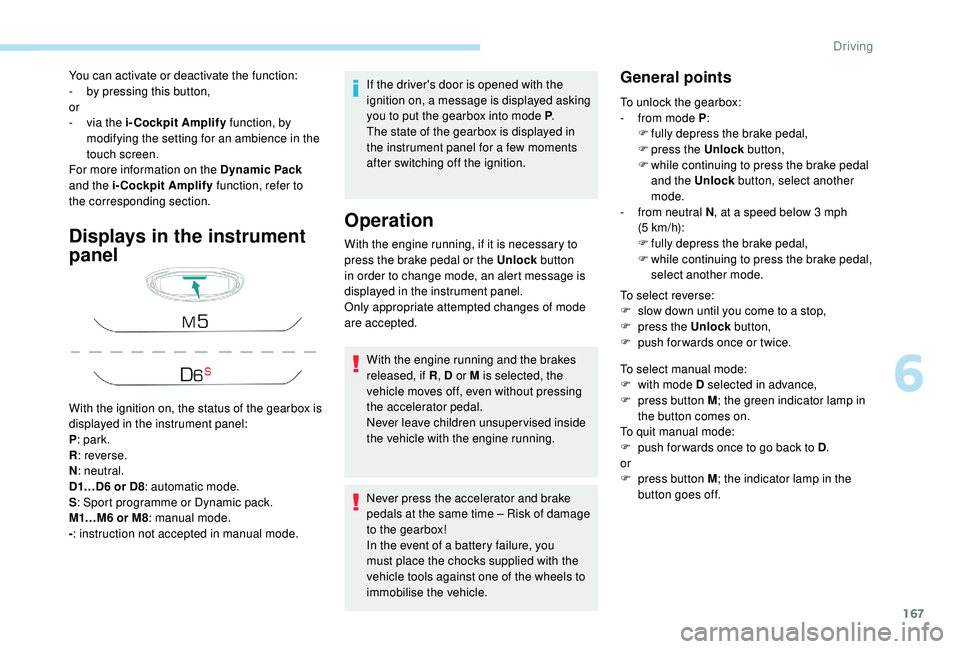
With the ignition on, the status of the gearbox is
displayed in the instrument panel:
P : park.
R : reverse.
N : neutral.
D1…D6
or D8: automatic mode.
S : Sport programme or Dynamic pack.
M1…M6
or M8: manual mode.
- : instruction not accepted in manual mode. With the engine running, if it is necessary to
press the brake pedal or the Unlock
button
in order to change mode, an alert message is
displayed in the instrument panel.
Only appropriate attempted changes of mode
are accepted.
With the engine running and the brakes
released, if R , D or M is selected, the
vehicle moves off, even without pressing
the accelerator pedal.
Never leave children unsuper vised inside
the vehicle with the engine running.
Never press the accelerator and brake
pedals at the same time – Risk of damage
to the gearbox!
In the event of a
battery failure, you
must place the chocks supplied with the
vehicle tools against one of the wheels to
immobilise the vehicle.General points
To unlock the gearbox:
- f rom mode P :
F
f
ully depress the brake pedal,
F
press the Unlock button,
F
w
hile continuing to press the brake pedal
and the Unlock button, select another
mode.
-
f
rom neutral N , at a
speed below 3 mph
(5
km/h):
F
f
ully depress the brake pedal,
F
w
hile continuing to press the brake pedal,
select another mode.
To select reverse:
F
s
low down until you come to a stop,
F
p
ress the Unlock button,
F
p
ush forwards once or twice.
To select manual mode:
F
w
ith mode D selected in advance,
F
p
ress button M ; the green indicator lamp in
the button comes on.
To quit manual mode:
F
p
ush for wards once to go back to D .
or
F
p
ress button M ; the indicator lamp in the
button goes off.
6
Driving
Page 170 of 364
168
To switch off the ignition, the vehicle must be
stationary.
To put the vehicle in free-wheeling mode,
engine off:
F
w
ith the vehicle stationary, engine running,
select N ,
F
s
witch off the engine,
F
w
ithin five seconds, switch the ignition on
again,
F
w
ith your foot on the brake pedal, push the
selector for wards or backwards once to
confirm N and manually release the electric
parking brake,
F
s
witch off the ignition.
If you exceed the time limit of five seconds,
the gearbox engages mode P ; you must then
restart the procedure.
If you open the driver's door when mode N
is engaged, an audible signal will sound. It
will stop when you close the driver's door
again.
Special aspects of automatic
mode
For maximum acceleration without touching
the selector, press the accelerator fully down
(kick-down). The gearbox changes down
automatically or holds the gear selected until
the maximum engine speed is reached.
When braking, the gearbox changes down
automatically to provide effective engine
braking.
The steering mounted controls allow the driver
to temporarily select a
gear, if the road and
engine speed permit.
Special aspects of manual mode
The change from one gear to another takes
place only if the road speed and engine speed
permit.
If the engine speed is too high or too low, the
gear selected flashes for a
few seconds, then
the gear actually engaged is displayed.
Moving off
From mode P:
F P ress the brake pedal firmly.
F
S
tart the engine.
F
M
aintaining pressure on the brake pedal,
press the Unlock button.
F
P
ush once or twice rear ward to select the
automatic mode D, or for ward to engage
reverse R . In severe wintry conditions (temperature
below -23°C), it is recommended that the
engine be allowed to run for a
few minutes
before moving off, to ensure the correct
operation and durability of the engine and
gearbox.
Stopping the vehicle
Whatever the state of the gearbox when the
ignition is switched off, mode P is engaged
automatically, with the exception of N , in which
case mode P will be engaged after a
delay of
5
seconds (allowing the change to free-wheel).
The gearbox selects the gear that offers
optimum per formance, taking account of the
exterior temperature, the profile of the road, the
load on the vehicle and the style of driving. From neutral N
:
F
P
ress the brake pedal firmly.
F
S
tart the engine.
F
M
aintaining pressure on the brake pedal,
push rear ward to select the automatic mode
D, or for ward, while pressing the Unlock
button to engage reverse R .
Then, from P or N :
F
R
elease the brake pedal.
F
A
ccelerate progressively to automatically
release the electric parking brake.
F
W
ith the parking brake released, the vehicle
then moves off.
Driving
Page 176 of 364
174
Under-inflation detection
System which automatically checks the
pressures of the tyres while driving.
The system monitors the pressures in the four
tyres, once the vehicle is moving.
It compares the information given by the wheel
speed sensors with reference values, which
must be reinitialised ever y time the tyre
pressures are adjusted or a wheel changed.
The system triggers an alert as soon as it
detects a
drop in the inflation pressure of one
or more tyres.
The under-inflation detection system does
not replace the need for vigilance on the
part of the driver.
This system does not avoid the need to
check the tyre pressures (including the
spare wheel) every month as well as
before a
long journey.
Driving with under-inflated tyres worsens
road-holding, lengthens braking distances,
causes premature wear of the tyres,
particularly in adverse conditions (heavy
loads, high speeds, long journeys). Driving with under-inflated tyres
increases fuel consumption.
The inflation pressures defined for your
vehicle can be found on the tyre pressure
label.
For more information on the
Identification markings , refer to the
corresponding section.
Checking tyre pressures
This check should be done when the tyres
are "cold" (vehicle stopped for 1
hour or
after a
journey of less than 6 miles (10 km)
at moderate speeds).
Other wise, add 0.3
bar to the pressures
shown on the label.
Snow chains
The system does not have to be
reinitialised after fitting or removing snow
chains.
Under-inflation alert
This warning is indicated by
continuous illumination of this lamp,
an audible signal and, depending on
the equipment installed, a message
displayed on the screen.
F
R
educe speed immediately, avoid excessive
steering movements and sudden braking.
F
S
top the vehicle as soon as it is safe to do
so.
The loss of pressure detected does not
always cause visible bulging of the tyre.
Do not satisfy yourself with just a
visual
check.
F
I
f you have a compressor, such as the one
in the temporary puncture repair kit, check
the pressures of the four tyres when cold.
F
I
f it is not possible to make this check
immediately, drive carefully at reduced
speed.
or
F
I
n case of a puncture, use the temporary
puncture repair kit or the spare wheel
(depending on equipment).
The alert is kept active until the system is
reinitialised.
Driving
Page 177 of 364
175
Reinitialisation
The system must be reinitialised after any
adjustment to the pressures of one or more
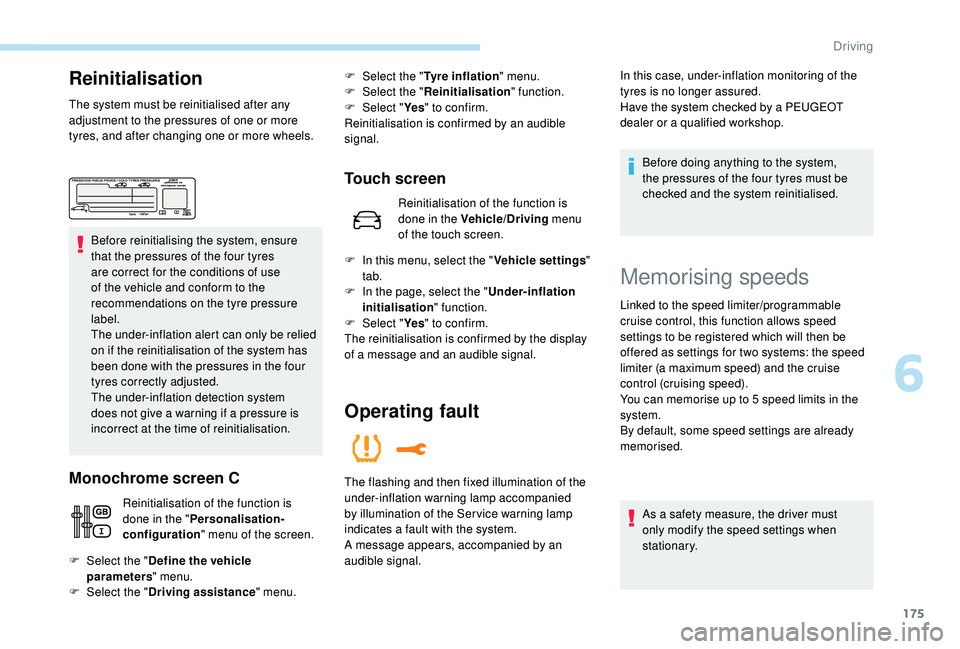
tyres, and after changing one or more wheels.Before reinitialising the system, ensure
that the pressures of the four tyres
are correct for the conditions of use
of the vehicle and conform to the
recommendations on the tyre pressure
label.
The under-inflation alert can only be relied
on if the reinitialisation of the system has
been done with the pressures in the four
tyres correctly adjusted.
The under-inflation detection system
does not give a
warning if a pressure is
incorrect at the time of reinitialisation.
Monochrome screen C
Reinitialisation of the function is
done in the " Personalisation-
configuration " menu of the screen.
Touch screen
Reinitialisation of the function is
done in the Vehicle/Driving menu
of the touch screen.
F
Sel
ect the " Define the vehicle
parameters " menu.
F
Sel
ect the " Driving assistance " menu.F
Sel
ect the "
Tyre inflation " menu.
F
Sel
ect the "
Reinitialisation " function.
F
Sel
ect "
Ye s" to confirm.
Reinitialisation is confirmed by an audible
signal.
F
I
n this menu, select the " Vehicle settings"
tab.
F
I
n the page, select the "
Under-inflation
initialisation " function.
F
Sel
ect " Ye s" to confirm.
The reinitialisation is confirmed by the display
of a
message and an audible signal.
Operating fault
In this case, under-inflation monitoring of the
tyres is no longer assured.
Have the system checked by a PEUGEOT
dealer or a
qualified workshop.
Before doing anything to the system,
the pressures of the four tyres must be
checked and the system reinitialised.
The flashing and then fixed illumination of the
under-inflation warning lamp accompanied
by illumination of the Ser vice warning lamp
indicates a
fault with the system.
A message appears, accompanied by an
audible signal.
Memorising speeds
Linked to the speed limiter/programmable
cruise control, this function allows speed
settings to be registered which will then be
offered as settings for two systems: the speed
limiter (a maximum speed) and the cruise
control (cruising speed).
You can memorise up to 5
speed limits in the
system.
By default, some speed settings are already
memorised.
As a
safety measure, the driver must
only modify the speed settings when
stationary.
6
Driving
Page 180 of 364
178
Operating limits
The legislation on speed limits is specific to
each country.
The system does not take account of reduced
speed limits in the following cases:
-
p
oor weather (rain, snow),
-
a
tmospheric pollution,
-
t
railer, caravan,
-
d
riving with a space-saver type spare wheel
or snow chains fitted,
-
p
uncture repair using the temporary repair
kit,
-
y
oung drivers, etc.
The following situations may inter fere with the
operation of the system or prevent it working:
-
p
oor visibility (inadequate street lighting,
falling snow, rain, fog),
-
w
indscreen area located in front of the
camera dirty, misted, frost-covered, snow-
covered, damaged or covered by a
sticker,
-
f
ault with the camera,
-
o
bsolete or incorrect mapping,
-
h
idden road signs (other vehicles,
vegetation, snow),
-
s
peed limit signs that do not conform to the
standard, are damaged or distorted.
Memorising the speed
setting
This memorise function is in addition to the
display of Recognition of speed limit signs.
For more information on the Speed
limiter, Cruise control , or Adaptive
cruise control with Stop function , refer
to the corresponding sections.
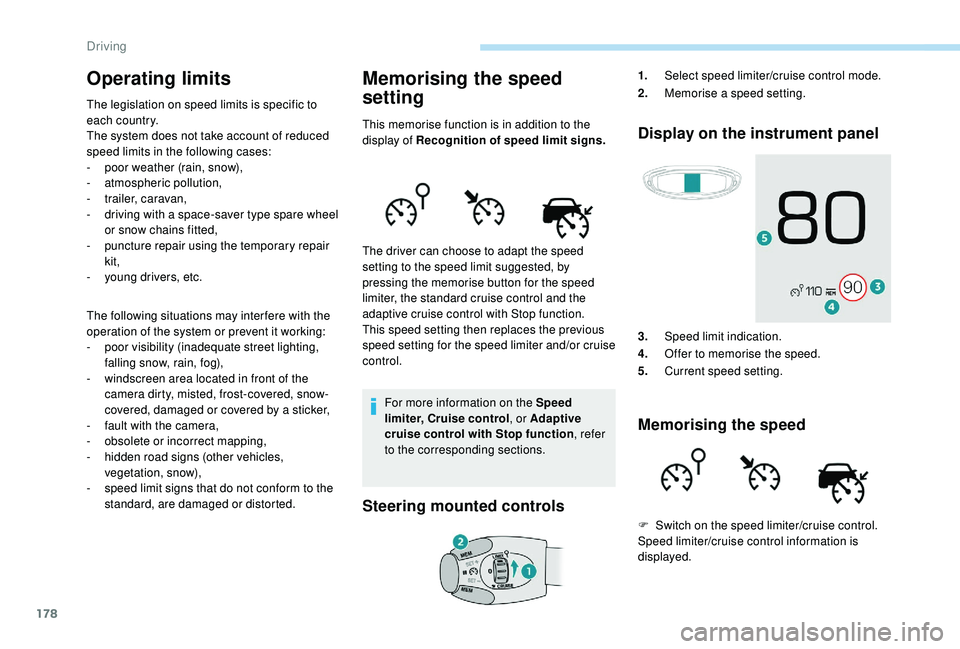
Steering mounted controls Display on the instrument panel
3.
Speed limit indication.
4. Offer to memorise the speed.
5. Current speed setting.
Memorising the speed
The driver can choose to adapt the speed
setting to the speed limit suggested, by
pressing the memorise button for the speed
limiter, the standard cruise control and the
adaptive cruise control with Stop function.
This speed setting then replaces the previous
speed setting for the speed limiter and/or cruise
control. 1.
Select speed limiter/cruise control mode.
2. Memorise a
speed setting.
F
S
witch on the speed limiter/cruise control.
Speed limiter/cruise control information is
displayed.
Driving
Page 182 of 364
180
Displays on the instrument
panelSwitching on
F If the speed setting is suitable (last speed setting programmed in the system), press
button 4
to switch the speed limiter on.
F
P
ressing button 4 again temporarily
interrupts the function (pause).
Adjusting the limit speed
setting
You do not have to switch the speed limiter on
in order to set the speed.
To modify the limit speed setting from the
current speed of the vehicle:
F
i
n steps of +/- 1 mph (km/h), make
successive short presses on button 2
or 3,
F
c
ontinuously, in steps of +/- 5 mph (km/h),
press and hold button 2
or 3. F
p
ress button 5 to display the six memorised
speed settings,
F
p
ress the button for the desired speed
setting.
This setting becomes the new limit speed.
To modify the speed limiter setting using
the speed suggested by the speed limit sign
recognition system:
F
t
he speed suggested is displayed in the
instrument panel,
F
m
ake a first press on button 5
; a message
is displayed to confirm the memorisation
request,
F
p
ress button 5 again to save the suggested
speed.
The speed displays immediately in the
instrument panel as the new speed setting.
Temporarily exceeding the
programmed speed
F If you want to temporarily exceed the programmed limit speed, press firmly on
the accelerator pedal, going beyond the
point of resistance .
The speed limiter is deactivated temporarily
and the displayed programmed speed flashes.
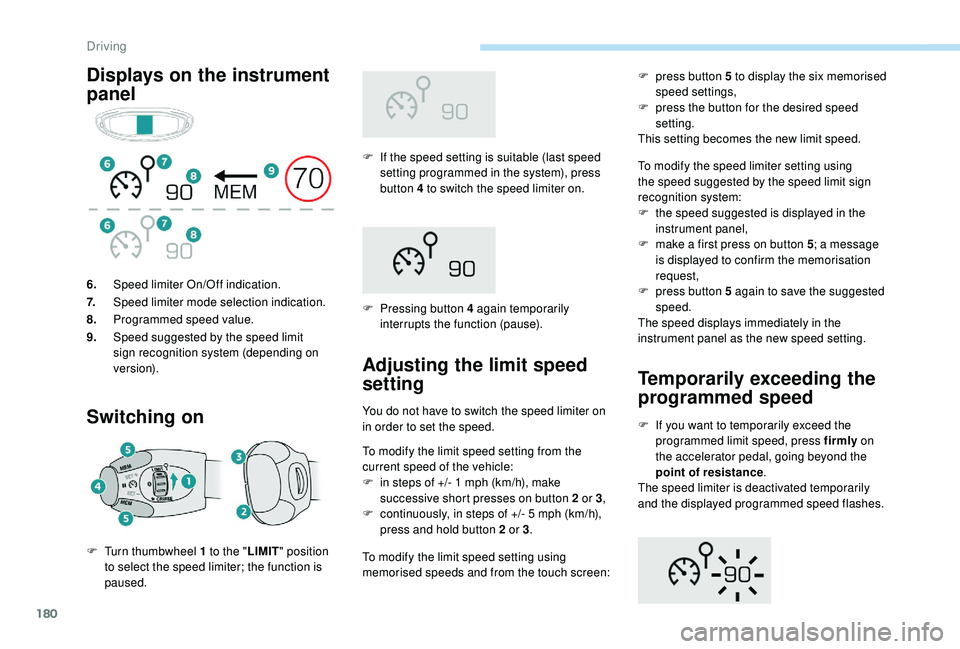
6.
Speed limiter On/Off indication.
7. Speed limiter mode selection indication.
8. Programmed speed value.
9. Speed suggested by the speed limit
sign recognition system (depending on
ve r s i o n).
F
T
urn thumbwheel 1
to the " LIMIT" position
to select the speed limiter; the function is
paused. To modify the limit speed setting using
memorised speeds and from the touch screen:
Driving
Page 183 of 364
181
On a steep descent or in the event of
shar p acceleration, the speed limiter will
not be able to prevent the vehicle from
exceeding the programmed speed.
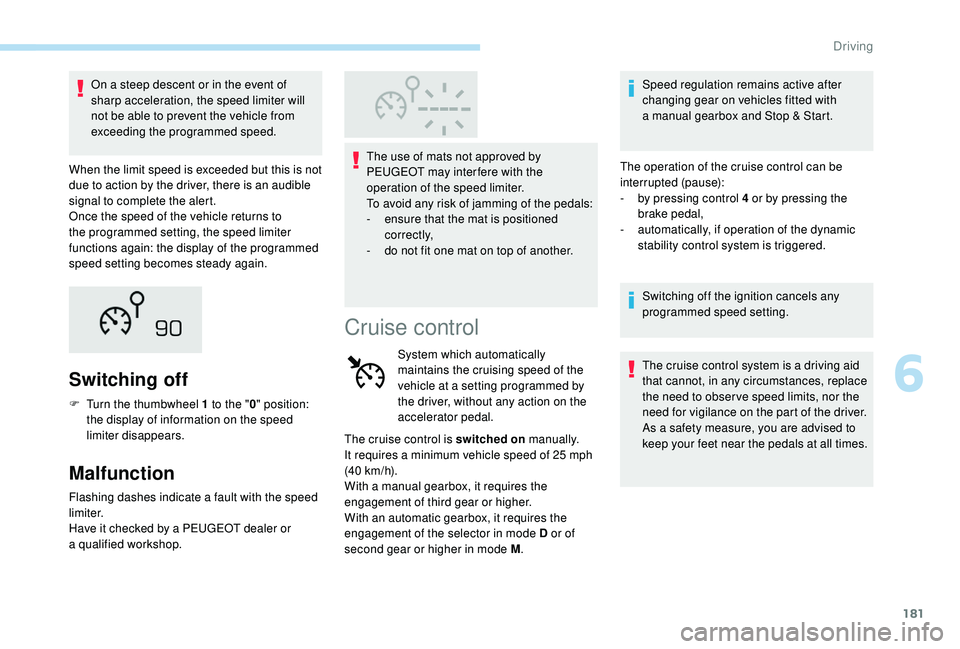
When the limit speed is exceeded but this is not
due to action by the driver, there is an audible
signal to complete the alert.
Once the speed of the vehicle returns to
the programmed setting, the speed limiter
functions again: the display of the programmed
speed setting becomes steady again.
Switching off
F Turn the thumbwheel 1 to the "0" position:
the display of information on the speed
limiter disappears.
Malfunction
Flashing dashes indicate a fault with the speed
l imiter.
Have it checked by a
PEUGEOT dealer or
a
qualified workshop. The use of mats not approved by
PEUGEOT may inter fere with the
operation of the speed limiter.
To avoid any risk of jamming of the pedals:
-
e
nsure that the mat is positioned
c o r r e c t l y,
-
d
o not fit one mat on top of another.
Cruise control
System which automatically
maintains the cruising speed of the
vehicle at a
setting programmed by
the driver, without any action on the
accelerator pedal.
The cruise control is switched on manually.
It requires a
minimum vehicle speed of 25 mph
(40
km/h).
With a
manual gearbox, it requires the
engagement of third gear or higher.
With an automatic gearbox, it requires the
engagement of the selector in mode D or of
second gear or higher in mode M .Speed regulation remains active after
changing gear on vehicles fitted with
a
manual gearbox and Stop & Start.
The operation of the cruise control can be
interrupted (pause):
-
b
y pressing control 4 or by pressing the
brake pedal,
-
a
utomatically, if operation of the dynamic
stability control system is triggered.
Switching off the ignition cancels any
programmed speed setting.
The cruise control system is a driving aid
that cannot, in any circumstances, replace
the need to obser ve speed limits, nor the
need for vigilance on the part of the driver.
As a
safety measure, you are advised to
keep your feet near the pedals at all times.
6
Driving
Page 184 of 364
182
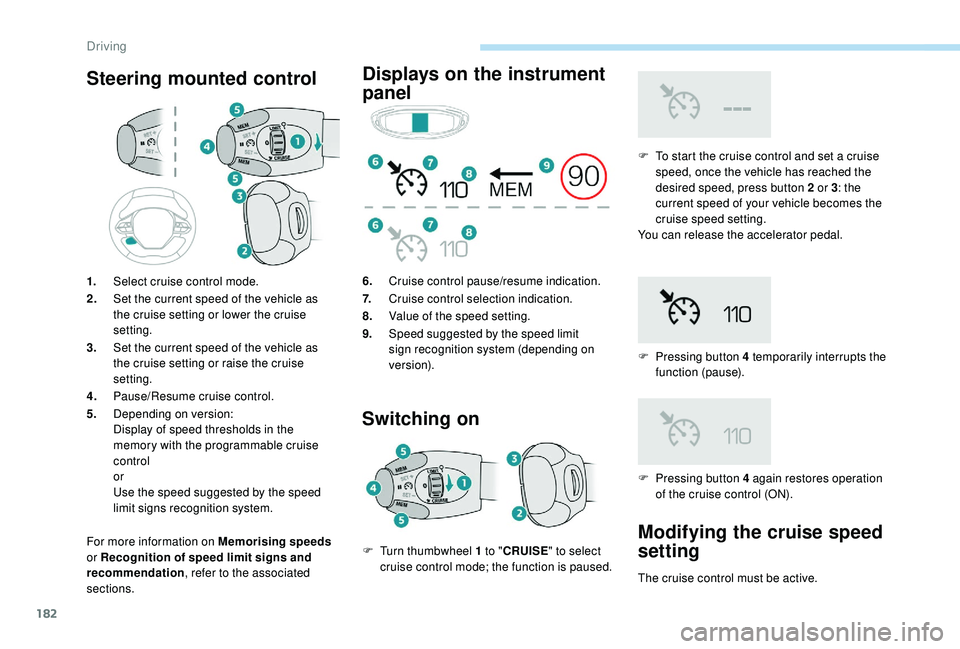
Steering mounted control
For more information on Memorising speeds
or Recognition of speed limit signs and
recommendation , refer to the associated
sections.
Displays on the instrument
panel
Switching on
F To start the cruise control and set a cruise
speed, once the vehicle has reached the
desired speed, press button 2
or 3: the
current speed of your vehicle becomes the
cruise speed setting.
You can release the accelerator pedal.
F
P
ressing button 4 temporarily interrupts the
function (pause).
1.
Select cruise control mode.
2. Set the current speed of the vehicle as
the cruise setting or lower the cruise
setting.
3. Set the current speed of the vehicle as
the cruise setting or raise the cruise
setting.
4. Pause/Resume cruise control.
5. Depending on version:
Display of speed thresholds in the
memory with the programmable cruise
control
or
Use the speed suggested by the speed
limit signs recognition system. 6.
Cruise control pause/resume indication.
7. Cruise control selection indication.
8. Value of the speed setting.
9. Speed suggested by the speed limit
sign recognition system (depending on
ve r s i o n).
F
T
urn thumbwheel 1
to " CRUISE " to select
cruise control mode; the function is paused. F
P
ressing button 4 again restores operation
of the cruise control (ON).
Modifying the cruise speed
setting
The cruise control must be active.
Driving
Page 185 of 364
183
To modify the cruise speed setting from the
current speed of the vehicle:
F
i
n steps of + or - 1 mph (km/h), make
repeated short presses on button 2
or 3,
F
c
ontinuously, in steps of + or - 5 mph (km/h),
press and hold button 2
or 3.
Take care: pressing and holding button
2
or 3 results in a rapid change in the
speed of your vehicle.
As a
precaution, it is recommended
that the cruise speed chosen be close
to the current speed of your vehicle, so
as to avoid any sudden acceleration or
deceleration of the vehicle.
To modify the cruise speed setting using
memorised speed settings and from the touch
screen:
F
p
ress button 5 to display the six memorised
speed settings,
F
p
ress the button for the desired speed
setting.
This setting becomes the new cruise speed. F
m ake a first press on button 5; a message
is displayed to confirm the memorisation
request,
F
p
ress button 5 again to save the suggested
speed.
The speed displays immediately in the
instrument panel as the new speed setting.
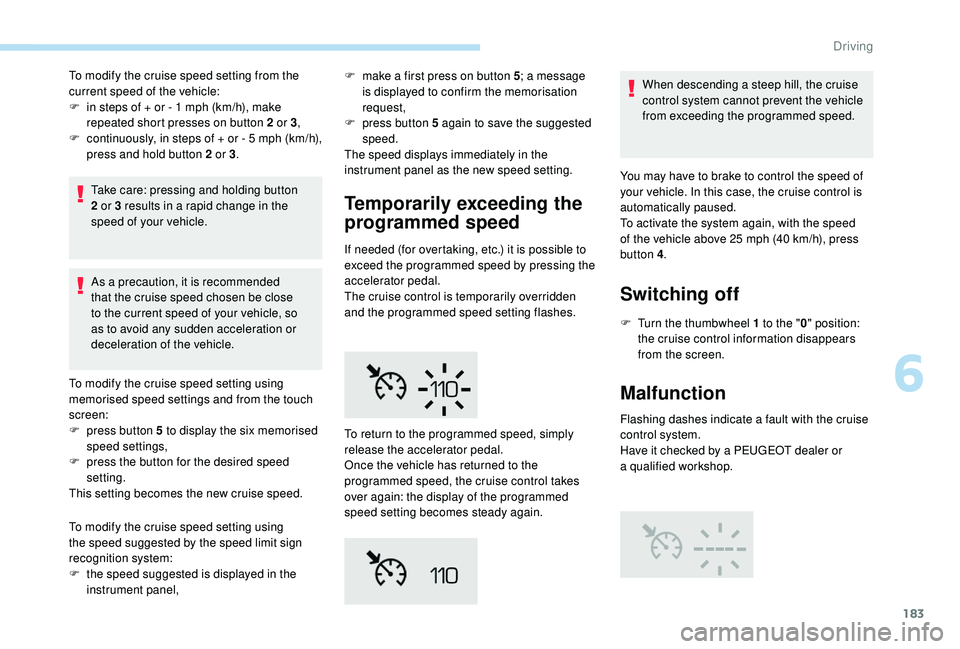
Temporarily exceeding the
programmed speed
If needed (for overtaking, etc.) it is possible to
exceed the programmed speed by pressing the
accelerator pedal.
The cruise control is temporarily overridden
and the programmed speed setting flashes. When descending a
steep hill, the cruise
control system cannot prevent the vehicle
from exceeding the programmed speed.
To modify the cruise speed setting using
the speed suggested by the speed limit sign
recognition system:
F
t
he speed suggested is displayed in the
instrument panel, To return to the programmed speed, simply
release the accelerator pedal.
Once the vehicle has returned to the
programmed speed, the cruise control takes
over again: the display of the programmed
speed setting becomes steady again. You may have to brake to control the speed of
your vehicle. In this case, the cruise control is
automatically paused.
To activate the system again, with the speed
of the vehicle above 25
mph (40 km/h), press
button 4 .
Switching off
F Turn the thumbwheel 1 to the "0" position:
the cruise control information disappears
from the screen.
Malfunction
Flashing dashes indicate a fault with the cruise
c ontrol system.
Have it checked by a
PEUGEOT dealer or
a
qualified workshop.
6
Driving