mirror PEUGEOT 5008 2023 Owner's Manual
[x] Cancel search | Manufacturer: PEUGEOT, Model Year: 2023, Model line: 5008, Model: PEUGEOT 5008 2023Pages: 292, PDF Size: 9.43 MB
Page 157 of 292
155
Driving
6– The speed of your vehicle must be between 7
and 87 mph (12 and 140 km/h).
–
When overtaking a vehicle, the speed
difference is less than 6
mph (10 km/h).
–
When overtaken by a vehicle, the speed
difference is less than 16
mph (25 km/h).
–
T
raffic is flowing normally.
–
Overtaking a vehicle over a certain period of
time and the vehicle being overtaken remains in
the blind spot.
–
Y
ou are driving on a straight or slightly curved
road.
–
Y
our vehicle is not pulling a trailer, a caravan,
etc.
Operating limits
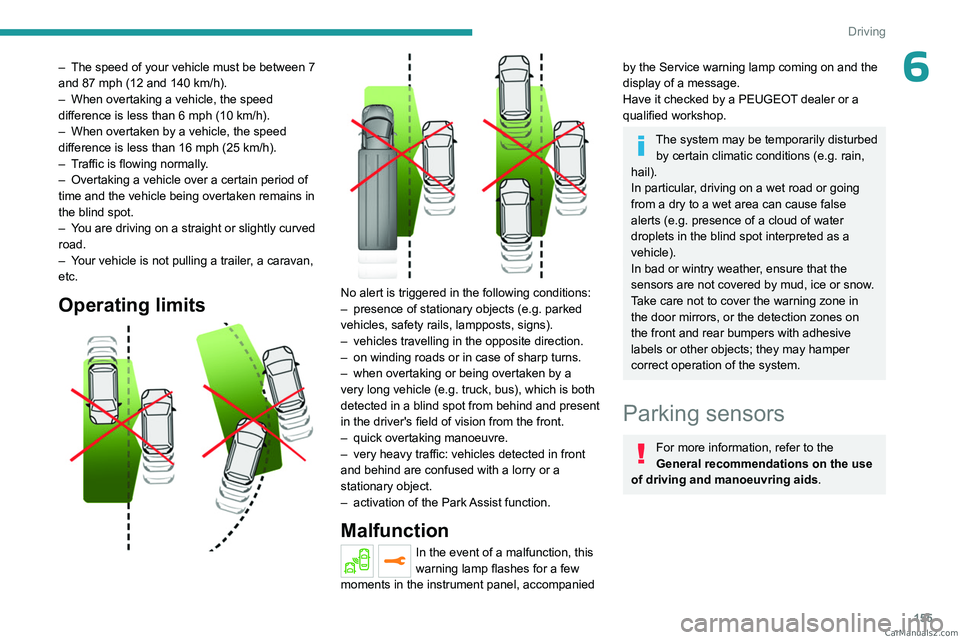
No alert is triggered in the following conditions:
– presence of stationary objects (e.g. parked
vehicles, safety rails, lampposts, signs).
–
vehicles travelling in the opposite direction.
–
on winding roads or in case of sharp turns.
–
when overtaking or being overtaken by a
very long vehicle (e.g.
truck, bus), which is both
detected in a blind spot from behind and present
in the driver's field of vision from the front.
–
quick overtaking manoeuvre.
–
very heavy traffic: vehicles detected in front
and behind are confused with a lorry or a
stationary object.
–
activation of
the Park Assist function.
Malfunction
In the event of a malfunction, this
warning lamp flashes for a few
moments in the instrument panel, accompanied
by the Service warning lamp coming on and the
display of a message.
Have it checked by a PEUGEOT dealer or a
qualified workshop.
The system may be temporarily disturbed by certain climatic conditions (e.g. rain,
hail).
In particular, driving on a wet road or going
from a dry to a wet area can cause false
alerts (e.g.
presence of a cloud of water
droplets in the blind spot interpreted as a
vehicle).
In bad or wintry weather, ensure that the
sensors are not covered by mud, ice or snow.
Take care not to cover the warning zone in
the door mirrors, or the detection zones on
the front and rear bumpers with adhesive
labels or other objects; they may hamper
correct operation of the system.
Parking sensors
For more information, refer to the
General recommendations on the use
of driving and manoeuvring aids .
CarM an uals 2 .c o m
Page 160 of 292
158
Driving
the system is activated when the vehicle has
already moved, the view from above can be fully
displayed.
Visiopark 1
Rear view
To activate the camera located on the tailgate,
engage reverse gear and do not exceed a speed
of 6 mph (10 km/h).
The system is deactivated:
–
Automatically
, at speeds above approximately
6 mph (10
km/h),
–
Automatically
, if the tailgate is opened.
–
Upon changing out of reverse gear (the image
remains displayed for 7
seconds).
–
By pressing the white arrow in the upper-left
corner of the touch screen.
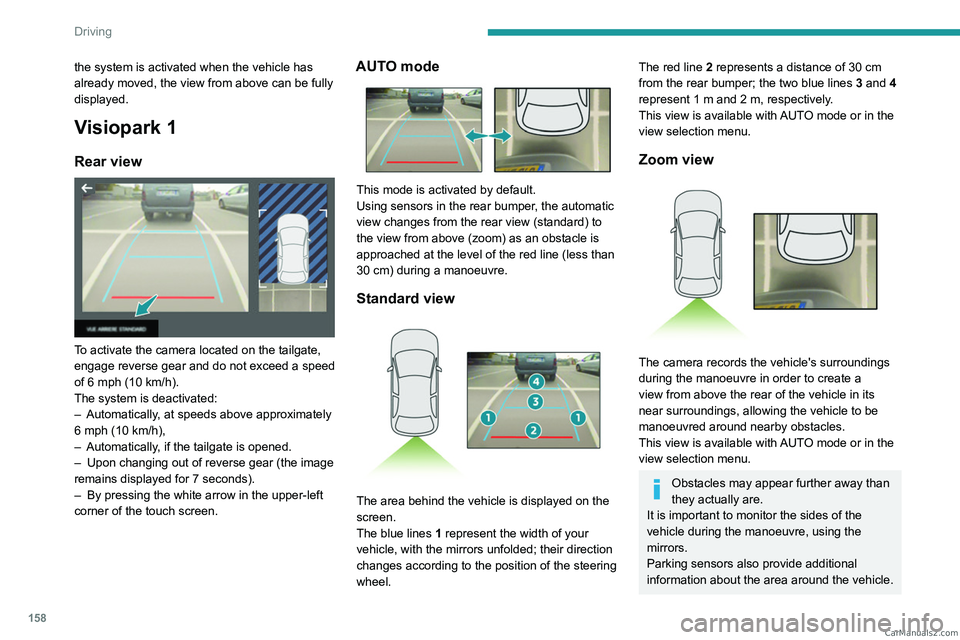
AUTO mode
This mode is activated by default.
Using sensors in the rear bumper, the automatic
view changes from the rear view (standard) to
the view from above (zoom) as an obstacle is
approached at the level of the red line (less than
30
cm) during a manoeuvre.
Standard view
The area behind the vehicle is displayed on the
screen.
The blue lines 1 represent the width of your
vehicle, with the mirrors unfolded; their direction
changes according to the position of the steering
wheel.
The red line 2 represents a distance of 30 cm
from the rear bumper; the two blue lines 3 and 4
represent 1
m and 2 m, respectively.
This view is available with AUTO mode or in the
view selection menu.
Zoom view
The camera records the vehicle's surroundings
during the manoeuvre in order to create a
view from above the rear of the vehicle in its
near surroundings, allowing the vehicle to be
manoeuvred around nearby obstacles.
This view is available with AUTO mode or in the
view selection menu.
Obstacles may appear further away than
they actually are.
It is important to monitor the sides of the
vehicle during the manoeuvre, using the
mirrors.
Parking sensors also provide additional
information about the area around the vehicle. CarM an uals 2 .c o m
Page 162 of 292
160
Driving
AUTO mode
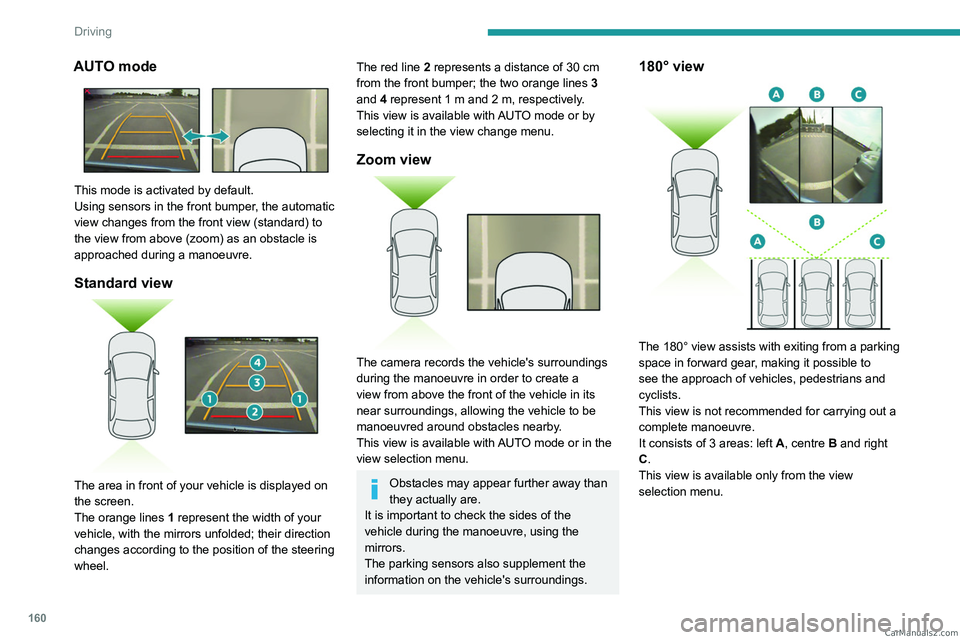
This mode is activated by default.
Using sensors in the front bumper, the automatic
view changes from the front view (standard) to
the view from above (zoom) as an obstacle is
approached during a manoeuvre.
Standard view
The area in front of your vehicle is displayed on
the screen.
The orange lines 1 represent the width of your
vehicle, with the mirrors unfolded; their direction
changes according to the position of the steering
wheel.
The red line 2 represents a distance of 30 cm
from the front bumper; the two orange lines 3
and 4 represent 1 m and 2 m, respectively.
This view is available with AUTO mode or by
selecting it in the view change menu.
Zoom view
The camera records the vehicle's surroundings
during the manoeuvre in order to create a
view from above the front of the vehicle in its
near surroundings, allowing the vehicle to be
manoeuvred around obstacles nearby.
This view is available with AUTO mode or in the
view selection menu.
Obstacles may appear further away than
they actually are.
It is important to check the sides of the
vehicle during the manoeuvre, using the
mirrors.
The parking sensors also supplement the
information on the vehicle's surroundings.
180° view
The 180° view assists with exiting from a parking
space in forward gear, making it possible to
see the approach of vehicles, pedestrians and
cyclists.
This view is not recommended for carrying out a
complete manoeuvre.
It consists of 3 areas: left A, centre B and right
C.
This view is available only from the view
selection menu. CarM an uals 2 .c o m
Page 268 of 292
266
Alphabetical index
Charging flap (Rechargeable
hybrid)
168, 175–177
Charging the traction battery
(Rechargeable hybrid)
19, 167, 175–177
CHECK
20
Checking the engine oil level
17
Checking the levels
185–186
Checking tyre pressures
(using the kit)
198, 200
Checks
185–186, 187–189
Checks, routine
187–188
Child lock
109
Children
94, 101–102, 105–106, 108
Children (safety)
109
Child seats
94, 97–101, 107, 108
Child seats, conventional
100–101
Child seats, i-Size
108
Child seats, ISOFIX
102, 104–105
Cleaning (advice)
168, 192–194
Closing the boot
29, 33
Closing the doors
29, 32
Collision Risk Alert
150–151
Configurations, seats
55
Configuration, vehicle
23–24
Connected applications
249
Connection, Android Auto
249
Connection, Apple CarPlay
231, 248
Connection, Bluetooth
232–233,
249–250, 254–255
Connection, MirrorLink
231
Connection, Wi-Fi network
250
Connectivity
248
Consumptions
24Container, AdBlue® 190
Control, emergency boot release
33
Control, emergency door
30–31
Control, heated seats
46
Controls, steering mounted
118, 121–123
Control stalk, lighting
74–75
Control stalk, wipers
80–82
Control unit
169–171, 176
Courtesy lamps
66
Cruise control
131, 134, 137–139
Cruise control, adaptive
139
Cruise control, adaptive with Stop function
134
Cruise control by speed limit recognition
134
Cup holder
62
D
DAB (Digital Audio Broadcasting) -
Digital radio
229, 252
Date (setting)
235, 257
Daytime running lamps
75, 207
Deactivating the passenger airbag
96, 99–100
Deadlocking
27, 29
Deferred charging
24, 176
Deferred charging (Rechargeable
hybrid)
23–24, 168, 175
Defrosting
48, 60
Defrosting, front
60
Defrosting, rear screen
61
Demisting
48, 60
Demisting, front
60
Demisting, rear
61
Dials and gauges 9
Digital instrument panel
9–10
Dimensions
222
Dipstick
17, 185
Direction indicators (turn signals)
75, 207
Domestic charging
171
Domestic charging (Rechargeable
hybrid)
176–177
Door pockets
62
Doors
32
Drive Assist Plus
139
Driver’s attention warning
153
Driving
42–43, 111–112
Driving aids camera (warnings)
130
Driving aids (recommendations)
130
Driving economically
7
Driving modes
89–90, 125
Driving positions (storing)
45–46
Dynamic stability control (DSC)
88, 90
E
EBFD 87
Eco-driving (advice)
7
ECO mode
125
Electric windows
38
Electronic brake force distribution (EBFD)
87
Emergency braking assistance (EBA)
87
Emergency call
85–86
Emergency switching off
11 4
Emergency warning lamps
84, 195
Emissions control system, SCR
19, 189 CarM an uals 2 .c o m
Page 270 of 292
268
Alphabetical index
Indicators, direction 75
Indicator, service
16, 20
Inflating tyres
188, 223
Inflating tyres and accessories
(using the kit)
198, 200
Information, vehicle
9, 262
Infrared camera
79, 130
Instrument panel
9–10, 20–22, 131
Instrument panel (Rechargeable hybrid)
9
Intelligent Traction Control
88
Internet browser
246, 249
ISOFIX mountings
102
J
Jack 198, 201–203, 252
Jump starting
209
K
Key 26–27, 30–31
Key, electronic
28–29
Keyless Entry and Starting
26, 28–29, 113
Key not recognised
11 4
Key with remote control
26, 112
Kit, hands-free
232, 254
Kit, puncture repair
196–197
Kit, temporary puncture repair
195–200
Klaxon
85
L
Labels 6
Labels, identification
223
Lamps, parking
75
Lamps, rear
207
Lamps with Full LED technology
76, 78
Lane assist
139, 143–145
Lane keeping assist
147
Leather (care)
194
LEDs - Light-emitting diodes
75, 206–207
Level, AdBlue®
187
Level, brake fluid
186
Level, Diesel additive
186–187
Level, engine coolant
18, 186
Level, engine oil
17, 185
Levels and checks
185–187
Level, screenwash fluid
81, 186
Light-emitting diodes - LEDs
75, 206–207
Lighting, boot
73
Lighting, cornering
78–79
Lighting dimmer
21
Lighting, exterior
74, 77
Lighting, guide-me home
27, 77
Lighting, interior
66
Lighting, mood
21, 66
Lighting, welcome
77
Loading
70–71, 180–181
Load reduction mode
183
Load space cover
69
Locating your vehicle
27
Locking
27, 29
Locking from the inside
30
Locking the doors 30
Long objects, transporting
67
M
Mains socket (domestic network) 169–170
Maintenance (advice)
168, 192
Maintenance, routine
131, 187, 189
Manoeuvring aids (recommendations)
130
Map reading lamps
66
Markings, identification
223
Massage function
46
Massage, multi-point
46
Mat
65, 131
Memorising a speed
131
Menu
231
Menu, main
23
Menus (audio)
226–227, 238–239
Menu, shortcuts
23
Messages
256
Messages, quick
256
Mirror, rear view
48
Mirrors, door
47–48, 61, 154
Mirror, vanity
62
Misfuel prevention
166
Mobile application
24, 61, 175–176
Modularity, seats
55
Motor, electric
125–126, 167, 221
Motorised tailgate
33–34, 36
Mountings, ISOFIX
102 CarM an uals 2 .c o m