phone Peugeot 508 2012 User Guide
[x] Cancel search | Manufacturer: PEUGEOT, Model Year: 2012, Model line: 508, Model: Peugeot 508 2012Pages: 340, PDF Size: 11.11 MB
Page 266 of 340
264
8
06
7
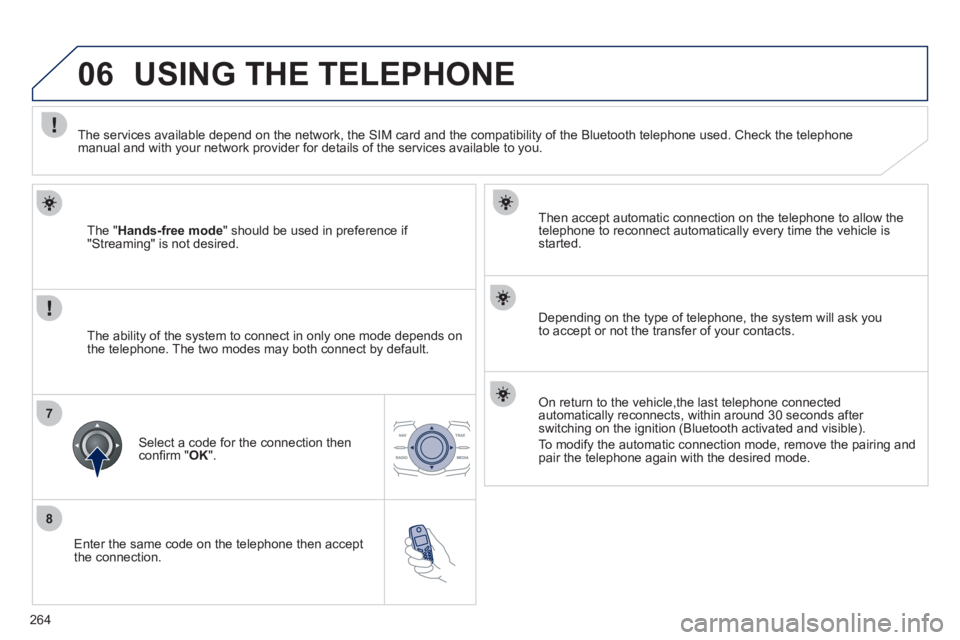
Enter the same code on the telephone then accept
the connection.
Then accept automatic connection on the telephone to allow the
telephone to reconnect automaticall
y every time the vehicle is started.
Dependin
g on the type of telephone, the system will ask you
to accept or not the transfer of your contacts.
USING THE TELEPHONE
The "Hands-free mode" should be used in preference if "Streaming" is not desired.
The services available depend on the network, the
SIM card and the compatibility of the Bluetooth telephone used. Check the telephone manual and with your network provider for details of the services available to you.
The ability o
f the system to connect in only one mode depends on
the telephone. The two modes may both connect by default.
Select a code for the connection then confi rm " OK
".
On return to the vehicle,the last telephone connected
automatically reconnects, within around 30 seconds after
switching on the ignition (Bluetooth activated and visible).
To modif
y the automatic connection mode, remove the pairing and pair the telephone again with the desired mode.
Page 267 of 340
265
1
2
2
3
1
3
4
06USING THE TELEPHONE
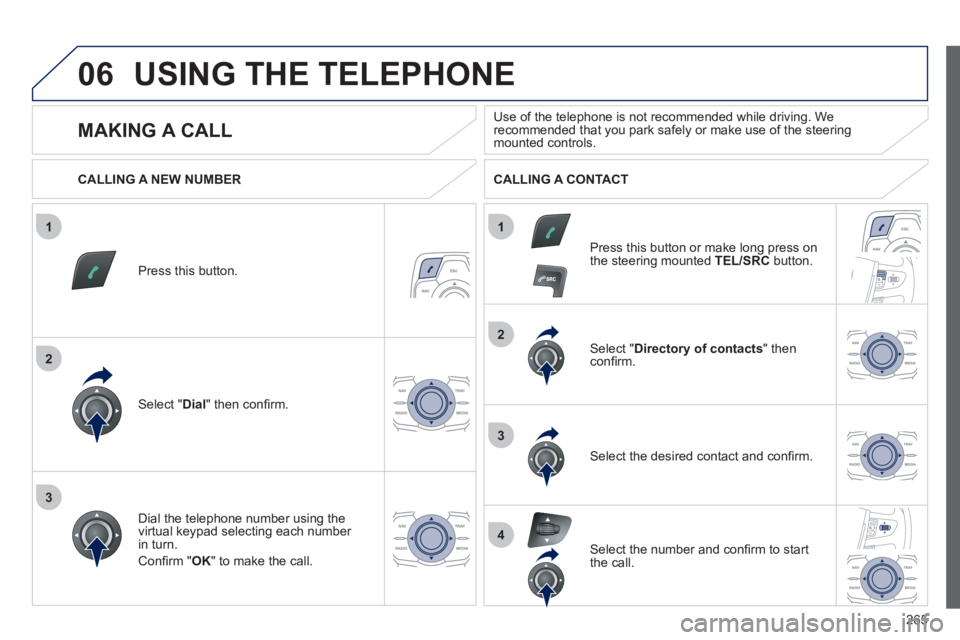
Press this button.
Select " Dial" then confi rm.
Select " Directory of contacts" thenconfi rm.
Dial the telephone number usin
g the
virtual keypad selecting each number in turn.
Confi rm " OK " to make the call.
Press this button or make lon
g press on
the steering mounted TEL/SRC
button.
CALLING A NEW NUMBER CALLING A CONTACT
Select the desired contact and confi rm.
Select the number and confi rm to start
the call.
MAKING A CALL
Use of the telephone is not recommended while driving. Werecommended that you park safely or make use of the steering mounted controls.
Page 268 of 340
266
1
2
06
1
USING THE TELEPHONE
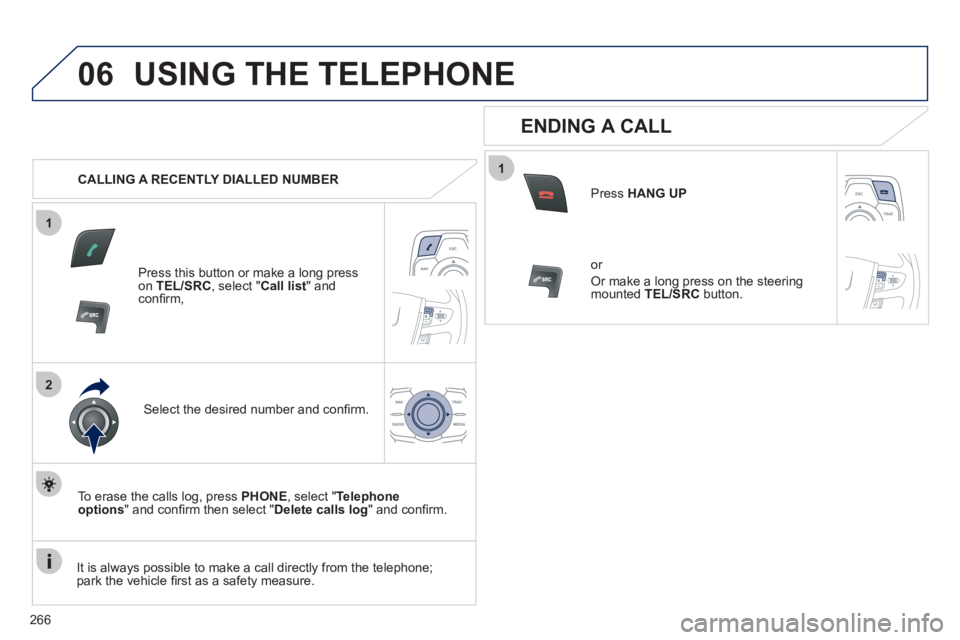
CALLING A RECENTLY DIALLED NUMBER
Press this button or make a long press on TEL/SRC, select "Call list" andconfi rm,
Select the desired number and confi rm.
To erase the calls lo
g, press PHONE
, select " Telephoneoptions" and confi rm then select " Delete calls log
" and confi rm.
ENDING A CALL
Press HANG UP
or
Or make a long press on the steering
mounted TEL/SRC
button.
It is alwa
ys possible to make a call directly from the telephone;
park the vehicle fi rst as a safety measure.
Page 269 of 340
267
1
2
06USING THE TELEPHONE
RECEIVING A CALL
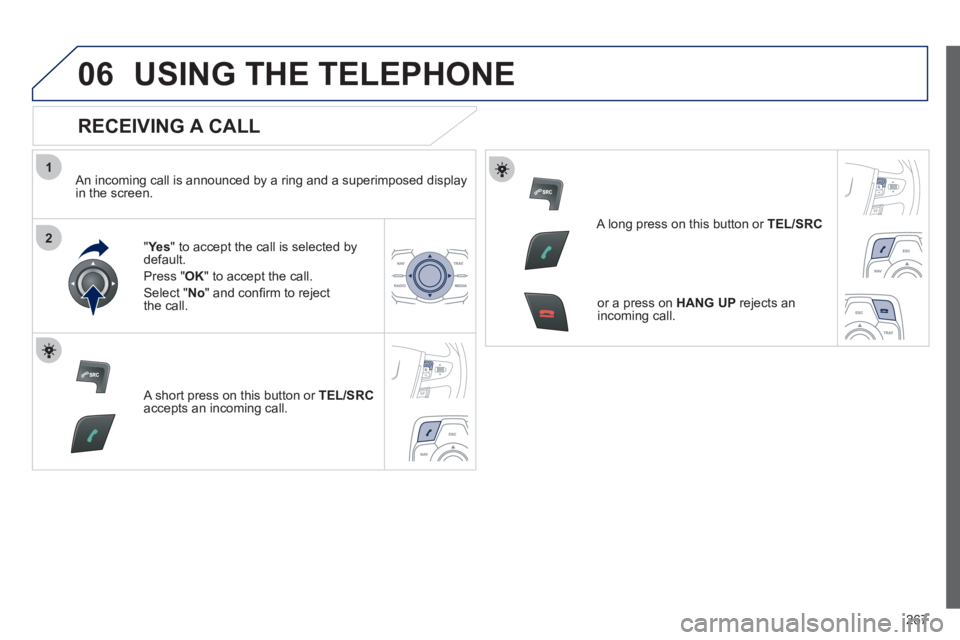
An incoming call is announced by a ring and a superimposed displayin the screen.
"Ye
s
" to accept the call is selected bydefault.
Pr
ess " OK" to accept the call.
Select " No" and confi rm to reject
the call.
A short press on this button or TEL/SRC
accepts an incoming call.
A long press on this button or TEL/SRC
or a press on HANG UPrejects anincoming call.
Page 270 of 340
268
1
2a
2b
2c
2d
06USING THE TELEPHONE
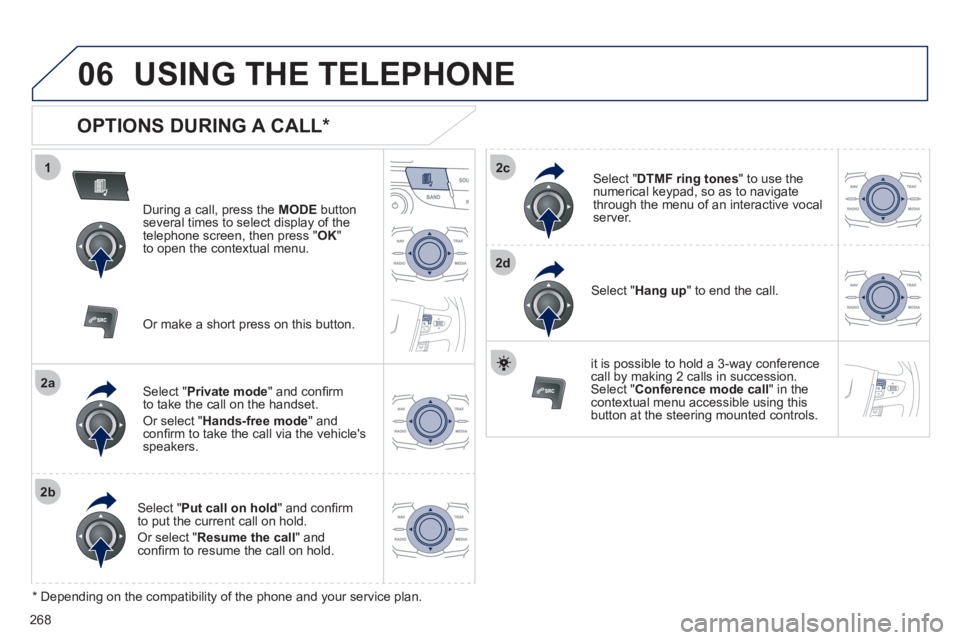
OPTIONS DURING A CALL *
During a call, press the MODE
button
several times to select display of the
telephone screen, then press " OK "
to open the contextual menu.
Select " Private mode
" and confi rm
to take the call on the handset.
Or select " Hands-free mode" andconfi rm to take the call via the vehicle's
speakers.
Select " Put call on hold" and confi rm
to put the current call on hold.
Or select " Resume the call" andconfi rm to resume the call on hold.
Select " DTMF ring tones
" to use thenumerical keypad, so as to navigate
through the menu of an interactive vocal server.
Select " Hang up " to end the call.
*
Depending on the compatibility of the phone and your service plan.
it is possible to hold a 3-wa
y conferencecall by making 2 calls in succession. Select "Conferencemode call" in the contextual menu accessible using this
button at the steering mounted controls.
Or make a short press on this button.
Page 271 of 340
269
1
2
3
1
2
3
4
5
06
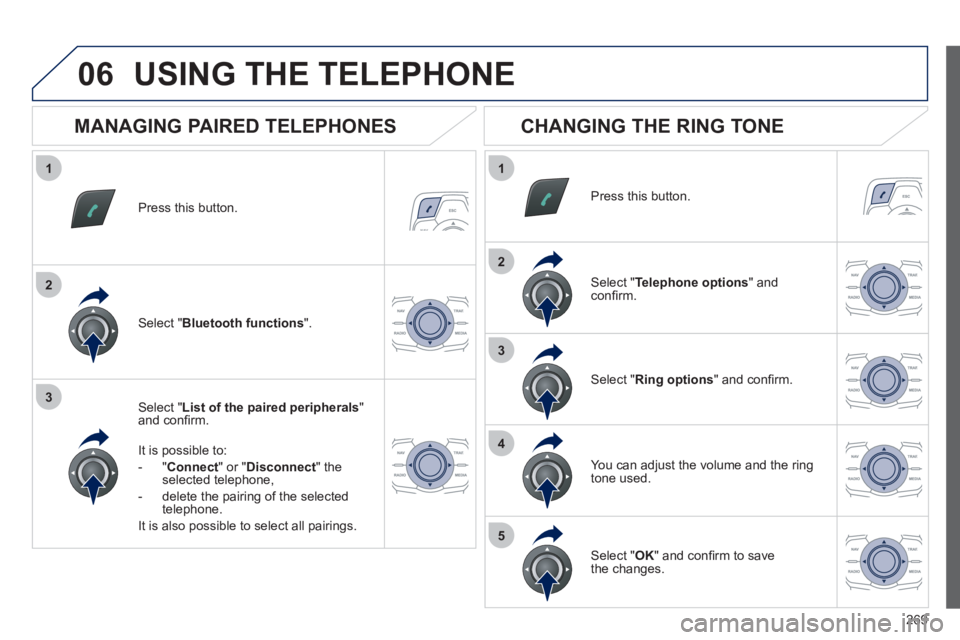
Press this button.
Select " List of the paired peripherals"and confi rm.
It is possible to:
-
"Connect" or " Disconnect " theselected telephone,
- delete the pairin
g of the selected
telephone.
It is also possible to select all pairin
gs.
USING THE TELEPHONE
MANAGING PAIRED TELEPHONES
CHANGING THE RING TONE
Press this button.
Select " Telephone options" andconfi rm.
Select " Ring options" and confi rm.
You can ad
just the volume and the ring
tone used.
Select " Bluetooth functions".
Select " OK
" and confi rm to save
the changes.
Page 272 of 340
270
07 DIRECTORY - ADDR BOOK
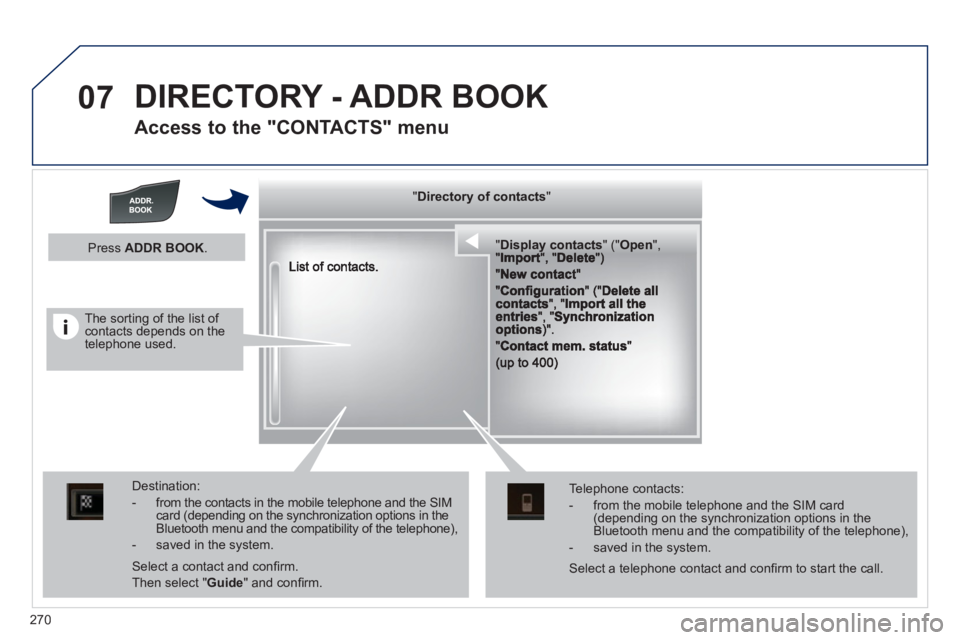
Access to the "CONTACTS" menu
""""""""yyyyyDirectory of contactsDirectory of contactsDirectory of contactsDirectory of contactsDirectory of contactsDirectory of contactsDirectory of contactsDirectory of contactsDirectory of contactsDirectory of contactsDirectory of contactsDirectory of contactsDirectory of contactsDirectory of contactsDi t f t tDi t f t tDi t f t tDi t f t tDi f """"""""
""""""""""pypypypypypypysp ay co tactsDisplay contactsDisplay contactsDisplay contactsDisplay contactsDisplay contactsDisplay contactsDisplay contactsDisplay contactsDisplay contactsDisplay contactsDisplay contactsDisplay contactsDisplay contactsDisplay contactsDisplay contactsDisplay contactsDisplay contactsDisplay contactsDisplay contactsDisplay contactsDi l t tDi l t tDi l t tDi l t tDi l t tDi l t tDi l(((((((( ( (((((((((((((((("(""(""(""(""(""(""(""(""(""("pppppppOpeOpenOpenOpenOpenOpenOpenOpenOpenOpenOpenOpenOpenOpenOpenOpenOpenOpenOpenOpenOpenOOOOOOO,,,,, , ,,,""""""""""""""ItItItIt""""""""DltDltDltDlt")")")"))
Destination:
- from the contacts in the mobile telephone and the SIMcard (depending on the synchronization options in the Bluetooth menu and the compatibility of the telephone),
- saved in the system.
Select a contact and confi rm.
Then select "Guide
" and confi rm.
Telephone contacts:
- from the mobile telephone and the SIM card(depending on the synchronization options in the Bluetooth menu and the compatibility of the telephone),
- saved in the system.
Press ADDR BOOK.
Select a telephone contact and confi rm to start the call.
The sorting of the list of contacts depends on the telephone used.
Page 273 of 340
271
1
2
3a
3b
3c
4
07
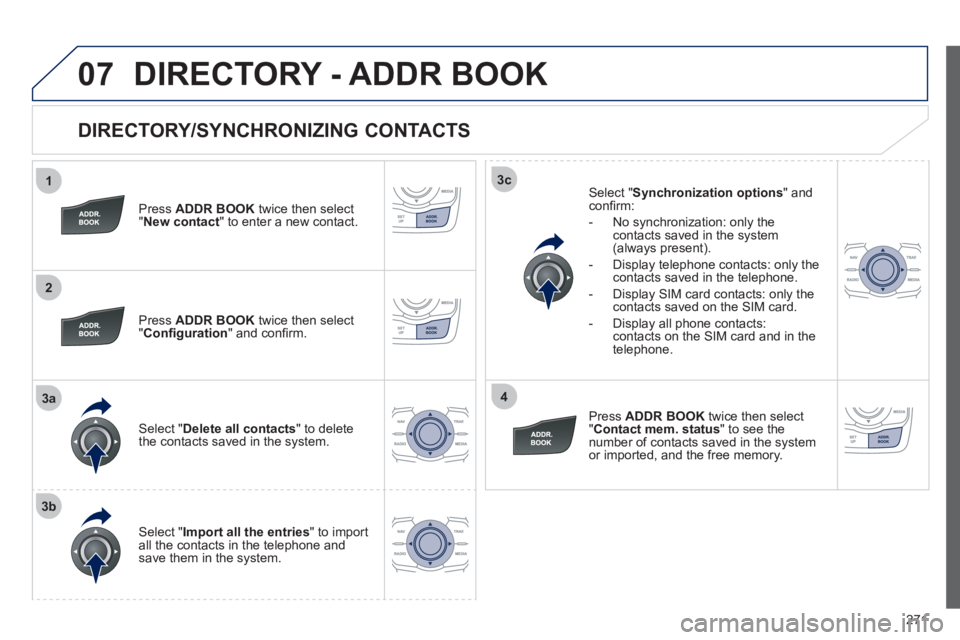
DIRECTORY/SYNCHRONIZING CONTACTS
Press ADDR BOOKtwice then select " New contact" to enter a new contact.
Pr
ess ADDR BOOKtwice then select
" Confi guration" and confi rm.
Select "Delete all contacts" to delete
the contacts saved in the system.
Select "Import all the entries " to import
all the contacts in the telephone andsave them in the system.
Select "Synchronization options
" and confi rm:
- No s
ynchronization: only the contacts saved in the system (always present).
-
Display telephone contacts: only the contacts saved in the telephone.
- Display
SIM card contacts: only thecontacts saved on the SIM card.
- Displa
y all phone contacts: contacts on the SIM card and in the
telephone.
Pr
essADDR BOOKtwice then select
"Contact mem. status
" to see the number of contacts saved in the systemor imported, and the free memory.
DIRECTORY - ADDR BOOK
Page 274 of 340
272
1
2
3
4
5
6
07
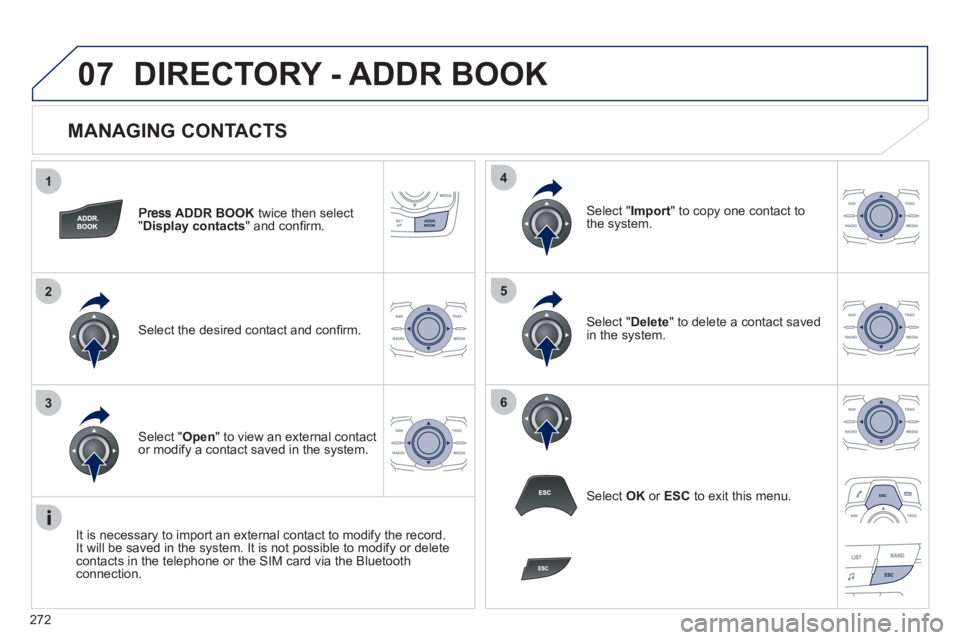
MANAGING CONTACTS
ADDR BOOK
twice then select
"Display contacts
" and confi rm.
Select the desired contact and confi rm.
Select " Import" to copy one contact to
the system.
Select " Open
" to view an external contact
or modify a contact saved in the system.
Select OK
or ESC
to exit this menu.
Select " Delete" to delete a contact savedin the system.
It is necessar
y to import an external contact to modify the record.
It will be saved in the system. It is not possible to modify or delete contacts in the telephone or the SIM card via the Bluetoothconnection.
DIRECTORY - ADDR BOOK
Page 282 of 340
280
1
2
1
2
09
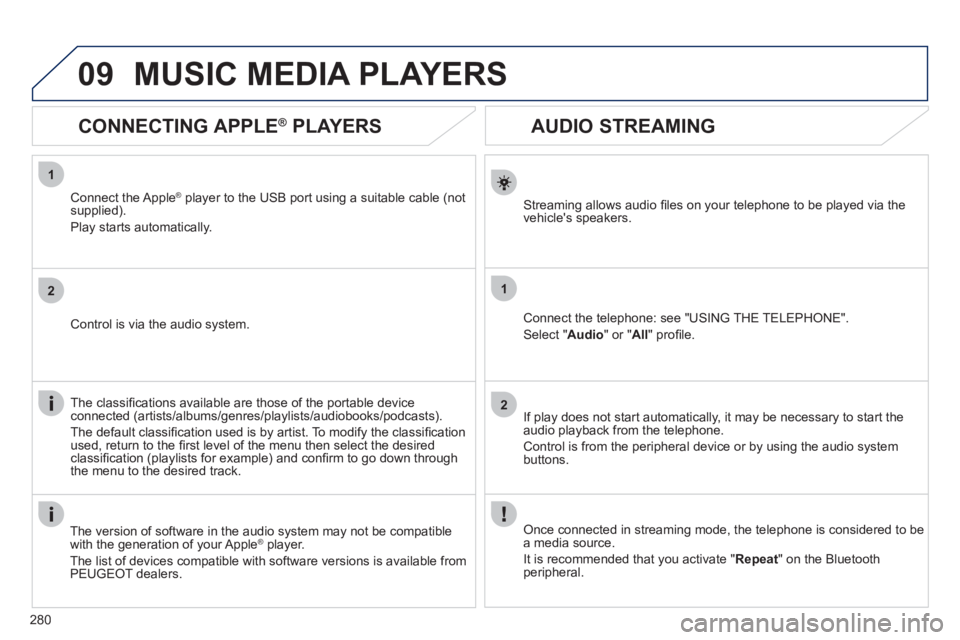
AUDIO STREAMING
Streaming allows audio fi les on your telephone to be played via the
vehicle's speakers.
Connect the telephone: see "USING THE TELEPHONE".
Select " Audio" or " All" profi le.
I
f play does not start automatically, it may be necessary to start the audio playback from the telephone.
Control is from the peripheral device or b
y using the audio system buttons.
Once connected in streaming mode, the telephone is considered to bea media source.
It is recommended that you activate "
Repeat" on the Bluetooth
peripheral.
MUSIC MEDIA PLAYERS
CONNECTING APPLE ®
PLAYERS
Connect the Apple ®player to the USB port using a suitable cable (not
supplied).
Pla
y starts automatically.
Control is via the audio system.
The classifi cations available are those of the portable device
connected (artists/albums/genres/playlists/audiobooks/podcasts).
The de
fault classifi cation used is by artist. To modify the classifi cationused, return to the fi rst level of the menu then select the desired classifi cation (playlists for example) and confi rm to go down through
the menu to the desired track.
The version o
f software in the audio system may not be compatible
with the generation of your AppleÆ player.Æ
The list of devices compatible with software versions is available fromPEUGEOT dealers.