bluetooth Peugeot 508 2012 Owner's Guide
[x] Cancel search | Manufacturer: PEUGEOT, Model Year: 2012, Model line: 508, Model: Peugeot 508 2012Pages: 340, PDF Size: 11.11 MB
Page 311 of 340
309
1
2
3
4
05
5
USING THE TELEPHONE
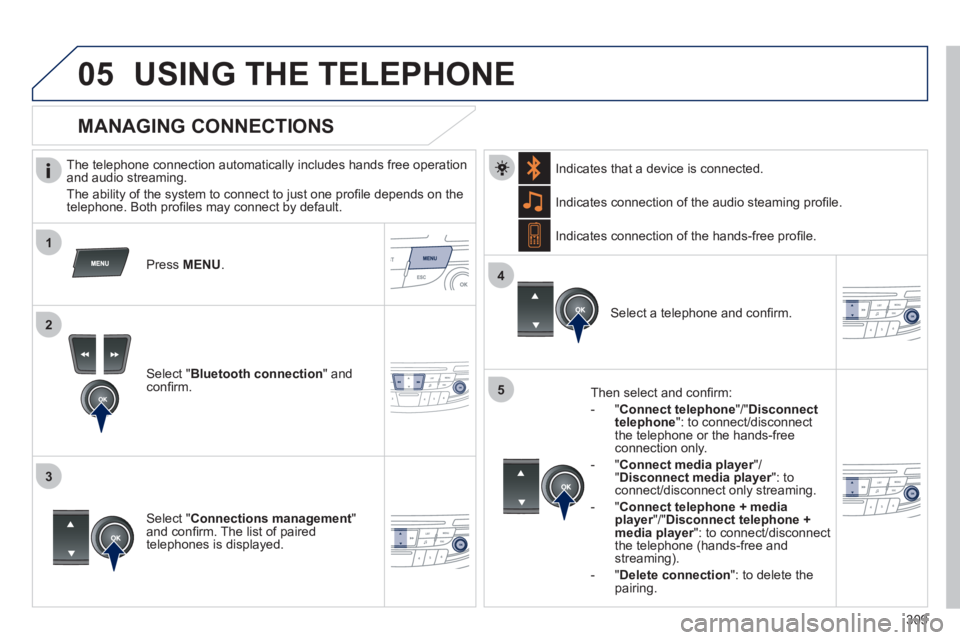
The telephone connection automatically includes hands free operation
and audio streaming.
The abilit
y of the system to connect to just one profi le depends on the
telephone. Both profi les may connect by default.
Pr
ess MENU.
Select " Bluetooth connection" andconfi rm. Indicates connection of the audio steamin
g profi le.
MANAGING CONNECTIONS
Select " Connections management"and confi rm. The list of paired
telephones is displayed.
Select a telephone and confi rm. Indicates connection o
f the hands-free profi le.
Th
en select and confi rm:
- "Connect telephon
e"/" Disconnect
telephone ": to connect/disconnect
the telephone or the hands-free
connection only.
-
"Connect media player"/r"Disconnect media player": to rconnect/disconnect only streaming.
- "Connect tele
phone + media player"/" rDisconnect telephone + media player
": to connect/disconnectrthe telephone (hands-free and streaming).
-
"Delete connection": to delete thepairing.
In
dicates that a device is connected.
Page 315 of 340
313
2c
2e
2d
05
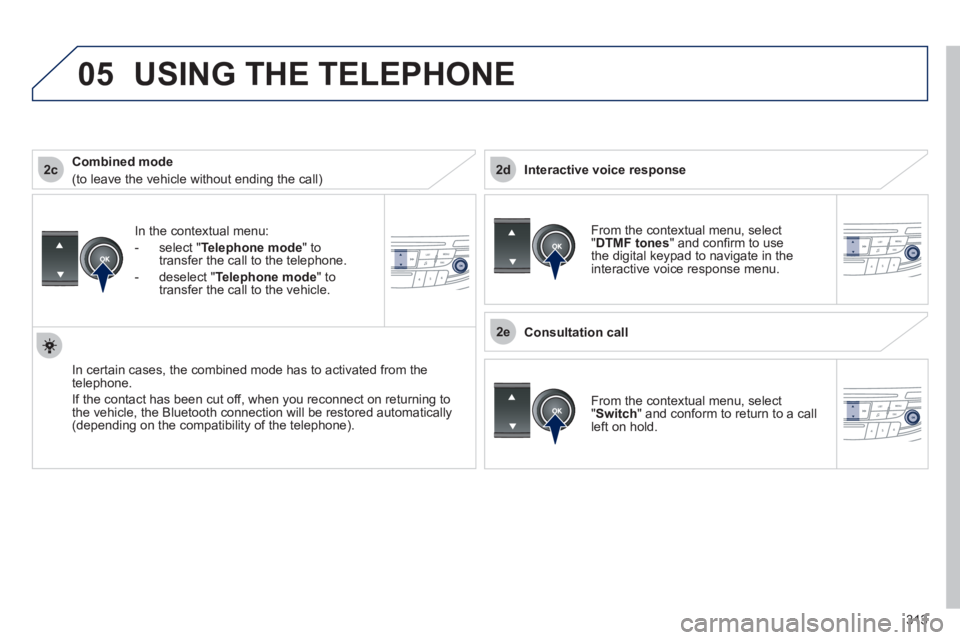
In the contextual menu:
-
select "Telephone mode" totransfer the call to the telephone.
-
deselect " Telephone mode " totransfer the call to the vehicle.
In certain cases, the combined mode has to activated
from the
telephone.
I
f the contact has been cut off, when you reconnect on returning to
the vehicle, the Bluetooth connection will be restored automatically (depending on the compatibility of the telephone).
Combined mode
(to leave the vehicle without ending the call)
USING THE TELEPHONE
From the contextual menu, select
"DTMF tones " and confi rm to use
the digital keypad to navigate in theinteractive voice response menu.
From the contextual menu, select
"Switch" and conform to return to a call
left on hold.
Interactive voice response
Consultation call
Page 316 of 340
314
2
3
1
05USING THE TELEPHONE
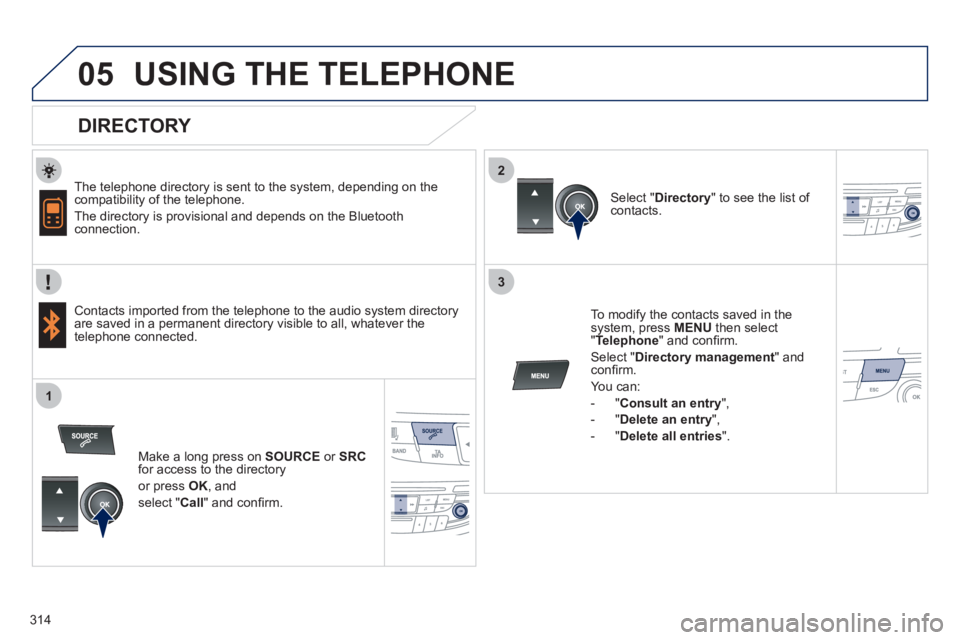
DIRECTORY
The telephone directory is sent to the system, depending on the compatibility of the telephone.
The directory is provisional and depends on the Bluetoothconnection.
Contacts imported from the telephone to the audio s
ystem directory
are saved in a permanent directory visible to all, whatever the
telephone connected.
To modify the contacts saved in thesystem, press MENU
then select
" Telephone" and confi rm.
Select "Directory management " and confi rm.
Y
ou can:
-
"Consult an entry ",
-
"Delete an entry ",
-
"Delete all entries ".
Select "Directory
" to see the list of contacts.
Make a lon
g press on SOURCE
or SRCfor access to the directory
or press OK, and
select "Call
" and confi rm.
Page 320 of 340
318
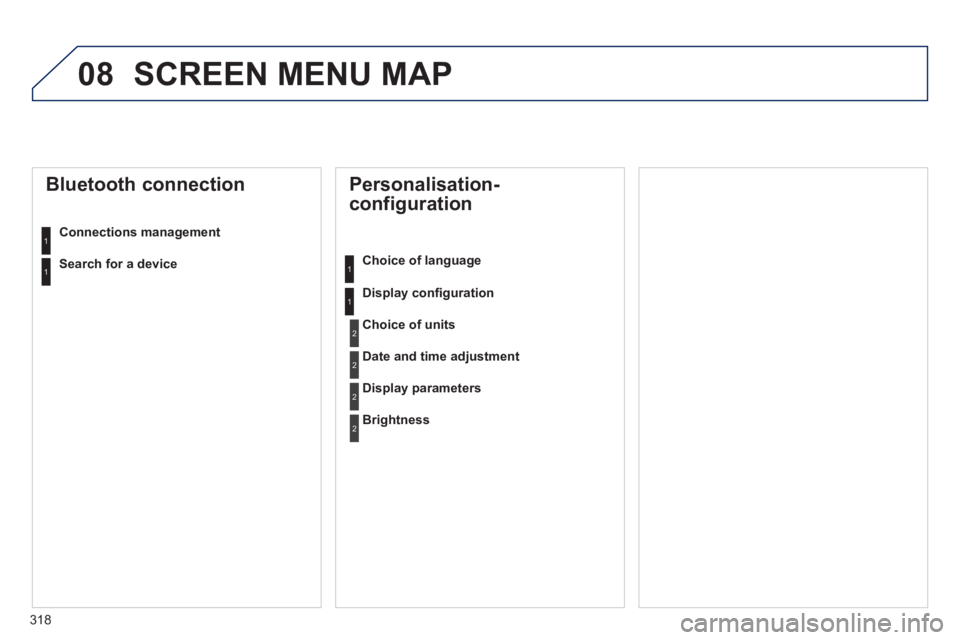
08 SCREEN MENU MAP
Personalisation-
configuration
Choice of language
Displa
y confi guration
Bluetooth connection
Connections management
Choice of units
Date and time adjustment
Display parameters
Brightness
1
1
2
2
2
2
1
1Search for a device
Page 323 of 340
321
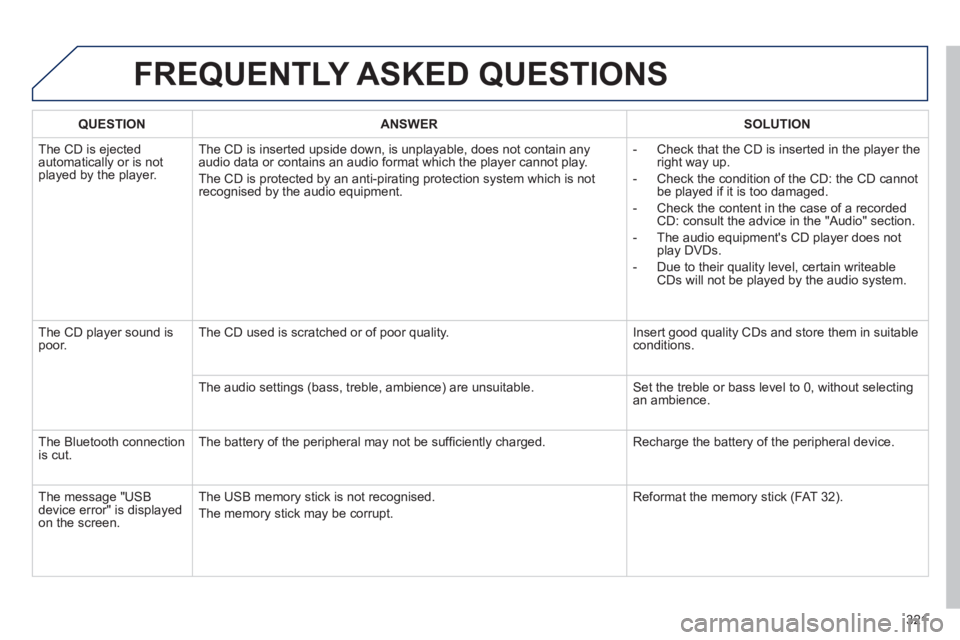
FREQUENTLY ASKED QUESTIONS
QUESTIONANSWERSOLUTION
The CD is ejected
automatically or is not played by the player. The CD is inserted upside down, is unpla
yable, does not contain any audio data or contains an audio format which the player cannot play.
The
CD is protected by an anti-pirating protection system which is not recognised by the audio equipment.
- Check that the CD is inserted in the pla
yer the
right way up.
-
Check the condition of the CD: the CD cannot
be played if it is too damaged.
-
Check the content in the case of a recordedCD: consult the advice in the "Audio" section.
- The audio equipment's CD pla
yer does not
play DVDs.
-
Due to their quality level, certain writeableCDs will not be played by the audio system.
The CD pla
yer sound ispoor.The CD used is scratched or of poor quality. Insert good quality CDs and store them in suitable conditions.
The audio settin
gs (bass, treble, ambience) are unsuitable. Set the treble or bass level to 0, without selectingan ambience.
Th
e Bluetooth connection
is cut. The battery of the peripheral may not be suffi ciently charged. Recharge the battery of the peripheral device.
The messa
ge "USB device error" is displayedon the screen.The USB memor
y stick is not recognised.
The memory stick may be corrupt. Reformat the memor
y stick (FAT 3 2).
Page 326 of 340
324
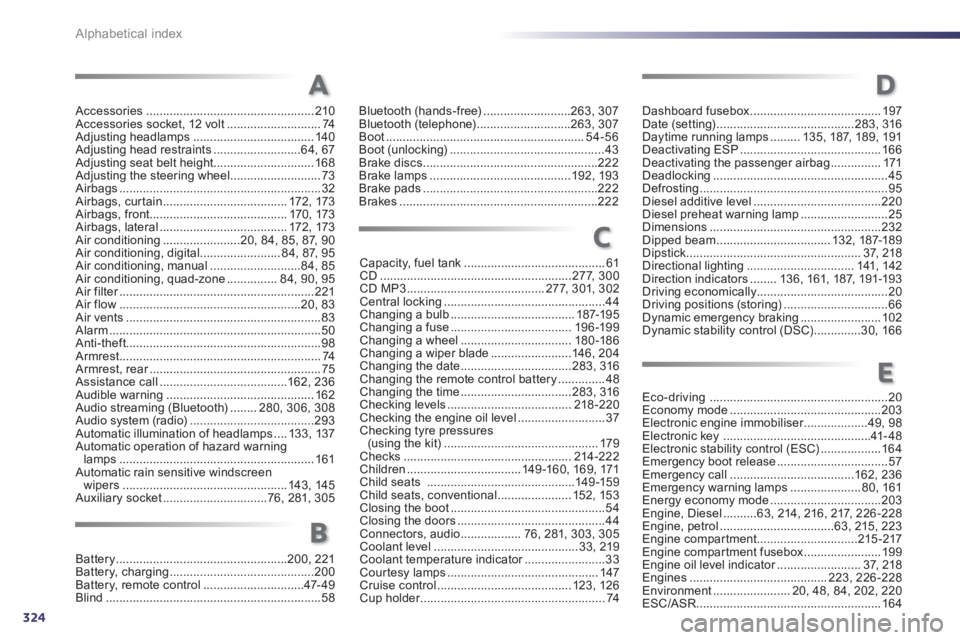
Alphabetical index
Accessories ..................................................210Accessories socket, 12 volt............................74Adjusting headlamps .................................... 140Adjusting head restraints..........................64, 67Adjusting seat belt height..............................168Adjusting the steering wheel...........................73Airbags............................................................32Airbags, cur tain .....................................172, 173Airbags, front.........................................170, 173Airbags, lateral ......................................172, 173Air conditioning.......................20, 84, 85, 87, 90Air conditioning, digital ........................84,87,95Air conditioning, manual...........................84,85Air conditioning, quad-zone...............84,90,95Air filter..........................................................r221Air flow......................................................20, 83Air vents ..........................................................83Alarm ...............................................................50Anti-theft..........................................................98Armrest ............................................................74Armrest, rear...................................................r75Assistance call......................................162, 236Audible warning............................................162Audio streaming (Bluetooth)........280, 306,308Audio system (radio).....................................293Automatic illumination of headlamps ....133,137Automatic operation of hazard warninglamps ..........................................................161Automatic rain sensitive windscreen
wipers ................................................. 143, 145Auxiliary socket...............................76, 281,305
Bluetooth (hands-free)..........................263, 307Bluetooth (telephone)............................263, 307Boot...........................................................54-56
Boot (unlocking)..............................................43Brake discs....................................................222Brake lamps..........................................192, 193Brake pads....................................................222Brakes ...........................................................222
Capacity, fuel tank..........................................61CD.........................................................277, 300CD MP3 .........................................277, 301,302Central locking................................................44Changing a bulb.....................................187-195Changing a fuse....................................196-199Changing a wheel.................................180-186Changing a wiper blade........................146,204Changing the date.................................283, 316Changing the remote control battery ..............48Changing the time.................................283, 316Checking levels .....................................218-220Checking the engine oil level..........................37Checking tyre pressures(using the kit)..............................................179Checks..................................................214-222Children..................................149 -160, 169, 171Child seats............................................149-159Child seats, conventional ......................152,153Closing the boot..............................................54Closing the doors ............................................44Connectors, audio ..................76, 281,303,305Coolant level...........................................33, 219Coolant temperature indicator........................r33Courtesy lamps.............................................147Cruise control........................................123,126Cup holder.......................................................r74
Eco-driving.....................................................20Economy mode.............................................203Electronic engine immobiliser...................r49,98Electronic key............................................41- 48Electronic stability control (ESC)..................164Emergency boot release .................................57Emergency call.....................................162, 236Emergency warning lamps .....................80,161Energy economy mode.................................203Engine, Diesel..........63, 214, 216, 217,226-228Engine, petrol..................................63, 215, 223Engine compartment..............................215-217Engine compar tment fusebox.......................199Engine oil level indicator.........................r37,218Engines .........................................223,226-228Environment .......................20, 48, 84, 202, 220ESC/ASR....................................................... 164
A
C
E
Dashboard fusebox .......................................197Date (setting).........................................283, 316Daytime running lamps .........135,187, 189, 191Deactivating ESP..........................................166Deactivating the passenger airbag...............171Deadlocking....................................................45Defrosting........................................................95Diesel additive level......................................220Diesel preheat warning lamp..........................25Dimensions...................................................232Dipped beam ..................................132,187-189Dipstick....................................................37,218Directional lighting................................141, 142Direction indicators........136, 161, 187, 191-193Driving economically.......................................20Driving positions (storing)...............................66Dynamic emergency braking........................102
Dynamic stability control (DSC) ..............30, 166
Battery...................................................200, 221Battery, charging...........................................200Battery, remote control..............................47-49Blind................................................................58
B
D