warning Peugeot 508 2012 Owner's Manual
[x] Cancel search | Manufacturer: PEUGEOT, Model Year: 2012, Model line: 508, Model: Peugeot 508 2012Pages: 340, PDF Size: 11.11 MB
Page 2 of 340
!Please note the following point: The fitting of electrical equipment or accessories which are not recommended by PEUGEOT may result in a failure of your vehicle's electronic system. Please note this specific warning. It is advisable to contact a PEUGEOT dealer to be shown the recommended equipment and accessories.
Page 3 of 340
i !
WELCOME
Key
Warning:
this symbol marks warnings which it is essential to observe for your own safety, for the safety of others or toavoid any risk of damaging your vehicle.
Information:
this symbol draws your attention to additional information for better use of your vehicle.
Protection of
the environment:
this symbol accompanies advicerelating to protection of the environment.
Page reference:
this symbol invites you to refer to the
pages which provide details of the function.
Thank
you for choosing a 508.
This handbook has been designed to enable you
to make the most of
your vehicle in all situations.
Therefore, on the first few pages, you will find a
detailed summary followed by a quick reference guide intended to make it easier for you to
become
familiar with your vehicle.
All of the details specific to your vehicle, comfort, safety, practical information, are then presented in this handbook, to increase your
appreciation of the vehicle and to help you make
the most of it.
Each model ma
y only be fitted with some
of the equipment shown in this handbook,depending on the trim level, model, version andspecification for the country in which it is sold.
Page 4 of 340
.
Contents
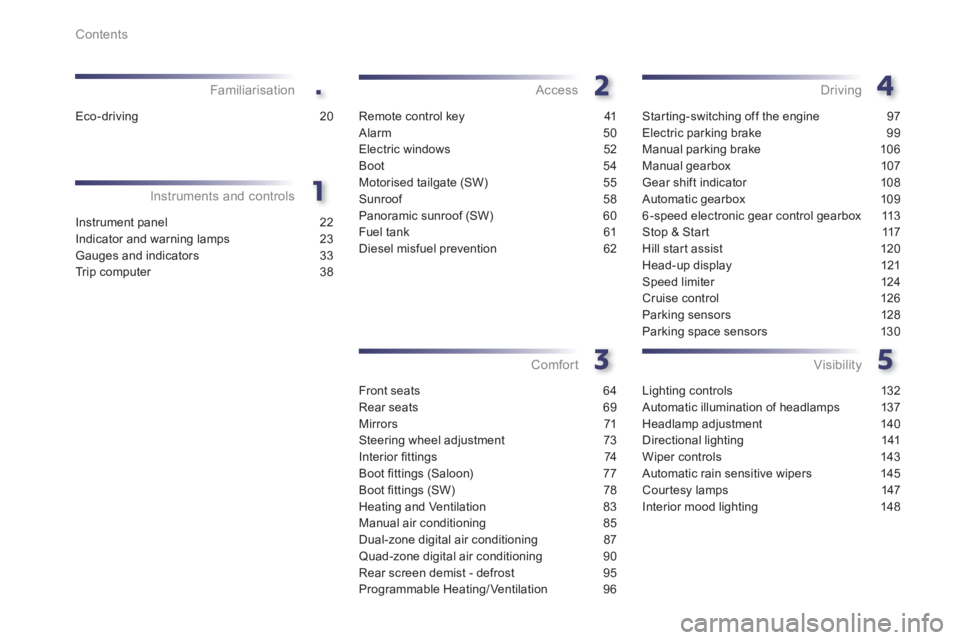
Instrument panel 22
Indicator and warning lamps 23
Gauges and indicators 33
Tr ip computer 38
Instruments and controlsFamiliarisation
Remote control key 41
Alarm 50
Electric windows 52
Boot 54
Motorised tailgate (SW) 55
Sunroof 58
Panoramic sunroof (SW) 60
Fuel tank 61
Diesel misfuel prevention 62
Access
Front seats 64
Rear seats 69
Mirrors 71
Steering wheel adjustment 73
Interior fi ttings 74
Boot fi ttin
gs (Saloon) 77
Boot fi ttings (SW) 78
Heating and Ventilation 83
Manual air conditioning 85
Dual-zone digital air conditioning 87
Quad-zone digital air conditioning 90
Rear screen demist - defrost 95
Programmable Heating/Ventilation 96
Comfort
Starting-switching off the engine 97
Electric parking brake 99
Manual parking brake 106
Manual gearbox 107
Gear shift indicator 108
Automatic gearbox 109
6-speed electronic gear control gearbox 113
Stop & Star t 117
Hill start assist 120
Head-up display 121
Speed limiter 124
Cruise control 126
Parking sensors 128
Parking space sensors 130
Driving
Lighting controls 132
Automatic illumination of headlamps 137
Headlamp adjustment 140
Directional lighting 141
Wiper controls 143
Automatic rain sensitive wipers 145
Cour tesy lamps 147
Interior mood lighting 148
Visibility
Eco-driving 20
Page 7 of 340
.
5
Familiarisation
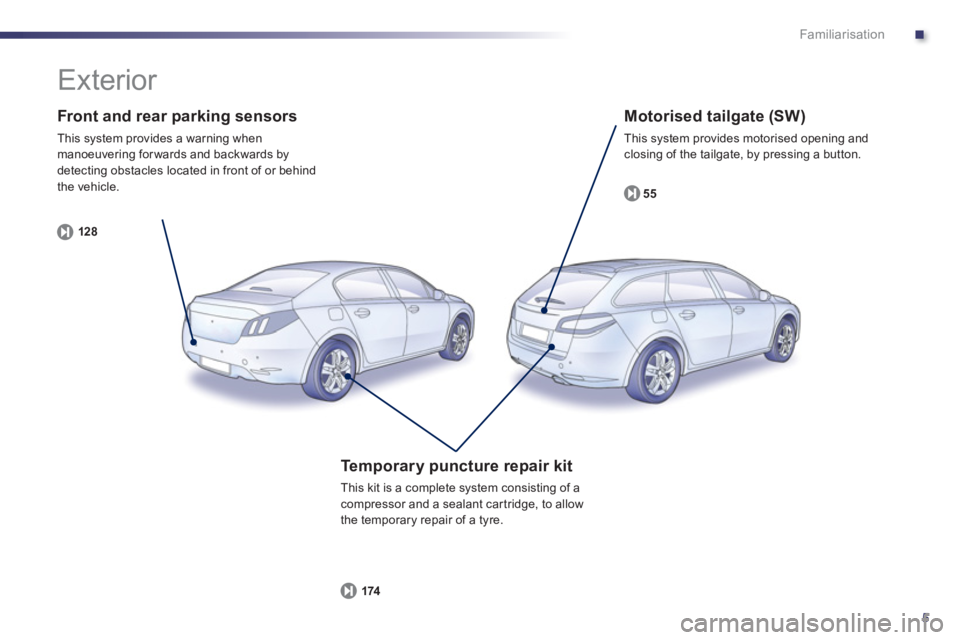
Front and rear parking sensors
This system provides a warning when manoeuvering for wards and backwards by
detecting obstacles located in front of or behind
the vehicle.
12
8
Motorised tailgate (SW)
This system provides motorised opening and closing of the tailgate, by pressing a button.
55
Te m p o r a ry puncture repair kit
This kit is a complete system consisting of acompressor and a sealant car tridge, to allow
the temporary repair of a tyre.
174
Exterior
Page 10 of 340
8
Familiarisation
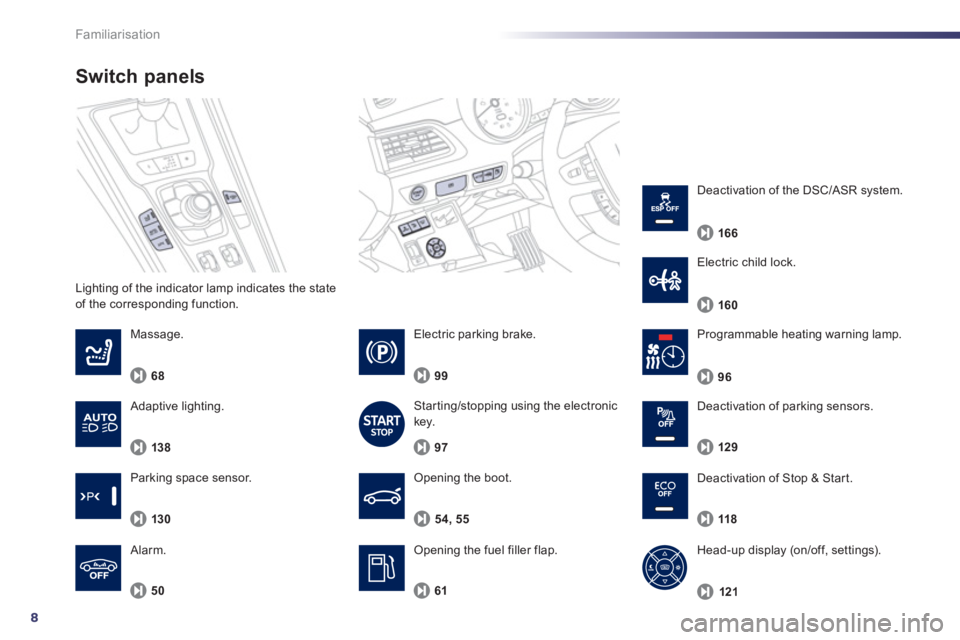
Lighting of the indicator lamp indicates the state
of the corresponding function.
Switch panels
Opening the boot.
Opening the fuel filler flap. 54, 55
Massa
ge.
6
8
50
Alarm.
Pro
grammable heating warning lamp.
6
1
96
Electric parking brake.
99
Starting/stopping using the electronic key.
97
Deactivation o
f Stop & Start.
118
Head-up display (on/off, settings).
12
1
Deactivation of parking sensors.
129
Parkin
g space sensor.
130
Electric child lock.
160
Deactivation o
f the DSC/ASR system.
166
Adaptive lighting.
138
Page 12 of 340
10
Familiarisation
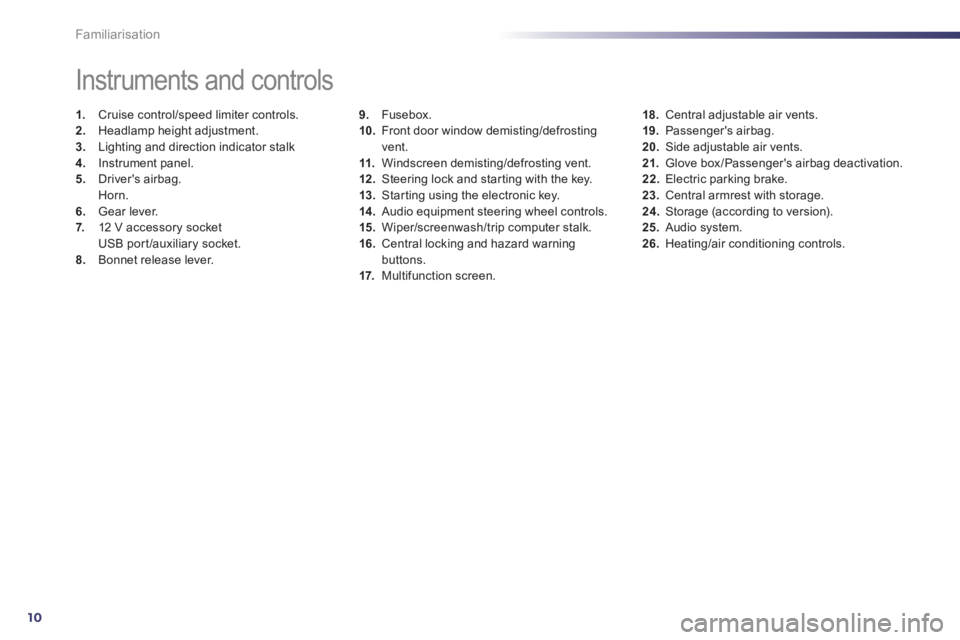
9.Fusebox.
10. Front door window demisting/defrostingvent.
11.Windscreen demisting/defrosting vent. 12 .Steering lock and star ting with the key.
13. Starting using the electronic key. 14 .
Audio equipment steering wheel controls.
15. Wiper/screenwash/trip computer stalk.
16.Central locking and hazard warningbuttons.
17. Multifunction screen.
Instruments and controls
1.
Cruise control/speed limiter controls. 2.
Headlamp height adjustment. 3.
Lighting and direction indicator stalk
4.
Instrument panel. 5.
Driver's airbag.Horn.
6.Gear lever.
7. 12 V accessory socket
USB por t/auxiliary socket.8.Bonnet release lever.
18.Central adjustable air vents.19. Passenger's airbag.20.
Side adjustable air vents.
21.Glove box/Passenger's airbag deactivation. 22.
Electric parking brake. 23.
Central armrest with storage. 24.
Storage (according to version).25.Audio system. 26.Heating/air conditioning controls.
Page 18 of 340
16
Familiarisation
Monitoring
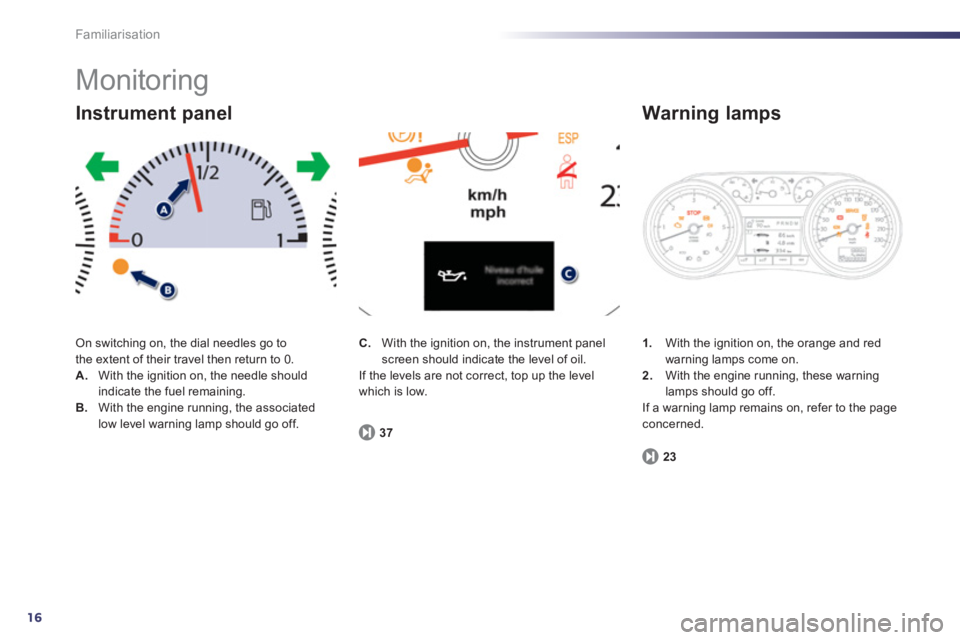
On switching on, the dial needles go to
the extent of their travel then return to 0. A. With the ignition on, the needle shouldindicate the fuel remaining. B.With the engine running, the associated low level warning lamp should go off.
Instrument panel
1.
With the ignition on, the orange and red
warning lamps come on.2.With the engine running, these warninglamps should go off.
If a warning lamp remains on, refer to the page concerned.
Warning lamps
23
C.
With the ignition on, the instrument panelscreen should indicate the level of oil.
If the levels are not correct, top up the level
whi
ch is low.
3
7
Page 19 of 340
.
17
Familiarisation
Passenger safety
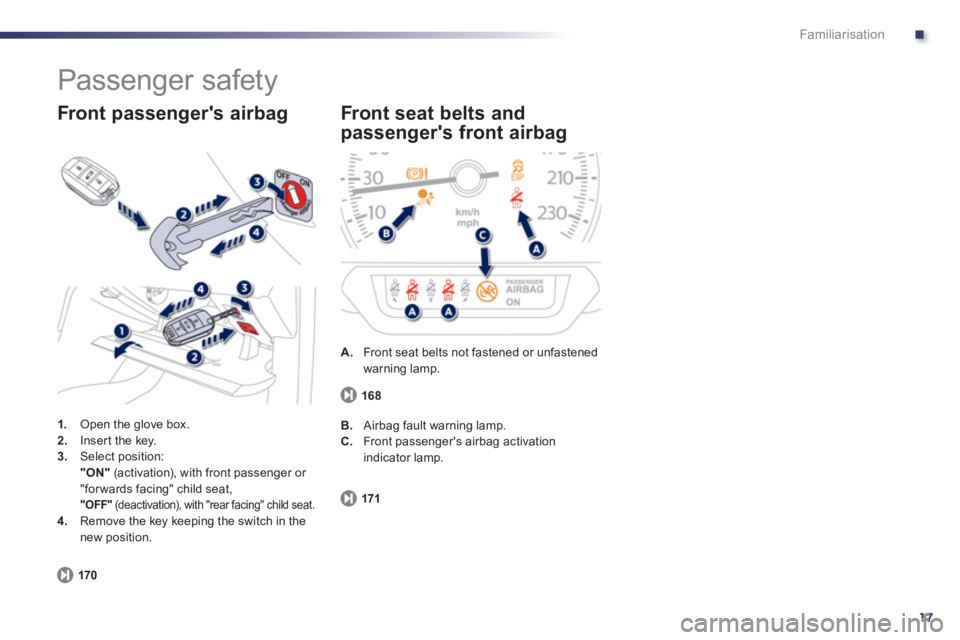
1.
Open the glove box. 2.Inser t the key. 3.Select position:"ON"(activation), with front passenger or
"for wards facing" child seat, "OFF"
(deactivation), with "rear facing" child seat. 4.
Remove the key keeping the switch in the
new position.
Front passenger's airbag
170
A.
Front seat belts not fastened or unfastenedwarning lamp.
Front seat belts and
passen
ger's front airbag
171
B. Airbag fault warning lamp.
C.
Front passenger's airbag activationindicator lamp.
168
Page 20 of 340
18
i
!
Familiarisation
Driving safely
Stop & Start
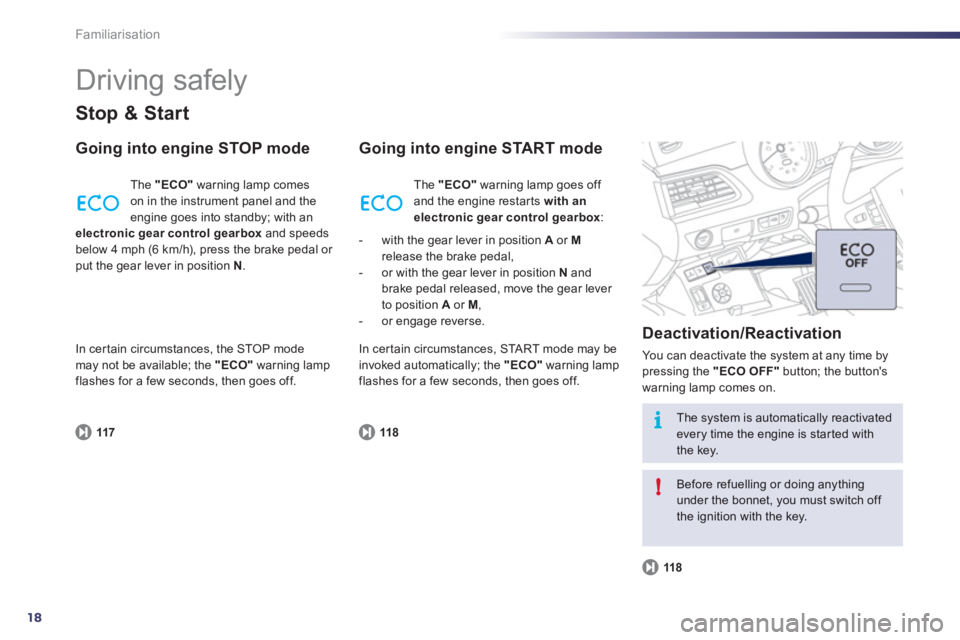
Going into engine STOP mode
117
The "ECO"warning lamp comes
on in the instrument panel and the
engine goes into standby; with anelectronic gear control gearbox and speeds
below 4 mph (6 km/h), press the brake pedal or put the gear lever in position N.
Going into engine START mode
Deactivation
/Reactivation
You can deactivate the system at any time bypressing the "ECO OFF"
button; the button's
warning lamp comes on.
118
118
The system is automatically reactivated every time the engine is star ted withthe key.
Before refuelling or doing anything under the bonnet, you must switch off the ignition with the key. Th
e "ECO"
warning lamp goes off
and the engine restar ts with anelectronic gear control gearbox:
- with the gear lever in position A
or Mrelease the brake pedal,
- or with the gear lever in position N
andbrake pedal released, move the gear lever
to position Aor M ,
- or engage reverse.
In certain circumstances, the ST
OP modemay not be available; the "ECO"
warning lamp
flashes for a few seconds, then goes off. In certain circumstances,
STA R T m o d e m ay be
invoked automatically; the "ECO"warning lampflashes for a few seconds, then goes off.
Page 25 of 340
1
23
!
Instruments and controls
Indicator and warning
lamps
Visual indicators informing the driver that
a system is in operation, switched off or hasa fault.
When the ignition is switched on
Certain warning lamps come on for a few seconds in the instrument panel and/or
instrument panel screen when the vehicle's
ignition is switched on.
When the engine is started, these same
warning lamps should go off.
If they remain on, before moving off, refer to
the information on the warning lamp concerned.
Associated warnings
The switching on of cer tain warning lamps
may be accompanied by an audible signal and
a message in the instrument panel screen.
The warning lamps may come on continuously(fixed) or flash.
Certain warning lamps may come on inone of two modes. Only by relating thetype of lighting to the operating status
of the vehicle can it be ascertainedwhether the situation is normal or whether a fault has occurred.
1
2
2
2
3
3
3
2
3
3
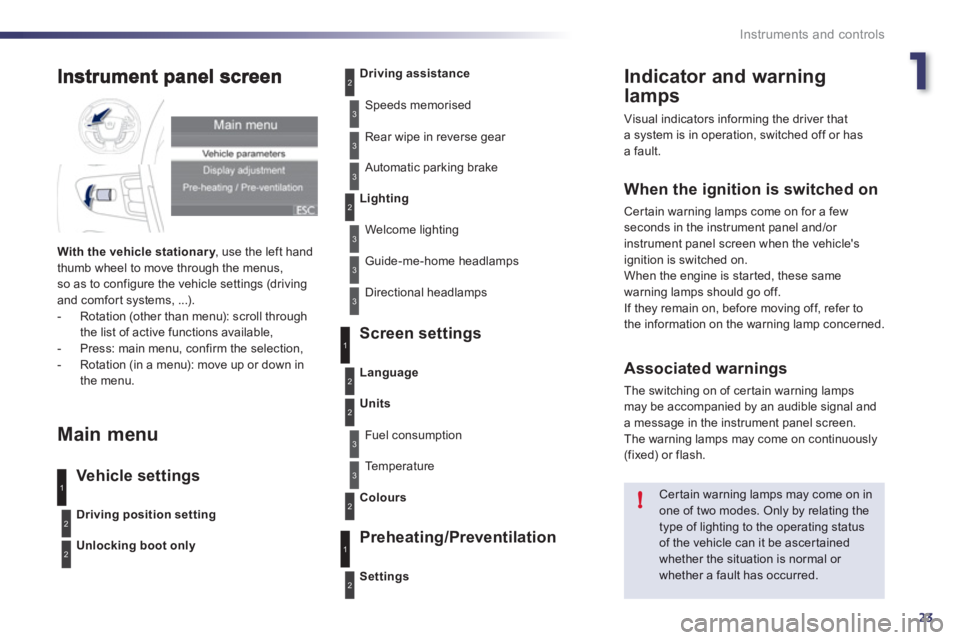
With the vehicle stationar y, use the left handythumb wheel to move through the menus,so as to configure the vehicle settings (driving
and comfor t systems, ...).
- Rotation (other than menu): scroll through
the list of active functions available,
- Press: main menu, confirm the selection,
- Rotation (in a menu): move up or down in
the menu.
Main menu
Vehicle settings Screen settin
gs
Preheatin
g/Preventilation
Driving position setting
Unlocking boot only
Driving assistance
Speeds memorised
Rear wipe in reverse
gear
Automatic parking brake
Lighting
Welcome lighting
Guide-me-home headlamps
Directional headlamps
Settin
gs
Language
Units
Fuel consumption
Te m p e r a t u r e
Colour
s
3
1
2
2
3
2
3
1
2