Peugeot 508 2016 - RHD (UK, Australia) Service Manual
508 2016
Peugeot
Peugeot
https://www.carmanualsonline.info/img/29/28142/w960_28142-0.png
Peugeot 508 2016 - RHD (UK, Australia) Service Manual
Page 299 of 364
297
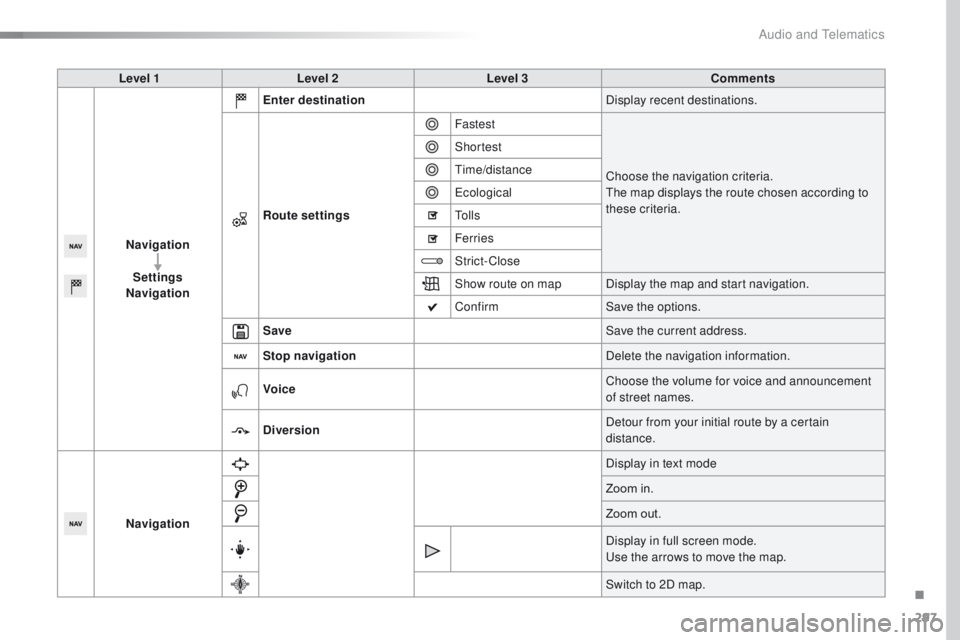
Level 1Level 2 Level 3 Comments
Navigation Settings
Navigation Enter destination
Display recent destinations.
Route settings Fastest
Choose the navigation criteria.
th
e map displays the route chosen according to
these criteria.
Shortest
tim
e/distance
ec
ological
to
l l s
Ferries
Strict-Close
Show route on map Display the map and start navigation.
Confirm Save the options.
Save Save the current address.
Stop navigation Delete the navigation information.
Voice Choose the volume for voice and announcement
of street names.
Diversion Detour from your initial route by a certain
distance.
Navigation Display in text mode
Zoom in.
Zoom out.
Display in full screen mode.
us
e the arrows to move the map.
Switch to 2D map.
.
Audio and Telematics
Page 300 of 364
298
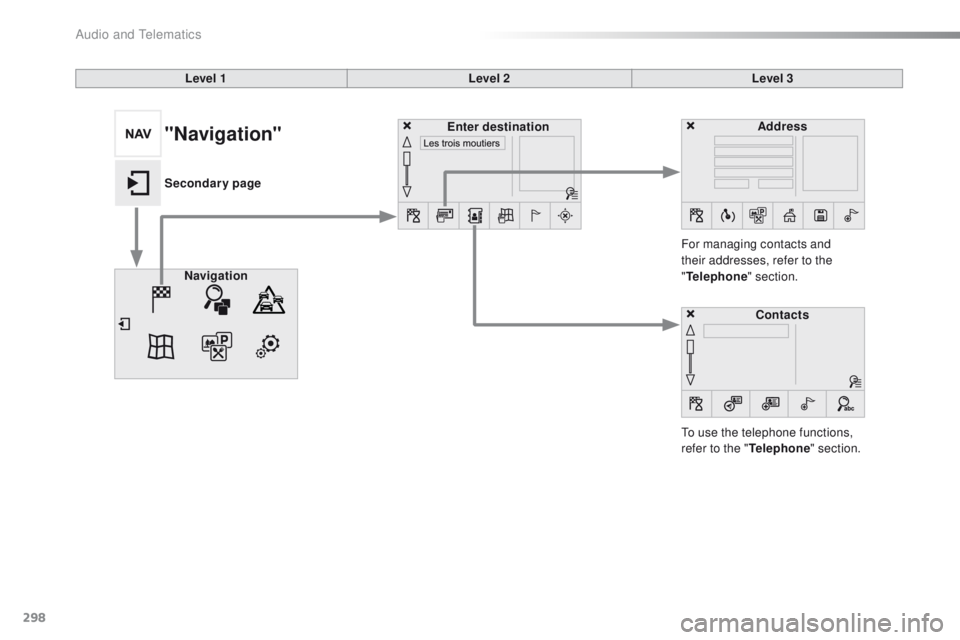
Level 1Level 2Level 3
to u
se the telephone functions,
refer to the " Telephone" section.
For managing contacts and
their addresses, refer to the
"
Telephone " section.
Navigation Address
Enter destination
Contacts
"Navigation"
Secondary page
Audio and Telematics
Page 301 of 364
299
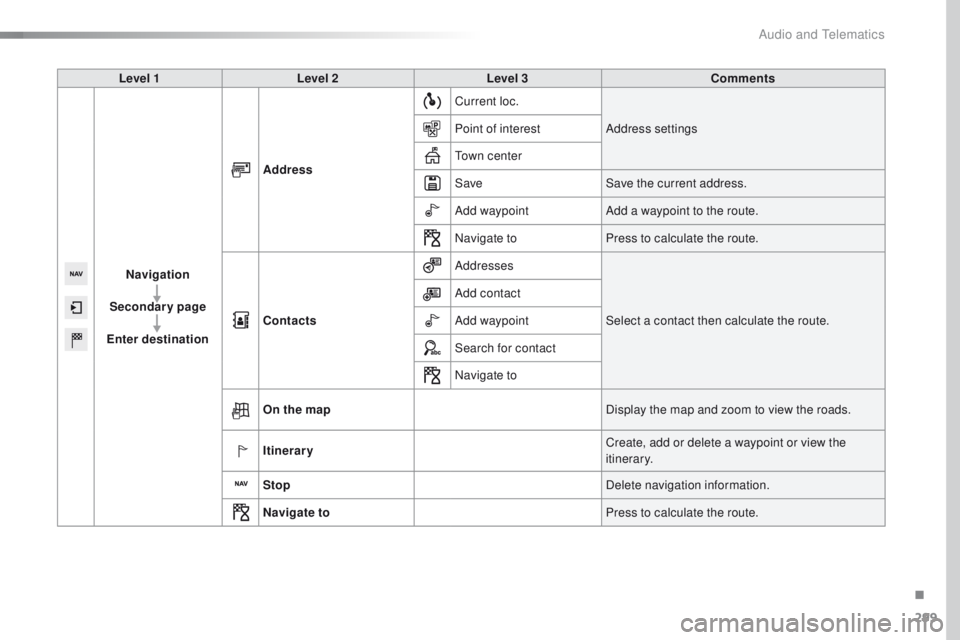
Level 1Level 2 Level 3 Comments
Navigation
Secondary page
Enter destination Address
Current loc.
Address settings
Point of interest
to
wn center
Save Save the current address.
Add waypoint Add a waypoint to the route.
Navigate to Press to calculate the route.
Contacts Addresses
Select a contact then calculate the route.
Add contact
Add waypoint
Search for contact
Navigate to
On the map Display the map and zoom to view the roads.
Itinerary Create, add or delete a waypoint or view the
itinerary.
Stop Delete navigation information.
Navigate to Press to calculate the route.
.
Audio and Telematics
Page 302 of 364
300
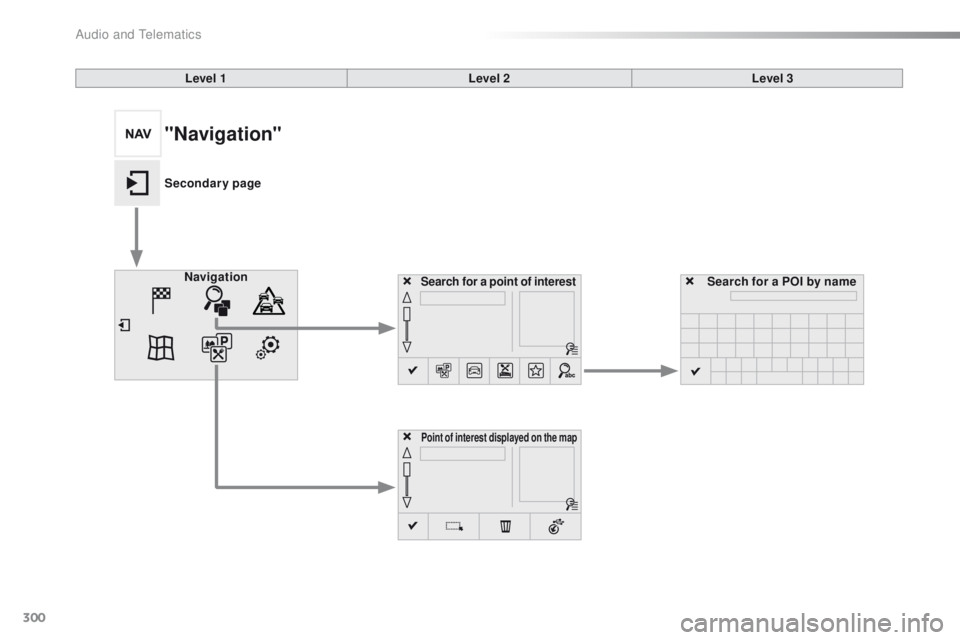
Search for a point of interestNavigation
Point of interest displayed on the map
Search for a POI by name
Level 1
Level 2Level 3
"Navigation"
Secondary page
Audio and Telematics
Page 303 of 364
301
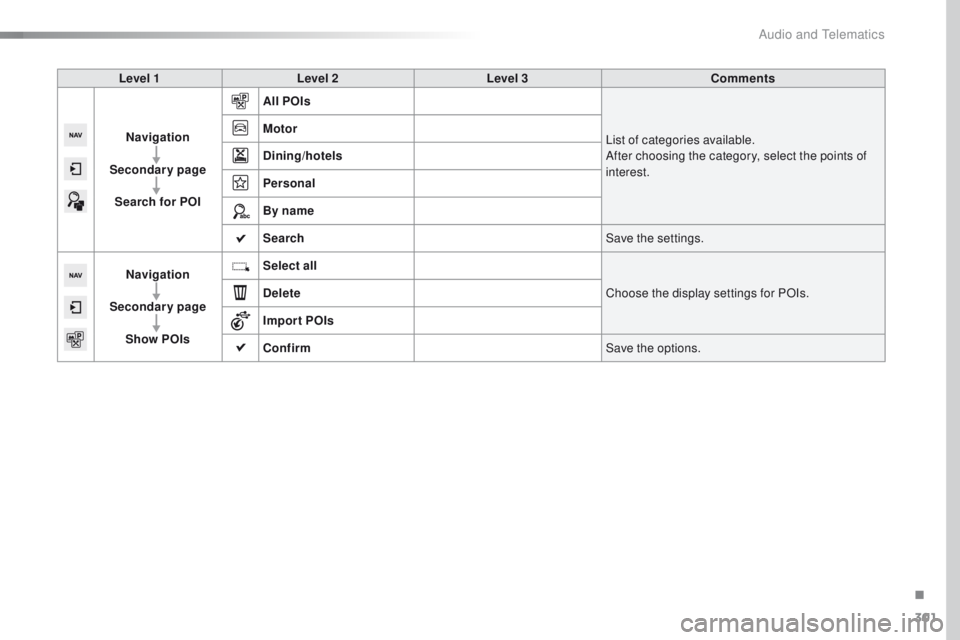
Level 1Level 2 Level 3 Comments
Navigation
Secondary page Search for POI All POIs
List of categories available.
After choosing the category, select the points of
interest.
Motor
Dining/hotels
Personal
By name
Search
Save the settings.
Navigation
Secondary page Show POIs Select all
Choose the display settings for POIs.
Delete
Import POIs
Confirm Save the options.
.
Audio and Telematics
Page 304 of 364
302
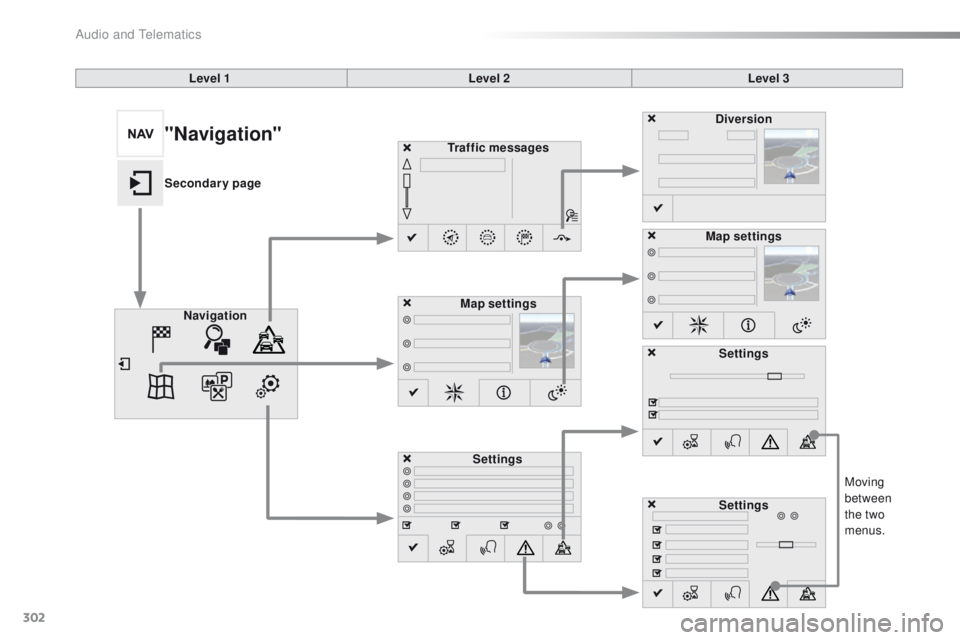
Moving
between
the two
menus.
Level 1
Level 2Level 3
Traffic messages
Settings Diversion
Map settings
Navigation Map settings
Settings
Settings
"Navigation"
Secondary page
Audio and telematics
Page 305 of 364
303
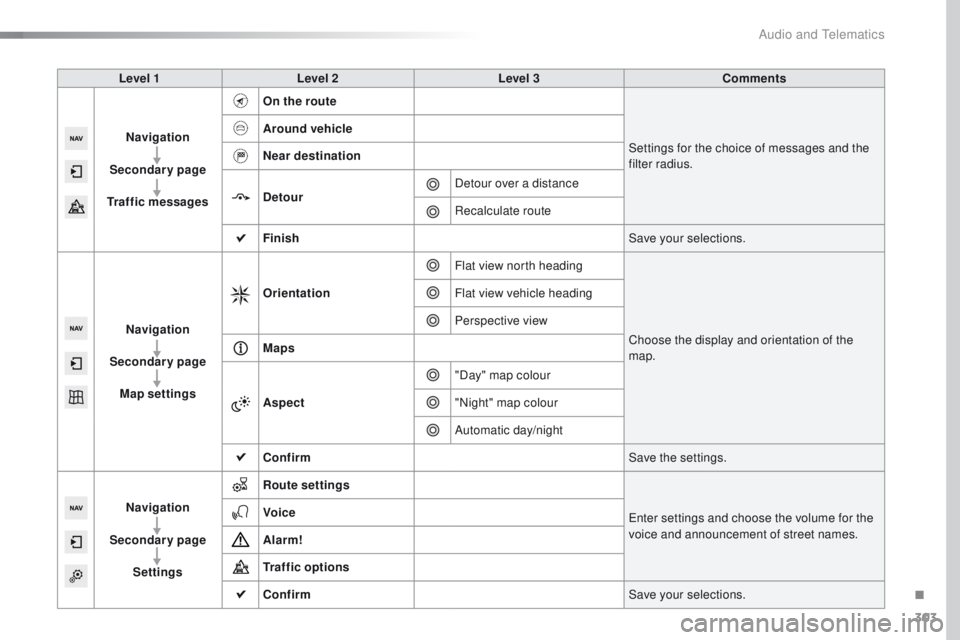
Level 1Level 2 Level 3 Comments
Navigation
Secondary page
Traffic messages On the route
Settings for the choice of messages and the
filter radius.
Around vehicle
Near destination
Detour
Detour over a distance
Recalculate route
Finish Save your selections.
Navigation
Secondary page Map settings Orientation
Flat view north heading
Choose the display and orientation of the
map.
Flat view vehicle heading
Perspective view
Maps
Aspect "Day" map colour
"Night" map colour
Automatic day/night
Confirm Save the settings.
Navigation
Secondary page Settings Route settings
en
ter settings and choose the volume for the
voice and announcement of street names.
Voice
Alarm!
Traffic options
Confirm
Save your selections.
.
Audio and Telematics
Page 306 of 364
304
Navigation - guidance
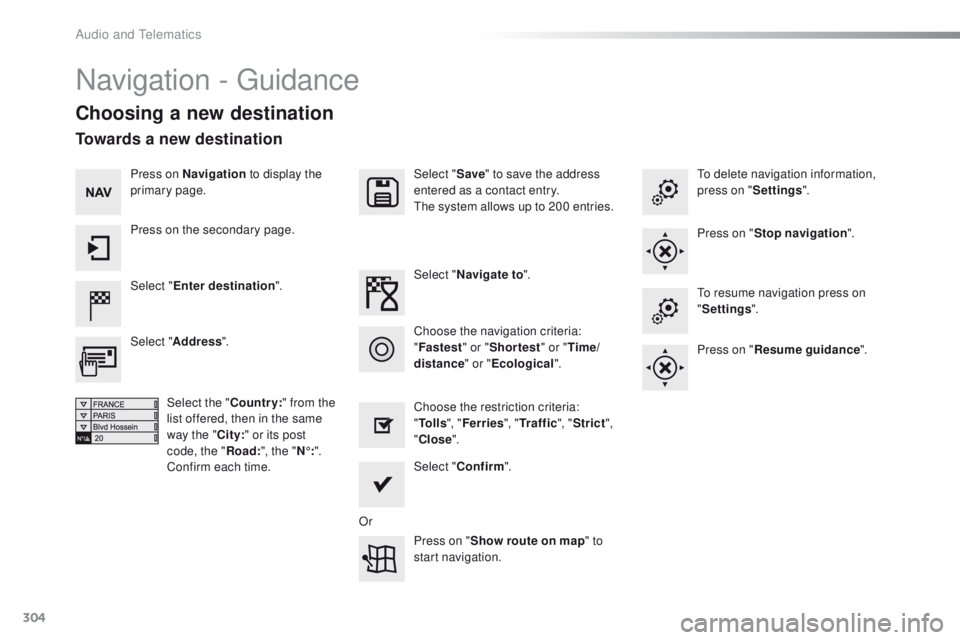
Choosing a new destination
Select "Enter destination ". Select "
Save" to save the address
entered as a contact entry.
th
e system allows up to 200 entries.
Select " Confirm ".
Press on " Show route on map " to
start navigation.
Select "
Address ".
Select the " Country:" from the
list offered, then in the same
way the " City:" or its post
code, the " Road:", the " N°:".
Confirm each time. Select "
Navigate to ".
Choose the restriction criteria:
" To l l s ", "Ferries ", "Tr a f f i c ", "Strict ",
" Close ".
Choose the navigation criteria:
"
Fastest " or "Shortest " or "Time/
distance " or "Ecological".
to
delete navigation information,
press on " Settings".
Press on " Stop navigation ".to r
esume navigation press on
" Settings ".
Press on " Resume guidance ".
Press on Navigation
to display the
primary page.
Press on the secondary page.
Towards a new destination
Or
Audio and telematics
Page 307 of 364
305
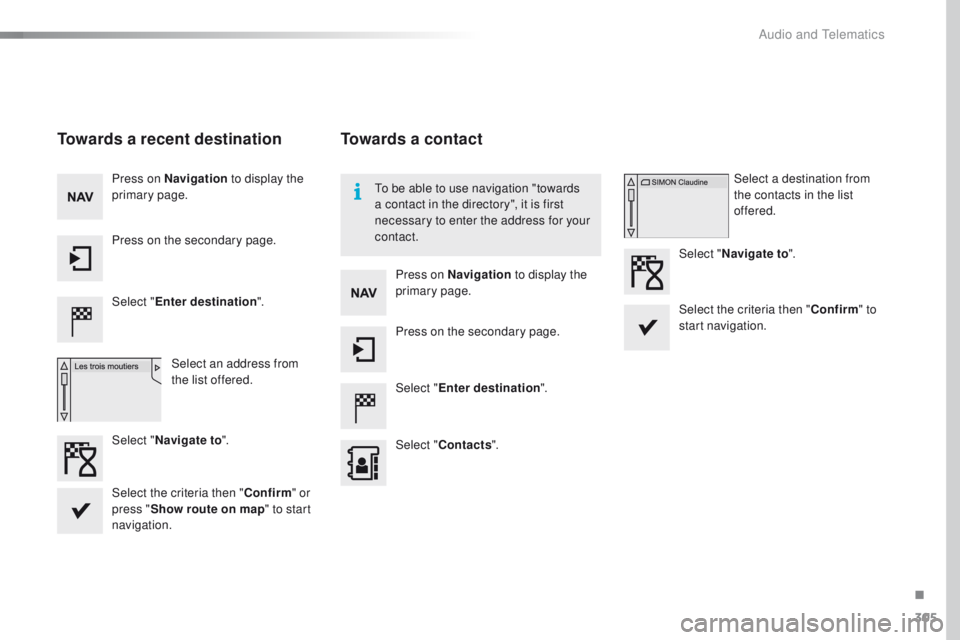
Towards a recent destination
Select "Enter destination ".
Select an address from
the list offered.
Press on Navigation
to display the
primary page.
Press on the secondary page.
Select " Navigate to ".
Towards a contact
Select "Enter destination ".
Select " Contacts ".
Press on Navigation
to display the
primary page.
Press on the secondary page. Select a destination from
the contacts in the list
offered.
Select " Navigate to ".
Select the criteria then " Confirm" to
start navigation.
to b
e able to use navigation "towards
a contact in the directory", it is first
necessary to enter the address for your
contact.
Select the criteria then " Confirm" or
press " Show route on map " to start
navigation.
.
Audio and Telematics
Page 308 of 364
306
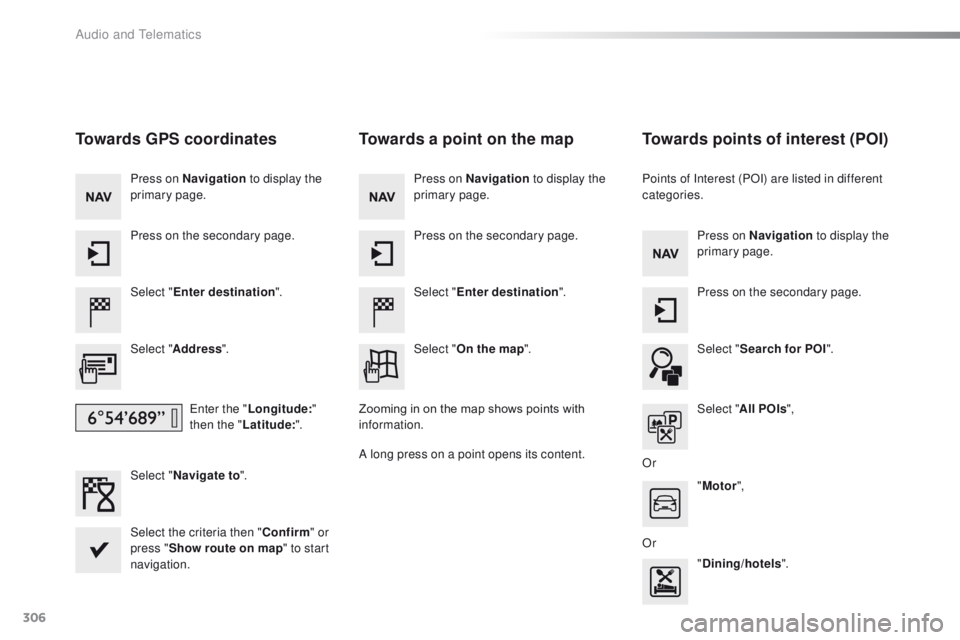
Towards GPS coordinates
Select "Enter destination ".
Select " Address ".
en
ter the "Longitude: "
then the " Latitude: ".
Select " Navigate to ".
Select the criteria then " Confirm" or
press " Show route on map " to start
navigation. Press on Navigation to display the
primary page.
Press on the secondary page.
Towards a point on the map
Select " Enter destination ".
Select " On the map ".
Press on Navigation
to display the
primary page.
Press on the secondary page.
Zooming in on the map shows points with
information.
A long press on a point opens its content.
Towards points of interest (POI)
Points of Interest (POI) are listed in different
categories. Press on Navigation to display the
primary page.
Press on the secondary page.
Select " Search for POI ".
Select " All POIs ",
Or "Motor ",
Or "Dining/hotels ".
Audio and Telematics