navigation Peugeot 508 2016 Owner's Guide
[x] Cancel search | Manufacturer: PEUGEOT, Model Year: 2016, Model line: 508, Model: Peugeot 508 2016Pages: 371, PDF Size: 12.12 MB
Page 311 of 371
309
508_en_Chap10c_SMegplus_ed01-2016
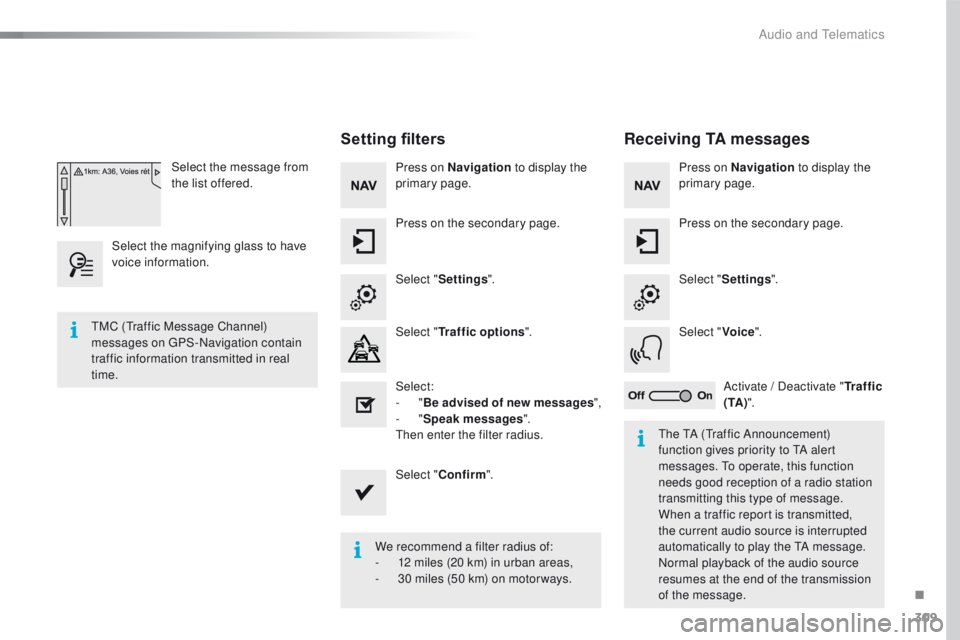
Select the message from
the list offered.
Select the magnifying glass to have
voice information.
Setting filters
Press on Navigation to display the
primary page.
Press on the secondary page.
Select " Settings ".
Select " Traffic options ".
Select:
-
"Be advised of new messages ",
-
"Speak messages ".
then
enter the filter radius.
Select " Confirm ".
We recommend a filter radius of:
-
1
2 miles (20 km) in urban areas,
-
3
0 miles (50 km) on motor ways.
tM
C (
tr
affic Message Channel)
messages on
g
P
S-Navigation contain
traffic information transmitted in real
time.
th
e t
A (tr
affic Announcement)
function gives priority to
t
A a
lert
messages.
t
o o
perate, this function
needs good reception of a radio station
transmitting this type of message.
When a traffic report is transmitted,
the current audio source is interrupted
automatically to play the
t
A m
essage.
Normal playback of the audio source
resumes at the end of the transmission
of the message.
Receiving TA messages
Press on Navigation to display the
primary page.
Press on the secondary page.
Select " Settings ".
Select " Voice".
Activate
/ Deactivate "Tr a f f i c
( TA ) ".
.
Audio and telematics
Page 320 of 371
318
508_en_Chap10c_SMegplus_ed01-2016
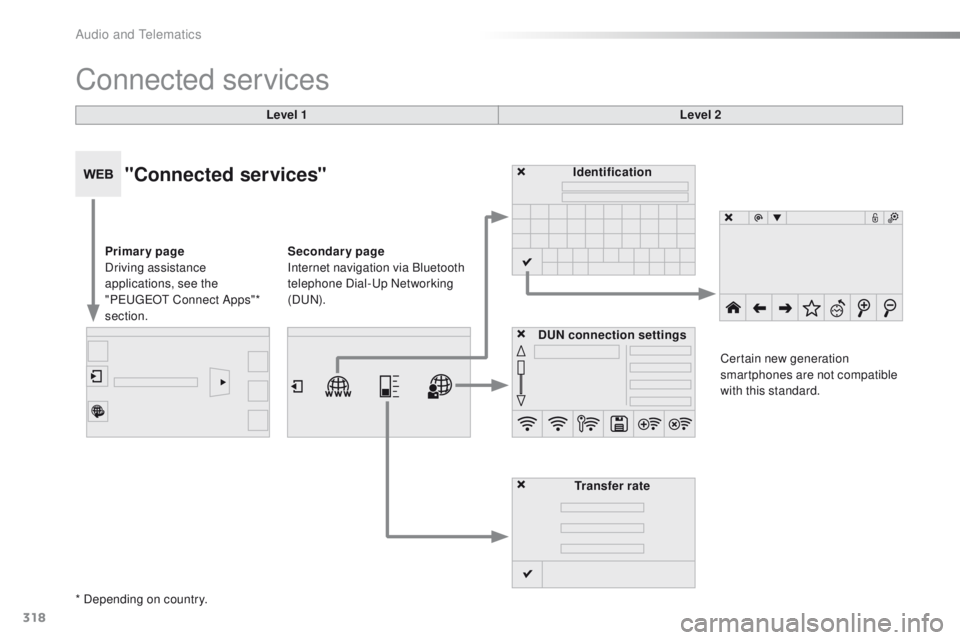
Connected services
Level 1Level 2
"Connected services"
Primary page
Driving assistance
applications, see the
"P
e
uge
Ot
Connect Apps"*
section. Identification
DUN connection settings Transfer rate Certain new generation
smartphones are not compatible
with this standard.
Secondary page
Internet navigation via Bluetooth
telephone Dial-
u
p Networking
(D
uN)
.
* Depending on country.
Audio and telematics
Page 330 of 371
328
508_en_Chap10c_SMegplus_ed01-2016
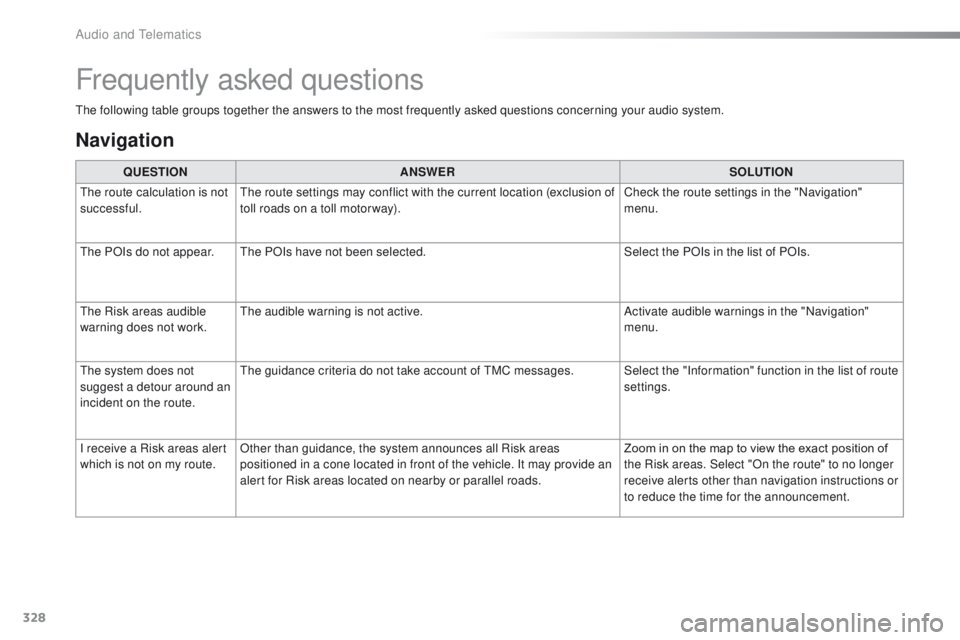
the following table groups together the answers to the most frequently asked questions concerning your audio system.
Frequently asked questions
Navigation
QUESTIONANSWER SOLUTION
th
e route calculation is not
successful.
th
e route settings may conflict with the current location (exclusion of
toll roads on a toll motor way). Check the route settings in the "Navigation"
menu.
th
e POIs do not appear.
th
e POIs have not been selected. Select the POIs in the list of POIs.
th
e Risk areas audible
warning does not work.
th
e audible warning is not active. Activate audible warnings in the "Navigation"
menu.
th
e system does not
suggest a detour around an
incident on the route.
th
e guidance criteria do not take account of t
M
C messages. Select the "Information" function in the list of route settings.
I receive a Risk areas alert
which is not on my route. Other than guidance, the system announces all Risk areas
positioned in a cone located in front of the vehicle. It may provide an
alert for Risk areas located on nearby or parallel roads. Zoom in on the map to view the exact position of
the Risk areas. Select "On the route" to no longer
receive alerts other than navigation instructions or
to reduce the time for the announcement.
Audio and telematics
Page 340 of 371
338
508_en_Chap10d_RD5_ed01-2016
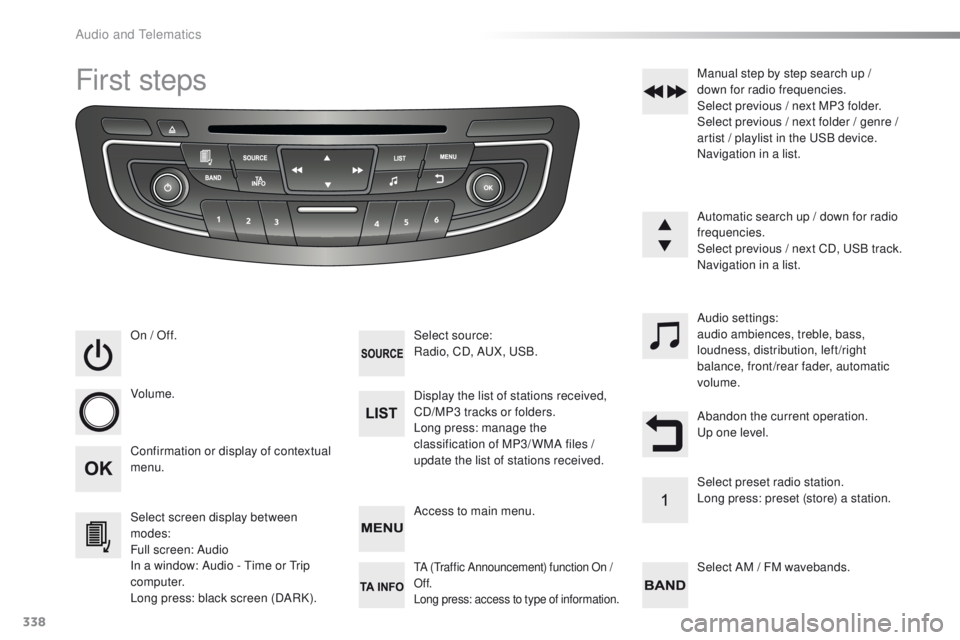
First steps
On / Off.
Volume.
Select screen display between
modes:
Full screen: Audio
In a window: Audio - t
i
me or t
r
ip
computer.
Long press: black screen (DARK). Select source:
Radio, CD, AuX
, uS B.
Confirmation or display of contextual
menu. Display the list of stations received,
CD/MP3 tracks or folders.
Long press: manage the
classification of MP3/ WMA files /
update the list of stations received.Audio settings:
audio ambiences, treble, bass,
loudness, distribution, left/right
balance, front/rear fader, automatic
volume.
Access to main menu. Select AM / FM wavebands. Manual step by step search up /
down for radio frequencies.
Select previous / next MP3 folder.
Select previous / next folder / genre /
artist / playlist in the u
S
B device.
Navigation in a list.
Automatic search up / down for radio
frequencies.
Select previous / next CD, u
S
B track.
Navigation in a list.
tA (traffic Announcement) function On /
Of f.
Long press: access to type of information.
Abandon the current operation.up o ne level.
Select preset radio station.
Long press: preset (store) a station.
Audio and telematics
Page 357 of 371
355
508_en_Chap11_index-alpha_ed01-2016
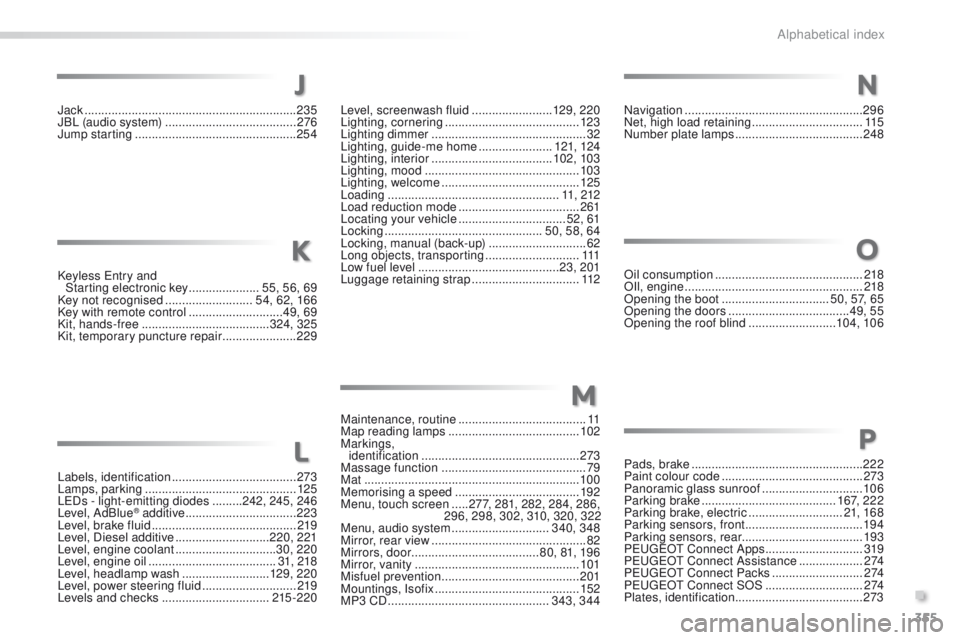
Keyless entry and
Starting electronic key ..................... 5
5, 56, 69
Key not recognised
..........................54, 62, 166
Key with remote control
............................49, 69
Kit, hands-free
...................................... 324, 325
Kit, temporary puncture repair
......................229
Labels, identification
..................................... 2
73
Lamps, parking
............................................. 12
5
L
eD
s - light-emitting diodes
.........242, 245, 246
Level, AdBlue
® additive ................................. 223
Level, brake fluid ........................................... 2
19
Level, Diesel additive
............................ 220, 221
Level, engine coolant
.............................. 30, 220
Level, engine oil
...............................
.......31, 218
Level, headlamp wash
.......................... 129, 2 20
Level, power steering fluid
............................ 2
19
Levels and checks
................................ 215 -220
Jack
........
.......................................................
235
JBL (audio system)
.......................................
2
76
Jump starting
..............................
..................
254Level, screenwash fluid ........................
129, 2 20
Lighting, cornering
........................................
123
Lighting dimmer
..............................
................
32
Lighting, guide-me home
......................
121, 124
Lighting, interior
....................................
102, 103
Lighting, mood
..............................................
103
Lighting, welcome
.........................................
125
Loading
...................................................
11, 212
Load reduction mode
....................................
261
Locating your vehicle
................................ 5
2, 61
Locking
...............................................
50, 58, 64
Locking, manual (back-up)
............................. 62
L
ong objects, transporting
............................
111
L
ow fuel level ..........................................
23, 201
Luggage retaining strap
................................
112
K
L
J
Maintenance, routine ...................................... 11
Map reading lamps ....................................... 102
Markings, identification
............................................... 2
73
Massage function
........................................... 79
Mat
................................................................ 10 0
Memorising a speed
..................................... 192
Menu, touch screen
.....277, 281, 282, 284, 286,
296, 298, 302, 310, 320, 322
Menu, audio system
.............................340, 348
Mirror, rear view
.............................................. 82
Mirrors, door ...................................... 80, 81, 19 6
Mirror, vanity
..............................
...................101
Misfuel prevention
...............................
..........201
Mountings, Isofix
........................................... 152
MP3 CD
................................................ 343, 344
M
Navigation ..................................................... 296
Net, high load retaining .................................115
Number plate lamps
...................................... 24
8
Oil consumption
............................................ 218
OIl, engine
..................................................... 218
Opening the boot
..............................
..50, 57, 65
Opening the doors
...............................
.....49, 55
Opening the roof blind
..........................104, 10 6
Pads, brake
................................................... 222
Paint colour code
.......................................... 273
Panoramic glass sunroof
..............................10 6
Parking brake
........................................ 167, 222
Parking brake, electric
............................21, 16 8
Parking sensors, front
...................................19 4
Parking sensors, rear .................................... 193
P
e
uge
Ot
Connect Apps .............................319
Peuge
O
t Connect Assistance
...................2 74
Peuge
O
t Connect Packs
...........................2 74
Peuge
O
t Connect SOS
............................. 2
74
Plates, identification ...................................... 273
O
P
N
.
Alphabetical index