light Peugeot 508 2018 User Guide
[x] Cancel search | Manufacturer: PEUGEOT, Model Year: 2018, Model line: 508, Model: Peugeot 508 2018Pages: 320, PDF Size: 10.09 MB
Page 39 of 320
37
Welcome lighting
Availability of this function depends on version.F
B
riefly press this button.
The
sidelamps, dipped beam
headlamps, number plate
lamps
and door mirror spotlamps
come on for 30 seconds.
Pressing again before the end of the timed
period switches off the lamps immediately.
Selective unlocking and
opening of the tailgate
The settings for the selective tailgate
unlocking and motorised operation
are made in the Driving/Vehicle
menu of the touch screen.
By default, selective tailgate unlocking is
activated and the motorised function is
deactivated. F
M
ake a long press on this button
to unlock the boot and trigger the
motorised opening of the tailgate.
The doors and fuel filler flap remain locked. If selective unlocking of the tailgate is
deactivated, pressing the unlocking button
unlocks the whole vehicle.
If motorised operation of the tailgate is
deactivated, pressing the unlocking button
releases the tailgate.
To lock the vehicle, it is necessary to close
the tailgate again.
Keyless Entry and
Starting
The electronic key can also be used as a
remote control.
For more information on the operation
of the Remote control
, refer to the
corresponding section.
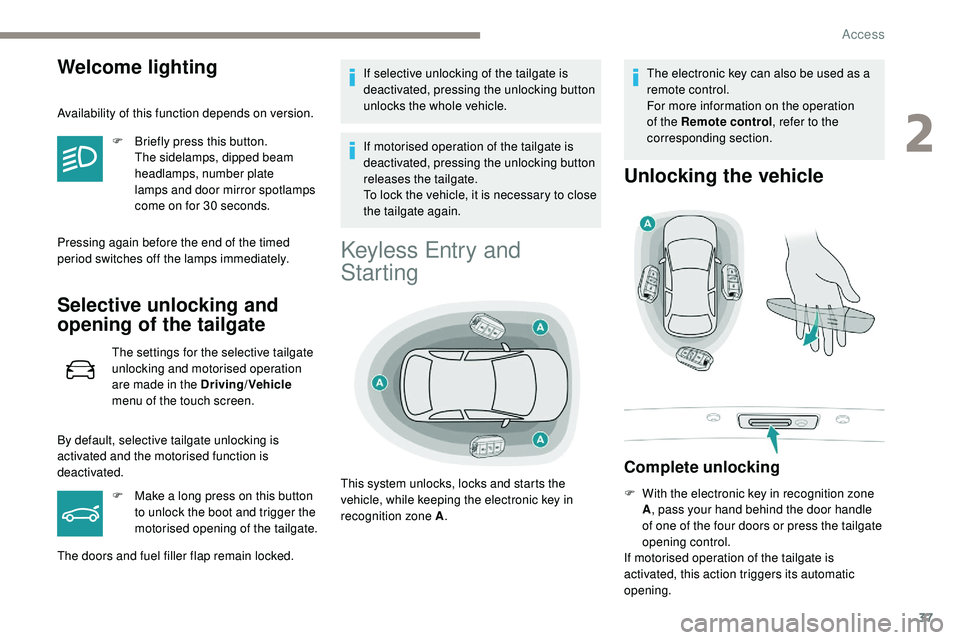
Unlocking the vehicle
Complete unlocking
F With the electronic key in recognition zone A, pass your hand behind the door handle
of one of the four doors or press the tailgate
opening control.
If motorised operation of the tailgate is
activated, this action triggers its automatic
opening.
This system unlocks, locks and starts the
vehicle, while keeping the electronic key in
recognition zone A
.
2
Access
Page 43 of 320
41
Back-up procedures
Complete unlocking/locking
of the vehicle with the key
These procedures should be used in the
following cases:
-
r
emote control cell battery discharged,
-
r
emote control fault,
-
v
ehicle in an area subject to strong
electromagnetic interference.
In the first case, you can also replace the
remote control cell battery.
Refer to the corresponding section.
In the second case, you can also reinitialise the
remote control.
Refer to the corresponding section. If the alarm is activated, the siren sounds
on opening the door; switch on the ignition
to stop it.
Normal locking
If your vehicle is fitted with an alarm, this
function will not be activated when locking
with the key.
F
I
nsert the key in the door lock.
F
T
urn the key towards the rear of the vehicle.
Deadlocking
F Insert the key in the door lock.
F T urn the key towards the rear of the vehicle
to lock it.
F
W
ithin five seconds, turn the key towards
the rear of the vehicle again to deadlock it.
For versions without alarm, at the second
manoeuvre, the deadlocking is confirmed by
lighting of the direction indicators for a few
seconds.
The door mirrors fold.
Purchasing a second-hand vehicle
Have the key codes memorised by a
PEUGEOT dealer, to ensure that the keys
in your possession are the only ones
which can start the vehicle.
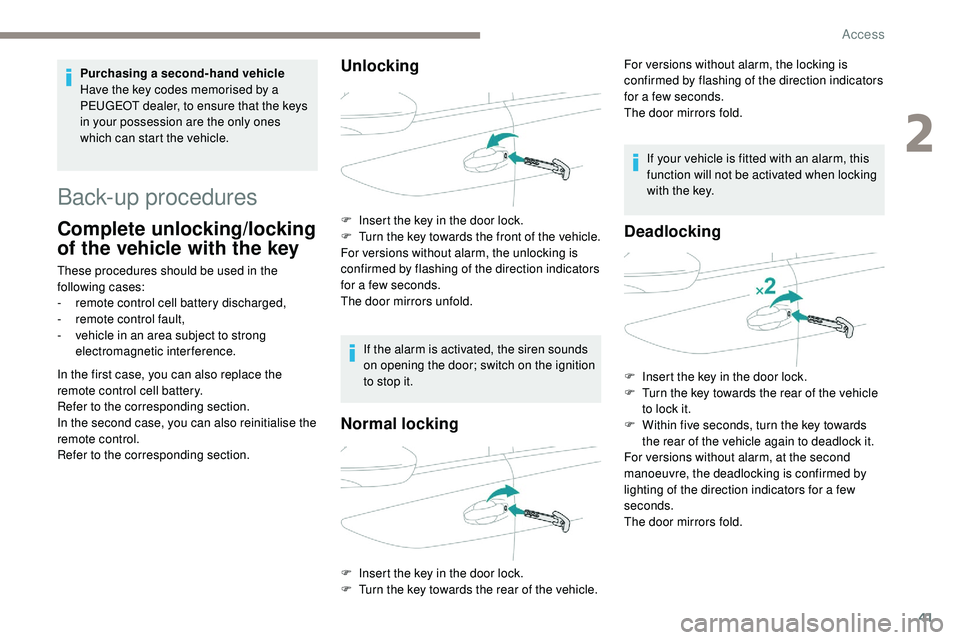
Unlocking
F Insert the key in the door lock.
F
T urn the key towards the front of the vehicle.
For versions without alarm, the unlocking is
confirmed by flashing of the direction indicators
for a few seconds.
The door mirrors unfold. For versions without alarm, the locking is
confirmed by flashing of the direction indicators
for a few seconds.
The door mirrors fold.
2
Access
Page 49 of 320
47
With the selective unlocking activated:
- o pening the driver's door unlocks the
driver's door only (if the vehicle has not
already been completely unlocked),
-
o
pening one of the passenger doors
unlocks the rest of the vehicle.
Closing
Beware of the risk of trapping your fingers
when the window comes up automatically. When a door is not closed correctly:
-
w
ith the engine running or the
vehicle moving (speed below
6 mph (10 km/h))
, this warning
lamp comes on, accompanied
by an alert message for a few
seconds.
-
w
ith the vehicle moving (speed
above 6 mph (10 km/h))
, in
addition to the warning lamp and
alert message, an audible signal
sounds for a few seconds.
When washing your vehicle:
-
l
ock the vehicle using the remote
control or remove the electronic key
from the recognition zone, with the
doors closed.
-
a
void spraying the upper part of the
windows.
- k eep the end of the high pressure
lance at least 1 metre away from the
door windows and seals.
The window automatically goes back up after
a few seconds and adjusts to seal the window
perfectly.
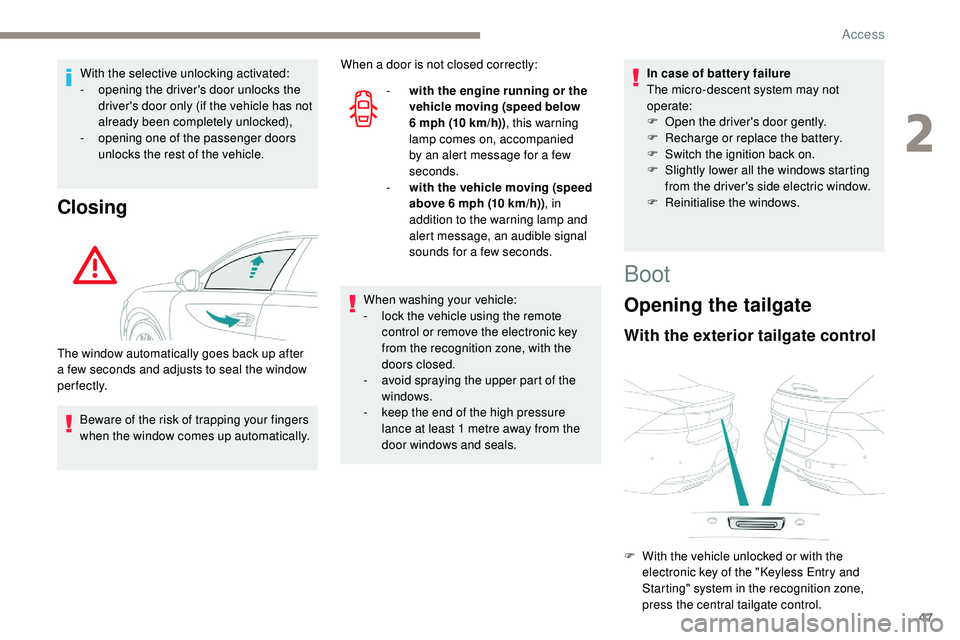
Boot
Opening the tailgate
With the exterior tailgate control
In case of batter y failure
The micro-descent system may not
operate:
F
O
pen the driver's door gently.
F
R
echarge or replace the battery.
F
S
witch the ignition back on.
F
S
lightly lower all the windows starting
from the driver's side electric window.
F
R
einitialise the windows.
F
W
ith the vehicle unlocked or with the
electronic key of the "Keyless Entry and
Starting" system in the recognition zone,
press the central tailgate control.
2
Access
Page 52 of 320
50
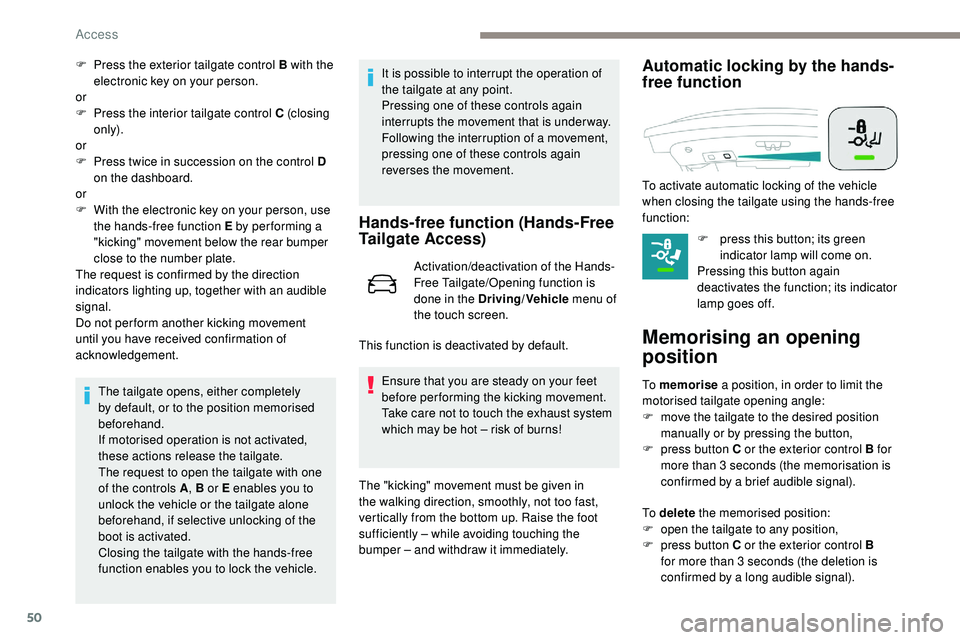
F Press the exterior tailgate control B with the electronic key on your person.
or
F
P
ress the interior tailgate control C (closing
only).
or
F
P
ress twice in succession on the control D
on the dashboard.
or
F
W
ith the electronic key on your person, use
the hands-free function E by per forming a
"kicking" movement below the rear bumper
close to the number plate.
The request is confirmed by the direction
indicators lighting up, together with an audible
signal.
Do not per form another kicking movement
until you have received confirmation of
acknowledgement.
The tailgate opens, either completely
by default, or to the position memorised
beforehand.
If motorised operation is not activated,
these actions release the tailgate.
The request to open the tailgate with one
of the controls A , B or E enables you to
unlock the vehicle or the tailgate alone
beforehand, if selective unlocking of the
boot is activated.
Closing the tailgate with the hands-free
function enables you to lock the vehicle. It is possible to interrupt the operation of
the tailgate at any point.
Pressing one of these controls again
interrupts the movement that is under way.
Following the interruption of a movement,
pressing one of these controls again
reverses the movement.
Hands-free function (Hands-Free
Tailgate Access)
Activation/deactivation of the Hands-
Free Tailgate/Opening function is
done in the Driving/Vehicle
menu of
the touch screen.
Ensure that you are steady on your feet
before performing the kicking movement.
Take care not to touch the exhaust system
which may be hot – risk of burns!
Automatic locking by the hands-
free function
F press this button; its green indicator lamp will come on.
Pressing this button again
deactivates the function; its indicator
lamp goes off.
Memorising an opening
position
To memorise a position, in order to limit the
motorised tailgate opening angle:
F
m
ove the tailgate to the desired position
manually or by pressing the button,
F
p
ress button C or the exterior control B for
more than 3 seconds (the memorisation is
confirmed by a brief audible signal).
This function is deactivated by default. To activate automatic locking of the vehicle
when closing the tailgate using the hands-free
function:
To delete
the memorised position:
F
o
pen the tailgate to any position,
F
p
ress button C or the exterior control B
for more than 3 seconds (the deletion is
confirmed by a long audible signal).
The "kicking" movement must be given in
the walking direction, smoothly, not too fast,
vertically from the bottom up. Raise the foot
sufficiently – while avoiding touching the
bumper – and withdraw it immediately.
Access
Page 55 of 320
53
Reinitialising the electric
windows
Following reconnection of the battery, the
safety anti-pinch function must be reinitialised.
The safety anti-pinch function is not active
during these operations.
For each window:
-
b
ring the window down completely,
then bring it back up. It will go up by a
few centimetres each time. Repeat the
operation until the window is fully closed,
-
c
ontinue to pull the switch for at least one
second after reaching the window closed
position. In the event of contact (pinching) during
operation of the windows, you must
reverse the movement of the window.
To
do this, press the switch concerned.
When operating the passenger electric
window switches, the driver must ensure
that nothing is preventing correct closing
of the windows.
The driver must ensure that the
passengers use the electric windows
c o r r e c t l y.
Be particularly aware of children when
operating the windows.
Be aware of passengers or other persons
present when closing the windows using
the electronic key or the "Keyless Entry
and Starting" system.
Before any change of or operation on the
battery, slightly lower the four windows.
Panoramic sunroof
The panoramic sunroof consists of a movable
glass that slides over the roof and a blind that
can be opened independently. Opening the roof
automatically opens the blind.
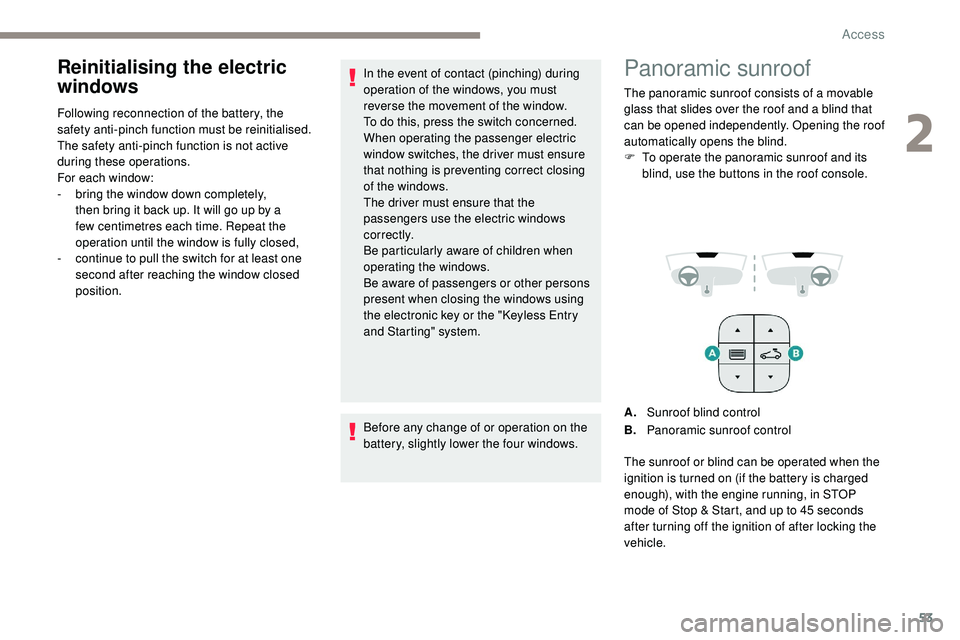
F
T
o operate the panoramic sunroof and its
blind, use the buttons in the roof console.
A. Sunroof blind control
B. Panoramic sunroof control
The sunroof or blind can be operated when the
ignition is turned on (if the battery is charged
enough), with the engine running, in STOP
mode of Stop & Start, and up to 45
seconds
after turning off the ignition of after locking the
vehicle.
2
Access
Page 58 of 320
56
Driving position
Adopting a good driving position helps improve
your comfort and protection.
It also optimises interior and exterior visibility
as well as access to controls.
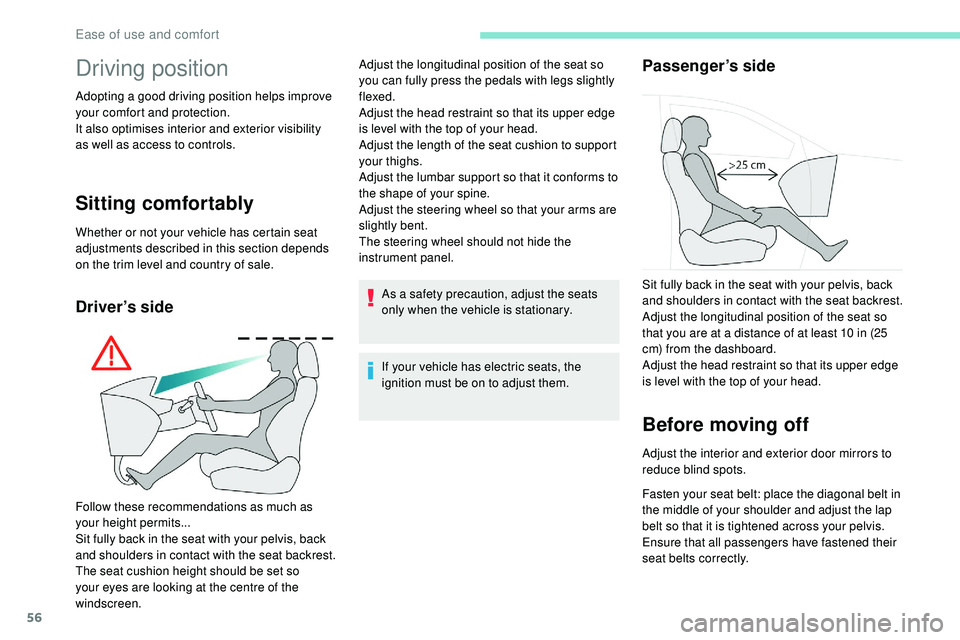
Sitting comfortably
Whether or not your vehicle has certain seat
adjustments described in this section depends
on the trim level and country of sale.
Driver’s sideAs a safety precaution, adjust the seats
only when the vehicle is stationary.
If your vehicle has electric seats, the
ignition must be on to adjust them.
Passenger’s side
Before moving off
Adjust the interior and exterior door mirrors to
reduce blind spots.
Fasten your seat belt: place the diagonal belt in
the middle of your shoulder and adjust the lap
belt so that it is tightened across your pelvis.
Ensure that all passengers have fastened their
seat belts correctly.
Follow these recommendations as much as
your height permits...
Sit fully back in the seat with your pelvis, back
and shoulders in contact with the seat backrest.
The seat cushion height should be set so
your eyes are looking at the centre of the
windscreen. Adjust the longitudinal position of the seat so
you can fully press the pedals with legs slightly
flexed.
Adjust the head restraint so that its upper edge
is level with the top of your head.
Adjust the length of the seat cushion to support
your thighs.
Adjust the lumbar support so that it conforms to
the shape of your spine.
Adjust the steering wheel so that your arms are
slightly bent.
The steering wheel should not hide the
instrument panel.
Sit fully back in the seat with your pelvis, back
and shoulders in contact with the seat backrest.
Adjust the longitudinal position of the seat so
that you are at a distance of at least 10 in (25
cm) from the dashboard.
Adjust the head restraint so that its upper edge
is level with the top of your head.
Ease of use and comfort
Page 64 of 320
62
Folding
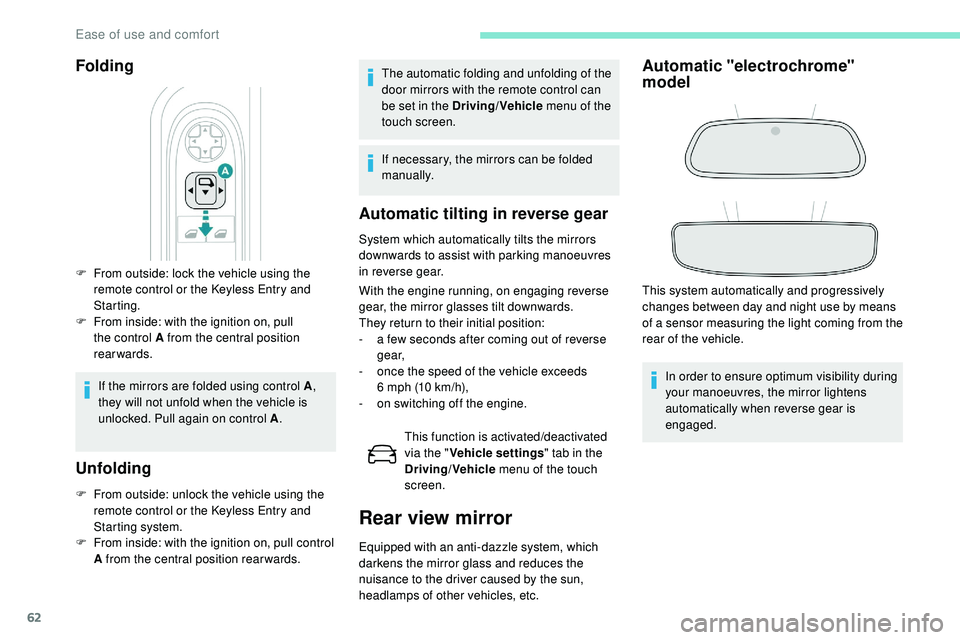
F From outside: lock the vehicle using the remote control or the Keyless Entry and
Starting.
F
F
rom inside: with the ignition on, pull
the control A from the central position
rearwards.
If the mirrors are folded using control A ,
they will not unfold when the vehicle is
unlocked. Pull again on control A .
Unfolding
F From outside: unlock the vehicle using the
remote control or the Keyless Entry and
Starting system.
F
F
rom inside: with the ignition on, pull control
A from the central position rear wards.
Automatic tilting in reverse gear
System which automatically tilts the mirrors
downwards to assist with parking manoeuvres
in reverse gear.
With the engine running, on engaging reverse
gear, the mirror glasses tilt downwards.
They return to their initial position:
-
a f
ew seconds after coming out of reverse
g e a r,
-
o
nce the speed of the vehicle exceeds
6
mph (10 km/h),
-
o
n switching off the engine.This function is activated/deactivated
via the " Vehicle settings " tab in the
Driving/Vehicle menu of the touch
screen.
Rear view mirror
Equipped with an anti-dazzle system, which
darkens the mirror glass and reduces the
nuisance to the driver caused by the sun,
headlamps of other vehicles, etc.
Automatic "electrochrome"
model
This system automatically and progressively
changes between day and night use by means
of a sensor measuring the light coming from the
rear of the vehicle.
In order to ensure optimum visibility during
your manoeuvres, the mirror lightens
automatically when reverse gear is
engaged.
The automatic folding and unfolding of the
door mirrors with the remote control can
be set in the Driving/Vehicle
menu of the
touch screen.
If necessary, the mirrors can be folded
manually.
Ease of use and comfort
Page 66 of 320
64
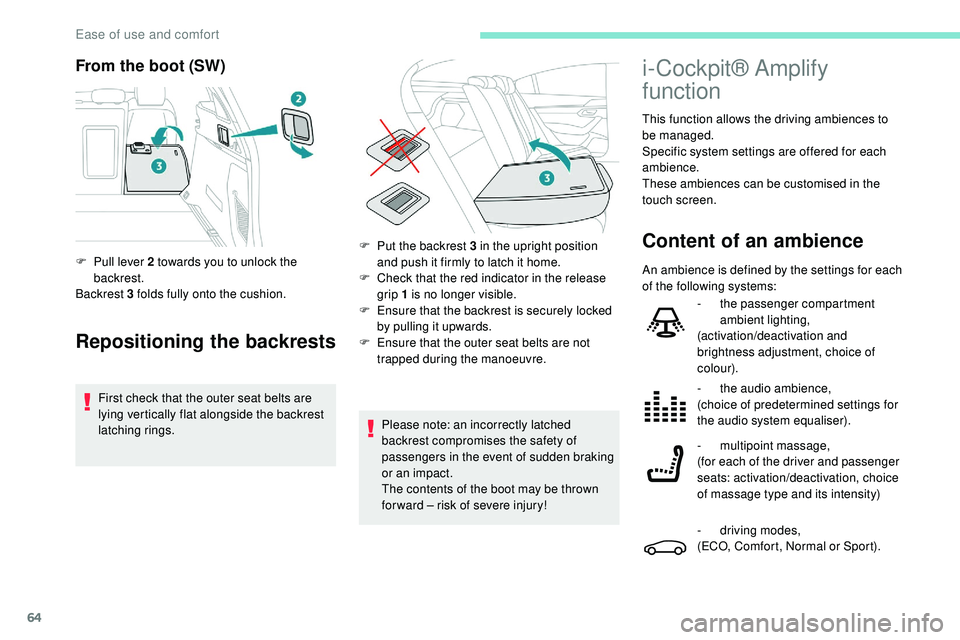
From the boot (SW)
Repositioning the backrests
First check that the outer seat belts are
lying vertically flat alongside the backrest
latching rings.
F
P
ull lever 2 towards you to unlock the
backrest.
Backrest 3 folds fully onto the cushion.
Please note: an incorrectly latched
backrest compromises the safety of
passengers in the event of sudden braking
or an impact.
The contents of the boot may be thrown
for ward – risk of severe injury!
i-Cockpit® Amplify
function
This function allows the driving ambiences to
be managed.
Specific system settings are offered for each
ambience.
These ambiences can be customised in the
touch screen.
Content of an ambienceF Put the backrest 3 in the upright position and push it firmly to latch it home.
F
C
heck that the red indicator in the release
grip 1 is no longer visible.
F
E
nsure that the backrest is securely locked
by pulling it upwards.
F
E
nsure that the outer seat belts are not
trapped during the manoeuvre. An ambience is defined by the settings for each
of the following systems:
-
t
he passenger compartment
ambient lighting,
(activation/deactivation and
brightness adjustment, choice of
colour).
-
t
he audio ambience,
(choice of predetermined settings for
the audio system equaliser).
-
m
ultipoint massage,
(for each of the driver and passenger
seats: activation/deactivation, choice
of massage type and its intensity)
-
d
riving modes,
(ECO, Comfort, Normal or Sport).
Ease of use and comfort
Page 67 of 320
65
Access to the i-Cockpit®
Amplify function's home
page
Direct access via this button
Access via the Applications menu
F
Sel
ect "i-Cockpit® Amplify ".
Activating an ambience
From the home page:
F
Sel ect an ambience: " Relax" or "Boost ".
Depending on the settings made for the
ambience, the systems are activated
immediately.
Deactivating an ambience
From the home page:
F P ress " Deactivate ambience ".
or
F
Sel
ect another ambience.
The ambience is automatically deactivated
when the ignition is switched off.
Personalising an ambience
From the home page:
F S elect an ambience to activate it. It is possible to temporarily modify an
ambience at any time, by modifying the
settings for one or more of the systems
managed in the ambience, without going
via the i- Cockpit® Amplify function.
For example, you can deactivate or modify
the intensity of the current massage by
pressing the massage activation button
on your seat or activate/deactivate
the ambient lighting in the passenger
compartment from the Driving/Vehicle
menu.
In this case, the new settings will not be
saved as part of the current ambience.
F
P
ress "
Settings " to display the settings
page for the ambience.
F
S
elect a system for which you wish to
modify the settings.
F
A
fter making the modifications, press any
area of the screen outside the system
settings window to return to the ambience
settings page.
F
A
fter making all of the desired modifications
to settings, press " Save settings".
The modifications are taken into account
immediately.
Heating and Ventilation
Air intake
The air circulating in the passenger
compartment is filtered and originates either
from the outside via the grille located at the
base of the windscreen or from the inside in air
recirculation mode.
Controls
Depending on your vehicle, the controls are
accessible in the " Air conditioning" menu of
the touch screen or are grouped together on
the control panel of the centre console.
3
Ease of use and comfort
Page 72 of 320
70
Mono-zone/Dual-zone
The passenger temperature setting can be
linked to the driver's setting (mono-zone
function).
It is available in the secondary page by
pressing the "OPTIONS" button.
F
P
ress button 8 to activate the " MONO"
function; its status is displayed as " ON".
The function is automatically deactivated if the
passenger uses their temperature adjustment
buttons (dual-zone function).
Ventilation with the ignition on
When the ignition is switched on, you can use
the ventilation system to adjust the air flow 2
and air distribution 3 settings in the passenger
compartment, for a period which depends on
the battery charge.
This function does not allow the operation of
the air conditioning system.
System switch-off
F Press button 14 .
Its indicator lamp comes on and all other
indicator lamps for the system go off.
This action deactivates all functions of the air
conditioning system.
By reducing the air flow 2 to a minimum, you
are stopping ventilation.
Temperature is no longer regulated. A slight air
flow can still be felt however, resulting from the
for ward movement of the vehicle. Avoid driving for too long with the ventilation
off or the system deactivated – risk of
misting and deterioration of the air quality!
Pressing any button reactivates the system
with the settings that were previously in use.
Recirculation of the
interior air
The intake of exterior air prevents the formation
of mist on the windscreen and the side windows.
The recirculation of the interior air isolates the
passenger compartment from exterior odours
and fumes.
This function also allows the desired
temperature in the passenger compartment to
be reached in the shortest time.
F
P
ress this button to activate/
deactivate the function.
Recirculation is automatically activated
when the front screenwash is used or
when reverse gear is engaged.
Avoid prolonged use of the recirculation of
interior air – risk of formation of mist and
deterioration of the air quality!
Front demist – defrost
Automatic visibility
programme
The automatic visibility programme allows
to demist or defrost the windscreen and side
windows as quickly as possible. F
P
ress this button to activate/
deactivate the function.
When the indicator lamp is on, the function is
activated.
The system automatically manages the air
conditioning (depending on version), air
flow and air intake, and provides optimum
distribution towards the windscreen and side
windows.
The system allows the manual modification of
air flow without causing automatic deactivation
of the automatic visibility programme.
With Stop & Start, when demisting –
defrosting has been activated, STOP
mode is not available.
When the indicator lamp is on, the function is
activated.
Ease of use and comfort