light Peugeot 508 2018 Workshop Manual
[x] Cancel search | Manufacturer: PEUGEOT, Model Year: 2018, Model line: 508, Model: Peugeot 508 2018Pages: 320, PDF Size: 10.09 MB
Page 167 of 320
165
Operating limits
The Lane Positioning Assist system may
emit an alert when the vehicle is travelling
in a long straight lane on a smooth road
sur face even if the driver is holding the
steering wheel properly.
The following situations may interfere with
the operation of the system or prevent it from
working:
-
P
oor visibility (inadequate street lighting,
snowfall, rain, fog).
-
D
azzle (headlamps of an oncoming vehicle,
low sun, reflections on a wet road sur face,
leaving a tunnel, alternating light and
shade).
-
W
indscreen area in front of the camera
being dirty, misted up, frost-covered, snow-
covered, damaged or masked by a sticker.
-
L
ane markings damaged, partially hidden
(snow, mud) or multiple (roadworks,
pavement seams).
-
T
ravelling in a tight bend.
-
W
inding roads.
Active Safety Brake
with Distance Alert and
Intelligent emergency
braking assistance
This system allows:
- t he driver to be warned that their vehicle is
at risk of collision with the vehicle in front, a
pedestrian or, depending on the version, a
cyclist,
-
a c
ollision to be prevented, or its severity to
be limited, by reducing the vehicle’s speed.
The system also takes motorcyclists and
animals into account; however, animals
below 0.5
m and objects on the road are
not necessarily detected.
The system must not be activated in the
following situations:
-
W
hen driving on a small-diameter
spare wheel.
-
W
hen towing, especially with an
unconnected or unapproved trailer.
-
Un
favourable climatic conditions.
-
D
riving on slippery road sur faces (risk
of aquaplaning, snow, ice).
-
D
riving on racing circuits.
-
D
riving on a rolling road.
Recommendations on care
- Regularly check that the front bumper and
the area of the windscreen located in front
of the camera are clean.
-
R
egularly check that the windscreen wipers
are in good condition.
-
I
n bad weather, or during the winter, ensure
that the front bumper and windscreen are
not covered with mud, ice or snow.
Operating faults
(orange
colour) A system malfunction is indicated
by the Ser vice warning lamp
coming on and this (orange) symbol,
accompanied by an alert message
and an audible signal.
6
Driving
Page 168 of 320
166
This system is a driving aid that includes three
functions:
-
D
istance Alert (alert if there is a risk of
collision),
-
I
ntelligent emergency braking assistance,
-
A
ctive Safety Brake (automatic emergency
b r ak ing).
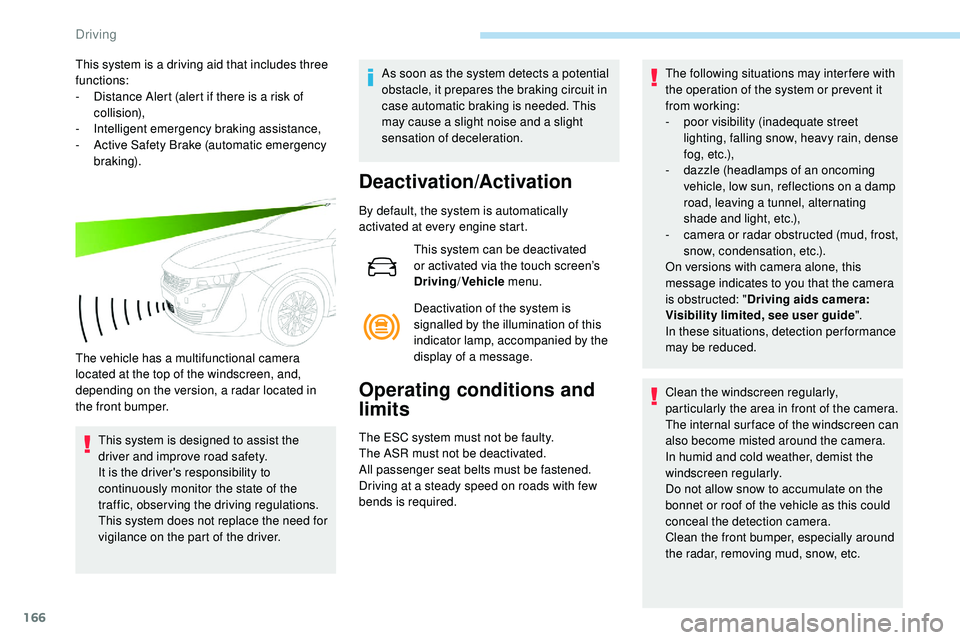
The vehicle has a multifunctional camera
located at the top of the windscreen, and,
depending on the version, a radar located in
the front bumper. This system is designed to assist the
driver and improve road safety.
It is the driver's responsibility to
continuously monitor the state of the
traffic, observing the driving regulations.
This system does not replace the need for
vigilance on the part of the driver. As soon as the system detects a potential
obstacle, it prepares the braking circuit in
case automatic braking is needed. This
may cause a slight noise and a slight
sensation of deceleration.
Deactivation/Activation
By default, the system is automatically
activated at every engine start.
This system can be deactivated
or activated via the touch screen’s
Driving/Vehicle menu.
Deactivation of the system is
signalled by the illumination of this
indicator lamp, accompanied by the
display of a message.
Operating conditions and
limits
The ESC system must not be faulty.
The ASR must not be deactivated.
All passenger seat belts must be fastened.
Driving at a steady speed on roads with few
bends is required. The following situations may interfere with
the operation of the system or prevent it
from working:
-
p
oor visibility (inadequate street
lighting, falling snow, heavy rain, dense
f o g , e t c .),
-
d
azzle (headlamps of an oncoming
vehicle, low sun, reflections on a damp
road, leaving a tunnel, alternating
shade and light, etc.),
-
c
amera or radar obstructed (mud, frost,
snow, condensation, etc.).
On versions with camera alone, this
message indicates to you that the camera
is obstructed: " Driving aids camera:
Visibility limited, see user guide".
In these situations, detection performance
may be reduced.
Clean the windscreen regularly,
particularly the area in front of the camera.
The internal sur face of the windscreen can
also become misted around the camera.
In humid and cold weather, demist the
windscreen regularly.
Do not allow snow to accumulate on the
bonnet or roof of the vehicle as this could
conceal the detection camera.
Clean the front bumper, especially around
the radar, removing mud, snow, etc.
Driving
Page 170 of 320
168
Intelligent emergency
braking assistance
If the driver brakes, but not sufficiently to avoid
a collision, this system will supplement the
braking, within the limits of the laws of physics.
This assistance will only be provided if you
press the brake pedal.
Active Safety Brake
Operation
The system operates under the following
conditions:
-
T
he vehicle's speed does not exceed 37 mph
(60 km/h) when a pedestrian is detected.
-
T
he vehicle's speed does not exceed 50 mph
(80 km/h) when a stationary vehicle or a
cyclist is detected. If the camera and/or radar have
confirmed the presence of a vehicle,
a pedestrian or a cyclist, this warning
lamp flashes (for about 10 seconds)
when the function is acting on the
vehicle's brakes.
With an automatic gearbox, in the event of
automatic emergency braking until the vehicle
comes to a complete stop, keep the brake
pedal pressed down to prevent the vehicle from
starting off again.
With a manual gearbox, in the event of
automatic emergency braking until the vehicle
comes to a complete stop, the engine may stall.
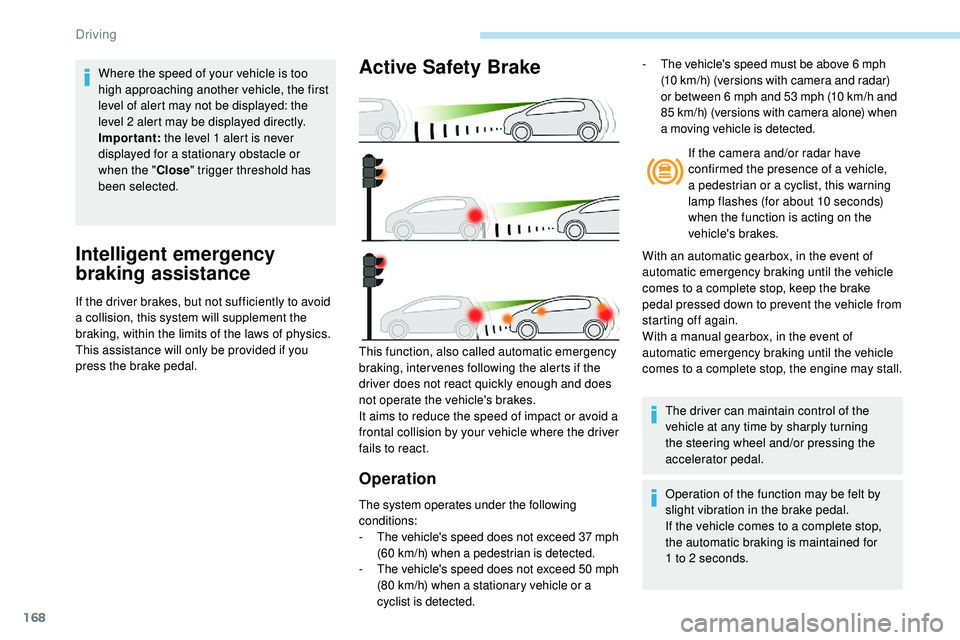
This function, also called automatic emergency
braking, inter venes following the alerts if the
driver does not react quickly enough and does
not operate the vehicle's brakes.
It aims to reduce the speed of impact or avoid a
frontal collision by your vehicle where the driver
fails to react. The driver can maintain control of the
vehicle at any time by sharply turning
the steering wheel and/or pressing the
accelerator pedal.
Operation of the function may be felt by
slight vibration in the brake pedal.
If the vehicle comes to a complete stop,
the automatic braking is maintained for
1
to 2 seconds.
-
T
he vehicle's speed must be above 6 mph
(10 km/h) (versions with camera and radar)
or between 6 mph and 53 mph (10 km/h and
85 km/h) (versions with camera alone) when
a moving vehicle is detected.
Where the speed of your vehicle is too
high approaching another vehicle, the first
level of alert may not be displayed: the
level 2 alert may be displayed directly.
Important:
the level 1 alert is never
displayed for a stationary obstacle or
when the " Close" trigger threshold has
been selected.
Driving
Page 172 of 320
170
After three first level alerts, the system triggers
a new alert with the message "Take a break!",
accompanied by a more pronounced audible
signal. When the system interprets the behaviour of
the vehicle as indicating a certain fatigue or
inattention threshold on the part of the driver,
it triggers the first level of alert.
The driver is then alerted by the message
" Ta k e c a r e ! ", accompanied by an audible
signal.
Active Blind Spot
Monitoring System
In addition to the fixed warning lamp in the door
mirror on the side in question, a correction of
trajectory will be felt if you attempt to cross a
lane marking with the direction indicators on,
to
help you avoid a collision.
This system is the combination of the Active
Lane Keeping Assistance and Blind Spot
Detection.
These two functions must be activated and in
operation.
The speed of the vehicle must be between
40
and 87 mph (65 and 140 km/h) inclusive.
These functions are especially suitable for
driving on motor ways and main roads.
For more information on the Active Lane
Keeping Assistance and Blind Spot
Detection , refer to the corresponding sections.
This system is a driving aid which cannot,
in any circumstances, replace the need for
vigilance on the part of the driver.
In certain driving conditions (poor road
sur face or strong winds), the system may
give alerts independent of the driver's
level of vigilance. The following situations may interfere with
the operation of the system or prevent it
from working:
-
p
oor visibility (inadequate lighting of
the roadway, falling snow, heavy rain,
dense fog, etc.),
-
d
azzle (headlamps of an oncoming
vehicle, low sun, reflections on a damp
road, leaving a tunnel, alternating
shade and light, etc.),
-
w
indscreen area located in front of the
camera: dirty, misted up, frost-covered,
snow-covered, damaged or covered by
a s t i c ke r,
-
l
ane markings absent, worn, hidden
(snow, mud) or multiple (roadworks,
e t c .),
-
c
lose to the vehicle ahead (lane
markings not detected),
-
r
oads that are narrow, winding, etc.
Clean the windscreen regularly,
particularly the area in front of the camera.
The internal sur face of the windscreen can
also become misted around the camera.
In humid and cold weather, demist the
windscreen regularly.
Do not allow snow to accumulate on the
bonnet or roof of the vehicle as this could
conceal the detection camera.
Driving
Page 176 of 320
174
The following situations may interfere with
the operation of the system or prevent it
working:
-
c
onditions of poor visibility (inadequate
street lighting, snowfall, rain, fog),
-
d
azzle (headlamps of an oncoming
vehicle, low sun, reflections on a damp
road, leaving a tunnel, alternating
shade and light),
-
w
indscreen area located in front of the
camera: dirty, misted, frost-covered,
snow-covered, damaged or covered by
a s t i c ke r,
-
l
ane markings worn, hidden (snow,
mud) or multiple (roadworks, etc.),
-
r
unning close to the vehicle in front
(the lane markings may not be
detected),
-
r
oads that are narrow, winding, etc.
Risk of undesirable operation
- driving with a trailer,
- d riving on a rolling stand,
-
d
riving on unstable sur faces.
Deactivation/Activation
Deactivation of the system is recommended in
the following situations:
-
d
riving on a road sur face in poor condition,
-
u
nfavourable climatic conditions,
-
d
riving on slippery sur faces (ice).
The system is not intended for driving in the
following situations:
-
d
riving on a speed circuit, F
P
ress and hold this button to deactivate the
system at any time.
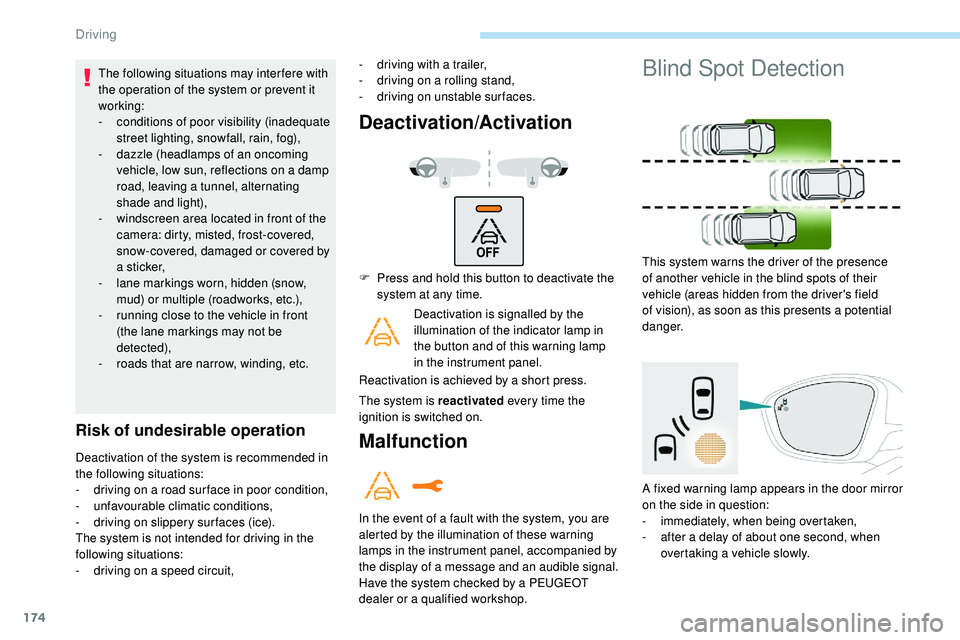
Deactivation is signalled by the
illumination of the indicator lamp in
the button and of this warning lamp
in the instrument panel.
Reactivation is achieved by a short press.
The system is reactivated every time the
ignition is switched on.Malfunction
In the event of a fault with the system, you are
alerted by the illumination of these warning
lamps in the instrument panel, accompanied by
the display of a message and an audible signal.
Have the system checked by a PEUGEOT
dealer or a qualified workshop.
Blind Spot Detection
This system warns the driver of the presence
of another vehicle in the blind spots of their
vehicle (areas hidden from the driver's field
of vision), as soon as this presents a potential
danger.
A fixed warning lamp appears in the door mirror
on the side in question:
-
i
mmediately, when being overtaken,
-
a
fter a delay of about one second, when
overtaking a vehicle slowly.
Driving
Page 177 of 320
175
This driving aid system is designed to
improve safety when driving and is in no
circumstances a substitute for the use
of the interior rear view mirror and door
mirrors. It is the driver's responsibility to
constantly check the traffic, to assess the
relative distances and speeds of other
vehicles and to anticipate their movements
before deciding whether to change lane.
This system is a driving aid which cannot,
in any circumstances, replace the need for
vigilance on the part of the driver.
Activation/Deactivation
The function is activated and
deactivated in the Driving/Vehicle
menu of the touch screen.
The state of the system is memorised when
switching off the ignition. The system is automatically deactivated
when towing with a towing device
approved by PEUGEOT.
Operation
Sensors fitted in the front and rear bumpers
monitor the blind spots.
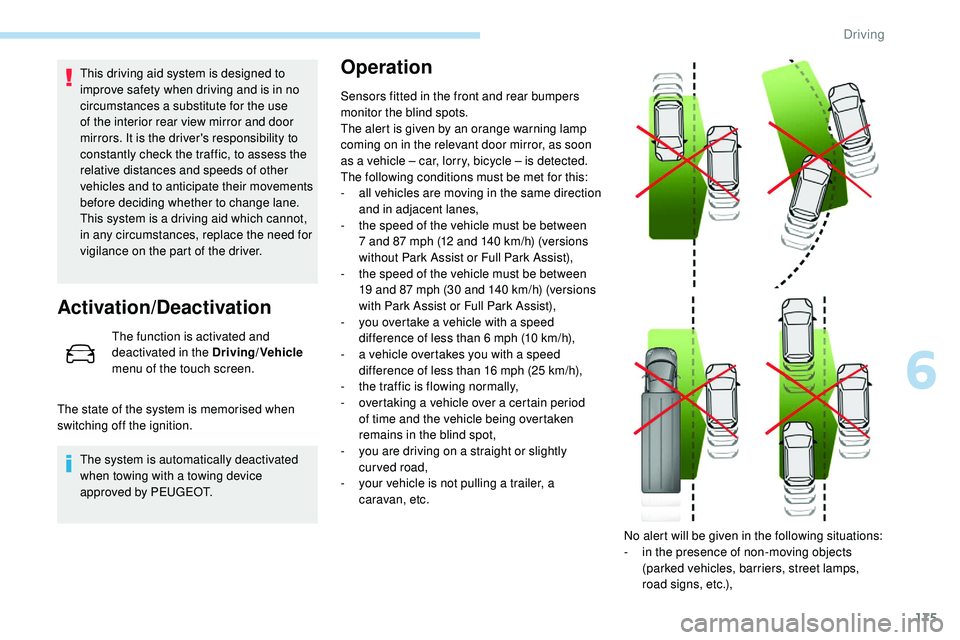
The alert is given by an orange warning lamp
coming on in the relevant door mirror, as soon
as a vehicle – car, lorry, bicycle – is detected.
The following conditions must be met for this:
-
a
ll vehicles are moving in the same direction
and in adjacent lanes,
-
t
he speed of the vehicle must be between
7 and 87 mph (12 and 140
km/h) (versions
without Park Assist or Full Park Assist),
-
t
he speed of the vehicle must be between
19 and 87 mph (30 and 140
km/h) (versions
with Park Assist or Full Park Assist),
-
y
ou overtake a vehicle with a speed
difference of less than 6 mph (10
km/h),
-
a v
ehicle overtakes you with a speed
difference of less than 16 mph (25
km/h),
-
t
he traffic is flowing normally,
-
ov
ertaking a vehicle over a certain period
of time and the vehicle being overtaken
remains in the blind spot,
-
y
ou are driving on a straight or slightly
curved road,
-
y
our vehicle is not pulling a trailer, a
caravan, etc.
No alert will be given in the following situations:
-
i
n the presence of non-moving objects
(parked vehicles, barriers, street lamps,
road signs, etc.),
6
Driving
Page 182 of 320
180
This system is a visual aid that cannot in
any circumstances replace the need for
vigilance on the part of the driver.
The images provided by the camera(s)
may be distorted by the relief.
In the presence of areas in shade, or in
conditions of bright sunlight or inadequate
lighting, the image may be darkened and
with lower contrast.
Recommendations on care
In bad or wintry weather, ensure that the
sensors and camera lenses are not covered
with mud, ice or snow.
Check the cleanliness of the camera lenses
regularly.
If necessary, clean the cameras with a soft,
dry cloth.
When washing your vehicle at high pressure,
direct the lance at least 30 cm away from the
cameras and parking aid sensors.
Visiopark 1
Rear vision
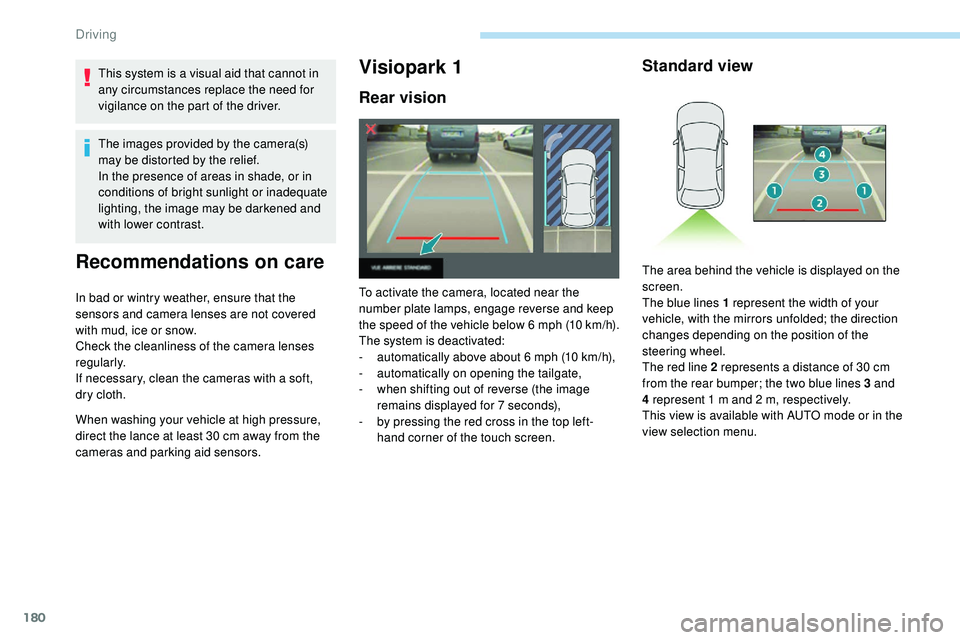
To activate the camera, located near the
number plate lamps, engage reverse and keep
the speed of the vehicle below 6 mph (10
k
m/h).
The system is deactivated:
-
a
utomatically above about 6 mph (10 km/h),
-
a
utomatically on opening the tailgate,
-
w
hen shifting out of reverse (the image
remains displayed for 7 seconds),
-
b
y pressing the red cross in the top left-
hand corner of the touch screen.
Standard view
The area behind the vehicle is displayed on the
screen.
The blue lines 1 represent the width of your
vehicle, with the mirrors unfolded; the direction
changes depending on the position of the
steering wheel.
The red line 2 represents a distance of 30 cm
from the rear bumper; the two blue lines 3 and
4 represent 1 m and 2 m, respectively.
This view is available with AUTO mode or in the
view selection menu.
Driving
Page 188 of 320
186
7
5
Visiopark 1 or Visiopark 2 and the parking
sensors are automatically activated to help
you monitor the close surrounding area of your
vehicle during the manoeuvre.
During the manoeuvre
The system takes over the vehicle's steering. It
gives instructions on the manoeuvring direction
when starting the entry and exit parallel parking
manoeuvres and for all entry manoeuvres for
bay parking.
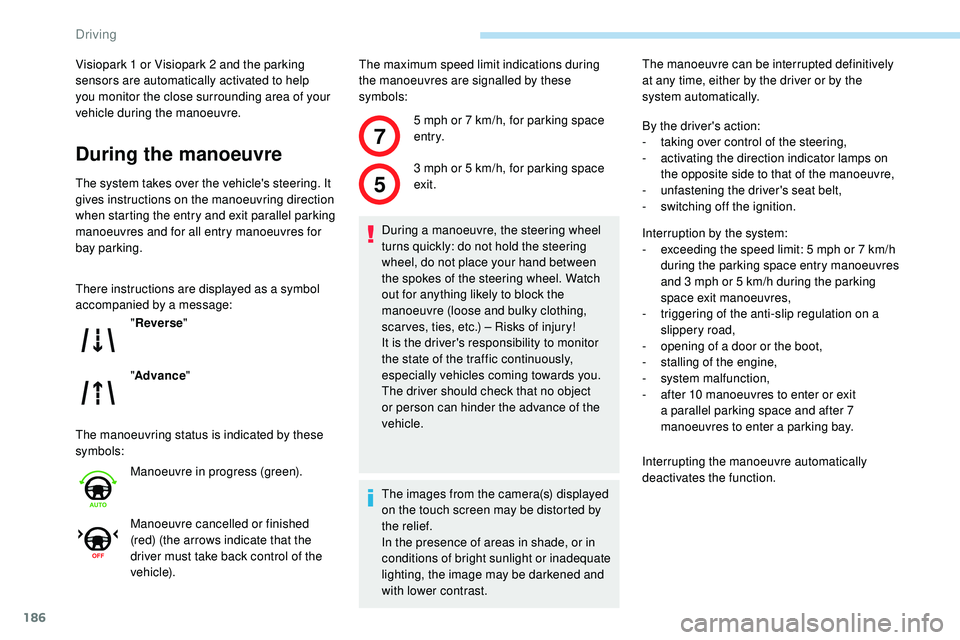
There instructions are displayed as a symbol
accompanied by a message:
The manoeuvring status is indicated by these
symbols:The maximum speed limit indications during
the manoeuvres are signalled by these
symbols:
" Reverse "
" Advance "
Manoeuvre in progress (green).
Manoeuvre cancelled or finished
(red) (the arrows indicate that the
driver must take back control of the
vehicle). 5 mph or 7
km/h, for parking space
e nt r y.
3 mph or 5 km/h, for parking space
exit.
During a manoeuvre, the steering wheel
turns quickly: do not hold the steering
wheel, do not place your hand between
the spokes of the steering wheel. Watch
out for anything likely to block the
manoeuvre (loose and bulky clothing,
scar ves, ties, etc.) – Risks of injury!
It is the driver's responsibility to monitor
the state of the traffic continuously,
especially vehicles coming towards you.
The driver should check that no object
or person can hinder the advance of the
vehicle.
The images from the camera(s) displayed
on the touch screen may be distorted by
the relief.
In the presence of areas in shade, or in
conditions of bright sunlight or inadequate
lighting, the image may be darkened and
with lower contrast. The manoeuvre can be interrupted definitively
at any time, either by the driver or by the
system automatically.
By the driver's action:
-
t
aking over control of the steering,
-
a
ctivating the direction indicator lamps on
the opposite side to that of the manoeuvre,
- u nfastening the driver's seat belt,
-
s
witching off the ignition.
Interruption by the system:
-
e
xceeding the speed limit: 5 mph or 7 km/h
during the parking space entry manoeuvres
and 3 mph or 5 km/h during the parking
space exit manoeuvres,
-
t
riggering of the anti-slip regulation on a
slippery road,
-
o
pening of a door or the boot,
-
s
talling of the engine,
-
s
ystem malfunction,
-
a
fter 10 manoeuvres to enter or exit
a parallel parking space and after 7
manoeuvres to enter a parking bay.
Interrupting the manoeuvre automatically
deactivates the function.
Driving
Page 194 of 320
192
The direction of the manoeuvre is indicated by
these symbols:
The central arrow is green whilst the vehicle
is moving, or white to indicate the next
manoeuvring direction.Throughout the whole manoeuvre,
indicated by a green " AUTO" symbol, the
driver must hold the selector button down. Manoeuvre completed or
abandoned (white arrows indicate
that the driver must take back
control of their vehicle).
For wards.
Reverse.
During the manoeuvring stages, the
steering wheel rotates rapidly: do not hold
the steering wheel nor place your hands
between the spokes of the steering wheel.
Watch out for anything likely to block the
manoeuvre (loose and bulky clothing,
scar ves, ties, etc.) – risk of injury!
It is the driver's responsibility to monitor
the state of the traffic continuously,
especially vehicles coming towards you.
The driver should check that no object or
person might hinder the advance of the
vehicle.
In some circumstances, the sensors may
not detect small obstacles located in their
blind spots.
The images from the camera(s) displayed
on the touch screen may be distorted by
the relief.
In the presence of areas in shade, or in
conditions of bright sunlight or inadequate
lighting, the image may be darkened and
with lower contrast.
The driver must check the sides of the
vehicle, using the mirrors.
If the vehicle slows down significantly, the
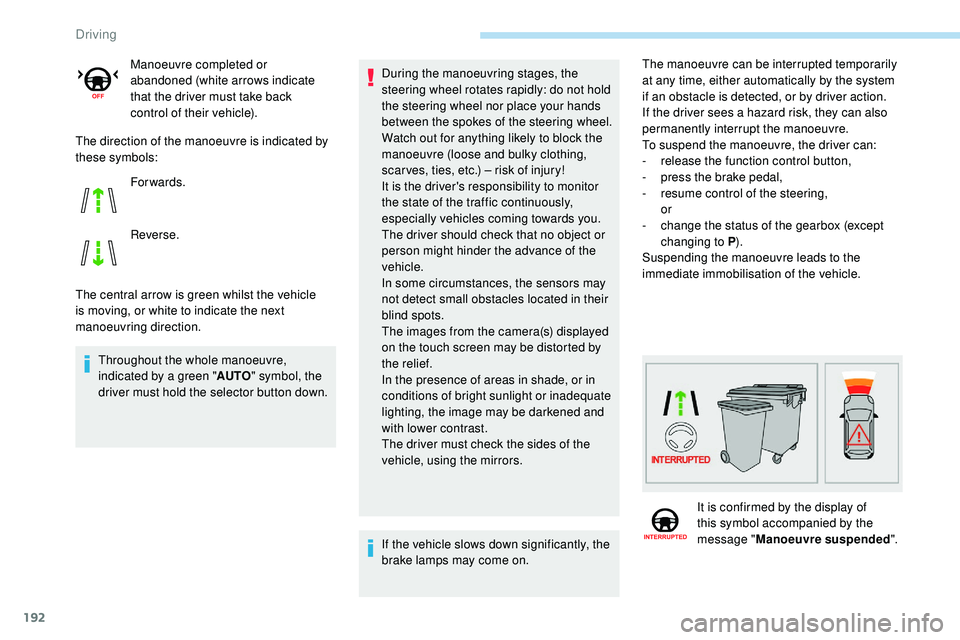
brake lamps may come on. The manoeuvre can be interrupted temporarily
at any time, either automatically by the system
if an obstacle is detected, or by driver action.
If the driver sees a hazard risk, they can also
permanently interrupt the manoeuvre.
To suspend the manoeuvre, the driver can:
-
r
elease the function control button,
-
p
ress the brake pedal,
-
r
esume control of the steering,
or
-
c
hange the status of the gearbox (except
changing to P ).
Suspending the manoeuvre leads to the
immediate immobilisation of the vehicle.
It is confirmed by the display of
this symbol accompanied by the
message " Manoeuvre suspended ".
Driving
Page 211 of 320
209
Manual gearbox
The gearbox does not require any
maintenance (no oil change).
Automatic gearbox
The gearbox does not require any
maintenance (no oil change).
Brake pads
Brake wear depends on the style
of driving, particularly in the case
of vehicles used in town, over short
distances. It may be necessary to
have the condition of the brakes
checked, even between vehicle
services.
Unless there is a leak in the circuit, a drop in
the brake fluid level indicates that the brake
pads are worn.
Brake disc/drum wear
For any information on checking
brake disc wear, contact a
PEUGEOT dealer or a qualified
workshop.
Electric parking brake
This system does not require any
specific check. However, in the
event of a problem, have the system
checked by a PEUGEOT dealer or a
qualified workshop.
For more information on the Electric
parking brake , refer to the corresponding
section.
Wheels and tyres
The pressure must be checked on
all tyres, including the spare wheel,
when the tyres are "cold", at least
once a month and before a long
j o u r n ey. Driving with worn or damaged tyres reduces
braking efficiency and control of the vehicle's
steering. Regular inspections of the condition
of tyres (tread and sides) and rims are
recommended as well as making sure that
valves are fitted.
Using different size wheels and tyres from
those specified can affect the lifetime of tyres,
wheel rotation, ground clearance and the
speedometer reading and have an adverse
effect on road holding.
Fitting different tyres on the front and rear axles
can cause the ESC to mistime.
Only use products recommended by
PEUGEOT or products of equivalent
quality and specification.
In order to optimise the operation of
components as important as those in the
braking system, PEUGEOT selects and
offers very specific products.
After washing the vehicle, dampness, or
in wintry conditions, ice can form on the
brake discs and pads: braking efficiency
may be reduced. Make light brake
applications to dry and defrost the brakes.
The pressures given on the tyre pressure label
are valid for "cold" tyres. If you have driven for
more than 10 minutes or more than 6 miles (10
kilometres) at more than 31 mph (50 km/h),
0.3 bar (30 kPa) should be added to the values
given on the label.
Under-inflation increases fuel consumption.
Non-compliant tyre pressure causes premature
wear on tyres and has an adverse effect on the
vehicle's road holding – Risk of an accident!
7
Practical information