start stop button Peugeot 508 2018 User Guide
[x] Cancel search | Manufacturer: PEUGEOT, Model Year: 2018, Model line: 508, Model: Peugeot 508 2018Pages: 320, PDF Size: 10.09 MB
Page 63 of 320
61
F next, proceed with the passenger's seat in the same way.
The changes are taken into account immediately.Once activated, the system starts a one hour
massage cycle, made up of sequences of 6 minutes
of massage followed by 3 minutes at rest.
The system stops automatically at the end of the
cycle; the indicator lamp in the button goes off.
Steering wheel adjustment
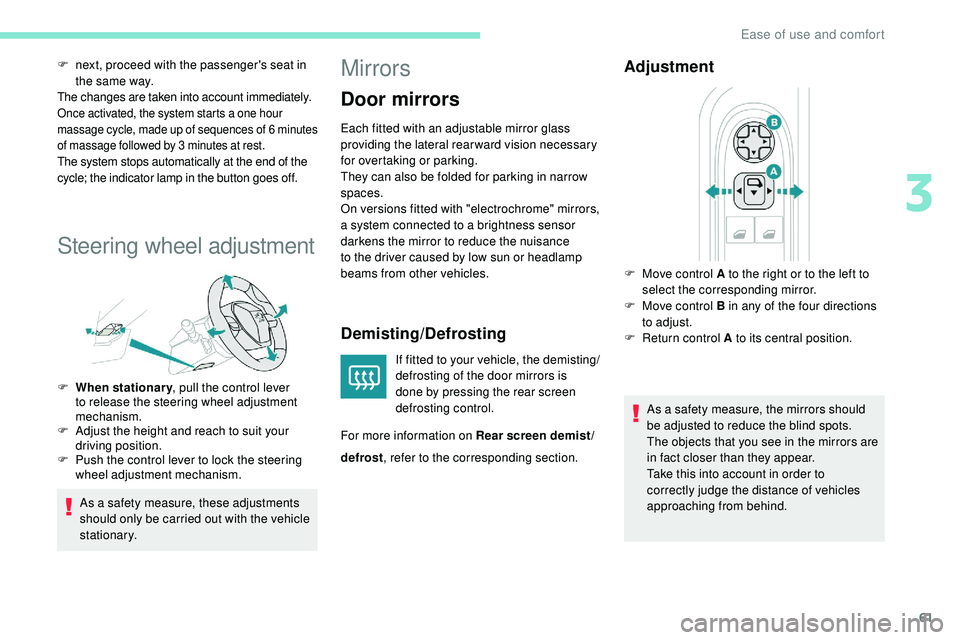
F When stationary , pull the control lever
to release the steering wheel adjustment
mechanism.
F
A
djust the height and reach to suit your
driving position.
F
P
ush the control lever to lock the steering
wheel adjustment mechanism.
As a safety measure, these adjustments
should only be carried out with the vehicle
stationary.
Mirrors
Door mirrors
Each fitted with an adjustable mirror glass
providing the lateral rear ward vision necessary
for overtaking or parking.
They can also be folded for parking in narrow
spaces.
On versions fitted with "electrochrome" mirrors,
a system connected to a brightness sensor
darkens the mirror to reduce the nuisance
to the driver caused by low sun or headlamp
beams from other vehicles.
Demisting/Defrosting
If fitted to your vehicle, the demisting/
defrosting of the door mirrors is
done by pressing the rear screen
defrosting control.
For more information on Rear screen demist/
Adjustment
As a safety measure, the mirrors should
be adjusted to reduce the blind spots.
The objects that you see in the mirrors are
in fact closer than they appear.
Take this into account in order to
correctly judge the distance of vehicles
approaching from behind.
F
M
ove control A to the right or to the left to
select the corresponding mirror.
F
M
ove control B in any of the four directions
to adjust.
F
R
eturn control A to its central position.
defrost , refer to the corresponding section.
3
Ease of use and comfort
Page 69 of 320
67
If after an extended stop in sunshine, the
interior temperature is very high, first air
the passenger compartment for a few
moments.
Put the air flow control at a setting high
enough to quickly change the air in the
passenger compartment.
The condensation created by the air
conditioning results in a discharge of water
under the vehicle which is per fectly normal.
Servicing the ventilation and air
conditioning system
F
E
nsure that the passenger compartment
filter is in good condition and have the
filter elements replaced regularly.
We recommend the use of a combined
passenger compartment filter. Thanks to
its special active additive, it contributes
to the purification of the air breathed by
the occupants and the cleanliness of the
passenger compartment (reduction of
allergic symptoms, bad odours and greasy
deposits).
F
T
o ensure correct operation of the
air conditioning system, you are also
advised to have it checked regularly
as recommended in the Warranty and
Maintenance Record. Stop & Star t
The heating and air conditioning systems
only work when the engine is running.
Temporarily deactivate the Stop &
Start system to maintain a comfortable
temperature in the passenger
compartment.
For more information on Stop & Star t
,
refer to the corresponding section.
ECO driving mode
Selection of this mode optimises fuel
consumption, but limits the performance
of the heating and air conditioning, without
however deactivating them.
Automatic dual-zone air
conditioning
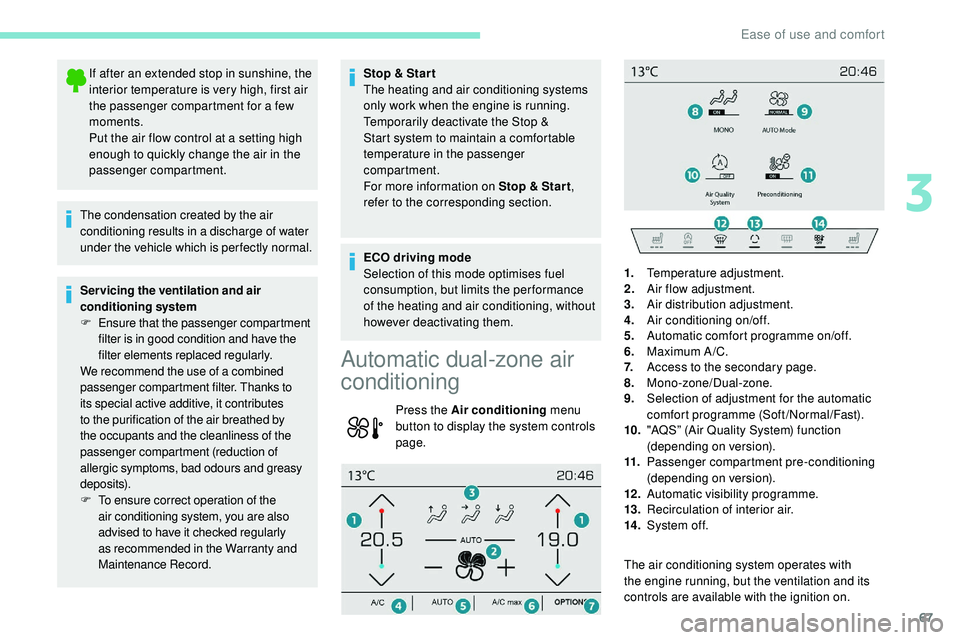
Press the Air conditioning menu
button to display the system controls
page.
The air conditioning system operates with
the engine running, but the ventilation and its
controls are available with the ignition on.1.
Temperature adjustment.
2. Air flow adjustment.
3. Air distribution adjustment.
4. Air conditioning on/off.
5. Automatic comfort programme on/off.
6. Maximum A /C.
7. Access to the secondary page.
8. Mono-zone/Dual-zone.
9. Selection of adjustment for the automatic
comfort programme (Soft/Normal/Fast).
10. "AQS” (Air Quality System) function
(depending on version).
11. Passenger compartment pre-conditioning
(depending on version).
12 . Automatic visibility programme.
13. Recirculation of interior air.
14 . System of f.
3
Ease of use and comfort
Page 72 of 320
70
Mono-zone/Dual-zone
The passenger temperature setting can be
linked to the driver's setting (mono-zone
function).
It is available in the secondary page by
pressing the "OPTIONS" button.
F
P
ress button 8 to activate the " MONO"
function; its status is displayed as " ON".
The function is automatically deactivated if the
passenger uses their temperature adjustment
buttons (dual-zone function).
Ventilation with the ignition on
When the ignition is switched on, you can use
the ventilation system to adjust the air flow 2
and air distribution 3 settings in the passenger
compartment, for a period which depends on
the battery charge.
This function does not allow the operation of
the air conditioning system.
System switch-off
F Press button 14 .
Its indicator lamp comes on and all other
indicator lamps for the system go off.
This action deactivates all functions of the air
conditioning system.
By reducing the air flow 2 to a minimum, you
are stopping ventilation.
Temperature is no longer regulated. A slight air
flow can still be felt however, resulting from the
for ward movement of the vehicle. Avoid driving for too long with the ventilation
off or the system deactivated – risk of
misting and deterioration of the air quality!
Pressing any button reactivates the system
with the settings that were previously in use.
Recirculation of the
interior air
The intake of exterior air prevents the formation
of mist on the windscreen and the side windows.
The recirculation of the interior air isolates the
passenger compartment from exterior odours
and fumes.
This function also allows the desired
temperature in the passenger compartment to
be reached in the shortest time.
F
P
ress this button to activate/
deactivate the function.
Recirculation is automatically activated
when the front screenwash is used or
when reverse gear is engaged.
Avoid prolonged use of the recirculation of
interior air – risk of formation of mist and
deterioration of the air quality!
Front demist – defrost
Automatic visibility
programme
The automatic visibility programme allows
to demist or defrost the windscreen and side
windows as quickly as possible. F
P
ress this button to activate/
deactivate the function.
When the indicator lamp is on, the function is
activated.
The system automatically manages the air
conditioning (depending on version), air
flow and air intake, and provides optimum
distribution towards the windscreen and side
windows.
The system allows the manual modification of
air flow without causing automatic deactivation
of the automatic visibility programme.
With Stop & Start, when demisting –
defrosting has been activated, STOP
mode is not available.
When the indicator lamp is on, the function is
activated.
Ease of use and comfort
Page 74 of 320
72
12:13
23 °C
OFF
OK
12:13
1 12:00 AM
12:00 AM
2
23 °C
Heating
This is an additional and separate system
which heats the passenger compartment and
improves defrosting performance.
This indicator lamp is illuminated
when the system is programmed.
This indicator lamp flashes while
the heating is in operation or when
you carry out a remote start via the
remote control.
This indicator lamp goes off at the
end of the heating cycle or when the
heating is stopped using the remote
control.
Ventilation
This system allows ventilation of the passenger
compartment with exterior air to improve the
temperature experienced on entering the
vehicle in summer.
Programming
You can programme the heating or ventilation
to come on using the second page of the
"Air
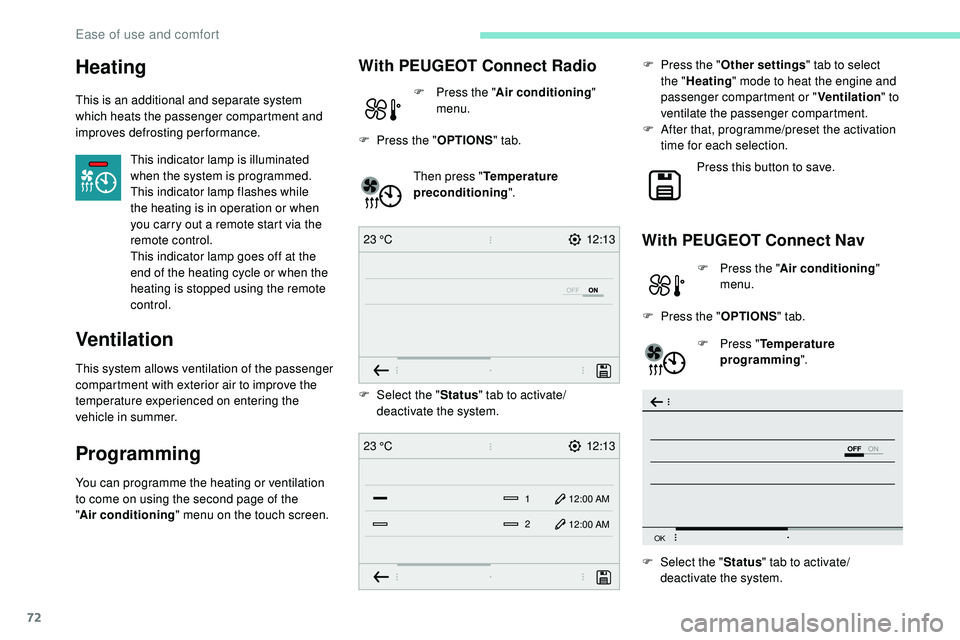
conditioning " menu on the touch screen. Then press "
Temperature
preconditioning ".
With PEUGEOT Connect Nav
F Press the "Air conditioning "
menu.
F
P
ress the " OPTIONS " tab.
F
P
ress " Temperature
programming ".
With PEUGEOT Connect Radio
F Press the " Air conditioning "
menu.
F
P
ress the " OPTIONS " tab.
F
Sel
ect the "Status" tab to activate/
deactivate the system.
F
Sel
ect the " Status" tab to activate/
deactivate the system. F
P
ress the "
Other settings " tab to select
the " Heating " mode to heat the engine and
passenger compartment or " Ventilation" to
ventilate the passenger compartment.
F
A
fter that, programme/preset the activation
time for each selection.
Press this button to save.
Ease of use and comfort
Page 75 of 320
73
OK
00 00
00 00
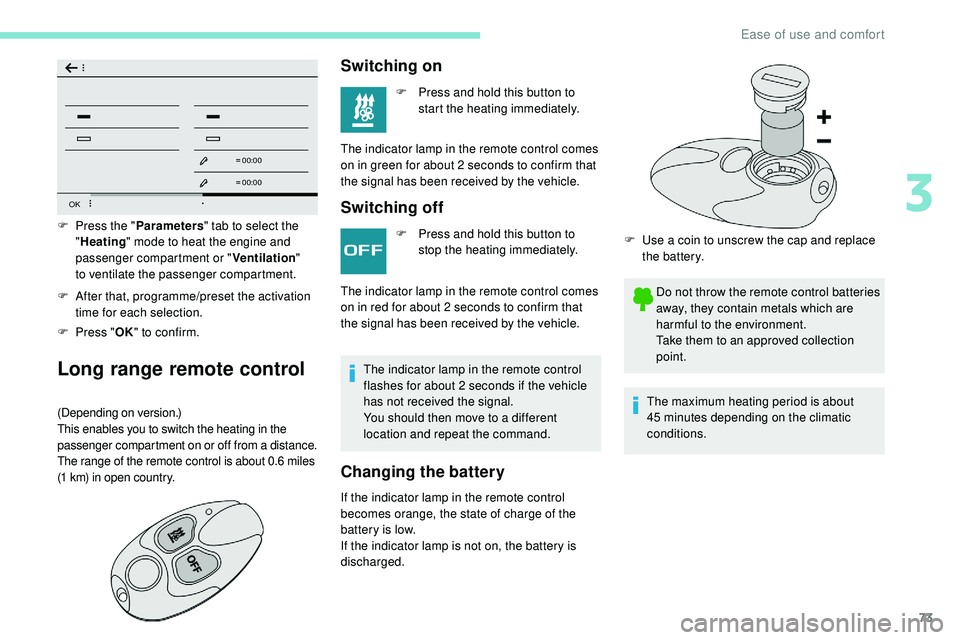
F After that, programme/preset the activation time for each selection.
F
P
ress " OK" to confirm.
Long range remote control
(Depending on version.)
This enables you to switch the heating in the
passenger compartment on or off from a distance.
The range of the remote control is about 0.6 miles
(1
km) in open country.
F Press the " Parameters" tab to select the
" Heating " mode to heat the engine and
passenger compartment or " Ventilation"
to
ventilate the passenger compartment.
Switching on
F Press and hold this button to start the heating immediately.
The indicator lamp in the remote control comes
on in green for about 2
seconds to confirm that
the signal has been received by the vehicle.
Switching off
F Press and hold this button to stop the heating immediately.
The indicator lamp in the remote control
flashes for about 2 seconds if the vehicle
has not received the signal.
You should then move to a different
location and repeat the command.
Changing the battery
The indicator lamp in the remote control comes
on in red for about 2 seconds to confirm that
the signal has been received by the vehicle.
If the indicator lamp in the remote control
becomes orange, the state of charge of the
battery is low.
If the indicator lamp is not on, the battery is
discharged. F
U
se a coin to unscrew the cap and replace
the battery.
Do not throw the remote control batteries
away, they contain metals which are
harmful to the environment.
Take them to an approved collection
point.
The maximum heating period is about
45
minutes depending on the climatic
conditions.
3
Ease of use and comfort
Page 128 of 320
126
The Keyless Entry and Starting electronic
key must be inside the vehicle.
If the electronic key is not detected in this
zone, a message is displayed.
Move the electronic key into this zone so
that the engine can be started.
If there is still a problem, refer to the "Key
not detected – Back-up starting" section.
F
P
ress the " START/STOP " button while
maintaining pressure on the pedal until the
engine starts.
The steering column unlocks and the engine
starts.
On certain versions with the automatic gearbox
(EAT6/EAT8), the steering column does not
lock.
For Diesel engines , in sub-zero temperatures
and/or when the engine is cold, the start will
only take place once the preheater warning
lamp is off. F
W
ith a manual gearbox
, you should keep
the clutch pedal fully depressed and not
press the " START/STOP " button again until
the engine is running.
F
W
ith an automatic gearbox
, you should
keep the brake pedal fully depressed and
not press the " START/STOP" button again
until the engine is running.
If one of the starting conditions is not met,
a reminder message is displayed in the
instrument panel.
In some circumstances, it is necessary to turn
the steering wheel slightly while pressing the
" START/STOP " button to assist unlocking of
the steering column.
F
W
ith the electronic key inside the vehicle,
fully depress the clutch pedal.
or
F
W
ith an automatic gearbox
, select mode P
or N .
F
W
ith the electronic key inside the vehicle,
press the brake pedal. If this warning lamp comes on after
pressing the "
START/STOP " button:
With petrol engines , after a cold start,
preheating the catalytic converter can
cause noticeable engine vibrations for
up to 2 minutes while stationary with the
engine running (accelerated idle speed).
If the engine stalls, release the clutch
pedal and push it all the way down again,
the engine will restart automatically. As a safety measure, never leave the
vehicle while the engine is running.
Switching off the engine
F Immobilise the vehicle, engine at idle.
F
W ith a manual gearbox , preferably put the
gear lever into neutral.
F
W
ith an automatic gearbox , preferably
select mode P or N .
F
W
ith the electronic key inside the vehicle,
press the " START/STOP " button.
The engine stops and the steering column
locks.
In some circumstances, it is necessary to turn
the steering wheel to lock the steering column.
On certain versions with the automatic gearbox
(EAT6/EAT8), the steering column does not
lock, but the gearbox locks in mode P .
If the vehicle is not immobilised, the
engine will not stop.
Never leave your vehicle with the
electronic key still inside.
Switching off the engine leads to a loss of
braking assistance.
Driving
Page 129 of 320
127
Switching the ignition on
With the ignition on, the system
automatically goes into energy economy
mode to maintain an adequate state of
charge in the battery.
Key not detected
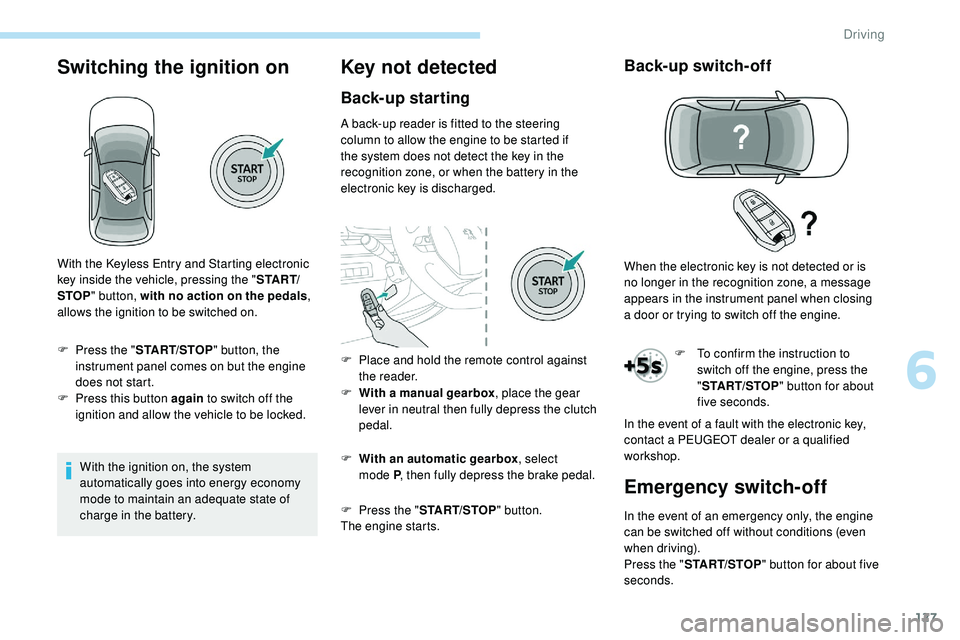
Back-up starting
A back-up reader is fitted to the steering
column to allow the engine to be started if
the system does not detect the key in the
recognition zone, or when the battery in the
electronic key is discharged.
F
W
ith a manual gearbox , place the gear
lever in neutral then fully depress the clutch
pedal.
F
W
ith an automatic gearbox , select
mode
P, then fully depress the brake pedal.
F
P
ress the " START/STOP " button.
The engine starts.
Back-up switch-off
F To confirm the instruction to switch off the engine, press the
"START/STOP " button for about
five seconds.
With the Keyless Entry and Starting electronic
key inside the vehicle, pressing the "
S TA R T/
STOP " button, with no action on the pedals ,
allows the ignition to be switched on.
F
P
ress the "
START/STOP " button, the
instrument panel comes on but the engine
does not start.
F
P
ress this button again to switch off the
ignition and allow the vehicle to be locked. F
P
lace and hold the remote control against
the reader. When the electronic key is not detected or is
no longer in the recognition zone, a message
appears in the instrument panel when closing
a
door or trying to switch off the engine.
In the event of a fault with the electronic key,
contact a PEUGEOT dealer or a qualified
workshop.
Emergency switch-off
In the event of an emergency only, the engine
can be switched off without conditions (even
when driving).
Press the " START/STOP " button for about five
seconds.
6
Driving
Page 136 of 320
134
Special aspects of automatic
mode
For maximum acceleration without touching the
selector, push the accelerator to the floor (kick-
down). The gearbox shifts down automatically
or holds the gear selected until the maximum
engine speed is reached.
The steering mounted controls allow the driver
to temporarily select a gear, if the road and
engine speed permit.
Special aspects of manual mode
The change from one gear to another takes
place only if the road speed and engine speed
permit.
Starting the vehicle
The gearbox selects the gear that offers
optimum per formance, taking account of the
exterior temperature, the profile of the road, the
load on the vehicle and the style of driving.From mode P
:
F
P
ress the brake pedal down fully.
F
S
tart the engine.
F
M
aintaining pressure on the brake pedal,
press the Unlock button.
F
P
ush once or twice rear ward to select the
automatic mode D , or for ward to engage
reverse R .
From neutral N :
F
P
ress the brake pedal down fully.
F S tart the engine.
F M aintaining pressure on the brake pedal,
push rear ward to select the automatic
mode D , or for ward, while pressing the
Unlock
button to engage reverse R.
Engaging reverse gear
F Slow down until you come to a stop.
F
W ith your foot on the brake pedal, press the
Unlock button.
F
Sel
ect mode R while continuing to press the
brake pedal and the Unlock button.
Permanent manual mode
Switching to the mode:
With EAT8 without the Full Park Assist button
a n d E AT 6 :
F
w
ith mode D selected in advance,
F
p
ress button M ; the green indicator lamp in
the button comes on.
With EAT8 and the Full Park Assist button:
F
p
ress the DRIVE MODE control,
F
s
elect "Manual" mode which is displayed in
the instrument panel.
Exiting the mode:
F
p
ush for wards once to go back to D .
or
F
p
ress button M ; the indicator lamp in the
button goes off.
or
F
s
elect another mode using the DRIVE
MODE control.
Switching off the ignition
To switch off the ignition, the vehicle must be
stationary.
Changing to free-wheel
To put the vehicle in free-wheeling mode with
the engine switched off:
F
w
ith the vehicle stationary and the engine
running, select N ,
F
s
witch off the engine,
F
w
ithin 5 seconds, switch the ignition on
again,
F
w
ith your foot on the brake pedal, push the
selector for ward or back once to confirm N
and manually release the electric parking
brake,
F
s
witch off the ignition.
After this time limit, the gearbox engages mode
P ; you should then restart the procedure.
If you open the driver's door when mode N
is engaged, an audible signal will sound.
It
will stop when you close the driver's
door again.
Driving
Page 140 of 320
138
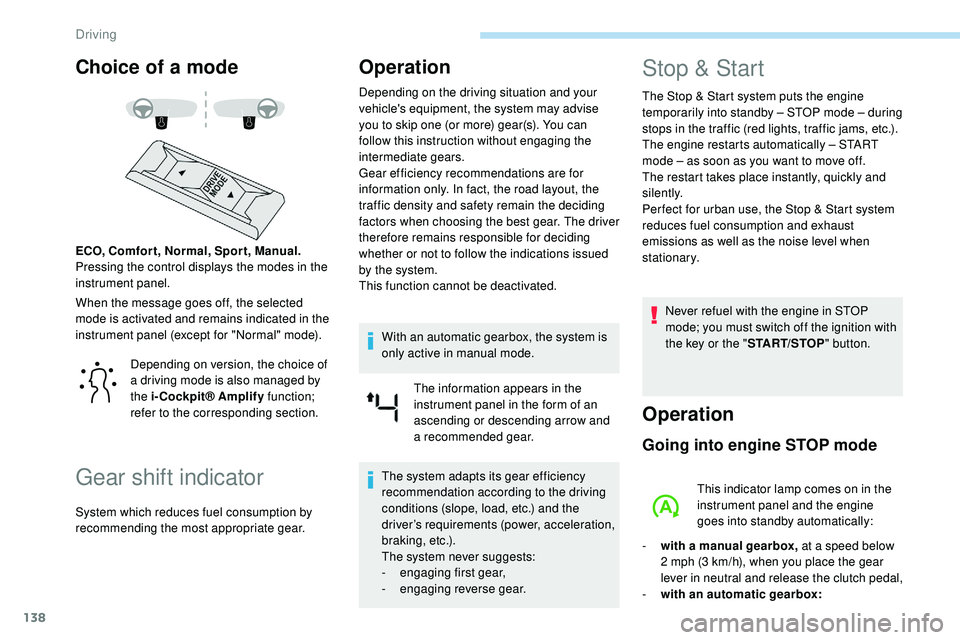
Choice of a mode
When the message goes off, the selected
mode is activated and remains indicated in the
instrument panel (except for "Normal" mode). ECO, Comfor t, Normal, Spor t, Manual.
Pressing the control displays the modes in the
instrument panel.
Gear shift indicator
Operation
Depending on the driving situation and your
vehicle's equipment, the system may advise
you to skip one (or more) gear(s). You can
follow this instruction without engaging the
intermediate gears.
Gear efficiency recommendations are for
information only. In fact, the road layout, the
traffic density and safety remain the deciding
factors when choosing the best gear. The driver
therefore remains responsible for deciding
whether or not to follow the indications issued
by the system.
This function cannot be deactivated.With an automatic gearbox, the system is
only active in manual mode. The information appears in the
instrument panel in the form of an
ascending or descending arrow and
a recommended gear.
The system adapts its gear efficiency
recommendation according to the driving
conditions (slope, load, etc.) and the
driver’s requirements (power, acceleration,
b r a k i n g , e t c .) .
The system never suggests:
-
e
ngaging first gear,
-
enga
ging reverse gear.
Stop & Start
The Stop & Start system puts the engine
t emporarily into standby – STOP mode – during
stops in the traffic (red lights, traffic jams, etc.).
The engine restarts automatically – START
mode – as soon as you want to move off.
The restart takes place instantly, quickly and
silently.
Per fect for urban use, the Stop & Start system
reduces fuel consumption and exhaust
emissions as well as the noise level when
stationary.
Never refuel with the engine in STOP
mode; you must switch off the ignition with
the key or the " START/STOP" button.
Operation
Going into engine STOP mode
This indicator lamp comes on in the
instrument panel and the engine
goes into standby automatically:
-
w
ith a manual gearbox, at a speed below
2 mph (3
km/h), when you place the gear
lever in neutral and release the clutch pedal,
-
w
ith an automatic gearbox:
Depending on version, the choice of
a driving mode is also managed by
the i-Cockpit® Amplify
function;
refer to the corresponding section.
System which reduces fuel consumption by
recommending the most appropriate gear.
Driving
Page 141 of 320
139
A time counter calculates the time spent in
STOP mode during the journey. It is reset to
zero every time the ignition is switched on with
the "START/STOP " button.
For your comfort, during parking
manoeuvres, STOP mode is not available
for a few seconds after coming out of
reverse gear or turning the steering wheel.
The Stop & Start does not affect the
operation of vehicle systems, such as
braking, etc.
Special cases: STOP mode not
available
STOP mode is not activated when:
- t he vehicle is on a steep slope
(rising
or
falling),
-
t
he driver's door is open,
-
t
he driver's seat belt is not fastened,
-
t
he vehicle has not exceeded 6 mph
(10
km/h) since the last engine start,
-
t
his is necessary to maintain a comfortable
In this case, this indicator lamp flashes
for a few seconds, then goes off.
Going into engine START mode
This indicator lamp goes off and the
engine restarts automatically:
-
w
ith a manual gearbox , when you fully
depress the clutch pedal,
-
w
ith an automatic gearbox:
•
g
ear selector in mode D or M , when you
release the brake pedal,
•
o
r gear selector in mode N and brake
pedal released, when you place the gear
selector in mode D or M ,
•
o
r when you engage reverse.
Special cases: START mode
activated automatically
As a safety measure or to maintain comfort
levels in the vehicle, START mode is activated
automatically when:
-
y
ou open the driver's door,
-
y
ou unfasten the driver's seat belt,
-
w
ith a manual gearbox, the vehicle speed
exceeds 2.5 mph (4
km/h),
-
w
ith an automatic gearbox in mode N , the
vehicle speed exceeds 0.6 mph (1
km/h),
-
w
ith an automatic gearbox in mode D ,
release the brake pedal,
-
s
ome special conditions (battery charge,
engine temperature, braking assistance,
air conditioning setting, etc.) make this
necessary to ensure control of a system or
the vehicle.
In this case, this indicator lamp flashes
for a few seconds, then goes off.
Deactivation/Reactivation
In certain cases, such as the need to maintain
a comfortable temperature in the passenger
compartment, it may be useful to deactivate the
Stop & Start system.
This operation is perfectly normal.
This operation is perfectly normal.
•
a
t a speed below 12 mph (20
km/h)
for BlueHDi versions, or below 1 mph
(1
km/h) for the PureTech 180 and 225
versions, when you brake hard with the
gear selector in mode D ,
•
w
ith the vehicle stationary, when you
place the gear selector in position N .temperature in the passenger compartment,
-
d
emisting is active,
-
t
he exterior temperature is below 0°C or
above +35°C,
-
s
ome temporary conditions (battery charge,
engine temperature, braking assistance,
altitude, etc.) make this necessary to ensure
control of a system.
6
Driving