ignition Peugeot 508 2018 Owner's Guide
[x] Cancel search | Manufacturer: PEUGEOT, Model Year: 2018, Model line: 508, Model: Peugeot 508 2018Pages: 320, PDF Size: 10.09 MB
Page 58 of 320
56
Driving position
Adopting a good driving position helps improve
your comfort and protection.
It also optimises interior and exterior visibility
as well as access to controls.
Sitting comfortably
Whether or not your vehicle has certain seat
adjustments described in this section depends
on the trim level and country of sale.
Driver’s sideAs a safety precaution, adjust the seats
only when the vehicle is stationary.
If your vehicle has electric seats, the
ignition must be on to adjust them.
Passenger’s side
Before moving off
Adjust the interior and exterior door mirrors to
reduce blind spots.
Fasten your seat belt: place the diagonal belt in
the middle of your shoulder and adjust the lap
belt so that it is tightened across your pelvis.
Ensure that all passengers have fastened their
seat belts correctly.
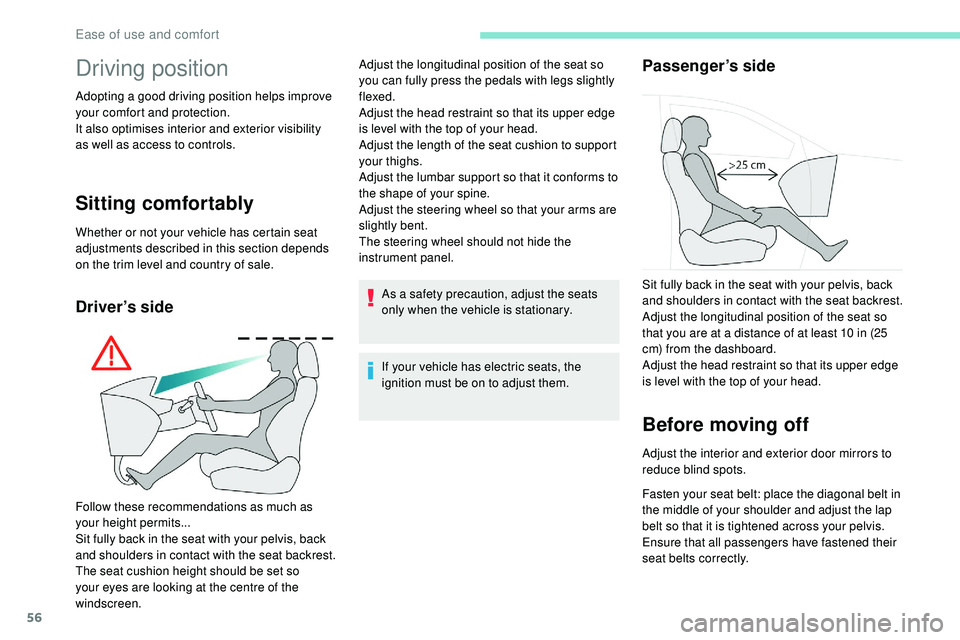
Follow these recommendations as much as
your height permits...
Sit fully back in the seat with your pelvis, back
and shoulders in contact with the seat backrest.
The seat cushion height should be set so
your eyes are looking at the centre of the
windscreen. Adjust the longitudinal position of the seat so
you can fully press the pedals with legs slightly
flexed.
Adjust the head restraint so that its upper edge
is level with the top of your head.
Adjust the length of the seat cushion to support
your thighs.
Adjust the lumbar support so that it conforms to
the shape of your spine.
Adjust the steering wheel so that your arms are
slightly bent.
The steering wheel should not hide the
instrument panel.
Sit fully back in the seat with your pelvis, back
and shoulders in contact with the seat backrest.
Adjust the longitudinal position of the seat so
that you are at a distance of at least 10 in (25
cm) from the dashboard.
Adjust the head restraint so that its upper edge
is level with the top of your head.
Ease of use and comfort
Page 59 of 320
57
If your vehicle has electric door mirrors,
the ignition must be on to adjust them.
When driving
Maintain a good driving position and hold the
steering wheel with both hands at the "quarter
to three" position, so that you can quickly reach
the controls on and near the steering wheel.Never adjust the seats or steering wheel
when driving.
Always keep your feet on the floor.
Front seats
Front head restraints
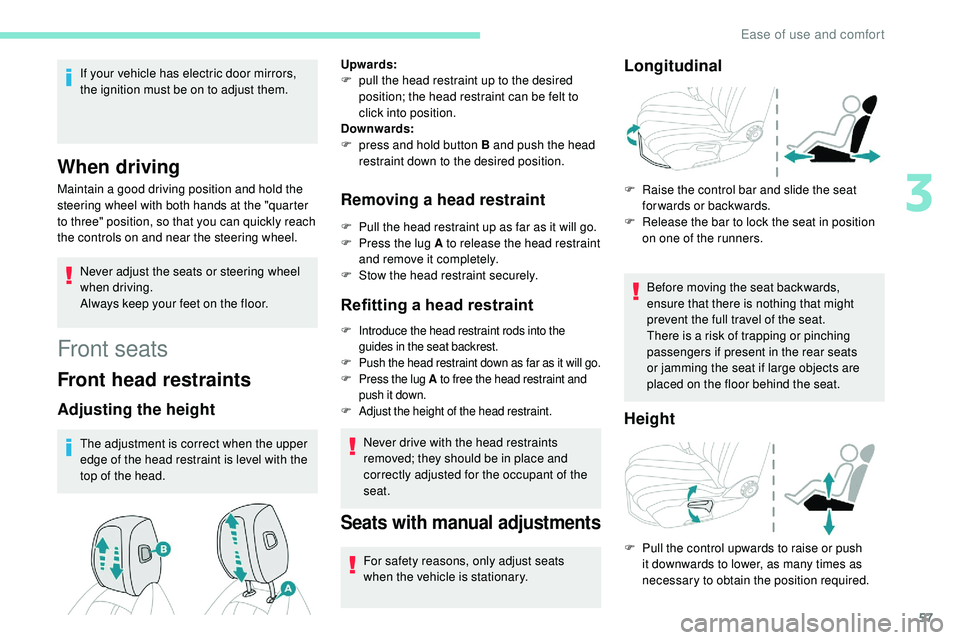
Adjusting the height
The adjustment is correct when the upper
edge of the head restraint is level with the
top of the head.
Removing a head restraint
F Pull the head restraint up as far as it will go.
F P ress the lug A to release the head restraint
and remove it completely.
F
S
tow the head restraint securely.
Refitting a head restraint
F Introduce the head restraint rods into the guides in the seat backrest.
F
P
ush the head restraint down as far as it will go.
F
P
ress the lug A to free the head restraint and
push it down.
F
A
djust the height of the head restraint.
Never drive with the head restraints
removed; they should be in place and
correctly adjusted for the occupant of the
seat.
Upwards:
F
p
ull the head restraint up to the desired
position; the head restraint can be felt to
click into position.
Downwards:
F
p
ress and hold button B and push the head
restraint down to the desired position.
Seats with manual adjustments
For safety reasons, only adjust seats
when the vehicle is stationary.
Longitudinal
F Raise the control bar and slide the seat forwards or backwards.
F
R
elease the bar to lock the seat in position
on one of the runners.
Before moving the seat backwards,
ensure that there is nothing that might
prevent the full travel of the seat.
There is a risk of trapping or pinching
passengers if present in the rear seats
or jamming the seat if large objects are
placed on the floor behind the seat.
Height
F Pull the control upwards to raise or push it downwards to lower, as many times as
necessary to obtain the position required.
3
Ease of use and comfort
Page 61 of 320
59
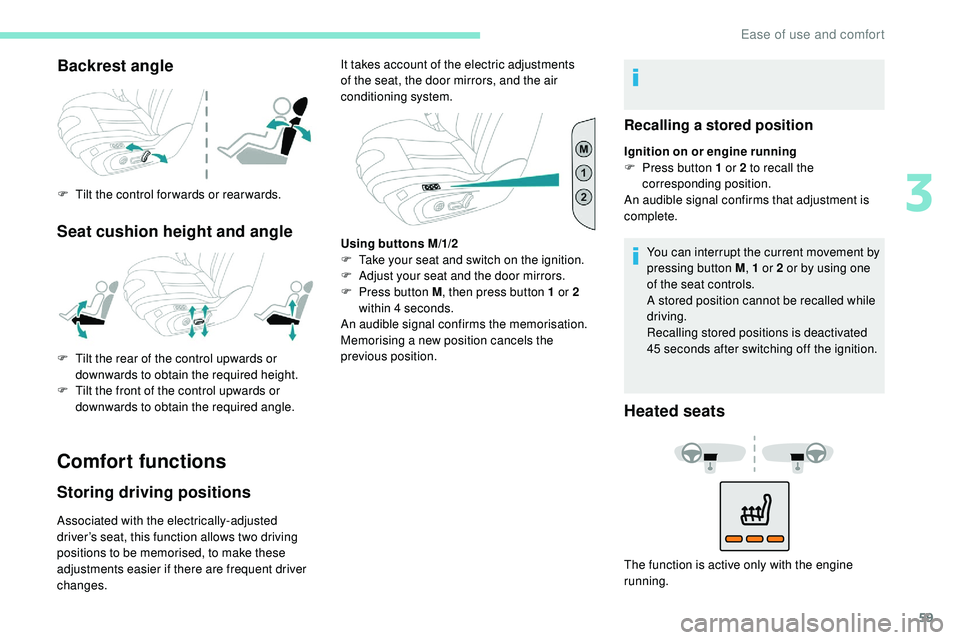
Backrest angle
F Tilt the control for wards or rear wards.
Seat cushion height and angle
Comfort functions
Storing driving positions
Associated with the electrically-adjusted
driver’s seat, this function allows two driving
positions to be memorised, to make these
adjustments easier if there are frequent driver
changes.It takes account of the electric adjustments
of the seat, the door mirrors, and the air
conditioning system.
F
T
ilt the rear of the control upwards or
downwards to obtain the required height.
F
T
ilt the front of the control upwards or
downwards to obtain the required angle.
Recalling a stored position
Ignition on or engine running
F P ress button 1 or 2 to recall the
corresponding position.
An audible signal confirms that adjustment is
complete.
You can interrupt the current movement by
pressing button M , 1 or 2 or by using one
of the seat controls.
A stored position cannot be recalled while
driving.
Recalling stored positions is deactivated
45 seconds after switching off the ignition.
Heated seats
The function is active only with the engine
running.
Using buttons M/1/2
F
T
ake your seat and switch on the ignition.
F
A
djust your seat and the door mirrors.
F
P
ress button M
, then press button 1 or 2
within 4 seconds.
An audible signal confirms the memorisation.
Memorising a new position cancels the
previous position.
3
Ease of use and comfort
Page 62 of 320
60
Do not use the function when the seat is
not occupied.
Reduce the intensity of the heating as
soon as possible.
When the seat and passenger
compartment have reached an adequate
temperature, you can stop the function;
reducing the consumption of electrical
current reduces fuel consumption.Prolonged use is not recommended for
those with sensitive skin.
There is a risk of burns for people whose
perception of heat is impaired (illness,
taking medication, etc.).
There is a risk of overheating the system if
material with insulating properties is used,
such as cushions or seat covers.
Do not use the system:
-
i
f wearing damp clothing,
-
i
f child seats are fitted.
To avoid breaking the heating element in
the seat:
-
d
o not place heavy objects on the seat,
- d o not kneel or stand on the seat,
- d o not place sharp objects on the seat,
-
d
o not spill liquids onto the seat.
To avoid the risk of short-circuit:
-
d
o not use liquid products for cleaning
the seat,
-
n
ever use the heating function when
the seat is damp.
Multipoint massage
System with a choice of type of massage and
adjustment of its intensity.
This system operates with the engine running,
as well as in STOP mode of Stop & Start.
Activation/Settings
The massage settings are adjusted in the touch
screen. The multipoint massages are
also managed by the i-Cockpit®
Amplify
function.
For more information on the i-Cockpit®
Amplify function , refer to the corresponding
section. From the front seat:
F
P
ress this button; its green
indicator lamp comes on.
The settings page is displayed on the touch
screen with the last memorised settings.
If the settings suit you and you make no
changes, the display returns to its previous
state, and the function activates immediately.
Seats must be adjusted one after another,
starting with the driver's seat.
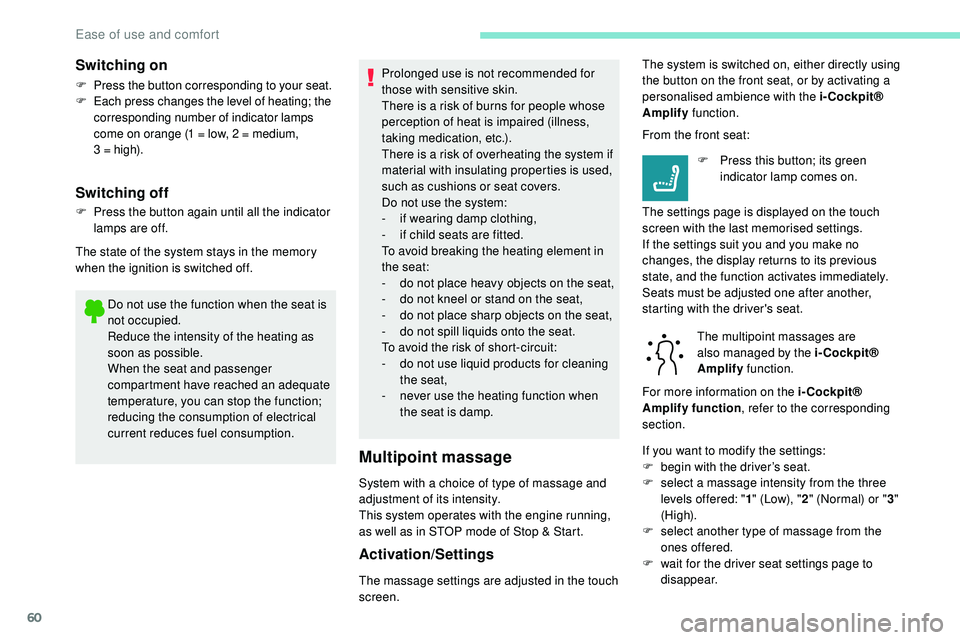
Switching on
F Press the button corresponding to your seat.
F E ach press changes the level of heating; the
corresponding number of indicator lamps
come on orange (1 = low, 2 = medium,
3
= high).
Switching off
F Press the button again until all the indicator lamps are off.
The state of the system stays in the memory
when the ignition is switched off. The system is switched on, either directly using
the button on the front seat, or by activating a
personalised ambience with the i-Cockpit®
Amplify
function.
If you want to modify the settings:
F
b
egin with the driver’s seat.
F
s
elect a massage intensity from the three
levels offered: " 1" (Low), " 2" (Normal) or " 3"
(High).
F
s
elect another type of massage from the
ones offered.
F
w
ait for the driver seat settings page to
disappear.
Ease of use and comfort
Page 64 of 320
62
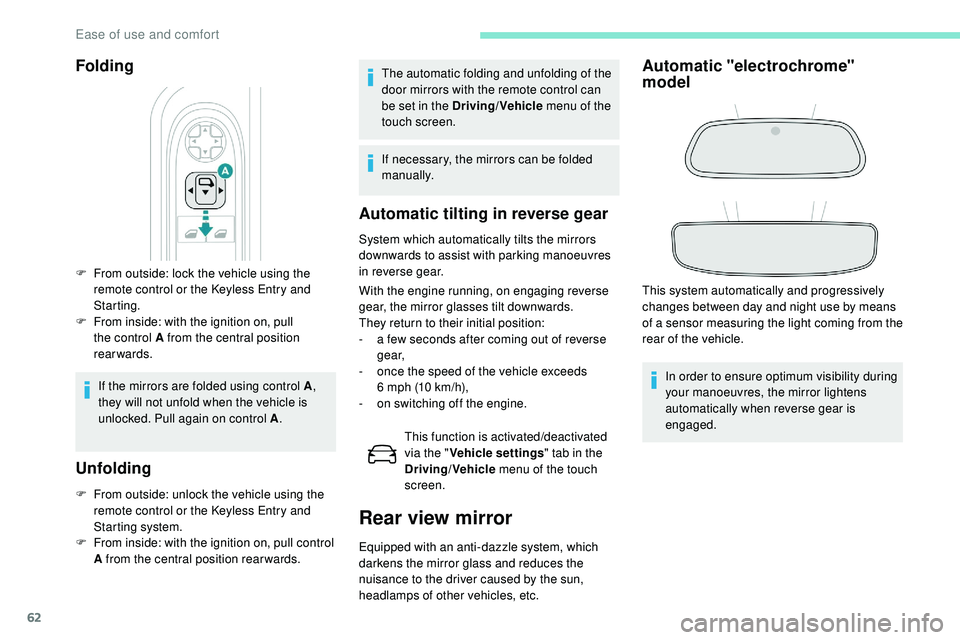
Folding
F From outside: lock the vehicle using the remote control or the Keyless Entry and
Starting.
F
F
rom inside: with the ignition on, pull
the control A from the central position
rearwards.
If the mirrors are folded using control A ,
they will not unfold when the vehicle is
unlocked. Pull again on control A .
Unfolding
F From outside: unlock the vehicle using the
remote control or the Keyless Entry and
Starting system.
F
F
rom inside: with the ignition on, pull control
A from the central position rear wards.
Automatic tilting in reverse gear
System which automatically tilts the mirrors
downwards to assist with parking manoeuvres
in reverse gear.
With the engine running, on engaging reverse
gear, the mirror glasses tilt downwards.
They return to their initial position:
-
a f
ew seconds after coming out of reverse
g e a r,
-
o
nce the speed of the vehicle exceeds
6
mph (10 km/h),
-
o
n switching off the engine.This function is activated/deactivated
via the " Vehicle settings " tab in the
Driving/Vehicle menu of the touch
screen.
Rear view mirror
Equipped with an anti-dazzle system, which
darkens the mirror glass and reduces the
nuisance to the driver caused by the sun,
headlamps of other vehicles, etc.
Automatic "electrochrome"
model
This system automatically and progressively
changes between day and night use by means
of a sensor measuring the light coming from the
rear of the vehicle.
In order to ensure optimum visibility during
your manoeuvres, the mirror lightens
automatically when reverse gear is
engaged.
The automatic folding and unfolding of the
door mirrors with the remote control can
be set in the Driving/Vehicle
menu of the
touch screen.
If necessary, the mirrors can be folded
manually.
Ease of use and comfort
Page 67 of 320
65
Access to the i-Cockpit®
Amplify function's home
page
Direct access via this button
Access via the Applications menu
F
Sel
ect "i-Cockpit® Amplify ".
Activating an ambience
From the home page:
F
Sel ect an ambience: " Relax" or "Boost ".
Depending on the settings made for the
ambience, the systems are activated
immediately.
Deactivating an ambience
From the home page:
F P ress " Deactivate ambience ".
or
F
Sel
ect another ambience.
The ambience is automatically deactivated
when the ignition is switched off.
Personalising an ambience
From the home page:
F S elect an ambience to activate it. It is possible to temporarily modify an
ambience at any time, by modifying the
settings for one or more of the systems
managed in the ambience, without going
via the i- Cockpit® Amplify function.
For example, you can deactivate or modify
the intensity of the current massage by
pressing the massage activation button
on your seat or activate/deactivate
the ambient lighting in the passenger
compartment from the Driving/Vehicle
menu.
In this case, the new settings will not be
saved as part of the current ambience.
F
P
ress "
Settings " to display the settings
page for the ambience.
F
S
elect a system for which you wish to
modify the settings.
F
A
fter making the modifications, press any
area of the screen outside the system
settings window to return to the ambience
settings page.
F
A
fter making all of the desired modifications
to settings, press " Save settings".
The modifications are taken into account
immediately.
Heating and Ventilation
Air intake
The air circulating in the passenger
compartment is filtered and originates either
from the outside via the grille located at the
base of the windscreen or from the inside in air
recirculation mode.
Controls
Depending on your vehicle, the controls are
accessible in the " Air conditioning" menu of
the touch screen or are grouped together on
the control panel of the centre console.
3
Ease of use and comfort
Page 69 of 320
67
If after an extended stop in sunshine, the
interior temperature is very high, first air
the passenger compartment for a few
moments.
Put the air flow control at a setting high
enough to quickly change the air in the
passenger compartment.
The condensation created by the air
conditioning results in a discharge of water
under the vehicle which is per fectly normal.
Servicing the ventilation and air
conditioning system
F
E
nsure that the passenger compartment
filter is in good condition and have the
filter elements replaced regularly.
We recommend the use of a combined
passenger compartment filter. Thanks to
its special active additive, it contributes
to the purification of the air breathed by
the occupants and the cleanliness of the
passenger compartment (reduction of
allergic symptoms, bad odours and greasy
deposits).
F
T
o ensure correct operation of the
air conditioning system, you are also
advised to have it checked regularly
as recommended in the Warranty and
Maintenance Record. Stop & Star t
The heating and air conditioning systems
only work when the engine is running.
Temporarily deactivate the Stop &
Start system to maintain a comfortable
temperature in the passenger
compartment.
For more information on Stop & Star t
,
refer to the corresponding section.
ECO driving mode
Selection of this mode optimises fuel
consumption, but limits the performance
of the heating and air conditioning, without
however deactivating them.
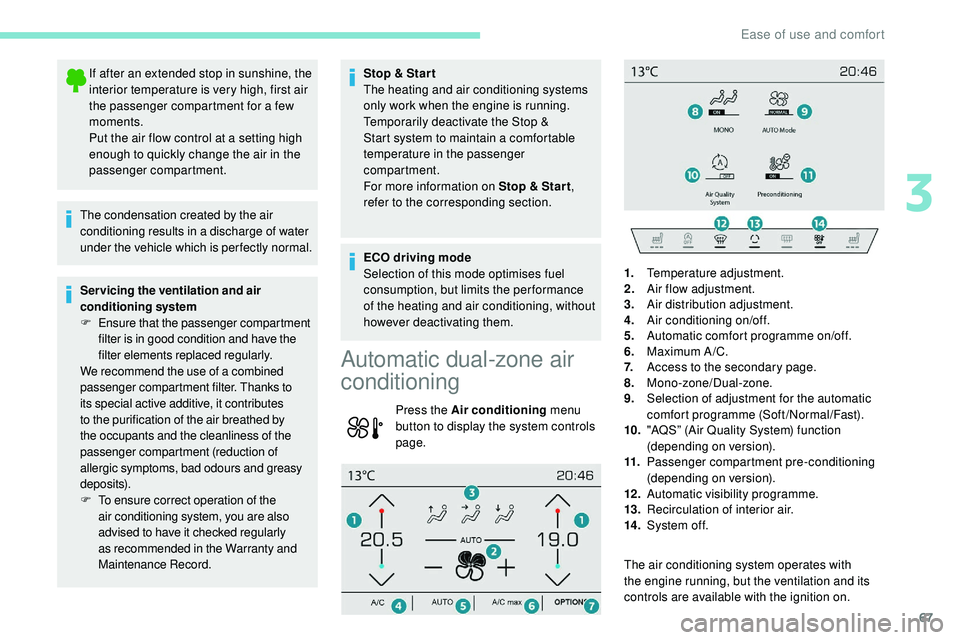
Automatic dual-zone air
conditioning
Press the Air conditioning menu
button to display the system controls
page.
The air conditioning system operates with
the engine running, but the ventilation and its
controls are available with the ignition on.1.
Temperature adjustment.
2. Air flow adjustment.
3. Air distribution adjustment.
4. Air conditioning on/off.
5. Automatic comfort programme on/off.
6. Maximum A /C.
7. Access to the secondary page.
8. Mono-zone/Dual-zone.
9. Selection of adjustment for the automatic
comfort programme (Soft/Normal/Fast).
10. "AQS” (Air Quality System) function
(depending on version).
11. Passenger compartment pre-conditioning
(depending on version).
12 . Automatic visibility programme.
13. Recirculation of interior air.
14 . System of f.
3
Ease of use and comfort
Page 72 of 320
70
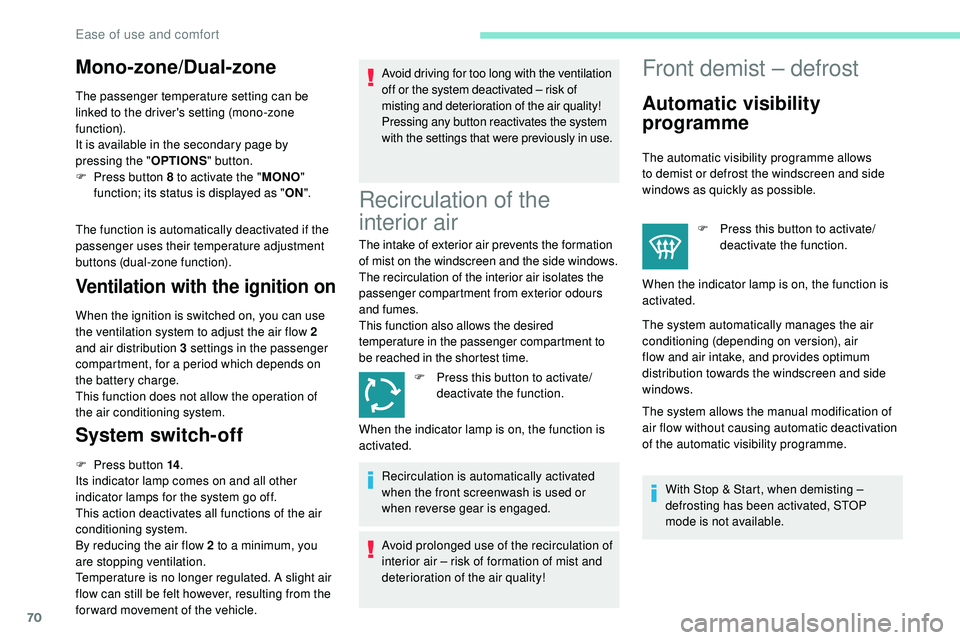
Mono-zone/Dual-zone
The passenger temperature setting can be
linked to the driver's setting (mono-zone
function).
It is available in the secondary page by
pressing the "OPTIONS" button.
F
P
ress button 8 to activate the " MONO"
function; its status is displayed as " ON".
The function is automatically deactivated if the
passenger uses their temperature adjustment
buttons (dual-zone function).
Ventilation with the ignition on
When the ignition is switched on, you can use
the ventilation system to adjust the air flow 2
and air distribution 3 settings in the passenger
compartment, for a period which depends on
the battery charge.
This function does not allow the operation of
the air conditioning system.
System switch-off
F Press button 14 .
Its indicator lamp comes on and all other
indicator lamps for the system go off.
This action deactivates all functions of the air
conditioning system.
By reducing the air flow 2 to a minimum, you
are stopping ventilation.
Temperature is no longer regulated. A slight air
flow can still be felt however, resulting from the
for ward movement of the vehicle. Avoid driving for too long with the ventilation
off or the system deactivated – risk of
misting and deterioration of the air quality!
Pressing any button reactivates the system
with the settings that were previously in use.
Recirculation of the
interior air
The intake of exterior air prevents the formation
of mist on the windscreen and the side windows.
The recirculation of the interior air isolates the
passenger compartment from exterior odours
and fumes.
This function also allows the desired
temperature in the passenger compartment to
be reached in the shortest time.
F
P
ress this button to activate/
deactivate the function.
Recirculation is automatically activated
when the front screenwash is used or
when reverse gear is engaged.
Avoid prolonged use of the recirculation of
interior air – risk of formation of mist and
deterioration of the air quality!
Front demist – defrost
Automatic visibility
programme
The automatic visibility programme allows
to demist or defrost the windscreen and side
windows as quickly as possible. F
P
ress this button to activate/
deactivate the function.
When the indicator lamp is on, the function is
activated.
The system automatically manages the air
conditioning (depending on version), air
flow and air intake, and provides optimum
distribution towards the windscreen and side
windows.
The system allows the manual modification of
air flow without causing automatic deactivation
of the automatic visibility programme.
With Stop & Start, when demisting –
defrosting has been activated, STOP
mode is not available.
When the indicator lamp is on, the function is
activated.
Ease of use and comfort
Page 77 of 320
75
5.USB socket(s)/Front 12 V socket (120 W)
Storage compartment or Wireless
smartphone charger
6. Cup holders
7. Front armrest with storage compartment
8. USB socket(s) or Rear 12 V socket (120 W)
Sun visor
F With the ignition on, raise the concealing
flap; the mirror is illuminated automatically.
This sun visor is also equipped with a ticket
h o l d e r.
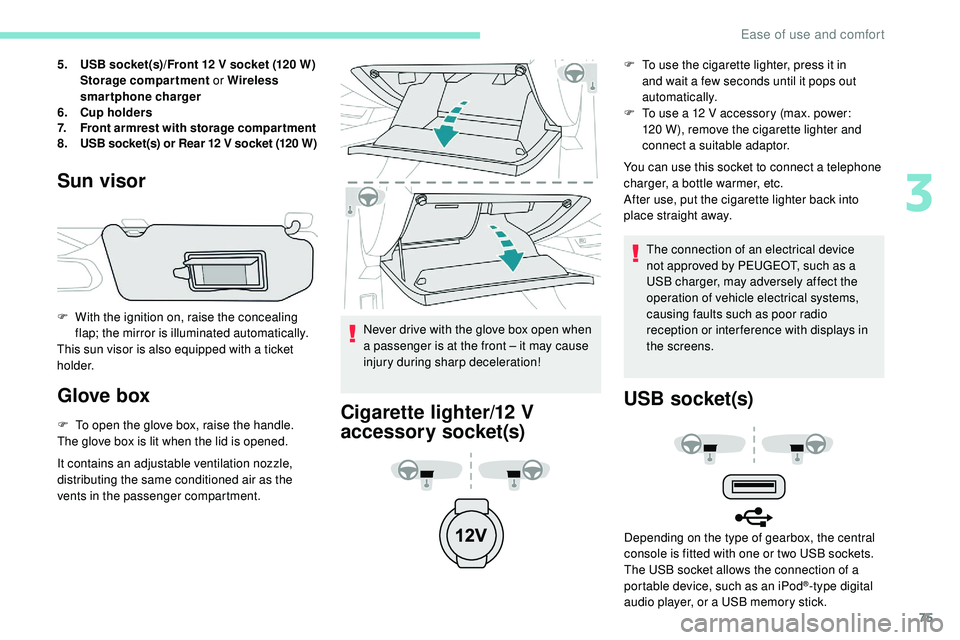
Glove box
F To open the glove box, raise the handle.
The glove box is lit when the lid is opened.
It contains an adjustable ventilation nozzle,
distributing the same conditioned air as the
vents in the passenger compartment. Never drive with the glove box open when
a passenger is at the front – it may cause
injury during sharp deceleration!Cigarette lighter/12 V
accessory socket(s)
F To use the cigarette lighter, press it in
and wait a few seconds until it pops out
automatically.
F
T
o use a 12 V accessory (max. power:
120 W), remove the cigarette lighter and
connect a suitable adaptor.
You can use this socket to connect a telephone
charger, a bottle warmer, etc.
After use, put the cigarette lighter back into
place straight away.
The connection of an electrical device
not approved by PEUGEOT, such as a
USB charger, may adversely affect the
operation of vehicle electrical systems,
causing faults such as poor radio
reception or inter ference with displays in
the screens.
USB socket(s)
Depending on the type of gearbox, the central
console is fitted with one or two USB sockets.
The USB socket allows the connection of a
portable device, such as an iPod
®-type digital
audio player, or a USB memory stick.
3
Ease of use and comfort
Page 79 of 320
77
Wireless smartphone
charger
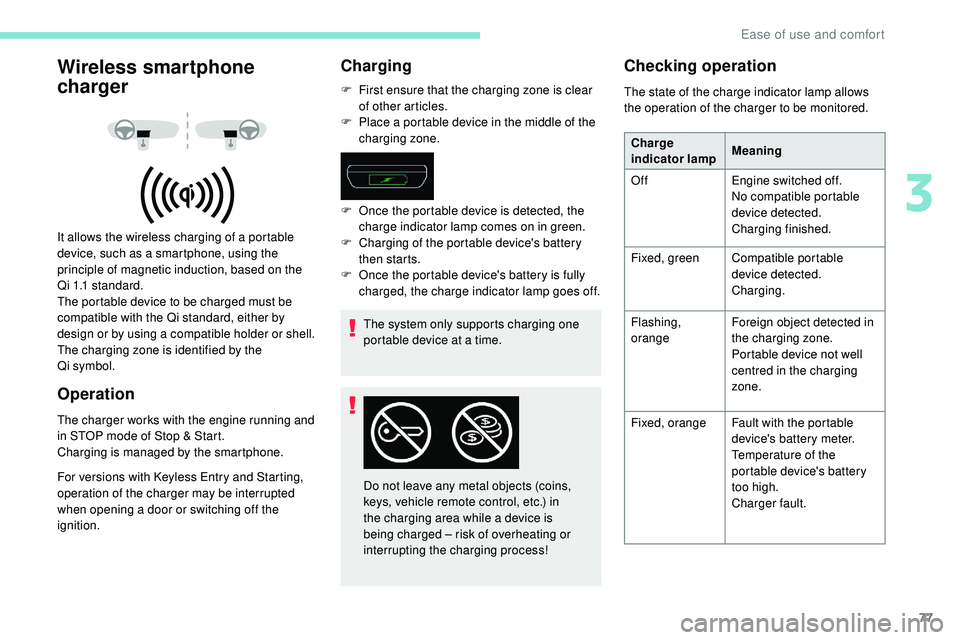
It allows the wireless charging of a portable
device, such as a smartphone, using the
principle of magnetic induction, based on the
Qi 1.1 standard.
The portable device to be charged must be
compatible with the Qi standard, either by
design or by using a compatible holder or shell.
The charging zone is identified by the
Qi
symbol.
Operation
The charger works with the engine running and
in STOP mode of Stop & Start.
Charging is managed by the smartphone.
For versions with Keyless Entry and Starting,
operation of the charger may be interrupted
when opening a door or switching off the
ignition.
Charging
F First ensure that the charging zone is clear of other articles.
F
P
lace a portable device in the middle of the
charging zone.
The system only supports charging one
portable device at a time.
F
O
nce the portable device is detected, the
charge indicator lamp comes on in green.
F
C
harging of the portable device's battery
then starts.
F
O
nce the portable device's battery is fully
charged, the charge indicator lamp goes off.
Do not leave any metal objects (coins,
keys, vehicle remote control, etc.) in
the charging area while a device is
being charged – risk of overheating or
interrupting the charging process!
Checking operation
The state of the charge indicator lamp allows
the operation of the charger to be monitored. Charge
indicator lamp Meaning
Off Engine switched off.
No compatible portable
device detected.
Charging finished.
Fixed, green Compatible portable
device detected.
Charging.
Flashing,
orange Foreign object detected in
the charging zone.
Portable device not well
centred in the charging
zone.
Fixed, orange Fault with the portable
device's battery meter.
Temperature of the
portable device's battery
too high.
Charger fault.
3
Ease of use and comfort