reverse Peugeot 508 2019 Owner's Guide
[x] Cancel search | Manufacturer: PEUGEOT, Model Year: 2019, Model line: 508, Model: Peugeot 508 2019Pages: 320, PDF Size: 10.09 MB
Page 141 of 320
139
A time counter calculates the time spent in
STOP mode during the journey. It is reset to
zero every time the ignition is switched on with
the "START/STOP " button.
For your comfort, during parking
manoeuvres, STOP mode is not available
for a few seconds after coming out of
reverse gear or turning the steering wheel.
The Stop & Start does not affect the
operation of vehicle systems, such as
braking, etc.
Special cases: STOP mode not
available
STOP mode is not activated when:
- t he vehicle is on a steep slope
(rising
or
falling),
-
t
he driver's door is open,
-
t
he driver's seat belt is not fastened,
-
t
he vehicle has not exceeded 6 mph
(10
km/h) since the last engine start,
-
t
his is necessary to maintain a comfortable
In this case, this indicator lamp flashes
for a few seconds, then goes off.
Going into engine START mode
This indicator lamp goes off and the
engine restarts automatically:
-
w
ith a manual gearbox , when you fully
depress the clutch pedal,
-
w
ith an automatic gearbox:
•
g
ear selector in mode D or M , when you
release the brake pedal,
•
o
r gear selector in mode N and brake
pedal released, when you place the gear
selector in mode D or M ,
•
o
r when you engage reverse.
Special cases: START mode
activated automatically
As a safety measure or to maintain comfort
levels in the vehicle, START mode is activated
automatically when:
-
y
ou open the driver's door,
-
y
ou unfasten the driver's seat belt,
-
w
ith a manual gearbox, the vehicle speed
exceeds 2.5 mph (4
km/h),
-
w
ith an automatic gearbox in mode N , the
vehicle speed exceeds 0.6 mph (1
km/h),
-
w
ith an automatic gearbox in mode D ,
release the brake pedal,
-
s
ome special conditions (battery charge,
engine temperature, braking assistance,
air conditioning setting, etc.) make this
necessary to ensure control of a system or
the vehicle.
In this case, this indicator lamp flashes
for a few seconds, then goes off.
Deactivation/Reactivation
In certain cases, such as the need to maintain
a comfortable temperature in the passenger
compartment, it may be useful to deactivate the
Stop & Start system.
This operation is perfectly normal.
This operation is perfectly normal.
•
a
t a speed below 12 mph (20
km/h)
for BlueHDi versions, or below 1 mph
(1
km/h) for the PureTech 180 and 225
versions, when you brake hard with the
gear selector in mode D ,
•
w
ith the vehicle stationary, when you
place the gear selector in position N .temperature in the passenger compartment,
-
d
emisting is active,
-
t
he exterior temperature is below 0°C or
above +35°C,
-
s
ome temporary conditions (battery charge,
engine temperature, braking assistance,
altitude, etc.) make this necessary to ensure
control of a system.
6
Driving
Page 161 of 320
159
During the vehicle immobilisation phase,
it is recommended:
-
N
ot to open the doors.
-
N
ot to drop off or pick up passengers.
-
N
ot to engage reverse gear.
When the vehicle restarts, watch out for
cyclists, pedestrians or animals which may
not be detected properly.
Operating limits
The system cannot exceed the limits of the
laws of physics.
Certain situations cannot be managed by the
system and require the driver to take back
control of the vehicle.
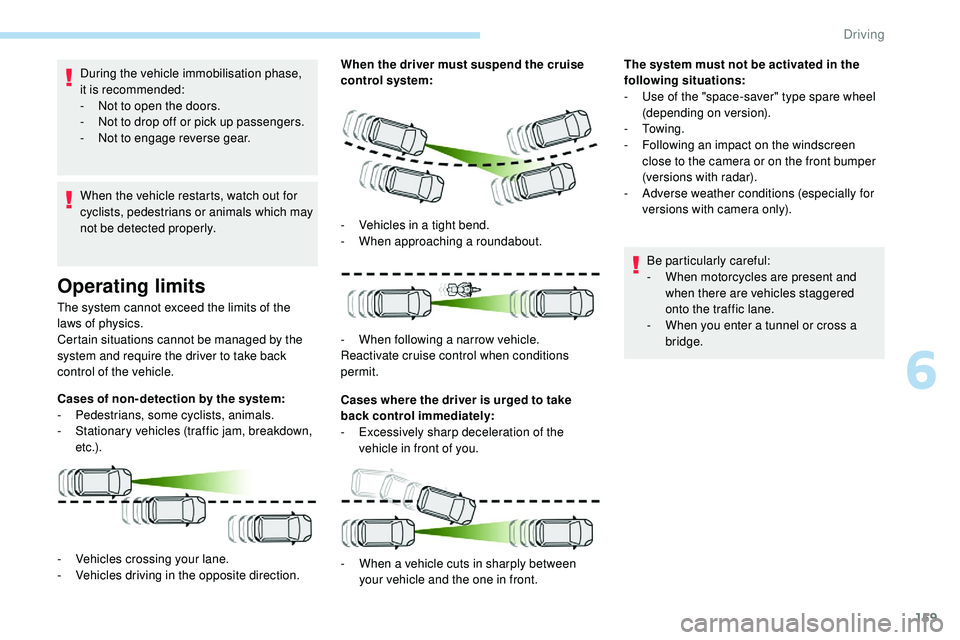
Cases of non- detection by the system:
-
Pe
destrians, some cyclists, animals.
-
S
tationary vehicles (traffic jam, breakdown,
e t c .) . When the driver must suspend the cruise
control system:
Cases where the driver is urged to take
back control immediately:
-
E
xcessively sharp deceleration of the
vehicle in front of you.
-
V
ehicles crossing your lane.
-
V
ehicles driving in the opposite direction. -
V
ehicles in a tight bend.
-
W
hen approaching a roundabout.
-
W
hen following a narrow vehicle.
Reactivate cruise control when conditions
permit.
-
W
hen a vehicle cuts in sharply between
your vehicle and the one in front. The system must not be activated in the
following situations:
-
U
se of the "space-saver" type spare wheel
(depending on version).
-
To w i n g .
-
F
ollowing an impact on the windscreen
close to the camera or on the front bumper
(versions with radar).
-
A
dverse weather conditions (especially for
versions with camera only).
Be particularly careful:
-
W
hen motorcycles are present and
when there are vehicles staggered
onto the traffic lane.
-
W
hen you enter a tunnel or cross a
bridge.
6
Driving
Page 179 of 320
177
This function is a manoeuvring aid which
cannot, in any circumstances, replace the
need for vigilance on the part of the driver.
The driver must remain attentive and stay
in control of their vehicle.
They must always check the vehicle’s
surroundings before undertaking a
manoeuvre.
During the entire manoeuvre, the driver
must ensure that the space remains clear.
Rear parking sensors
The system is switched on by engaging reverse
g e a r.
This is confirmed by an audible signal.
The system is switched off when you come out
of reverse gear.
Audible assistance
The proximity information is given by an
intermittent audible signal, the frequency of which
increases as the vehicle approaches the obstacle.
When the distance between the vehicle and
the obstacle becomes less than about thirty
centimetres, the sound signal becomes
continuous.
The sound emitted by the speaker (right or
left) indicates the side on which the obstacle is
located.
Adjusting the audible signalIn versions equipped with
PEUGEOT Connect Radio,
pressing this button opens the
audible signal volume adjustment
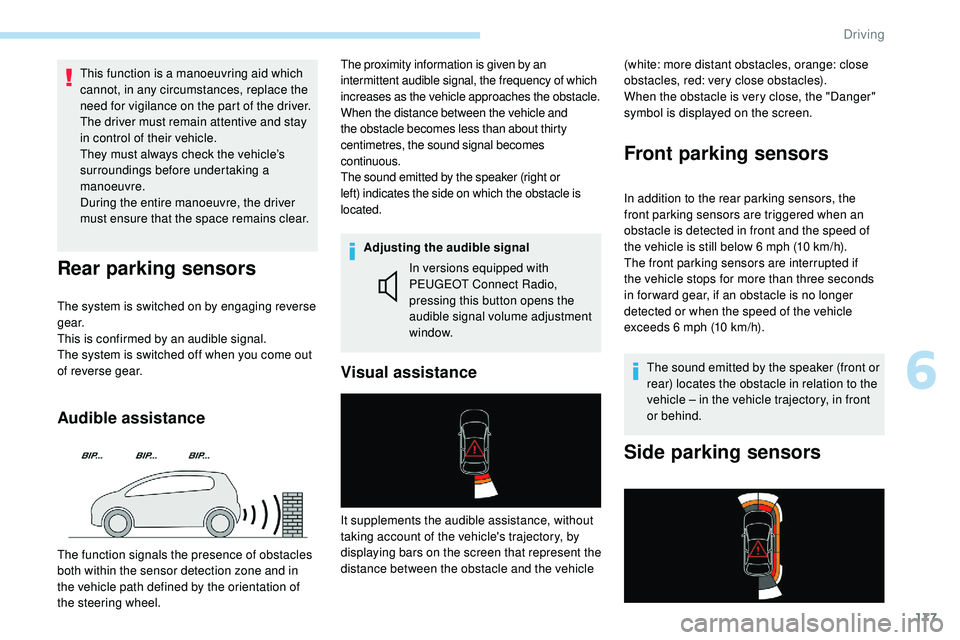
window. (white: more distant obstacles, orange: close
obstacles, red: very close obstacles).
When the obstacle is very close, the "Danger"
symbol is displayed on the screen.
Front parking sensors
In addition to the rear parking sensors, the
front parking sensors are triggered when an
obstacle is detected in front and the speed of
the vehicle is still below 6 mph (10 km/h).
The front parking sensors are interrupted if
the vehicle stops for more than three seconds
in for ward gear, if an obstacle is no longer
detected or when the speed of the vehicle
exceeds 6 mph (10 km/h).
The sound emitted by the speaker (front or
rear) locates the obstacle in relation to the
vehicle – in the vehicle trajectory, in front
or behind.
Side parking sensors
Visual assistance
The function signals the presence of obstacles
both within the sensor detection zone and in
the vehicle path defined by the orientation of
the steering wheel. It supplements the audible assistance, without
taking account of the vehicle's trajectory, by
displaying bars on the screen that represent the
distance between the obstacle and the vehicle
6
Driving
Page 180 of 320
178
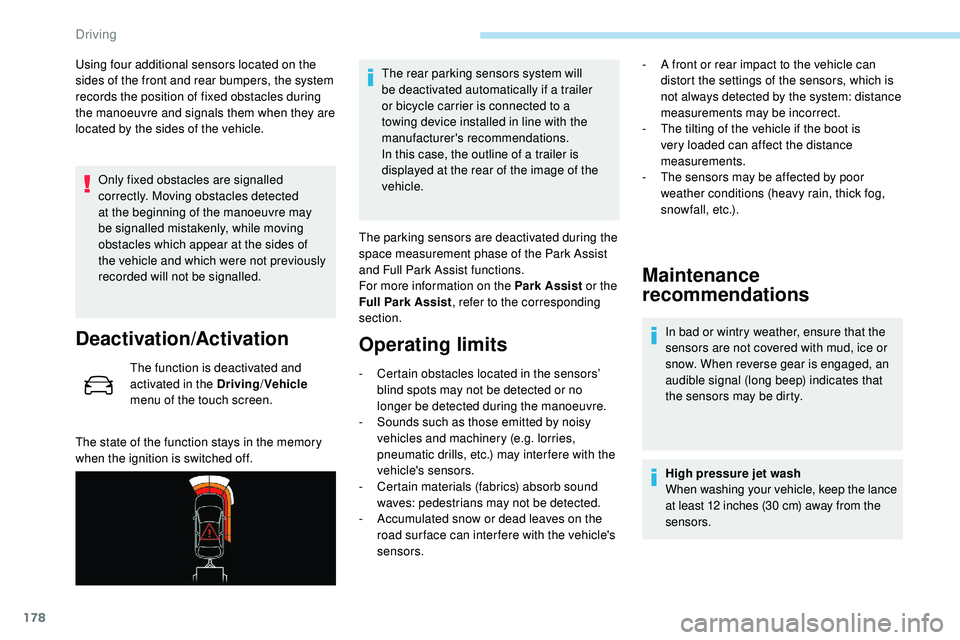
Using four additional sensors located on the
sides of the front and rear bumpers, the system
records the position of fixed obstacles during
the manoeuvre and signals them when they are
located by the sides of the vehicle.Only fixed obstacles are signalled
correctly. Moving obstacles detected
at the beginning of the manoeuvre may
be signalled mistakenly, while moving
obstacles which appear at the sides of
the vehicle and which were not previously
recorded will not be signalled.
Deactivation/Activation
The function is deactivated and
activated in the Driving /Vehicle
menu of the touch screen.
The state of the function stays in the memory
when the ignition is switched off. The rear parking sensors system will
be deactivated automatically if a trailer
or bicycle carrier is connected to a
towing device installed in line with the
manufacturer's recommendations.
In this case, the outline of a trailer is
displayed at the rear of the image of the
vehicle.
The parking sensors are deactivated during the
space measurement phase of the Park Assist
and Full Park Assist functions.
For more information on the Park Assist or the
Full Park Assist , refer to the corresponding
section.
Operating limits
- Certain obstacles located in the sensors’ blind spots may not be detected or no
longer be detected during the manoeuvre.
-
S
ounds such as those emitted by noisy
vehicles and machinery (e.g. lorries,
pneumatic drills, etc.) may inter fere with the
vehicle's sensors.
-
C
ertain materials (fabrics) absorb sound
waves: pedestrians may not be detected.
-
A
ccumulated snow or dead leaves on the
road sur face can inter fere with the vehicle's
sensors.
Maintenance
recommendations
In bad or wintry weather, ensure that the
sensors are not covered with mud, ice or
snow. When reverse gear is engaged, an
audible signal (long beep) indicates that
the sensors may be dirty.
High pressure jet wash
When washing your vehicle, keep the lance
at least 12 inches (30 cm) away from the
sensors.
-
A f
ront or rear impact to the vehicle can
distort the settings of the sensors, which is
not always detected by the system: distance
measurements may be incorrect.
-
T
he tilting of the vehicle if the boot is
very loaded can affect the distance
measurements.
-
T
he sensors may be affected by poor
weather conditions (heavy rain, thick fog,
snowfall, etc.).
Driving
Page 181 of 320
179
Operating fault
If a fault occurs when shifting
to reverse, this warning lamp
comes on in the instrument panel,
accompanied by a message and an
audible signal (short beep).
Contact a PEUGEOT dealer or a qualified
workshop to have the system checked.
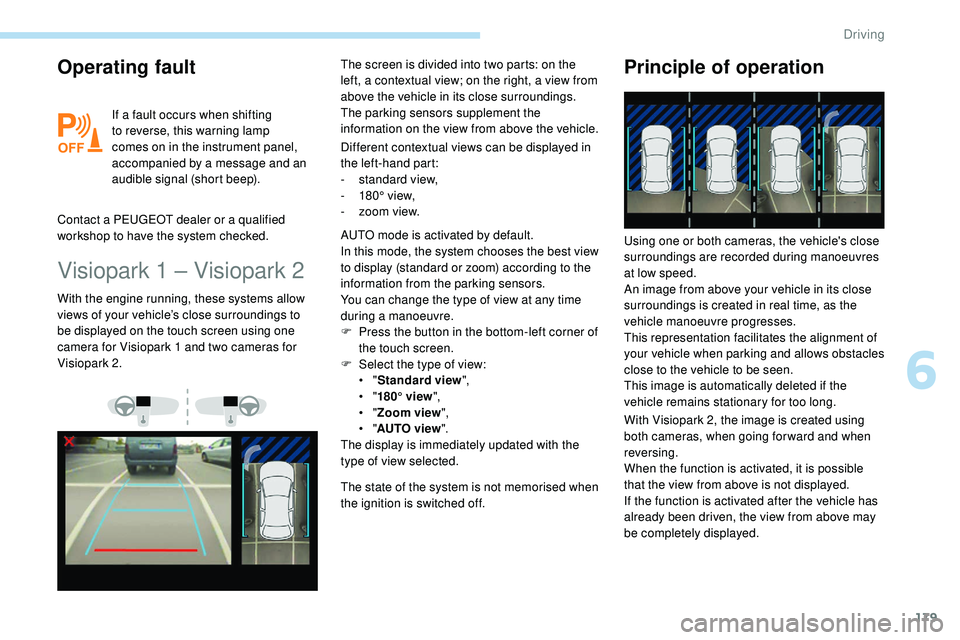
Visiopark 1 – Visiopark 2
Different contextual views can be displayed in
the left-hand part:
-
s
tandard view,
-
1
80° view,
-
z
oom view.
With the engine running, these systems allow
views of your vehicle’s close surroundings to
be displayed on the touch screen using one
camera for Visiopark 1 and two cameras for
Visiopark 2. The screen is divided into two parts: on the
left, a contextual view; on the right, a view from
above the vehicle in its close surroundings.
The parking sensors supplement the
information on the view from above the vehicle.
AUTO mode is activated by default.
In this mode, the system chooses the best view
to display (standard or zoom) according to the
information from the parking sensors.
You can change the type of view at any time
during a manoeuvre.
F
P
ress the button in the bottom-left corner of
the touch screen.
F
Sel
ect the type of view:
•
"Standard view ",
•
"180° view ",
•
"Zoom view ",
•
"AUTO view ".
The display is immediately updated with the
type of view selected.
The state of the system is not memorised when
the ignition is switched off.
Principle of operation
With Visiopark 2, the image is created using
both cameras, when going for ward and when
reversing.
When the function is activated, it is possible
that the view from above is not displayed.
If
the function is activated after the vehicle has
already been driven, the view from above may
be completely displayed. Using one or both cameras, the vehicle's close
surroundings are recorded during manoeuvres
at low speed.
An image from above your vehicle in its close
surroundings is created in real time, as the
vehicle manoeuvre progresses.
This representation facilitates the alignment of
your vehicle when parking and allows obstacles
close to the vehicle to be seen.
This image is automatically deleted if the
vehicle remains stationary for too long.
6
Driving
Page 182 of 320
180
This system is a visual aid that cannot in
any circumstances replace the need for
vigilance on the part of the driver.
The images provided by the camera(s)
may be distorted by the relief.
In the presence of areas in shade, or in
conditions of bright sunlight or inadequate
lighting, the image may be darkened and
with lower contrast.
Recommendations on care
In bad or wintry weather, ensure that the
sensors and camera lenses are not covered
with mud, ice or snow.
Check the cleanliness of the camera lenses
regularly.
If necessary, clean the cameras with a soft,
dry cloth.
When washing your vehicle at high pressure,
direct the lance at least 30 cm away from the
cameras and parking aid sensors.
Visiopark 1
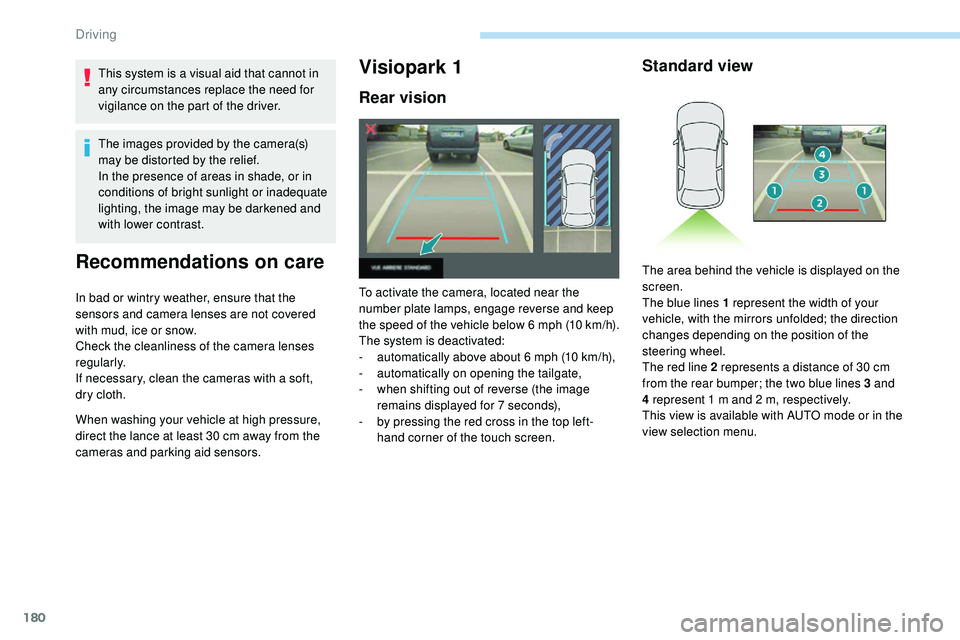
Rear vision
To activate the camera, located near the
number plate lamps, engage reverse and keep
the speed of the vehicle below 6 mph (10
k
m/h).
The system is deactivated:
-
a
utomatically above about 6 mph (10 km/h),
-
a
utomatically on opening the tailgate,
-
w
hen shifting out of reverse (the image
remains displayed for 7 seconds),
-
b
y pressing the red cross in the top left-
hand corner of the touch screen.
Standard view
The area behind the vehicle is displayed on the
screen.
The blue lines 1 represent the width of your
vehicle, with the mirrors unfolded; the direction
changes depending on the position of the
steering wheel.
The red line 2 represents a distance of 30 cm
from the rear bumper; the two blue lines 3 and
4 represent 1 m and 2 m, respectively.
This view is available with AUTO mode or in the
view selection menu.
Driving
Page 184 of 320
182
Rear vision
If a trailer or a bicycle carrier is fitted to
the towball, the zone behind the vehicle on
the view from above goes dark.
The surroundings are reconstructed by the
front camera only.
The system activates automatically when
reverse gear is engaged.
The system is deactivated:
-
a
utomatically above about 6 mph (10 km/h),
-
w
hen shifting out of reverse (the rear view
image is replaced by the front view image
for 7 seconds),
-
b
y pressing the red cross in the top left-
hand corner of the touch screen. The rear vision views are similar to those for
Visiopark 1.
For more information on Visiopark 1
, refer to
the corresponding section.
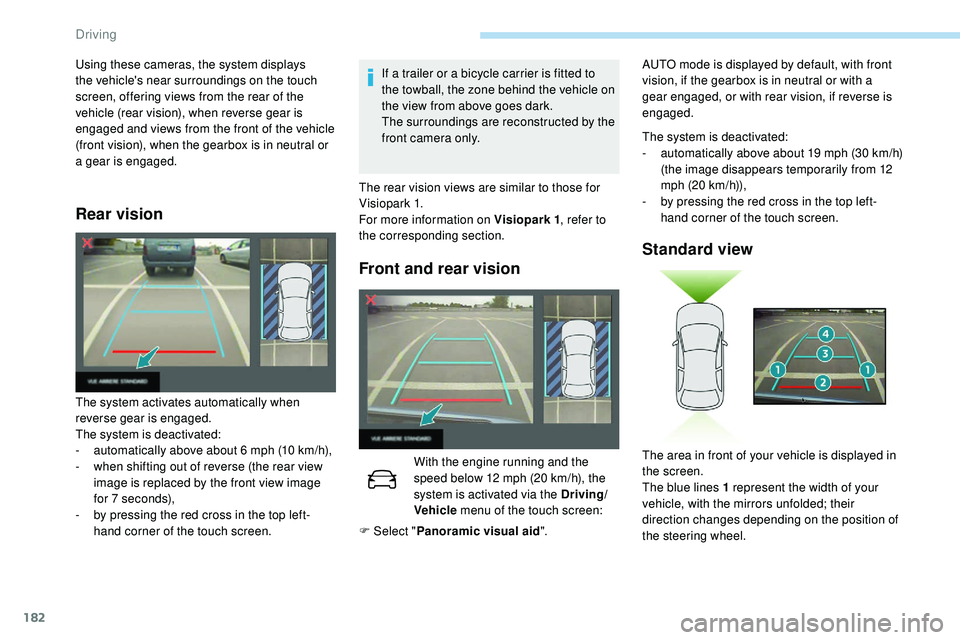
Front and rear vision
With the engine running and the
speed below 12 mph (20 km/h), the
system is activated via the Driving/
Vehicle menu of the touch screen:
Using these cameras, the system displays
the vehicle's near surroundings on the touch
screen, offering views from the rear of the
vehicle (rear vision), when reverse gear is
engaged and views from the front of the vehicle
(front vision), when the gearbox is in neutral or
a gear is engaged.
F Select "Panoramic visual aid ".The system is deactivated:
-
a
utomatically above about 19 mph (30 km/h)
(the image disappears temporarily from 12
mph (20 km/h)),
-
b
y pressing the red cross in the top left-
hand corner of the touch screen.
Standard view
The area in front of your vehicle is displayed in
the screen.
The blue lines 1 represent the width of your
vehicle, with the mirrors unfolded; their
direction changes depending on the position of
the steering wheel.
AUTO mode is displayed by default, with front
vision, if the gearbox is in neutral or with a
gear engaged, or with rear vision, if reverse is
engaged.
Driving
Page 187 of 320
185
The selection is accompanied by
this indicator lamp coming on.
Parking space search
F You should drive at a distance of between 0.50 m and 1.50 m from the row of parked
vehicles, without ever exceeding 19 mph
(30
km/h), until the system finds an available
space.
The parking space search stops over this limit.
The function automatically deactivates once
the vehicle speed exceeds 31 mph (50 km/h).
For "parallel" parking, the space must at
a minimum be equal to the length of your
vehicle plus 0.60 m.
For "bay" parking, the width of the space
must be equal to the width of your vehicle
plus 0.70 m.
If the parking sensors function has been
deactivated in the Driving/Vehicle menu
of the touch screen, it will be automatically
reactivated when the system is activated. When the system finds an available space,
"
OK " is displayed on the parking view,
accompanied by an audible signal.
Preparing for the
manoeuvre
F Move very slowly until the request to stop the vehicle is displayed: " Stop the vehicle"
and the " STOP" sign, accompanied by an
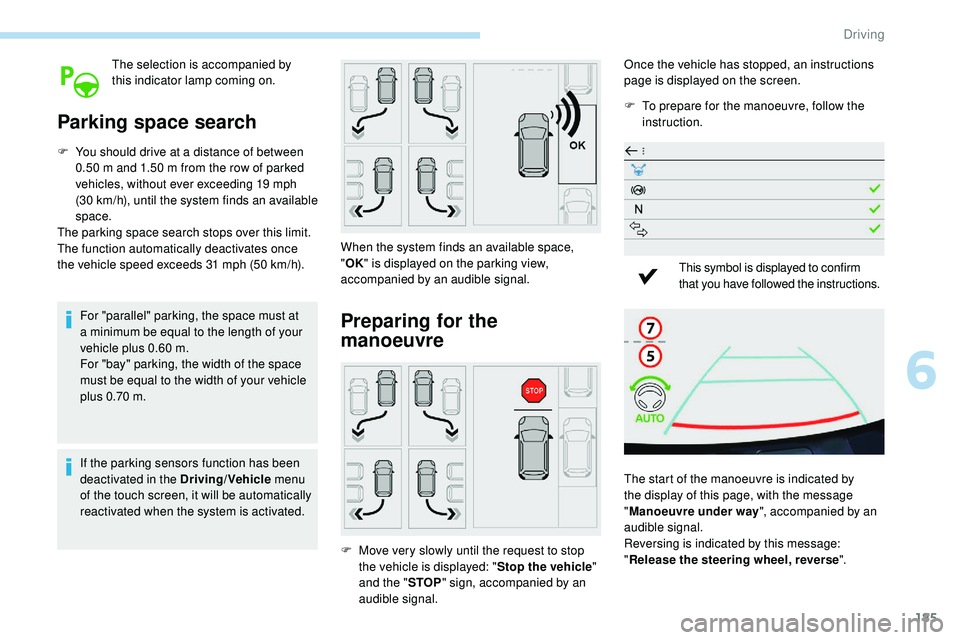
audible signal. Once the vehicle has stopped, an instructions
page is displayed on the screen.
F
T
o prepare for the manoeuvre, follow the
instruction.
This symbol is displayed to confirm
that you have followed the instructions.
The start of the manoeuvre is indicated by
the display of this page, with the message
" Manoeuvre under way ", accompanied by an
audible signal.
Reversing is indicated by this message:
" Release the steering wheel, reverse ".
6
Driving
Page 188 of 320
186
7
5
Visiopark 1 or Visiopark 2 and the parking
sensors are automatically activated to help
you monitor the close surrounding area of your
vehicle during the manoeuvre.
During the manoeuvre
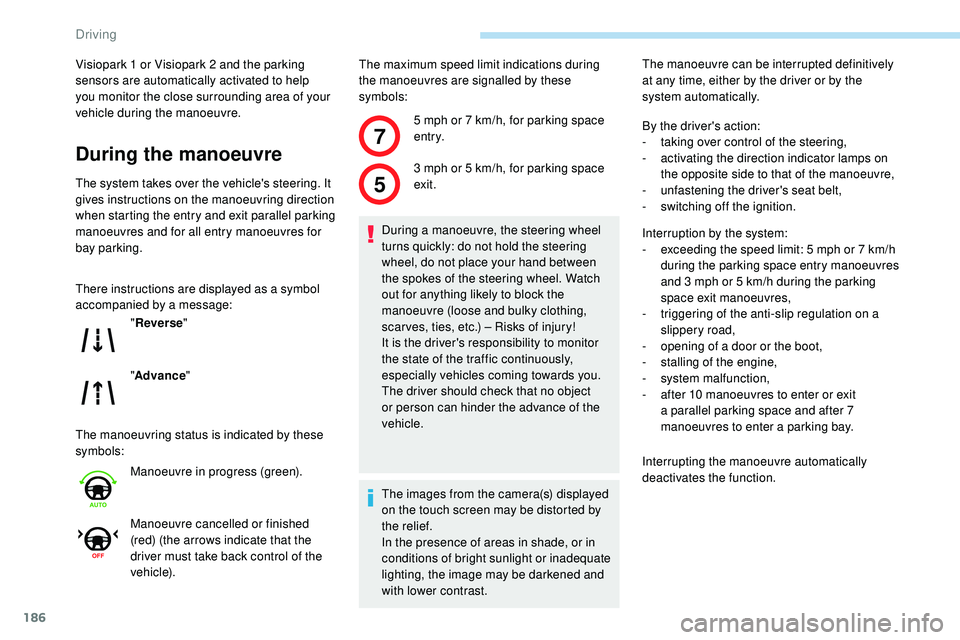
The system takes over the vehicle's steering. It
gives instructions on the manoeuvring direction
when starting the entry and exit parallel parking
manoeuvres and for all entry manoeuvres for
bay parking.
There instructions are displayed as a symbol
accompanied by a message:
The manoeuvring status is indicated by these
symbols:The maximum speed limit indications during
the manoeuvres are signalled by these
symbols:
" Reverse "
" Advance "
Manoeuvre in progress (green).
Manoeuvre cancelled or finished
(red) (the arrows indicate that the
driver must take back control of the
vehicle). 5 mph or 7
km/h, for parking space
e nt r y.
3 mph or 5 km/h, for parking space
exit.
During a manoeuvre, the steering wheel
turns quickly: do not hold the steering
wheel, do not place your hand between
the spokes of the steering wheel. Watch
out for anything likely to block the
manoeuvre (loose and bulky clothing,
scar ves, ties, etc.) – Risks of injury!
It is the driver's responsibility to monitor
the state of the traffic continuously,
especially vehicles coming towards you.
The driver should check that no object
or person can hinder the advance of the
vehicle.
The images from the camera(s) displayed
on the touch screen may be distorted by
the relief.
In the presence of areas in shade, or in
conditions of bright sunlight or inadequate
lighting, the image may be darkened and
with lower contrast. The manoeuvre can be interrupted definitively
at any time, either by the driver or by the
system automatically.
By the driver's action:
-
t
aking over control of the steering,
-
a
ctivating the direction indicator lamps on
the opposite side to that of the manoeuvre,
- u nfastening the driver's seat belt,
-
s
witching off the ignition.
Interruption by the system:
-
e
xceeding the speed limit: 5 mph or 7 km/h
during the parking space entry manoeuvres
and 3 mph or 5 km/h during the parking
space exit manoeuvres,
-
t
riggering of the anti-slip regulation on a
slippery road,
-
o
pening of a door or the boot,
-
s
talling of the engine,
-
s
ystem malfunction,
-
a
fter 10 manoeuvres to enter or exit
a parallel parking space and after 7
manoeuvres to enter a parking bay.
Interrupting the manoeuvre automatically
deactivates the function.
Driving
Page 193 of 320
191
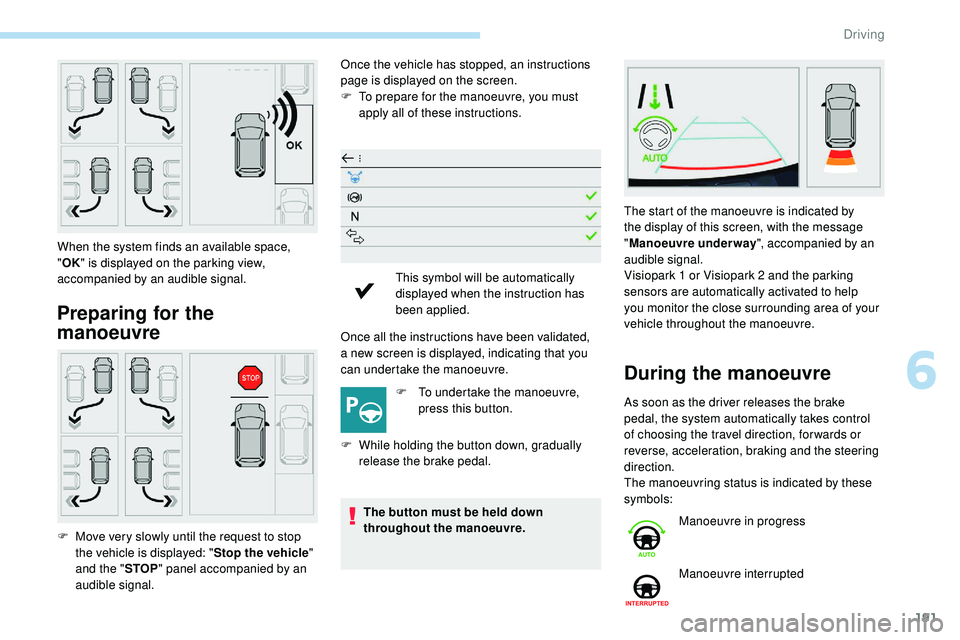
Preparing for the
manoeuvre
Once the vehicle has stopped, an instructions
page is displayed on the screen.
F
T
o prepare for the manoeuvre, you must
apply all of these instructions.
Once all the instructions have been validated,
a
new screen is displayed, indicating that you
can undertake the manoeuvre.
F
T
o undertake the manoeuvre,
press this button.
F
W
hile holding the button down, gradually
release the brake pedal.
The button must be held down
throughout the manoeuvre.
When the system finds an available space,
"
OK " is displayed on the parking view,
accompanied by an audible signal.
F
M
ove very slowly until the request to stop
the vehicle is displayed: " Stop the vehicle"
and the " STOP" panel accompanied by an
audible signal. This symbol will be automatically
displayed when the instruction has
been applied.
During the manoeuvre
As soon as the driver releases the brake
pedal, the system automatically takes control
of choosing the travel direction, for wards or
reverse, acceleration, braking and the steering
direction.
The manoeuvring status is indicated by these
symbols: The start of the manoeuvre is indicated by
the display of this screen, with the message
"
Manoeuvre underway ", accompanied by an
audible signal.
Visiopark 1 or Visiopark 2 and the parking
sensors are automatically activated to help
you monitor the close surrounding area of your
vehicle throughout the manoeuvre.
Manoeuvre in progress
Manoeuvre interrupted
6
Driving