Indicator Peugeot 508 2019 Owner's Guide
[x] Cancel search | Manufacturer: PEUGEOT, Model Year: 2019, Model line: 508, Model: Peugeot 508 2019Pages: 320, PDF Size: 10.09 MB
Page 47 of 320
45
Following an instruction to lock the
vehicle, the exterior perimeter monitoring
is activated after 5 seconds and the
interior volumetric and anti-tilt monitoring
after 45 seconds.
If an opening (door, boot or bonnet) is not
closed properly, the vehicle is not locked
but the exterior perimeter monitoring will
be activated after 45 seconds at the same
time as the interior volumetric and anti-tilt
monitoring.
Deactivation
F Press the unlocking button on the remote control.
or
F
U
nlock the vehicle with the Keyless Entry
and Starting system.
The monitoring system is deactivated: the
indicator lamp in the button goes off and the
direction indicators flash for about 2 seconds.
When the vehicle automatically locks
itself again (as happens if a door or the
boot is not opened within 30 seconds of
unlocking), the monitoring system is also
reactivated automatically.
Locking the vehicle
with exterior perimeter
monitoring only
Deactivate the interior volumetric and anti-tilt
monitoring to avoid unwanted triggering of the
alarm in certain cases such as:
-
l
eaving a pet in the vehicle,
-
l
eaving a window or sunroof partially open,
-
w
ashing your vehicle,
-
c
hanging a wheel,
-
h
aving your vehicle towed,
-
t
ransport by ship.
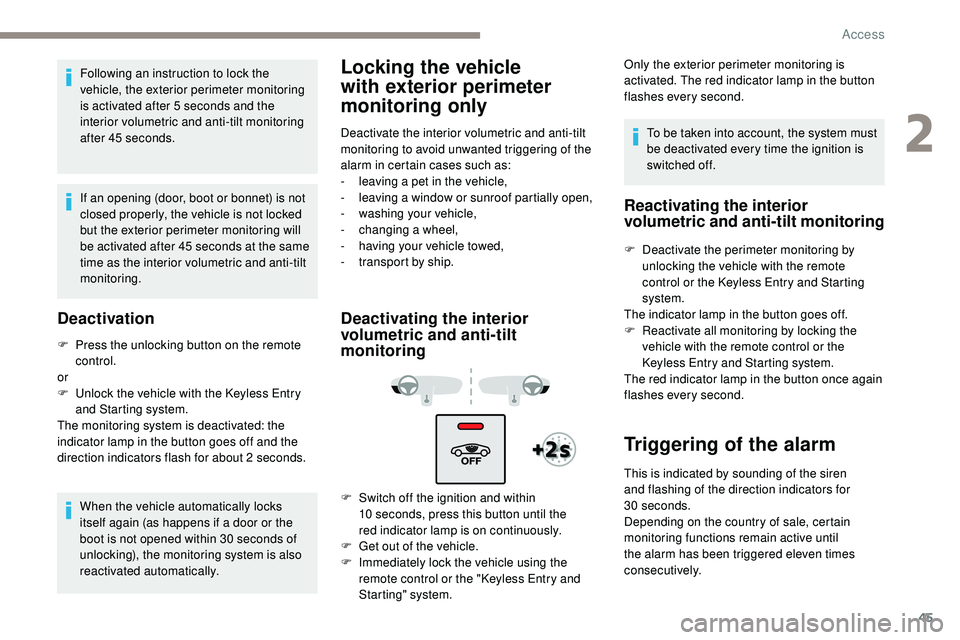
Deactivating the interior
volumetric and anti-tilt
monitoring
F Switch off the ignition and within 10 seconds, press this button until the
red
indicator lamp is on continuously.
F
G
et out of the vehicle.
F
I
mmediately lock the vehicle using the
remote control or the "Keyless Entry and
Starting" system. To be taken into account, the system must
be deactivated every time the ignition is
switched off.
Reactivating the interior
volumetric and anti-tilt monitoring
F Deactivate the perimeter monitoring by
unlocking the vehicle with the remote
control or the Keyless Entry and Starting
system.
The indicator lamp in the button goes off.
F
R
eactivate all monitoring by locking the
vehicle with the remote control or the
Keyless Entry and Starting system.
The red indicator lamp in the button once again
flashes every second.
Triggering of the alarm
Only the exterior perimeter monitoring is
activated. The red indicator lamp in the button
flashes every second.
This is indicated by sounding of the siren
and flashing of the direction indicators for
30
seconds.
Depending on the country of sale, certain
monitoring functions remain active until
the alarm has been triggered eleven times
consecutively.
2
Access
Page 48 of 320
46
When the vehicle is unlocked using the remote
control or the "Keyless Entry and Starting"
system, rapid flashing of the red indicator
lamp in the button informs you that the alarm
was triggered during your absence. When
the ignition is switched on, the flashing stops
immediately.
Failure of the remote
control
To deactivate the monitoring functions:
F u nlock the vehicle using the key (integral to
the remote control) in the driver's door lock,
F
o
pen the door; the alarm is triggered,
F
s
witch on the ignition; the alarm stops; the
indicator lamp in the button goes off.
Locking the vehicle without
activating the alarm
F Lock or deadlock the vehicle using the key (integral to the remote control) in the driver's
door lock.
Malfunction
When the ignition is switched on, fixed
illumination of the red indicator lamp in the
button indicates a malfunction of the system.
Have it checked by a PEUGEOT dealer or a
qualified workshop.
Automatic activation
(Depending on the country of sale)
The system is activated automatically 2 minutes
after the last door or the boot is closed.
F
T
o avoid triggering the alarm on entering
the vehicle, first press the unlocking button
on the remote control or unlock the vehicle
using the "Keyless Entry and Starting"
system.
Doors
Your vehicle has doors with frameless windows.
A window micro-descent system is activated
when the door is opened and closed, as soon
as an action is per formed on the outer or inner
door handle.
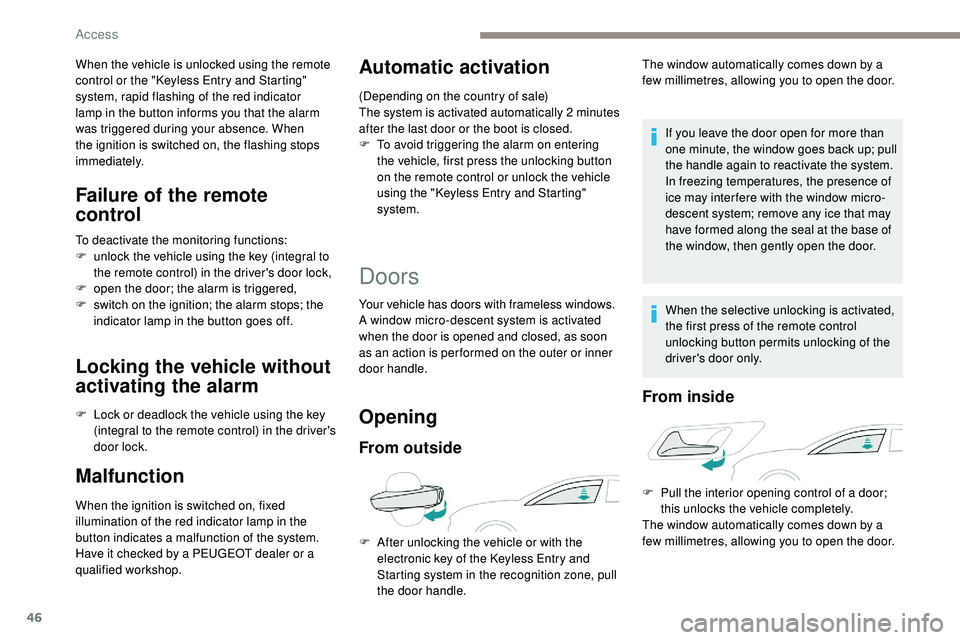
Opening
From outside
If you leave the door open for more than
one minute, the window goes back up; pull
the handle again to reactivate the system.
In freezing temperatures, the presence of
ice may inter fere with the window micro-
descent system; remove any ice that may
have formed along the seal at the base of
the window, then gently open the door.
When the selective unlocking is activated,
the first press of the remote control
unlocking button permits unlocking of the
driver's door only.
From inside
F After unlocking the vehicle or with the electronic key of the Keyless Entry and
Starting system in the recognition zone, pull
the door handle. The window automatically comes down by a
few millimetres, allowing you to open the door.
F
P
ull the interior opening control of a door;
this unlocks the vehicle completely.
The window automatically comes down by a
few millimetres, allowing you to open the door.
Access
Page 52 of 320
50
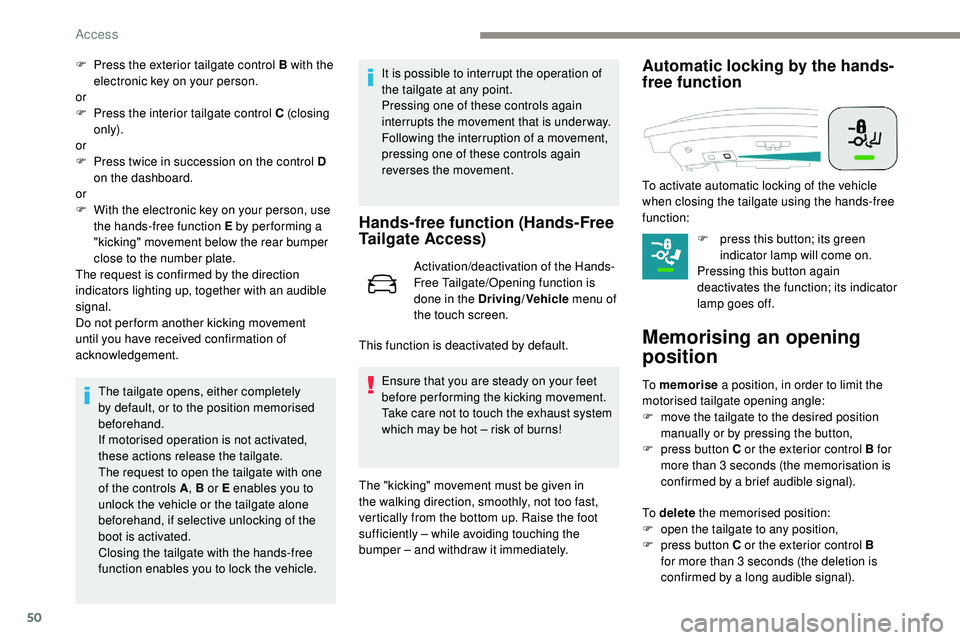
F Press the exterior tailgate control B with the electronic key on your person.
or
F
P
ress the interior tailgate control C (closing
only).
or
F
P
ress twice in succession on the control D
on the dashboard.
or
F
W
ith the electronic key on your person, use
the hands-free function E by per forming a
"kicking" movement below the rear bumper
close to the number plate.
The request is confirmed by the direction
indicators lighting up, together with an audible
signal.
Do not per form another kicking movement
until you have received confirmation of
acknowledgement.
The tailgate opens, either completely
by default, or to the position memorised
beforehand.
If motorised operation is not activated,
these actions release the tailgate.
The request to open the tailgate with one
of the controls A , B or E enables you to
unlock the vehicle or the tailgate alone
beforehand, if selective unlocking of the
boot is activated.
Closing the tailgate with the hands-free
function enables you to lock the vehicle. It is possible to interrupt the operation of
the tailgate at any point.
Pressing one of these controls again
interrupts the movement that is under way.
Following the interruption of a movement,
pressing one of these controls again
reverses the movement.
Hands-free function (Hands-Free
Tailgate Access)
Activation/deactivation of the Hands-
Free Tailgate/Opening function is
done in the Driving/Vehicle
menu of
the touch screen.
Ensure that you are steady on your feet
before performing the kicking movement.
Take care not to touch the exhaust system
which may be hot – risk of burns!
Automatic locking by the hands-
free function
F press this button; its green indicator lamp will come on.
Pressing this button again
deactivates the function; its indicator
lamp goes off.
Memorising an opening
position
To memorise a position, in order to limit the
motorised tailgate opening angle:
F
m
ove the tailgate to the desired position
manually or by pressing the button,
F
p
ress button C or the exterior control B for
more than 3 seconds (the memorisation is
confirmed by a brief audible signal).
This function is deactivated by default. To activate automatic locking of the vehicle
when closing the tailgate using the hands-free
function:
To delete
the memorised position:
F
o
pen the tailgate to any position,
F
p
ress button C or the exterior control B
for more than 3 seconds (the deletion is
confirmed by a long audible signal).
The "kicking" movement must be given in
the walking direction, smoothly, not too fast,
vertically from the bottom up. Raise the foot
sufficiently – while avoiding touching the
bumper – and withdraw it immediately.
Access
Page 54 of 320
52
After installing a towing device, it is
essential to contact a PEUGEOT dealer
or a qualified workshop so that it is taken
into account by the detection system.
Other wise, there is a risk of hands-free
function failure.
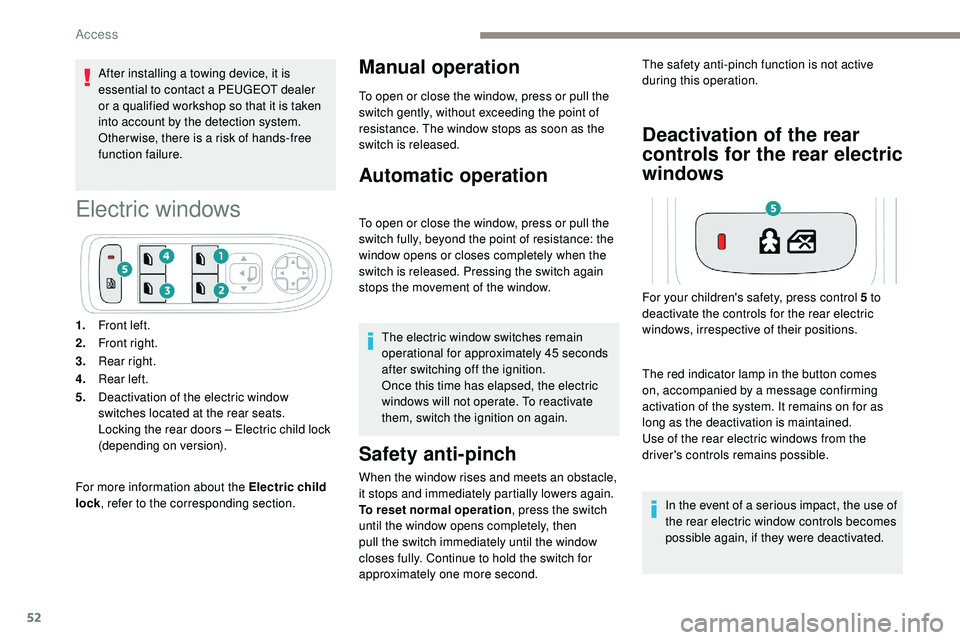
Electric windows
For more information about the Electric child
lock, refer to the corresponding section.
Manual operation
To open or close the window, press or pull the
switch gently, without exceeding the point of
resistance. The window stops as soon as the
switch is released.
Automatic operation
To open or close the window, press or pull the
switch fully, beyond the point of resistance: the
window opens or closes completely when the
switch is released. Pressing the switch again
stops the movement of the window.
The electric window switches remain
operational for approximately 45 seconds
after switching off the ignition.
Once this time has elapsed, the electric
windows will not operate. To reactivate
them, switch the ignition on again.
Safety anti-pinch
When the window rises and meets an obstacle,
it stops and immediately partially lowers again.
To reset normal operation , press the switch
until the window opens completely, then
pull the switch immediately until the window
closes fully. Continue to hold the switch for
approximately one more second.
Deactivation of the rear
controls for the rear electric
windows
1. Front left.
2. Front right.
3. Rear right.
4. Rear left.
5. Deactivation of the electric window
switches located at the rear seats.
Locking the rear doors – Electric child lock
(depending on version). The safety anti-pinch function is not active
during this operation.
The red indicator lamp in the button comes
on, accompanied by a message confirming
activation of the system. It remains on for as
long as the deactivation is maintained.
Use of the rear electric windows from the
driver's controls remains possible. In the event of a serious impact, the use of
the rear electric window controls becomes
possible again, if they were deactivated.
For your children's safety, press control 5 to
deactivate the controls for the rear electric
windows, irrespective of their positions.
Access
Page 62 of 320
60
Do not use the function when the seat is
not occupied.
Reduce the intensity of the heating as
soon as possible.
When the seat and passenger
compartment have reached an adequate
temperature, you can stop the function;
reducing the consumption of electrical
current reduces fuel consumption.Prolonged use is not recommended for
those with sensitive skin.
There is a risk of burns for people whose
perception of heat is impaired (illness,
taking medication, etc.).
There is a risk of overheating the system if
material with insulating properties is used,
such as cushions or seat covers.
Do not use the system:
-
i
f wearing damp clothing,
-
i
f child seats are fitted.
To avoid breaking the heating element in
the seat:
-
d
o not place heavy objects on the seat,
- d o not kneel or stand on the seat,
- d o not place sharp objects on the seat,
-
d
o not spill liquids onto the seat.
To avoid the risk of short-circuit:
-
d
o not use liquid products for cleaning
the seat,
-
n
ever use the heating function when
the seat is damp.
Multipoint massage
System with a choice of type of massage and
adjustment of its intensity.
This system operates with the engine running,
as well as in STOP mode of Stop & Start.
Activation/Settings
The massage settings are adjusted in the touch
screen. The multipoint massages are
also managed by the i-Cockpit®
Amplify
function.
For more information on the i-Cockpit®
Amplify function , refer to the corresponding
section. From the front seat:
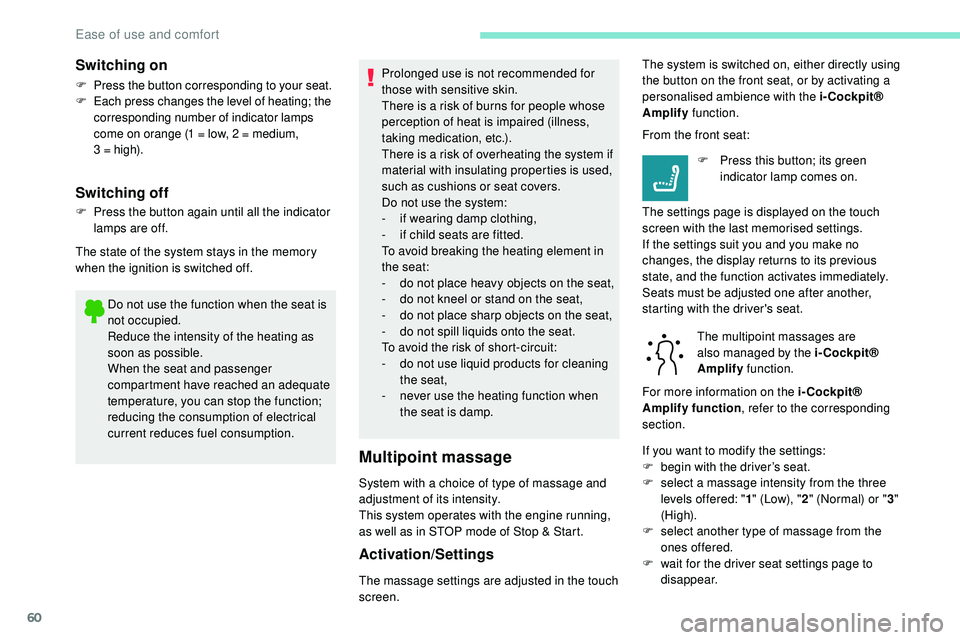
F
P
ress this button; its green
indicator lamp comes on.
The settings page is displayed on the touch
screen with the last memorised settings.
If the settings suit you and you make no
changes, the display returns to its previous
state, and the function activates immediately.
Seats must be adjusted one after another,
starting with the driver's seat.
Switching on
F Press the button corresponding to your seat.
F E ach press changes the level of heating; the
corresponding number of indicator lamps
come on orange (1 = low, 2 = medium,
3
= high).
Switching off
F Press the button again until all the indicator lamps are off.
The state of the system stays in the memory
when the ignition is switched off. The system is switched on, either directly using
the button on the front seat, or by activating a
personalised ambience with the i-Cockpit®
Amplify
function.
If you want to modify the settings:
F
b
egin with the driver’s seat.
F
s
elect a massage intensity from the three
levels offered: " 1" (Low), " 2" (Normal) or " 3"
(High).
F
s
elect another type of massage from the
ones offered.
F
w
ait for the driver seat settings page to
disappear.
Ease of use and comfort
Page 63 of 320
61
F next, proceed with the passenger's seat in the same way.
The changes are taken into account immediately.Once activated, the system starts a one hour
massage cycle, made up of sequences of 6 minutes
of massage followed by 3 minutes at rest.
The system stops automatically at the end of the
cycle; the indicator lamp in the button goes off.
Steering wheel adjustment
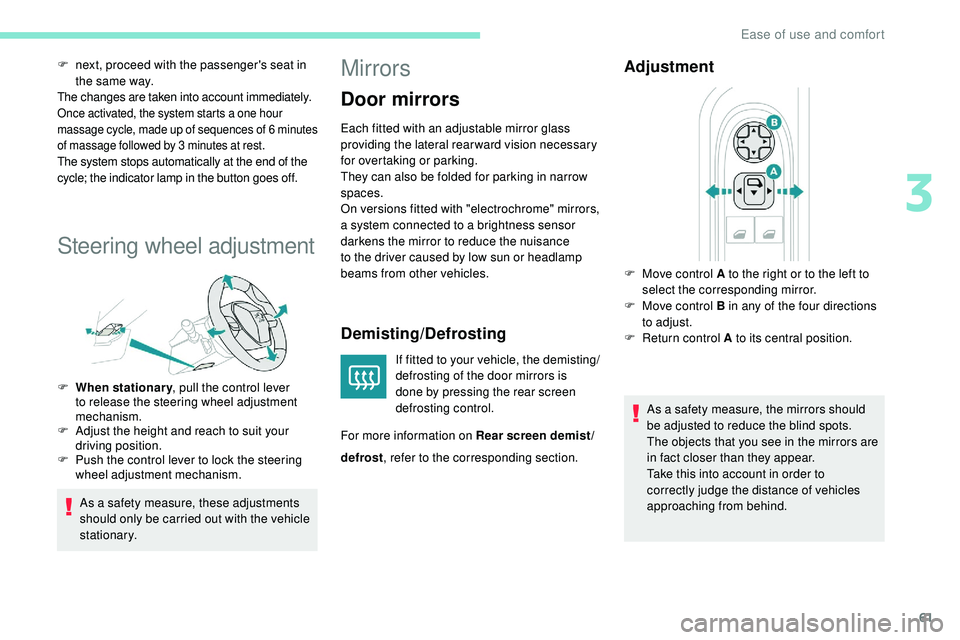
F When stationary , pull the control lever
to release the steering wheel adjustment
mechanism.
F
A
djust the height and reach to suit your
driving position.
F
P
ush the control lever to lock the steering
wheel adjustment mechanism.
As a safety measure, these adjustments
should only be carried out with the vehicle
stationary.
Mirrors
Door mirrors
Each fitted with an adjustable mirror glass
providing the lateral rear ward vision necessary
for overtaking or parking.
They can also be folded for parking in narrow
spaces.
On versions fitted with "electrochrome" mirrors,
a system connected to a brightness sensor
darkens the mirror to reduce the nuisance
to the driver caused by low sun or headlamp
beams from other vehicles.
Demisting/Defrosting
If fitted to your vehicle, the demisting/
defrosting of the door mirrors is
done by pressing the rear screen
defrosting control.
For more information on Rear screen demist/
Adjustment
As a safety measure, the mirrors should
be adjusted to reduce the blind spots.
The objects that you see in the mirrors are
in fact closer than they appear.
Take this into account in order to
correctly judge the distance of vehicles
approaching from behind.
F
M
ove control A to the right or to the left to
select the corresponding mirror.
F
M
ove control B in any of the four directions
to adjust.
F
R
eturn control A to its central position.
defrost , refer to the corresponding section.
3
Ease of use and comfort
Page 65 of 320
63
Rear seats
Rear head restraints
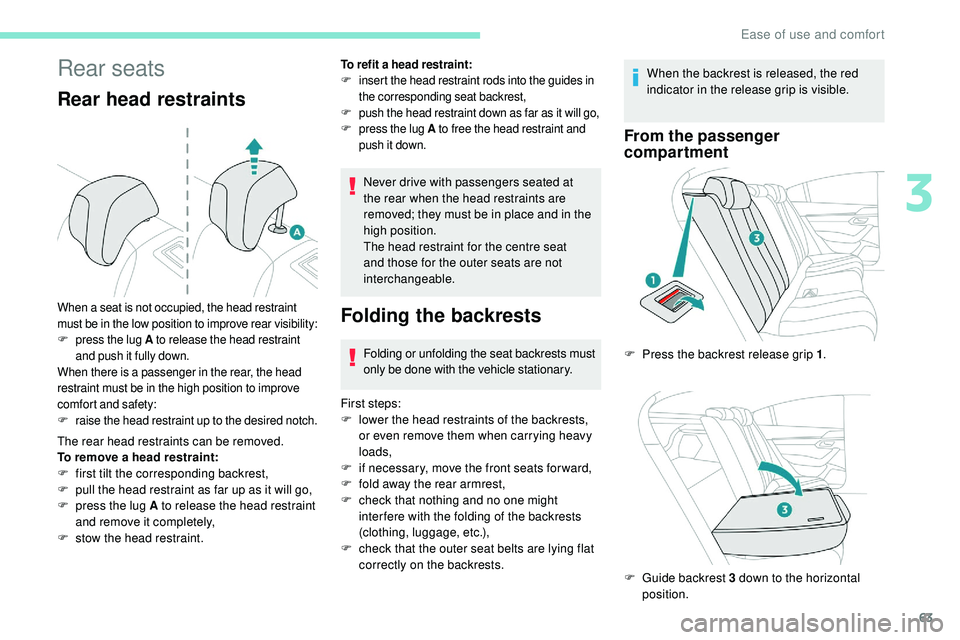
The rear head restraints can be removed.
To remove a head restraint:
F
f
irst tilt the corresponding backrest,
F
p
ull the head restraint as far up as it will go,
F
p
ress the lug A to release the head restraint
and remove it completely,
F
s
tow the head restraint.
When a seat is not occupied, the head restraint
must be in the low position to improve rear visibility:
F press the lug A to release the head restraint
and push it fully down.
When there is a passenger in the rear, the head
restraint must be in the high position to improve
comfort and safety:
F
r
aise the head restraint up to the desired notch.
Never drive with passengers seated at
the rear when the head restraints are
removed; they must be in place and in the
high position.
The head restraint for the centre seat
and those for the outer seats are not
interchangeable.
Folding the backrests
Folding or unfolding the seat backrests must
only be done with the vehicle stationary.
First steps:
F
l
ower the head restraints of the backrests,
or even remove them when carrying heavy
loads,
F
i
f necessary, move the front seats for ward,
F
f
old away the rear armrest,
F
c
heck that nothing and no one might
inter fere with the folding of the backrests
(clothing, luggage, etc.),
F
c
heck that the outer seat belts are lying flat
correctly on the backrests. When the backrest is released, the red
indicator in the release grip is visible.
From the passenger
compartment
To refit a head restraint:
F i
nsert the head restraint rods into the guides in
the corresponding seat backrest,
F
p
ush the head restraint down as far as it will go,
F
p
ress the lug A to free the head restraint and
push it down.
F Press the backrest release grip 1 .
F
G
uide backrest 3 down to the horizontal
position.
3
Ease of use and comfort
Page 66 of 320
64
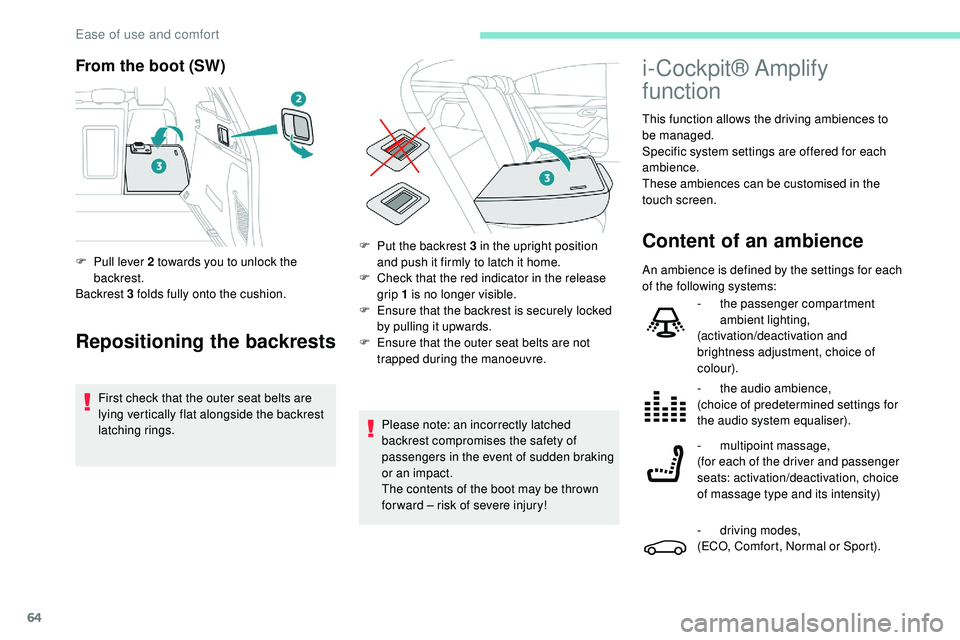
From the boot (SW)
Repositioning the backrests
First check that the outer seat belts are
lying vertically flat alongside the backrest
latching rings.
F
P
ull lever 2 towards you to unlock the
backrest.
Backrest 3 folds fully onto the cushion.
Please note: an incorrectly latched
backrest compromises the safety of
passengers in the event of sudden braking
or an impact.
The contents of the boot may be thrown
for ward – risk of severe injury!
i-Cockpit® Amplify
function
This function allows the driving ambiences to
be managed.
Specific system settings are offered for each
ambience.
These ambiences can be customised in the
touch screen.
Content of an ambienceF Put the backrest 3 in the upright position and push it firmly to latch it home.
F
C
heck that the red indicator in the release
grip 1 is no longer visible.
F
E
nsure that the backrest is securely locked
by pulling it upwards.
F
E
nsure that the outer seat belts are not
trapped during the manoeuvre. An ambience is defined by the settings for each
of the following systems:
-
t
he passenger compartment
ambient lighting,
(activation/deactivation and
brightness adjustment, choice of
colour).
-
t
he audio ambience,
(choice of predetermined settings for
the audio system equaliser).
-
m
ultipoint massage,
(for each of the driver and passenger
seats: activation/deactivation, choice
of massage type and its intensity)
-
d
riving modes,
(ECO, Comfort, Normal or Sport).
Ease of use and comfort
Page 70 of 320
68
$872
)$67
$872
1250$/
62)7
$872
Operation of the air conditioning and regulation
of temperature, air flow and air distribution in
the passenger compartment are automatic.
Temperature adjustment
The driver and front passenger can each
choose their own temperature setting.
The value indicated corresponds to a level of
comfort and not to a precise temperature.
F
P
ress one of the buttons 1 to increase or
decrease the value.
It is recommended that you avoid a difference of
more than 3°C in the settings for left and right.
Automatic comfort
programme
When the indicator lamp in the button is on, the
air conditioning system operates automatically:
the system manages the temperature, air
flow and air distribution in the passenger
compartment in an optimum way according to
the comfort level you have selected.
It is possible to modulate the intensity of the
automatic comfort programme by choosing one
of the settings offered in the secondary page,
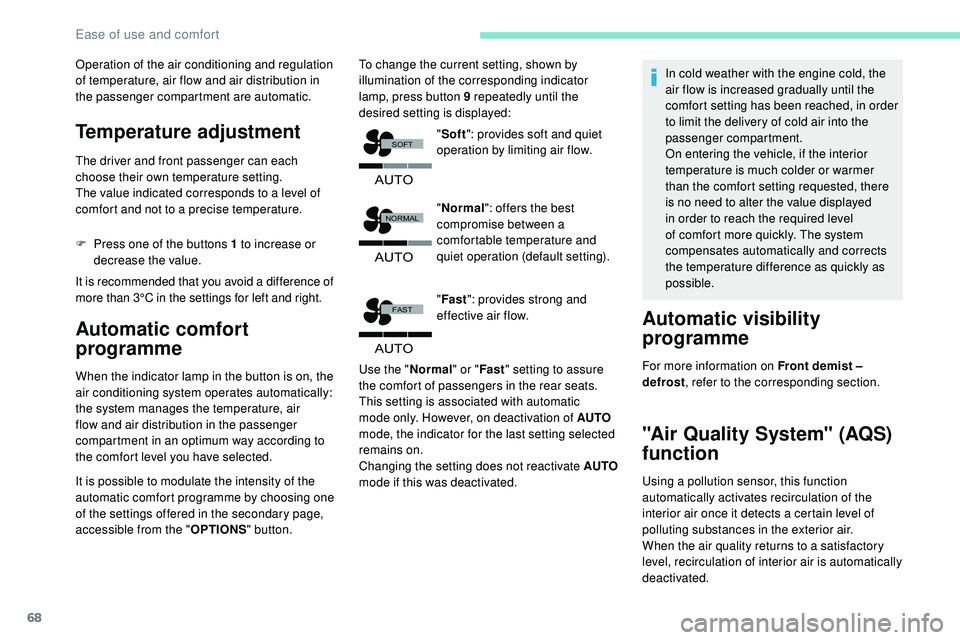
accessible from the " OPTIONS" button. To change the current setting, shown by
illumination of the corresponding indicator
lamp, press button 9 repeatedly until the
desired setting is displayed:
"Normal ": offers the best
compromise between a
comfortable temperature and
quiet operation (default setting).
" Fast ": provides strong and
effective air flow.
Use the " Normal" or "Fast" setting to assure
the comfort of passengers in the rear seats.
This setting is associated with automatic
mode only. However, on deactivation of AUTO
mode, the indicator for the last setting selected
remains on.
Changing the setting does not reactivate AUTO
mode if this was deactivated. In cold weather with the engine cold, the
air flow is increased gradually until the
comfort setting has been reached, in order
to limit the delivery of cold air into the
passenger compartment.
On entering the vehicle, if the interior
temperature is much colder or warmer
than the comfort setting requested, there
is no need to alter the value displayed
in order to reach the required level
of comfort more quickly. The system
compensates automatically and corrects
the temperature difference as quickly as
possible.
Automatic visibility
programme
For more information on Front demist –
defrost
, refer to the corresponding section.
"Air Quality System" (AQS)
function
Using a pollution sensor, this function
automatically activates recirculation of the
interior air once it detects a certain level of
polluting substances in the exterior air.
When the air quality returns to a satisfactory
level, recirculation of interior air is automatically
deactivated.
"
Soft ": provides soft and quiet
operation by limiting air flow.
Ease of use and comfort
Page 71 of 320
69
To activate or deactivate the function, go to
the secondary page by using the "OPTIONS"
button, then press button 10 .
Manual control
You can manually adjust one or more of these
functions, while retaining automatic control of
the other functions by the system:
-
a
ir flow 2 ,
-
a
ir distribution 3 .
As soon as you modify a setting, the indicator
lamp in the " AUTO" button goes off.
F
P
ress button 5 again to reactivate the
automatic comfort programme.
Air flow adjustment
F Press one of the buttons 2 to increase or decrease the fan speed.
The air flow symbol (a fan) is filled in
progressively as the speed of the fan is
increased. This function is not designed to detect
unpleasant odours.
Recirculation is automatically activated when
the front screenwash is used or when reverse
gear is engaged.
The function does not operate if the exterior
temperature is below 5°C, to avoid the risk of
misting of the windscreen and side windows. By reducing the air flow to minimum, you are
stopping ventilation.
"
OFF " is displayed alongside the fan.
Avoid driving for too long without
ventilation – risk of condensation and
deterioration of air quality!
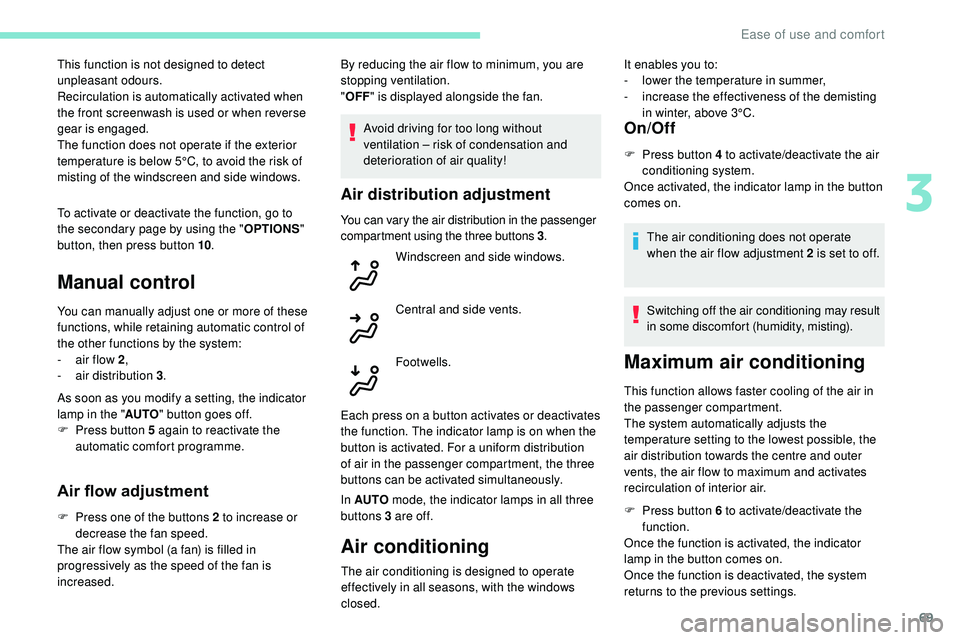
Air distribution adjustment
You can vary the air distribution in the passenger
compartment using the three buttons 3 .
Each press on a button activates or deactivates
the function. The indicator lamp is on when the
button is activated. For a uniform distribution
of air in the passenger compartment, the three
buttons can be activated simultaneously.
In AUTO mode, the indicator lamps in all three
buttons 3 are of f.
Air conditioning
On/Off
F Press button 4 to activate/deactivate the air conditioning system.
Once activated, the indicator lamp in the button
comes on.
The air conditioning does not operate
when the air flow adjustment 2 is set to off.
Switching off the air conditioning may result
in some discomfort (humidity, misting).
Windscreen and side windows.
Central and side vents.
Footwells.
Maximum air conditioning
This function allows faster cooling of the air in
the passenger compartment.
The system automatically adjusts the
temperature setting to the lowest possible, the
air distribution towards the centre and outer
vents, the air flow to maximum and activates
recirculation of interior air.
F
P
ress button 6 to activate/deactivate the
function.
Once the function is activated, the indicator
lamp in the button comes on.
Once the function is deactivated, the system
returns to the previous settings.
The air conditioning is designed to operate
effectively in all seasons, with the windows
closed. It enables you to:
-
l
ower the temperature in summer,
-
i
ncrease the effectiveness of the demisting
in winter, above 3°C.
3
Ease of use and comfort