mirror PEUGEOT 508 2021 Owner's Manual
[x] Cancel search | Manufacturer: PEUGEOT, Model Year: 2021, Model line: 508, Model: PEUGEOT 508 2021Pages: 292, PDF Size: 8.61 MB
Page 119 of 292
11 7
Driving
6mirrors, always leave your feet close to the
pedals and take a break every 2 hours.
Manoeuvring aids
The driver must always check the
surroundings of the vehicle before and during
the whole manoeuvre, in particular using the
mirrors.
Radar(s)
The operation of the radar(s), along with
any associated functions, may be affected
by the accumulation of dirt (e.g.
mud, ice),
in poor weather conditions (e.g.
heavy rain,
snow), or if the bumpers are damaged.
If the front bumper is to be repainted, contact
a PEUGEOT dealer or a qualified workshop;
certain types of paint could interfere with the
operation of the radar(s).
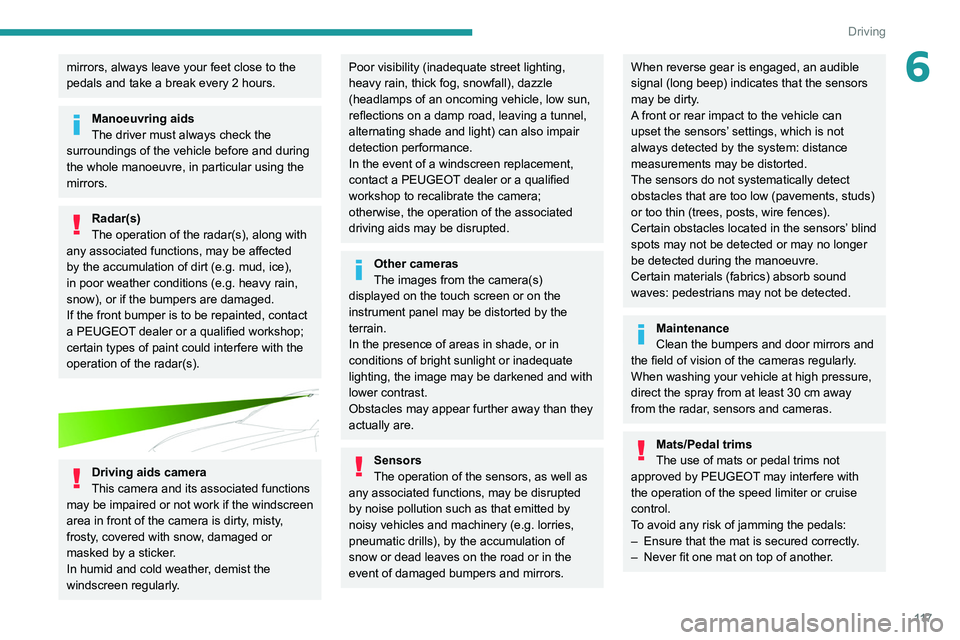
Driving aids camera
This camera and its associated functions
may be impaired or not work if the windscreen
area in front of the camera is dirty, misty,
frosty, covered with snow, damaged or
masked by a sticker.
In humid and cold weather, demist the
windscreen regularly.
Poor visibility (inadequate street lighting,
heavy rain, thick fog, snowfall), dazzle
(headlamps of an oncoming vehicle, low sun,
reflections on a damp road, leaving a tunnel,
alternating shade and light) can also impair
detection performance.
In the event of a windscreen replacement,
contact a PEUGEOT dealer or a qualified
workshop to recalibrate the camera;
otherwise, the operation of the associated
driving aids may be disrupted.
Other cameras
The images from the camera(s)
displayed on the touch screen or on the
instrument panel may be distorted by the
terrain.
In the presence of areas in shade, or in
conditions of bright sunlight or inadequate
lighting, the image may be darkened and with
lower contrast.
Obstacles may appear further away than they
actually are.
Sensors
The operation of the sensors, as well as
any associated functions, may be disrupted
by noise pollution such as that emitted by
noisy vehicles and machinery (e.g. lorries,
pneumatic drills), by the accumulation of
snow or dead leaves on the road or in the
event of damaged bumpers and mirrors.
When reverse gear is engaged, an audible
signal (long beep) indicates that the sensors
may be dirty.
A front or rear impact to the vehicle can
upset the sensors’ settings, which is not
always detected by the system: distance
measurements may be distorted.
The sensors do not systematically detect
obstacles that are too low (pavements, studs)
or too thin (trees, posts, wire fences).
Certain obstacles located in the sensors’ blind
spots may not be detected or may no longer
be detected during the manoeuvre.
Certain materials (fabrics) absorb sound
waves: pedestrians may not be detected.
Maintenance
Clean the bumpers and door mirrors and
the field of vision of the cameras regularly.
When washing your vehicle at high pressure,
direct the spray from at least 30
cm away
from the radar, sensors and cameras.
Mats/Pedal trims
The use of mats or pedal trims not
approved by PEUGEOT may interfere with
the operation of the speed limiter or cruise
control.
To avoid any risk of jamming the pedals:
–
Ensure that the mat is secured correctly
.
–
Never fit one mat on top of another
.
Page 142 of 292
140
Driving
The following situations may interfere with the operation of the system or
prevent it from working:
–
Insufficient contrast between the road
surface and the verge or hard shoulder
(e.g.
shade).
–
Lane markings worn, hidden (snow
, mud)
or multiple (roadworks, etc.),
–
Close proximity to the vehicle in front (lane
markings may not be detected).
–
Roads that are narrow
, winding.
Risk of undesirable operation
The system should be deactivated in the
following situations:
–
When changing a wheel or working near a
wheel.
–
T
owing or with a bicycle carrier on a towing
device, especially with trailer not plugged in or
not approved.
–
Road in poor condition, unstable or with very
poor grip (risk of aquaplaning, snow
, ice).
–
Adverse weather conditions.
–
Driving on racing circuits.
–
Driving on a rolling road.
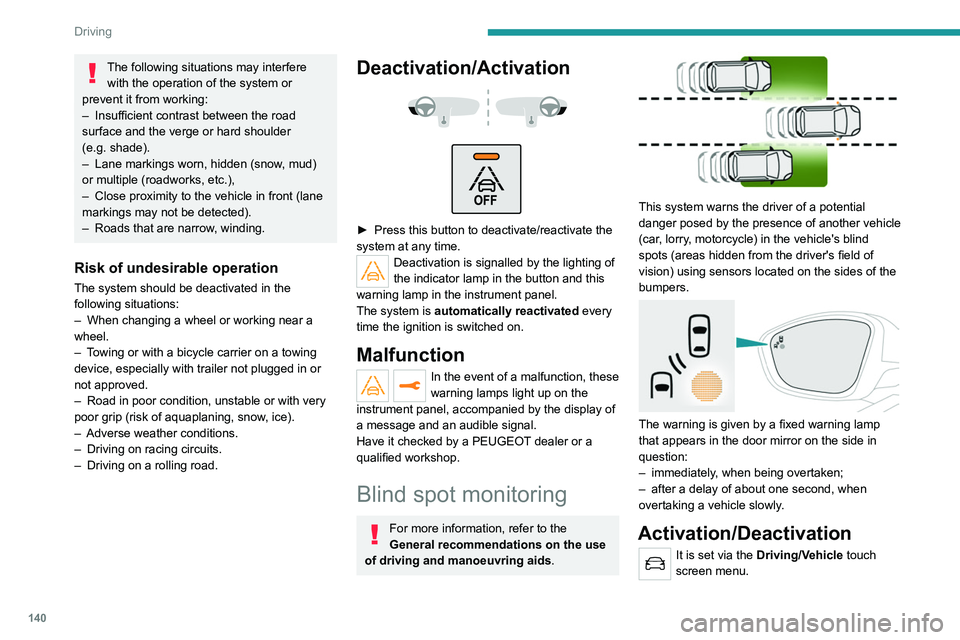
Deactivation/Activation
► Press this button to deactivate/reactivate the
system at any time.
Deactivation is signalled by the lighting of
the indicator lamp in the button and this
warning lamp in the instrument panel.
The system is automatically reactivated every
time the ignition is switched on.
Malfunction
In the event of a malfunction, these
warning lamps light up on the
instrument panel, accompanied by the display of
a message and an audible signal.
Have it checked by a PEUGEOT dealer or a
qualified workshop.
Blind spot monitoring
For more information, refer to the
General recommendations on the use
of driving and manoeuvring aids .
This system warns the driver of a potential
danger posed by the presence of another vehicle
(car, lorry, motorcycle) in the vehicle's blind
spots (areas hidden from the driver's field of
vision) using sensors located on the sides of the
bumpers.
The warning is given by a fixed warning lamp
that appears in the door mirror on the side in
question:
–
immediately
, when being overtaken;
–
after a delay of about one second, when
overtaking a vehicle slowly
.
Activation/Deactivation
It is set via the Driving/Vehicle touch
screen menu.
When starting the vehicle, the warning lamp
comes on in each mirror to indicate that the
system is activated.
The status of the system is memorised when the
ignition is switched off.
The system is automatically deactivated when towing with a towing device
approved by PEUGEOT.
Operating conditions
– All vehicles are moving in the same direction
and in adjacent lanes.
– The speed of your vehicle must be between
7 and 87 mph (12 and 140 km/h) (versions
without Park Assist or Full Park Assist) or
between 19 and 87 mph (30 and 140 km/h)
(versions with Park Assist or Full Park Assist).
– When overtaking a vehicle, the speed
difference is less than 6 mph (10 km/h).
– When overtaken by a vehicle, the speed
difference is less than 16 mph (25 km/h).
– Traffic is flowing normally.
– Overtaking a vehicle over a certain period of
time and the vehicle being overtaken remains in
the blind spot.
– You are driving on a straight or slightly curved
road.
– Your vehicle is not pulling a trailer, a caravan,
etc.
Page 143 of 292
141
Driving
6When starting the vehicle, the warning lamp
comes on in each mirror to indicate that the
system is activated.
The status of the system is memorised when the
ignition is switched off.
The system is automatically deactivated when towing with a towing device
approved by PEUGEOT.
Operating conditions
– All vehicles are moving in the same direction
and in adjacent lanes.
–
The speed of your vehicle must be between
7
and 87 mph (12 and 140 km/h) (versions
without Park Assist or Full Park Assist) or
between 19
and 87 mph (30 and 140 km/h)
(versions with Park Assist or Full Park Assist).
–
When overtaking a vehicle, the speed
difference is less than 6
mph (10 km/h).
–
When overtaken by a vehicle, the speed
difference is less than 16
mph (25 km/h).
–
T
raffic is flowing normally.
–
Overtaking a vehicle over a certain period of
time and the vehicle being overtaken remains in
the blind spot.
–
Y
ou are driving on a straight or slightly curved
road.
–
Y
our vehicle is not pulling a trailer, a caravan,
etc.
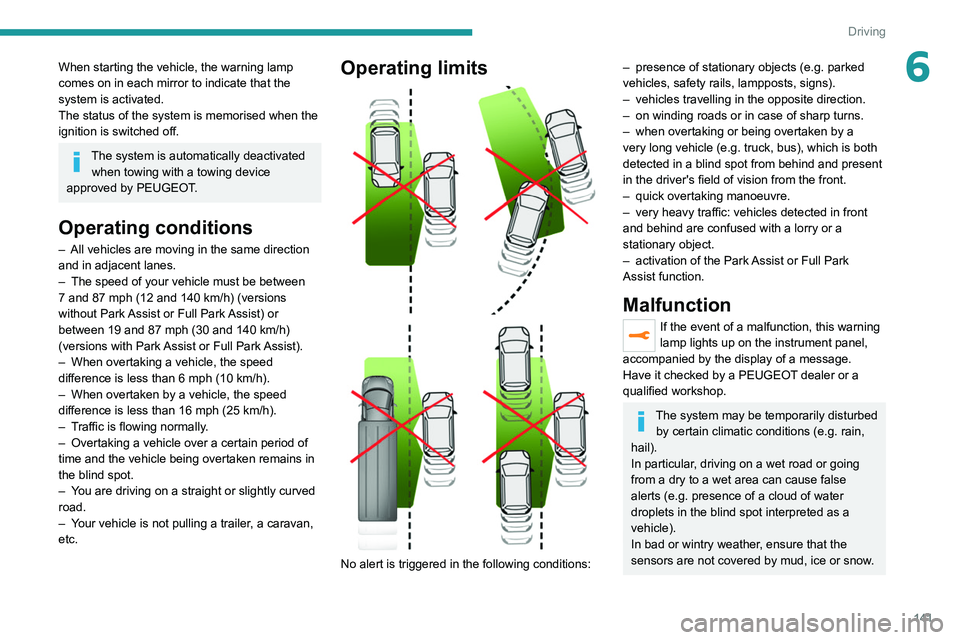
Operating limits
No alert is triggered in the following conditions:
– presence of stationary objects (e.g. parked
vehicles, safety rails, lampposts, signs).
–
vehicles travelling in the opposite direction.
–
on winding roads or in case of sharp turns.
–
when overtaking or being overtaken by a
very long vehicle (e.g.
truck, bus), which is both
detected in a blind spot from behind and present
in the driver's field of vision from the front.
–
quick overtaking manoeuvre.
–
very heavy traffic: vehicles detected in front
and behind are confused with a lorry or a
stationary object.
–
activation of the
Park Assist or Full Park
Assist
function.
Malfunction
If the event of a malfunction, this warning
lamp lights up on the instrument panel,
accompanied by the display of a message.
Have it checked by a PEUGEOT dealer or a
qualified workshop.
The system may be temporarily disturbed by certain climatic conditions (e.g. rain,
hail).
In particular, driving on a wet road or going
from a dry to a wet area can cause false
alerts (e.g.
presence of a cloud of water
droplets in the blind spot interpreted as a
vehicle).
In bad or wintry weather, ensure that the
sensors are not covered by mud, ice or snow.
Page 144 of 292
142
Driving
Take care not to cover the warning zone in
the door mirrors, or the detection zones on
the front and rear bumpers with adhesive
labels or other objects; they may hamper
correct operation of the system.
Active Blind Spot Detection
In addition to the fixed warning lamp in the
door mirror on the side in question, a trajectory
correction will be felt if you attempt to cross
a lane marking with the direction indicator
activated, to help you avoid a collision.
This system is a combination of the Active
lane departure warning system and Blind spot
monitoring functions.
These two functions must be activated and in
operation.
The vehicle speed must be between 43 and
87 mph (70 and 140 km/h).
These functions are especially suitable for
driving on motorways and main roads.
For more information on the Active lane
departure warning system and Blind spot
monitoring , refer to the corresponding sections.
Parking sensors
For more information, refer to the
General recommendations on the use
of driving and manoeuvring aids .
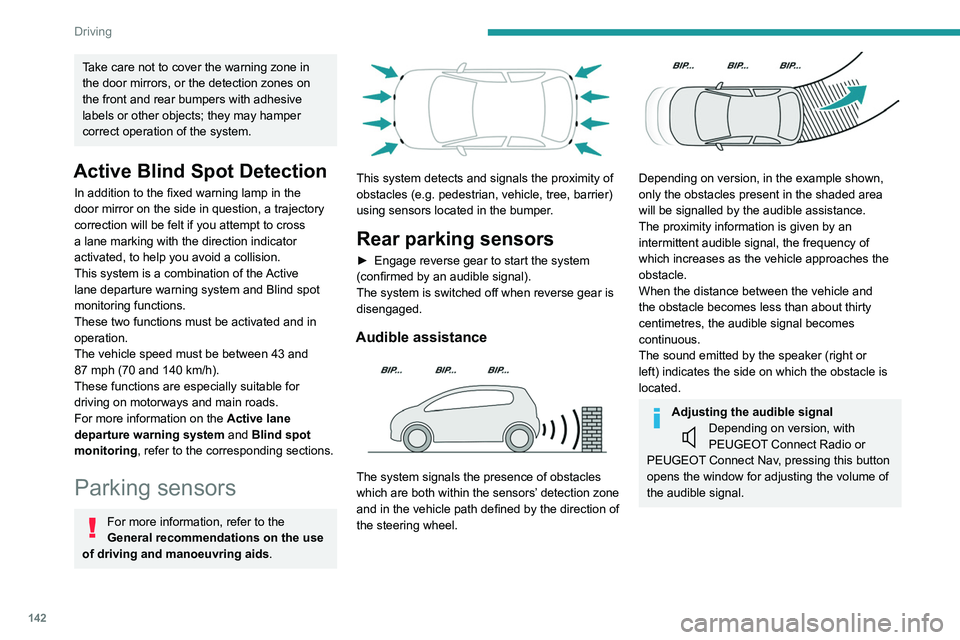
This system detects and signals the proximity of
obstacles (e.g.
pedestrian, vehicle, tree, barrier)
using sensors located in the bumper.
Rear parking sensors
► Engage reverse gear to start the system
(confirmed by an audible signal).
The system is switched off when reverse gear is
disengaged.
Audible assistance
The system signals the presence of obstacles
which are both within the sensors’ detection zone
and in the vehicle path defined by the direction of
the steering wheel.
Depending on version, in the example shown,
only the obstacles present in the shaded area
will be signalled by the audible assistance.
The proximity information is given by an
intermittent audible signal, the frequency of
which increases as the vehicle approaches the
obstacle.
When the distance between the vehicle and
the obstacle becomes less than about thirty
centimetres, the audible signal becomes
continuous.
The sound emitted by the speaker (right or
left) indicates the side on which the obstacle is
located.
Adjusting the audible signalDepending on version, with
PEUGEOT Connect Radio or
PEUGEOT Connect Nav, pressing this button
opens the window for adjusting the volume of
the audible signal.
Visual assistance
This supplements the audible signal, without
taking account of the vehicle's trajectory, by
displaying bars on the screen whose location
represents the distance between the obstacle
and the vehicle (white: more distant, orange:
close, red: very close).
When the obstacle is very close, the "Danger"
symbol is displayed on the screen.
Front parking sensors
Supplementing the rear parking sensors, the
front parking sensors are triggered when an
obstacle is detected in front and the speed of the
vehicle is below 6 mph (10 km/h).
Front parking sensor operation is suspended if
the vehicle stops for more than three seconds in
forward gear, if an obstacle is no longer detected
or the vehicle speed exceeds 6 mph (10 km/h).
The sound emitted by the speaker (front or rear) locates the obstacle relative to
the vehicle, whether in front of or behind it on
its path.
Page 147 of 292
145
Driving
6Visiopark 1
Rear view
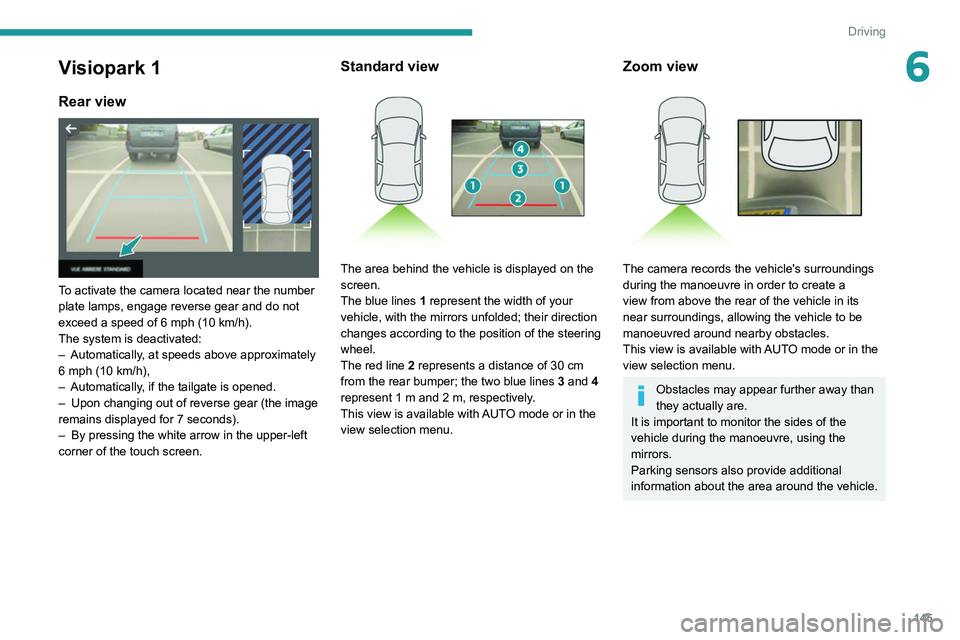
To activate the camera located near the number
plate lamps, engage reverse gear and do not
exceed a speed of 6 mph (10 km/h).
The system is deactivated:
–
Automatically
, at speeds above approximately
6 mph (10
km/h),
–
Automatically
, if the tailgate is opened.
–
Upon changing out of reverse gear (the image
remains displayed for 7
seconds).
–
By pressing the white arrow in the upper-left
corner of the touch screen.
Standard view
The area behind the vehicle is displayed on the
screen.
The blue lines 1 represent the width of your
vehicle, with the mirrors unfolded; their direction
changes according to the position of the steering
wheel.
The red line 2 represents a distance of 30
cm
from the rear bumper; the two blue lines 3 and 4
represent 1
m and 2 m, respectively.
This view is available with AUTO mode or in the
view selection menu.
Zoom view
The camera records the vehicle's surroundings
during the manoeuvre in order to create a
view from above the rear of the vehicle in its
near surroundings, allowing the vehicle to be
manoeuvred around nearby obstacles.
This view is available with AUTO mode or in the
view selection menu.
Obstacles may appear further away than
they actually are.
It is important to monitor the sides of the
vehicle during the manoeuvre, using the
mirrors.
Parking sensors also provide additional
information about the area around the vehicle.
Page 149 of 292
147
Driving
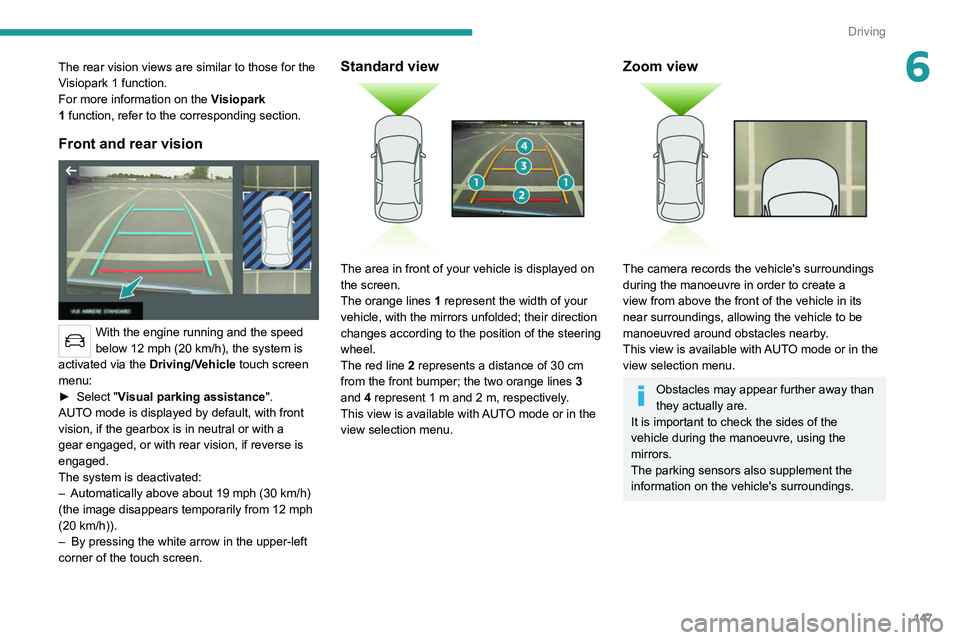
6The rear vision views are similar to those for the
Visiopark 1 function.
For more information on the Visiopark
1
function, refer to the corresponding section.
Front and rear vision
With the engine running and the speed
below 12 mph (20 km/h), the system is
activated via the Driving/Vehicle touch screen
menu:
►
Select "
Visual parking assistance".
AUTO mode is displayed by default, with front
vision, if the gearbox is in neutral or with a
gear engaged, or with rear vision, if reverse is
engaged.
The system is deactivated:
–
Automatically above about 19 mph (30
km/h)
(the image disappears temporarily from 12 mph
(20
km/h)).
–
By pressing the white arrow in the upper-left
corner of the touch screen.
Standard view
The area in front of your vehicle is displayed on
the screen.
The orange lines 1 represent the width of your
vehicle, with the mirrors unfolded; their direction
changes according to the position of the steering
wheel.
The red line 2 represents a distance of 30 cm
from the front bumper; the two orange lines 3
and 4 represent 1 m and 2 m, respectively.
This view is available with AUTO mode or in the
view selection menu.
Zoom view
The camera records the vehicle's surroundings
during the manoeuvre in order to create a
view from above the front of the vehicle in its
near surroundings, allowing the vehicle to be
manoeuvred around obstacles nearby.
This view is available with AUTO mode or in the
view selection menu.
Obstacles may appear further away than
they actually are.
It is important to check the sides of the
vehicle during the manoeuvre, using the
mirrors.
The parking sensors also supplement the
information on the vehicle's surroundings.
Page 254 of 292
252
Alphabetical index
Changing the remote control battery 32
Charge level indicator (Rechargeable
hybrid)
21
Charger, induction
60
Charger, wireless
60
Charging cable
163
Charging cable (Rechargeable
hybrid)
161–162, 167
Charging connector (Rechargeable
hybrid)
160, 166–168
Charging flap (Rechargeable hybrid)
160,
166–168
Charging the traction battery
(Rechargeable hybrid)
21, 159, 166–168
CHECK
22
Checking the engine oil level
19
Checking the levels
175–176
Checking tyre pressures (using
the kit)
185, 187
Checks
175, 176–178
Checks, routine
176–178
Child lock
98–99
Children
85, 92–97
Children (safety)
98
Child seats
85, 89–92
Child seats, conventional
91–92
Child seats, i-Size
97
Child seats, ISOFIX
93–96
Cigar lighter
59
Cleaning (advice)
160, 181–182
Closing the boot
30, 37
Closing the doors
30, 35Collision Risk Alert 133–134
Comfort mode
11 3
Configuration, vehicle
24
Connected applications
236
Connection, Bluetooth
219–220,
236–237, 241–242
Connection, MirrorLink
218
Connection, Wi-Fi network
237
Connectivity
235
Consumption figures
25
Container, AdBlue®
179
Control, emergency boot release
37
Control, emergency door
31
Control, heated seats
47
Controls, steering mounted
106–108
Control stalk, lighting
69–70
Control stalk, wipers
75–78
Control unit
161–163, 167
Courtesy lamp, front
63
Courtesy lamps
63–64
Cover, load space
65
Cruise control
120, 123–125
Cruise control, adaptive
125–126
Cruise control by speed limit recognition
120
Cruise control, dynamic with Stop function
120
Cup holder
59
D
DAB (Digital Audio Broadcasting) -
Digital radio
216, 239
Date (setting) 222, 244
Daytime running lamps
70, 192
Deactivating the passenger airbag
86, 90–91
Deadlocking
28, 30
Deferred charging
25, 168
Deferred charging (Rechargeable
hybrid)
25–26, 160, 166
Defrosting
48, 55
Defrosting, front
55
Demisting
48, 55
Demisting, front
55
Demisting, rear
56
Demisting, rear screen
56
Dials and gauges
10
Digital instrument panel
10–11
Dimensions
209
Dipstick
19, 175
Direction indicators
70, 192–194
Domestic charging
163
Domestic charging (Rechargeable
hybrid)
167–168
Door pockets
59
Doors
35
Drive Assist Plus
125
Driver’s attention warning
136
Driving
44, 100
Driving aids camera (warnings)
11 7
Driving aids (recommendations)
11 6
Driving economically
8
Driving modes
111
Driving positions (storing)
47
Dynamic stability control (DSC)
82–83
Page 257 of 292
255
Alphabetical index
Menus (audio) 213–214, 225–226
Menu short cuts
24
Messages
243
Messages, quick
243
Mirror, rear view
49
Mirrors, door
48–49, 56, 140
Mirror, vanity
59
Misfuel prevention
158–159
Mobile application
25–26, 58, 166, 168
Motor, electric
111–112, 159, 208
Motorised tailgate
37–38
Mountings, ISOFIX
93
N
Navigation 230–232
Navigation, connected
233–235
Net, high load retaining
66–67
Night vision
74
Night Vision
74
O
Obstacle detection 142
Oil change
175
Oil consumption
175
OIl, engine
175
On-board tools
68, 184–185
Opening the bonnet
173–174
Opening the boot
29, 36
Opening the doors 29, 35
Opening the windows
27
P
Pads, brake 177–178
Paint
181, 210
Paint colour code
210
Parcel shelf, rear
65
Park Assist
148
Parking brake, electric
103–105, 177
Parking sensors, audible and visual
142
Parking sensors, front
143
Parking sensors, rear
142
Passenger compartment temperature pre-
conditioning (Rechargeable hybrid)
26, 58
Pedestrian horn (Rechargeable hybrid)
80
Personalisation
11
Plates, identification
210
Player, Apple®
217, 240
Player, USB
216, 239
Port, USB
59, 63, 216, 218, 235, 239
Power
21
Power indicator (Rechargeable
hybrid)
9, 10, 21
Pressures, tyres
178, 186, 188, 210
Pre-tensioning seat belts
85
Priming pump
184
Priming the fuel system
183
Profiles
221, 244
Programmable cruise control
123
Protecting children 86, 89–97
Puncture
185–186, 188
R
Radar (warnings) 11 7
Radio
214–215, 238
Radio, digital (Digital Audio
Broadcasting - DAB)
216, 239
Range, AdBlue®
20, 176
RDS
215, 238
READY lamp
173
Rear screen, demisting
56
Rechargeable hybrid engine
9, 25, 172–173, 200, 208
Rechargeable hybrid system
6, 9, 25,
102, 112, 159
Recharging the battery
196, 198–199
Recharging the traction battery
163
Recharging the traction battery (
Rechargeable hybrid)
159, 166–168
Recirculation, air
54–55
Recovery
200–202
Recovery of the vehicle
200–202
Reduction of electrical load
173
Regeneration of the particle filter
177
Regenerative braking (deceleration
by engine braking)
109
Reinitialisation of the under-inflation
detection system
11 6
Reinitialising the remote control
33