door lock Peugeot 508 RXH 2016 User Guide
[x] Cancel search | Manufacturer: PEUGEOT, Model Year: 2016, Model line: 508 RXH, Model: Peugeot 508 RXH 2016Pages: 364, PDF Size: 10.31 MB
Page 61 of 364
59
508_en_Chap02_ouvertures_ed01-2016
If one of the doors or the boot is still
open or if the key for Keyless en try and
Starting system has been left inside
the vehicle or if the ignition is on, the
central locking does not take place.
When the vehicle is locked, if it is
unlocked inadvertently, it will lock itself
again automatically after about thirty
seconds unless a door is opened.
If the alarm was previously activated,
it will not be reactivated automatically.
th
e folding and unfolding of the door
mirrors by the remote control can be
deactivated by a P
e
uge
Ot
dealer or a
qualified workshop. As a safety measure (children on
board), never leave the vehicle without
taking the key for the Keyless
e
n
try and
Starting system, even for a short period.
gu
ard against theft when the key for the
Keyless
e
n
try and Starting system is
in the recognition zone with the vehicle
unlocked.
In order to preserve the charge of the
cell battery in the remote control, the
"hands-free" functions go into extended
stand-by after 21 days of non-use.
t
o
r
estore these functions, press one of
the remote control buttons or start the
engine with the electronic key in the
reader.
2
Access
Page 62 of 364
60
508_en_Chap02_ouvertures_ed01-2016
Deadlocking
Deadlocking renders the exterior and
interior door controls inoperative.
It also deactivates the manual central
locking button.
You should therefore never leave
anyone inside the vehicle when it is
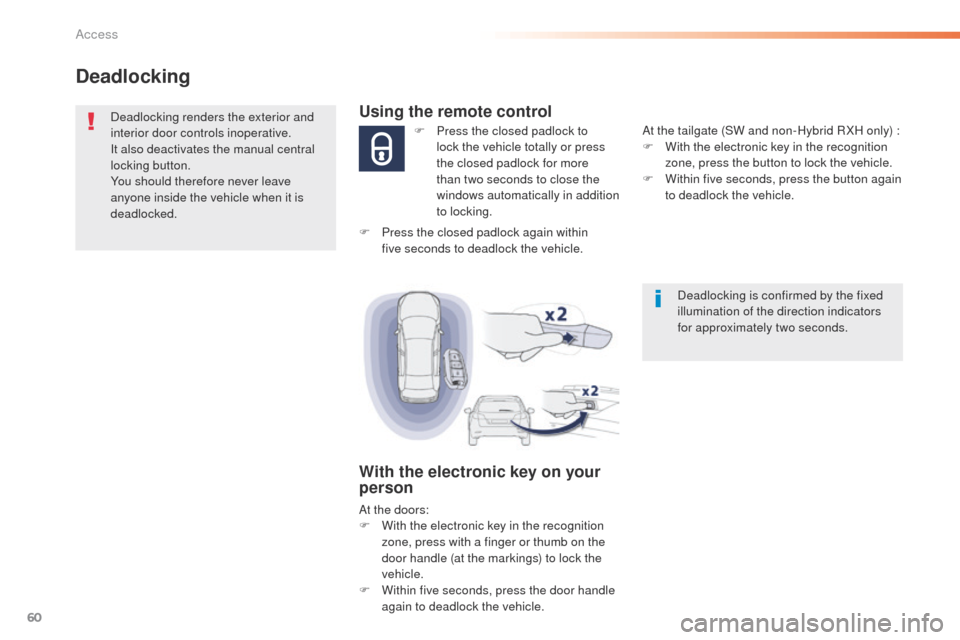
deadlocked.Using the remote control
F Press the closed padlock to lock the vehicle totally or press
the closed padlock for more
than two
seconds to close the
windows automatically in addition
to locking.
With the electronic key on your
person
At the doors:
F W ith the electronic key in the recognition
zone, press with a finger or thumb on the
door handle (at the markings) to lock the
vehicle.
F
W
ithin five seconds, press the door handle
again to deadlock the vehicle. At the tailgate (SW and non-Hybrid R XH only) :
F
W
ith the electronic key in the recognition
zone, press the button to lock the vehicle.
F
W
ithin five seconds, press the button again
to deadlock the vehicle.
F
P
ress the closed padlock again within
five
seconds to deadlock the vehicle.
Deadlocking is confirmed by the fixed
illumination of the direction indicators
for approximately two seconds.
Access
Page 64 of 364
62
508_en_Chap02_ouvertures_ed01-2016
Locking - unlocking using
the integral keyLocking-unlocking the
driver's door
Insert the key in the door lock to lock or unlock
the door.
Locking-unlocking the
passenger doors
Back-up procedure - ele
ctronic keys
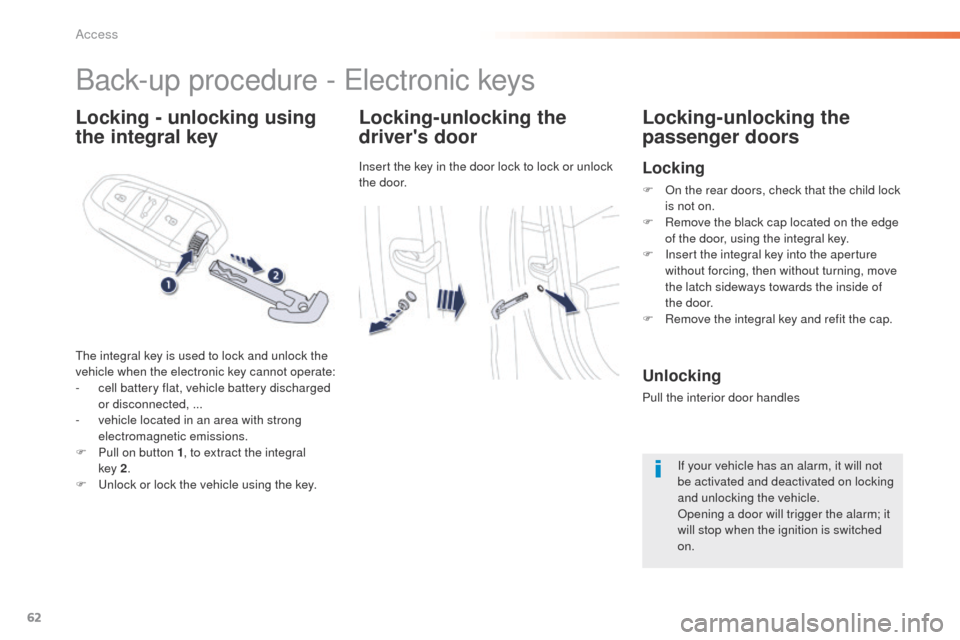
the integral key is used to lock and unlock the
vehicle when the electronic key cannot operate:
-
c
ell battery flat, vehicle battery discharged
or disconnected, ...
-
v
ehicle located in an area with strong
electromagnetic emissions.
F
P
ull on button 1 , to extract the integral
key
2.
F
u
n
lock or lock the vehicle using the key.
Locking
F On the rear doors, check that the child lock is not on.
F
R
emove the black cap located on the edge
of the door, using the integral key.
F
I
nsert the integral key into the aperture
without forcing, then without turning, move
the latch sideways towards the inside of
the
door.
F
R
emove the integral key and refit the cap.
Unlocking
Pull the interior door handles If your vehicle has an alarm, it will not
be activated and deactivated on locking
and unlocking the vehicle.
Opening a door will trigger the alarm; it
will stop when the ignition is switched
on.
Access
Page 65 of 364
63
508_en_Chap02_ouvertures_ed01-2016
Do not throw the remote control
batteries away, they contain metals
which are harmful to the environment.
ta
ke them to an approved collection
point.
Changing the battery of the
electronic key
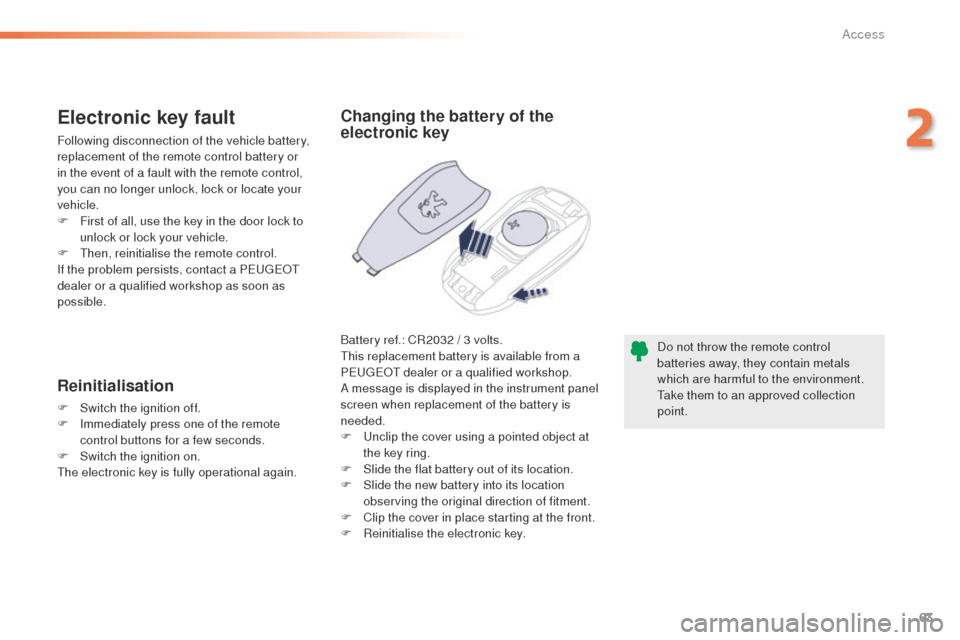
Battery ref.: CR2032 / 3 volts.th is replacement battery is available from a
P
e
uge
Ot
dealer or a qualified workshop.
A message is displayed in the instrument panel
screen when replacement of the battery is
needed.
F
u
n
clip the cover using a pointed object at
the key ring.
F
S
lide the flat battery out of its location.
F
S
lide the new battery into its location
observing the original direction of fitment.
F
C
lip the cover in place starting at the front.
F
R
einitialise the electronic key.
Electronic key fault
Following disconnection of the vehicle battery,
replacement of the remote control battery or
in the event of a fault with the remote control,
you can no longer unlock, lock or locate your
vehicle.
F
F
irst of all, use the key in the door lock to
unlock or lock your vehicle.
F
t
hen
, reinitialise the remote control.
If the problem persists, contact a P
e
uge
Ot
dealer or a qualified workshop as soon as
possible.
Reinitialisation
F Switch the ignition off.
F I mmediately press one of the remote
control buttons for a few seconds.
F
S
witch the ignition on.
th
e electronic key is fully operational again.
2
Access
Page 66 of 364
64
508_en_Chap02_ouvertures_ed01-2016
Locking/ unlocking from the inside
Driving with the doors locked may make
access to the passenger compartment
by the emergency services more
difficult in an emergency.
If the vehicle is deadlocked or locked
with the remote control or the door
handles, the button is not active. In this
case, use the key or the remote control
to unlock.
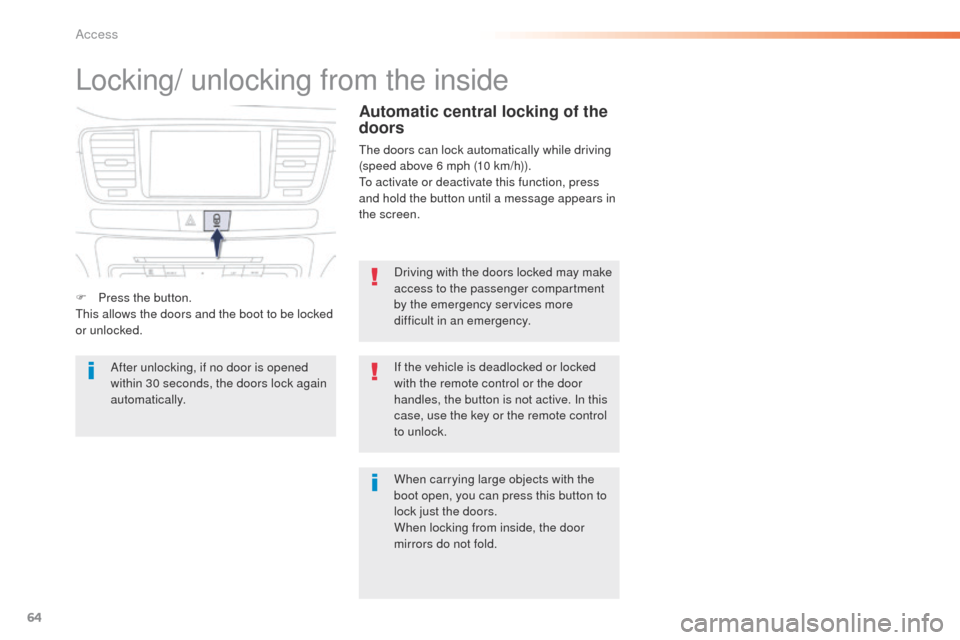
F
P
ress the button.
th
is allows the doors and the boot to be locked
or unlocked.
When carrying large objects with the
boot open, you can press this button to
lock just the doors.
When locking from inside, the door
mirrors do not fold.
Automatic central locking of the
doors
the doors can lock automatically while driving
(speed above 6 mph (10 km/h)).
to a
ctivate or deactivate this function, press
and hold the button until a message appears in
the screen.
After unlocking, if no door is opened
within 30 seconds, the doors lock again
automatically.
Access
Page 71 of 364
69
508_en_Chap02_ouvertures_ed01-2016
Lost keys, remote control, electronic key
Visit a PeugeOt dealer with the vehicle's registration certificate, your personal identification documents and if possible, the label bearing the
key code.
th
e P
e
uge
Ot
dealer will be able to retrieve the key code and the transponder code required to order a new key.
Remote control
the high frequency remote control is a sensitive system; do not operate it while it is in your pocket as there is a possibility that it may unlock the
vehicle, without you being aware of it.
Do not repeatedly press the buttons of your remote control out of range and out of sight of your vehicle. You run the risk of stopping it from
working and the remote control would have to be reinitialised.
th
e remote control does not operate when the key is in the ignition, even when the ignition is switched off.
Locking the vehicle
Driving with the doors locked may make access to the passenger compartment by the emergency services more difficult in an emergency.
As a safety precaution (with children on board), remove the key from the ignition or take the electronic key when you leave the vehicle, even for
a short time.
Electrical interference
the Keyless en try and Starting electronic key may not operate if close to certain electronic devices: telephone, laptop computer, strong
magnetic fields, ...
Anti-theft protection
Do not make any modifications to the electronic engine immobiliser system; this could cause malfunctions.
Don't forget to turn the steering to engage the steering lock.
When purchasing a second-hand vehicle
Have the key codes memorised by a Pe ugeOt dealer, to ensure that the keys in your possession are the only ones which can start the vehicle.
2
Access
Page 72 of 364
70
508_en_Chap02_ouvertures_ed01-2016
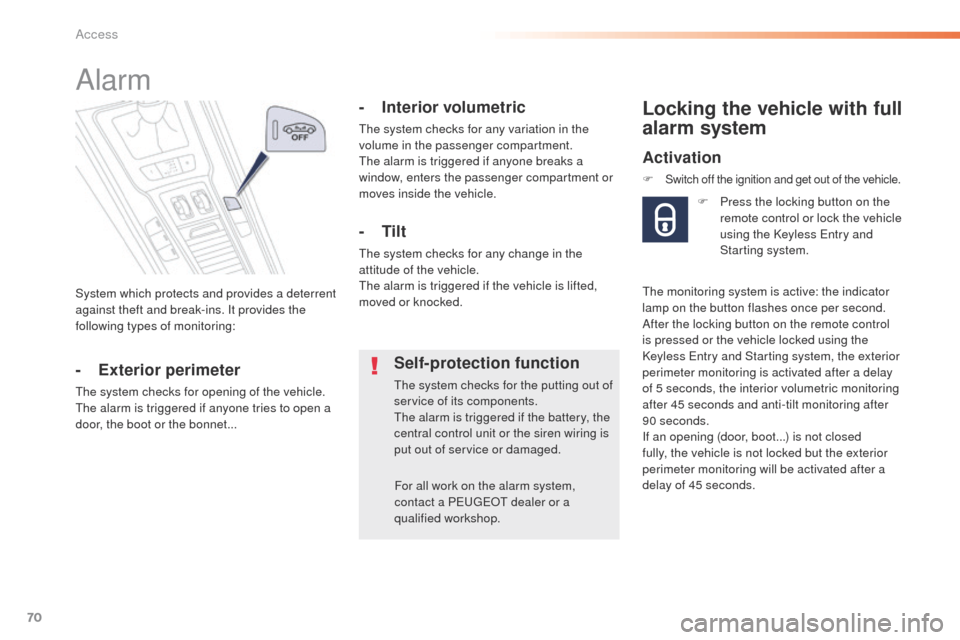
System which protects and provides a deterrent
against theft and break-ins. It provides the
following types of monitoring:
Alarm
- Exterior perimeter
the system checks for opening of the vehicle.the alarm is triggered if anyone tries to open a
door, the boot or the bonnet...
- Interior volumetric
the system checks for any variation in the
volume in the passenger compartment.
th
e alarm is triggered if anyone breaks a
window, enters the passenger compartment or
moves inside the vehicle.
- Tilt
the system checks for any change in the
attitude of the vehicle.
th
e alarm is triggered if the vehicle is lifted,
moved or knocked.
Self-protection function
the system checks for the putting out of
service of its components.
th
e alarm is triggered if the battery, the
central control unit or the siren wiring is
put out of service or damaged.
For all work on the alarm system,
contact a P
e
uge
Ot
dealer or a
qualified workshop.
Locking the vehicle with full
alarm system
Activation
F Switch off the ignition and get out of the vehicle.
F Press the locking button on the remote control or lock the vehicle
using the Keyless
e
n
try and
Starting system.
th
e monitoring system is active: the indicator
lamp on the button flashes once per second.
After the locking button on the remote control
is pressed or the vehicle locked using the
Keyless
e
n
try and Starting system, the exterior
perimeter monitoring is activated after a delay
of 5 seconds, the interior volumetric monitoring
after 45 seconds and anti-tilt monitoring after
90 seconds.
If an opening (door, boot...) is not closed
fully, the vehicle is not locked but the exterior
perimeter monitoring will be activated after a
delay of 45 seconds.
Access
Page 74 of 364
72
508_en_Chap02_ouvertures_ed01-2016
Triggering of the alarm
this is indicated by sounding of the siren
and flashing of the direction indicators for
thirty
seconds.
th
e monitoring functions remain active until
the alarm has been triggered eleven times in
succession.
When the vehicle is unlocked using
the remote control or unlocked
using the Keyless
e
n
try and Starting
system, rapid flashing of the indicator
lamp in the button informs you that
the alarm was triggered during
your absence. When the ignition
is switched on, this flashing stops
immediately.
Failure of the remote control
to deactivate the monitoring functions:
F
u
n
lock the vehicle using the key in the
driver's door lock.
F
O
pen the door; the alarm is triggered.
F
S
witch on the ignition; the alarm stops. t
h
e
indicator lamp in the button switches off.
Locking the vehicle without
activating the alarm
F Lock or deadlock the vehicle using the key in the driver's door lock.
Operating fault
When the ignition is switched on, fixed
illumination of the indicator lamp in the button
indicates a fault in the system.
Have it checked by a P
e
uge
Ot
dealer or a
qualified workshop.
* According to country.
Automatic activation*
2 minutes after the last door or the boot is
closed, the system is activated automatically.
F t
o a
void triggering the alarm on entering
the vehicle, first press the unlocking button
on the remote control or unlock the vehicle
using the Keyless
e
n
try and Starting
system.
Access
Page 75 of 364
73
508_en_Chap02_ouvertures_ed01-2016
electric windows
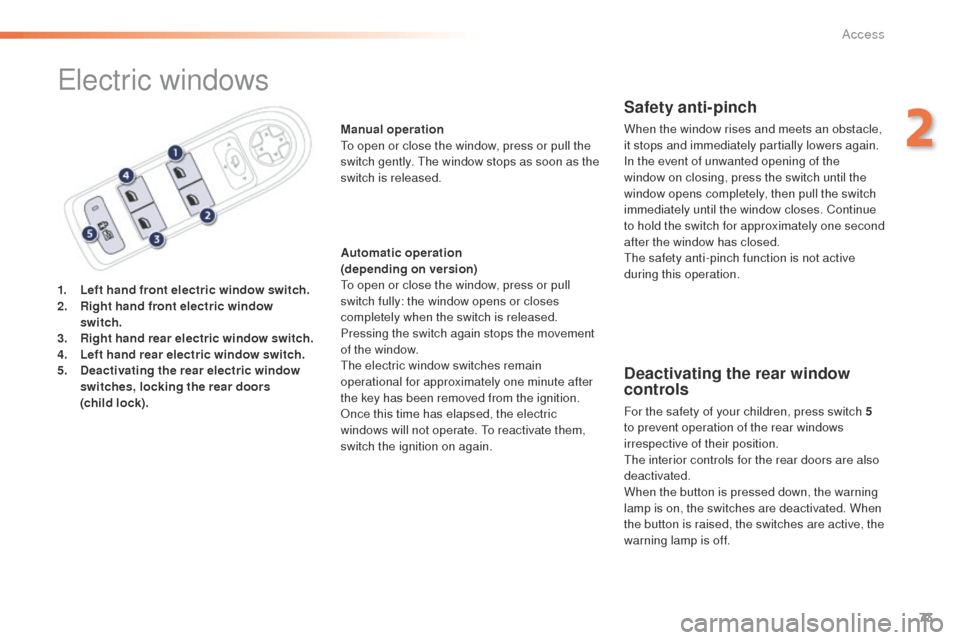
1. Left hand front electric window switch.
2. Right hand front electric window
switch.
3.
R
ight hand rear electric window switch.
4.
Le
ft hand rear electric window switch.
5.
D
eactivating the rear electric window
switches, locking the rear doors
(child
lock). Manual operation
to o
pen or close the window, press or pull the
switch gently. t
h
e window stops as soon as the
switch is released.
Automatic operation
(depending on version)to o pen or close the window, press or pull
switch fully: the window opens or closes
completely when the switch is released.
Pressing the switch again stops the movement
of the window.
the
electric window switches remain
operational for approximately one minute after
the key has been removed from the ignition.
Once this time has elapsed, the electric
windows will not operate.
t
o r
eactivate them,
switch the ignition on again.
Safety anti-pinch
When the window rises and meets an obstacle,
it stops and immediately partially lowers again.
In the event of unwanted opening of the
window on closing, press the switch until the
window opens completely, then pull the switch
immediately until the window closes. Continue
to hold the switch for approximately one second
after the window has closed.
th
e safety anti-pinch function is not active
during this operation.
Deactivating the rear window
controls
For the safety of your children, press switch 5
t o prevent operation of the rear windows
irrespective of their position.
th
e interior controls for the rear doors are also
deactivated.
When the button is pressed down, the warning
lamp is on, the switches are deactivated. When
the button is raised, the switches are active, the
warning lamp is off.
2
Access
Page 82 of 364
80
508_en_Chap03_ergonomie-et-confort_ed01-2016
Mirrors
each fitted with an adjustable mirror glass
providing the lateral rear ward vision necessary
for overtaking or parking.
th
ey can also be folded for parking in confined
spaces.
Door mirrors
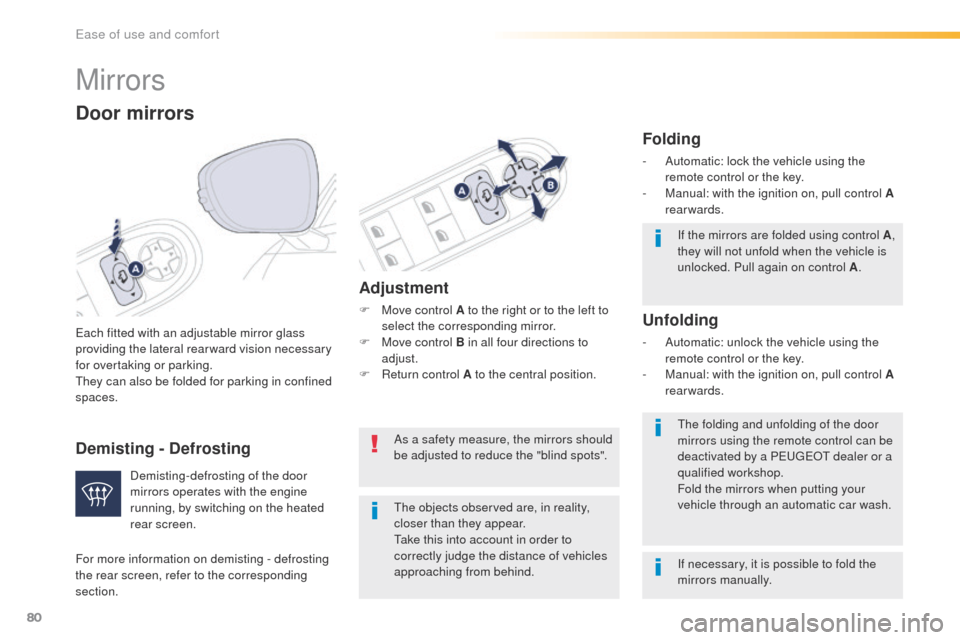
If the mirrors are folded using control A ,
they will not unfold when the vehicle is
unlocked. Pull again on control A .
th
e folding and unfolding of the door
mirrors using the remote control can be
deactivated by a P
e
uge
Ot
dealer or a
qualified workshop.
Fold the mirrors when putting your
vehicle through an automatic car wash.
th
e objects observed are, in reality,
closer than they appear.
ta
ke this into account in order to
correctly judge the distance of vehicles
approaching from behind.
Demisting-defrosting of the door
mirrors operates with the engine
running, by switching on the heated
rear screen.
Adjustment
F Move control A to the right or to the left to
select the corresponding mirror.
F
M
ove control B in all four directions to
adjust.
F
R
eturn control A to the central position.
Folding
- Automatic: lock the vehicle using the remote control or the key.
-
M
anual: with the ignition on, pull control A
rearwards.
Unfolding
- Automatic: unlock the vehicle using the remote control or the key.
-
M
anual: with the ignition on, pull control A
rearwards.
As a safety measure, the mirrors should
be adjusted to reduce the "blind spots".
If necessary, it is possible to fold the
mirrors manually.
For more information on demisting - defrosting
the rear screen, refer to the corresponding
section.
Demisting - Defrosting
ease of use and comfort