ignition PEUGEOT BOXER 2003 User Guide
[x] Cancel search | Manufacturer: PEUGEOT, Model Year: 2003, Model line: Boxer, Model: Peugeot Boxer 2003Pages: 180, PDF Size: 1.86 MB
Page 31 of 180
05-05-2003
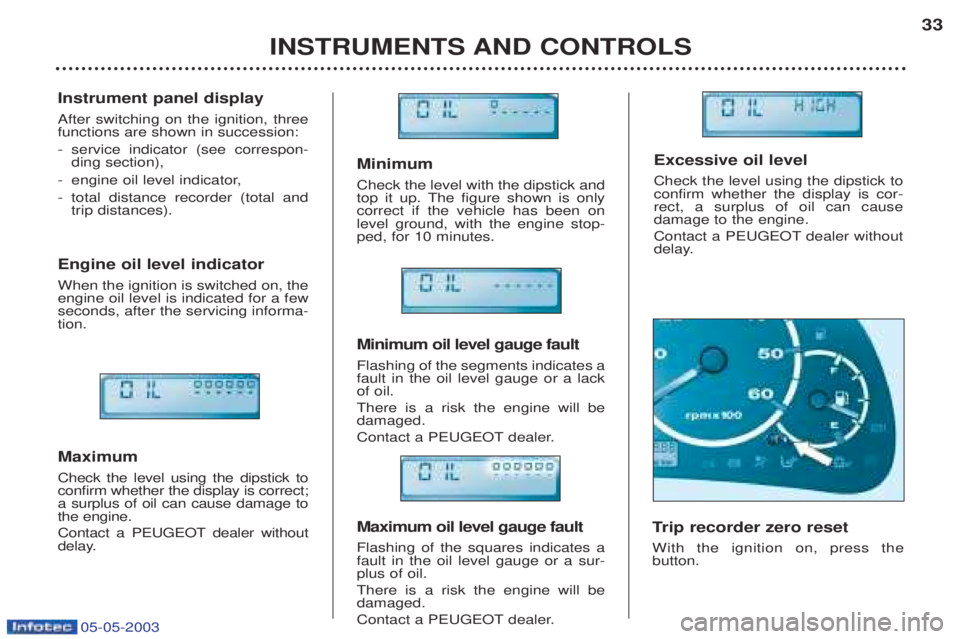
Minimum Check the level with the dipstick and
top it up. The figure shown is onlycorrect if the vehicle has been onlevel ground, with the engine stop-ped, for 10 minutes. Minimum oil level gauge fault Flashing of the segments indicates a fault in the oil level gauge or a lackof oil. There is a risk the engine will be damaged.
Contact a PEUGEOT dealer. Maximum oil level gauge fault Flashing of the squares indicates a fault in the oil level gauge or a sur-plus of oil. There is a risk the engine will be damaged.
Contact a PEUGEOT dealer.
INSTRUMENTS AND CONTROLS33
Instrument panel display After switching on the ignition, three functions are shown in succession: -
service indicator (see correspon- ding section),
- engine oil level indicator,
- total distance recorder (total andtrip distances).
Engine oil level indicator When the ignition is switched on, the engine oil level is indicated for a fewseconds, after the servicing informa-tion. Maximum Check the level using the dipstick to confirm whether the display is correct;a surplus of oil can cause damage tothe engine.
Contact a PEUGEOT dealer without
delay. T
rip recorder zero reset
With the ignition on, press the button. Excessive oil level Check the level using the dipstick to confirm whether the display is cor-rect, a surplus of oil can causedamage to the engine.
Contact a PEUGEOT dealer without
delay.
Page 34 of 180
05-05-2003
YOUR BOXER IN DETAIL
38
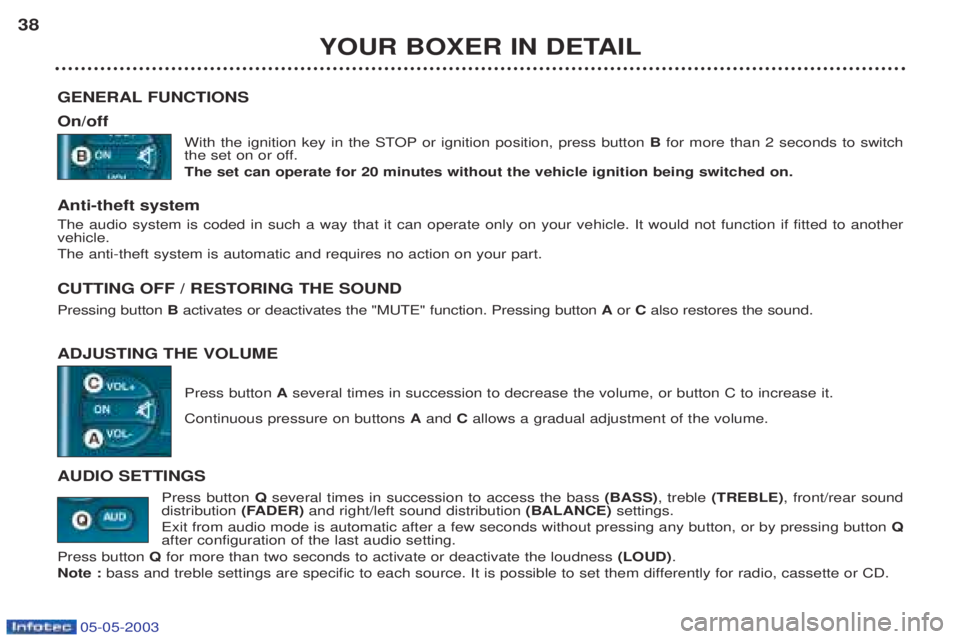
GENERAL FUNCTIONS On/off With the ignition key in the STOP or ignition position, press button Bfor more than 2 seconds to switch
the set on or off. The set can operate for 20 minutes without the vehicle ignition being switched on.
Anti-theft system The audio system is coded in such a way that it can operate only on your vehicle. It would not function if fitted to another vehicle. The anti-theft system is automatic and requires no action on your part.
CUTTING OFF / RESTORING THE SOUND Pressing button Bactivates or deactivates the "MUTE" function. Pressing button Aor Calso restores the sound.
ADJUSTING THE VOLUME Press button Aseveral times in succession to decrease the volume, or button C to increase it.
Continuous pressure on buttons Aand Callows a gradual adjustment of the volume.
AUDIO SETTINGS Press button Qseveral times in succession to access the bass (BASS), treble (TREBLE) , front/rear sound
distribution (FADER)and right/left sound distribution (BALANCE)settings.
Exit from audio mode is automatic after a few seconds without pressing any button, or by pressing button Q
after configuration of the last audio setting.
Press button Q for more than two seconds to activate or deactivate the loudness (LOUD).
Note : bass and treble settings are specific to each source. It is possible to set them differently for radio, cassette or CD.
Page 55 of 180
05-05-2003
YOUR BOXER IN DETAIL57
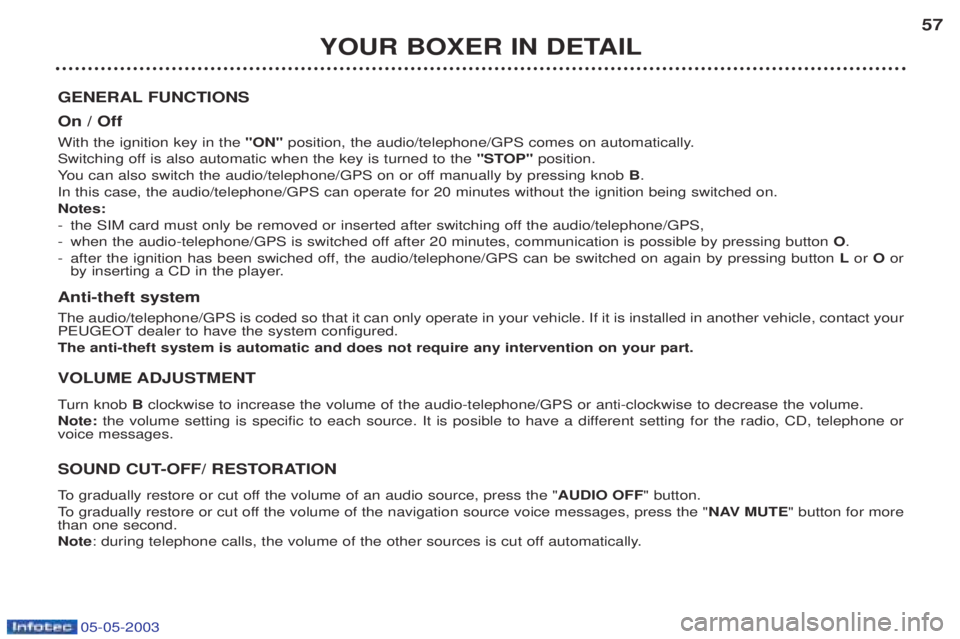
GENERAL FUNCTIONS On / Off With the ignition key in the "ON"position, the audio/telephone/GPS comes on automatically.
Switching off is also automatic when the key is turned to the "STOP"position.
Y ou can also switch the audio/telephone/GPS on or off manually by pressing knob B.
In this case, the audio/telephone/GPS can operate for 20 minutes without the ignition being switched on. Notes:- the SIM card must only be removed or inserted after switching off the audio/telephone/GPS,
- when the audio-telephone/GPS is switched off after 20 minutes, communication is possible by pressing button O.
- after the ignition has been swiched off, the audio/telephone/GPS can be switched on again by pressing button Lor Oor
by inserting a CD in the player.
Anti-theft system The audio/telephone/GPS is coded so that it can only operate in your vehicle. If it is installed in another vehicle, contact yo ur
PEUGEOT dealer to have the system configured. The anti-theft system is automatic and does not require any intervention on your part. VOLUME ADJUSTMENT T urn knob Bclockwise to increase the volume of the audio-telephone/GPS or anti-clockwise to decrease the volume.
Note: the volume setting is specific to each source. It is posible to have a different setting for the radio, CD, telephone or
voice messages.
SOUND CUT-OFF/ RESTORATION
To gradually restore or cut off the volume of an audio source, press the " AUDIO OFF" button.
To gradually restore or cut off the volume of the navigation source voice messages, press the " NAV MUTE" button for more
than one second. Note : during telephone calls, the volume of the other sources is cut off automatically.
Page 64 of 180
05-05-2003
YOUR BOXER IN DETAIL
66
TELEPHONE MODE This function is provided by a dual band GSM telephone (900 and 1800 MHz) incorporated in the audio/telephone/GPS. It is a "hands free" telephone. This function is provided by a microphone located next to the front courtesy light, the spea-
kers and a steering wheel control which permits access to most of the functions (the buttons on the audio/telephone/GPS control panel provide access to all of the functions). Displaying of the main "mobile telephone"type functions as well as consultation of the directories is via the multifunction
display.This function is active, irrespective of the position of the key.
Note: with the key in the accessories position (1 st
notch) or with the ignition on (2 nd
notch), this function will be cut off after
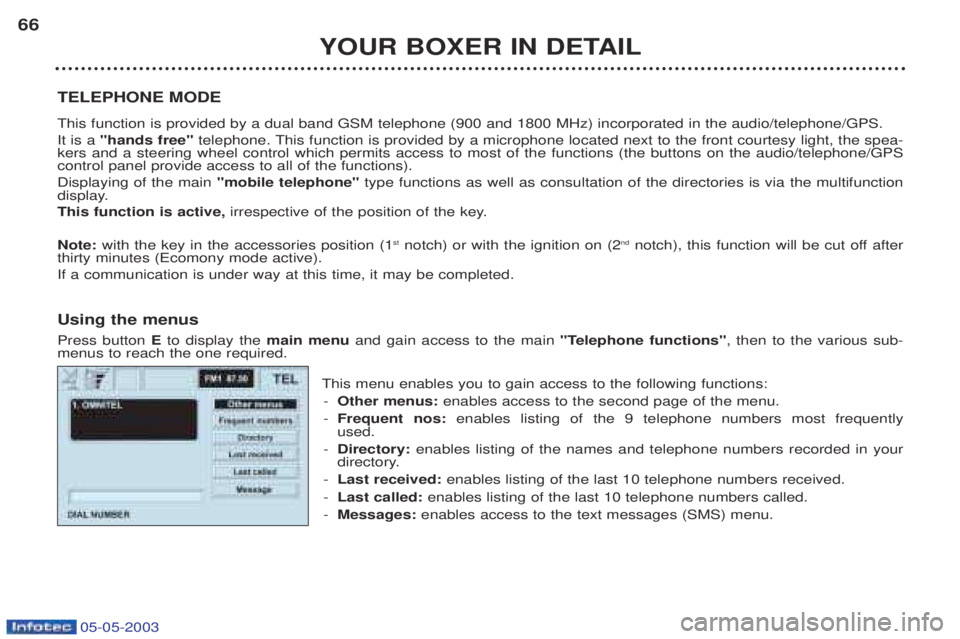
thirty minutes (Ecomony mode active).If a communication is under way at this time, it may be completed. Using the menus Press button Eto display the main menuand gain access to the main "Telephone functions", then to the various sub-
menus to reach the one required.
This menu enables you to gain access to the following functions:- Other menus: enables access to the second page of the menu.
- Frequent nos: enables listing of the 9 telephone numbers most frequently
used.
- Directory: enables listing of the names and telephone numbers recorded in your
directory.
- Last received: enables listing of the last 10 telephone numbers received.
- Last called: enables listing of the last 10 telephone numbers called.
- Messages: enables access to the text messages (SMS) menu.
Page 66 of 180
05-05-2003
YOUR BOXER IN DETAIL
68
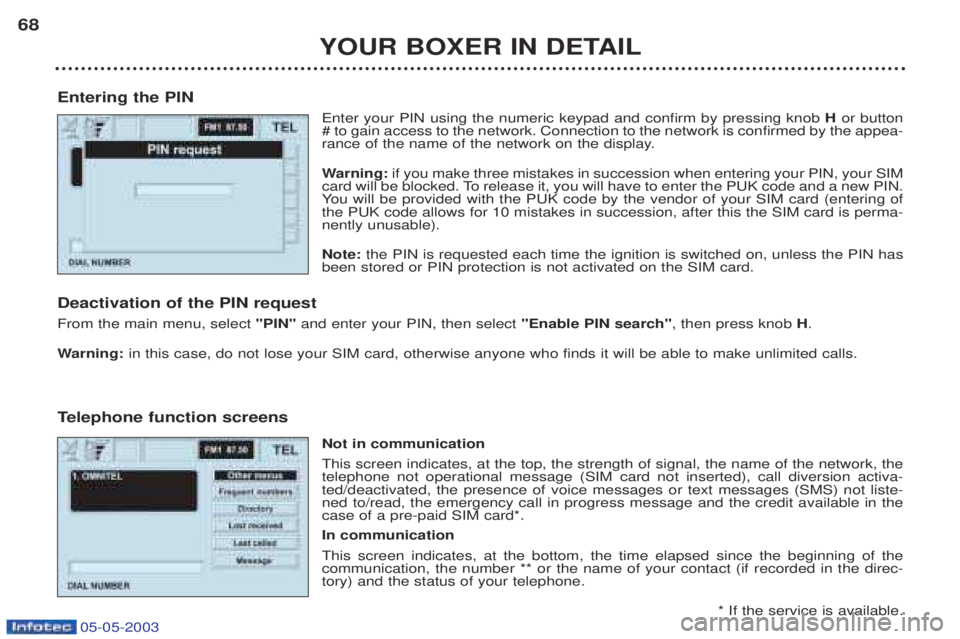
Entering the PIN Enter your PIN using the numeric keypad and confirm by pressing knob Hor button
# to gain access to the network. Connection to the network is confirmed by the appea-
rance of the name of the network on the display. W arning: if you make three mistakes in succession when entering your PIN, your SIM
card will be blocked. To release it, you will have to enter the PUK code and a new PIN. Y ou will be provided with the PUK code by the vendor of your SIM card (entering of
the PUK code allows for 10 mistakes in succession, after this the SIM card is perma-nently unusable). Note: the PIN is requested each time the ignition is switched on, unless the PIN has
been stored or PIN protection is not activated on the SIM card.
Deactivation of the PIN request From the main menu, select "PIN"and enter your PIN, then select "Enable PIN search", then press knobH.
W arning: in this case, do not lose your SIM card, otherwise anyone who finds it will be able to make unlimited calls.
T elephone function screens
Not in communicationThis screen indicates, at the top, the strength of signal, the name of the network, the telephone not operational message (SIM card not inserted), call diversion activa-ted/deactivated, the presence of voice messages or text messages (SMS) not liste-ned to/read, the emergency call in progress message and the credit available in thecase of a pre-paid SIM card*. In communication This screen indicates, at the bottom, the time elapsed since the beginning of the communication, the number ** or the name of your contact (if recorded in the direc-tory) and the status of your telephone.
* If the service is available.
Page 88 of 180
05-05-2003
YOUR BOXER IN DETAIL
90
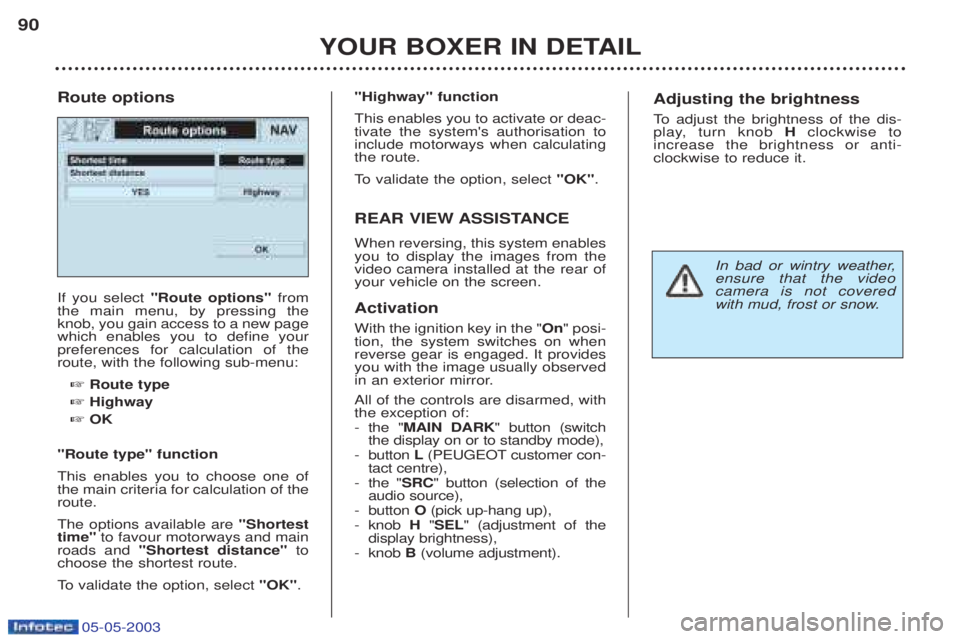
If you select
"Route options" from
the main menu, by pressing the knob, you gain access to a new pagewhich enables you to define yourpreferences for calculation of theroute, with the following sub-menu:
☞ Route type
☞ Highway
☞ OK
"Route type" function This enables you to choose one of the main criteria for calculation of theroute. The options available are "Shortest
time" to favour motorways and main
roads and "Shortest distance" to
choose the shortest route.
To validate the option, select "OK".
Route options
"Highway" function This enables you to activate or deac- tivate the system's authorisation toinclude motorways when calculatingthe route.
To
validate the option, select "OK".
REAR VIEW ASSISTANCE When reversing, this system enables you to display the images from thevideo camera installed at the rear ofyour vehicle on the screen. Activation With the ignition key in the " On" posi-
tion, the system switches on when reverse gear is engaged. It providesyou with the image usually observed
in an exterior mirror. All of the controls are disarmed, with the exception of: - the " MAIN DARK " button (switch
the display on or to standby mode),
- button L(PEUGEOT customer con-
tact centre),
- the " SRC" button (selection of the
audio source),
- button O(pick up-hang up),
- knob H"SEL " (adjustment of the
display brightness),
- knob B(volume adjustment).Adjusting the brightness
To adjust the brightness of the dis-
play, turn knob Hclockwise to
increase the brightness or anti- clockwise to reduce it.
In bad or wintry weather, ensure that the videocamera is not covered
with mud, frost or snow.
Page 89 of 180
05-05-2003
YOUR BOXER IN DETAIL
90
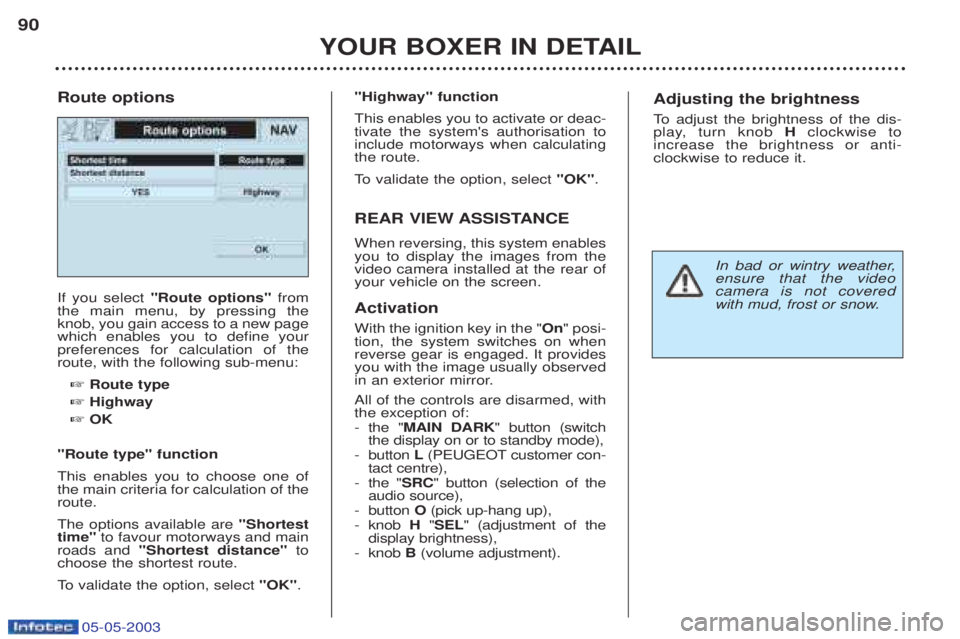
If you select
"Route options" from
the main menu, by pressing the knob, you gain access to a new pagewhich enables you to define yourpreferences for calculation of theroute, with the following sub-menu:
☞ Route type
☞ Highway
☞ OK
"Route type" function This enables you to choose one of the main criteria for calculation of theroute. The options available are "Shortest
time" to favour motorways and main
roads and "Shortest distance" to
choose the shortest route.
To validate the option, select "OK".
Route options
"Highway" function This enables you to activate or deac- tivate the system's authorisation toinclude motorways when calculatingthe route.
To
validate the option, select "OK".
REAR VIEW ASSISTANCE When reversing, this system enables you to display the images from thevideo camera installed at the rear ofyour vehicle on the screen. Activation With the ignition key in the " On" posi-
tion, the system switches on when reverse gear is engaged. It providesyou with the image usually observed
in an exterior mirror. All of the controls are disarmed, with the exception of: - the " MAIN DARK " button (switch
the display on or to standby mode),
- button L(PEUGEOT customer con-
tact centre),
- the " SRC" button (selection of the
audio source),
- button O(pick up-hang up),
- knob H"SEL " (adjustment of the
display brightness),
- knob B(volume adjustment).Adjusting the brightness
To adjust the brightness of the dis-
play, turn knob Hclockwise to
increase the brightness or anti- clockwise to reduce it.
In bad or wintry weather, ensure that the videocamera is not covered
with mud, frost or snow.
Page 104 of 180
05-05-2003
YOUR BOXER IN DETAIL105
SEAT BELTS
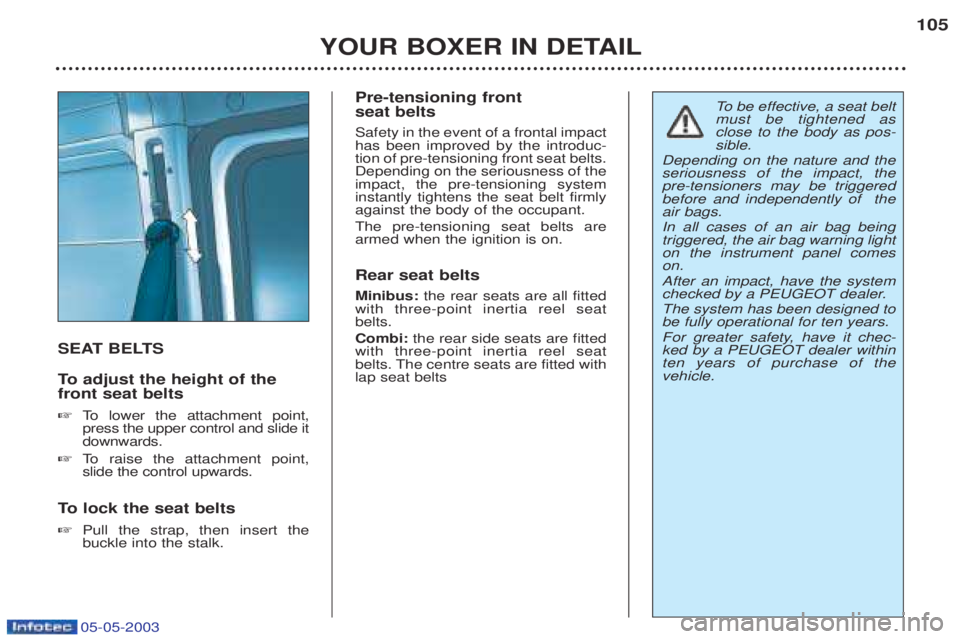
To
adjust the height of the
front seat belts ☞ To lower the attachment point,
press the upper control and slide it downwards.
☞ To raise the attachment point,
slide the control upwards.
To lock the seat belts
☞ Pull the strap, then insert thebuckle into the stalk. Pre-tensioning front seat belts Safety in the event of a frontal impact has been improved by the introduc-tion of pre-tensioning front seat belts.Depending on the seriousness of theimpact, the pre-tensioning systeminstantly tightens the seat belt firmlyagainst the body of the occupant. The pre-tensioning seat belts are armed when the ignition is on. Rear seat belts Minibus:
the rear seats are all fitted
with three-point inertia reel seat belts. Combi: the rear side seats are fitted
with three-point inertia reel seat
belts. The centre seats are fitted withlap seat belts
To be effective, a seat belt
must be tightened as close to the body as pos-sible.
Depending on the nature and theseriousness of the impact, thepre-tensioners may be triggeredbefore and independently of theair bags. In all cases of an air bag being triggered, the air bag warning lighton the instrument panel comeson. After an impact, have the system
checked by a PEUGEOT dealer. The system has been designed to be fully operational for ten years.
For greater safety, have it chec- ked by a PEUGEOT dealer withinten years of purchase of thevehicle.
Page 105 of 180
05-05-2003
YOUR BOXER IN DETAIL
106
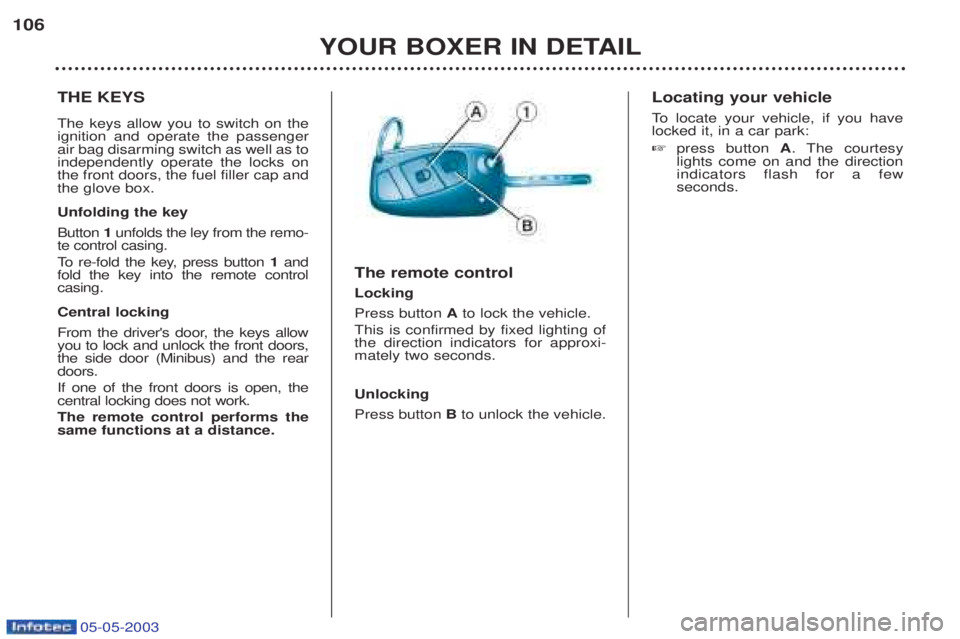
THE KEYS The keys allow you to switch on the ignition and operate the passengerair bag disarming switch as well as toindependently operate the locks onthe front doors, the fuel filler cap andthe glove box. Unfolding the key Button
1unfolds the ley from the remo-
te control casing.
To re-fold the key, press button 1and
fold the key into the remote control casing. Central locking
From the driver's door, the keys allow you to lock and unlock the front doors,the side door (Minibus) and the reardoors. If one of the front doors is open, the central locking does not work. The remote control performs the same functions at a distance. The remote control Locking Press button
Ato lock the vehicle.
This is confirmed by fixed lighting of the direction indicators for approxi-mately two seconds. Unlocking Press button Bto unlock the vehicle. Locating your vehicle
To
locate your vehicle, if you have
locked it, in a car park: ☞ press button A. The courtesy
lights come on and the direction indicators flash for a fewseconds.
Page 106 of 180
YOUR BOXER IN DETAIL107
Programming the remote control ☞ Switch off the ignition.
☞ Switch the ignition on again.
☞ Immediately press button A.
☞ Switch off the ignition and remo- ve the remote control key from
the ignition lock. The remotecontrol is now working again.
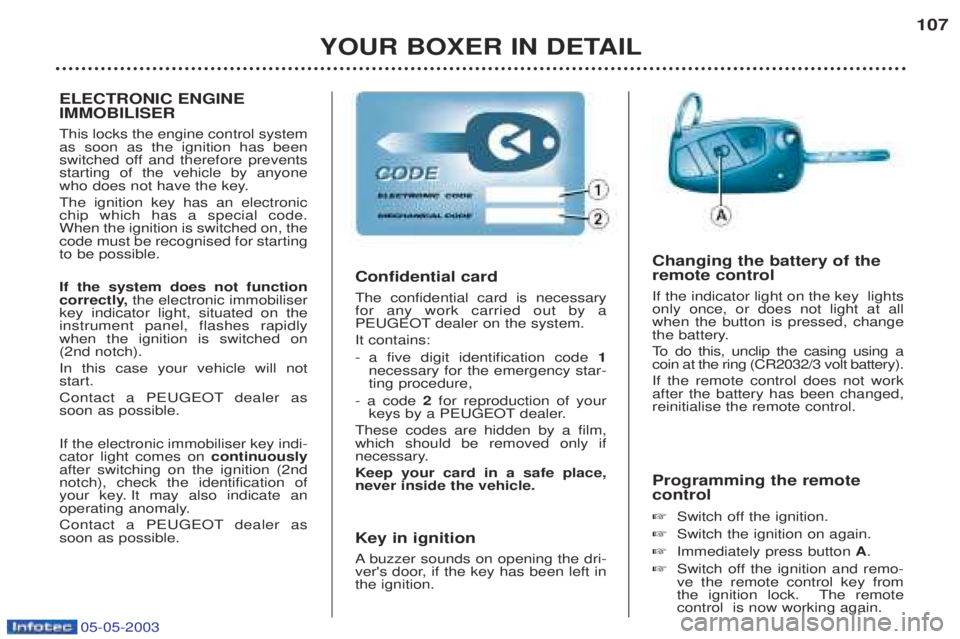
Confidential card The confidential card is necessary for any work carried out by a
PEUGEOT dealer on the system. It contains:
-a five digit identification code 1
necessary for the emergency star- ting procedure,
- a code 2for reproduction of your
keys by a PEUGEOT dealer.
These codes are hidden by a film,which should be removed only if
necessary. Keep your card in a safe place, never inside the vehicle.
Key in ignition A buzzer sounds on opening the dri-
ver's door, if the key has been left in the ignition. Changing the battery of the remote control If the indicator light on the key lights only once, or does not light at allwhen the button is pressed, change
the battery.
To
do this, unclip the casing using a
coin at the ring (CR2032/3 volt battery).If the remote control does not work after the battery has been changed,reinitialise the remote control.
ELECTRONIC ENGINE IMMOBILISER This locks the engine control system as soon as the ignition has been
switched off and therefore preventsstarting of the vehicle by anyone
who does not have the key. The ignition key has an electronic chip which has a special code.When the ignition is switched on, thecode must be recognised for startingto be possible. If the system does not function
correctly, the electronic immobiliser
key indicator light, situated on theinstrument panel, flashes rapidlywhen the ignition is switched on(2nd notch). In this case your vehicle will not start.
Contact a PEUGEOT dealer as soon as possible. If the electronic immobiliser key indi- cator light comes on continuously
after switching on the ignition (2ndnotch), check the identification of
your key. It may also indicate an
operating anomaly.
Contact a PEUGEOT dealer as soon as possible.
05-05-2003