audio Peugeot Boxer 2013 User Guide
[x] Cancel search | Manufacturer: PEUGEOT, Model Year: 2013, Model line: Boxer, Model: Peugeot Boxer 2013Pages: 184, PDF Size: 4.53 MB
Page 99 of 184
Bluetooth hands-free system
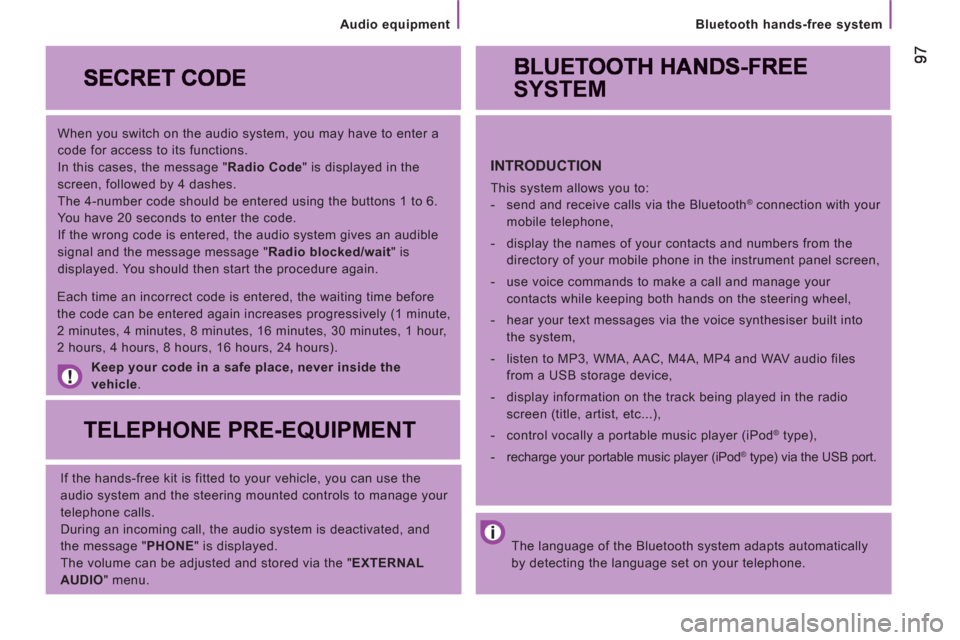
When you switch on the audio system, you may have to enter a
code for access to its functions.
In this cases, the message " Radio Code
" is displayed in the
screen, followed by 4 dashes.
The 4-number code should be entered using the buttons 1 to 6.
You have 20 seconds to enter the code.
If the wrong code is entered, the audio system gives an audible
signal and the message message " Radio blocked/wait
" is
displayed. You should then start the procedure again.
Keep your code in a safe place, never inside the
vehicle
.
TELEPHONE PRE-EQUIPMENT
If the hands-free kit is fitted to your vehicle, you can use the
audio system and the steering mounted controls to manage your
telephone calls.
During an incoming call, the audio system is deactivated, and
the message " PHONE
" is displayed.
The volume can be adjusted and stored via the " EXTERNAL
AUDIO
" menu.
Each time an incorrect code is entered, the waiting time before
the code can be entered again increases progressively (1 minute,
2 minutes, 4 minutes, 8 minutes, 16 minutes, 30 minutes, 1 hour,
2 hours, 4 hours, 8 hours, 16 hours, 24 hours).
The language of the Bluetooth system adapts automatically
by detecting the language set on your telephone.
SYSTEM
INTRODUCTION
This system allows you to:
- send and receive calls via the Bluetooth® connection with your
mobile telephone,
- display the names of your contacts and numbers from the
directory of your mobile phone in the instrument panel screen,
- use voice commands to make a call and manage your
contacts while keeping both hands on the steering wheel,
- hear your text messages via the voice synthesiser built into
the system,
- listen to MP3, WMA, AAC, M4A, MP4 and WAV audio files
from a USB storage device,
- display information on the track being played in the radio
screen (title, artist, etc...),
- control vocally a portable music player (iPod
® type),
- recharge your portable music player (iPod
® type) via the USB port.
Audio equipment
Page 100 of 184
98
Bluetooth hands-free system
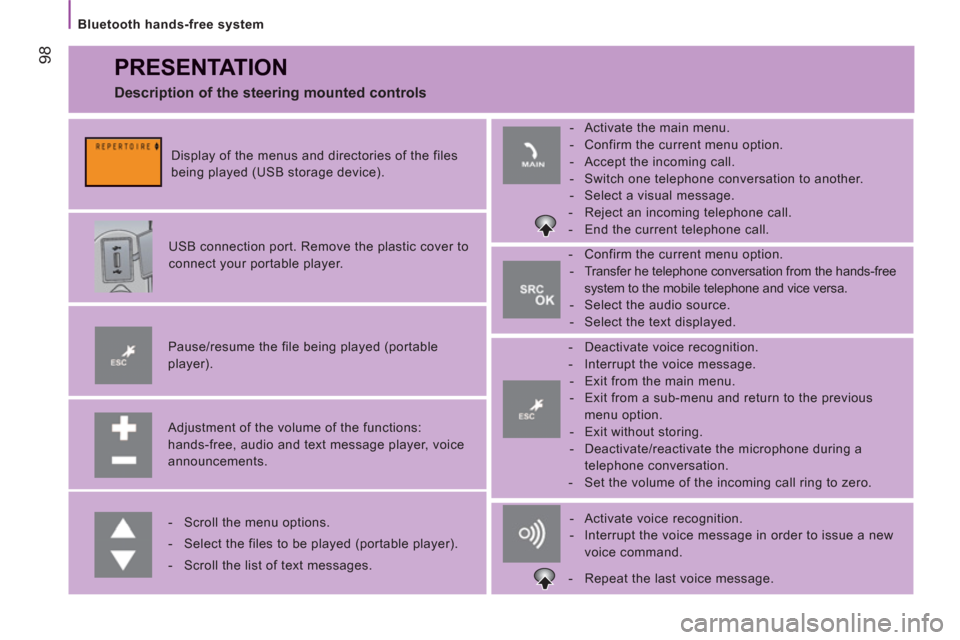
PRESENTATION
Adjustment of the volume of the functions:
hands-free, audio and text message player, voice
announcements.
Pause/resume the file being played (portable
player).
USB connection port. Remove the plastic cover to
connect your portable player.
Display of the menus and directories of the files
being played (USB storage device).
- Scroll the menu options.
- Select the files to be played (portable player).
- Scroll the list of text messages.
- Activate voice recognition.
- Interrupt the voice message in order to issue a new
voice command.
- Deactivate voice recognition.
- Interrupt the voice message.
- Exit from the main menu.
- Exit from a sub-menu and return to the previous
menu option.
- Exit without storing.
- Deactivate/reactivate the microphone during a
telephone conversation.
- Set the volume of the incoming call ring to zero.
- Confirm the current menu option.
- Transfer he telephone conversation from the hands-free
system to the mobile telephone and vice versa.
- Select the audio source.
- Select the text displayed.
- Activate the main menu.
- Confirm the current menu option.
- Accept the incoming call.
- Switch one telephone conversation to another.
- Select a visual message.
- Reject an incoming telephone call.
- End the current telephone call.
Description of the steering mounted controls
- Repeat the last voice message.
Page 105 of 184
103
Bluetooth hands-free system
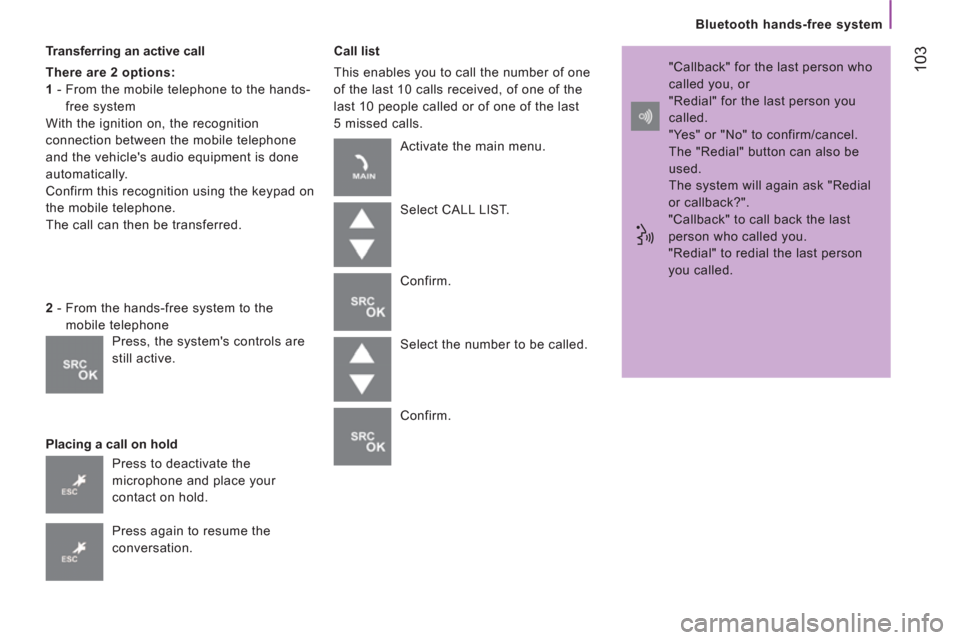
Transferring an active call
There are 2 options:
1
- From the mobile telephone to the hands-
free system
With the ignition on, the recognition
connection between the mobile telephone
and the vehicle's audio equipment is done
automatically.
Confirm this recognition using the keypad on
the mobile telephone.
The call can then be transferred.
Placing a call on hold
Call list
This enables you to call the number of one
of the last 10 calls received, of one of the
last 10 people called or of one of the last
5 missed calls.
2
- From the hands-free system to the
mobile telephone
Press to deactivate the
microphone and place your
contact on hold.
Press again to resume the
conversation. Activate the main menu.
Select CALL LIST.
Confirm.
Select the number to be called.
Confirm. "Callback" for the last person who
called you, or
"Redial" for the last person you
called.
"Yes" or "No" to confirm/cancel.
The "Redial" button can also be
used.
The system will again ask "Redial
or callback?".
"Callback" to call back the last
person who called you.
"Redial" to redial the last person
you called.
Press, the system's controls are
still active.
Page 109 of 184
107
Bluetooth hands-free system
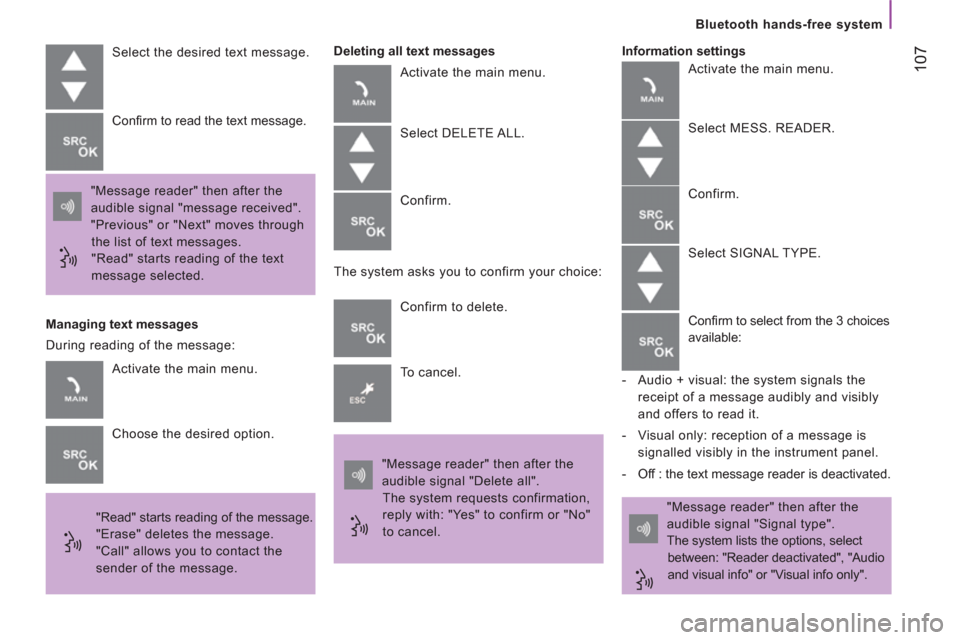
Select the desired text message.
"Message reader" then after the
audible signal "message received".
"Previous" or "Next" moves through
the list of text messages.
"Read" starts reading of the text
message selected. Confi rm to read the text message.
Managing text messages
"Read" starts reading of the message.
"Erase" deletes the message.
"Call" allows you to contact the
sender of the message.
Deleting all text messages
Activate the main menu.
Select DELETE ALL.
Confirm.
The system asks you to confirm your choice:
Confirm to delete.
To cancel.
"Message reader" then after the
audible signal "Delete all".
The system requests confirmation,
reply with: "Yes" to confirm or "No"
to cancel. "Message reader" then after the
audible signal "Signal type".
The system lists the options, select
between: "Reader deactivated", "Audio
and visual info" or "Visual info only".
Information settings
Activate the main menu.
Choose the desired option. During reading of the message: Activate the main menu.
Select MESS. READER.
Confirm.
Select SIGNAL TYPE.
Confi rm to select from the 3 choices
available:
- Audio + visual: the system signals the
receipt of a message audibly and visibly
and offers to read it.
- Visual only: reception of a message is
signalled visibly in the instrument panel.
- Off : the text message reader is deactivated.
Page 112 of 184
11
0
Bluetooth hands-free system
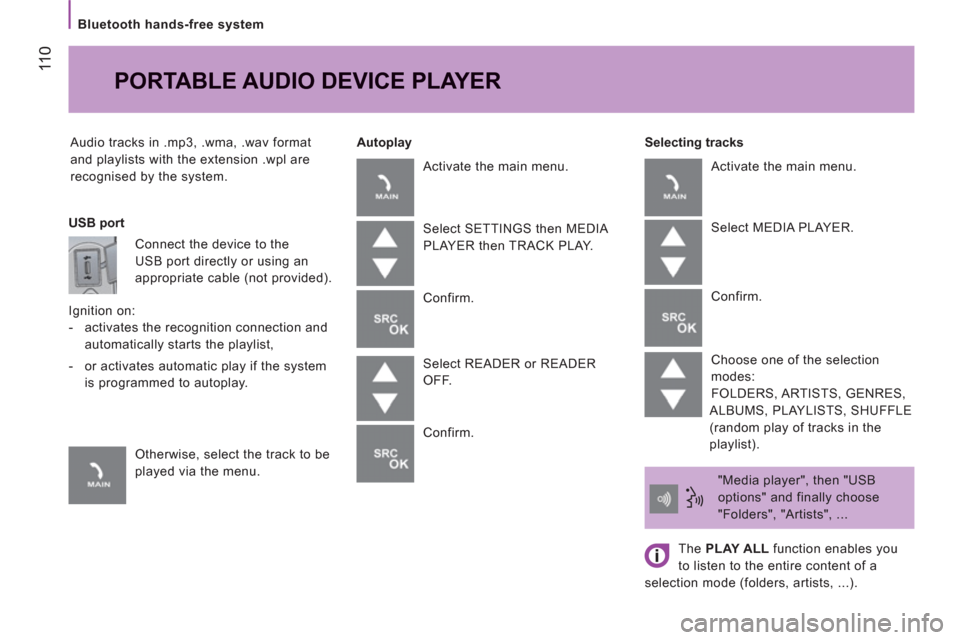
Audio tracks in .mp3, .wma, .wav format
and playlists with the extension .wpl are
recognised by the system.
Selecting tracks
PORTABLE AUDIO DEVICE PLAYER
Autoplay
USB port
Connect the device to the
USB port directly or using an
appropriate cable (not provided).
Ignition on:
- activates the recognition connection and
automatically starts the playlist,
- or activates automatic play if the system
is programmed to autoplay.
Otherwise, select the track to be
played via the menu. Activate the main menu.
Select SETTINGS then MEDIA
PLAYER then TRACK PLAY.
Confirm.
Select READER or READER
OFF.
Confirm. Activate the main menu.
Select MEDIA PLAYER.
Confirm.
Choose one of the selection
modes:
FOLDERS, ARTISTS, GENRES,
ALBUMS, PLAYLISTS, SHUFFLE
(random play of tracks in the
playlist).
"Media player", then "USB
options" and finally choose
"Folders", "Artists", ...
The PLAY ALL
function enables you
to listen to the entire content of a
selection mode (folders, artists, ...).
Page 113 of 184
111
Bluetooth hands-free system
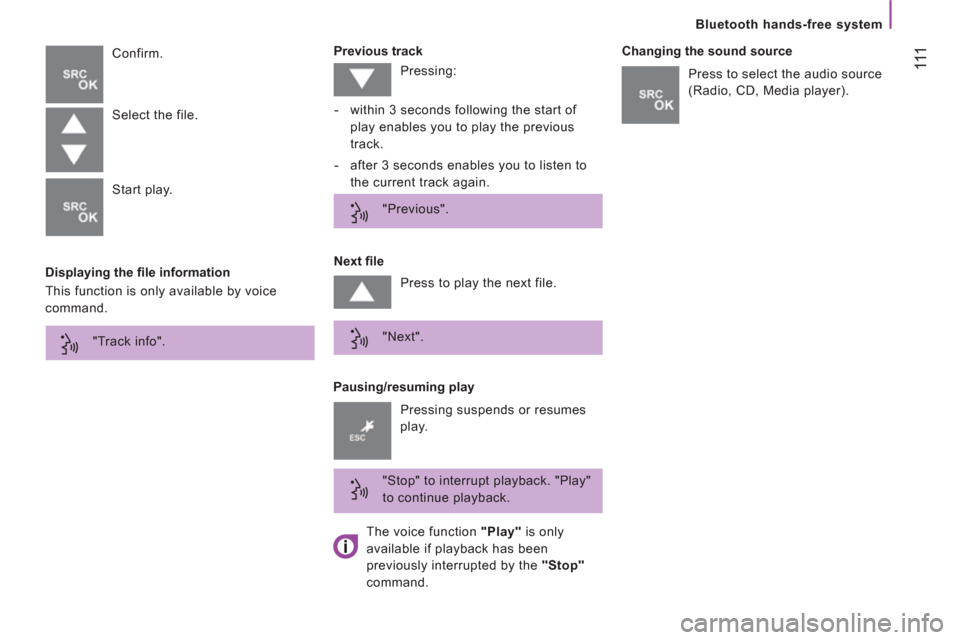
Displaying the fi le information
Previous track
Confirm.
Pausing/resuming play
Next fi le
Changing the sound source
Select the file.
Start play.
This function is only available by voice
command. Pressing:
- within 3 seconds following the start of
play enables you to play the previous
track.
- after 3 seconds enables you to listen to
the current track again.
"Previous".
Press to play the next file.
"Next".
"Stop" to interrupt playback. "Play"
to continue playback. Press to select the audio source
(Radio, CD, Media player).
Pressing suspends or resumes
play. "Track info".
The voice function "Play"
is only
available if playback has been
previously interrupted by the "Stop"
command.
Page 114 of 184
11 2
Bluetooth hands-free system
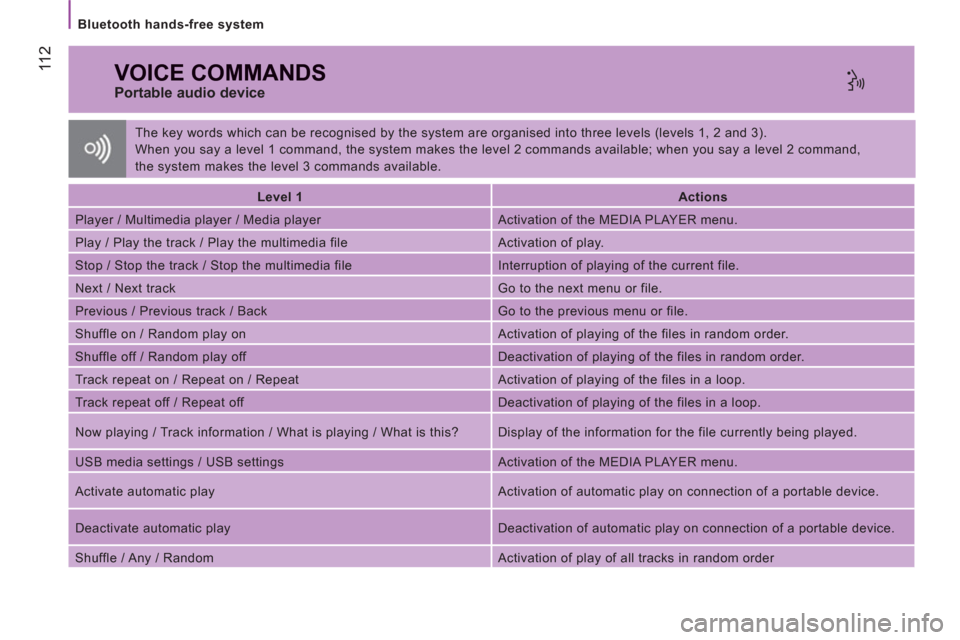
VOICE COMMANDS
Portable audio device
Level 1
Actions
Player / Multimedia player / Media player Activation of the MEDIA PLAYER menu.
Play / Play the track / Play the multimedia file Activation of play.
Stop / Stop the track / Stop the multimedia file Interruption of playing of the current file.
Next / Next track Go to the next menu or file.
Previous / Previous track / Back Go to the previous menu or file.
Shuffle on / Random play on Activation of playing of the files in random order.
Shuffle off / Random play off Deactivation of playing of the files in random order.
Track repeat on / Repeat on / Repeat Activation of playing of the files in a loop.
Track repeat off / Repeat off Deactivation of playing of the files in a loop.
Now playing / Track information / What is playing / What is this? Display of the information for the file currently being played.
USB media settings / USB settings Activation of the MEDIA PLAYER menu.
Activate automatic play Activation of automatic play on connection of a portable device.
Deactivate automatic play Deactivation of automatic play on connection of a portable device.
Shuffle / Any / Random Activation of play of all tracks in random order The key words which can be recognised by the system are organised into three levels (levels 1, 2 and 3).
When you say a level 1 command, the system makes the level 2 commands available; when you say a level 2 command,
the system makes the level 3 commands available.
Page 138 of 184
Equipment
136
Another range is also available, structured
around comfort, leisure and maintenance:
Anti-theft alarm, window etching, first aid
kit, high visibility safety jacket, rear parking
sensors, warning triangle, ...
Front seat covers compatible with aibags,
rubber mats, carpet mats, snow chains.
To prevent the mat from becoming caught
under the pedals:
- ensure that the mat and its fixings are
positioned correctly,
- never fit one mat on top of another. Audio equipment, hands-free system,
speakers, navigation, ... Trims, front mud flaps, rear mud flaps,
wooden floor, deflectors...
Installation of radiocommunication
transmitters
You are advised to contact a representative
of the PEUGEOT marque before installing
accessory radiocommunication transmitters
with external aerial on your vehicle.
The PEUGEOT Network will inform you of the
specifi cations (frequency waveband, maximum
output power, aerial position, specifi c
installation conditions) of the transmitters
which can be fi tted, in accordance with the
Motor Vehicle Electromagnetic Compatibility
Directive (2004/104/EC). Screenwash, interior and exterior cleaning
and maintenance products, replacement
bulbs, ...
The fitting of electrical equipment
or accessories which are not
recommended by Automobiles PEUGEOT
may result in the failure of your vehicle's
electronic system.
Please note this specific warning. You
are advised to contact a representative
of the Marque to be shown the range of
recommended equipment and accessories.
Depending on the country in which the
vehicle is sold or operated, it is compulsory
to have a high visibility safety jacket,
warning triangle and replacement bulbs
available in the vehicle.
Page 160 of 184
Changing a fuse
158
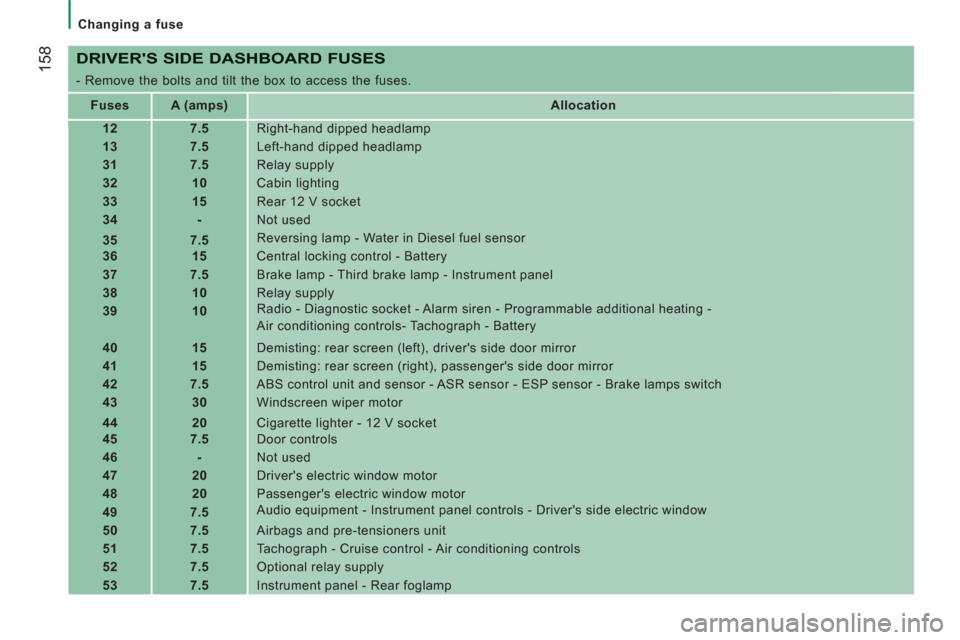
DRIVER'S SIDE DASHBOARD FUSES
- Remove the bolts and tilt the box to access the fuses.
Fuses
A (amps)
Allocation
12
7.5
Right-hand dipped headlamp
13
7.5
Left-hand dipped headlamp
31
7.5
Relay supply
32
10
Cabin lighting
33
15
Rear 12 V socket
34
-
Not used
35
7.5
Reversing lamp - Water in Diesel fuel sensor
36
15
Central locking control - Battery
37
7.5
Brake lamp - Third brake lamp - Instrument panel
38
10
Relay supply
39
10
Radio - Diagnostic socket - Alarm siren - Programmable additional heating -
Air conditioning controls- Tachograph - Battery
40
15
Demisting: rear screen (left), driver's side door mirror
41
15
Demisting: rear screen (right), passenger's side door mirror
42
7.5
ABS control unit and sensor - ASR sensor - ESP sensor - Brake lamps switch
43
30
Windscreen wiper motor
44
20
Cigarette lighter - 12 V socket
45
7.5
Door controls
46
-
Not used
47
20
Driver's electric window motor
48
20
Passenger's electric window motor
49
7.5
Audio equipment - Instrument panel controls - Driver's side electric window
50
7.5
Airbags and pre-tensioners unit
51
7.5
Tachograph - Cruise control - Air conditioning controls
52
7.5
Optional relay supply
53
7.5
Instrument panel - Rear foglamp
Page 178 of 184
17
6
Instruments and controls
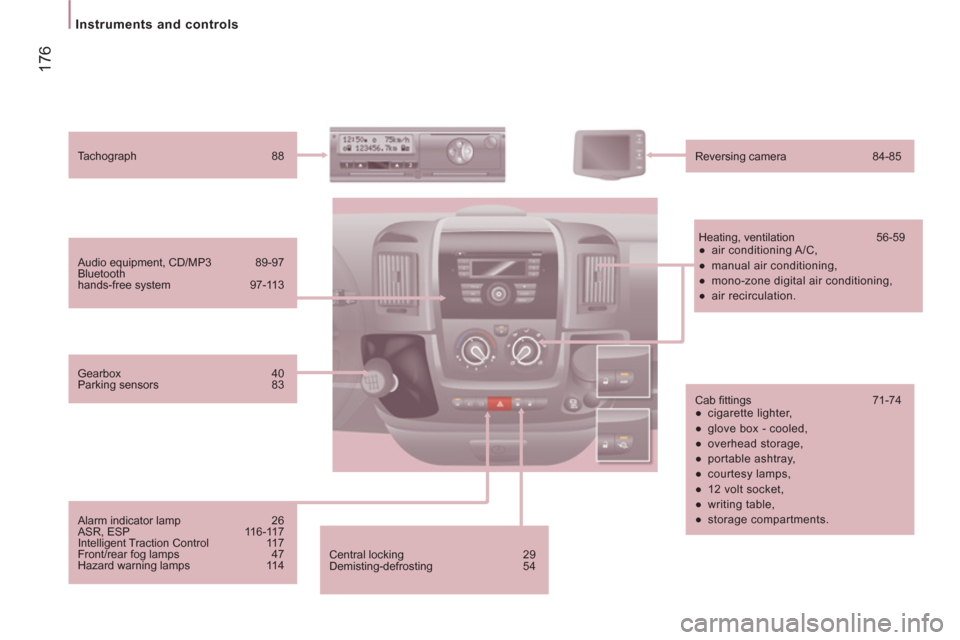
Central locking 29
Demisting-defrosting 54
Audio equipment, CD/MP3 89-97
Bluetooth
hands-free system 97-113
Tachograph 88
Reversing camera 84-85
Heating, ventilation 56-59
●
air conditioning A/C,
●
manual air conditioning,
●
mono-zone digital air conditioning,
●
air recirculation.
Cab fi ttings 71-74
●
cigarette lighter,
●
glove box - cooled,
●
overhead storage,
●
portable ashtray,
●
courtesy lamps,
●
12 volt socket,
●
writing table,
●
storage compartments.
Gearbox 40
Parking sensors 83
Alarm indicator lamp 26
ASR, ESP 116-117
Intelligent Traction Control 117
Front/rear fog lamps 47
Hazard warning lamps 114