display Peugeot Boxer 2014 User Guide
[x] Cancel search | Manufacturer: PEUGEOT, Model Year: 2014, Model line: Boxer, Model: Peugeot Boxer 2014Pages: 240, PDF Size: 8.98 MB
Page 57 of 240
55
3
EASE OF USE and COMFORT
Steering mounted controls
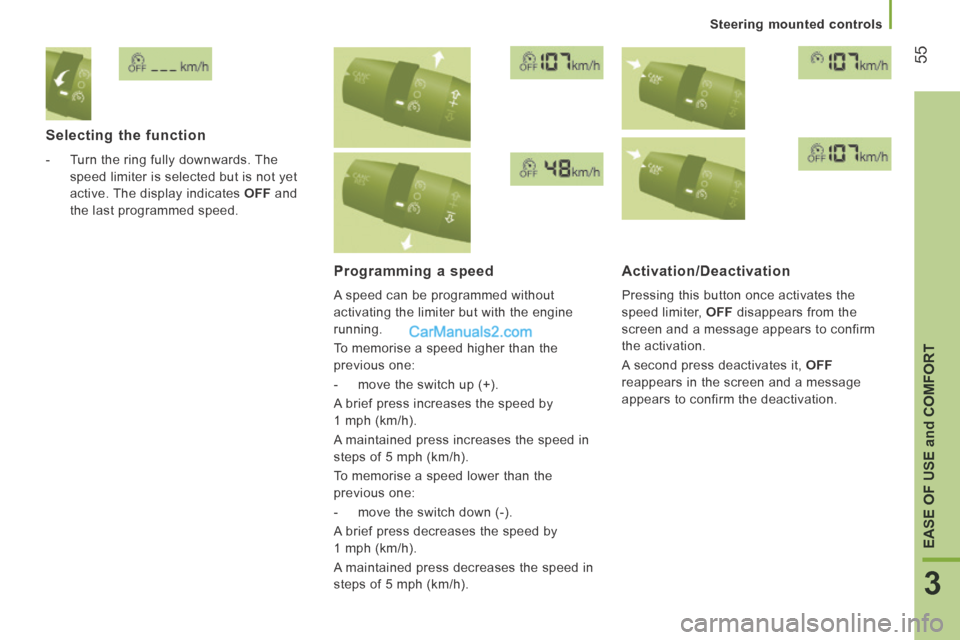
Selecting the function
- Turn the ring fully downwards. The speed limiter is selected but is not yet
active. The display indicates OFF and
the last programmed speed.
Programming a speed
A speed can be programmed without
activating the limiter but with the engine
running.
To memorise a speed higher than the
previous one:
- move the switch up (+).
A brief press increases the speed by
1 mph (km/h).
A maintained press increases the speed in
steps of 5 mph (km/h).
To memorise a speed lower than the
previous one:
- move the switch down (-).
A brief press decreases the speed by
1 mph (km/h).
A maintained press decreases the speed in
steps of 5 mph (km/h).
Activation/Deactivation
Pressing this button once activates the
speed limiter, OFF disappears from the
screen and a message appears to confirm
the activation.
A second press deactivates it, OFF
reappears in the screen and a message
appears to confirm the deactivation.
Page 64 of 240
Ventilation
62
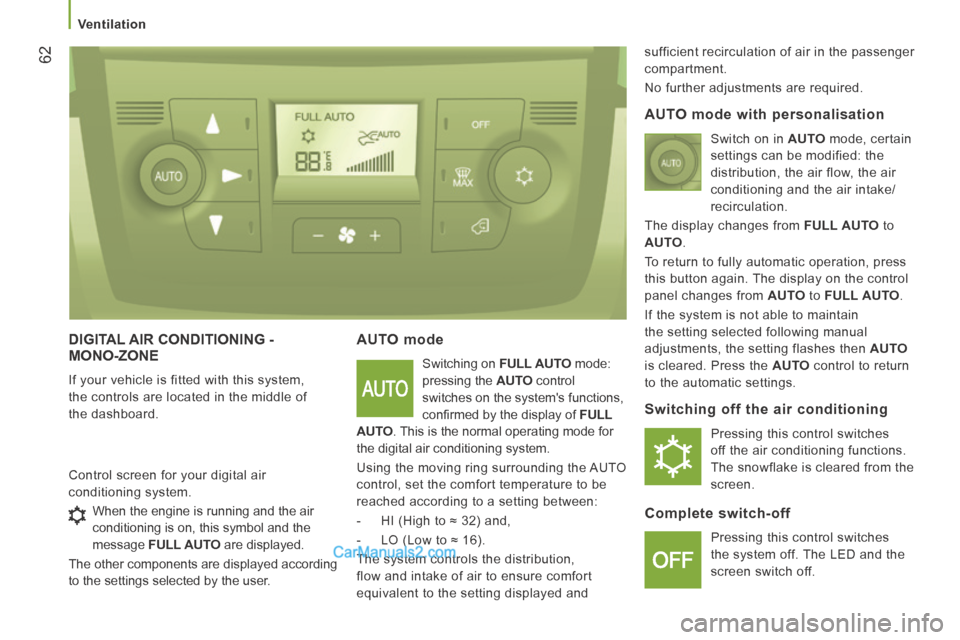
DIGITAL AIR CONDITIONING - MONO-ZONE
If your vehicle is fitted with this system,
the controls are located in the middle of
the dashboard.
AUTO mode
Switching on FULL AUTO mode:
pressing the AUTO control
switches on the system's functions,
confi rmed by the display of FULL
AUTO . This is the normal operating mode for
the digital air conditioning system.
Using the moving ring surrounding the AUTO
control, set the comfort temperature to be
reached according to a setting between:
- HI (High to ≈ 32) and,
- LO (Low to ≈ 16).
The system controls the distribution,
flow and intake of air to ensure comfort
equivalent to the setting displayed and sufficient recirculation of air in the passenger
compartment.
No further adjustments are required.
Control screen for your digital air
conditioning system.
AUTO mode with personalisation
Switch on in AUTO mode, certain
settings can be modified: the
distribution, the air flow, the air
conditioning and the air intake/
recirculation.
The display changes from FULL AUTO to
AUTO .
To return to fully automatic operation, press
this button again. The display on the control
panel changes from AUTO to FULL AUTO .
If the system is not able to maintain
the setting selected following manual
adjustments, the setting flashes then AUTO
is cleared. Press the AUTO control to return
to the automatic settings.
Switching off the air conditioning
Pressing this control switches
off the air conditioning functions.
The snowflake is cleared from the
screen.
Complete switch-off
Pressing this control switches
the system off. The LED and the
screen switch off.
When the engine is running and the air
conditioning is on, this symbol and the
message
FULL AUTO are displayed.
The other components are displayed according
to the settings selected by the user.
Page 68 of 240
Ventilation
66
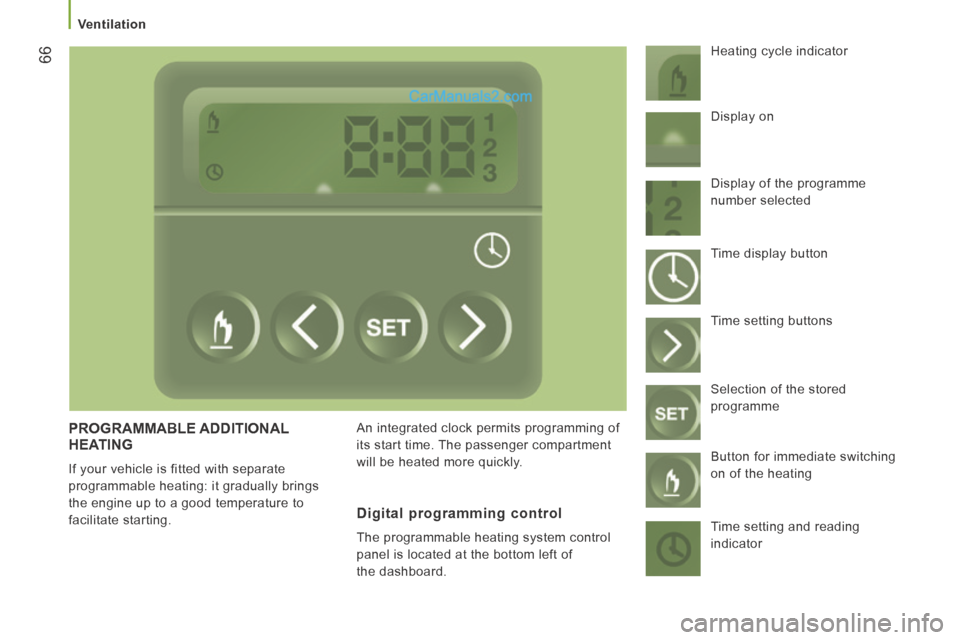
PROGRAMMABLE ADDITIONAL HEATING
If your vehicle is fitted with separate
programmable heating: it gradually brings
the engine up to a good temperature to
facilitate starting. An integrated clock permits programming of
its start time. The passenger compartment
will be heated more quickly. Heating cycle indicator
Digital programming control
The programmable heating system control
panel is located at the bottom left of
the dashboard. Display on
Display of the programme
number selected
Time display button
Time setting buttons
Selection of the stored
programme
Button for immediate switching
on of the heating
Time setting and reading
indicator
Page 69 of 240
Ventilation
67
3
EASE OF USE and COMFORT
Setting the time of the internal clock
Set the clock on the control panel before
programming the deferred switching on of
the heating.
Immediate switching on of the heating
Before switching on the heating, check that:
- the temperature setting control is in the "Hot air" position (red).
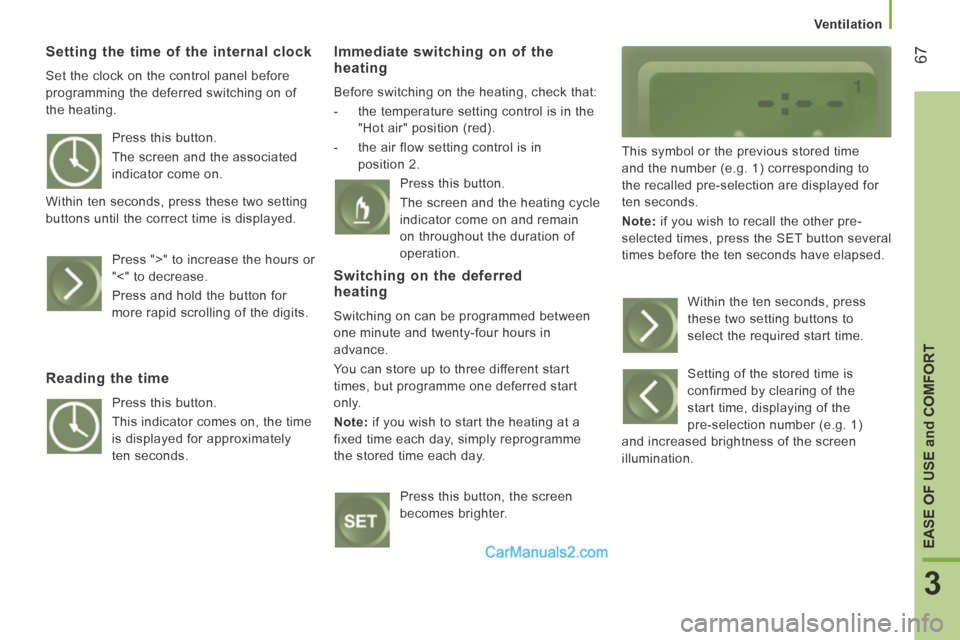
- the air flow setting control is in position 2. This symbol or the previous stored time
and the number (e.g. 1) corresponding to
the recalled pre-selection are displayed for
ten seconds.
Note: if you wish to recall the other pre-
selected times, press the SET button several
times before the ten seconds have elapsed.
Press this button.
The screen and the associated
indicator come on.
Within ten seconds, press these two setting
buttons until the correct time is displayed.
Press ">" to increase the hours or
"<" to decrease.
Press and hold the button for
more rapid scrolling of the digits.
Reading the time
Press this button.
This indicator comes on, the time
is displayed for approximately
ten seconds. Press this button.
The screen and the heating cycle
indicator come on and remain
on throughout the duration of
operation.
Switching on the deferred heating
Switching on can be programmed between
one minute and twenty-four hours in
advance.
You can store up to three different start
times, but programme one deferred start
only.
Note: if you wish to start the heating at a
fixed time each day, simply reprogramme
the stored time each day.
Press this button, the screen
becomes brighter. Within the ten seconds, press
these two setting buttons to
select the required start time.
Setting of the stored time is
confirmed by clearing of the
start time, displaying of the
pre-selection number (e.g. 1)
and increased brightness of the screen
illumination.
Page 87 of 240
Vehicle configuration
85
4
TECHNOLOGY on BOARD
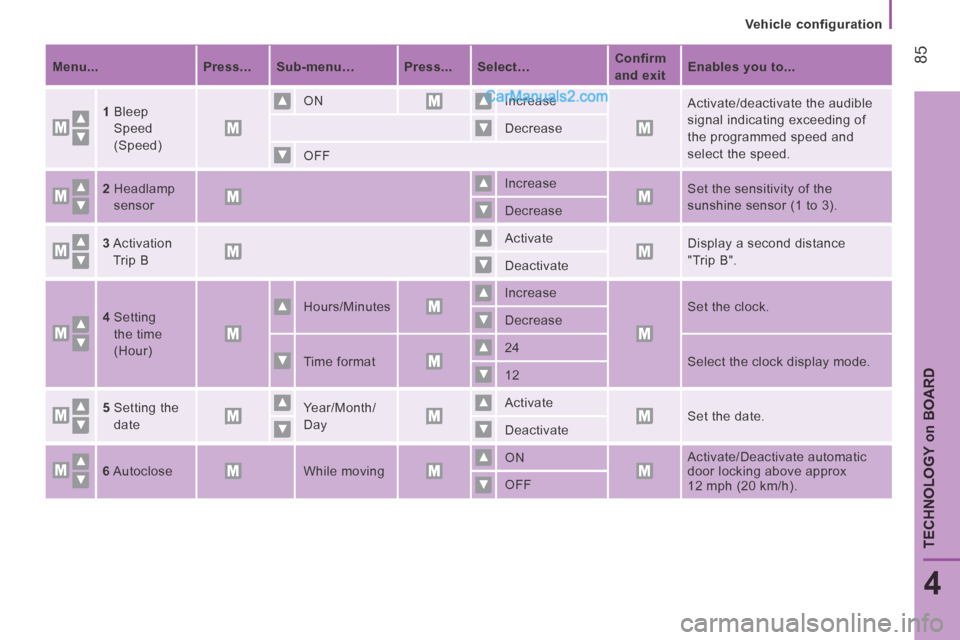
Menu... Press... Sub-menu… Press... Select… Confirm
and exit
Enables you to...
1 Bleep
Speed
(Speed) ON
Increase
Activate/deactivate the audible
signal indicating exceeding of
the programmed speed and
select the speed.
Decrease
OFF
2 Headlamp
sensor
Increase
Set the sensitivity of the
sunshine sensor (1 to 3).
Decrease
3 Activation
Trip B
Activate
Display a second distance
"Trip B".
Deactivate
4 Setting
the time
(Hour)
Hours/Minutes Increase
Set the clock.
Decrease
Time format 24
Select the clock display mode.
12
5 Setting the
date Year/Month/
Day Activate
Set the date.
Deactivate
6 Autoclose While moving ON
Activate/Deactivate automatic
door locking above approx
12 mph (20 km/h) .
OFF
Page 88 of 240
Vehicle configuration
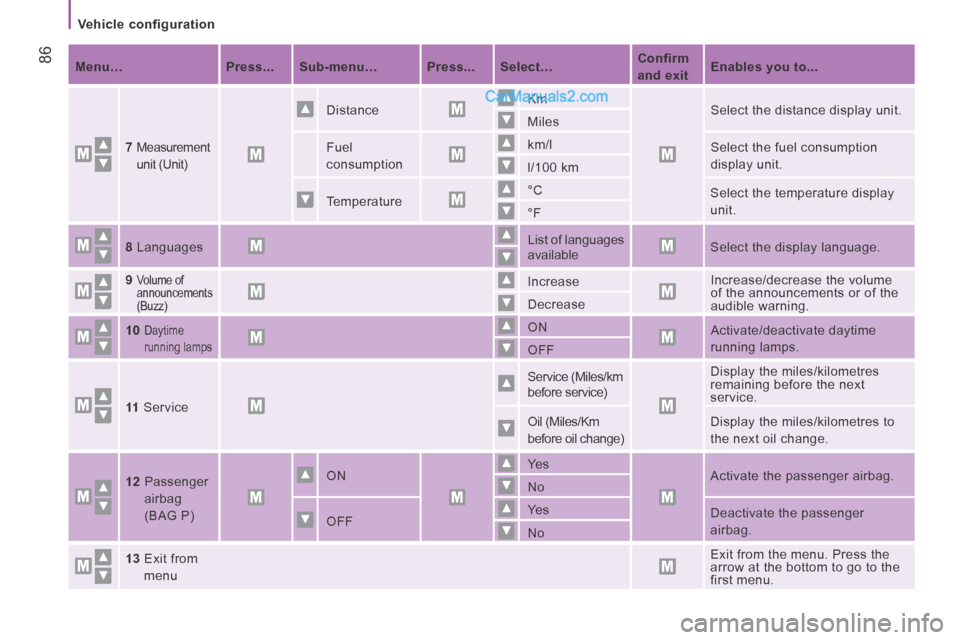
86 Menu… Press... Sub-menu… Press... Select… Confirm
and exit
Enables you to...
7
Measurement
unit (Unit)
Distance Km
Select the distance display unit.
Miles
Fuel
consumption km/l
Select the fuel consumption
display unit.
l/100 km
Temperature °C
Select the temperature display
unit.
°F
8 Languages List of languages
available
Select the display language.
9
Volume of
announcements
(Buzz) Increase
Increase/decrease the volume
of the announcements or of the
audible warning.
Decrease
10
Daytime
running lamps ON
Activate/deactivate daytime
running lamps.
OFF
11 Service Service (Miles/km
before service)
Display the miles/kilometres
remaining before the next
service.
Oil (Miles/Km
before oil change) Display the miles/kilometres to
the next oil change .
12 Passenger airbag
(BAG P)
ON Ye s
Activate the passenger airbag.
No
OFF Ye s
Deactivate the passenger
airbag.
No
13 Exit from menu
Exit from the menu. Press the
arrow at the bottom to go to the
first menu.
Page 89 of 240
Vehicle configuration
87
4
TECHNOLOGY on BOARD
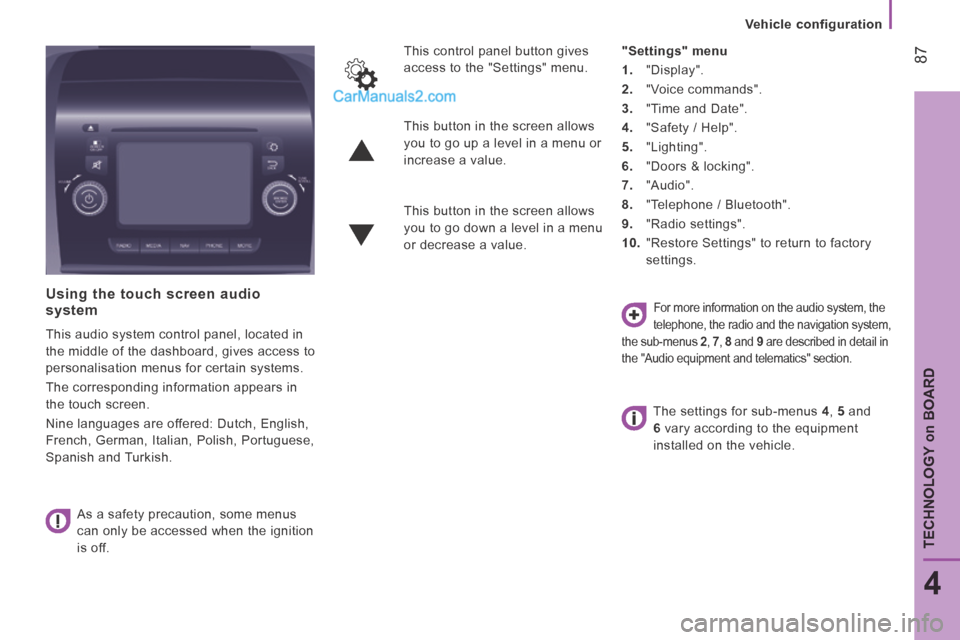
Using the touch screen audio system
This audio system control panel, located in
the middle of the dashboard, gives access to
personalisation menus for certain systems.
The corresponding information appears in
the touch screen.
Nine languages are offered: Dutch, English,
French, German, Italian, Polish, Portuguese,
Spanish and Turkish. As a safety precaution, some menus
can only be accessed when the ignition
is off. This control panel button gives
access to the "Settings" menu.
"Settings" menu
1. "Display".
2. "Voice commands".
3. "Time and Date".
4. "Safety / Help".
5. "Lighting".
6. "Doors & locking".
7. "Audio".
8. "Telephone / Bluetooth".
9. "Radio settings".
10. "Restore Settings" to return to factory
settings.
This button in the screen allows
you to go up a level in a menu or
increase a value.
This button in the screen allows
you to go down a level in a menu
or decrease a value.
For more information on the audio system, the
telephone, the radio and the navigation system,
the sub-menus 2 , 7 , 8 and 9 are described in detail in
the "Audio equipment and telematics" section.
The settings for sub-menus 4 , 5 and
6 vary according to the equipment
installed on the vehicle.
Page 90 of 240
Vehicle configuration
88 From the "Safety / Help" sub menu, you can:
- select "Reversing camera" to activate or deactivate its use (On, Off),
- select "Passenger airbag" to activate or deactivate its use (On, Off).
From the "Lighting" sub-menu, you can:
- select "Day lamps" to activate or deactivate their use (On, Off),
- select "Headlamp sensor" to adjust its sensitivity (1, 2, 3).
From the "Doors & locking", you can:
- select "Autoclose" to activate or deactivate its use (On, Off).
From the "Display" sub-menu, you can:
- select "Languages" and choose one of
the languages listed above,
- select "Units of measurement" to choose the units for fuel consumption
(l/100 km, mpg), distance (miles, km)
and temperature (°C, °F),
- select "Display Trip B" to switch trip B On or Off in the trip computer.
From the "Time and Date" sub-menu,
you can:
- select "Adjust time and format" to set the hour, minutes and seconds and choose
the format (24 h, 12 h with am or pm),
- select "Adjust Date" to set the day, month and year.
To set the time manually, "Synch Time"
must be Off.
Page 92 of 240
90
Vehicle data
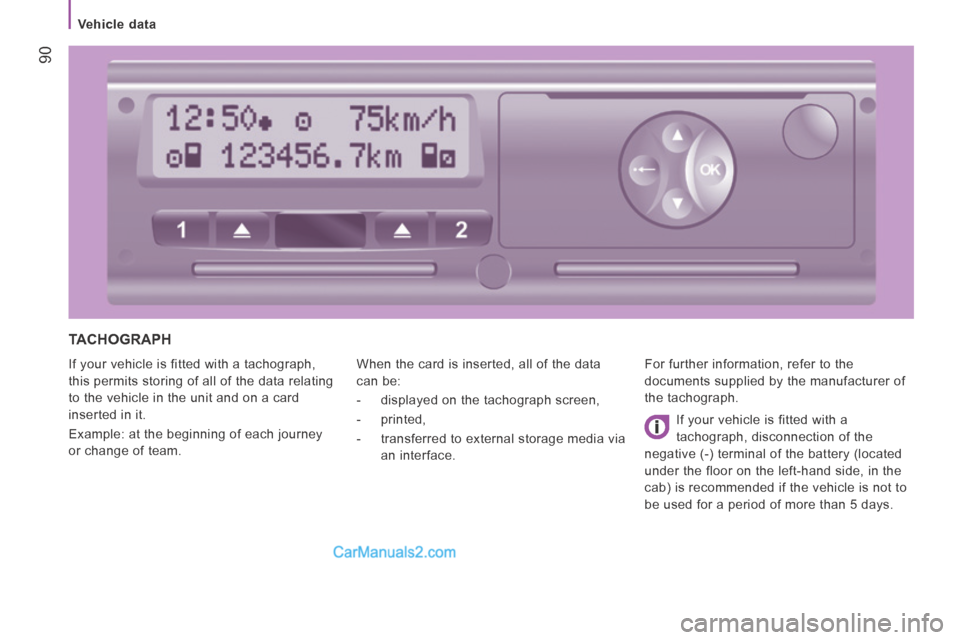
TACHOGRAPH
If your vehicle is fitted with a tachograph,
this permits storing of all of the data relating
to the vehicle in the unit and on a card
inserted in it.
Example: at the beginning of each journey
or change of team. When the card is inserted, all of the data
can be:
- displayed on the tachograph screen,
- printed,
- transferred to external storage media via
an interface. For further information, refer to the
documents supplied by the manufacturer of
the tachograph.
If your vehicle is fitted with a
tachograph, disconnection of the
negative (-) terminal of the battery (located
under the floor on the left-hand side, in the
cab) is recommended if the vehicle is not to
be used for a period of more than 5 days.
Page 94 of 240
Parking sensors
92
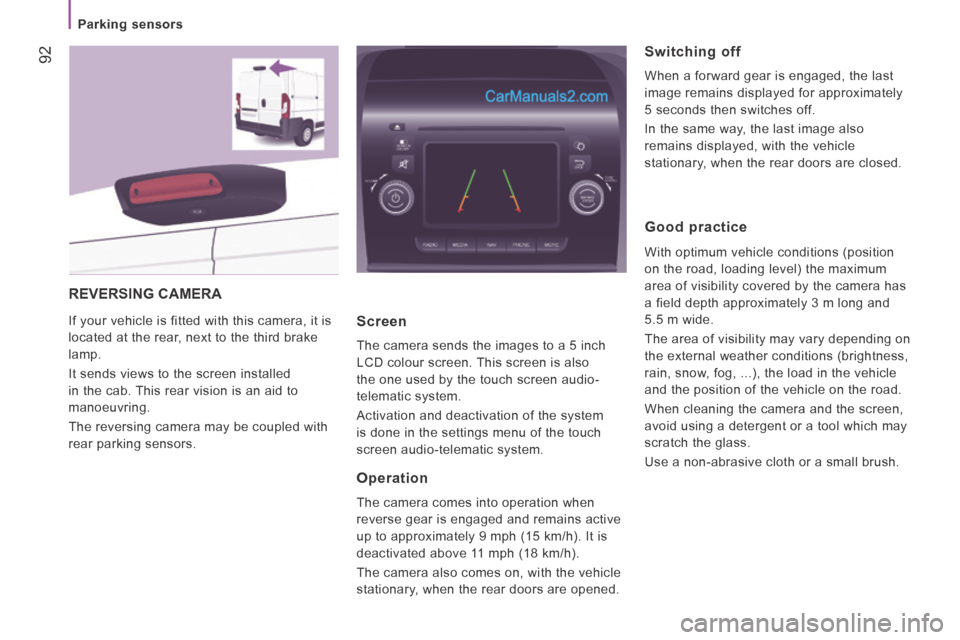
REVERSING CAMERA
If your vehicle is fitted with this camera, it is
located at the rear, next to the third brake
lamp.
It sends views to the screen installed
in the cab. This rear vision is an aid to
manoeuvring.
The reversing camera may be coupled with
rear parking sensors. Screen
The camera sends the images to a 5 inch
LCD colour screen. This screen is also
the one used by the touch screen audio-
telematic system.
Activation and deactivation of the system
is done in the settings menu of the touch
screen audio-telematic system.
Operation
The camera comes into operation when
reverse gear is engaged and remains active
up to approximately 9 mph (15 km/h). It is
deactivated above 11 mph (18 km/h).
The camera also comes on, with the vehicle
stationary, when the rear doors are opened.
Switching off
When a forward gear is engaged, the last
image remains displayed for approximately
5 seconds then switches off.
In the same way, the last image also
remains displayed, with the vehicle
stationary, when the rear doors are closed.
Good practice
With optimum vehicle conditions (position
on the road, loading level) the maximum
area of visibility covered by the camera has
a field depth approximately 3 m long and
5.5 m wide.
The area of visibility may vary depending on
the external weather conditions (brightness,
rain, snow, fog, ...), the load in the vehicle
and the position of the vehicle on the road.
When cleaning the camera and the screen,
avoid using a detergent or a tool which may
scratch the glass.
Use a non-abrasive cloth or a small brush.