display Peugeot Boxer 2014 Owner's Guide
[x] Cancel search | Manufacturer: PEUGEOT, Model Year: 2014, Model line: Boxer, Model: Peugeot Boxer 2014Pages: 240, PDF Size: 8.98 MB
Page 96 of 240
Loading assistance
94
Deactivation
Make a long press on both controls
simultaneously to deactivate the system.
The LEDs remain on. Return to the nominal floor height
Press the same number of times in reverse
as the level of the position displayed.
Reactivation
A second long press on both controls
simultaneously reactivates the system.
The LEDs go off.
Automatic correction of loading floor height
Above 12 mph (20 km/h), the system
automatically returns the rear height to its
nominal value.
Operating fault
If a fault occurs with the system,
this warning lamp comes on.
Good practice
Driving with the suspension set too high or
too low risks damaging components under
the body.
The height may be adjusted automatically to
take account of changes of temperature or
loading.
You must avoid using this control in the
following circumstances:
- when working underneath the vehicle,
- when changing a wheel,
- when the vehicle is being transported by lorry, train, ferry, boat, ...
Above 3 mph (5 km/h), the system
reactivates automatically. Have the system checked by a
PEUGEOT dealer or a qualified workshop.
Page 108 of 240
106
Airbags
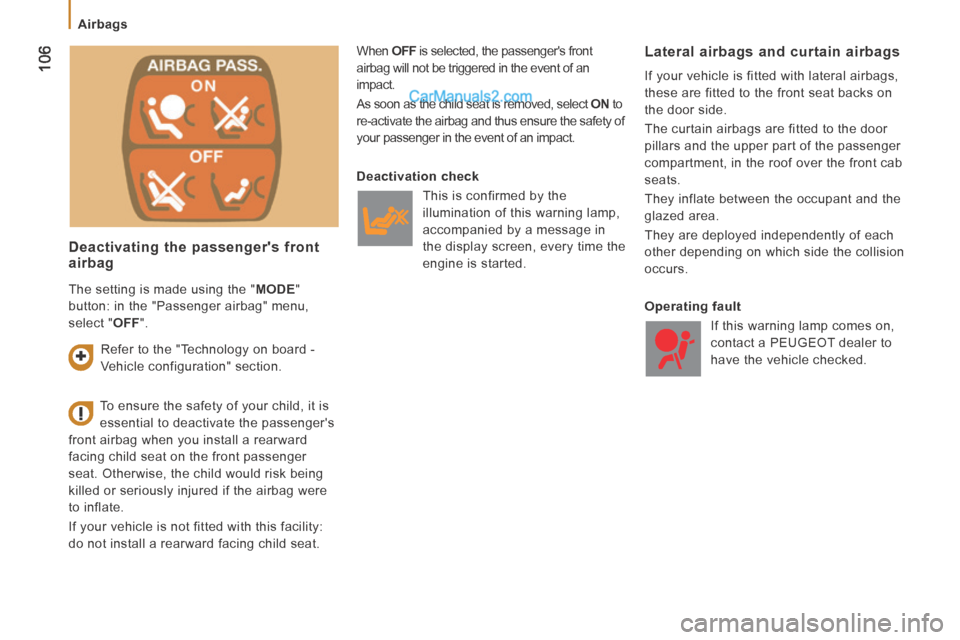
Deactivating the passenger's front airbag
When OFF is selected, the passenger's front
airbag will not be triggered in the event of an
impact.
As soon as the child seat is removed, select ON to
re-activate the airbag and thus ensure the safety of
your passenger in the event of an impact. Lateral airbags and curtain airbags
If your vehicle is fitted with lateral airbags,
these are fitted to the front seat backs on
the door side.
The curtain airbags are fitted to the door
pillars and the upper part of the passenger
compartment, in the roof over the front cab
seats.
They inflate between the occupant and the
glazed area.
They are deployed independently of each
other depending on which side the collision
occurs.
To ensure the safety of your child, it is
essential to deactivate the passenger's
front airbag when you install a rearward
facing child seat on the front passenger
seat. Otherwise, the child would risk being
killed or seriously injured if the airbag were
to inflate.
If your vehicle is not fitted with this facility:
do not install a rearward facing child seat. Deactivation check
T his is confirmed by the
illumination of this warning lamp,
accompanied by a message in
the display screen, every time the
engine is started.
Operating fault If this warning lamp comes on,
contact a PEUGEOT dealer to
have the vehicle checked.
Refer to the "Technology on board -
Vehicle configuration" section.
The setting is made using the "
MODE "
button: in the "Passenger airbag" menu,
select " OFF ".
Page 135 of 240
133
QUICK HELP
8
Discharged battery
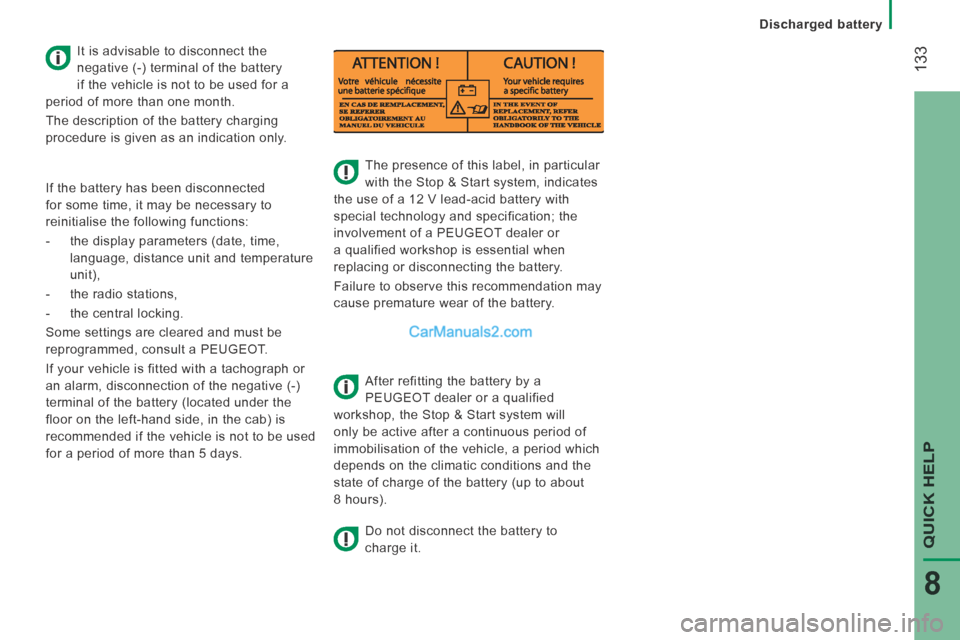
The presence of this label, in particular
with the Stop & Start system, indicates
the use of a 12 V lead-acid battery with
special technology and specification; the
involvement of a PEUGEOT dealer or
a qualified workshop is essential when
replacing or disconnecting the battery.
Failure to observe this recommendation may
cause premature wear of the battery.
After refitting the battery by a
PEUGEOT dealer or a qualified
workshop, the Stop & Start system will
only be active after a continuous period of
immobilisation of the vehicle, a period which
depends on the climatic conditions and the
state of charge of the battery (up to about
8 hours).
Do not disconnect the battery to
charge it.
It is advisable to disconnect the
negative (-) terminal of the battery
if the vehicle is not to be used for a
period of more than one month.
The description of the battery charging
procedure is given as an indication only.
If the battery has been disconnected
for some time, it may be necessary to
reinitialise the following functions:
- the display parameters (date, time, language, distance unit and temperature
unit),
- the radio stations,
- the central locking.
Some settings are cleared and must be
reprogrammed, consult a PEUGEOT.
If your vehicle is fitted with a tachograph or
an alarm, disconnection of the negative (-)
terminal of the battery (located under the
floor on the left-hand side, in the cab) is
recommended if the vehicle is not to be used
for a period of more than 5 days.
Page 170 of 240
02
10.4
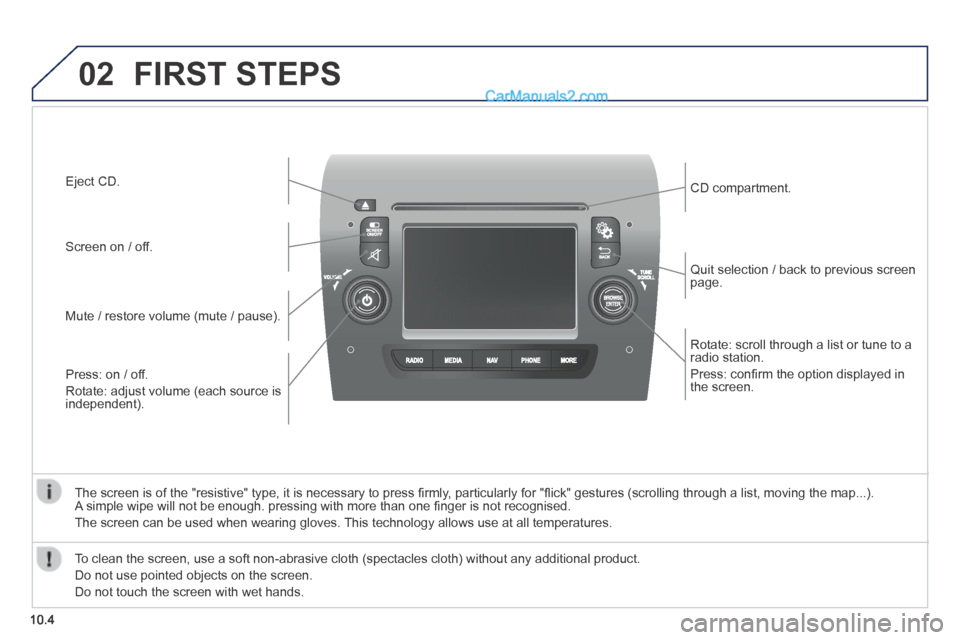
Rotate: scroll through a list or tune to a radio station.
Press: confi rm the option displayed in the screen.
Quit selection / back to previous screen page.
CD compartment.
Press: on / off.
Rotate: adjust volume (each source is independent).
Mute / restore volume (mute / pause).
Screen on / off.
Eject CD.
The screen is of the "resistive" type, it is necessary to press fi rmly, particularly for "fl ick" gestures (scrolling through a list, moving the map...). A simple wipe will not be enough. pressing with more than one fi nger is not recognised.
The screen can be used when wearing gloves. This technology allows use at all temperatures.
FIRST STEPS
To clean the screen, use a soft non-abrasive cloth (spectacles cloth) w\
ithout any additional product.
Do not use pointed objects on the screen.
Do not touch the screen with wet hands.
Page 173 of 240
10.7
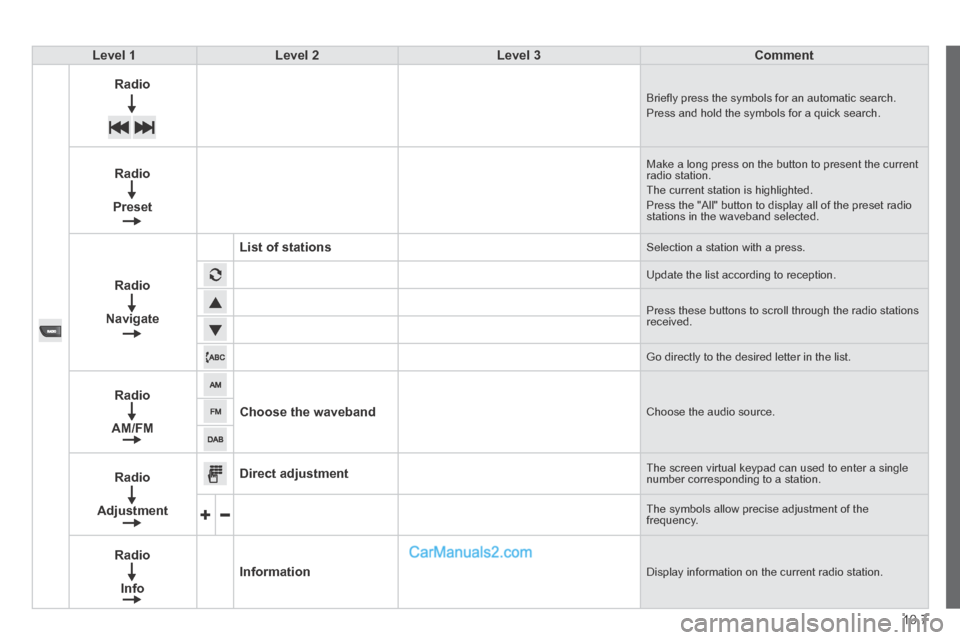
Level 1Level 2Level 3Comment
Radio Briefl y press the symbols for an automatic search. Press and hold the symbols for a quick search.
Radio
Preset
Make a long press on the button to present the current radio station. The current station is highlighted. Press the "All" button to display all of the preset radio stations in the waveband selected.
Radio
Navigate
List of stations Selection a station with a press.
Update the list according to reception.
Press these buttons to scroll through the radio stations received.
Go directly to the desired letter in the list.
Radio
AM/FM
Choose the waveband Choose the audio source.
Radio
Adjustment
Direct adjustment The screen virtual keypad can used to enter a single number corresponding to a station.
The symbols allow precise adjustment of the frequency.
Radio
Info
Information Display information on the current radio station.
Page 176 of 240
04
10.10
RADIO
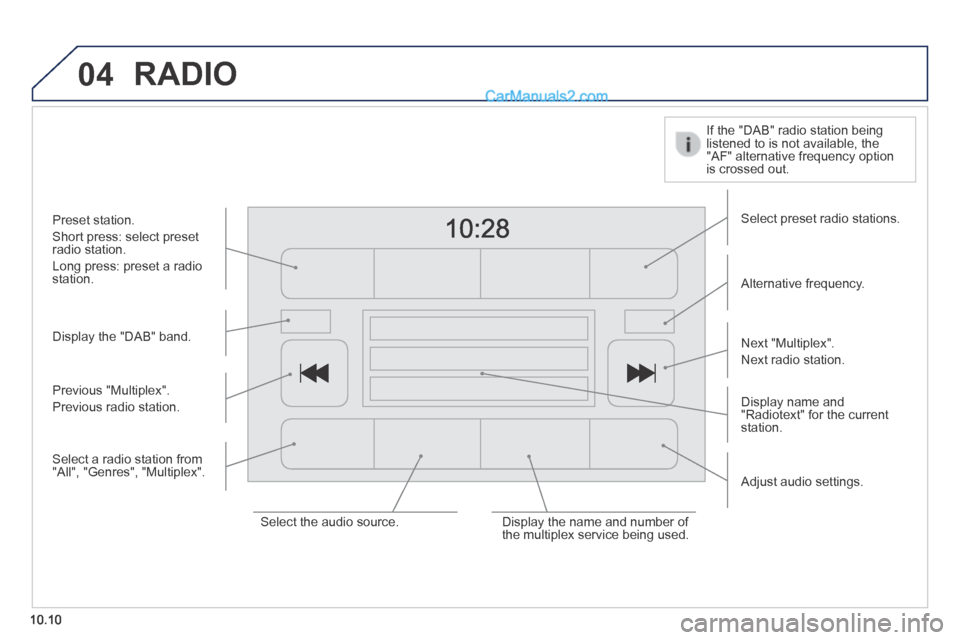
Display the "DAB" band.
Display name and "Radiotext" for the current station.
Select preset radio stations.
Alternative frequency.
If the "DAB" radio station being listened to is not available, the "AF" alternative frequency option is crossed out.
Preset station.
Short press: select preset radio station.
Long press: preset a radio station.
Next "Multiplex".
Next radio station.
Adjust audio settings.
Select the audio source. Display the name and number of the multiplex service being used.
Previous "Multiplex".
Previous radio station.
Select a radio station from "All", "Genres", "Multiplex".
Page 177 of 240
04
10.11
RADIO
When the system switches to analogue radio, there is a difference of few seconds with sometimes a change in volume.
When the digital signal is restored, the system automatically changes back to "DAB".
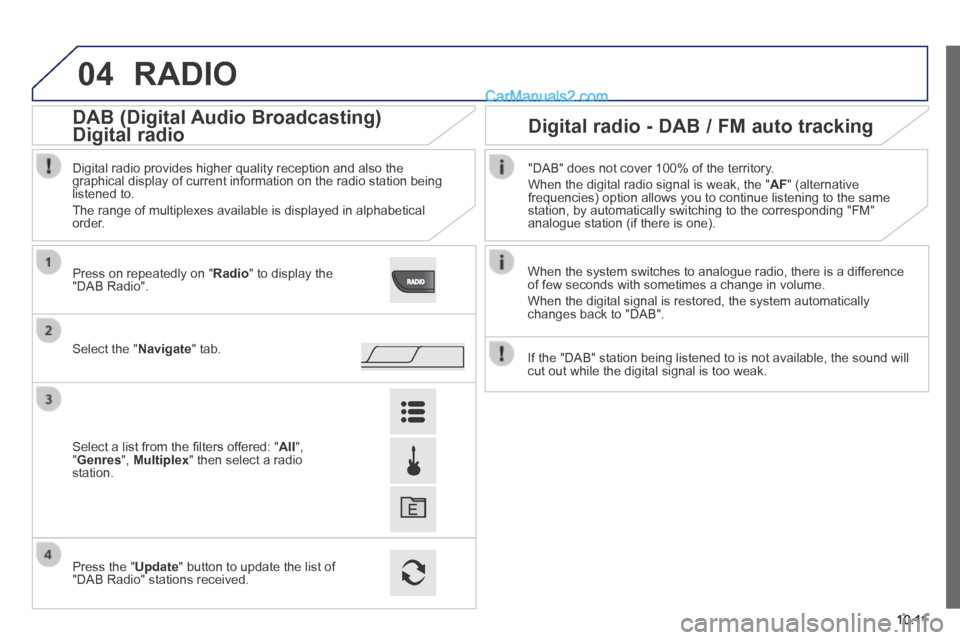
Select the " Navigate " tab.
Press on repeatedly on " Radio " to display the "DAB Radio".
Select a list from the fi lters offered: " All ", " Genres ", Multiplex " then select a radio station.
Press the " Update " button to update the list of "DAB Radio" stations received.
Digital radio provides higher quality reception and also the graphical display of current information on the radio station being listened to.
The range of multiplexes available is displayed in alphabetical order.
"DAB" does not cover 100% of the territory.
When the digital radio signal is weak, the " AF " (alternative frequencies) option allows you to continue listening to the same station, by automatically switching to the corresponding "FM" analogue station (if there is one).
If the "DAB" station being listened to is not available, the sound will \
cut out while the digital signal is too weak.
Digital radio - DAB / FM auto tracking DAB (Digital Audio Broadcasting)
Digital radio Digital radio
DAB (Digital Audio Broadcasting)
Digital radio
DAB (Digital Audio Broadcasting)
Page 179 of 240
10.13
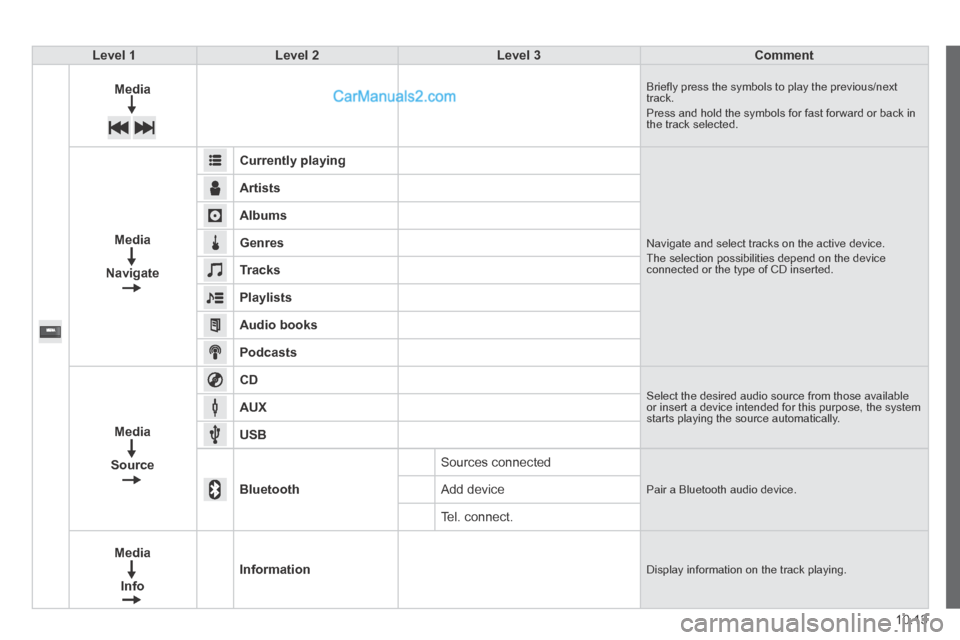
Level 1Level 2Level 3Comment
Media Briefl y press the symbols to play the previous/next track. Press and hold the symbols for fast forward or back in the track selected.
Media
Navigate
Currently playing
Navigate and select tracks on the active device. The selection possibilities depend on the device connected or the type of CD inserted.
Artists
Albums
Genres
Tracks
Playlists
Audio books
Podcasts
Media
Source
CD Select the desired audio source from those available or insert a device intended for this purpose, the system starts playing the source automatically. AUX
USB
Bluetooth
Sources connected
Pair a Bluetooth audio device. Add device
Tel. connect.
Media
Info
Information Display information on the track playing.
Page 183 of 240
05
10.17
MEDIA
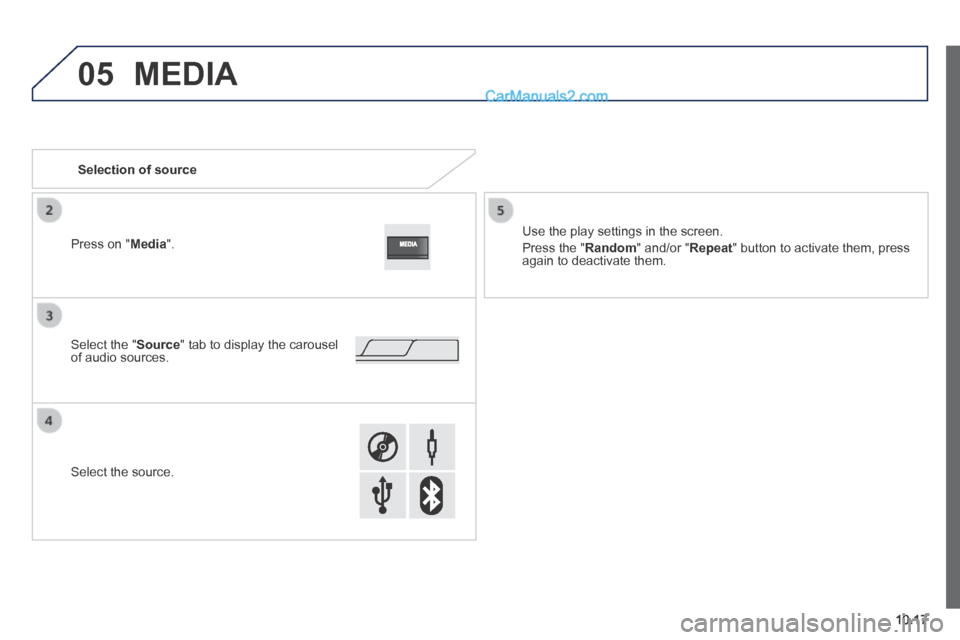
Selection of source
Use the play settings in the screen.
Press the " Random " and/or " Repeat " button to activate them, press again to deactivate them.
Select the " Source " tab to display the carousel of audio sources.
Select the source.
Press on " Media ".
Page 185 of 240
05
10.19
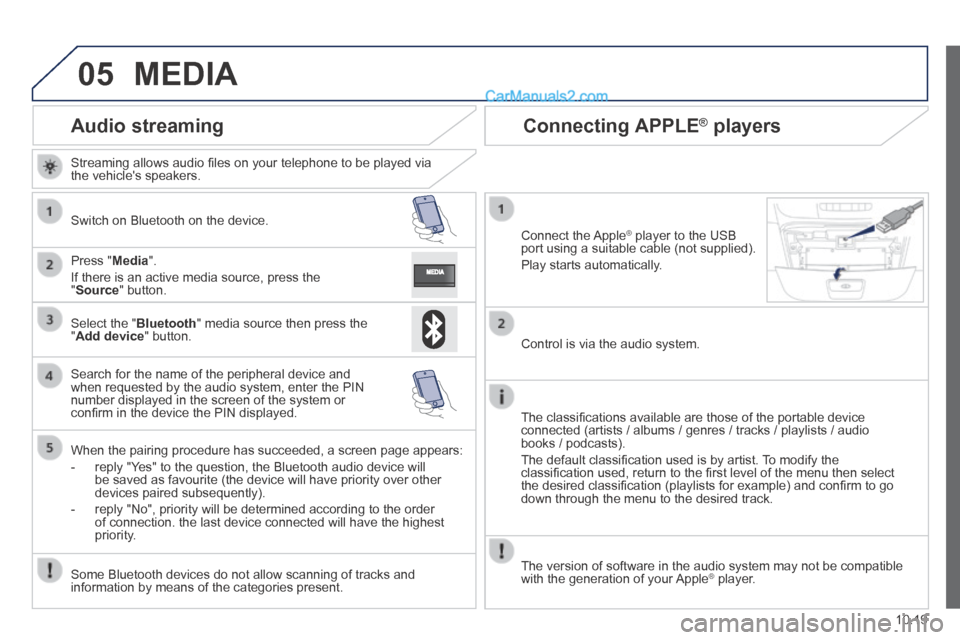
Audio streaming
Streaming allows audio fi les on your telephone to be played via the vehicle's speakers.
Switch on Bluetooth on the device.
Press " Media ".
If there is an active media source, press the " Source " button.
Select the " Bluetooth " media source then press the " Add device " button.
Search for the name of the peripheral device and when requested by the audio system, enter the PIN number displayed in the screen of the system or confi rm in the device the PIN displayed.
When the pairing procedure has succeeded, a screen page appears:
- reply "Yes" to the question, the Bluetooth audio device will be saved as favourite (the device will have priority over other devices paired subsequently).
- reply "No", priority will be determined according to the order of connection. the last device connected will have the highest priority.
Some Bluetooth devices do not allow scanning of tracks and information by means of the categories present.
Connecting APPLE ® Connecting APPLE ® Connecting APPLE players ® players ®
Connect the Apple ® player to the USB ® player to the USB ®
port using a suitable cable (not supplied).
Play starts automatically.
Control is via the audio system.
The classifi cations available are those of the portable device connected (artists / albums / genres / tracks / playlists / audio books / podcasts).
The default classifi cation used is by artist. To modify the classifi cation used, return to the fi rst level of the menu then select the desired classifi cation (playlists for example) and confi rm to go down through the menu to the desired track.
MEDIA
The version of software in the audio system may not be compatible with the generation of your Apple ® player. ® player. ®