steering Peugeot Boxer 2014 Owner's Guide
[x] Cancel search | Manufacturer: PEUGEOT, Model Year: 2014, Model line: Boxer, Model: Peugeot Boxer 2014Pages: 240, PDF Size: 8.98 MB
Page 53 of 240
51
3
EASE OF USE and COMFORT
Steering mounted controls
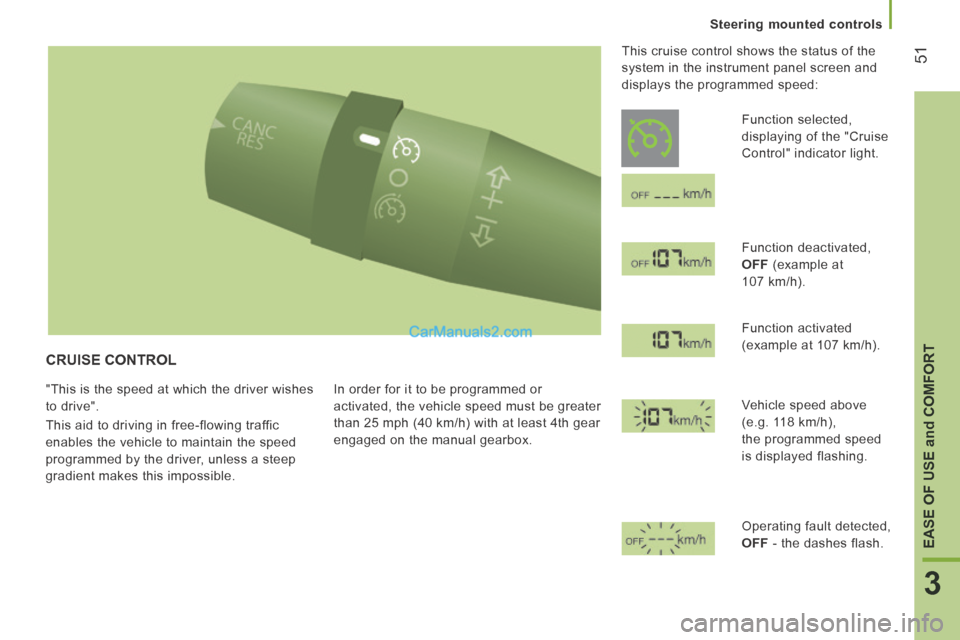
CRUISE CONTROL
"This is the speed at which the driver wishes
to drive".
This aid to driving in free-flowing traffic
enables the vehicle to maintain the speed
programmed by the driver, unless a steep
gradient makes this impossible. In order for it to be programmed or
activated, the vehicle speed must be greater
than 25 mph (40 km/h) with at least 4th gear
engaged on the manual gearbox. This cruise control shows the status of the
system in the instrument panel screen and
displays the programmed speed:
Function selected,
displaying of the "Cruise
Control" indicator light.
Function deactivated,
OFF (example at
107 km/h).
Function activated
(example at 107 km/h).
Vehicle speed above
(e.g. 118 km/h),
the programmed speed
is displayed flashing.
Operating fault detected,
OFF - the dashes flash.
Page 54 of 240
52
Steering mounted controls
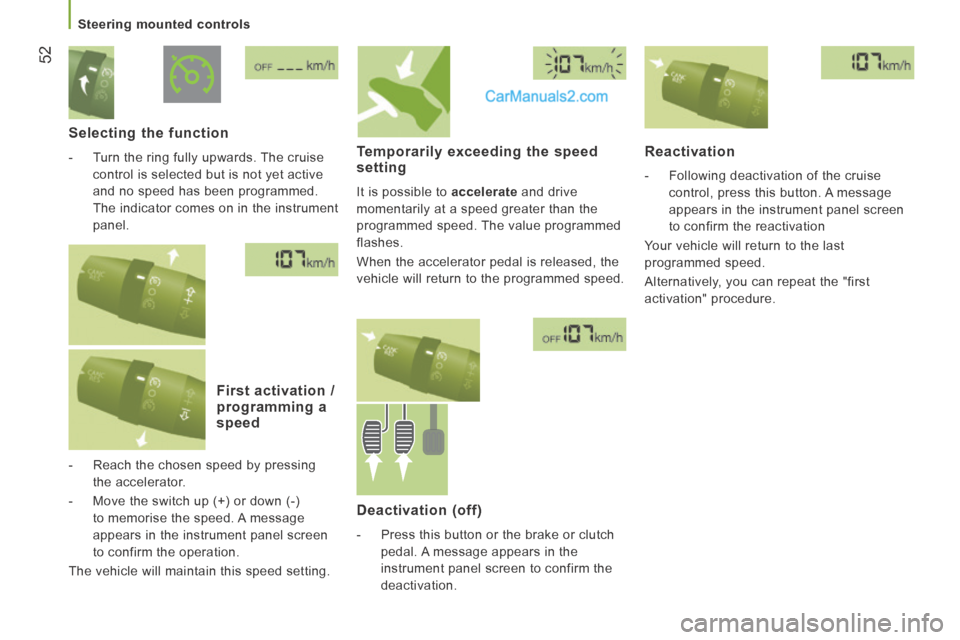
Selecting the function
- Turn the ring fully upwards. The cruise control is selected but is not yet active
and no speed has been programmed.
The indicator comes on in the instrument
panel .
First activation / programming a speed
- Reach the chosen speed by pressing the accelerator.
- Move the switch up (+) or down (-) to memorise the speed. A message
appears in the instrument panel screen
to confirm the operation.
The vehicle will maintain this speed setting.
Temporarily exceeding the speed setting
It is possible to accelerate and drive
momentarily at a speed greater than the
programmed speed. The value programmed
flashes.
When the accelerator pedal is released, the
vehicle will return to the programmed speed.
Reactivation
- Following deactivation of the cruise control, press this button. A message
appears in the instrument panel screen
to confirm the reactivation
Your vehicle will return to the last
programmed speed.
Alternatively, you can repeat the "first
activation" procedure.
Deactivation (off)
- Press this button or the brake or clutch pedal. A message appears in the
instrument panel screen to confirm the
deactivation.
Page 55 of 240
53
3
EASE OF USE and COMFORT
Steering mounted controls
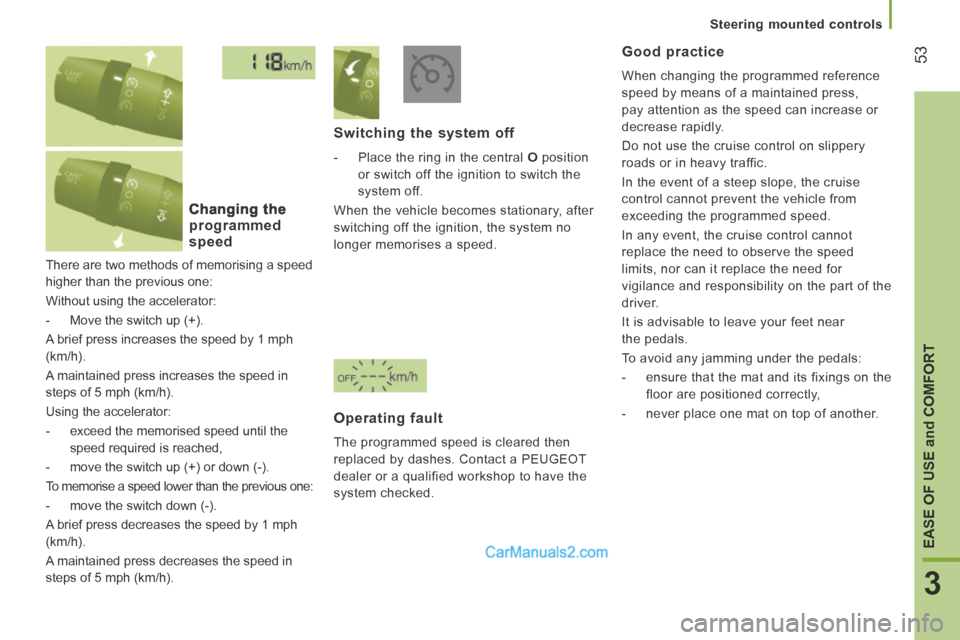
There are two methods of memorising a speed
higher than the previous one:
Without using the accelerator:
- Move the switch up (+).
A brief press increases the speed by 1 mph
(km/h).
A maintained press increases the speed in
steps of 5 mph (km/h).
Using the accelerator:
- exceed the memorised speed until the speed required is reached,
- move the switch up (+) or down (-).
To memorise a speed lower than the previous one:
- move the switch down (-).
A brief press decreases the speed by 1 mph
(km/h).
A maintained press decreases the speed in
steps of 5 mph (km/h).
Changing the
programmed speed
Switching the system off
- Place the ring in the central O position
or switch off the ignition to switch the
system off.
When the vehicle becomes stationary, after
switching off the ignition, the system no
longer memorises a speed.
Operating fault
The programmed speed is cleared then
replaced by dashes. Contact a PEUGEOT
dealer or a qualified workshop to have the
system checked.
Good practice
When changing the programmed reference
speed by means of a maintained press,
pay attention as the speed can increase or
decrease rapidly.
Do not use the cruise control on slippery
roads or in heavy traffic.
In the event of a steep slope, the cruise
control cannot prevent the vehicle from
exceeding the programmed speed.
In any event, the cruise control cannot
replace the need to observe the speed
limits, nor can it replace the need for
vigilance and responsibility on the part of the
driver.
It is advisable to leave your feet near
the pedals.
To avoid any jamming under the pedals:
- ensure that the mat and its fixings on the floor are positioned correctly,
- never place one mat on top of another.
Page 56 of 240
54
Steering mounted controls
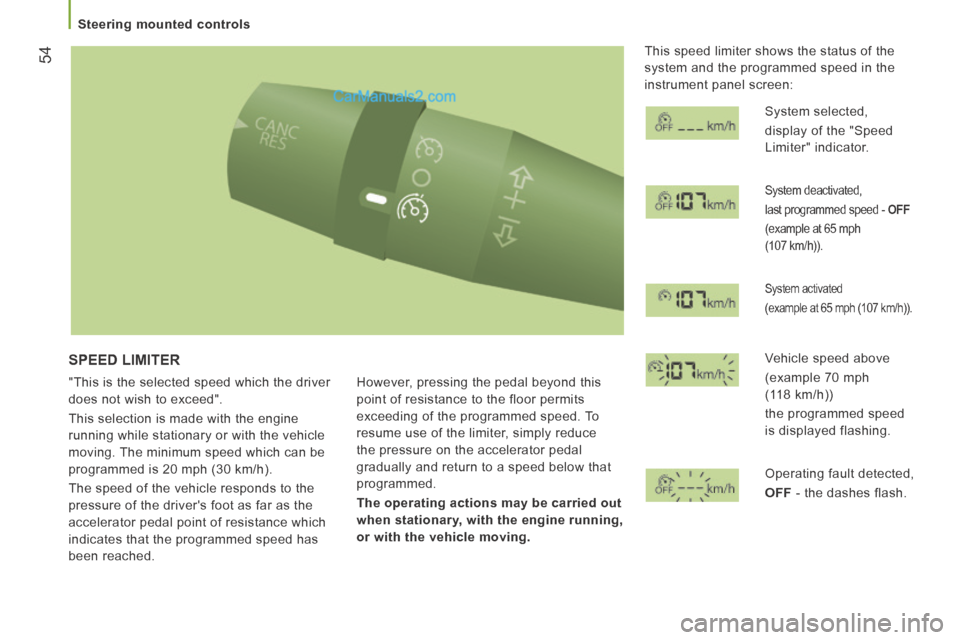
SPEED LIMITER
"This is the selected speed which the driver
does not wish to exceed".
This selection is made with the engine
running while stationary or with the vehicle
moving. The minimum speed which can be
programmed is 20 mph (30 km/h).
The speed of the vehicle responds to the
pressure of the driver's foot as far as the
accelerator pedal point of resistance which
indicates that the programmed speed has
been reached. However, pressing the pedal beyond this
point of resistance to the floor permits
exceeding of the programmed speed. To
resume use of the limiter, simply reduce
the pressure on the accelerator pedal
gradually and return to a speed below that
programmed.
The operating actions may be carried out
when stationary, with the engine running,
or with the vehicle moving.
This speed limiter shows the status of the
system and the programmed speed in the
instrument panel screen:
System selected,
display of the "Speed
Limiter" indicator.
System deactivated,
last programmed speed - OFF
(example at 65 mph
(107 km/h)).
System activated
(example at 65 mph (107 km/h)).
Vehicle speed above
(example 70 mph
(118 km/h))
the programmed speed
is displayed flashing.
Operating fault detected,
OFF - the dashes flash.
Page 57 of 240
55
3
EASE OF USE and COMFORT
Steering mounted controls
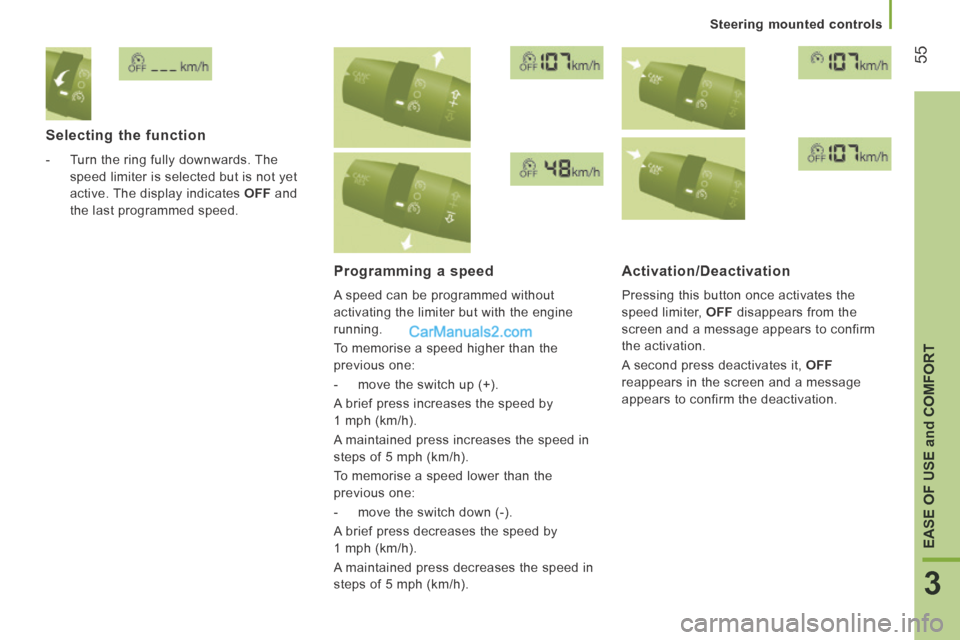
Selecting the function
- Turn the ring fully downwards. The speed limiter is selected but is not yet
active. The display indicates OFF and
the last programmed speed.
Programming a speed
A speed can be programmed without
activating the limiter but with the engine
running.
To memorise a speed higher than the
previous one:
- move the switch up (+).
A brief press increases the speed by
1 mph (km/h).
A maintained press increases the speed in
steps of 5 mph (km/h).
To memorise a speed lower than the
previous one:
- move the switch down (-).
A brief press decreases the speed by
1 mph (km/h).
A maintained press decreases the speed in
steps of 5 mph (km/h).
Activation/Deactivation
Pressing this button once activates the
speed limiter, OFF disappears from the
screen and a message appears to confirm
the activation.
A second press deactivates it, OFF
reappears in the screen and a message
appears to confirm the deactivation.
Page 58 of 240
56
Steering mounted controls
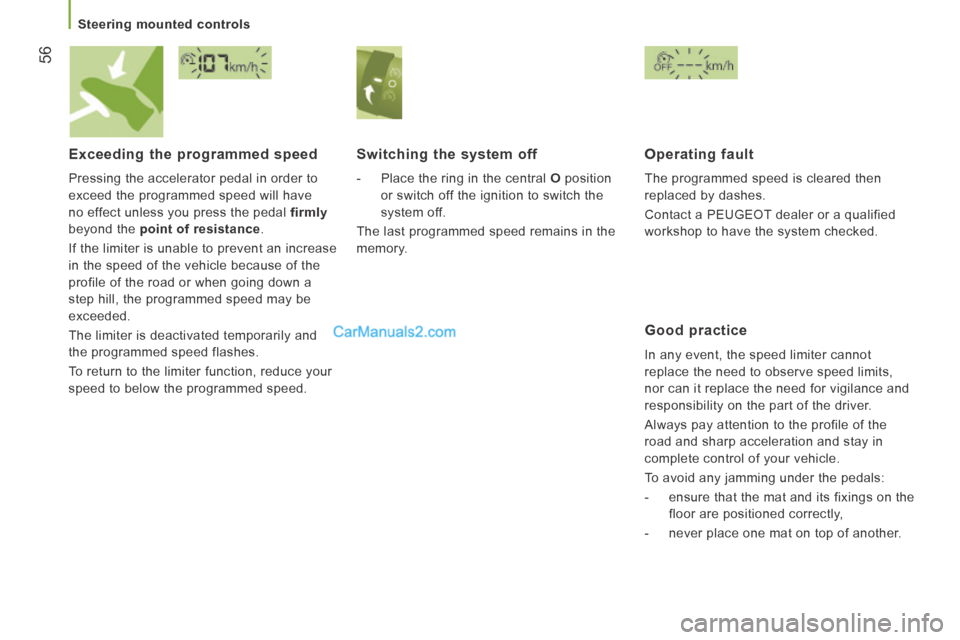
Exceeding the programmed speed
Pressing the accelerator pedal in order to
exceed the programmed speed will have
no effect unless you press the pedal firmly
beyond the point of resistance .
If the limiter is unable to prevent an increase
in the speed of the vehicle because of the
profile of the road or when going down a
step hill, the programmed speed may be
exceeded.
The limiter is deactivated temporarily and
the programmed speed flashes.
To return to the limiter function, reduce your
speed to below the programmed speed.
Switching the system off
- Place the ring in the central O position
or switch off the ignition to switch the
system off.
The last programmed speed remains in the
memory.
Operating fault
The programmed speed is cleared then
replaced by dashes.
Contact a PEUGEOT dealer or a qualified
workshop to have the system checked.
Good practice
In any event, the speed limiter cannot
replace the need to observe speed limits,
nor can it replace the need for vigilance and
responsibility on the part of the driver.
Always pay attention to the profile of the
road and sharp acceleration and stay in
complete control of your vehicle.
To avoid any jamming under the pedals:
- ensure that the mat and its fixings on the floor are positioned correctly,
- never place one mat on top of another.
Page 59 of 240
57
3
EASE OF USE and COMFORT
Steering mounted controls
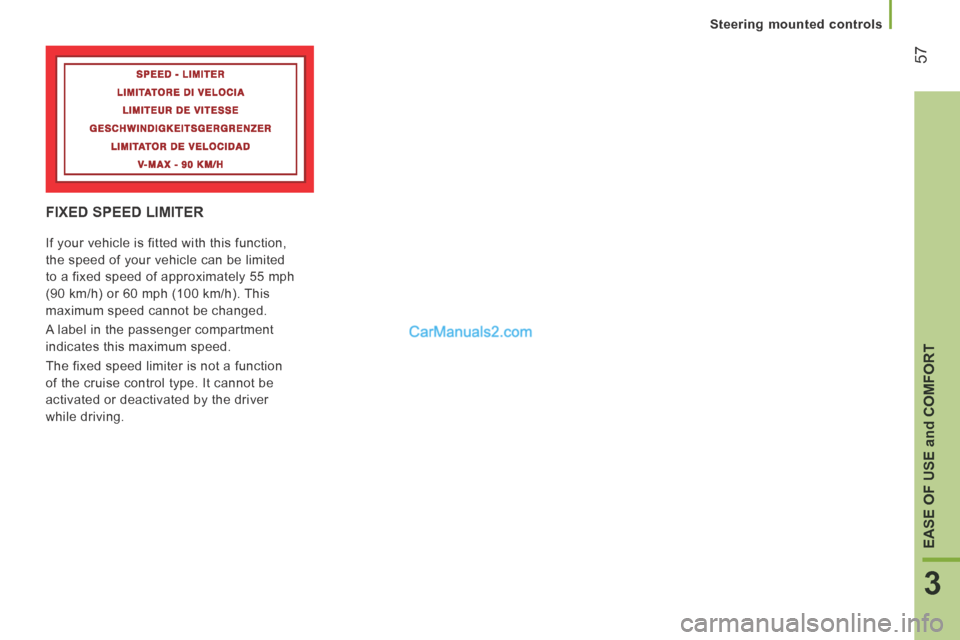
FIXED SPEED LIMITER
If your vehicle is fitted with this function,
the speed of your vehicle can be limited
to a fixed speed of approximately 55 mph
(90 km/h) or 60 mph (100 km/h). This
maximum speed cannot be changed.
A label in the passenger compartment
indicates this maximum speed.
The fixed speed limiter is not a function
of the cruise control type. It cannot be
activated or deactivated by the driver
while driving.
Page 65 of 240
Ventilation
63
3
EASE OF USE and COMFORT
Comfort value adjustment ring
The settings range between:
- increasing the interior ambient air temperature HI (High) which goes up to
to a maximum setting of 32,
- cooling the interior ambient air temperature LO (Low) which goes down
to a setting of 16.
Air distribution
A press illuminates the LED on the buttons
which distribute the air flow towards:
the windscreen and front side
window vents (demisting/
defrosting the windows),
the central and side vents (chest
and face),
the vents in the front and rear
areas (feet).
The combination of buttons permits
improvement of air distribution.
Air flow
Successive presses of this button
increase (+) or reduce (-) the
force of the air flow to the interior.
Intake of exterior air / Recirculation of interior air
When the LED is on, the air
recirculates inside the passenger
compartment to prevent the entry of exterior
odours and smoke. This position should be
temporary.
When the ambient air comfort level has been
reached, pressing the button switches the
LED off and reopens the exterior air intake.
Pressing the AUTO button also restores
the intake of exterior air. Returning to this
position permits renewal of the air in the
passenger compartment and demisting.
Pressing the AUTO button again restores
the FULL AUTO function.
Rapid Demisting / Defrosting
Pressing this control permits
rapid clearing of the windows.
The LED is on.
The system manages the air conditioning,
the flow and intake of air, the defrosting
of the rear screen and provides optimum
distribution of the air to the windscreen and
front side windows.
If your vehicle is fitted with additional
heating, switch it off to ensure rapid and
effective demisting/defrosting.
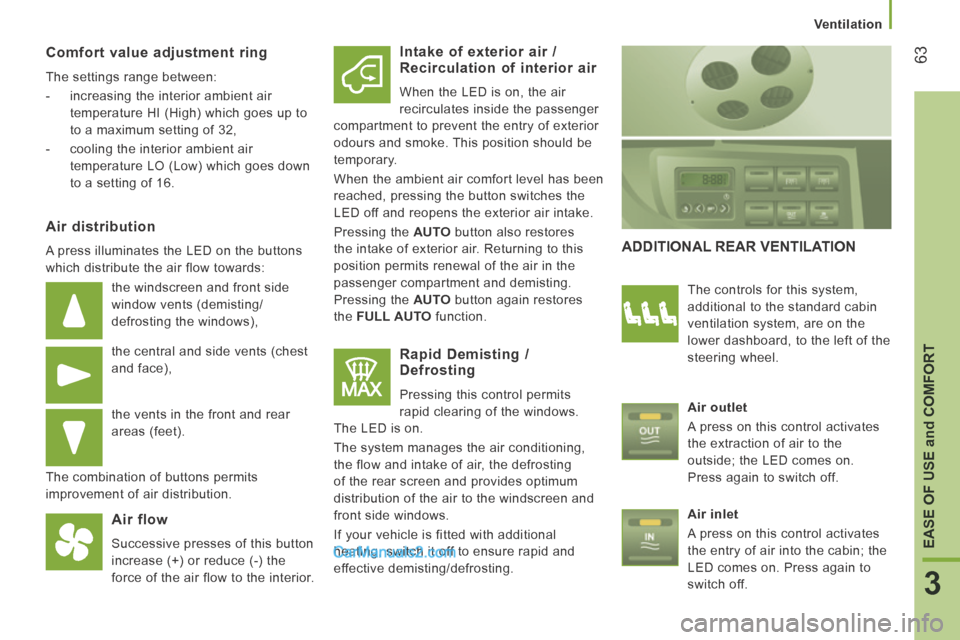
ADDITIONAL REAR VENTILATION
The controls for this system,
additional to the standard cabin
ventilation system, are on the
lower dashboard, to the left of the
steering wheel.
Air outlet
A press on this control activates
the extraction of air to the
outside; the LED comes on.
Press again to switch off.
Air inlet
A press on this control activates
the entry of air into the cabin; the
LED comes on. Press again to
switch off.
Page 86 of 240
Vehicle configuration
84 PERSONALISATION - CONFIGURATION
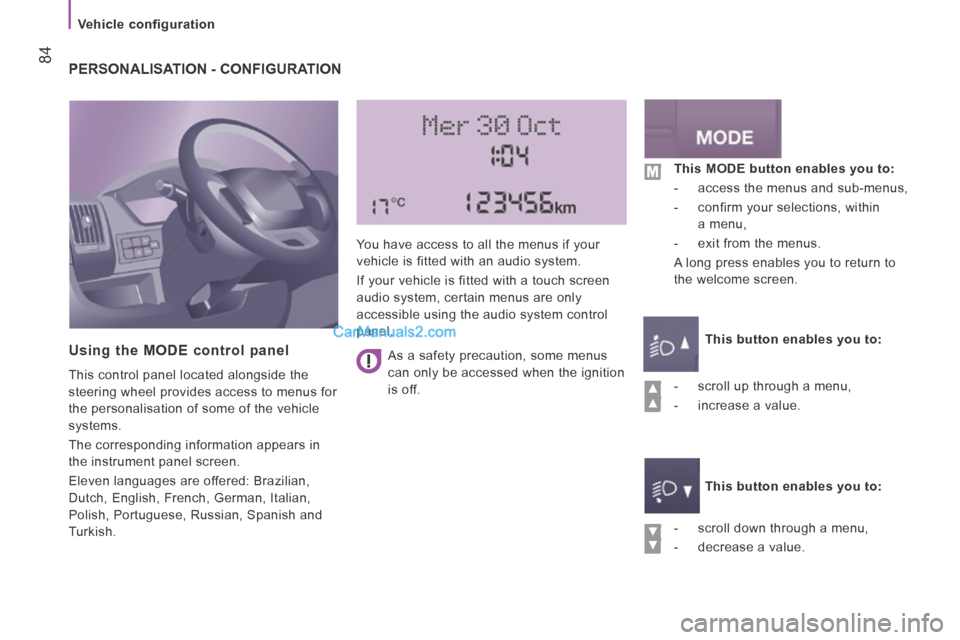
Using the MODE control panel
This control panel located alongside the
steering wheel provides access to menus for
the personalisation of some of the vehicle
systems.
The corresponding information appears in
the instrument panel screen.
Eleven languages are offered: Brazilian,
Dutch, English, French, German, Italian,
Polish, Portuguese, Russian, Spanish and
Turkish. You have access to all the menus if your
vehicle is fitted with an audio system.
If your vehicle is fitted with a touch screen
audio system, certain menus are only
accessible using the audio system control
panel.
- scroll down through a menu,
- decrease a value. This MODE button enables you to:
- access the menus and sub-menus,
- confirm your selections, within a menu,
- exit from the menus.
A long press enables you to return to
the welcome screen.
This button enables you to:
This button enables you to:
- scroll up through a menu,
- increase a value.
As a safety precaution, some menus
can only be accessed when the ignition
is off.
Page 98 of 240
96
Driving safely
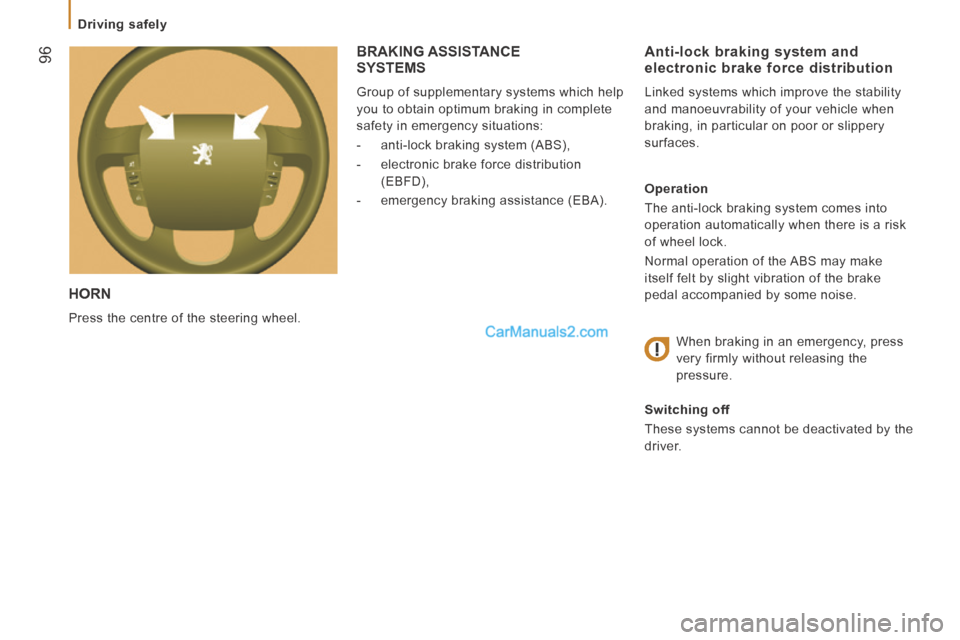
HORN
Press the centre of the steering wheel.
Anti-lock braking system and electronic brake force distribution
Linked systems which improve the stability
and manoeuvrability of your vehicle when
braking, in particular on poor or slippery
surfaces.
Operation
The anti-lock braking system comes into
operation automatically when there is a risk
of wheel lock.
Normal operation of the ABS may make
itself felt by slight vibration of the brake
pedal accompanied by some noise.
When braking in an emergency, press
very firmly without releasing the
pressure.
Switching off
These systems cannot be deactivated by the
driver.
BRAKING ASSISTANCE SYSTEMS
Group of supplementary systems which help
you to obtain optimum braking in complete
safety in emergency situations:
- anti-lock braking system (ABS),
- electronic brake force distribution (EBFD),
- emergency braking assistance (EBA).