ignition PEUGEOT EXPERT 2018 Owner's Manual
[x] Cancel search | Manufacturer: PEUGEOT, Model Year: 2018, Model line: EXPERT, Model: PEUGEOT EXPERT 2018Pages: 416, PDF Size: 14.12 MB
Page 41 of 416
39
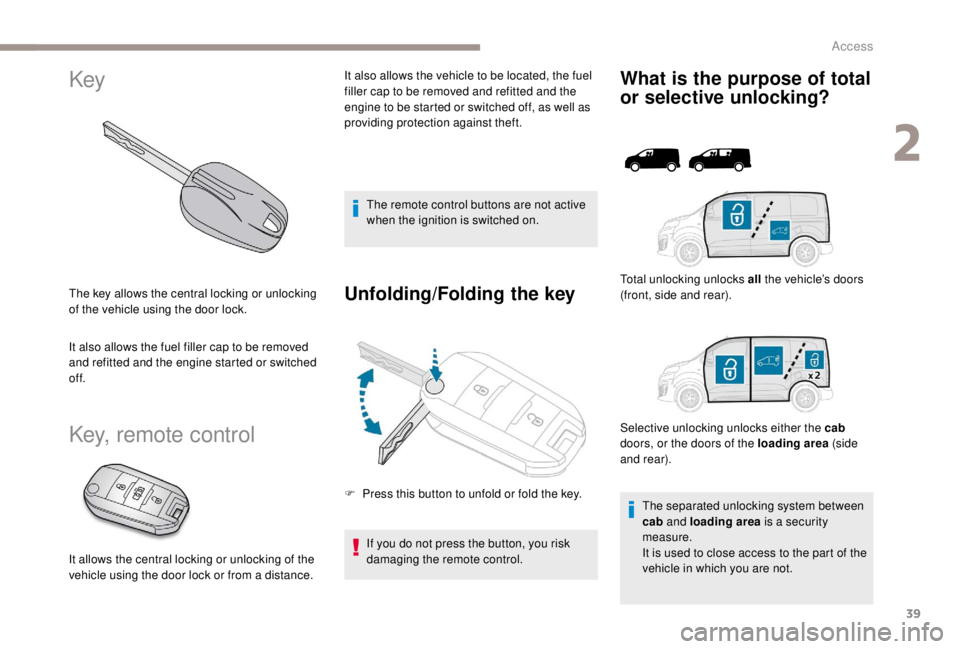
Key
The key allows the central locking or unlocking
of the vehicle using the door lock.
It also allows the fuel filler cap to be removed
and refitted and the engine started or switched
of f.
Key, remote control
The remote control buttons are not active
when the ignition is switched on.
Unfolding/Folding the key
If you do not press the button, you risk
damaging the remote control.
What is the purpose of total
or selective unlocking?
F Press this button to unfold or fold the key.Selective unlocking unlocks either the cab
doors, or the doors of the loading area (side
and rear). Total unlocking unlocks all
the vehicle’s doors
(front, side and rear).
The separated unlocking system between
cab and loading area is a security
measure.
It is used to close access to the part of the
vehicle in which you are not.
It allows the central locking or unlocking of the
vehicle using the door lock or from a distance. It also allows the vehicle to be located, the fuel
filler cap to be removed and refitted and the
engine to be started or switched off, as well as
providing protection against theft.
2
Access
Page 42 of 416
40
Unlocking is confirmed by rapid flashing
of the direction indicators for around two
seconds.
At the same time, depending on your
version, the door mirrors unfold.
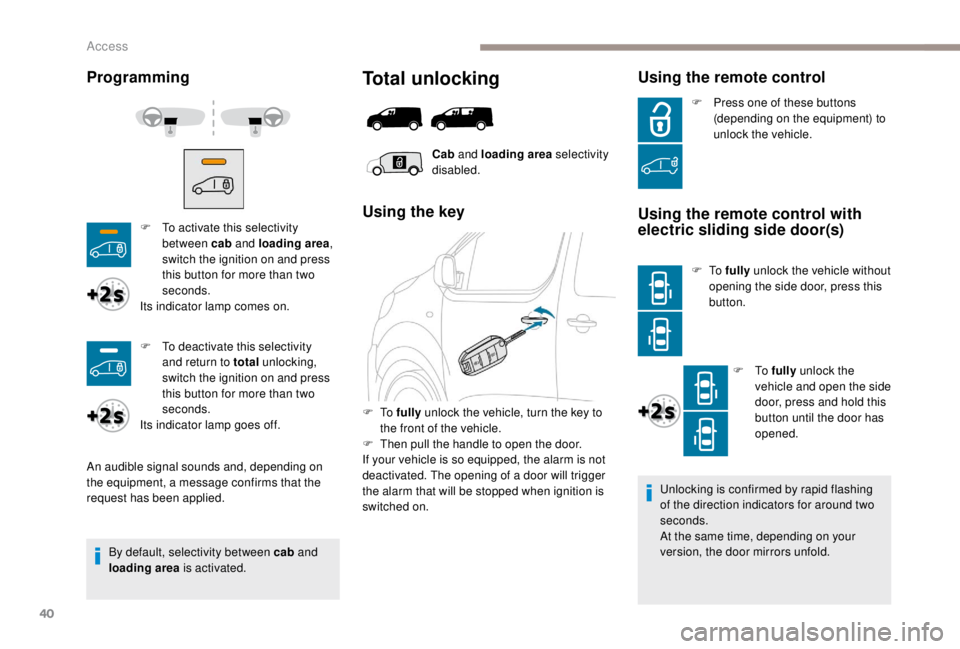
Programming
By default, selectivity between cab and
loading area is activated.
Total unlocking
Cab and loading area selectivity
disabled.
Using the key
F To fully unlock the vehicle, turn the key to
the front of the vehicle.
F
T
hen pull the handle to open the door.
If your vehicle is so equipped, the alarm is not
deactivated. The opening of a door will trigger
the alarm that will be stopped when ignition is
switched on.
Using the remote control
F To activate this selectivity between cab and loading area ,
switch the ignition on and press
this button for more than two
seconds.
Its indicator lamp comes on.
An audible signal sounds and, depending on
the equipment, a message confirms that the
request has been applied. F
P
ress one of these buttons
(depending on the equipment) to
unlock the vehicle.Using the remote control with
electric sliding side door(s)
F To fully unlock the vehicle without
opening the side door, press this
button.
F
To fully unlock the
vehicle and open the side
door, press and hold this
button until the door has
opened.
F
T
o deactivate this selectivity
and return to total unlocking,
switch the ignition on and press
this button for more than two
seconds.
Its indicator lamp goes off.
Access
Page 43 of 416
41
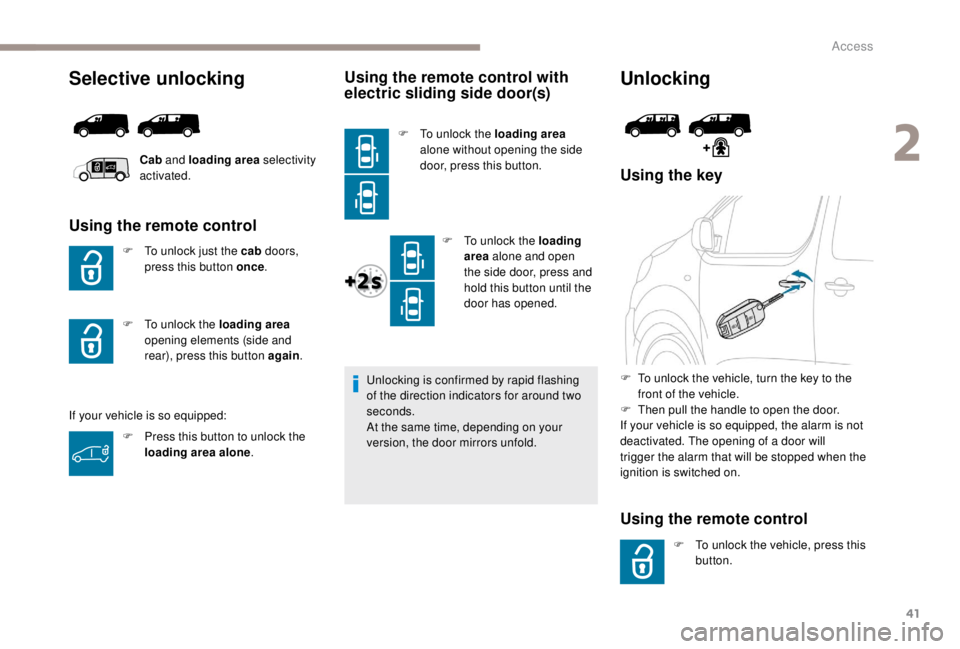
Selective unlocking
Using the remote control
F To unlock just the cab doors,
press this button once .
If your vehicle is so equipped:
Using the remote control with
electric sliding side door(s)
F To unlock the loading area
alone without opening the side
door, press this button.
F
T
o unlock the loading
area alone and open
the side door, press and
hold this button until the
door has opened.
Unlocking is confirmed by rapid flashing
of the direction indicators for around two
seconds.
At the same time, depending on your
version, the door mirrors unfold.
Unlocking
Using the key
Using the remote control
F To unlock the vehicle, press this button.
F
T
o unlock the vehicle, turn the key to the
front of the vehicle.
F
T
hen pull the handle to open the door.
If your vehicle is so equipped, the alarm is not
deactivated. The opening of a door will
trigger the alarm that will be stopped when the
ignition is switched on.
Cab
and loading area selectivity
activated.
F
P
ress this button to unlock the
loading area alone .
F
T
o unlock the loading area
opening elements (side and
rear), press this button again .
2
Access
Page 46 of 416
44
Anti-theft protection
Electronic engine immobiliser
The remote control contains an electronic chip
which has a secret code. When the ignition is
switched on, this code must be recognised in
order for starting to be possible.
A few seconds after switching off the ignition,
this system locks the engine control system,
therefore preventing the engine from being
started in the event of a break-in.In the event of a fault, you are
informed by illumination of this
warning lamp, an audible signal and
a message in the screen.
The vehicle will not start; contact a PEUGEOT
dealer as soon as possible.
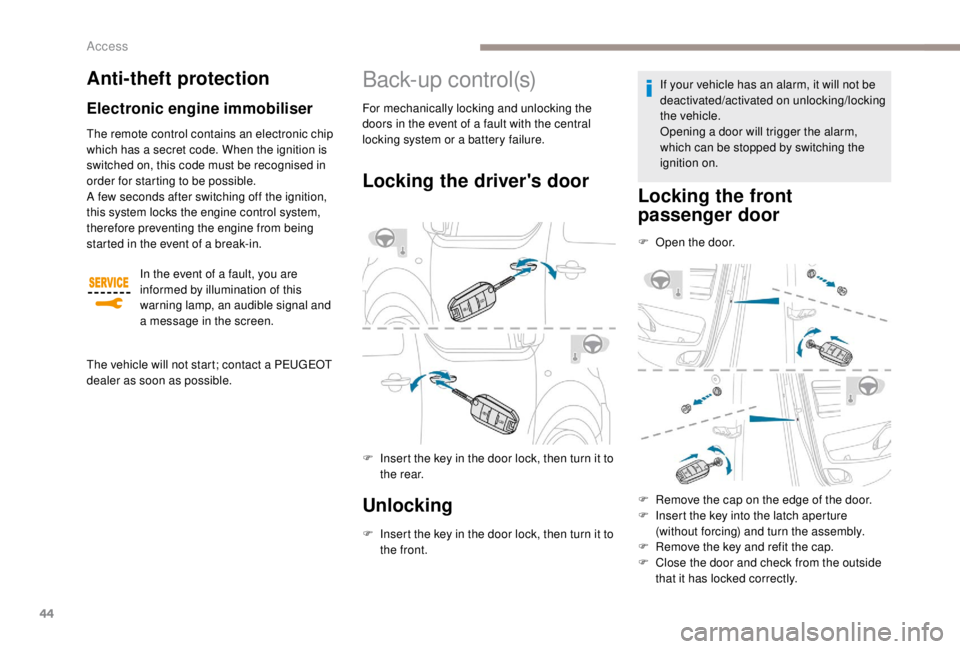
B a c k- u p c o nt r o l (s)
Locking the driver's door
F Insert the key in the door lock, then turn it to the rear.
Unlocking
F Insert the key in the door lock, then turn it to the front. If your vehicle has an alarm, it will not be
deactivated/activated on unlocking/locking
the vehicle.
Opening a door will trigger the alarm,
which can be stopped by switching the
ignition on.
Locking the front
passenger door
F Open the door.
F
R
emove the cap on the edge of the door.
F
I
nsert the key into the latch aperture
(without forcing) and turn the assembly.
F
R
emove the key and refit the cap.
F
C
lose the door and check from the outside
that it has locked correctly.
For mechanically locking and unlocking the
doors in the event of a fault with the central
locking system or a battery failure.
Access
Page 48 of 416
46
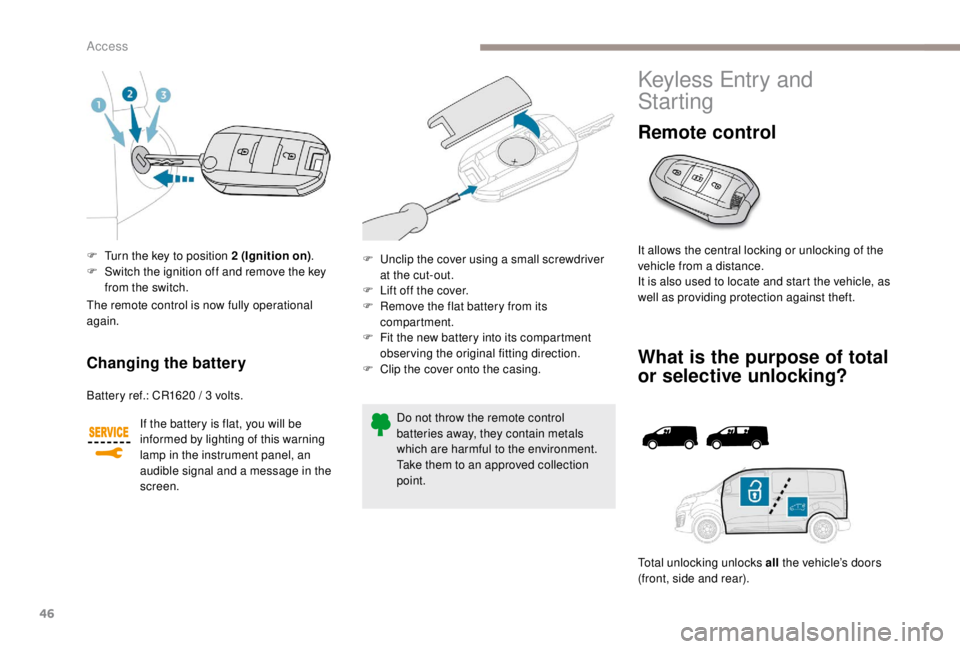
F Turn the key to position 2 (Ignition on).
F S witch the ignition off and remove the key
from the switch.
Changing the battery
Battery ref.: CR1620 / 3 volts.
I f the battery is flat, you will be
informed by lighting of this warning
lamp in the instrument panel, an
audible signal and a message in the
screen.
The remote control is now fully operational
again.
Do not throw the remote control
batteries away, they contain metals
which are harmful to the environment.
Take them to an approved collection
point.
F
U
nclip the cover using a small screwdriver
at the cut-out.
F
L
ift off the cover.
F
R
emove the flat battery from its
compartment.
F
F
it the new battery into its compartment
observing the original fitting direction.
F
C
lip the cover onto the casing.
Keyless Entry and
Starting
Remote control
It allows the central locking or unlocking of the
vehicle from a distance.
It is also used to locate and start the vehicle, as
well as providing protection against theft.
What is the purpose of total
or selective unlocking?
Total unlocking unlocks all
the vehicle’s doors
(front, side and rear).
Access
Page 49 of 416
47
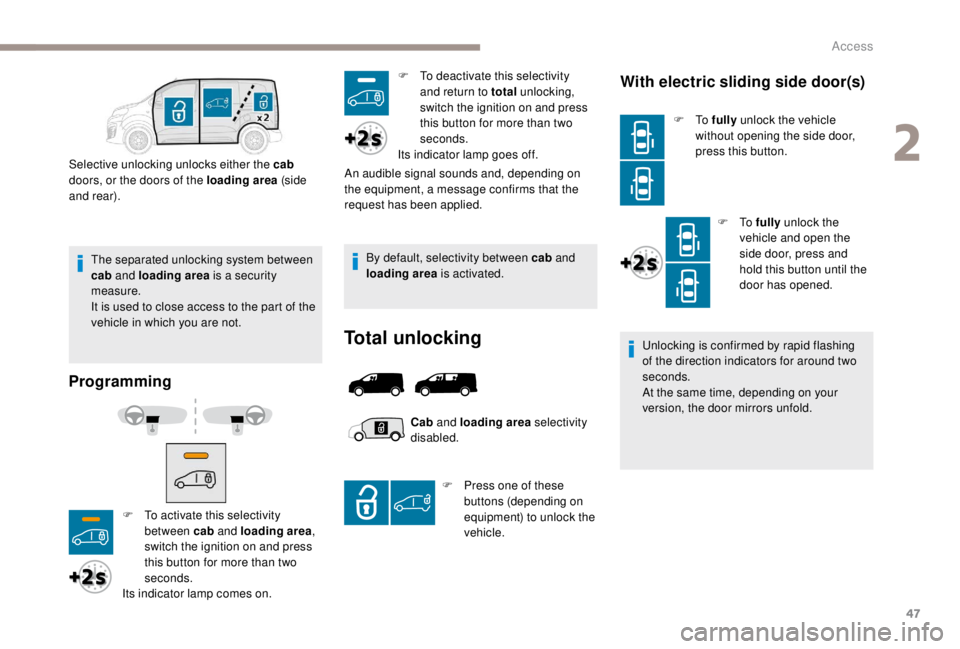
The separated unlocking system between
cab and loading area is a security
measure.
It is used to close access to the part of the
vehicle in which you are not.
Selective unlocking unlocks either the cab
doors, or the doors of the loading area (side
and rear).
Programming
By default, selectivity between cab and
loading area is activated.
Total unlocking
With electric sliding side door(s)
F To fully unlock the vehicle
without opening the side door,
press this button.
F
To fully unlock the
vehicle and open the
side door, press and
hold this button until the
door has opened.
Unlocking is confirmed by rapid flashing
of the direction indicators for around two
seconds.
At the same time, depending on your
version, the door mirrors unfold.
F
T
o activate this selectivity
between cab and loading area ,
switch the ignition on and press
this button for more than two
seconds.
Its indicator lamp comes on. An audible signal sounds and, depending on
the equipment, a message confirms that the
request has been applied.
F
T
o deactivate this selectivity
and return to total unlocking,
switch the ignition on and press
this button for more than two
seconds.
Its indicator lamp goes off.
Cab and loading area selectivity
disabled.
F
P
ress one of these
buttons (depending on
equipment) to unlock the
vehicle.
2
Access
Page 52 of 416
50
Deadlocking
Deadlocking renders the exterior and
interior door controls inoperative.
It also deactivates the manual central
control button.
Therefore, never leave anyone inside the
vehicle when it is deadlocked.
To lock the vehicle:
At the same time, depending on your
version, the door mirrors fold.
To deadlock the vehicle:
If your vehicle is not fitted with an alarm,
deadlocking is signalled by the fixed
illumination of the direction indicators for
about two seconds. If the system is fitted to your
vehicle, pressing and holding
this button closes the windows.
If you release the button, the
window will stop.
Ensure that no person or object could
prevent the correct closing of the windows.
Be particularly aware of children when
operating the windows.
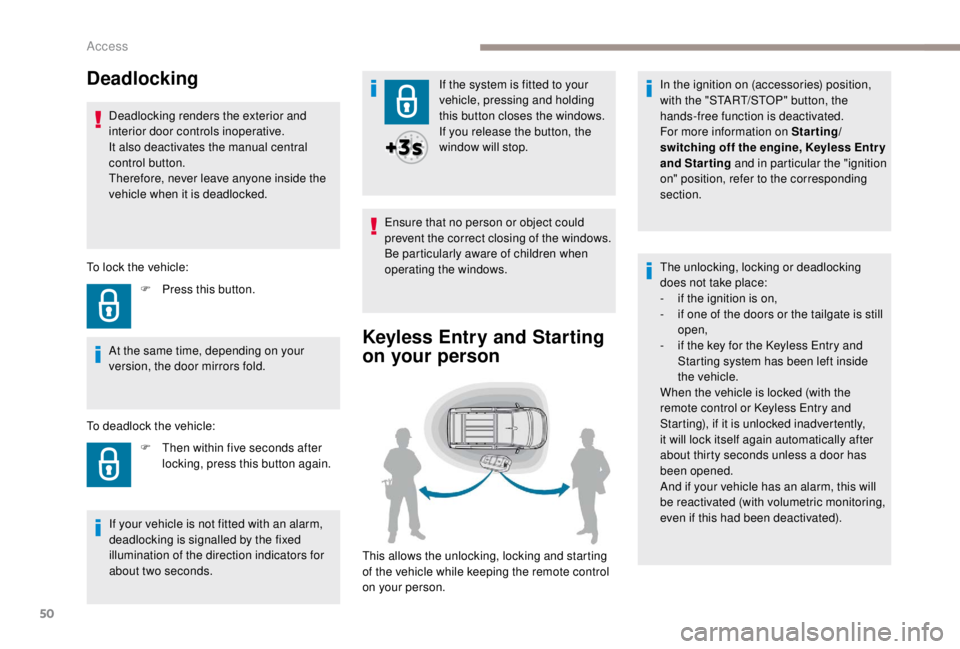
Keyless Entry and Starting
on your person
This allows the unlocking, locking and starting
of the vehicle while keeping the remote control
on your person.
F
P
ress this button.
F
T
hen within five seconds after
locking, press this button again. In the ignition on (accessories) position,
with the "START/STOP" button, the
hands-free function is deactivated.
For more information on Starting/
switching off the engine,
K
eyless Entr y
and Starting and in particular the "ignition
on" position, refer to the corresponding
section.
The unlocking, locking or deadlocking
does not take place:
-
i
f the ignition is on,
-
i
f one of the doors or the tailgate is still
open,
-
i
f the key for the
K
eyless Entry and
Starting system has been left inside
the vehicle.
When the vehicle is locked (with the
remote control or
K
eyless Entry and
Starting), if it is unlocked inadvertently,
it will lock itself again automatically after
about thirty seconds unless a door has
been opened.
And if your vehicle has an alarm, this will
be reactivated (with volumetric monitoring,
even if this had been deactivated).
Access
Page 59 of 416
57
In the event of a fault, you are
informed by illumination of this
warning lamp, an audible signal and
a message in the screen.
The vehicle will not start; contact a PEUGEOT
dealer as soon as possible.
Anti-theft protection
Electronic engine immobiliser
The remote control contains an electronic chip
which has a secret code. When the ignition is
switched on, this code must be recognised in
order for starting to be possible.
A few seconds after switching off the ignition,
this system locks the engine control system,
therefore preventing the engine from being
started in the event of a break-in.
Locating your vehicle
This function allows you to identify your vehicle
from a distance, particularly in poor light. Your
vehicle must have been locked for more than
five seconds.
Remote operation of
lighting
If fitted to your vehicle. A short press on this button switches
on the lighting remotely (sidelamps,
dipped beam headlamps and number
plate lamps).
A second press on this button before
the end of the timed period cancels
the remote lighting. F
P
ress this button.
This will switch on the courtesy lamps and the
direction indicators will flash for around ten
seconds.
B a c k- u p c o nt r o l (s)
Integral key
It is used to lock and unlock the vehicle when
the remote control cannot operate:
-
c
ell battery flat, vehicle battery discharged
or disconnected, etc.
-
v
ehicle located in an area with strong
electromagnetic signals.
If the alarm is activated, the audible signal
triggered on opening a door with the key
(integral with the remote control) will stop
when the ignition is switched on.
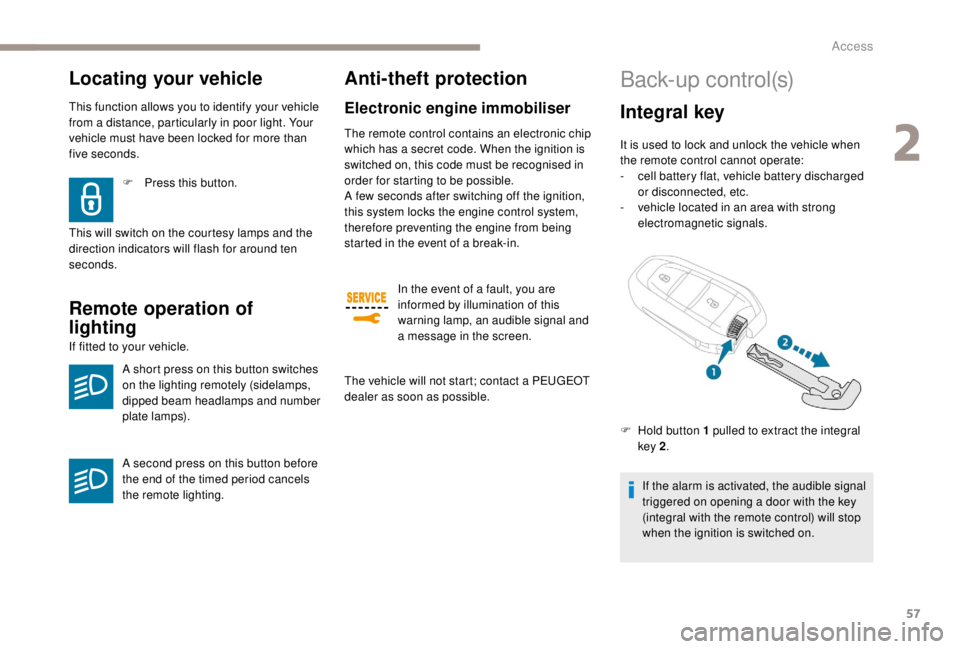
F
H
old button 1 pulled to extract the integral
key 2 .
2
Access
Page 60 of 416
58
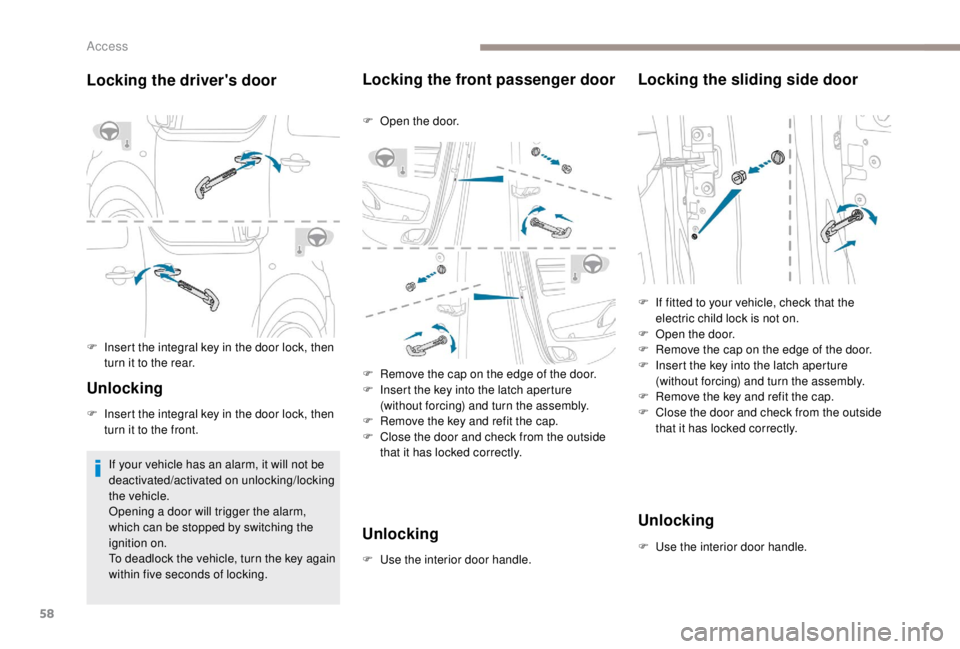
Locking the driver's door
F Insert the integral key in the door lock, then turn it to the rear.
Unlocking
F Insert the integral key in the door lock, then turn it to the front.
If your vehicle has an alarm, it will not be
deactivated/activated on unlocking/locking
the vehicle.
Opening a door will trigger the alarm,
which can be stopped by switching the
ignition on.
To deadlock the vehicle, turn the key again
within five seconds of locking.
Locking the front passenger door
F Open the door.
F
R
emove the cap on the edge of the door.
F
I
nsert the key into the latch aperture
(without forcing) and turn the assembly.
F
R
emove the key and refit the cap.
F
C
lose the door and check from the outside
that it has locked correctly.
Unlocking
F Use the interior door handle.
Locking the sliding side door
F If fitted to your vehicle, check that the electric child lock is not on.
F
O
pen the door.
F
R
emove the cap on the edge of the door.
F
I
nsert the key into the latch aperture
(without forcing) and turn the assembly.
F
R
emove the key and refit the cap.
F
C
lose the door and check from the outside
that it has locked correctly.
Unlocking
F Use the interior door handle.
Access
Page 61 of 416
59
Remote control problem
Following disconnection of the vehicle battery,
replacement of the remote control battery or
in the event of a remote control malfunction,
you can no longer unlock, lock or locate your
vehicle.
F
F
irst, use the integral key in the door lock to
unlock or lock your vehicle.
F
T
hen reinitialise the remote control.
Reinitialisation
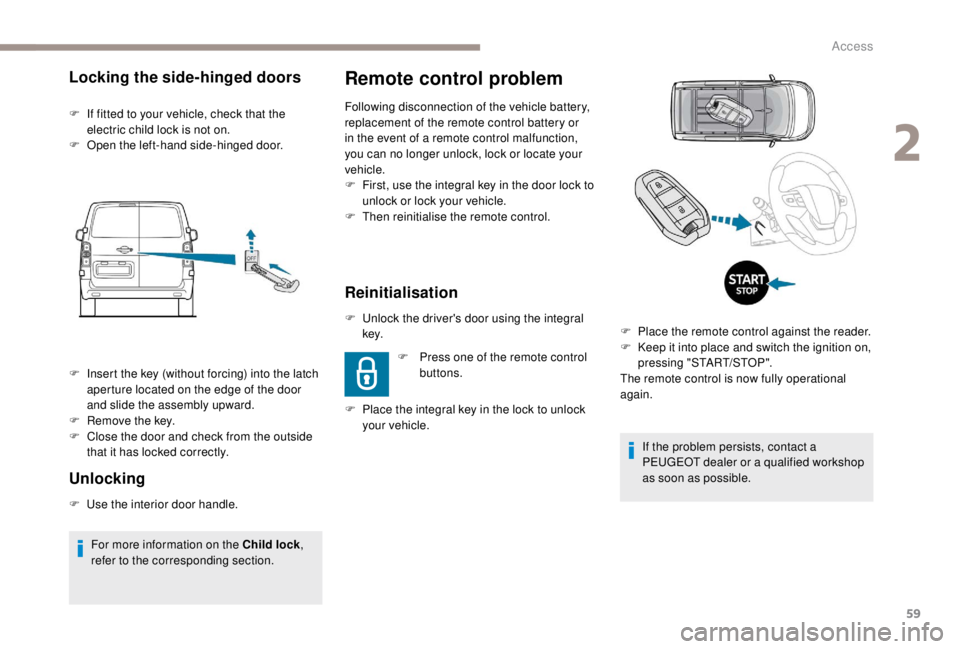
F Unlock the driver's door using the integral key.
F
P
lace the integral key in the lock to unlock
your vehicle. F
P
ress one of the remote control
buttons.
Locking the side-hinged doors
F If fitted to your vehicle, check that the electric child lock is not on.
F
O
pen the left-hand side-hinged door.
Unlocking
F Use the interior door handle.F
I
nsert the key (without forcing) into the latch
aperture located on the edge of the door
and slide the assembly upward.
F
R
emove the key.
F
C
lose the door and check from the outside
that it has locked correctly.
For more information on the Child lock ,
refer to the corresponding section. If the problem persists, contact a
PEUGEOT dealer or a qualified workshop
as soon as possible.
F
P
lace the remote control against the reader.
F
K
eep it into place and switch the ignition on,
pressing "START/STOP".
The remote control is now fully operational
again.
2
Access