connect Peugeot Expert 2019 User Guide
[x] Cancel search | Manufacturer: PEUGEOT, Model Year: 2019, Model line: Expert, Model: Peugeot Expert 2019Pages: 324, PDF Size: 13.07 MB
Page 80 of 324
78
When the USB socket is used, the
portable device charges automatically.
While charging, a message is displayed
if the power consumption of the portable
device exceeds the amperage supplied by
the vehicle.
For more information on the use of this
equipment, refer to the Audio equipment
and telematics section.
JACK socket
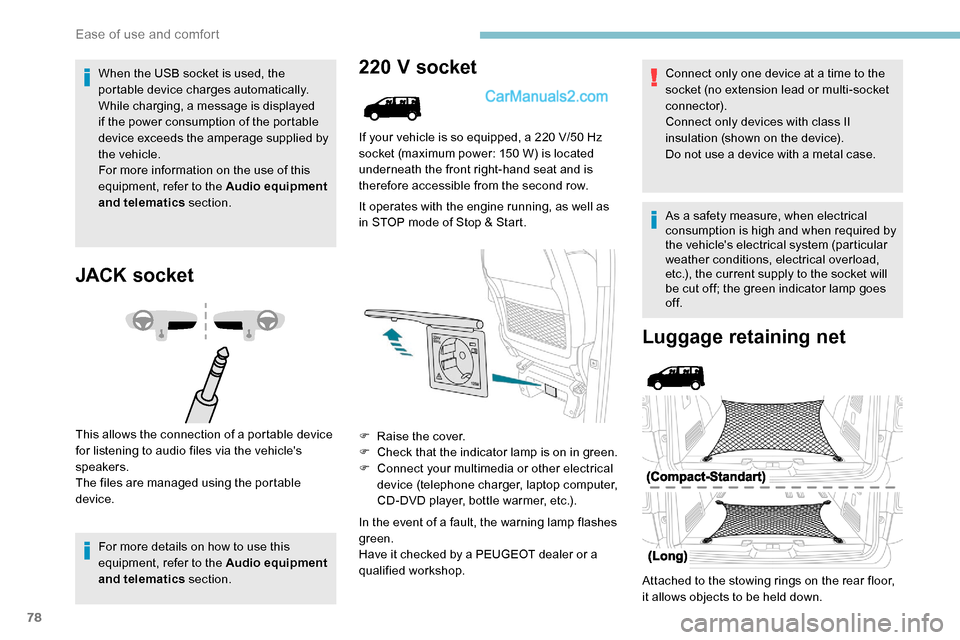
This allows the connection of a portable device
for listening to audio files via the vehicle's
speakers.
The files are managed using the portable
device.
For more details on how to use this
equipment, refer to the Audio equipment
and telematics section.
220 V socket
If your vehicle is so equipped, a 220 V/50 Hz
socket (maximum power: 150 W) is located
underneath the front right-hand seat and is
therefore accessible from the second row.
It operates with the engine running, as well as
in STOP mode of Stop & Start.
F
Ra
ise the cover.
F
C
heck that the indicator lamp is on in green.
F
C
onnect your multimedia or other electrical
device (telephone charger, laptop computer,
CD-DVD player, bottle warmer, etc.).
In the event of a fault, the warning lamp flashes
green.
Have it checked by a PEUGEOT dealer or a
qualified workshop.
Luggage retaining net
Attached to the stowing rings on the rear floor,
it allows objects to be held down. Connect only one device at a time to the
socket (no extension lead or multi-socket
connector).
Connect only devices with class II
insulation (shown on the device).
Do not use a device with a metal case.
As a safety measure, when electrical
consumption is high and when required by
the vehicle's electrical system (particular
weather conditions, electrical overload,
etc.), the current supply to the socket will
be cut off; the green indicator lamp goes
of f.
Ease of use and comfort
Page 95 of 324
93
Heating
This is an additional and separate system
which heats the passenger compartment and
improves defrosting performance.This indicator lamp is lit while the
system is programmed or set in
operation remotely via the remote
control.
It flashes during the whole duration
of the heating and goes off at the end
of the heating cycle or when stopped
using the remote control.
Ventilation
This system allows ventilation of the passenger
compartment with exterior air to improve the
temperature experienced on entering the
vehicle in summer.
Programming
With PEUGEOT Connect Nav, use the remote
control to start /stop the additional heating.
With a Bluetooth
® audio system or PEUGEOT
Connect Radio, use the remote control to start /
stop the additional heating and/or adjust the
preheating times.
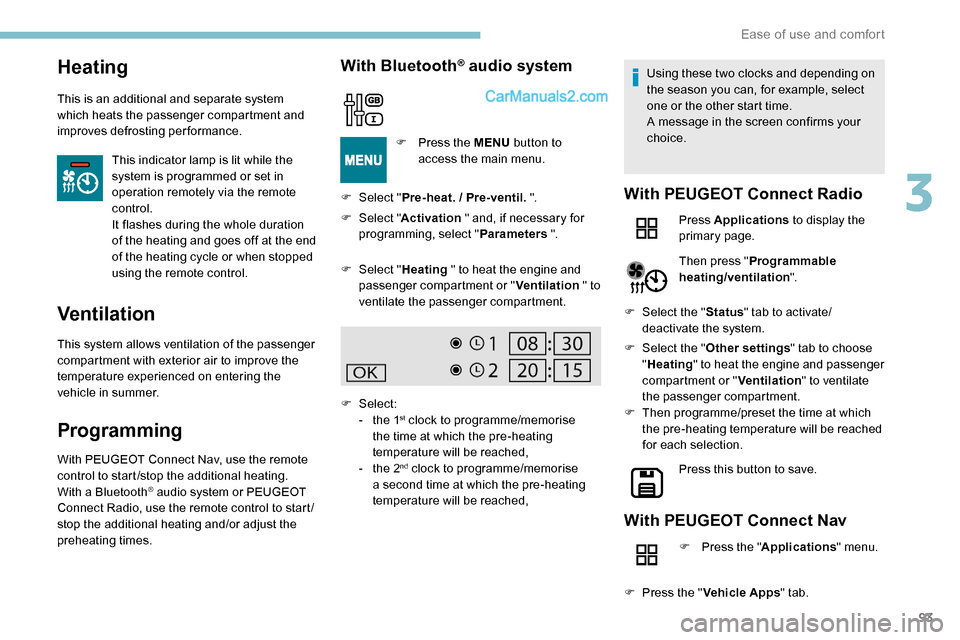
With Bluetooth® audio system
F Select " Pre-heat. / Pre-ventil. ".
F
Sel
ect "Activation " and, if necessary for
programming, select " Parameters ".
F
P
ress the MENU
button to
access the main menu.
F
Sel
ect "Heating " to heat the engine and
passenger compartment or " Ventilation " to
ventilate the passenger compartment.
F
Select:
-
t
he 1
st clock to programme/memorise
the time at which the pre-heating
temperature will be reached,
-
t
he 2
nd clock to programme/memorise
a second time at which the pre-heating
temperature will be reached, Using these two clocks and depending on
the season you can, for example, select
one or the other start time.
A message in the screen confirms your
choice.
With PEUGEOT Connect Radio
Press Applications
to display the
primary page.
Then press " Programmable
heating/ventilation ".
F
Sel
ect the " Status" tab to activate/
deactivate the system.
F
Sel
ect the " Other settings " tab to choose
" Heating " to heat the engine and passenger
compartment or " Ventilation" to ventilate
the passenger compartment.
F
T
hen programme/preset the time at which
the pre-heating temperature will be reached
for each selection.
Press this button to save.
With PEUGEOT Connect Nav
F Press the " Applications" menu.
F
P
ress the " Vehicle Apps " tab.
3
Ease of use and comfort
Page 110 of 324
108
Emergency or assistance
call
Peugeot Connect SOS
* In accordance with the general conditions of ser vice available from dealers and subject to
technological and technical limitations. **
A
ccording to the geographic coverage
of "Peugeot Connect SOS", "Peugeot
Connect Assistance" and the official national
language chosen by the owner of the vehicle.
The list of countries covered and PEUGEOT
CONNECT services is available from dealers
or on the website for your country.
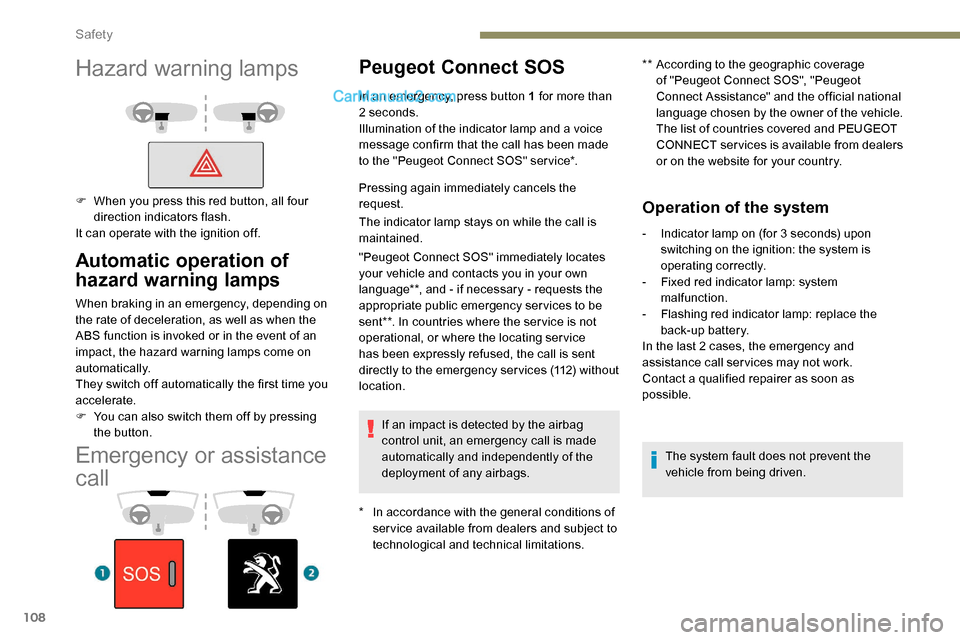
In an emergency, press button 1 for more than
2 seconds.
Illumination of the indicator lamp and a voice
message confirm that the call has been made
to the "Peugeot Connect SOS" ser vice*.
Pressing again immediately cancels the
request.
The indicator lamp stays on while the call is
maintained.
"Peugeot Connect SOS" immediately locates
your vehicle and contacts you in your own
language**, and - if necessary - requests the
appropriate public emergency services to be
sent**. In countries where the ser vice is not
operational, or where the locating service
has been expressly refused, the call is sent
directly to the emergency services (112) without
location.
If an impact is detected by the airbag
control unit, an emergency call is made
automatically and independently of the
deployment of any airbags.
Operation of the system
- Indicator lamp on (for 3 seconds) upon switching on the ignition: the system is
operating correctly.
-
F
ixed red indicator lamp: system
malfunction.
-
F
lashing red indicator lamp: replace the
back-up battery.
In the last 2 cases, the emergency and
assistance call ser vices may not work.
Contact a qualified repairer as soon as
possible.
The system fault does not prevent the
vehicle from being driven.
Automatic operation of
hazard warning lamps
When braking in an emergency, depending on
the rate of deceleration, as well as when the
ABS function is invoked or in the event of an
impact, the hazard warning lamps come on
automatically.
They switch off automatically the first time you
accelerate.
F
Y
ou can also switch them off by pressing
the button.
Hazard warning lamps
F When you press this red button, all four direction indicators flash.
It can operate with the ignition off.
Safety
Page 111 of 324
109
Peugeot Connect
Assistance
** According to the geographic coverage of ‘Peugeot Connect SOS’, ‘Peugeot Connect
Assistance’ and the official national
language chosen by the owner of the vehicle.
The list of countries covered and of the
telematic services is available from dealers
or on the website for your country.
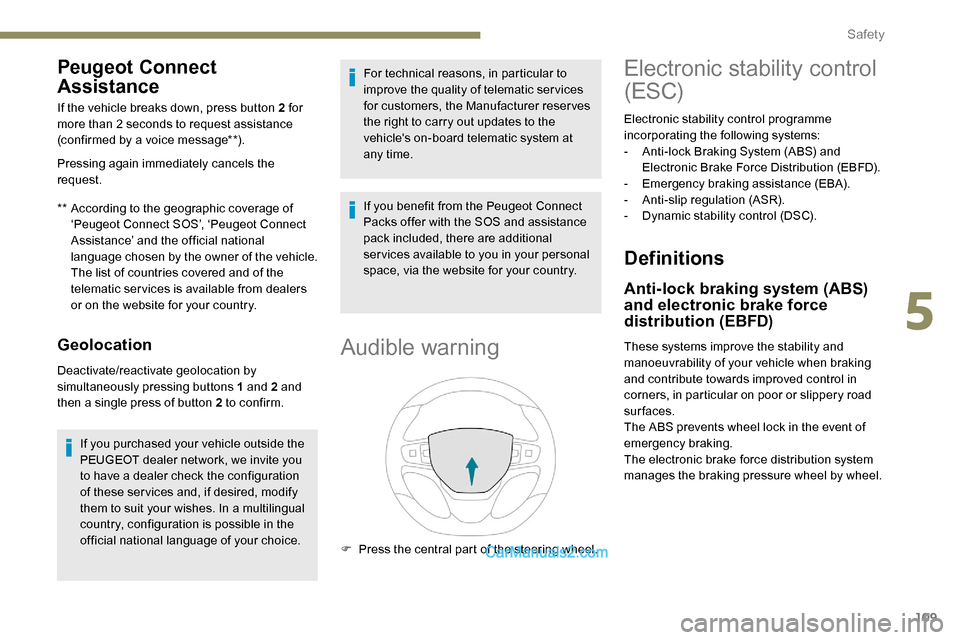
If the vehicle breaks down, press button 2 for
more than 2 seconds to request assistance
(confirmed by a voice message**).
Pressing again immediately cancels the
request.
Geolocation
Deactivate/reactivate geolocation by
simultaneously pressing buttons 1 and 2 and
then a single press of button 2 to confirm.
If you purchased your vehicle outside the
PEUGEOT dealer network, we invite you
to have a dealer check the configuration
of these ser vices and, if desired, modify
them to suit your wishes. In a multilingual
country, configuration is possible in the
official national language of your choice. For technical reasons, in particular to
improve the quality of telematic ser vices
for customers, the Manufacturer reserves
the right to carry out updates to the
vehicle's on-board telematic system at
any time.
If you benefit from the Peugeot Connect
Packs offer with the SOS and assistance
pack included, there are additional
ser vices available to you in your personal
space, via the website for your country.
Audible warning
F Press the central part of the steering wheel.
Electronic stability control
(ESC)
Electronic stability control programme
incorporating the following systems:
-
A
nti-lock Braking System (ABS) and
Electronic Brake Force Distribution (EBFD).
-
E
mergency braking assistance (EBA).
-
A
nti-slip regulation (ASR).
-
D
ynamic stability control (DSC).
Definitions
Anti-lock braking system (ABS)
and electronic brake force
distribution (EBFD)
These systems improve the stability and
manoeuvrability of your vehicle when braking
and contribute towards improved control in
corners, in particular on poor or slippery road
surfaces.
The ABS prevents wheel lock in the event of
emergency braking.
The electronic brake force distribution system
manages the braking pressure wheel by wheel.
5
Safety
Page 181 of 324
179
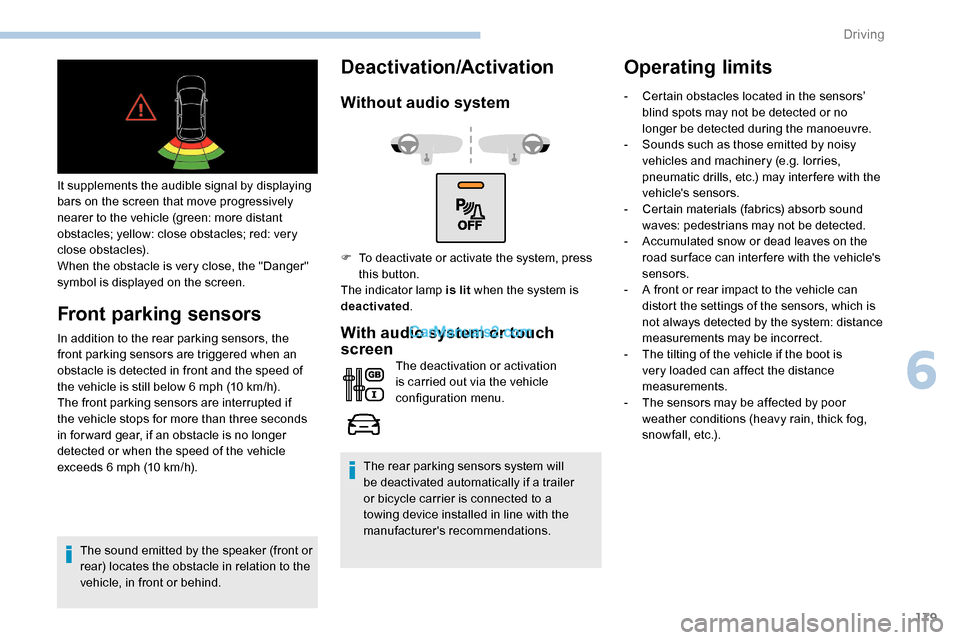
It supplements the audible signal by displaying
bars on the screen that move progressively
nearer to the vehicle (green: more distant
obstacles; yellow: close obstacles; red: very
close obstacles).
When the obstacle is very close, the "Danger"
symbol is displayed on the screen.
Front parking sensors
In addition to the rear parking sensors, the
front parking sensors are triggered when an
obstacle is detected in front and the speed of
the vehicle is still below 6 mph (10 km/h).
The front parking sensors are interrupted if
the vehicle stops for more than three seconds
in for ward gear, if an obstacle is no longer
detected or when the speed of the vehicle
exceeds 6
mph (10 km/h).
The sound emitted by the speaker (front or
rear) locates the obstacle in relation to the
vehicle, in front or behind.
Deactivation/Activation
Without audio system
With audio system or touch
screen
The deactivation or activation
is carried out via the vehicle
configuration menu.
The rear parking sensors system will
be deactivated automatically if a trailer
or bicycle carrier is connected to a
towing device installed in line with the
manufacturer's recommendations.
Operating limits
F To deactivate or activate the system, press this button.
The indicator lamp is lit when the system is
deactivated . -
C
ertain obstacles located in the sensors’
blind spots may not be detected or no
longer be detected during the manoeuvre.
-
S
ounds such as those emitted by noisy
vehicles and machinery (e.g. lorries,
pneumatic drills, etc.) may inter fere with the
vehicle's sensors.
-
C
ertain materials (fabrics) absorb sound
waves: pedestrians may not be detected.
-
A
ccumulated snow or dead leaves on the
road sur face can inter fere with the vehicle's
sensors.
-
A f
ront or rear impact to the vehicle can
distort the settings of the sensors, which is
not always detected by the system: distance
measurements may be incorrect.
-
T
he tilting of the vehicle if the boot is
very loaded can affect the distance
measurements.
-
T
he sensors may be affected by poor
weather conditions (heavy rain, thick fog,
snowfall, etc.).
6
Driving
Page 196 of 324
194
To p p i n g u p
This additive must be topped up without delay
by a PEUGEOT dealer or a qualified workshop.
AdBlue (BlueHDi)
An alert is triggered once the reser ve level is
reached.
For more information on the Indicators and in
particular the AdBlue range indicators, refer to
the corresponding section.
To avoid the vehicle being immobilised as per
regulations, you must top up the AdBlue tank.
For more information on AdBlue
® (BlueHDi) ,
and in particular on the supply of AdBlue, refer
to the corresponding section.
Checks
Unless otherwise indicated, check these
components in accordance with the
manufacturer's service schedule and according
to your engine.
Other wise, have them checked by a PEUGEOT
dealer or a qualified workshop. Only use products recommended by
PEUGEOT or products of equivalent
quality and specification.
In order to optimise the operation of
components as important as those in the
braking system, PEUGEOT selects and
offers very specific products.
12 V battery
The battery does not require any
maintenance.
However, check regularly that the
terminals are correctly tightened
(versions without quick release
terminals) and that the connections
are clean.
For more information on the precautions to
take before any work on the 12
V batter y,
refer to the corresponding section.
Versions equipped with Stop & Start are
fitted with a 12
V lead-acid battery of
specific technology and specification.
Its replacement should be carried out
only by a PEUGEOT dealer or a qualified
workshop.
Passenger compartment filter
Depending on the environment and
the use of the vehicle (e.g. dusty
atmosphere, city driving), change it
twice as often if necessar y .
A clogged passenger compartment
filter may have an adverse effect on
the per formance of the air conditioning
system and generate undesirable odours.
Air filter
Depending on the environment and
the use of the vehicle (e.g. dusty
atmosphere, city driving), change it
twice as often if necessar y .
Oil filter
Change the oil filter each time the
engine oil is changed.
Practical information
Page 205 of 324
203
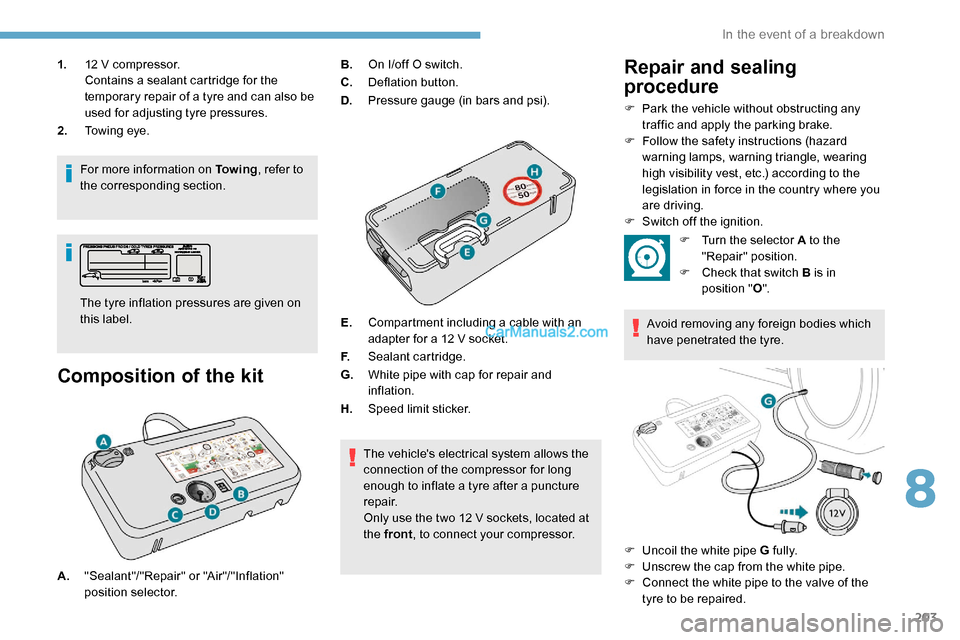
1.12 V compressor.
Contains a sealant cartridge for the
temporary repair of a tyre and can also be
used for adjusting tyre pressures.
2. Towing eye.
For more information on To w i n g , refer to
the corresponding section.
Composition of the kit
The tyre inflation pressures are given on
this label. B.
On I/off O switch.
C. Deflation button.
D. Pressure gauge (in bars and psi).
E. Compartment including a cable with an
adapter for a 12 V socket.
F. Sealant cartridge.
G. White pipe with cap for repair and
inflation.
H. Speed limit sticker.
The vehicle's electrical system allows the
connection of the compressor for long
enough to inflate a tyre after a puncture
repair.
Only use the two 12 V sockets, located at
the front , to connect your compressor.
Repair and sealing
procedure
F Park the vehicle without obstructing any
traffic and apply the parking brake.
F
F
ollow the safety instructions (hazard
warning lamps, warning triangle, wearing
high visibility vest, etc.) according to the
legislation in force in the country where you
are driving.
F
S
witch off the ignition.
A. "Sealant"/"Repair" or "Air"/"Inflation"
position selector. F
T
urn the selector A to the
"Repair" position.
F
C
heck that switch B is in
position " O".
Avoid removing any foreign bodies which
have penetrated the tyre.
F
U
ncoil the white pipe G fully.
F
U
nscrew the cap from the white pipe.
F
C
onnect the white pipe to the valve of the
tyre to be repaired.
8
In the event of a breakdown
Page 206 of 324
204
F Connect the compressor's electrical plug to the vehicle's 12 V socket.
F
A
ffix the speed limit sticker.
The speed limit sticker must be secured
to the interior of the vehicle in the driver's
field of vision, to remind you that a wheel
is in temporary use.
F
S
tart the vehicle and leave the engine
running.
Do not start the compressor before
connecting the white pipe to the tyre valve:
the sealant product would be expelled
through the pipe.
F
S
witch on the compressor by moving
switch B to position I until the tyre pressure
reaches 2.0 bars. The sealant product is
injected under pressure into the tyre; do not
disconnect the pipe from the valve during
this operation (risk of blowback). If after approximately seven minutes this
pressure is not reached, this indicates
that the tyre is not repairable; contact a
PEUGEOT dealer or a qualified workshop
for assistance.
F
R
emove the kit and screw the cap back
on the white pipe. Take care to avoid
contaminating the vehicle with traces of
fluid. Keep the kit to hand.
Take care, the sealant product is harmful
if swallowed and causes irritation to the
eyes.
Keep this product out of the reach of
children.
The use-by date of the fluid is marked on
the bottle.
After use, do not discard the bottle in
standard waste, take it to a PEUGEOT
dealer or an authorised waste disposal
site.
Do not forget to obtain a new bottle of
sealant, available from a PEUGEOT
dealer or a qualified workshop.
Inflation, occasional
inflation and checking
pressure
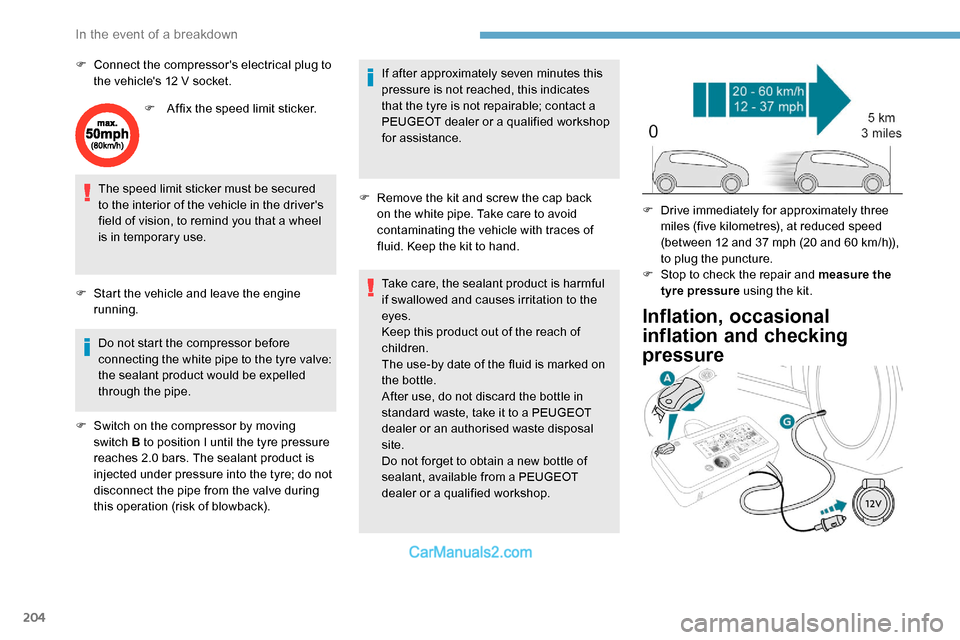
F Drive immediately for approximately three miles (five kilometres), at reduced speed
(between 12 and 37
mph (20 and 60 km/h)),
to plug the puncture.
F
S
top to check the repair and measure the
tyre pressure using the kit.
In the event of a breakdown
Page 207 of 324
205
F Turn selector A to the "Inflation" position.
F
U
ncoil the white pipe G fully.
F
C
onnect the white pipe to the
valve of the repaired wheel.
F
C
onnect the compressor's electrical plug to
the vehicle's 12 V socket again.
F
S
tart the vehicle and leave the engine
running.
As soon as possible, go to a PEUGEOT
dealer or a qualified workshop.
You must inform the technician that this kit
was used. After inspection, the technician
will tell you whether the tyre can be
repaired or if it must be replaced.
F
A
djust the pressure using the compressor
(to inflate: switch B in position " I"; to deflate:
switch B
in position " O" and press button
C),
in accordance with the vehicle's tyre
pressure label, located on the driver’s door
aperture.
A significant loss of pressure indicates that
the puncture has not been fully plugged;
contact a PEUGEOT dealer or a qualified
workshop for assistance.
F
R
emove the kit and stow it. F
D rive at reduced speed (50 mph
(80
km/h) max.) limiting the distance
travelled to approximately 125
miles
(2 0 0
k m).
It is also possible to use the compressor,
without injecting sealant, to check and, if
necessary, adjust the tyre pressures.
If after 7
minutes this pressure is not
reached, this indicates that the tyre is not
repairable; contact a PEUGEOT dealer or
a qualified workshop for assistance.
Do not drive more than 125 miles (200 km)
with a repaired tyre; contact a PEUGEOT
dealer or a qualified workshop to change
the tyre.
Should the pressure of one or more tyres
be adjusted, it is necessary to reinitialise
the under-inflation detection system.
For more information on Tyre under-
inflation detection , refer to the
corresponding section.Removing the pipe and
cartridge
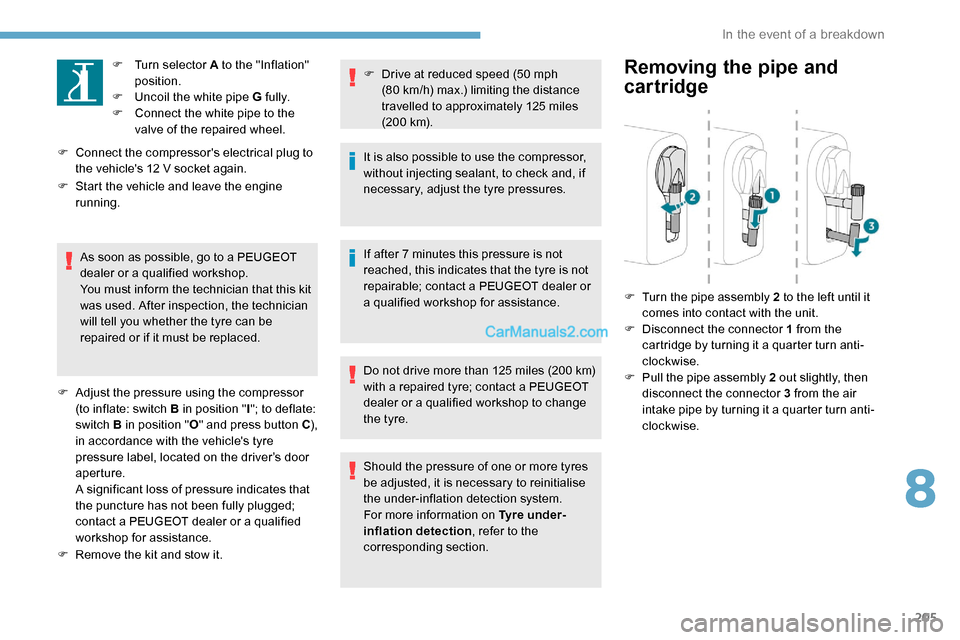
F Turn the pipe assembly 2 to the left until it comes into contact with the unit.
F
D
isconnect the connector 1 from the
cartridge by turning it a quarter turn anti-
clockwise.
F
P
ull the pipe assembly 2 out slightly, then
disconnect the connector 3 from the air
intake pipe by turning it a quarter turn anti-
clockwise.
8
In the event of a breakdown
Page 214 of 324
212
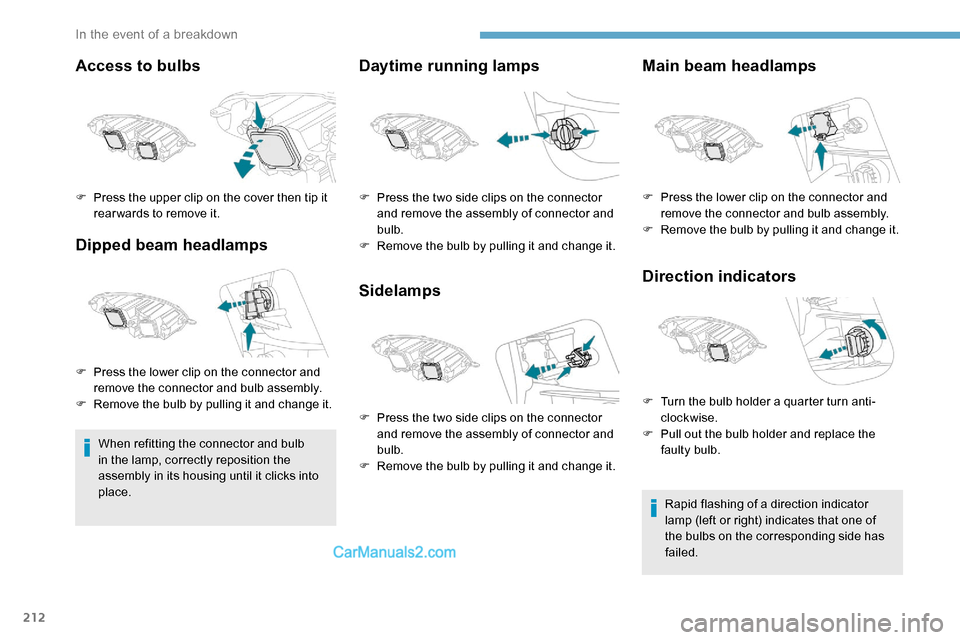
Access to bulbs
Dipped beam headlamps
When refitting the connector and bulb
in the lamp, correctly reposition the
assembly in its housing until it clicks into
place.
Daytime running lamps
SidelampsMain beam headlamps
Direction indicators
Rapid flashing of a direction indicator
lamp (left or right) indicates that one of
the bulbs on the corresponding side has
failed.
F
P
ress the upper clip on the cover then tip it
rear wards to remove it.
F
P
ress the lower clip on the connector and
remove the connector and bulb assembly.
F
R
emove the bulb by pulling it and change it. F
P
ress the two side clips on the connector
and remove the assembly of connector and
bulb.
F
R
emove the bulb by pulling it and change it.
F
P
ress the two side clips on the connector
and remove the assembly of connector and
bulb.
F
R
emove the bulb by pulling it and change it. F
P
ress the lower clip on the connector and
remove the connector and bulb assembly.
F
R
emove the bulb by pulling it and change it.
F
T
urn the bulb holder a quarter turn anti-
clockwise.
F
P
ull out the bulb holder and replace the
faulty bulb.
In the event of a breakdown