head Peugeot Expert 2019 Owner's Guide
[x] Cancel search | Manufacturer: PEUGEOT, Model Year: 2019, Model line: Expert, Model: Peugeot Expert 2019Pages: 324, PDF Size: 13.07 MB
Page 123 of 324
121
Advice
An incorrectly installed child seat
compromises the child's safety in the
event of an accident.
Ensure that there is no seat belt or seat
belt buckle under the child seat, as this
could destabilise it.
Remember to fasten the seat belts or the
harness of child seats, keeping the slack
relative to the child's body to a minimum,
even for short journeys.
When installing a child seat using the seat
belt, ensure that the seat belt is tightened
correctly on the child seat and that it
secures the child seat firmly on the seat
of the vehicle. If the passenger seat is
adjustable, move it forwards if necessary.
Remove the head restraint before
installing a child seat with a backrest
on a passenger seat.
Ensure that the head restraint is stored or
attached securely to prevent it from being
thrown around the vehicle in the event
of sharp braking. Refit the head restraint
once the child seat has been removed.Installing a booster seat
The chest part of the seat belt must be
positioned on the child's shoulder without
touching the neck.
Ensure that the lap part of the seat belt
passes correctly over the child's thighs.
Use a booster seat with backrest,
equipped with a belt guide at shoulder
level.
Additional protections
To prevent accidental opening of the doors
and rear windows, use the "Child lock".
Take care not to open the rear windows by
more than one third.
To protect young children from the rays
of the sun, fit side blinds on the rear
windows.
As a safety precaution, do not leave:
-
a c
hild alone and unattended in a
vehicle,
-
a c
hild or an animal in a vehicle
which is exposed to the sun, with the
windows closed,
-
t
he keys within reach of children inside
the vehicle.
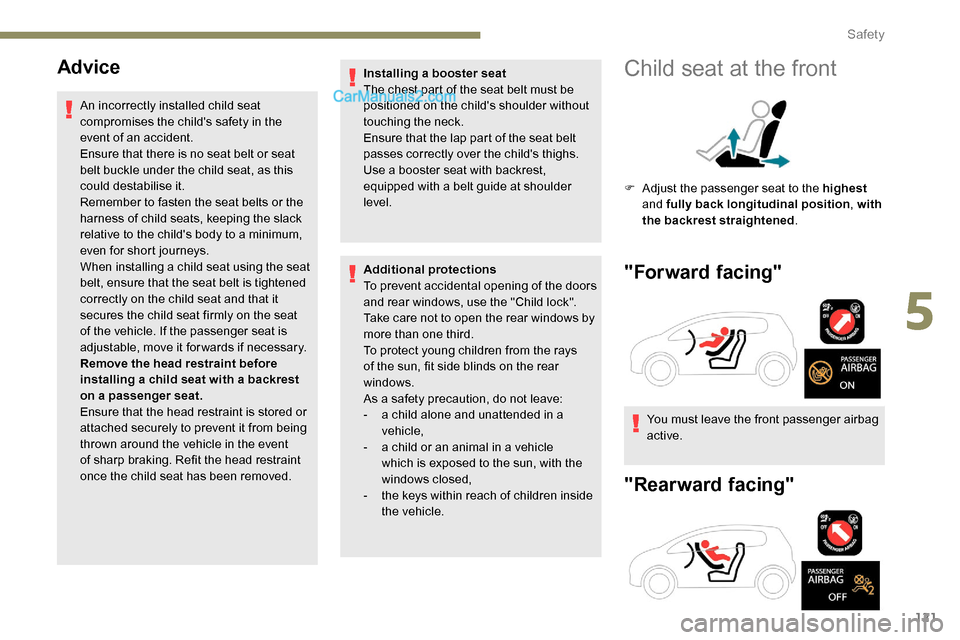
Child seat at the front
F Adjust the passenger seat to the highest
and fully back longitudinal position , with
the backrest straightened .
"Forward facing"
You must leave the front passenger airbag
active.
"Rearward facing"
5
Safety
Page 125 of 324
123
F Move the vehicle's front seat for ward and straighten the backrest so that the legs of
the child in the "for ward facing" child seat or
the "rear ward facing" child seat itself do not
touch the vehicle's front seat.
F
V
erify that the backrest of the "for ward
facing" child seat is as close as possible to
the backrest of the vehicle's rear seat, and
is ideally in contact with it.
F
A
djust the rear seat to the fully back
longitudinal position, with the backrest
straightened.
Make sure that the seat belt is correctly
tightened.
For child seats with a support leg, make
sure that the support leg is in firm and
steady contact with the floor. If necessary,
adjust the front seat of the vehicle.
Row 3
If the vehicle is so equipped, when a child
seat is installed on a passenger seat in the 3rd
row, move the seats in the 2nd row for ward and
straighten the backrests so that the child seat
or the legs of the child do not touch the seats in
the 2
nd row.
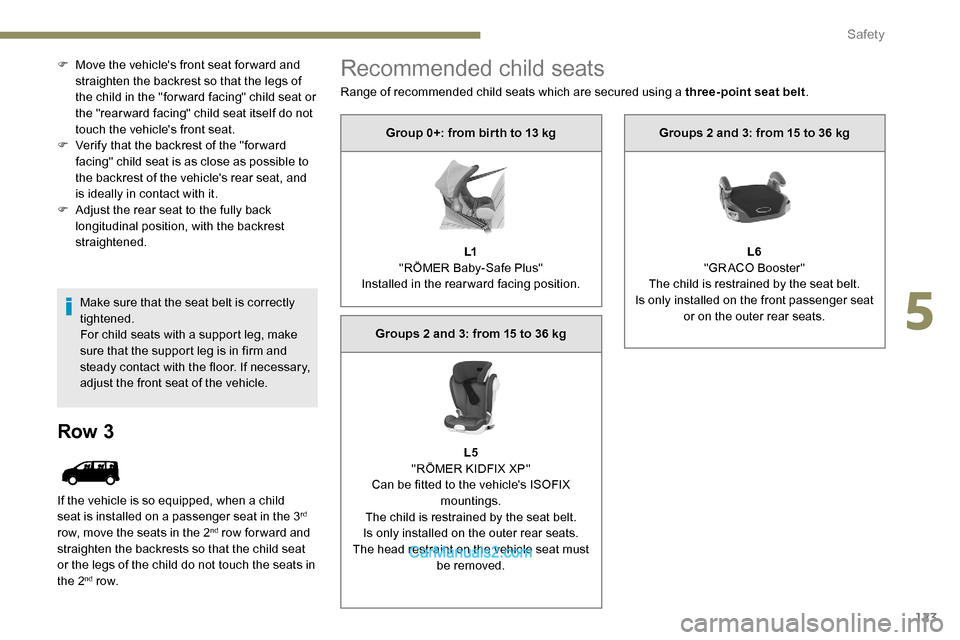
Recommended child seats
Range of recommended child seats which are secured using a three-point seat belt .
Group 0+: from bir th to 13 kg
L1
"RÖMER Baby-Safe Plus"
Installed in the rearward facing position.
Groups 2 and 3: from 15 to 36 kg
L5
"RÖMER KIDFIX XP"
Can be fitted to the vehicle's ISOFIX mountings.
The child is restrained by the seat belt.
Is only installed on the outer rear seats.
The head restraint on the vehicle seat must be removed. Groups 2 and 3: from 15 to 36 kg
L6
"GRACO Booster"
The child is restrained by the seat belt.
Is only installed on the front passenger seat or on the outer rear seats.
5
Safety
Page 131 of 324
129
UFSeat position suitable for the installation
of a child seat secured using the seat belt
and universally approved "forward facing".
X Seat position not suitable for the
installation of a child seat of the weight
class indicated.
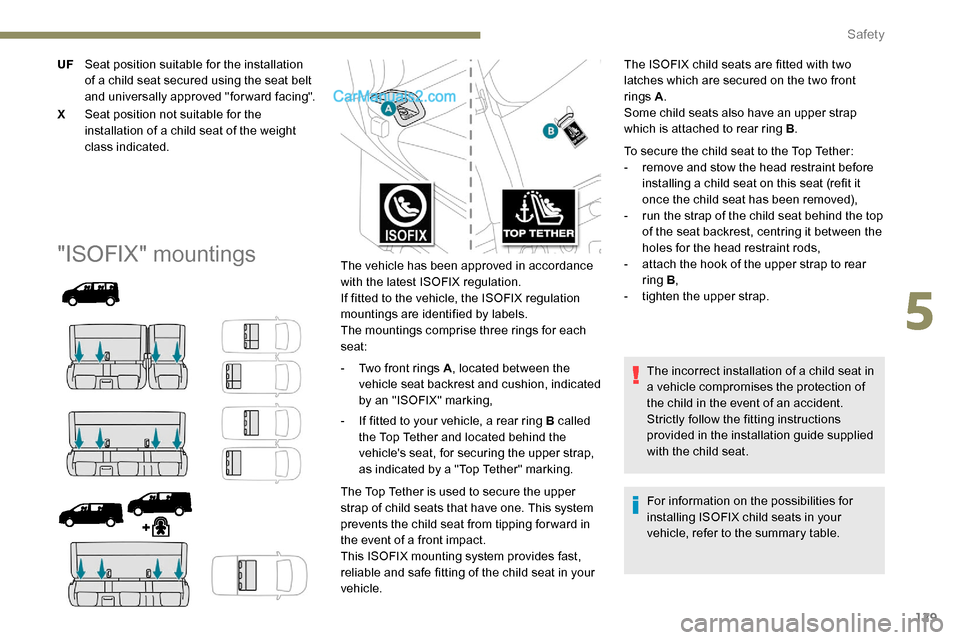
"ISOFIX" mountingsThe vehicle has been approved in accordance
with the latest ISOFIX regulation.
If fitted to the vehicle, the ISOFIX regulation
mountings are identified by labels.
The mountings comprise three rings for each
seat:
-
T
wo front rings A , located between the
vehicle seat backrest and cushion, indicated
by an "ISOFIX" marking,
-
I
f fitted to your vehicle, a rear ring B called
the Top Tether and located behind the
vehicle's seat, for securing the upper strap,
as indicated by a "Top Tether" marking.
The Top Tether is used to secure the upper
strap of child seats that have one. This system
prevents the child seat from tipping for ward in
the event of a front impact.
This ISOFIX mounting system provides fast,
reliable and safe fitting of the child seat in your
vehicle. For information on the possibilities for
installing ISOFIX child seats in your
vehicle, refer to the summary table.
The ISOFIX child seats are fitted with two
latches which are secured on the two front
rings A
.
Some child seats also have an upper strap
which is attached to rear ring B .
To secure the child seat to the Top Tether:
-
r
emove and stow the head restraint before
installing a child seat on this seat (refit it
once the child seat has been removed),
-
r
un the strap of the child seat behind the top
of the seat backrest, centring it between the
holes for the head restraint rods,
- a ttach the hook of the upper strap to rear
ring B ,
-
t
ighten the upper strap.
The incorrect installation of a child seat in
a vehicle compromises the protection of
the child in the event of an accident.
Strictly follow the fitting instructions
provided in the installation guide supplied
with the child seat.
5
Safety
Page 138 of 324
136
(a)Refer to the current legislation in the
country where you are driving, before
installing a child at this seat position.
(b) The seat can be installed centrally in the
vehicle; it then prevents the use of the
outer seats.
IUF Seat position suitable for installing an
Isofix U niversal seat, " For ward facing",
secured using the upper strap.
IL Seat position suitable for installing an I sofix
semi-universa L child seat which can be:
-
"
rear ward facing" fitted with an upper
strap or a support leg,
-
"
for ward facing" fitted with a support
leg,
-
a c
arrycot fitted with an upper strap or
a support leg.
For securing the upper strap using
the ISOFIX mountings , refer to the
corresponding section.
X Seat position unsuitable for the installation
of an ISOFIX child seat or carrycot of the
weight group indicated. (4)
The seat in row 2 must be adjusted so that
there is no contact between the child in
row 3 and the seat immediately in front.
(5) The front seat must be adjusted so that
there is no contact between the child in
row 2 and the seat immediately in front.
(6) The front seat must be adjusted so that
there is no contact between the child in
row 2 and the seat immediately in front
(with the front seat adjusted to 2 notches
ahead of the centre of the runner).
(1) The installation of a carrycot on this seat
may prevent the use of one or more of the
other seats in this row.
(2) Installation possible only behind the
driver's seat.
(3) Installation possible only behind the
driver's seat with individual passenger
seat.
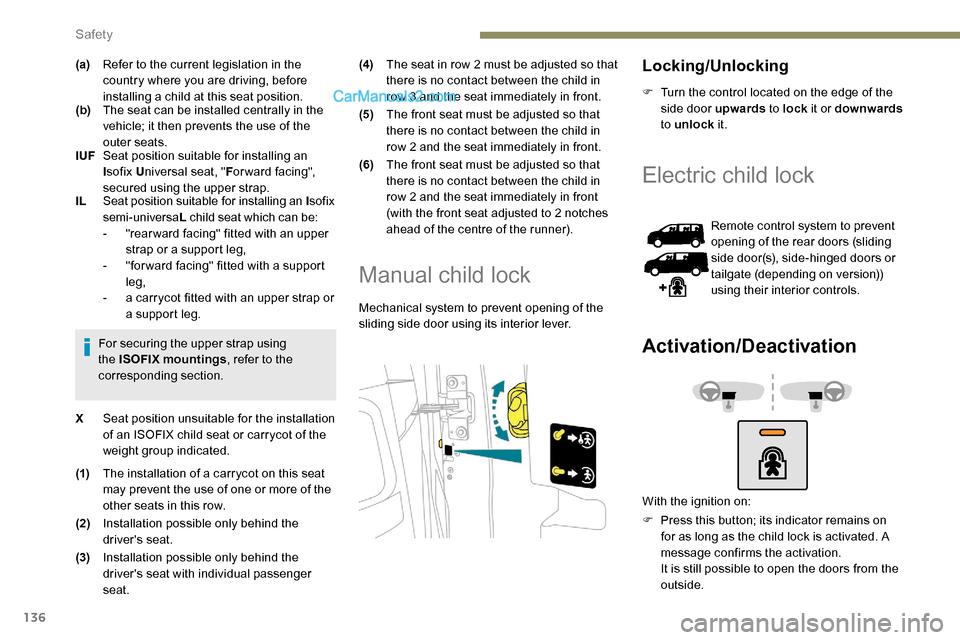
Manual child lock
Mechanical system to prevent opening of the
sliding side door using its interior lever.
Locking/Unlocking
F Turn the control located on the edge of the
side door upwards to lock it or downwards
to unlock it.
Electric child lock
Remote control system to prevent
opening of the rear doors (sliding
side door(s), side-hinged doors or
tailgate (depending on version))
using their interior controls.
Activation/Deactivation
With the ignition on:
F
P
ress this button; its indicator remains on
for as long as the child lock is activated. A
message confirms the activation.
It is still possible to open the doors from the
outside.
Safety
Page 141 of 324
139
In case of towing
Driving with a trailer places greater
demands on the towing vehicle and
requires extra care from the driver.Respect the maximum towable weights.
At altitude:
reduce the maximum load
by 10% per 1,000 metres of altitude; the
density of the air decreases with altitude
and the performance of the engine
reduces.
New vehicle: do not pull a trailer before
having driven at least 620 miles (1,000
kilometres).
If the outside temperature is high, let the
engine idle for 1 to 2 minutes after the
vehicle comes to a stop, to help it to cool.
Before setting off
Nose weight
F Distribute the load in the trailer so that the heaviest items are as close as possible to
the axle and the nose weight (at the point
where it joins your vehicle) approaches the
maximum permitted without exceeding it.
Ty r e s
F Check the tyre pressures of the towing vehicle and of the trailer, observing the
recommended pressures.
Lighting
F Check the electrical signalling on the trailer and the headlamp beam height of your
vehicle.
If a genuine PEUGEOT towing device
is used, the rear parking sensors will be
deactivated automatically to avoid the
audible signal.
When driving
Cooling
Towing a trailer uphill increases the
temperature of the coolant. The maximum
towable load depends on the gradient and the
exterior temperature. The cooling capacity of
the fan does not increase with engine speed.
F
T
o reduce the heating up, reduce the
vehicle speed and the engine speed.
In all cases, keep a check on the coolant
temperature.
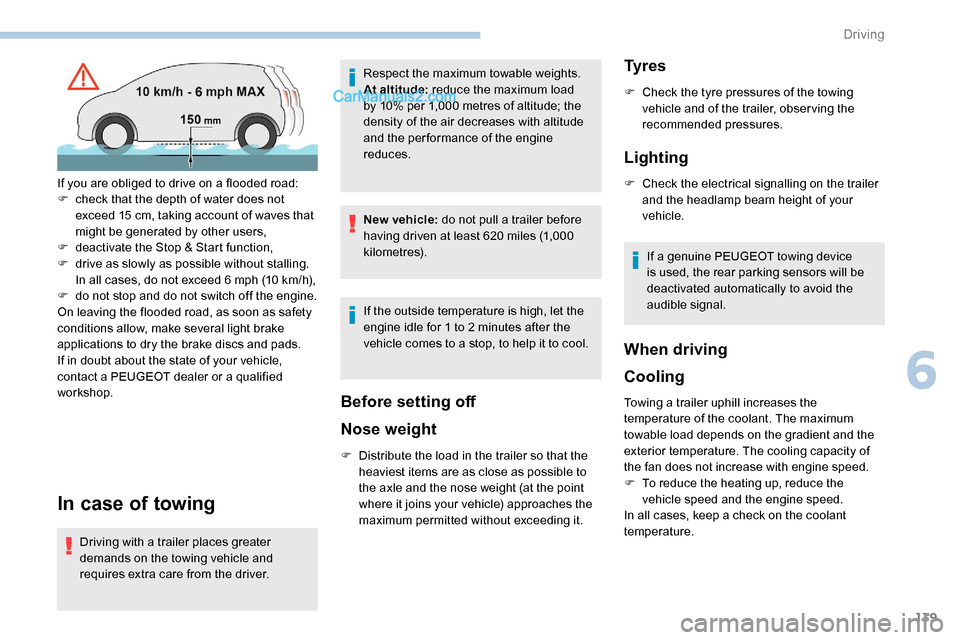
If you are obliged to drive on a flooded road:
F
c
heck that the depth of water does not
exceed 15
cm, taking account of waves that
might be generated by other users,
F
d
eactivate the Stop & Start function,
F
d
rive as slowly as possible without stalling.
In all cases, do not exceed 6 mph (10
km/h),
F
d
o not stop and do not switch off the engine.
On leaving the flooded road, as soon as safety
conditions allow, make several light brake
applications to dry the brake discs and pads.
If in doubt about the state of your vehicle,
contact a PEUGEOT dealer or a qualified
workshop.
6
Driving
Page 144 of 324
142
For Diesel vehicles, in sub-zero
temperatures, the engine will not
start until the pre-heater warning
lamp has gone off.
If this warning lamp comes on
after pressing the "START/
STOP" button, press down on
the brake or clutch pedal until the
warning lamp goes off, without
pressing the "START/STOP"
button again, until the engine
starts and runs.
The presence of the "Keyless Entry and
Starting" system remote control in the
recognition zone is essential.
Never leave the vehicle with the engine
running and with the remote control on
your person.
If the remote control leaves the
recognition zone, a message is displayed.
Move the remote control into the zone in
order to be able to start the engine. If one of the starting conditions is not
met, a message is displayed in the
instrument panel. In some circumstances,
it is required to turn the steering wheel
slightly while pressing the "START/STOP"
button to assist unlocking of the steering
column; a message warns you when this
is needed.
Switching off
With the conventional key/With
the remote control key
F Immobilise the vehicle.
F
T
urn the key all the way to position 1 (Stop)
and remove it from the ignition.
F
T
o lock the steering column, turn the
steering wheel until it locks.
To facilitate unlocking of the steering
column, it is recommended that the
wheels be returned to the straight ahead
position before switching off the engine.
F
C
heck that the parking brake is correctly
applied, particularly on sloping ground. Never switch off the ignition before the
complete immobilisation of the vehicle.
With the engine off, the braking and
steering assistance systems are also
turned off: risk of loss of control of the
vehicle.
As a safety measure, never leave the
vehicle without taking the remote control
with you, even for a short time.
Avoid attaching heavy objects to the key
or the remote control, which would weigh
down on its blade in the ignition switch
and could cause a malfunction.
Key left in the ignition
When opening the driver's door, an alert
message is displayed, accompanied by an
audible signal, to remind you that the key
is still in the ignition switch at position
1
(Stop) .
If the key has been left in the ignition
switch at position 2 (Ignition on) , the
ignition will be switched off automatically
after one hour.
To switch the ignition back on, turn the
key to position 1 (Stop) , then back to
position
2 (Ignition on) .
Driving
Page 159 of 324
157
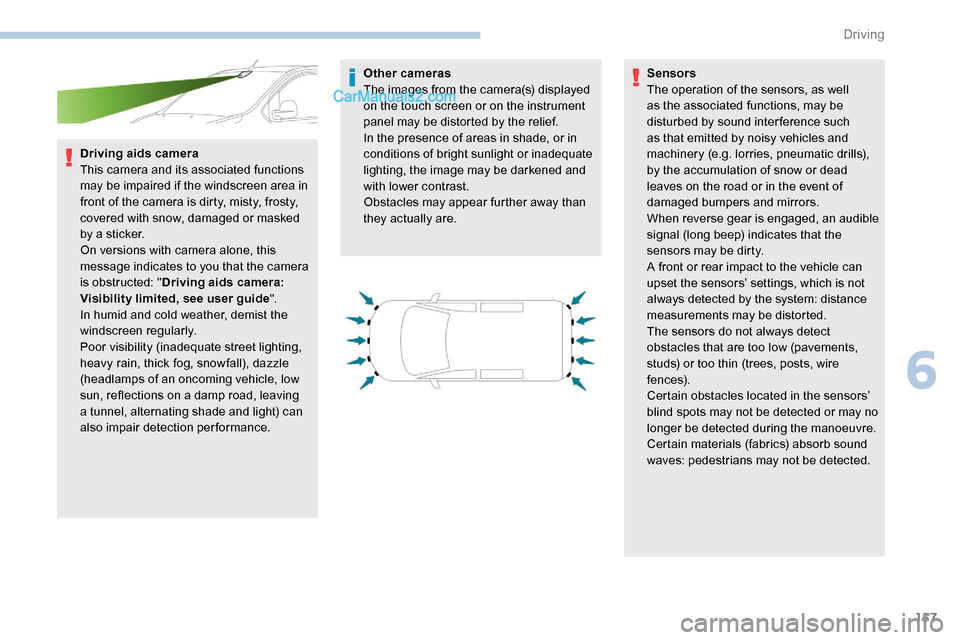
Driving aids camera
This camera and its associated functions
may be impaired if the windscreen area in
front of the camera is dirty, misty, frosty,
covered with snow, damaged or masked
by a sticker.
On versions with camera alone, this
message indicates to you that the camera
is obstructed: "Driving aids camera:
Visibility limited, see user guide".
In humid and cold weather, demist the
windscreen regularly.
Poor visibility (inadequate street lighting,
heavy rain, thick fog, snowfall), dazzle
(headlamps of an oncoming vehicle, low
sun, reflections on a damp road, leaving
a tunnel, alternating shade and light) can
also impair detection performance. Other cameras
The images from the camera(s) displayed
on the touch screen or on the instrument
panel may be distorted by the relief.
In the presence of areas in shade, or in
conditions of bright sunlight or inadequate
lighting, the image may be darkened and
with lower contrast.
Obstacles may appear further away than
they actually are.
Sensors
The operation of the sensors, as well
as the associated functions, may be
disturbed by sound inter ference such
as that emitted by noisy vehicles and
machinery (e.g. lorries, pneumatic drills),
by the accumulation of snow or dead
leaves on the road or in the event of
damaged bumpers and mirrors.
When reverse gear is engaged, an audible
signal (long beep) indicates that the
sensors may be dirty.
A front or rear impact to the vehicle can
upset the sensors’ settings, which is not
always detected by the system: distance
measurements may be distorted.
The sensors do not always detect
obstacles that are too low (pavements,
studs) or too thin (trees, posts, wire
fe n c e s).
Certain obstacles located in the sensors’
blind spots may not be detected or may no
longer be detected during the manoeuvre.
Certain materials (fabrics) absorb sound
waves: pedestrians may not be detected.
6
Driving
Page 160 of 324
158
Maintenance
Clean the bumpers and door mirrors and
the field of vision of the cameras regularly.
When washing your vehicle at high
pressure, direct the spray from at least
30 cm away from the radar, sensors and
cameras.
Mats
The use of mats not approved by
PEUGEOT may inter fere with the
operation of the speed limiter or cruise
control.
To avoid any risk of jamming the pedals:
F
e
nsure that the mat is secured
c o r r e c t l y,
F
n
ever fit one mat on top of another.
Units of speed
Ensure that the units of speed displayed
on the instrument panel (mph or km/h) are
those for the country you are driving in.
If this is not the case, when the vehicle is
stationary, set the display to the required
units of speed so that it complies with
what is authorised locally.
In case of doubt, contact a PEUGEOT
dealer or a qualified workshop.Head-up display
System which projects various information onto
a smoked blade in the driver's field of vision so
that they do not have to take their eyes off the
road.
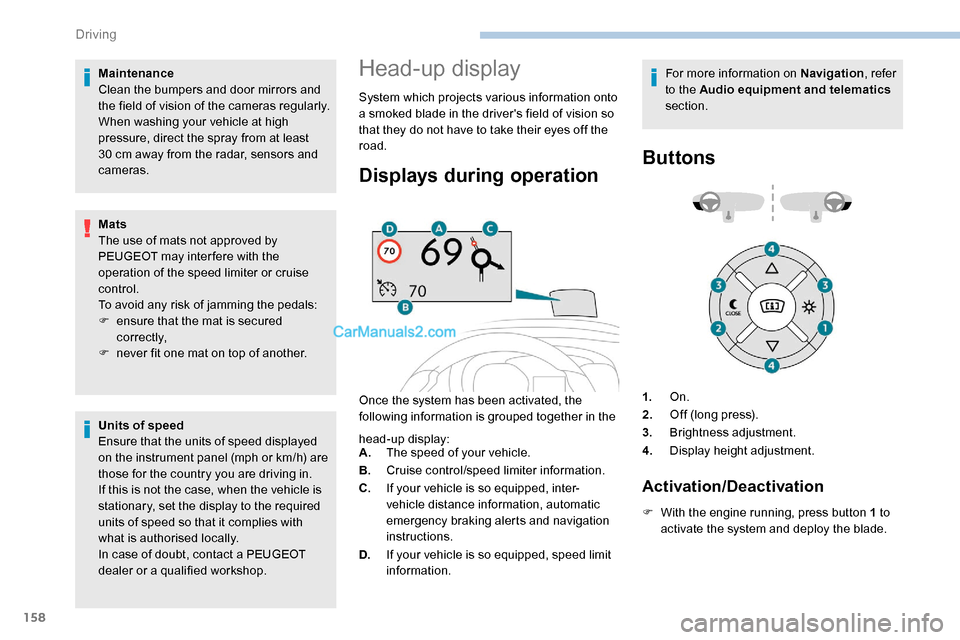
Displays during operation
Once the system has been activated, the
following information is grouped together in the For more information on Navigation
, refer
to the Audio equipment and telematics
section.
Buttons
head-up display:
A. The speed of your vehicle.
B. Cruise control/speed limiter information.
C. If your vehicle is so equipped, inter-
vehicle distance information, automatic
emergency braking alerts and navigation
instructions.
D. If your vehicle is so equipped, speed limit
information. 1.
On.
2. Off (long press).
3. Brightness adjustment.
4. Display height adjustment.
Activation/Deactivation
F With the engine running, press button 1 to
activate the system and deploy the blade.
Driving
Page 161 of 324
159
Height adjustment
With the engine running, adjust the display
to the desired height using buttons 4:
-
u
p to move the display up,
-
d
own to move the display down.
Brightness adjustment
F With the engine running, adjust the brightness of the information display using
button 3 :
-
t
he "sun" to increase the brightness,
-
t
he "moon" to decrease the brightness. When stationary or while driving, no
objects should be placed around the
blade (or in its recess) so as to not impede
deployment of the blade and its correct
operation.
In certain extreme weather conditions
(rain and/or snow, bright sunshine, etc.)
the head-up display may not be legible or
may suffer temporary interference.
Some sunglasses may hamper reading of
the information.
To clean the blade, use a clean, soft cloth
(such as a spectacles cloth or microfibre
cloth). Do not use a dry or abrasive cloth
or detergent or solvent products as these
could scratch the blade or damage the
anti-reflection coating.
This system operates when the engine is
running, and the settings are stored when
the ignition is switched off.
Memorising speeds
This function allows speed settings to
be stored that will then be offered for
configuration of two systems: speed limiter
or cruise control.
Programming
The speed thresholds can be set in
the vehicle configuration menu using
the touch screen.
F
S
elect the system for which you want to
memorise new speed settings:
•
sp
eed limiter
or •
c
ruise control.
F
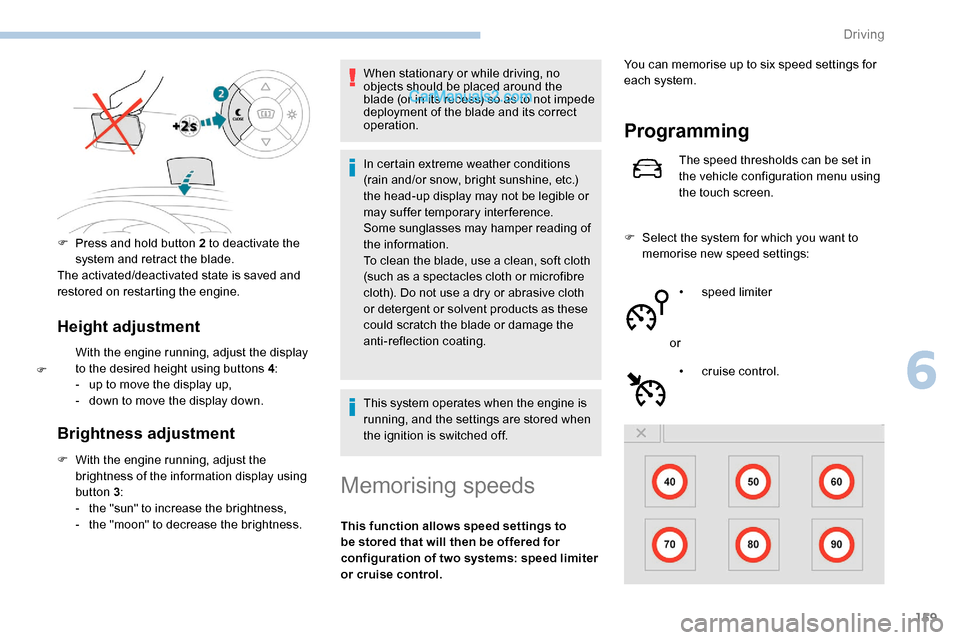
P
ress and hold button 2 to deactivate the
system and retract the blade.
The activated/deactivated state is saved and
restored on restarting the engine.
F
Y
ou can memorise up to six speed settings for
each system.
6
Driving
Page 162 of 324
160
F Enter the new value using the numerical keypad and confirm.
F
C
onfirm to record the changes and quit the
menu.
Memorised speeds are recalled
by pressing this button.
F
P
ress the button corresponding to the
speed setting you want to change.
Speed Limit recognition
and recommendation
Refer to the General recommendations on
the use of driving and manoeuvring aids .
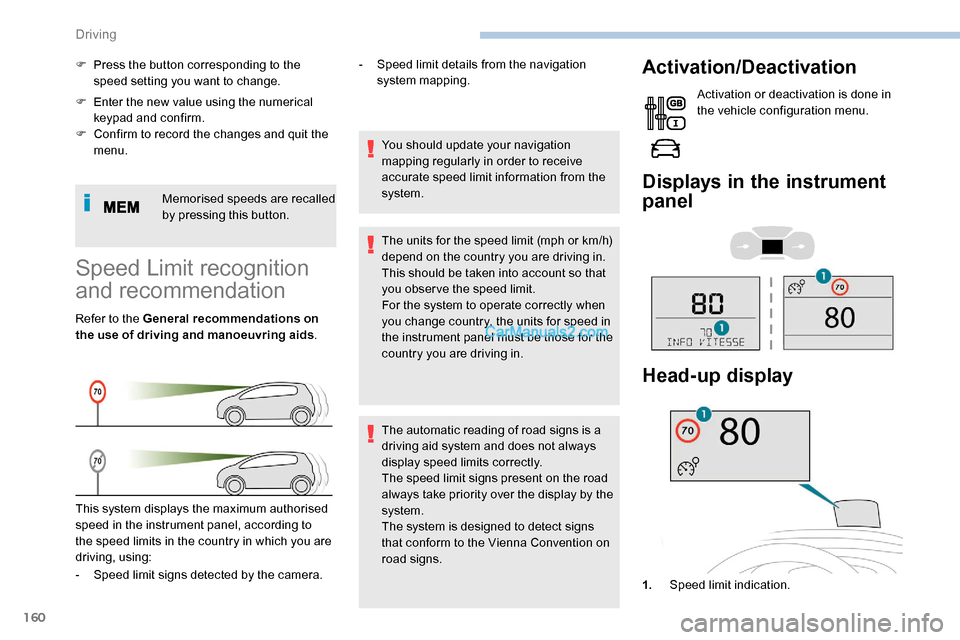
This system displays the maximum authorised
speed in the instrument panel, according to
the speed limits in the country in which you are
driving, using: -
S
peed limit details from the navigation
system mapping.
You should update your navigation
mapping regularly in order to receive
accurate speed limit information from the
system.
The units for the speed limit (mph or km/h)
depend on the country you are driving in.
This should be taken into account so that
you obser ve the speed limit.
For the system to operate correctly when
you change country, the units for speed in
the instrument panel must be those for the
country you are driving in.
The automatic reading of road signs is a
driving aid system and does not always
display speed limits correctly.
The speed limit signs present on the road
always take priority over the display by the
system.
The system is designed to detect signs
that conform to the Vienna Convention on
road signs.
Activation/Deactivation
Activation or deactivation is done in
the vehicle configuration menu.
Displays in the instrument
panel
- Speed limit signs detected by the camera. 1.Speed limit indication.
Head-up display
Driving