head Peugeot Expert 2019 Service Manual
[x] Cancel search | Manufacturer: PEUGEOT, Model Year: 2019, Model line: Expert, Model: Peugeot Expert 2019Pages: 324, PDF Size: 13.07 MB
Page 164 of 324
162
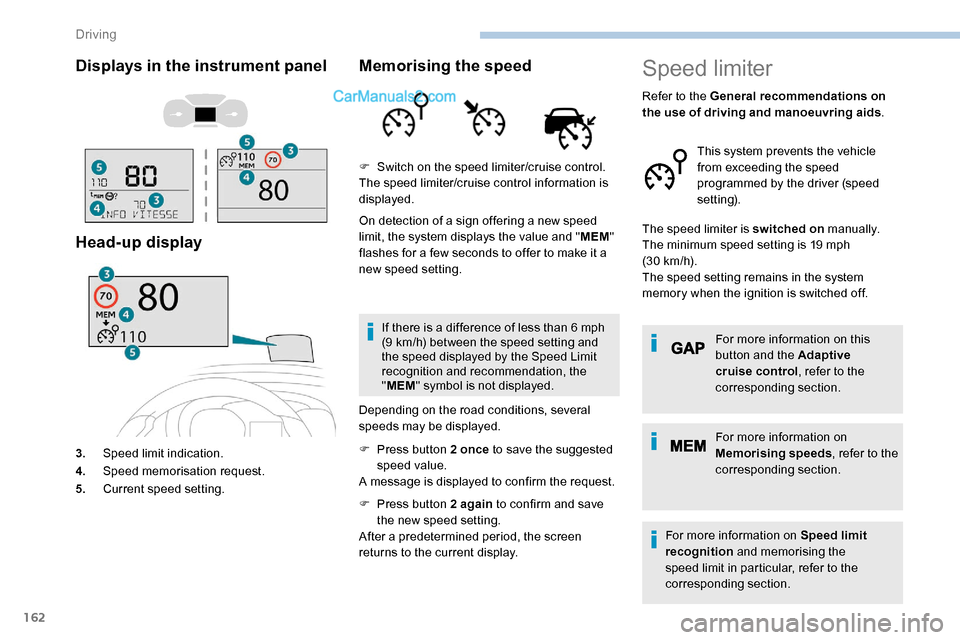
Displays in the instrument panel
Head-up display
3.Speed limit indication.
4. Speed memorisation request.
5. Current speed setting.
Memorising the speed
On detection of a sign offering a new speed
limit, the system displays the value and " MEM"
flashes for a few seconds to offer to make it a
new speed setting.
If there is a difference of less than 6 mph
(9
km/h) between the speed setting and
the speed displayed by the Speed Limit
recognition and recommendation, the
" MEM " symbol is not displayed.
Depending on the road conditions, several
speeds may be displayed.
F
P
ress button 2 once to save the suggested
speed value.
A message is displayed to confirm the request.
F
P
ress button 2 again to confirm and save
the new speed setting.
After a predetermined period, the screen
returns to the current display. F
S
witch on the speed limiter/cruise control.
The speed limiter/cruise control information is
displayed.
Speed limiter
Refer to the General recommendations on
the use of driving and manoeuvring aids .
This system prevents the vehicle
from exceeding the speed
programmed by the driver (speed
setting).
The speed limiter is switched on manually.
The minimum speed setting is 19 mph
(30
km/h).
The speed setting remains in the system
memory when the ignition is switched off.
For more information on this
button and the Adaptive
cruise control , refer to the
corresponding section.
For more information on
Memorising speeds , refer to the
corresponding section.
For more information on Speed limit
recognition and memorising the
speed limit in particular, refer to the
corresponding section.
Driving
Page 165 of 324
163
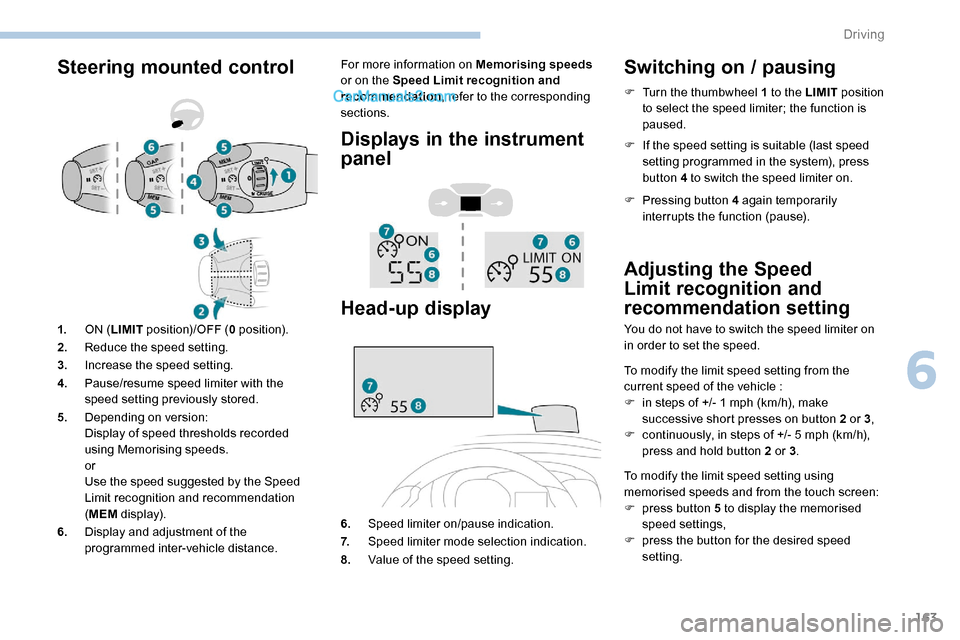
Steering mounted controlFor more information on Memorising speeds
or on the Speed Limit recognition and
recommendation , refer to the corresponding
sections.
Displays in the instrument
panel
Head-up display
6. Speed limiter on/pause indication.
7. Speed limiter mode selection indication.
8. Value of the speed setting.
Switching on / pausing
Adjusting the Speed
Limit recognition and
recommendation setting
You do not have to switch the speed limiter on
in order to set the speed.
To modify the limit speed setting from the
current speed of the vehicle :
F
i
n steps of +/- 1 mph (km/h), make
successive short presses on button 2 or 3 ,
F
c
ontinuously, in steps of +/- 5 mph (km/h),
press and hold button 2 or 3 .
To modify the limit speed setting using
memorised speeds and from the touch screen:
F
p
ress button 5 to display the memorised
speed settings,
F
p
ress the button for the desired speed
setting.
1.
ON (LIMIT position)/OFF ( 0 position).
2. Reduce the speed setting.
3. Increase the speed setting.
4. Pause/resume speed limiter with the
speed setting previously stored.
5. Depending on version:
Display of speed thresholds recorded
using Memorising speeds.
or
Use the speed suggested by the Speed
Limit recognition and recommendation
(MEM display).
6. Display and adjustment of the
programmed inter-vehicle distance. F
T
urn the thumbwheel 1 to the LIMIT
position
to select the speed limiter; the function is
paused.
F
I
f the speed setting is suitable (last speed
setting programmed in the system), press
button 4 to switch the speed limiter on.
F
P
ressing button 4 again temporarily
interrupts the function (pause).
6
Driving
Page 168 of 324
166
For more information on Memorising speeds
or on the Speed Limit recognition and
recommendation , refer to the corresponding
sections.
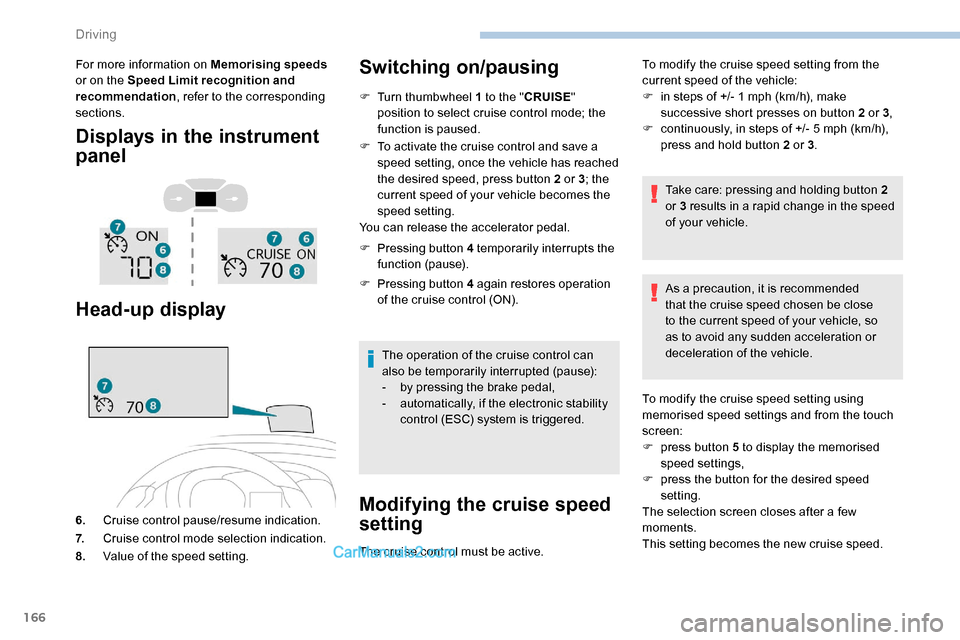
Displays in the instrument
panel
Head-up display
6. Cruise control pause/resume indication.
7. Cruise control mode selection indication.
8. Value of the speed setting.
Switching on/pausing
F Turn thumbwheel 1 to the " CRUISE"
position to select cruise control mode; the
function is paused.
F
T
o activate the cruise control and save a
speed setting, once the vehicle has reached
the desired speed, press button 2 or 3 ; the
current speed of your vehicle becomes the
speed setting.
You can release the accelerator pedal.
F
P
ressing button 4 temporarily interrupts the
function (pause).
F
P
ressing button 4 again restores operation
of the cruise control (ON).
The operation of the cruise control can
also be temporarily interrupted (pause):
-
b
y pressing the brake pedal,
-
a
utomatically, if the electronic stability
control (ESC) system is triggered.
Modifying the cruise speed
setting
The cruise control must be active. To modify the cruise speed setting from the
current speed of the vehicle:
F
i
n steps of +/- 1 mph (km/h), make
successive short presses on button 2 or 3 ,
F
c
ontinuously, in steps of +/- 5 mph (km/h),
press and hold button 2 or 3 .
Take care: pressing and holding button 2
or 3 results in a rapid change in the speed
of your vehicle.
As a precaution, it is recommended
that the cruise speed chosen be close
to the current speed of your vehicle, so
as to avoid any sudden acceleration or
deceleration of the vehicle.
To modify the cruise speed setting using
memorised speed settings and from the touch
screen:
F
p
ress button 5 to display the memorised
speed settings,
F
p
ress the button for the desired speed
setting.
The selection screen closes after a few
moments.
This setting becomes the new cruise speed.
Driving
Page 172 of 324
170
For more information on the Head-up
display, refer to the corresponding
section.
Messages and alerts
The display of these messages or alerts is
not sequential.
Operating limits
“Cruise control paused” or “Cruise
control suspended” following a brief
acceleration by the driver.
“Cruise control active”, no vehicle
detected.
“Cruise control active”, vehicle
detected.
“Cruise control active and speed
adjusted”, vehicle detected too close
or at a slower speed.
“Cruise control active and speed
adjusted”, automatic deactivation
imminent following a cruise control
limit being reached.
“Cruise control paused”, automatic
deactivation following speed limit
adjustment being exceeded and no
reaction from the driver. The regulation range is limited to a
maximum difference of 19 mph (30
km/h)
between the cruise speed setting and the
speed of the vehicle in front.
Above this, the system pauses itself if the
safety distance becomes too short.
The adaptive cruise control uses only engine
braking to slow the vehicle. Consequently the
vehicle loses speed slowly, as when releasing
the accelerator pedal.
The system is paused automatically:
-
i
f the vehicle in front slows down too much
or too suddenly, and the driver does not
brake,
-
i
f a vehicle comes between your vehicle and
the vehicle in front,
-
i
f the system does not slow the vehicle
enough to continue to maintain a safe
distance, for example when descending a
steep hill.
Cases of non- detection by the radar:
-
S
tationary vehicles (traffic jam, breakdown,
e t c .) .
-
V
ehicles driving in the opposite direction.
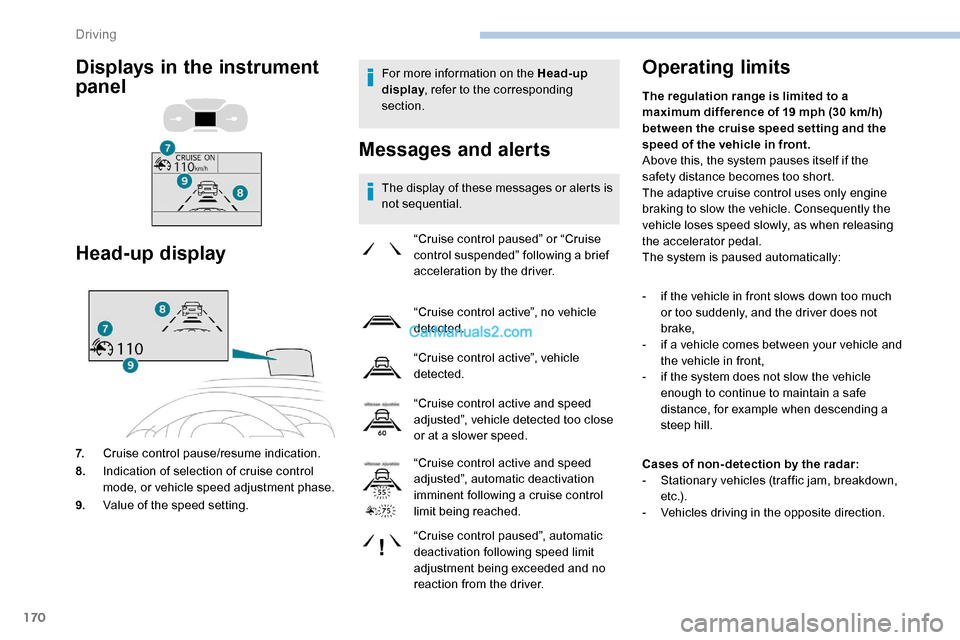
Head-up display
7.Cruise control pause/resume indication.
8. Indication of selection of cruise control
mode, or vehicle speed adjustment phase.
9. Value of the speed setting.
Displays in the instrument
panel
Driving
Page 178 of 324
176
Using a camera placed at the top
of the windscreen, the system
assesses the driver's level of
vigilance by identifying variations
in trajectory compared to the lane
markings.
This system is particularly suited to fast roads
(speed higher than 40 mph (65
km/h)).
When the system interprets the behaviour of
the vehicle as indicating a certain threshold of
driver fatigue or inattention, it triggers the first
level of alert.
The driver is then alerted by the message
" Ta k e c a r e ! ", accompanied by an audible
signal.
After three first level alerts, the system triggers
a further alert with the message " Dangerous
driving: take a break ", accompanied by a
more pronounced audible signal.
In certain driving conditions (poor road
sur face or strong winds), the system may
give alerts independent of the driver's
level of vigilance. The following situations may interfere with
the operation of the system or prevent it
from working:
-
l
ane markings absent, worn, hidden
(snow, mud) or multiple (roadworks),
-
c
lose to the vehicle ahead (lane
markings not detected),
-
r
oads that are narrow, winding, etc.
Blind Spot Detection
Refer to the General recommendations on
the use of driving and manoeuvring aids.
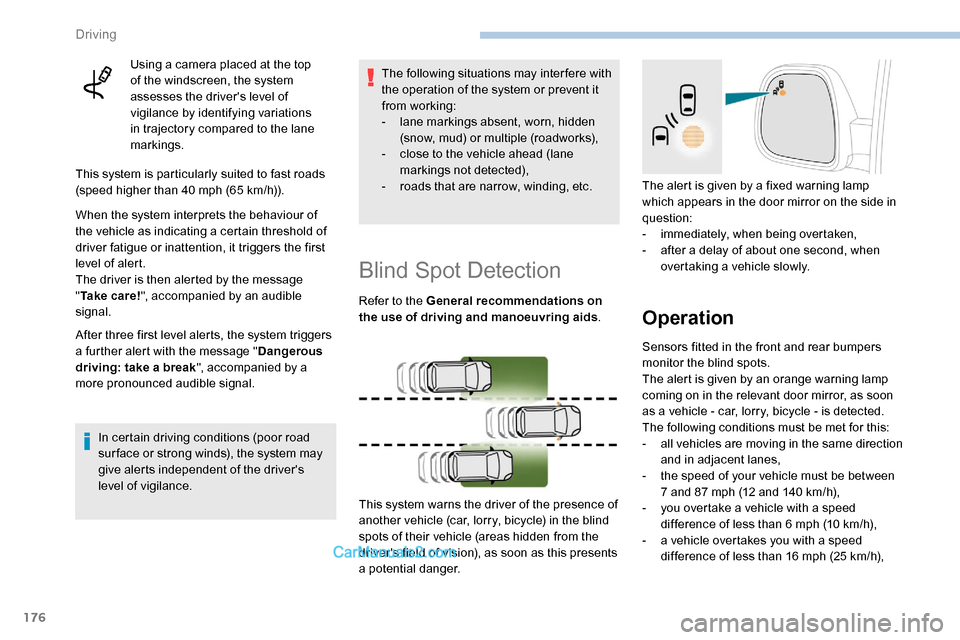
This system warns the driver of the presence of
another vehicle (car, lorry, bicycle) in the blind
spots of their vehicle (areas hidden from the
driver's field of vision), as soon as this presents
a potential danger. The alert is given by a fixed warning lamp
which appears in the door mirror on the side in
question:
-
i
mmediately, when being overtaken,
-
a
fter a delay of about one second, when
overtaking a vehicle slowly.
Operation
Sensors fitted in the front and rear bumpers
monitor the blind spots.
The alert is given by an orange warning lamp
coming on in the relevant door mirror, as soon
as a vehicle - car, lorry, bicycle - is detected.
The following conditions must be met for this:
-
a
ll vehicles are moving in the same direction
and in adjacent lanes,
-
t
he speed of your vehicle must be between
7 and 87 mph (12 and 140
km/h),
-
y
ou overtake a vehicle with a speed
difference of less than 6 mph (10
km/h),
-
a v
ehicle overtakes you with a speed
difference of less than 16 mph (25
km/h),
Driving
Page 185 of 324
183
180° view
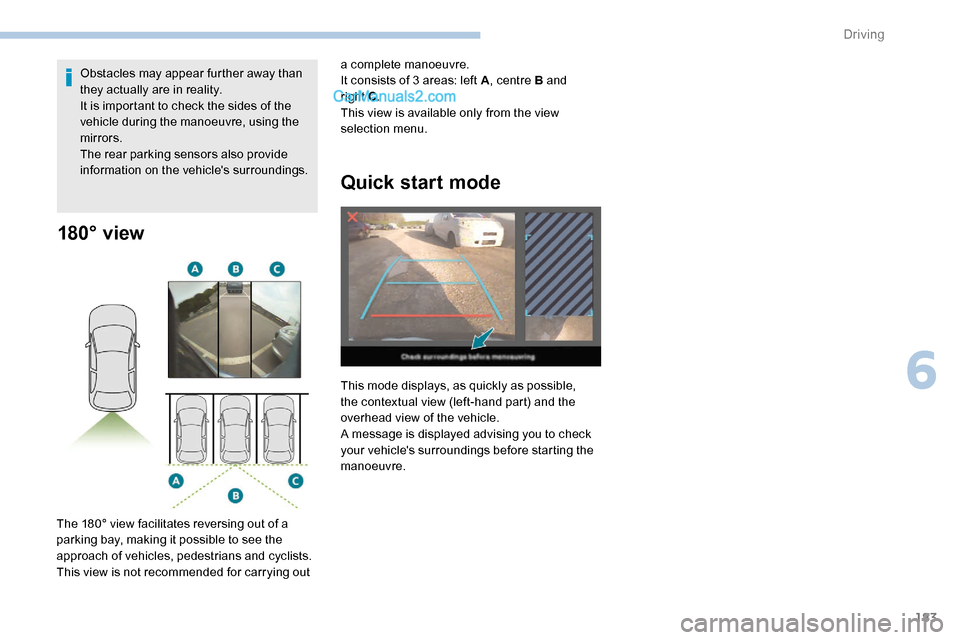
The 180° view facilitates reversing out of a
parking bay, making it possible to see the
approach of vehicles, pedestrians and cyclists.
This view is not recommended for carrying out Obstacles may appear further away than
they actually are in reality.
It is important to check the sides of the
vehicle during the manoeuvre, using the
mirrors.
The rear parking sensors also provide
information on the vehicle's surroundings.
Quick start mode
This mode displays, as quickly as possible,
the contextual view (left-hand part) and the
overhead view of the vehicle.
A message is displayed advising you to check
your vehicle's surroundings before starting the
manoeuvre. a complete manoeuvre.
It consists of 3 areas: left A
, centre B and
right C
.
This view is available only from the view
selection menu.
6
Driving
Page 191 of 324
189
Energy economy mode
System which manages the duration of use of
certain functions to conser ve a sufficient level
of charge in the battery.
After switching off the engine and for a
maximum cumulative period of around 40
minutes, you can continue to use functions
such as the audio and telematics system,
the wipers, the dipped beam headlamps, the
courtesy lamps, etc.
Switching to this mode
A message appears in the instrument panel
screen indicating that the vehicle has switched
to economy mode and the active functions are
put on standby.If a telephone call is being made at this
time, it will be maintained for around
10
minutes with the Bluetooth hands-free
system of your audio system.
Exiting the mode
These functions will be automatically
reactivated the next time the vehicle is used.
In order to restore the use of these functions
immediately, start the engine and let it run:
-
f
or less than 10 minutes, to use the
equipment for approximately 5 minutes, A flat battery prevents the engine from
starting.
For more information on the 12 V batter y
,
refer to the corresponding section.
Load reduction mode
System which manages the use of certain
functions according to the level of charge
remaining in the battery.
When the vehicle is being driven, the load
reduction function temporarily deactivates
certain functions, such as the air conditioning
and the heated rear screen.
The deactivated functions are reactivated
automatically as soon as conditions permit. -
f
or more than 10 minutes, to use the
equipment for approximately 30 minutes.
Let the engine run for the duration specified to
ensure that the battery charge is sufficient.
Do not repeatedly and continuously restart the
engine in order to charge the battery.
Roof bars/Roof rack
As a safety measure and to avoid
damaging the roof, it is essential to use
the roof bars and racks approved for the
vehicle.
Obser ve the instructions on fitting and use
contained in the guide supplied with the
roof bars and racks.
Recommendations
Distribute the load uniformly, taking care
to avoid overloading one of the sides.
Arrange the heaviest part of the load as
close as possible to the roof.
Secure the load securely.
Drive gently: the vehicle will be more
susceptible to the effects of side winds
and its stability may be affected.
Regularly check the security and tight
fastening of the roof bars, at least before
each trip.
Remove the roof bars once they are no
longer needed.
7
Practical information
Page 193 of 324
191
When the engine is hot, handle the
exterior safety catch and the bonnet
stay with care (risk of burns), using the
protected area.
When the bonnet is open, take care not to
damage the safety catch.
Do not open the bonnet under very windy
conditions.
The cooling fan may star t after
switching off the engine: take care
with articles and clothing that might be
caught by the fan blades.
Opening
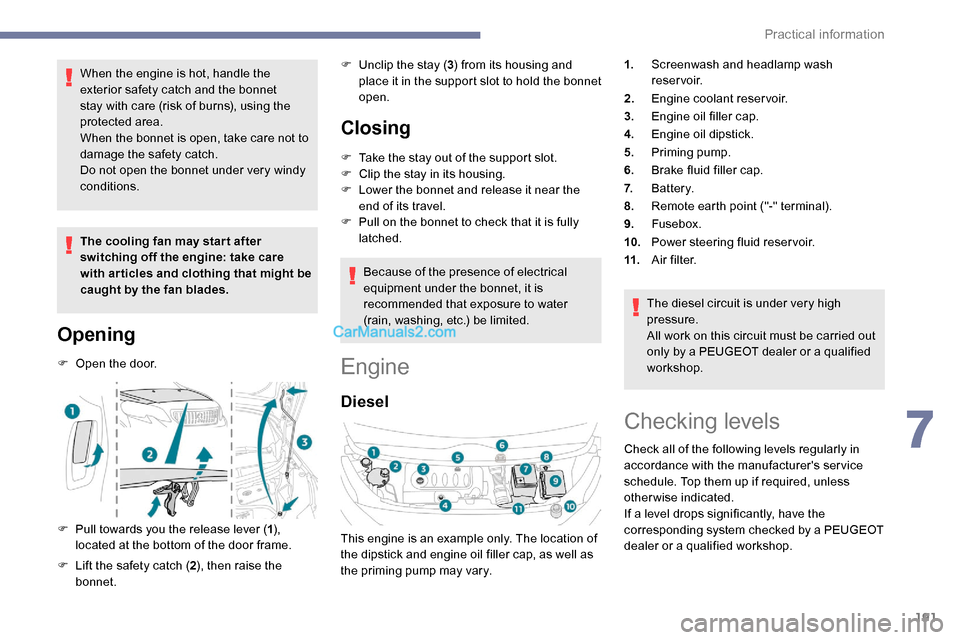
F Open the door.
F
P
ull towards you the release lever ( 1),
located at the bottom of the door frame.
F
L
ift the safety catch ( 2), then raise the
bonnet. F
U
nclip the stay (
3) from its housing and
place it in the support slot to hold the bonnet
open.
Closing
F Take the stay out of the support slot.
F C lip the stay in its housing.
F
L
ower the bonnet and release it near the
end of its travel.
F
P
ull on the bonnet to check that it is fully
latched.
Because of the presence of electrical
equipment under the bonnet, it is
recommended that exposure to water
(rain, washing, etc.) be limited.
Engine
Diesel
The diesel circuit is under very high
pressure.
All work on this circuit must be carried out
only by a PEUGEOT dealer or a qualified
workshop.
This engine is an example only. The location of
the dipstick and engine oil filler cap, as well as
the priming pump may vary. 1.
Screenwash and headlamp wash
reservoir.
2. Engine coolant reservoir.
3. Engine oil filler cap.
4. Engine oil dipstick.
5. Priming pump.
6. Brake fluid filler cap.
7. Battery.
8. Remote earth point ("-" terminal).
9. Fusebox.
10. Power steering fluid reservoir.
11. A i r f i l t e r.
Checking levels
Check all of the following levels regularly in
accordance with the manufacturer's service
schedule. Top them up if required, unless
otherwise indicated.
If a level drops significantly, have the
corresponding system checked by a PEUGEOT
dealer or a qualified workshop.
7
Practical information
Page 195 of 324
193
During the 30 minutes after topping up the
oil, the check per formed with the oil level
indicator in the instrument panel when the
ignition is switched on is not valid.
Brake fluid
The level of this fluid should be
close to the "MAX" mark. If not,
check the brake pad wear.
To know how often the brake fluid should be
replaced, refer to the manufacturer's servicing
schedule. If topping up, clean the cap before
replacing it. Use only DOT4 brake fluid
from a sealed canister.
F
A
dd more oil if necessary.
F
A
fter checking the level, carefully refit the oil
filler cap and the dipstick in its tube.
Power steering fluid
The level of this fluid should be
close to the " MAX" mark. With the
engine cold and the vehicle standing
on level ground, check this by
reading the level on the filler neck.
Engine coolant
Check the engine coolant level
regularly.
It is normal to top up this fluid
between two services.
The check and top-up must only be done with
the engine cold.
A low level presents a risk of serious damage
to the engine.
The level of this fluid should be close to the
" MAX " mark but should never exceed it.
If the level is close to or below the " MIN” mark,
it is essential to top up. Once the pressure has dropped, remove the
cap and top up to the required level.
Screen and headlamp
washer fluid
Top up the reser voir when you next
stop the vehicle.
Fluid specification
The fluid must be topped up with a ready-to-
use mixture.
In winter (temperatures below zero), a liquid
containing an agent to prevent freezing must
be used which is appropriate for the prevailing
conditions, in order to protect the elements of
the system (pump, tank, ducts, jets, etc.).
When the engine is hot, the temperature of this
fluid is regulated by the fan.
In addition, as the cooling system is
pressurised, wait at least one hour after
switching off the engine before carrying out any
work.
To avoid the risk of scalding if you need to top
up in an emergency, wrap a cloth around the
cap and unscrew the cap by two turns to allow
the pressure to drop. Filling with pure water is prohibited
under all circumstances (risk of freezing,
limestone deposits, etc.).
Diesel fuel additive (Diesel
with particle filter)
or
The minimum level in the particle
filter additive tank is indicated by
fixed illumination of this warning
lamp, accompanied by an audible
warning and a message warning that
the level of additive is too low.
7
Practical information
Page 201 of 324
199
If your vehicle's AdBlue® tank is
completely empty – which is confirmed
by the message "Top up AdBlue: Starting
impossible", you must top up with at least
5 litres.
Important: in the event of a top-up after
a breakdown because of a lack of
AdBlue, you must wait around 5 minutes
before switching on the ignition, without
opening the driver’s door, locking
the vehicle, introducing the key into
the ignition switch, or introducing
the key of the Keyless Entr y and
Star ting system into the passenger
compartment .
Switch on the ignition, then wait for
10
seconds before starting the engine.
Advice on care
General recommendations on the care and
maintenance of your vehicle are given in the
warranty and maintenance record. Observe the following recommendations to avoid damaging your vehicle:
-
D
o not clean your headlamps with a dry or abrasive cloth, nor with detergent or solvent
products. Use a sponge and soapy water or a pH neutral product.
-
W
hen using a high-pressure washer on stubborn dirt, avoid prolonged use on the
headlamps, the lamps and their edges to avoid damaging their lacquer finish and seals.
-
N
ever use an abrasive sponge to clean persistent dirt, as this may scratch the paint
sur face. Use a soft cloth with soapy water instead.
-
W
hen washing your vehicle, never clean the interior with a water jet.
-
W
hen washing your vehicle in an automatic roller-brush car wash, be sure to lock your
doors and, depending on version, remove the key and deactivate the " Hands-Free
Access " system.
-
N
ever use high-pressure washing to clean the engine compartment, in order to avoid
damaging the electrical units.
-
L
iquids carried in an open vessel (e.g. a cup or mug) could be spilt, presenting a risk of
damage on contact with the controls in the dashboard and centre console. Be careful.
Depending on version, in order to avoid damaging or unpeeling the stickers on the bodywork,
you are strongly advised against using high-pressure cleaners to wash your vehicle. It is
recommended that you wash it using a high-flow water jet and rinse the vehicle down using
demineralised water.
Only a microfibre cloth is recommended for wiping your vehicle; it must be clean and used
g e nt l y.
It is always preferable to have paint repairs carried out by a PEUGEOT dealer or a qualified
workshop.
7
Practical information