Trip Peugeot Expert 2019 Owner's Manual
[x] Cancel search | Manufacturer: PEUGEOT, Model Year: 2019, Model line: Expert, Model: Peugeot Expert 2019Pages: 324, PDF Size: 13.07 MB
Page 4 of 324
2
.
.
Instrument Panel 9
W arning and indicator lamps 1 0
Indicators
23
Distance recorders
2
7
Lighting dimmer
2
7
Trip computer
2
8
Setting the time and date
2
9
Electronic key with remote control function
and built-in key,
3
1
Unlocking/Complete or selective unlocking
3
3
Back-up procedures
3
8
Central locking / unlocking
4
1
Electric sliding side door(s)
4
3
General recommendations
for the sliding side doors
4
5
Hands-free sliding side door(s)
4
7
Side-hinged rear doors
4
9
Tailgate
5
0
Tailgate rear screen
5
0
Alarm
51
Electric windows
5
3Correct driving position
5
4
Front seats
5
4
2-seat front bench seat
5
6
Steering wheel adjustment
5
8
Mirrors 59
Moduwork
6
0
Precautions for the seats and bench seats
6
3
Fixed one-piece bench seat 6 4
Fixed rear seat and bench seat 6 6
Rear seat and bench seat on rails 6 8
Individual rear seat(s) on rails
7
1
Crew cab, fixed
7
3
Crew cab, folding
7
4
Interior fittings
7
5
Loading area fittings
7
9
Seating area fittings
8
1
Panoramic sunroof
8
2
Retractable sliding table
8
3
Heating and Ventilation
8
6
Heating
87
Manual air conditioning
8
7
Dual-zone automatic air conditioning
8
8
Recirculation of interior air
9
0
Front demisting - defrosting
9
0
Rear screen and/or door mirrors
demisting - defrosting
9
1
Rear heating - air conditioning
9
2
Additional Heating / Ventilation
9
2
Courtesy lamp(s)
9
5Lighting control stalk
9
7
Direction indicators
9
8
Daytime running lamps/Sidelamps
9
9
Automatic illumination of headlamps
9
9
Guide-me-home and welcome lighting
9
9
Cornering lighting
1
00
Automatic headlamp dipping
1
01
Manual headlamp beam height adjustment 1 02
Interior ambient lighting 1 02
Wiper control stalk 1 03
Automatic wiping
1
04
Changing a wiper blade
1
06
General safety recommendations
1
07
Hazard warning lamps
1
08
Emergency or assistance call
1
08
Audible warning
1
09
Electronic stability control (ESC)
1
09
Advanced Grip Control
1
12
Seat belts
1
13
Airbags
117
Child seats
1
20
Deactivating the front passenger airbag
1
22
ISOFIX child seats
1
29
Manual child lock
1
36
Electric child lock
1
36
Child lock on rear windows
1
37
Over view
Instruments
Access Ease of use and comfort
Safety
Lighting and visibility
Instruments and controls 4
L abels 5
Eco-driving
Contents
Page 6 of 324
4
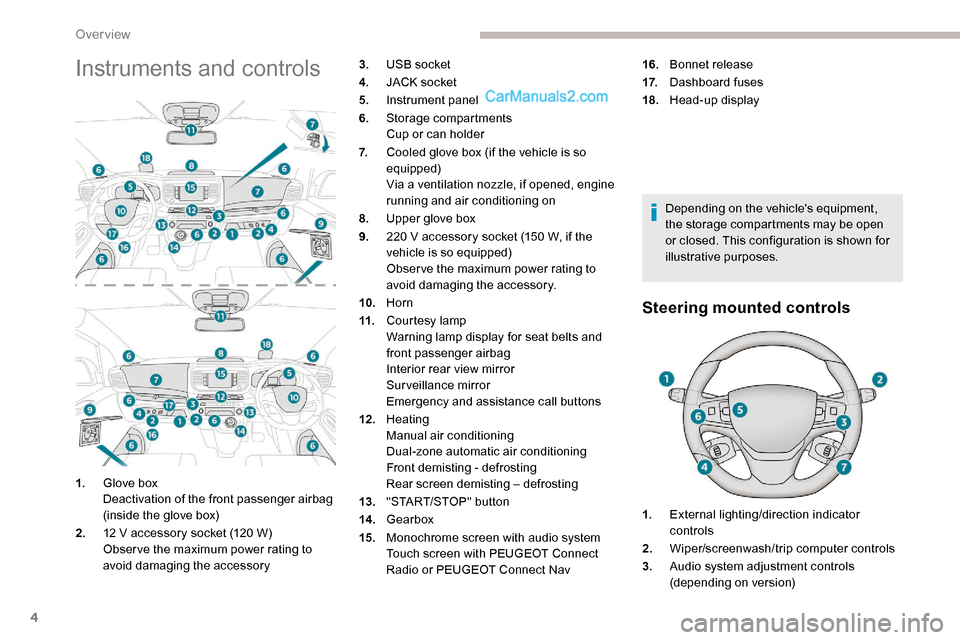
Instruments and controls
Depending on the vehicle's equipment,
the storage compartments may be open
or closed. This configuration is shown for
illustrative purposes.
Steering mounted controls
1.Glove box
Deactivation of the front passenger airbag
(inside the glove box)
2. 12 V accessory socket (120 W)
Obser ve the maximum power rating to
avoid damaging the accessory 3.
USB socket
4. JACK socket
5. Instrument panel
6. Storage compartments
Cup or can holder
7. Cooled glove box (if the vehicle is so
equipped)
Via a ventilation nozzle, if opened, engine
running and air conditioning on
8. Upper glove box
9. 220 V accessory socket (150 W, if the
vehicle is so equipped)
Obser ve the maximum power rating to
avoid damaging the accessory.
10. Horn
11. Courtesy lamp
Warning lamp display for seat belts and
front passenger airbag
Interior rear view mirror
Surveillance mirror
Emergency and assistance call buttons
12 . Heating
Manual air conditioning
Dual-zone automatic air conditioning
Front demisting - defrosting
Rear screen demisting – defrosting
13. "START/STOP" button
14 . Gearbox
15. Monochrome screen with audio system
Touch screen with PEUGEOT Connect
Radio or PEUGEOT Connect Nav 16.
Bonnet release
17. Dashboard fuses
18. Head-up display
1. External lighting/direction indicator
controls
2. Wiper/screenwash/trip computer controls
3. Audio system adjustment controls
(depending on version)
Over view
Page 11 of 324
9
Instrument panel
Speedometer
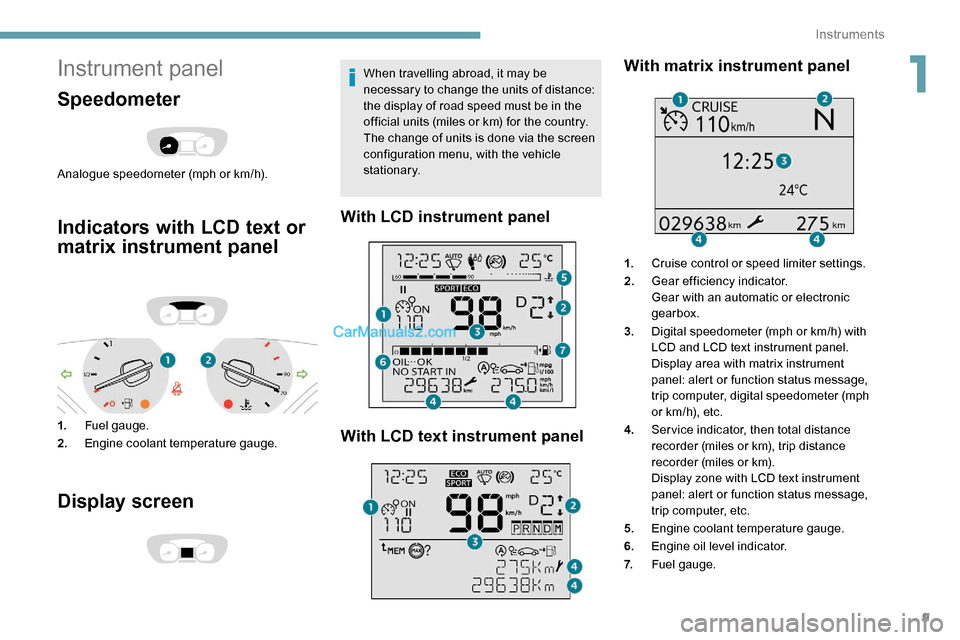
Analogue speedometer (mph or km/h).
Indicators with LCD text or
matrix instrument panel
1.Fuel gauge.
2. Engine coolant temperature gauge.
Display screen
When travelling abroad, it may be
necessary to change the units of distance:
the display of road speed must be in the
official units (miles or km) for the country.
The change of units is done via the screen
configuration menu, with the vehicle
stationary.
With LCD instrument panel
With LCD text instrument panel With matrix instrument panel
1.
Cruise control or speed limiter settings.
2. Gear efficiency indicator.
Gear with an automatic or electronic
gearbox.
3. Digital speedometer (mph or km/h) with
LCD and LCD text instrument panel.
Display area with matrix instrument
panel: alert or function status message,
trip computer, digital speedometer (mph
or km/h), etc.
4. Ser vice indicator, then total distance
recorder (miles or km), trip distance
recorder (miles or km).
Display zone with LCD text instrument
panel: alert or function status message,
trip computer, etc.
5. Engine coolant temperature gauge.
6. Engine oil level indicator.
7. Fuel gauge.
1
Instruments
Page 12 of 324
10
Control buttons
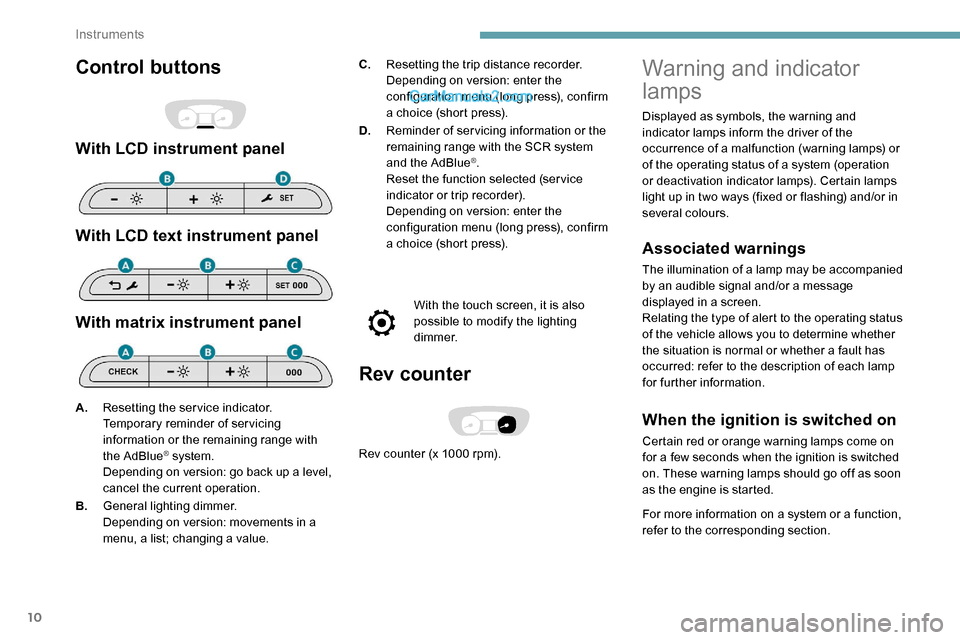
With LCD instrument panel
With LCD text instrument panel
With matrix instrument panel
C.Resetting the trip distance recorder.
Depending on version: enter the
configuration menu (long press), confirm
a choice (short press).
D. Reminder of servicing information or the
remaining range with the SCR system
and the AdBlue
®.
Reset the function selected (ser vice
indicator or trip recorder).
Depending on version: enter the
configuration menu (long press), confirm
a choice (short press).
With the touch screen, it is also
possible to modify the lighting
d i m m e r.
Rev counter
Rev counter (x 1000 rpm).
A.
Resetting the service indicator.
Temporary reminder of servicing
information or the remaining range with
the AdBlue® system.
Depending on version: go back up a level,
cancel the current operation.
B. General lighting dimmer.
Depending on version: movements in a
menu, a list; changing a value.
Warning and indicator
lamps
Displayed as symbols, the warning and
indicator lamps inform the driver of the
occurrence of a malfunction (warning lamps) or
of the operating status of a system (operation
or deactivation indicator lamps). Certain lamps
light up in two ways (fixed or flashing) and/or in
several colours.
Associated warnings
The illumination of a lamp may be accompanied
by an audible signal and/or a message
displayed in a screen.
Relating the type of alert to the operating status
of the vehicle allows you to determine whether
the situation is normal or whether a fault has
occurred: refer to the description of each lamp
for further information.
When the ignition is switched on
Certain red or orange warning lamps come on
for a few seconds when the ignition is switched
on. These warning lamps should go off as soon
as the engine is started.
For more information on a system or a function,
refer to the corresponding section.
Instruments
Page 29 of 324
27
Have the system checked by a PEUGEOT
dealer or a qualified workshop as soon as
possible.
Starting prevented
Every time the ignition is switched on, the
message "Emissions fault: Starting prevented"
or "NO START IN" is displayed.To be able to restart the engine, call on a
PEUGEOT dealer or a qualified workshop.
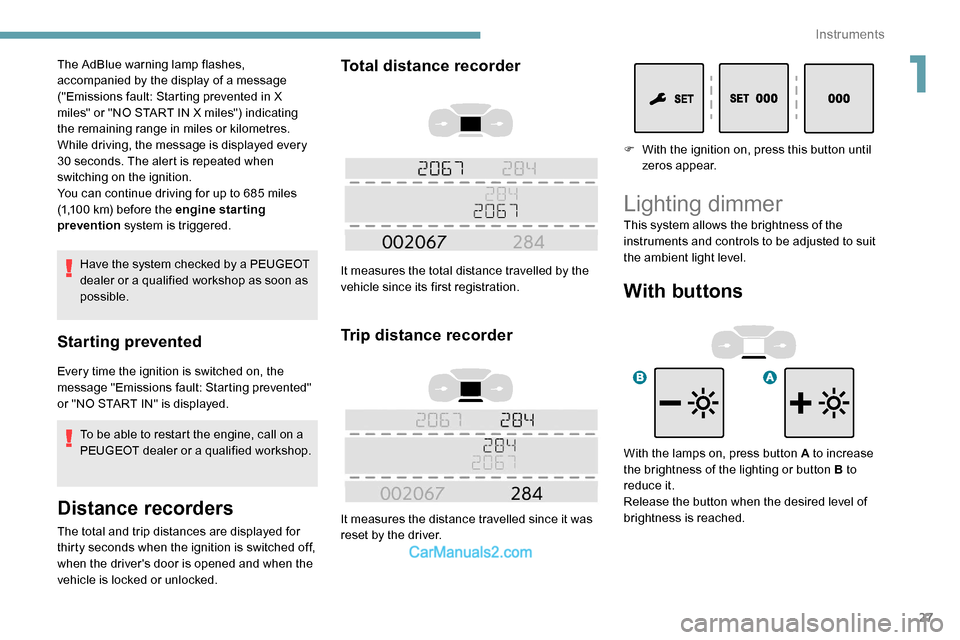
Distance recorders
The total and trip distances are displayed for
thirty seconds when the ignition is switched off,
when the driver's door is opened and when the
vehicle is locked or unlocked.
Total distance recorder
It measures the total distance travelled by the
vehicle since its first registration.
Trip distance recorder
It measures the distance travelled since it was
reset by the driver.
The AdBlue warning lamp flashes,
accompanied by the display of a message
("Emissions fault: Starting prevented in X
miles" or "NO START IN X miles") indicating
the remaining range in miles or kilometres.
While driving, the message is displayed every
30 seconds. The alert is repeated when
switching on the ignition.
You can continue driving for up to 685 miles
(1,100
km) before the engine star ting
prevention system is triggered. F
W
ith the ignition on, press this button until
zeros appear.
Lighting dimmer
With buttons
With the lamps on, press button A to increase
the brightness of the lighting or button B to
reduce it.
Release the button when the desired level of
brightness is reached. This system allows the brightness of the
instruments and controls to be adjusted to suit
the ambient light level.
1
Instruments
Page 30 of 324
28
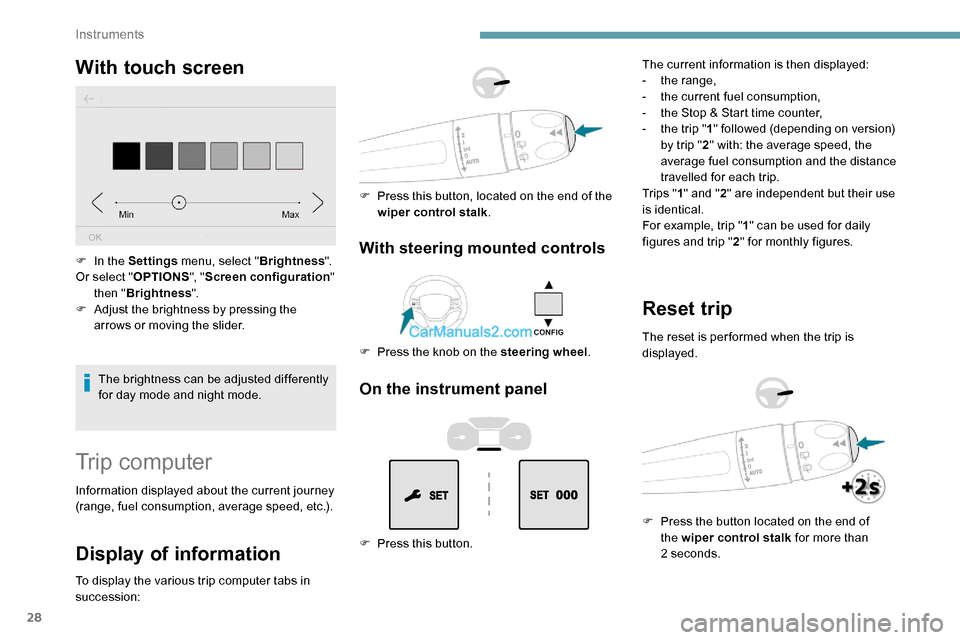
With touch screen
The brightness can be adjusted differently
for day mode and night mode.
F
I
n the Settings
menu, select " Brightness".
Or select " OPTIONS", "Screen configuration "
then " Brightness ".
F
A
djust the brightness by pressing the
arrows or moving the slider.
Trip computer
Information displayed about the current journey
(range, fuel consumption, average speed, etc.).
Display of information
To display the various trip computer tabs in
succession:
With steering mounted controls
F Press the knob on the steering wheel .
F
P
ress this button, located on the end of the
wiper control stalk .
On the instrument panel
F Press this button. The current information is then displayed:
-
t
he range,
-
t
he current fuel consumption,
-
t
he Stop & Start time counter,
-
t
he trip "
1" followed (depending on version)
by trip " 2" with: the average speed, the
average fuel consumption and the distance
travelled for each trip.
Tr i p s " 1" and " 2" are independent but their use
is identical.
For example, trip " 1" can be used for daily
figures and trip " 2" for monthly figures.
Reset trip
The reset is per formed when the trip is
displayed.
F
P
ress the button located on the end of
the wiper control stalk for more than
2
seconds.
Instruments
Page 31 of 324
29
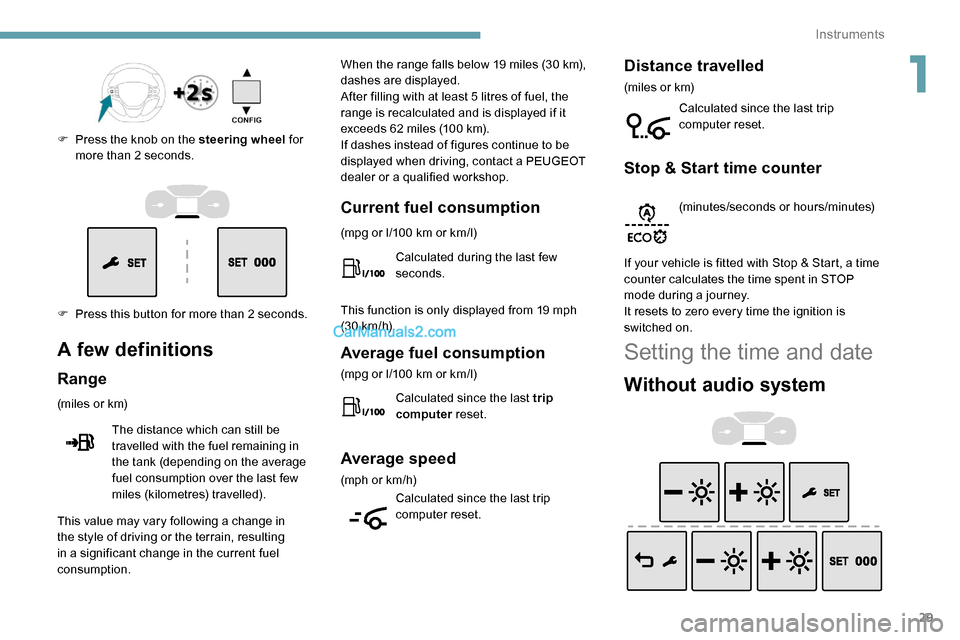
F Press this button for more than 2 seconds. F
P
ress the knob on the steering wheel
for
more than 2 seconds.
A few definitions
Range
(miles or km)
The distance which can still be
travelled with the fuel remaining in
the tank (depending on the average
fuel consumption over the last few
miles (kilometres) travelled). When the range falls below 19 miles (30
km),
dashes are displayed.
After filling with at least 5 litres of fuel, the
range is recalculated and is displayed if it
exceeds 62 miles (100 km).
If dashes instead of figures continue to be
displayed when driving, contact a PEUGEOT
dealer or a qualified workshop.
This value may vary following a change in
the style of driving or the terrain, resulting
in a significant change in the current fuel
consumption.
Current fuel consumption
(mpg or l/100 km or km/l)
C alculated during the last few
seconds.
This function is only displayed from 19 mph
(30
km/h).
Average fuel consumption
(mpg or l/100 km or km/l)
C alculated since the last trip
computer reset.
Average speed
(mph or km/h)
Calculated since the last trip
computer reset.
Distance travelled
(miles or km)
Calculated since the last trip
computer reset.
Stop & Start time counter
(minutes/seconds or hours/minutes)
If your vehicle is fitted with Stop & Start, a time
counter calculates the time spent in STOP
mode during a journey.
It resets to zero every time the ignition is
switched on.
Setting the time and date
Without audio system
1
Instruments
Page 115 of 324
113
All-terrain (mud, damp grass,
etc.)
This mode, when moving off, allows
considerable spin on the wheel with
the least grip to optimise clearing of the
mud and to regain grip. At the same
time, the wheel with the most grip is
controlled in such a way as to transmit
as much torque as possible.
When moving, the system optimises wheel spin
to respond to the driver's requirements as fully
as possible.
(mode active up to 31 mph (50
km/h))
Sand
This mode allows little spin on the two
driving wheels at the same time to allow
the vehicle to move for ward and limit
the risks of getting stuck in the sand.
(mode active up to 75 mph (120 km/h))
Do not use the other modes on sand as
the vehicle may become stuck. The ASR and DSC systems can be
deactivated by turning the knob to
the "
OFF" position.
Recommendations
Your vehicle is designed principally to
drive on tarmac roads but it allows you to
occasionally drive on other less passable
terrain.
However, it does not permit off-road
driving such as:
-
c
rossing and driving on terrain which
could damage the underbody or strip
away components (fuel pipe, fuel
cooler, etc.) due to obstacles or stones
in particular,
-
d
riving on terrain with steep gradients
and poor grip,
-
c
rossing a stream.
The ASR and DSC systems will no longer
have an effect on engine operation or
the brakes in the event of an involuntary
change of trajectory.
These systems are reactivated
automatically from 31 mph (50
km/h) or
every time the ignition is switched on.
Seat belts
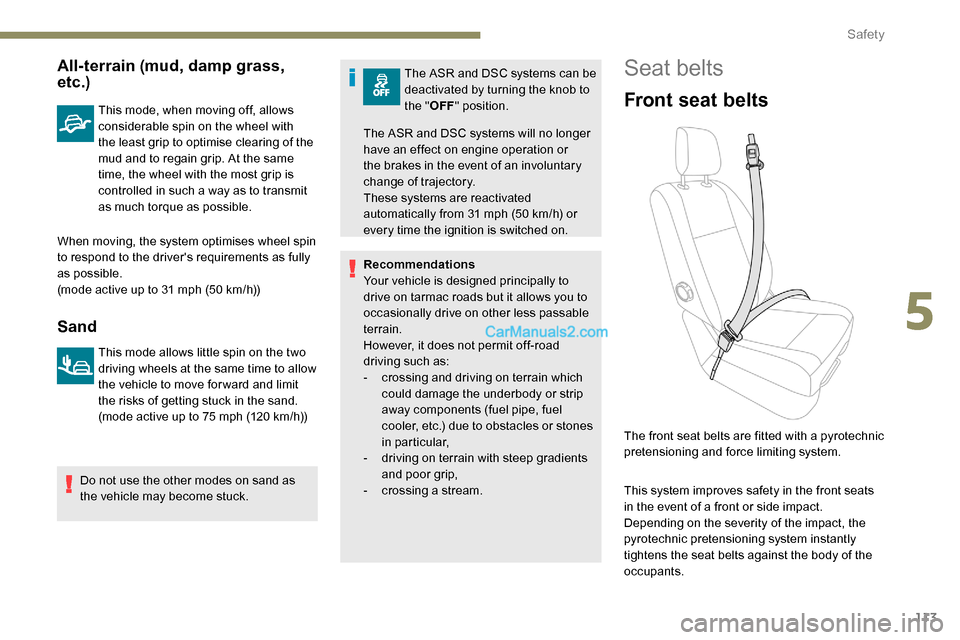
Front seat belts
The front seat belts are fitted with a pyrotechnic
pretensioning and force limiting system.
This system improves safety in the front seats
in the event of a front or side impact.
Depending on the severity of the impact, the
pyrotechnic pretensioning system instantly
tightens the seat belts against the body of the
occupants.
5
Safety
Page 140 of 324
138
Driving recommendations
F Observe the driving regulations and remain vigilant whatever the traffic conditions.
F
M
onitor your environment and keep your
hands on the wheel to be able to react to
anything that may happen any time.
F
D
rive smoothly, anticipate the need for
braking and maintain a longer safety
distance, especially in bad weather.
F
S
top the vehicle to carry out operations
that require close attention (such as
adjustments).
F
D
uring long trips, take a break every two
hours.
To assure the durability of your vehicle and
for safety reasons, remember that certain
precautions, described hereafter, should be
taken when driving your vehicle:
Manoeuvre cautiously, at low
speed
The dimensions of this vehicle differ greatly
from those of a light vehicle, in width, in height,
as well as in length, and some obstacles will be
more difficult to notice.
Manoeuvre slowly.
Before turning, check that there are no
obstacles at mid-height along the sides.
Before reversing, check that there are no
obstacles, particularly at high level behind the
vehicle.
Be aware of the external dimensions, if ladders
are fitted.
Drive the vehicle in a cautious
and efficient way
Take corners gently.
Anticipate the need to brake as the stopping
distance is increased, particularly on wet or icy
roads.
Be aware of the effect of side winds on the
vehicle.
Be careful
The tyres must be inflated to at least the
pressures indicated on the label, even over-
inflated by 0.2 to 0.3 bar for long journeys.
Important!
Never leave the engine running in
a closed space without sufficient
ventilation. Internal combustion engines
emit toxic exhaust gases such as carbon
monoxide. Danger of poisoning and death!
In severe wintry conditions (temperature
below -23°C), let the engine run for 4
minutes before moving off, to ensure the
correct operation and durability of the
mechanical components of your vehicle
(engine and gearbox). Never drive with the parking brake
applied
. Risk of overheating and damage
to the braking system!
Do not park the vehicle or leave the
engine running on a flammable sur face
(dr y grass, dead leaves, etc.). The
exhaust system of your vehicle is very
hot, even several minutes after the engine
stops. Risk of fire!
Never leave a vehicle unattended with
the engine running. If you have to leave
your vehicle with the engine running, apply
the parking brake and put the gearbox into
neutral or position N or P (depending on
the type of gearbox).
Never leave children inside the vehicle
unsupervised .
On flooded roads
We strongly advise against driving on flooded
roads, as this could cause serious damage
to the engine or gearbox, as well as to the
electrical systems of your vehicle.
Driving
Page 191 of 324
189
Energy economy mode
System which manages the duration of use of
certain functions to conser ve a sufficient level
of charge in the battery.
After switching off the engine and for a
maximum cumulative period of around 40
minutes, you can continue to use functions
such as the audio and telematics system,
the wipers, the dipped beam headlamps, the
courtesy lamps, etc.
Switching to this mode
A message appears in the instrument panel
screen indicating that the vehicle has switched
to economy mode and the active functions are
put on standby.If a telephone call is being made at this
time, it will be maintained for around
10
minutes with the Bluetooth hands-free
system of your audio system.
Exiting the mode
These functions will be automatically
reactivated the next time the vehicle is used.
In order to restore the use of these functions
immediately, start the engine and let it run:
-
f
or less than 10 minutes, to use the
equipment for approximately 5 minutes, A flat battery prevents the engine from
starting.
For more information on the 12 V batter y
,
refer to the corresponding section.
Load reduction mode
System which manages the use of certain
functions according to the level of charge
remaining in the battery.
When the vehicle is being driven, the load
reduction function temporarily deactivates
certain functions, such as the air conditioning
and the heated rear screen.
The deactivated functions are reactivated
automatically as soon as conditions permit. -
f
or more than 10 minutes, to use the
equipment for approximately 30 minutes.
Let the engine run for the duration specified to
ensure that the battery charge is sufficient.
Do not repeatedly and continuously restart the
engine in order to charge the battery.
Roof bars/Roof rack
As a safety measure and to avoid
damaging the roof, it is essential to use
the roof bars and racks approved for the
vehicle.
Obser ve the instructions on fitting and use
contained in the guide supplied with the
roof bars and racks.
Recommendations
Distribute the load uniformly, taking care
to avoid overloading one of the sides.
Arrange the heaviest part of the load as
close as possible to the roof.
Secure the load securely.
Drive gently: the vehicle will be more
susceptible to the effects of side winds
and its stability may be affected.
Regularly check the security and tight
fastening of the roof bars, at least before
each trip.
Remove the roof bars once they are no
longer needed.
7
Practical information