engine PEUGEOT EXPERT 2022 Owners Manual
[x] Cancel search | Manufacturer: PEUGEOT, Model Year: 2022, Model line: EXPERT, Model: PEUGEOT EXPERT 2022Pages: 324, PDF Size: 10.39 MB
Page 223 of 324
221
In the event of a breakdown
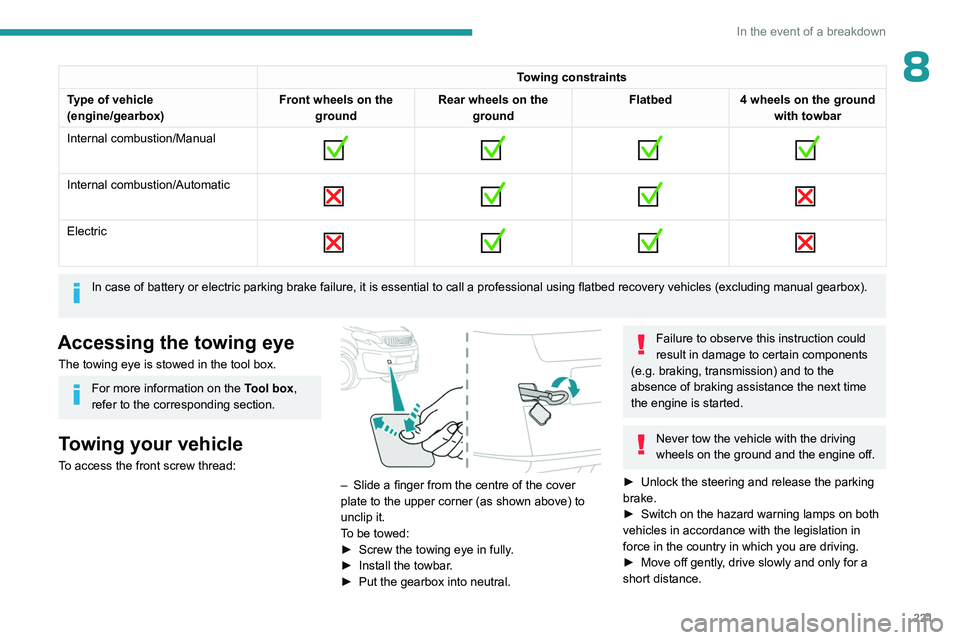
8Towing constraints
Type of vehicle
(engine/gearbox) Front wheels on the
ground Rear wheels on the
ground Flatbed
4 wheels on the ground
with towbar
Internal combustion/Manual
Internal combustion/Automatic
Electric
In case of battery or electric parking brake failure, it is essential to call a p
rofessional using flatbed recovery vehicles (excluding manual gearbox).
Accessing the towing eye
The towing eye is stowed in the tool box.
For more information on the Tool box,
refer to the corresponding section.
Towing your vehicle
To access the front screw thread:
– Slide a finger from the centre of the cover
plate to the upper corner (as shown above) to
unclip it.
T
o be towed:
►
Screw the towing eye in fully
.
►
Install the towbar
.
►
Put the gearbox into neutral.
Failure to observe this instruction could
result in damage to certain components
(e.g. braking, transmission) and to the
absence of braking assistance the next time
the engine is started.
Never tow the vehicle with the driving
wheels on the ground and the engine off.
►
Unlock the steering and release the parking
brake.
►
Switch on the hazard warning lamps on both
vehicles in accordance with the legislation in
force in the country in which you are driving.
►
Move off gently
, drive slowly and only for a
short distance.
Page 225 of 324
223
Technical data
9Engine technical data and
towed loads
Engines
The engine characteristics are given in the
vehicle's registration document, as well as in
sales brochures.
Only the values available at the time of
publication are presented in the tables.
Contact a PEUGEOT dealer or a qualified
workshop to obtain missing values.
The maximum power corresponds to the value type-approved on a test bed, under
conditions defined by European legislation
(Directive 1999/99/EC).
For more information, contact a PEUGEOT
dealer or a qualified workshop.
Weights and towed loads
The weights and towed loads relating to
the vehicle are indicated on the registration
document, as well as in sales brochures.
These values are also indicated on the
manufacturer's plate or label.
For more information, contact a PEUGEOT
dealer or a qualified workshop.
The GTW (Gross Train Weight) and towed load
values indicated are valid up to a maximum
altitude of 1,000 metres. The towed load value
must be reduced by 10% for each additional
1,000 metres of altitude.
The maximum authorised nose weight
corresponds to the weight permitted on the
towball.
When exterior temperatures are high, the
vehicle performance may be limited in
order to protect the engine. When the exterior
temperature is higher than 37°C, reduce the
towed weight.
Towing even with a lightly loaded vehicle can adversely affect its road holding.
Braking distances are increased when towing
a trailer.
When using a vehicle to tow, never exceed
a speed of 62 mph (100
km/h) (observe the
local legislation in force).
Page 226 of 324
224
Technical data
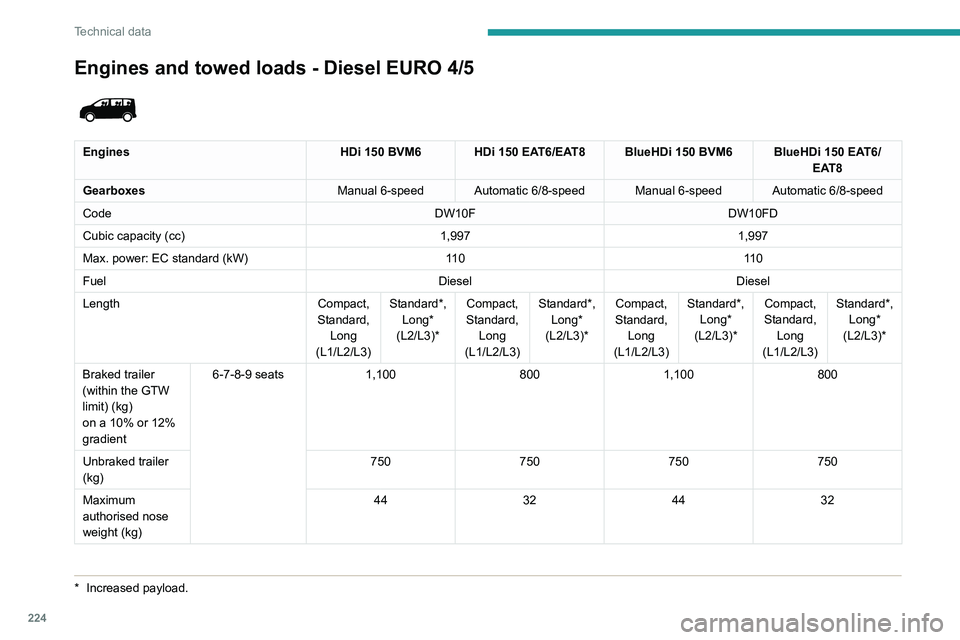
Engines and towed loads - Diesel EURO 4/5
* Increased payload.
Engines HDi 150 BVM6 HDi 150 EAT6/EAT8 BlueHDi 150 BVM6 BlueHDi 150 EAT6/
EAT8
Gearboxes Manual 6-speed Automatic 6/8-speed Manual 6-speed Automatic 6/8-speed
Code DW10FDW10FD
Cubic capacity (cc) 1,9971,997
Max. power: EC standard (kW) 11 011 0
Fuel DieselDiesel
Length Compact,
Standard, Long
(L1/L2/L3) Standard*,
Long*
(L2/L3)* Compact,
Standard, Long
(L1/L2/L3) Standard*,
Long*
(L2/L3)* Compact,
Standard, Long
(L1/L2/L3) Standard*,
Long*
(L2/L3)* Compact,
Standard, Long
(L1/L2/L3) Standard*,
Long*
(L2/L3)*
Braked trailer
(within the GTW
limit) (kg)
on a 10% or 12%
gradient 6-7-8-9 seats
1,100 8001,100 800
Unbraked trailer
(kg) 750
750750750
Maximum
authorised nose
weight (kg) 44
324432
Page 227 of 324
225
Technical data
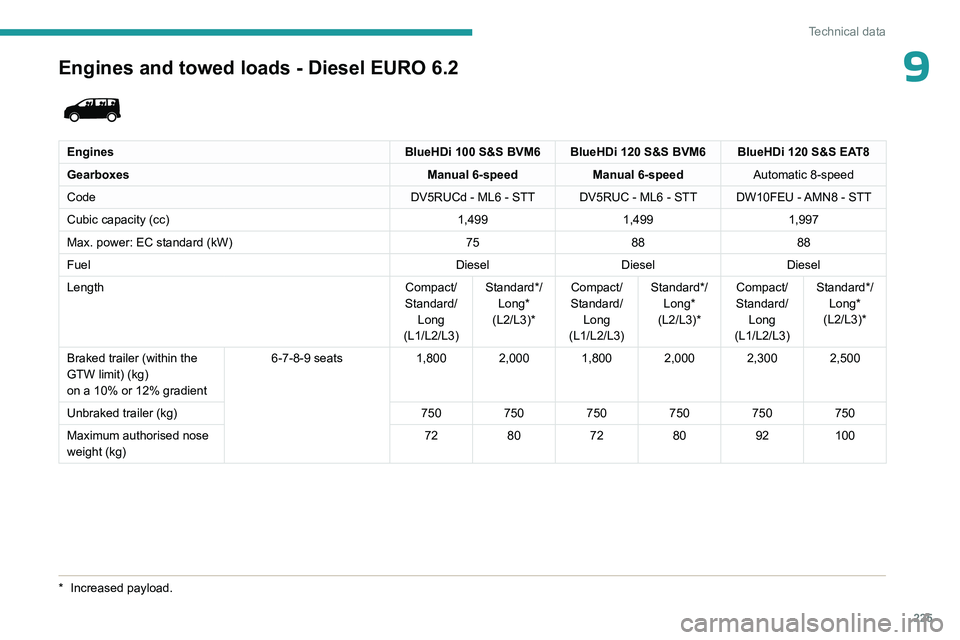
9Engines and towed loads - Diesel EURO 6.2
EnginesBlueHDi 100 S&S BVM6 BlueHDi 120 S&S BVM6 BlueHDi 120 S&S EAT8
Gearboxes Manual 6-speedManual 6-speedAutomatic 8-speed
Code DV5RUCd - ML6 - STT DV5RUC - ML6 - STT DW10FEU - AMN8 - STT
Cubic capacity (cc) 1,4991,4991,997
Max. power: EC standard (kW) 758888
Fuel DieselDieselDiesel
Length Compact/
Standard/ Long
(L1/L2/L3) Standard*/
Long*
(L2/L3)* Compact/
Standard/ Long
(L1/L2/L3) Standard*/
Long*
(L2/L3)* Compact/
Standard/ Long
(L1/L2/L3) Standard*/
Long*
(L2/L3)*
Braked trailer (within the
GTW limit) (kg)
on a 10% or 12% gradient 6-7-8-9 seats
1,800 2,000 1,800 2,000 2,300 2,500
Unbraked trailer (kg) 750750750750750750
Maximum authorised nose
weight (kg) 72
80728092100
* Increased payloa d.
Page 228 of 324
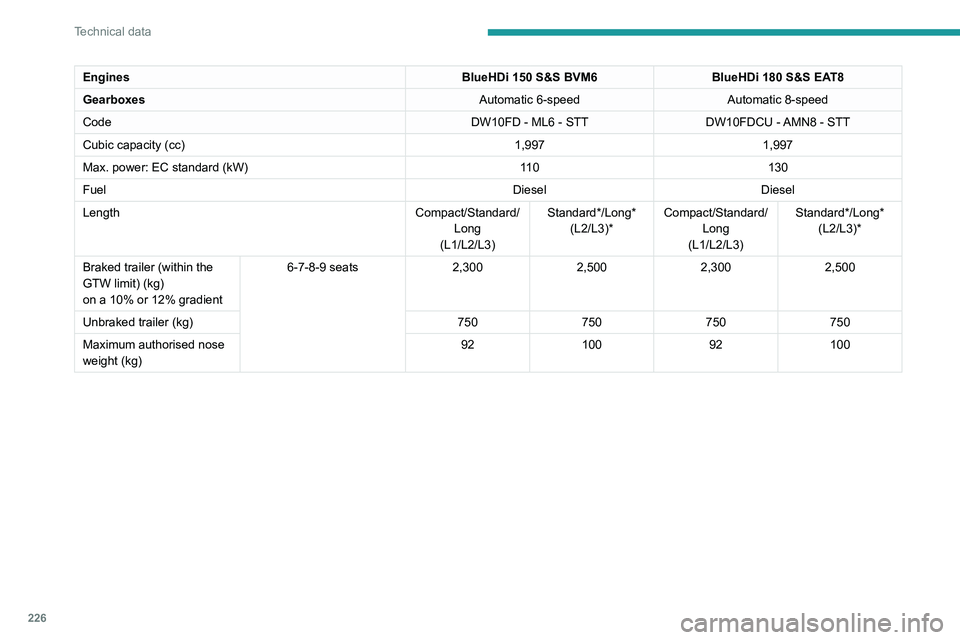
226
Technical data
EnginesBlueHDi 150 S&S BVM6BlueHDi 180 S&S EAT8
Gearboxes Automatic 6-speedAutomatic 8-speed
Code DW10FD - ML6 - STTDW10FDCU - AMN8 - STT
Cubic capacity (cc) 1,9971,997
Max. power: EC standard (kW) 11 0130
Fuel DieselDiesel
Length Compact/Standard/
Long
(L1/L2/L3) Standard*/Long*
(L2/L3)* Compact/Standard/
Long
(L1/L2/L3) Standard*/Long*
(L2/L3)*
Braked trailer (within the
GTW limit) (kg)
on a 10% or 12% gradient 6-7-8-9 seats
2,3002,5002,3002,500
Unbraked trailer (kg) 750750750750
Maximum authorised nose
weight (kg) 92
100 92100
Page 229 of 324
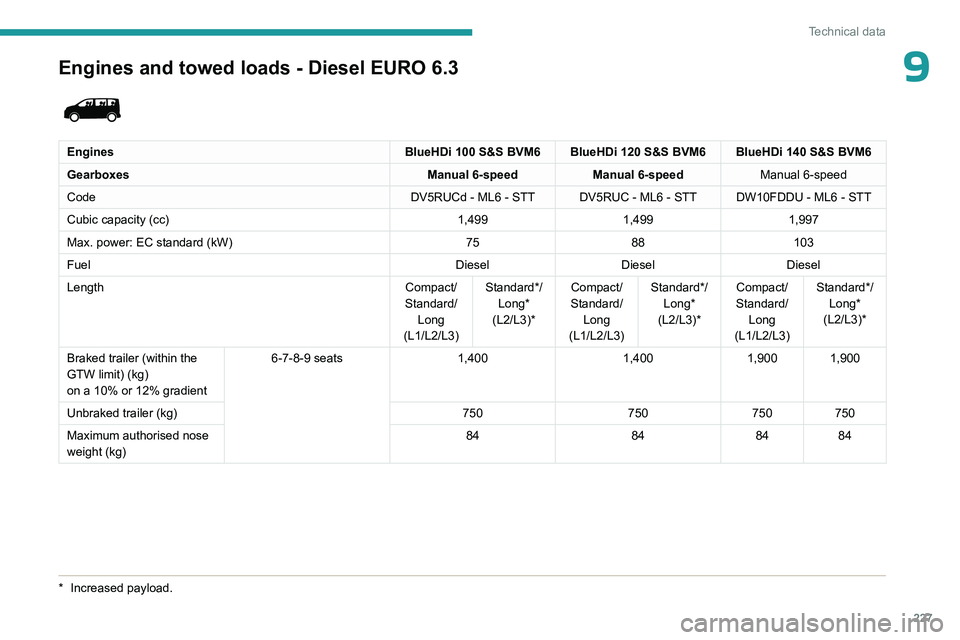
227
Technical data
9Engines and towed loads - Diesel EURO 6.3
EnginesBlueHDi 100 S&S BVM6 BlueHDi 120 S&S BVM6 BlueHDi 140 S&S BVM6
Gearboxes Manual 6-speedManual 6-speed Manual 6-speed
Code DV5RUCd - ML6 - STT DV5RUC - ML6 - STT DW10FDDU - ML6 - STT
Cubic capacity (cc) 1,4991,4991,997
Max. power: EC standard (kW) 7588103
Fuel DieselDieselDiesel
Length Compact/
Standard/ Long
(L1/L2/L3) Standard*/
Long*
(L2/L3)* Compact/
Standard/ Long
(L1/L2/L3) Standard*/
Long*
(L2/L3)* Compact/
Standard/ Long
(L1/L2/L3) Standard*/
Long*
(L2/L3)*
Braked trailer (within the
GTW limit) (kg)
on a 10% or 12% gradient 6-7-8-9 seats
1,4001,4001,900 1,900
Unbraked trailer (kg) 750750750750
Maximum authorised nose
weight (kg) 84
848484
* Increased payloa d.
Page 230 of 324
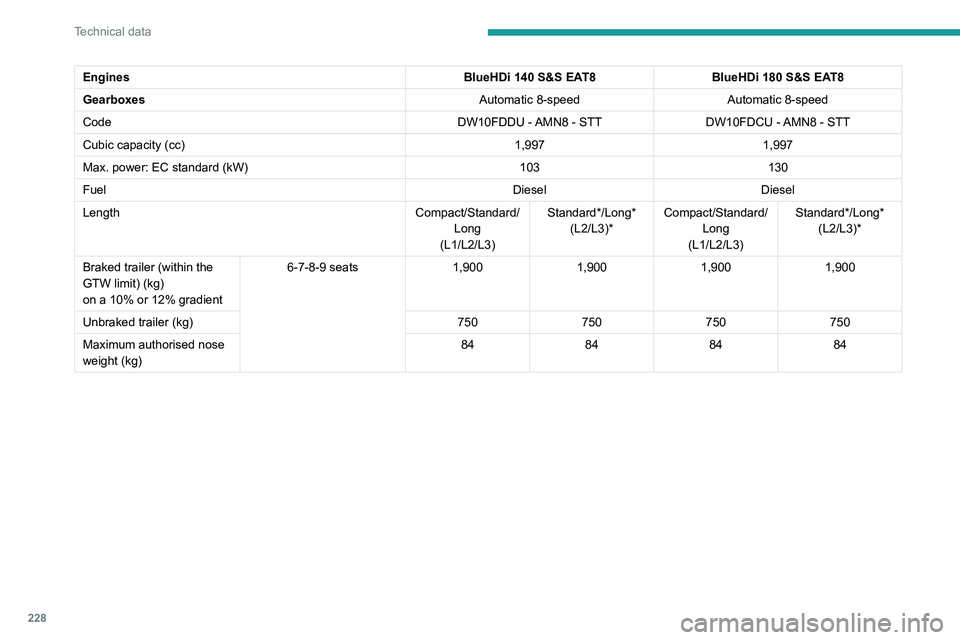
228
Technical data
EnginesBlueHDi 140 S&S EAT8BlueHDi 180 S&S EAT8
Gearboxes Automatic 8-speedAutomatic 8-speed
Code DW10FDDU - AMN8 - STTDW10FDCU - AMN8 - STT
Cubic capacity (cc) 1,9971,997
Max. power: EC standard (kW) 103130
Fuel DieselDiesel
Length Compact/Standard/
Long
(L1/L2/L3) Standard*/Long*
(L2/L3)* Compact/Standard/
Long
(L1/L2/L3) Standard*/Long*
(L2/L3)*
Braked trailer (within the
GTW limit) (kg)
on a 10% or 12% gradient 6-7-8-9 seats
1,9001,9001,9001,900
Unbraked trailer (kg) 750750750750
Maximum authorised nose
weight (kg) 84
848484
Page 237 of 324
235
Bluetooth® audio system
10Bluetooth® audio system
The different functions and settings described vary according to the version
and configuration of your vehicle.
As a safety measure and because it requires sustained attention by the driver,
the pairing of a Bluetooth
® mobile telephone
with the Bluetooth® hands-free system of your
audio system must be done with the vehicle
stationary and the ignition on.
Your audio system is coded in such a way that it will only operate in your
vehicle.
All work on the system must be carried out
exclusively by a dealer or qualified workshop,
to avoid any risk of electrocution, fire or
mechanical faults.
To avoid discharging the battery, the audio system may switch off after a few
minutes if the engine is not running.
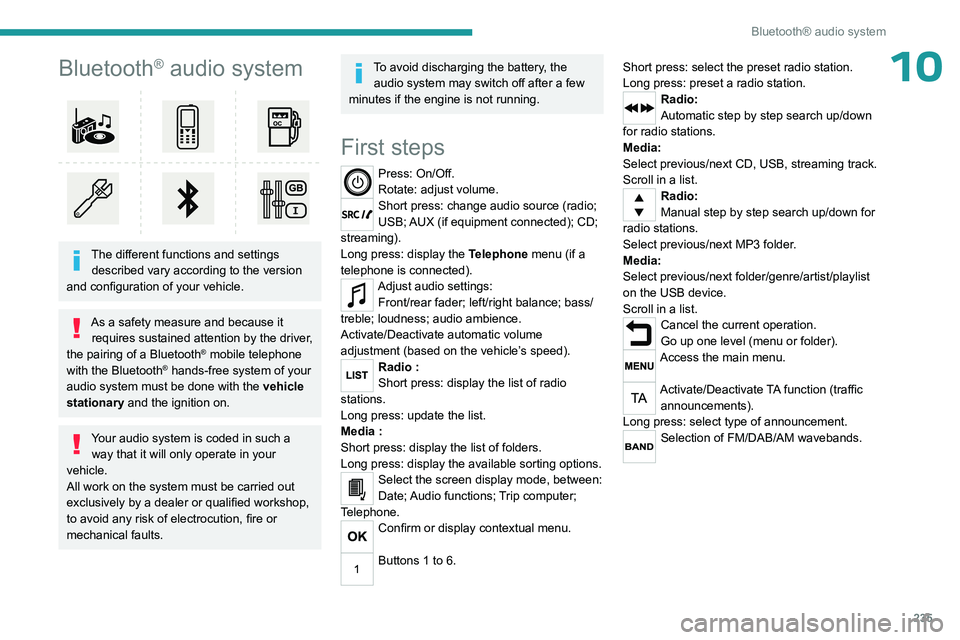
First steps
Press: On/Off.
Rotate: adjust volume.
Short press: change audio source (radio;
USB; AUX (if equipment connected); CD;
streaming).
Long press: display the Telephone menu (if a
telephone is connected).
Adjust audio settings: Front/rear fader; left/right balance; bass/
treble; loudness; audio ambience.
Activate/Deactivate automatic volume
adjustment (based on the vehicle’s speed).
Radio :
Short press: display the list of radio
stations.
Long press: update the list.
Media
:
Short press: display the list of folders.
Long press: display the available sorting options.
Select the screen display mode, between:
Date; Audio functions; Trip computer;
Telephone.
Confirm or display contextual menu.
Buttons 1 to 6. Short press: select the preset radio station.
Long press: preset a radio station.
Radio:
Automatic step by step search up/down
for radio stations.
Media:
Select previous/next CD, USB, streaming track.
Scroll in a list.
Radio:
Manual step by step search up/down for
radio stations.
Select previous/next MP3 folder.
Media:
Select previous/next folder/genre/artist/playlist
on the USB device.
Scroll in a list.
Cancel the current operation.
Go up one level (menu or folder).
Access the main menu.
Activate/Deactivate TA function (traffic announcements).
Long press: select type of announcement.
Selection of FM/DAB/AM wavebands.
Page 246 of 324
244
Bluetooth® audio system
Interactive voice response
From the contextual menu, select "DTMF
tones" and confirm to use the digital
keypad to navigate in the interactive voice
response menu.
Confirm with OK.
Consultation call
From the contextual menu, select
"Switch" and validate to return to a call
left on hold.
Confirm with OK.
Directory
To access the directory, press and hold SRC/TEL.
Select "Directory" to see the list of
contacts.
Confirm with OK.
To modify the contacts saved in the system, press MENU then select
"Telephone" and confirm.
Select "Directory management " and confirm.
You can:
–
"Consult an entry",
–
"Delete an entry",
–
"Delete all entries".
The system accesses the telephone's contacts directory, depending on its
compatibility, and while it is connected via
Bluetooth.
With certain telephones connected by
Bluetooth you can send a contact to the
directory of the audio system.
Contacts imported in this way are saved in a
permanent directory visible to all, whatever the
telephone connected.
The menu for the directory is not accessible if it
is empty.
Voice recognition
This function allows you to use your
smartphone's voice recognition via the system.
To start voice recognition, depending on the type
of steering mounted controls:
Make a long press on the end of the lighting
control stalk.
OR
Press this button.
Voice recognition requires the use of a
compatible smartphone first connected to
the vehicle by Bluetooth.
Frequently asked
questions
The following information groups together the answers to the most frequently asked questions
concerning your audio system. With the engine off, the audio system
switches off after a few minutes of use.
When the engine is switched off, the audio
system operating time depends on the state of
charge of the battery.
The switch-off is normal: the audio system
switches to economy mode and switches off to
avoid discharging the vehicle's battery.
►
Start the vehicle’
s engine to increase the
charge of the battery.
The message "the audio system is
overheated" is displayed onscreen.
To protect the installation if the ambient
temperature is too high, the audio system
switches to an automatic thermal protection
mode, in which the volume may be decreased or
the CD player stopped.
►
Switch the audio system off for a few minutes
to allow the system to cool.
Radio
There is a difference in sound quality
between the different audio sources (radio,
CD, etc.).
For optimal listening quality, the audio settings
(Volume, Bass, Treble, Ambience and Loudness)
can be adjusted to different audio sources,
resulting in audible differences when switching
between sources (radio, CD, etc.).
►
Check that the audio settings (V
olume, Bass,
Treble, Ambience and Loudness) are appropriate
to the sources being listened to. We recommend
setting the audio functions (Bass, Treble, Fr-Re
Page 249 of 324
247
Audio System with Touch Screen
11Audio System with Touch Screen
Multimedia audio system -
Applications - Bluetooth
®
telephone
The functions and settings described
vary according to the vehicle version and
configuration, as well as the country of sale.
For safety reasons and because they
require sustained attention by the driver,
the following operations must be carried out
with the vehicle stationary and the ignition
on:
–
Pairing the smartphone with the system via
Bluetooth.
–
Using the smartphone.
–
Connecting to the CarPlay® or Android
Auto applications (certain applications stop
displaying when the vehicle is moving).
–
Changing the system settings and
configuration.
The system is protected so that it only operates in the vehicle.
The message Energy economy mode is
displayed when the system is about to go into
standby.
The system’s Open Source Software (OSS) source codes are available at the
following addresses:
https://www.groupe-psa.com/fr/oss/
https://www.groupe-psa.com/en/oss/
First steps
With the engine running, a press mutes
the sound.
With the ignition off, a press turns the system on.
Increase or decrease the volume using
the wheel or the "plus" or "minus" buttons
(depending on the equipment).
Use the buttons on either side of or below the
touch screen to access the menus, then press
the virtual buttons on the touch screen.
Depending on the model, use the "Source" and
"Menu" buttons on the left of the touch screen to
access the menus, then press the virtual buttons
on the touch screen.
At all times it is possible to display the rolling
menus by pressing the screen briefly with three
fingers.
All touch-sensitive areas on the screen are
white.
On pages with multiple tabs at the bottom of the
screen, you can switch between pages either
by tapping the tab for the desired page or by
swiping the pages to the left or right with your
finger.
Press in the shaded area to go back up a level
or confirm.
Press the back arrow to go back a level or
confirm.
The touch screen is of the "capacitive" type.
To clean the screen, use a soft, non-abrasive
cloth (e.g. spectacles cloth) with no additional
product.
Do not use sharp objects on the screen.
Do not touch the screen with wet hands.
Certain information is displayed permanently in
the upper bar of the touch screen:
–
Air conditioning status information (depending
on version), and direct access to the
corresponding menu.
–
Radio Media and
Telephone menu status
information.
–
Privacy status information.
–
Access to the touch screen and digital
instrument panel settings.
Audio source selection (depending on
equipment):
–
FM/DAB/AM radio stations (depending on
equipment).
–
T
elephone connected via Bluetooth and
Bluetooth multimedia broadcast (streaming).
–
USB Memory stick.
–
Media player connected via the auxiliary
socket (depending on equipment).