locking PEUGEOT EXPERT 2022 Owner's Manual
[x] Cancel search | Manufacturer: PEUGEOT, Model Year: 2022, Model line: EXPERT, Model: PEUGEOT EXPERT 2022Pages: 324, PDF Size: 10.39 MB
Page 57 of 324
55
Ease of use and comfort
3Never put your hand underneath the seat
cushion to guide it upwards, as your
fingers may become trapped.
Always use only the strap.
When the outer seat is raised and the
flap is removed, you must install the
anti-slip net.
Refer to the Anti-slip net section.
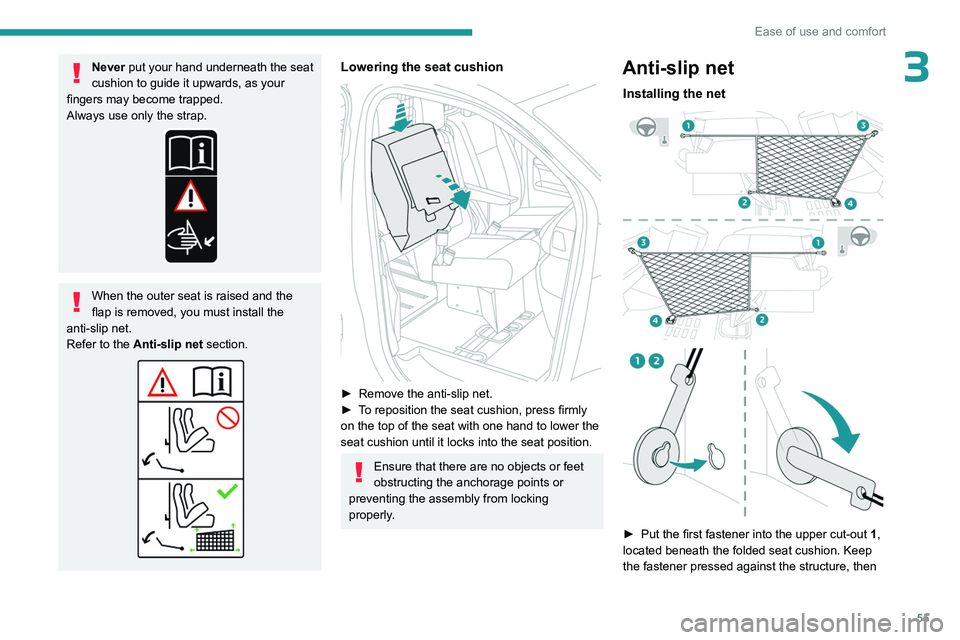
Lowering the seat cushion
► Remove the anti-slip net.
► T o reposition the seat cushion, press firmly
on the top of the seat with one hand to lower the
seat cushion until it locks into the seat position.
Ensure that there are no objects or feet
obstructing the anchorage points or
preventing the assembly from locking
properly.
Anti-slip net
Installing the net
► Put the first fastener into the upper cut-out 1,
located beneath the folded seat cushion. Keep
the fastener pressed against the structure, then
Page 61 of 324
59
Ease of use and comfort
3Removing
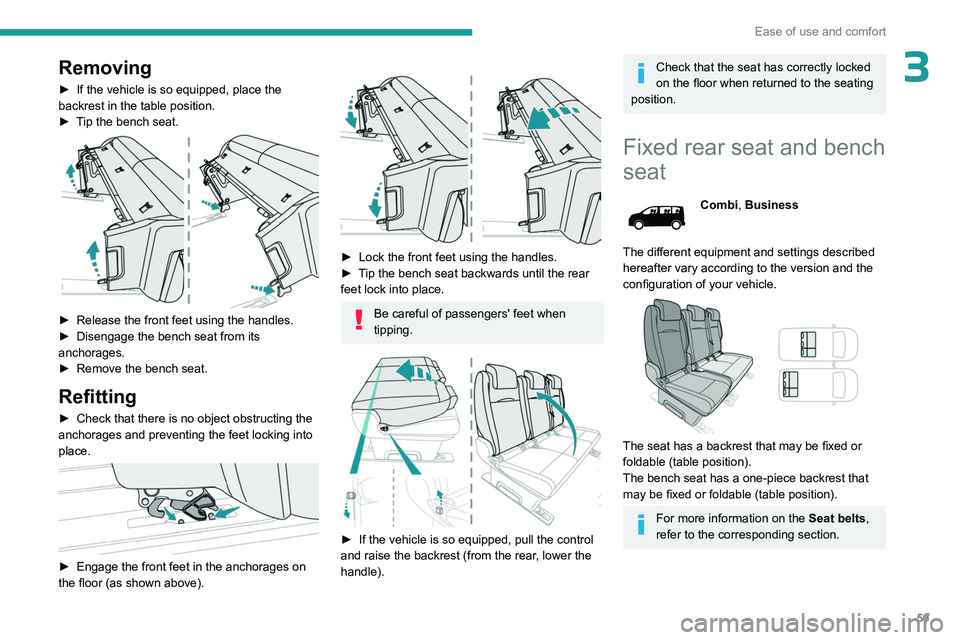
► If the vehicle is so equipped, place the
backrest in the table position.
►
T
ip the bench seat.
► Release the front feet using the handles.
► Disengage the bench seat from its
anchorages.
►
Remove the bench seat.
Refitting
► Check that there is no object obstructing the
anchorages and preventing the feet locking into
place.
► Engage the front feet in the anchorages on
the floor (as shown above).
► Lock the front feet using the handles.
► T ip the bench seat backwards until the rear
feet lock into place.
Be careful of passengers' feet when
tipping.
► If the vehicle is so equipped, pull the control
and raise the backrest (from the rear , lower the
handle).
Check that the seat has correctly locked
on the floor when returned to the seating
position.
Fixed rear seat and bench
seat
Combi, Business
The different equipment and settings described
hereafter vary according to the version and the
configuration of your vehicle.
The seat has a backrest that may be fixed or
foldable (table position).
The bench seat has a one-piece backrest that
may be fixed or foldable (table position).
For more information on the Seat belts,
refer to the corresponding section.
Page 63 of 324
61
Ease of use and comfort
3► Remove the seat through the side door for
row 2 or from the rear for row 3.
Refitting
(example of an individual seat)
► Check that there is no object obstructing the
anchorage points and preventing the feet locking
correctly into place.
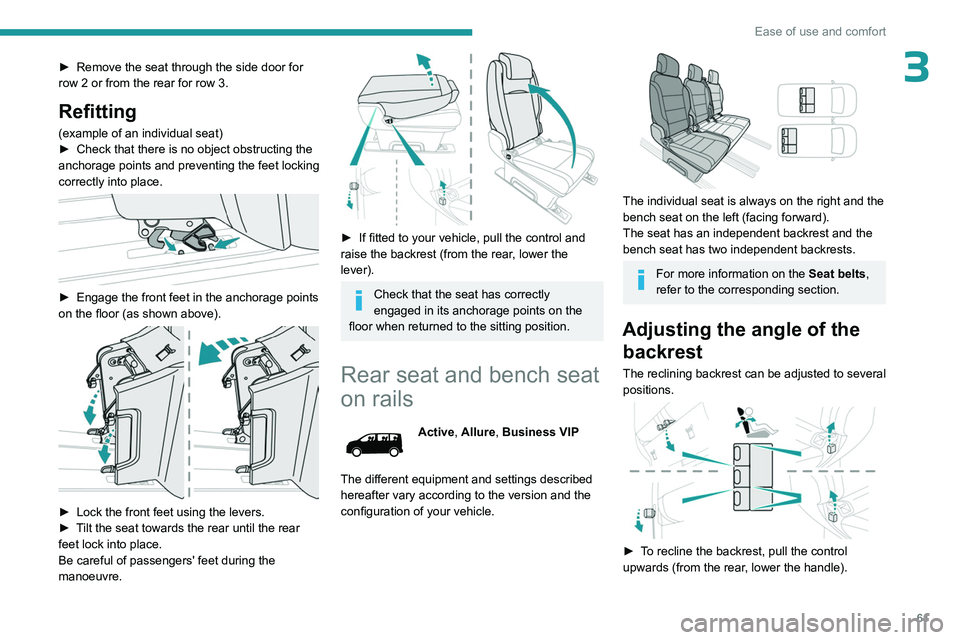
► Engage the front feet in the anchorage points
on the floor (as shown above).
► Lock the front feet using the levers.
► T ilt the seat towards the rear until the rear
feet lock into place.
Be careful of passengers' feet during the
manoeuvre.
► If fitted to your vehicle, pull the control and
raise the backrest (from the rear , lower the
lever).
Check that the seat has correctly
engaged in its anchorage points on the
floor when returned to the sitting position.
Rear seat and bench seat
on rails
Active, Allure, Business VIP
The different equipment and settings described
hereafter vary according to the version and the
configuration of your vehicle.
The individual seat is always on the right and the
bench seat on the left (facing forward).
The seat has an independent backrest and the
bench seat has two independent backrests.
For more information on the Seat belts,
refer to the corresponding section.
Adjusting the angle of the backrest
The reclining backrest can be adjusted to several
positions.
► To recline the backrest, pull the control
upwards (from the rear, lower the handle).
Page 77 of 324
75
Ease of use and comfort
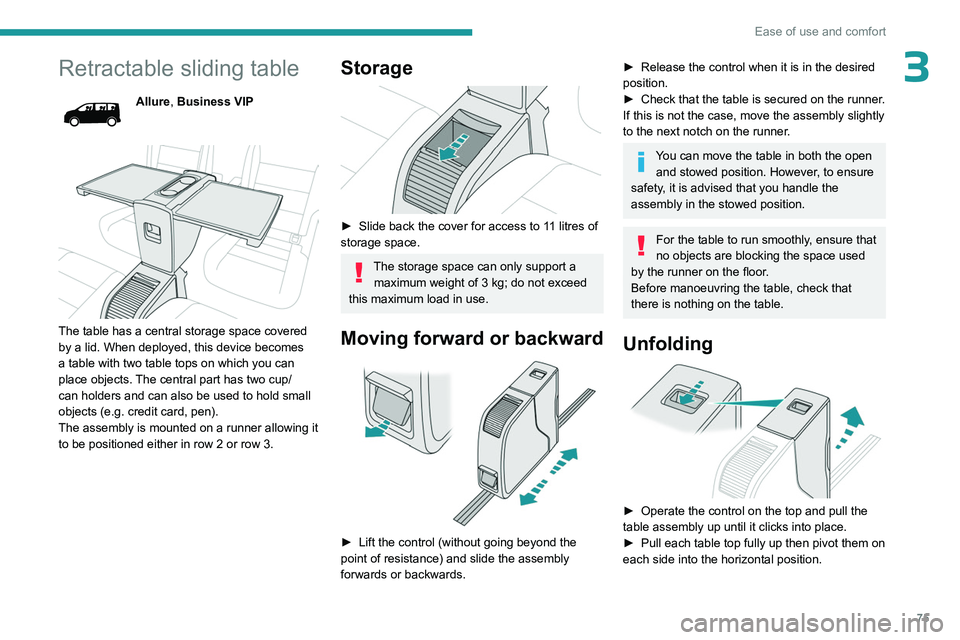
3Retractable sliding table
Allure, Business VIP
The table has a central storage space covered
by a lid. When deployed, this device becomes
a table with two table tops on which you can
place objects. The central part has two cup/
can holders and can also be used to hold small
objects (e.g. credit card, pen).
The assembly is mounted on a runner allowing it
to be positioned either in row 2 or row 3.
Storage
► Slide back the cover for access to 11 litres of
storage space.
The storage space can only support a maximum weight of 3 kg; do not exceed
this maximum load in use.
Moving forward or backward
► Lift the control (without going beyond the
point of resistance) and slide the assembly
forwards or backwards.
► Release the control when it is in the desired
position.
►
Check that the table is secured on the runner
.
If this is not the case, move the assembly slightly
to the next notch on the runner.
You can move the table in both the open and stowed position. However, to ensure
safety, it is advised that you handle the
assembly in the stowed position.
For the table to run smoothly, ensure that
no objects are blocking the space used
by the runner on the floor.
Before manoeuvring the table, check that
there is nothing on the table.
Unfolding
► Operate the control on the top and pull the
table assembly up until it clicks into place.
►
Pull each table top fully up then pivot them on
each side into the horizontal position.
Page 78 of 324
76
Ease of use and comfort
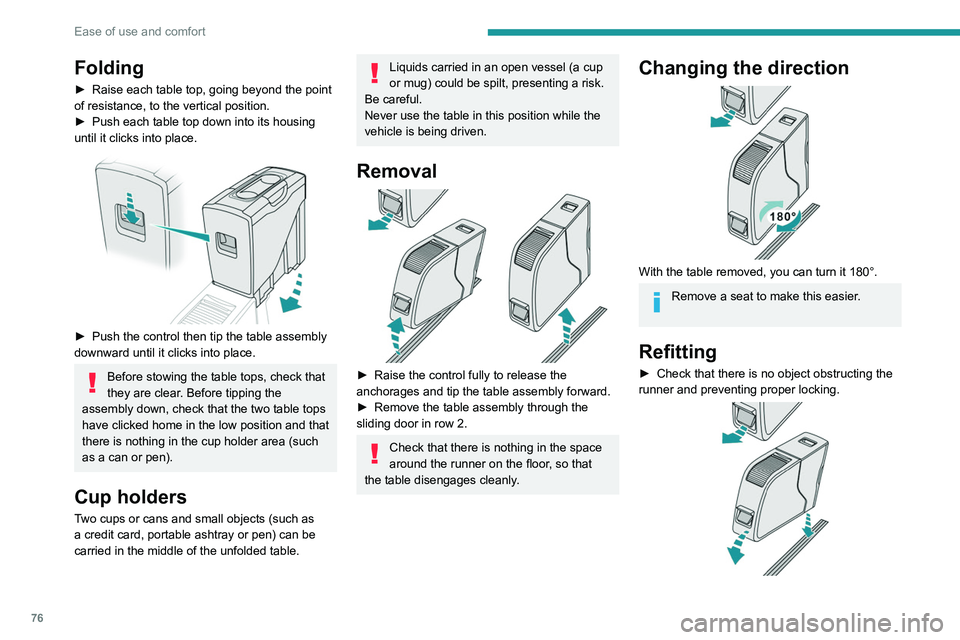
Folding
► Raise each table top, going beyond the point
of resistance, to the vertical position.
►
Push each table top down into its housing
until it clicks into place.
► Push the control then tip the table assembly
downward until it clicks into place.
Before stowing the table tops, check that
they are clear. Before tipping the
assembly down, check that the two table tops
have clicked home in the low position and that
there is nothing in the cup holder area (such
as a can or pen).
Cup holders
Two cups or cans and small objects (such as
a credit card, portable ashtray or pen) can be
carried in the middle of the unfolded table.
Liquids carried in an open vessel (a cup
or mug) could be spilt, presenting a risk.
Be careful.
Never use the table in this position while the
vehicle is being driven.
Removal
► Raise the control fully to release the
anchorages and tip the table assembly forward.
►
Remove the table assembly through the
sliding door in row 2.
Check that there is nothing in the space
around the runner on the floor, so that
the table disengages cleanly.
Changing the direction
With the table removed, you can turn it 180°.
Remove a seat to make this easier.
Refitting
► Check that there is no object obstructing the
runner and preventing proper locking.
Page 79 of 324
77
Ease of use and comfort
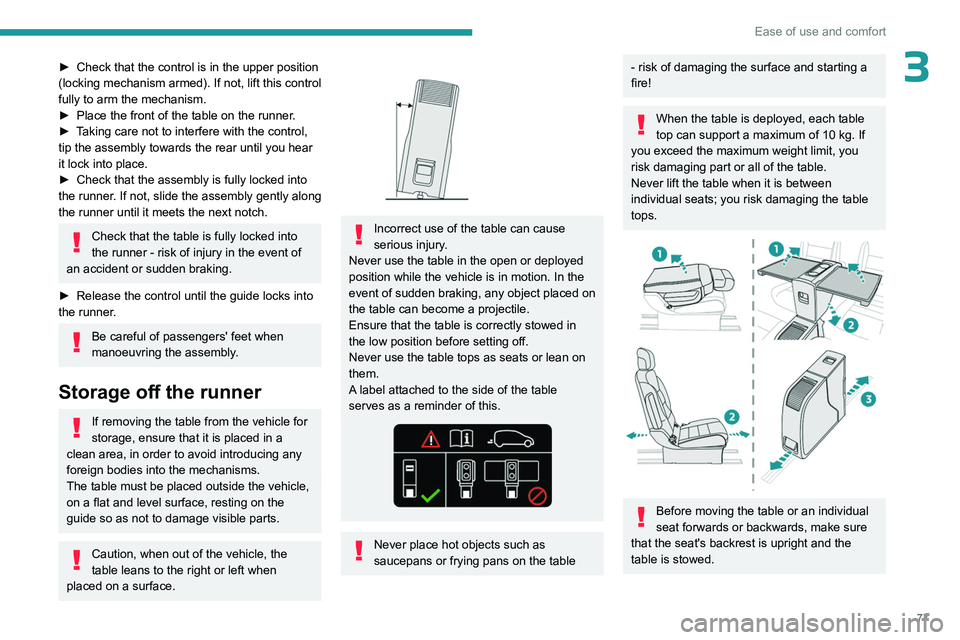
3► Check that the control is in the upper position
(locking mechanism armed). If not, lift this control
fully to arm the mechanism.
►
Place the front of the table on the runner
.
►
T
aking care not to interfere with the control,
tip the assembly towards the rear until you hear
it lock into place.
►
Check that the assembly is fully locked into
the runner
. If not, slide the assembly gently along
the runner until it meets the next notch.
Check that the table is fully locked into
the runner - risk of injury in the event of
an accident or sudden braking.
►
Release the control until the guide locks into
the runner
.
Be careful of passengers' feet when
manoeuvring the assembly.
Storage off the runner
If removing the table from the vehicle for
storage, ensure that it is placed in a
clean area, in order to avoid introducing any
foreign bodies into the mechanisms.
The table must be placed outside the vehicle,
on a flat and level surface, resting on the
guide so as not to damage visible parts.
Caution, when out of the vehicle, the
table leans to the right or left when
placed on a surface.
Incorrect use of the table can cause
serious injury.
Never use the table in the open or deployed
position while the vehicle is in motion. In the
event of sudden braking, any object placed on
the table can become a projectile.
Ensure that the table is correctly stowed in
the low position before setting off.
Never use the table tops as seats or lean on
them.
A label attached to the side of the table
serves as a reminder of this.
Never place hot objects such as
saucepans or frying pans on the table
- risk of damaging the surface and starting a
fire!
When the table is deployed, each table
top can support a maximum of 10 kg. If
you exceed the maximum weight limit, you
risk damaging part or all of the table.
Never lift the table when it is between
individual seats; you risk damaging the table
tops.
Before moving the table or an individual
seat forwards or backwards, make sure
that the seat's backrest is upright and the
table is stowed.
Page 92 of 324
90
Lighting and visibility
on if rain is detected, at the same time as the
automatic rain sensitive wipers.
As soon as the brightness returns to a sufficient
level or after the windscreen wipers are switched
off, the lamps are switched off automatically.
Malfunction
In the event of a malfunction of the rain/sunshine
sensor, the vehicle’s lamps come on and this
warning lamp is displayed on the instrument
panel, accompanied by an audible signal and/or
the display of a message.
Have it checked by a PEUGEOT dealer or a
qualified workshop.
Do not cover the rain/sunshine sensor
located at the top centre of the
windscreen behind the interior rear view
mirror; the associated functions would no
longer be controlled.
In fog or snow, the rain/sunshine sensor
may detect sufficient light. For this
reason, the lighting will not come on
automatically.
The inner surface of the windscreen may become misted up and affect the proper
operation of the rain/sunshine sensor.
In humid and cold weather, demist the
windscreen regularly.
Guide-me-home and
welcome lighting
Guide-me-home lighting
Manual
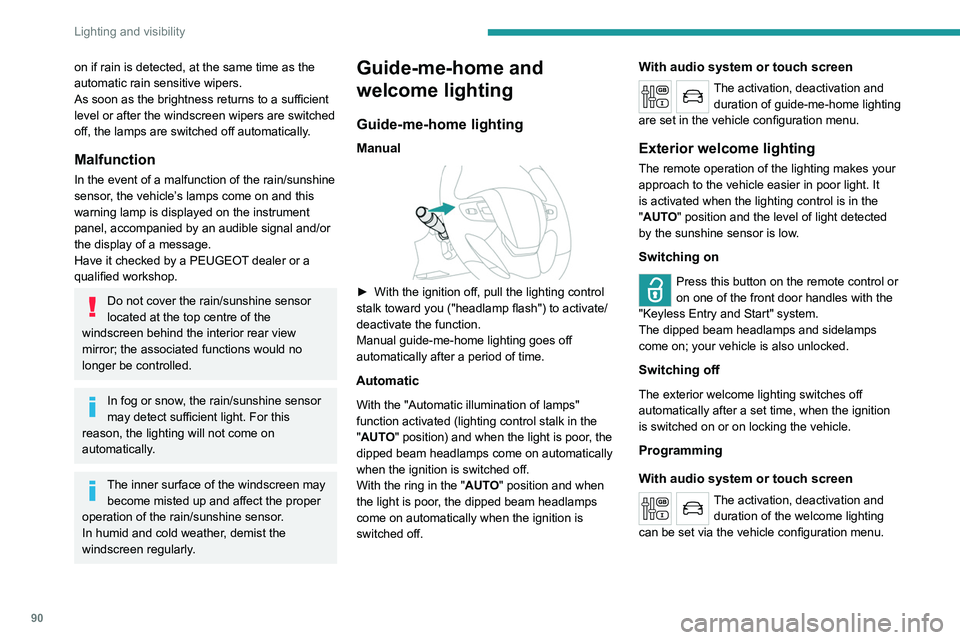
► With the ignition off, pull the lighting control
stalk toward you ("headlamp flash") to activate/
deactivate the function.
Manual guide-me-home lighting goes off
automatically after a period of time.
Automatic
With the "Automatic illumination of lamps"
function activated (lighting control stalk in the
"AUTO" position) and when the light is poor, the
dipped beam headlamps come on automatically
when the ignition is switched off.
With the ring in the "AUTO" position and when
the light is poor, the dipped beam headlamps
come on automatically when the ignition is
switched off.
With audio system or touch screen
The activation, deactivation and duration of guide-me-home lighting
are set in the vehicle configuration menu.
Exterior welcome lighting
The remote operation of the lighting makes your
approach to the vehicle easier in poor light. It
is activated when the lighting control is in the
"AUTO" position and the level of light detected
by the sunshine sensor is low.
Switching on
Press this button on the remote control or
on one of the front door handles with the
"Keyless Entry and Start" system.
The dipped beam headlamps and sidelamps
come on; your vehicle is also unlocked.
Switching off
The exterior welcome lighting switches off
automatically after a set time, when the ignition
is switched on or on locking the vehicle.
Programming
With audio system or touch screen
The activation, deactivation and duration of the welcome lighting
can be set via the vehicle configuration menu.
Page 101 of 324
99
Safety
5Horn
► Press the central part of the steering wheel.
Pedestrian horn (Electric)
This system alerts pedestrians that the vehicle is approaching.
The pedestrian horn operates once the vehicle
is moving and at speeds of up to 19 mph
(30
km/h), in forward or reverse gear.
This function cannot be deactivated.
Malfunction
In the event of a malfunction, this warning
lamp lights up on the instrument panel.
Have it checked by a PEUGEOT dealer or a
qualified workshop.
Electronic stability control
(ESC)
The electronic stability control programme includes the following systems:
–
Anti-lock braking system (ABS) and Electronic
brake force distribution (EBFD).
–
Emergency braking assistance (EBA).
–
Anti-slip regulation (ASR).
–
Dynamic stability control (DSC).
–
Intelligent traction control.
–
T
railer stability assist (TSA).
Anti-lock braking system (ABS)/Electronic brake force
distribution (EBFD)
These systems enhance the vehicle’s stability
and handling during braking, and enable greater
control while cornering, particularly on poor or
slippery road surfaces.
ABS prevents wheel locking in the event of
emergency braking.
Electronic brake force distribution (EBFD)
manages overall braking pressure on each
individual wheel.
►
When braking in an emergency
, depress
the pedal very firmly and maintain this
pressure.
Normal operation of the ABS may make
itself felt by slight vibrations of the brake
pedal.
The fixed illumination of this warning lamp signals that there is a fault with the ABS.
The vehicle retains conventional braking. Drive
carefully at a moderate speed.
Have it checked by a PEUGEOT dealer or a
qualified workshop.
This warning lamp, when lit together with the STOP and ABS warning lamps,
accompanied by a message and an audible
signal, indicates an EBFD malfunction.
You must stop the vehicle.
Stop as soon as it is safe to do so and switch off
the ignition.
Contact a PEUGEOT dealer or a qualified
workshop.
When changing wheels (tyres and rims),
ensure that these are approved for your
vehicle.
After an impact
Have it checked by a PEUGEOT dealer
or a qualified workshop.
Emergency braking
assistance (EBA)
In an emergency, this system enables you
to reach the optimum braking pressure more
quickly and therefore reduce the stopping
distance.
It is triggered in relation to the speed at which
the brake pedal is pressed. This is felt by a
Page 132 of 324
130
Safety
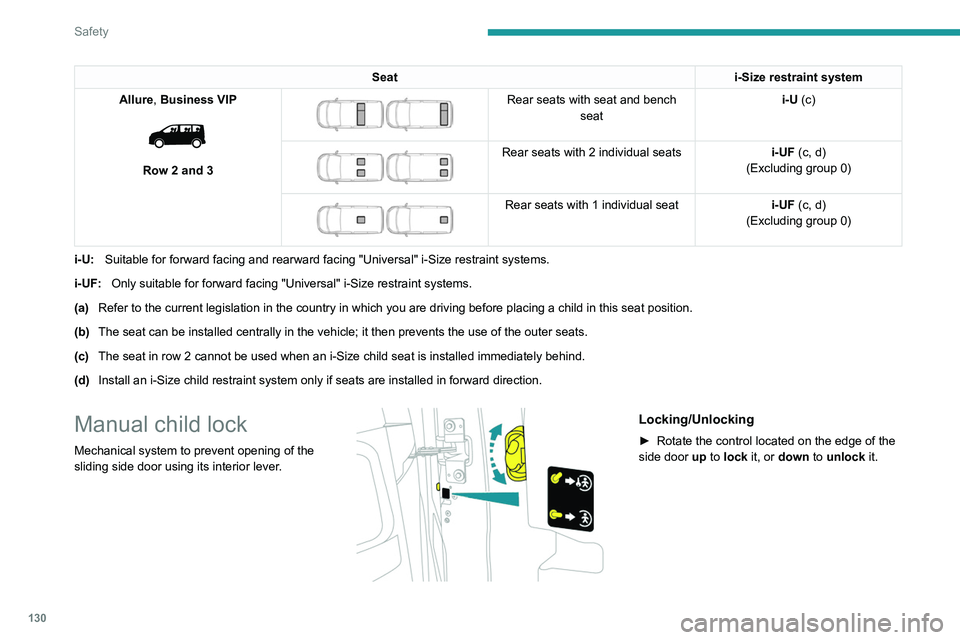
Seati-Size restraint system
Allure, Business VIP
Row 2 and 3
Rear seats with seat and bench seat i-U (c)
Rear seats with 2 individual seats
i-UF (c, d)
(Excluding group 0)
Rear seats with 1 individual seat i-UF (c, d)
(Excluding group 0)
i-U: Suitable for forward facing and rearward facing "Universal" i-Size restr\
aint systems.
i-UF: Only suitable for forward facing "Universal" i-Size restraint systems.
(a) Refer to the current legislation in the country in which you are driving\
before placing a child in this seat position.
(b) The seat can be installed centrally in the vehicle; it then prevents the use of the outer seats.
(c) The seat in row 2 cannot be used when an i-Size child seat is installed \
immediately behind.
(d) Install an i-Size child restraint system only if seats are installed in \
forward direction.
Manual child lock
Mechanical system to prevent opening of the
sliding side door using its interior lever.
Locking/Unlocking
► Rotate the control located on the edge of the
side door up
to lock it, or down to unlock it.
Page 133 of 324
131
Safety
5Electric child lock
Remote control system to
prevent opening of the rear
doors (sliding side door(s), side-
hinged rear doors or tailgate
(depending on version)) using
their interior controls.
This control prevents the opening of the rear
doors using their interior handles and the use of
the rear electric windows.
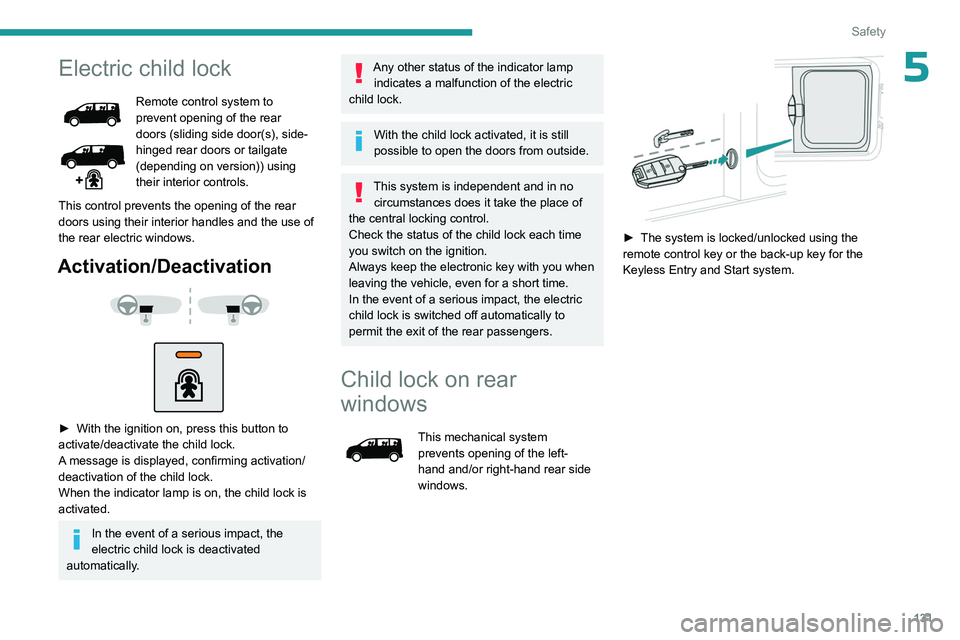
Activation/Deactivation
► With the ignition on, press this button to
activate/deactivate the child lock.
A
message is displayed, confirming activation/
deactivation of the child lock.
When the indicator lamp is on, the child lock is
activated.
In the event of a serious impact, the
electric child lock is deactivated
automatically.
Any other status of the indicator lamp indicates a malfunction of the electric
child lock.
With the child lock activated, it is still
possible to open the doors from outside.
This system is independent and in no circumstances does it take the place of
the central locking control.
Check the status of the child lock each time
you switch on the ignition.
Always keep the electronic key with you when
leaving the vehicle, even for a short time.
In the event of a serious impact, the electric
child lock is switched off automatically to
permit the exit of the rear passengers.
Child lock on rear
windows
This mechanical system
prevents opening of the left-
hand and/or right-hand rear side
windows.
► The system is locked/unlocked using the
remote control key or the back-up key for the
Keyless Entry and Start system.