remote start PEUGEOT EXPERT 2022 Owner's Guide
[x] Cancel search | Manufacturer: PEUGEOT, Model Year: 2022, Model line: EXPERT, Model: PEUGEOT EXPERT 2022Pages: 324, PDF Size: 10.39 MB
Page 189 of 324
187
Practical information
7The start of charging is confirmed when the
charging indicator lamp in the flap flashes green.
If this is not the case, charging has not started;
restart the procedure, ensuring that the
connection has been properly established.
The red indicator lamp in the flap comes on to
indicate that the nozzle is locked.
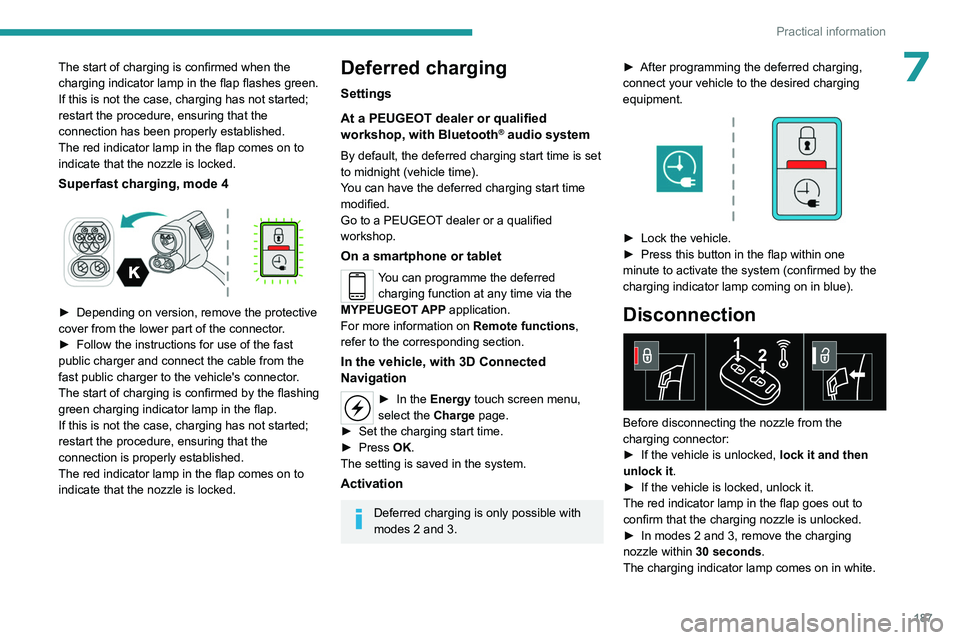
Superfast charging, mode 4
► Depending on version, remove the protective
cover from the lower part of the connector .
►
Follow the instructions for use of the fast
public charger and connect the cable from the
fast public charger
to the vehicle's connector.
The start of charging is confirmed by the flashing
green charging indicator lamp in the flap.
If this is not the case, charging has not started;
restart the procedure, ensuring that the
connection is properly established.
The red indicator lamp in the flap comes on to
indicate that the nozzle is locked.
Deferred charging
Settings
At a PEUGEOT dealer or qualified
workshop, with
Bluetooth
® audio system
By default, the deferred charging start time is set
to midnight (vehicle time).
You can have the deferred charging start time
modified.
Go to a PEUGEOT dealer or a qualified
workshop.
On a smartphone or tablet
You can programme the deferred charging function at any time via the
MYPEUGEOT APP application.
For more information on Remote functions,
refer to the corresponding section.
In the vehicle, with 3D Connected
Navigation
► In the Energy touch screen menu,
select the Charge page.
►
Set the charging start time.
►
Press
OK.
The setting is saved in the system.
Activation
Deferred charging is only possible with
modes 2 and 3. ►
After programming the deferred charging,
connect your vehicle to the desired charging
equipment.
► Lock the vehicle.
► Press this button in the flap within one
minute to activate the system (confirmed by the
charging indicator lamp coming on in blue).
Disconnection
Before disconnecting the nozzle from the
charging connector:
►
If the vehicle is unlocked, lock it and then
unlock it .
►
If the vehicle is locked, unlock it.
The red indicator lamp in the flap goes out to
confirm that the charging nozzle is unlocked.
►
In modes 2 and 3, remove the charging
nozzle within 30 seconds
.
The charging indicator lamp comes on in white.
Page 194 of 324
192
Practical information
Engine compartment
The engine shown here is an example for
illustrative purposes only.
The locations of the following components may
vary:
–
Air filter
.
–
Engine oil dipstick.
–
Engine oil filler cap.
–
Priming pump.
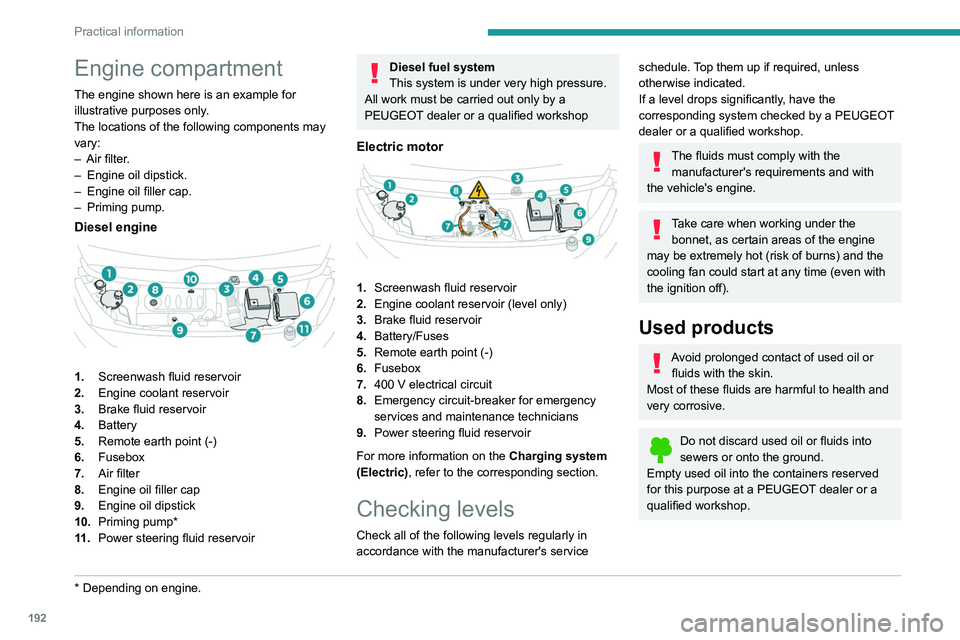
Diesel engine
1. Screenwash fluid reservoir
2. Engine coolant reservoir
3. Brake fluid reservoir
4. Battery
5. Remote earth point (-)
6. Fusebox
7. Air filter
8. Engine oil filler cap
9. Engine oil dipstick
10. Priming pump*
11 . Power steering fluid reservoir
* Depending on engine.
Diesel fuel system
This system is under very high pressure.
All work must be carried out only by a
PEUGEOT dealer or a qualified workshop
Electric motor
1. Screenwash fluid reservoir
2. Engine coolant reservoir (level only)
3. Brake fluid reservoir
4. Battery/Fuses
5. Remote earth point (-)
6. Fusebox
7. 400
V electrical circuit
8. Emergency circuit-breaker for emergency
services and maintenance technicians
9. Power steering fluid reservoir
For more information on the Charging system
(Electric), refer to the corresponding section.
Checking levels
Check all of the following levels regularly in
accordance with the manufacturer's service
schedule. Top them up if required, unless
otherwise indicated.
If a level drops significantly, have the
corresponding system checked by a PEUGEOT
dealer or a qualified workshop.
The fluids must comply with the manufacturer's requirements and with
the vehicle's engine.
Take care when working under the bonnet, as certain areas of the engine
may be extremely hot (risk of burns) and the
cooling fan could start at any time (even with
the ignition off).
Used products
Avoid prolonged contact of used oil or fluids with the skin.
Most of these fluids are harmful to health and
very corrosive.
Do not discard used oil or fluids into
sewers or onto the ground.
Empty used oil into the containers reserved
for this purpose at a PEUGEOT dealer or a
qualified workshop.
Page 219 of 324
217
In the event of a breakdown
8Symbols
No sparks or naked flames, no smoking.
Always protect your eyes. Explosive gases can cause blindness and injury.
Keep the vehicle's battery out of the reach
of children.
The vehicle's battery contains sulphuric acid which can make you go blind or
cause severe burns.
For more information, refer to the
handbook.
Explosive gases can be present close to
the battery.
Always replace the battery with one of equivalent specification.
Access to the battery
The battery is located under the bonnet.
► Open the bonnet using the interior release
lever
, then the exterior safety catch.
►
Secure the bonnet stay
.
► Remove the plastic cover to access the (+)
terminal, if your vehicle has one.
The battery (-) terminal is not accessible.
There is a remote earth point near the battery
.
For more information on the Bonnet and
the Engine , refer to the corresponding
sections.
Starting using another
battery
If the vehicle's battery is flat, the engine can be
started using a backup battery (either external or
from another vehicle) and jump leads or using a
battery booster.
Never start the engine by connecting a
battery charger.
Never use a 24
V or higher battery booster.
Check beforehand that the backup battery
has a nominal voltage of 12
V and a capacity
at least equal to that of the discharged
battery.
The two vehicles must not be in contact with
each other.
Switch off all electricity-consuming equipment
on both vehicles (audio system, wipers,
lighting, etc.).
Make sure that the jump leads are well away
from the engine’s moving parts (fan, belt,
etc.).
Do not disconnect the (+) terminal while the
engine is running.
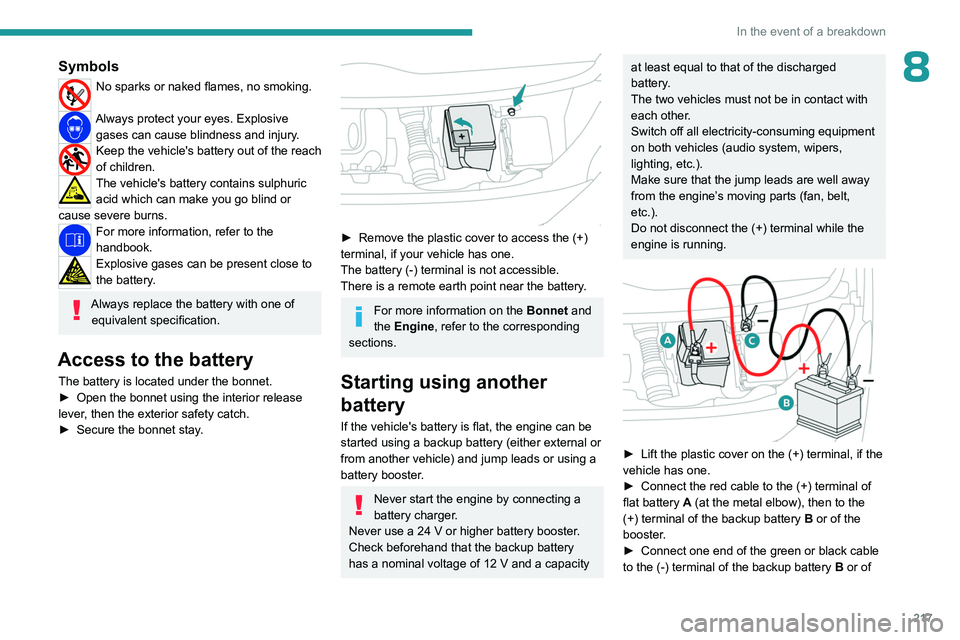
► Lift the plastic cover on the (+) terminal, if the
vehicle has one.
►
Connect the red cable to the (+) terminal of
flat battery
A (at the metal elbow), then to the
(+) terminal of the backup battery
B or of the
booster.
►
Connect one end of the green or black cable
to the (-) terminal of the backup battery
B or of
Page 222 of 324
220
In the event of a breakdown
Referring to the relevant section, reinitialise
certain equipment:
–
Remote control key or electronic key
(depending on version).
–
Electric windows.
–
Date and time.
–
Preset radio stations.
The Stop & Start system may not be operational during the trip following the
first engine start.
In this case, the system will only be available
again after a continuous period with the
vehicle immobilised, the duration of which
depends on the exterior temperature and the
state of charge of the battery (up to about 8
hours).
Towing the vehicle
Procedure for having your vehicle towed or
for towing another vehicle using a removable
mechanical device.
General recommendations
Observe the legislation in force in the
country where you are driving.
Check that the towing vehicle is heavier than
the towed vehicle.
The driver must remain at the wheel of the
towed vehicle and must have a valid driving
licence.
When towing a vehicle with all four wheels on
the ground, always use an approved towbar;
ropes and straps are prohibited.
The towing vehicle must move off gently.
When the vehicle is towed with its engine
off, there is no longer braking and steering
assistance.
A professional recovery service must
be called in the following cases:
–
broken down on a motorway or main road;
–
not possible to put the gearbox into neutral,
unlock the steering, or release the parking
brake;
–
not possible to tow a vehicle with an
automatic gearbox, with the engine running;
– towing with only two wheels on the ground;
– four-wheel drive vehicle;
–
no approved towbar available.
Before towing the vehicle, it is essential
to put the vehicle in free-wheeling mode.
For more information on Free-wheeling, refer
to the corresponding section.
Electric motor
An electric vehicle cannot under any
circumstances be used to tow another
vehicle.
However, it may be used, for example, to exit
a rut.
With a manual gearbox, place the gear
lever in neutral.
With an automatic gearbox, place the gear
selector in position N.
Failure to adhere to this instruction may lead
to damage to some braking components and
the lack of braking assistance on restarting
the engine.
Page 293 of 324
291
Alphabetical index
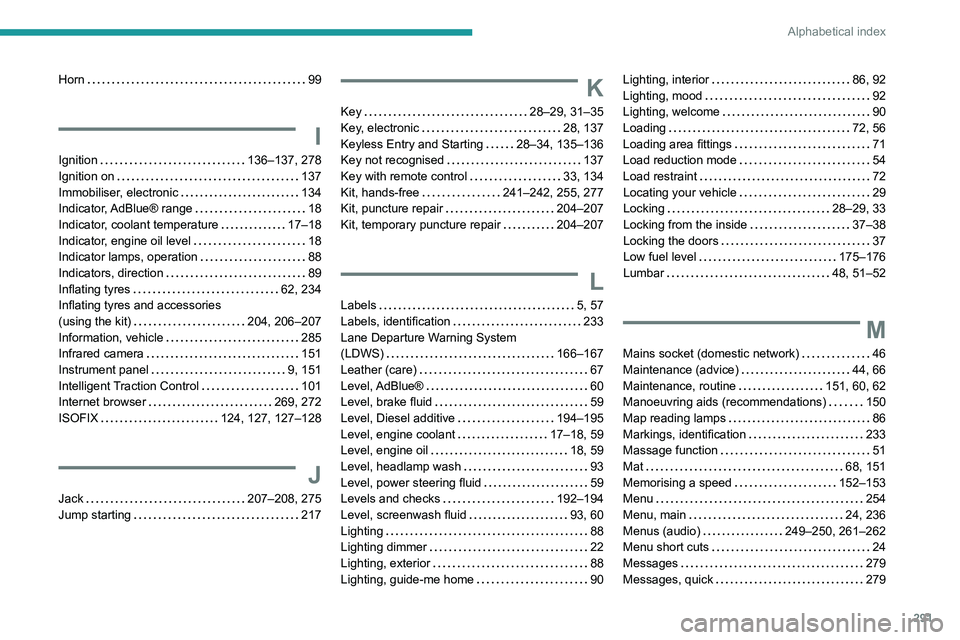
Horn 99
I
Ignition 136–137, 278
Ignition on
137
Immobiliser, electronic
134
Indicator, AdBlue® range
18
Indicator, coolant temperature
17–18
Indicator, engine oil level
18
Indicator lamps, operation
88
Indicators, direction
89
Inflating tyres
62, 234
Inflating tyres and accessories
(using the kit)
204, 206–207
Information, vehicle
285
Infrared camera
151
Instrument panel
9, 151
Intelligent Traction Control
101
Internet browser
269, 272
ISOFIX
124, 127, 127–128
J
Jack 207–208, 275
Jump starting
217
K
Key 28–29, 31–35
Key, electronic
28, 137
Keyless Entry and Starting
28–34, 135–136
Key not recognised
137
Key with remote control
33, 134
Kit, hands-free
241–242, 255, 277
Kit, puncture repair
204–207
Kit, temporary puncture repair
204–207
L
Labels 5, 57
Labels, identification
233
Lane Departure Warning System
(LDWS)
166–167
Leather (care)
67
Level, AdBlue®
60
Level, brake fluid
59
Level, Diesel additive
194–195
Level, engine coolant
17–18, 59
Level, engine oil
18, 59
Level, headlamp wash
93
Level, power steering fluid
59
Levels and checks
192–194
Level, screenwash fluid
93, 60
Lighting
88
Lighting dimmer
22
Lighting, exterior
88
Lighting, guide-me home
90
Lighting, interior 86, 92
Lighting, mood
92
Lighting, welcome
90
Loading
72, 56
Loading area fittings
71
Load reduction mode
54
Load restraint
72
Locating your vehicle
29
Locking
28–29, 33
Locking from the inside
37–38
Locking the doors
37
Low fuel level
175–176
Lumbar
48, 51–52
M
Mains socket (domestic network) 46
Maintenance (advice)
44, 66
Maintenance, routine
151, 60, 62
Manoeuvring aids (recommendations)
150
Map reading lamps
86
Markings, identification
233
Massage function
51
Mat
68, 151
Memorising a speed
152–153
Menu
254
Menu, main
24, 236
Menus (audio)
249–250, 261–262
Menu short cuts
24
Messages
279
Messages, quick
279
Page 295 of 324
293
Alphabetical index
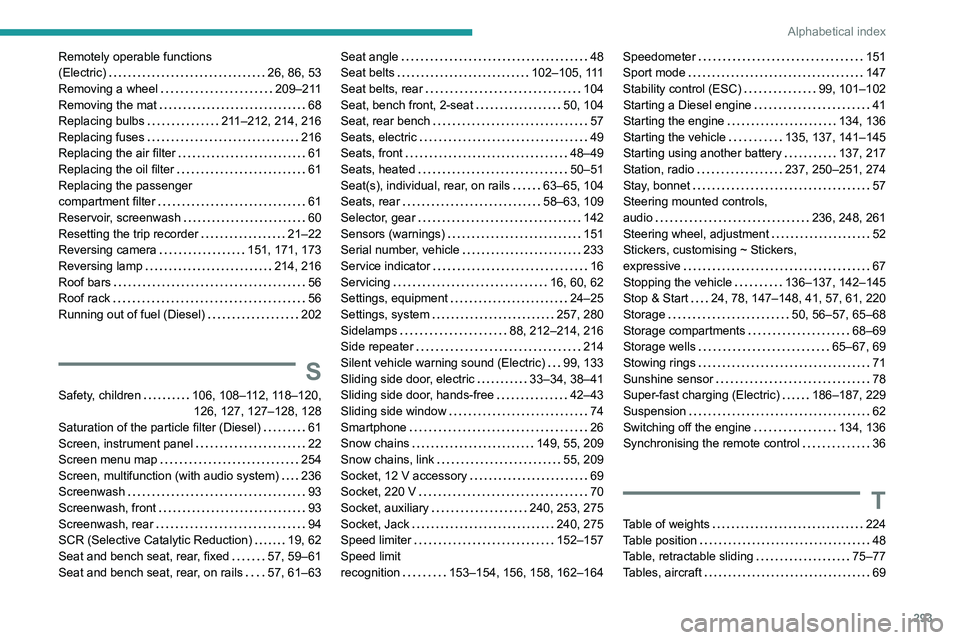
Remotely operable functions
(Electric)
26, 86, 53
Removing a wheel
209–211
Removing the mat
68
Replacing bulbs
211–212, 214, 216
Replacing fuses
216
Replacing the air filter
61
Replacing the oil filter
61
Replacing the passenger
compartment filter
61
Reservoir, screenwash
60
Resetting the trip recorder
21–22
Reversing camera
151, 171, 173
Reversing lamp
214, 216
Roof bars
56
Roof rack
56
Running out of fuel (Diesel)
202
S
Safety, children 106, 108–112, 118–120,
126, 127, 127–128, 128
Saturation of the particle filter (Diesel)
61
Screen, instrument panel
22
Screen menu map
254
Screen, multifunction (with audio system)
236
Screenwash
93
Screenwash, front
93
Screenwash, rear
94
SCR (Selective Catalytic Reduction)
19, 62
Seat and bench seat, rear, fixed
57, 59–61
Seat and bench seat, rear, on rails
57, 61–63
Seat angle 48
Seat belts
102–105, 111
Seat belts, rear
104
Seat, bench front, 2-seat
50, 104
Seat, rear bench
57
Seats, electric
49
Seats, front
48–49
Seats, heated
50–51
Seat(s), individual, rear, on rails
63–65, 104
Seats, rear
58–63, 109
Selector, gear
142
Sensors (warnings)
151
Serial number, vehicle
233
Service indicator
16
Servicing
16, 60, 62
Settings, equipment
24–25
Settings, system
257, 280
Sidelamps
88, 212–214, 216
Side repeater
214
Silent vehicle warning sound (Electric)
99, 133
Sliding side door, electric
33–34, 38–41
Sliding side door, hands-free
42–43
Sliding side window
74
Smartphone
26
Snow chains
149, 55, 209
Snow chains, link
55, 209
Socket, 12 V accessory
69
Socket, 220 V
70
Socket, auxiliary
240, 253, 275
Socket, Jack
240, 275
Speed limiter
152–157
Speed limit
recognition
153–154, 156, 158, 162–164Speedometer 151
Sport mode
147
Stability control (ESC)
99, 101–102
Starting a Diesel engine
41
Starting the engine
134, 136
Starting the vehicle
135, 137, 141–145
Starting using another battery
137, 217
Station, radio
237, 250–251, 274
Stay, bonnet
57
Steering mounted controls,
audio
236, 248, 261
Steering wheel, adjustment
52
Stickers, customising ~ Stickers,
expressive
67
Stopping the vehicle
136–137, 142–145
Stop & Start
24, 78, 147–148, 41, 57, 61, 220
Storage
50, 56–57, 65–68
Storage compartments
68–69
Storage wells
65–67, 69
Stowing rings
71
Sunshine sensor
78
Super-fast charging (Electric)
186–187, 229
Suspension
62
Switching off the engine
134, 136
Synchronising the remote control
36
T
Table of weights 224
Table position
48
Table, retractable sliding
75–77
Tables, aircraft
69