display PEUGEOT EXPERT 2023 Owners Manual
[x] Cancel search | Manufacturer: PEUGEOT, Model Year: 2023, Model line: EXPERT, Model: PEUGEOT EXPERT 2023Pages: 348, PDF Size: 12 MB
Page 282 of 348
280
3D Connected Navigation
The system reads a variety of data (folder, title,
artist, etc.). This can take from a few seconds to
a few minutes.
This is perfectly normal.
Some characters in information about the
currently playing media may not be displayed
correctly.
The audio system is unable to process certain
types of character.
►
Use standard characters to name tracks and
folders.
Playback of streaming files does not start.
The connected device does not automatically
launch playback.
►
Start playback from the device.
T
rack names and playing times are not
displayed on the audio streaming screen.
The Bluetooth profile does not allow the transfer
of this information.
Telephone
I am unable to connect my Bluetooth
telephone.
The telephone's Bluetooth function may be
switched off or the device may not be visible.
►
Check that the telephone has Bluetooth
switched on.
►
Check in the telephone settings that it is
"visible to all".
►
Deactivate then reactivate the telephone’
s
Bluetooth function.
The Bluetooth telephone is not compatible with
the system. ►
Y
ou can check the compatibility of the
telephone on the Brand's website (services).
Android Auto and/or CarPlay do not work.
Android Auto and CarPlay may not activate if the
USB cables are of poor quality.
►
Use genuine USB cables to ensure
compatibility
.
Android Auto and/or CarPlay do not work.
Android Auto and CarPlay are not available in all
countries.
►
Check the list of supported countries via
these
websites: Google Android Auto or Apple.
The volume of the telephone connected via
Bluetooth is too low.
The volume depends on both the system and the
telephone.
►
Increase the volume of the audio system, to
maximum if required, and increase the volume of
the telephone if necessary
.
Ambient noise affects the quality of the
telephone call.
► Reduce ambient noise (e.g. close the
windows, reduce ventilation, slow down).
Some contacts are duplicated in the list.
The options for synchronising contacts are:
synchronise the contacts on the SIM card, the
contacts on the telephone, or both. When both
synchronisations are selected, some contacts
may be duplicated.
►
Select "Display SIM card contacts" or
"Display telephone contacts".
The contacts are not listed in alphabetical
order
.Some telephones offer display options.
Depending on the settings chosen, contacts can
be transferred in a specific order.
►
Modify the telephone directory display
settings.
The system is not receiving SMS text
messages.
Bluetooth mode does not allow SMS text
messages to be sent to the system.
Settings
When the treble and bass settings are
changed, the ambience is deselected.
When the ambience is changed, the treble
and bass settings are reset.
Selecting an ambience imposes the treble and
bass settings, and vice versa.
►
Modify the treble and bass or ambience
settings to obtain the desired musical ambience.
When the balance settings are changed, the
distribution is deselected.
When the distribution setting is changed, the
balance settings are deselected.
Selecting a distribution setting imposes the
balance settings, and vice versa.
►
Modify the balance setting or the distribution
setting to obtain the desired sound quality
.
There is a difference in sound quality
between audio sources.
To allow for optimal listening quality, the sound
settings can be tailored to different audio
sources, which can generate audible differences
when changing source. CarM an uals 2 .c o m
Page 284 of 348
282
Vehicle data recording and privacy
Vehicle data recording
and privacy
Electronic control units are installed in your
vehicle. These control units process data
received from the vehicle's sensors, for example,
or data they generate themselves or exchange
with each other. Some of these control units are
required for the correct operation of your vehicle,
some others assist you while driving (driving or
manoeuvring aids), while others provide comfort
or infotainment functions.
The following contains general information about
how data is processed within the vehicle.
You will find additional information about the
specific data which is downloaded, stored
and transmitted to third parties and what it is
used for in your vehicle under the keyword
"Data protection". This information is directly
associated with the references for the functions
in question contained in the corresponding
vehicle handbook, or in the general terms and
conditions of sale.
This information is also available online.
Vehicle operating data
The control units process the data used for the
operation of the vehicle.
This data includes, for example:
–
Information about the state of the vehicle
(e.g.
speed, travel time, lateral acceleration,
wheel rotation rate, fastened seat belts display). –
Environmental conditions (e.g.
temperature,
rain sensor, distance sensor).
As a general rule, this data is temporary, is
not stored for longer than one operating cycle
and is only used within the vehicle itself. The
control units often record this data (including the
vehicle's key). This function allows either the
temporary or permanent storage of information
about the state of the vehicle, stresses on
components, servicing requirements, as well as
events and technical errors.
Depending on the vehicle's equipment level, the
data stored is as follows:
–
Operating state of system components
(e.g.
filling level, tyre pressures, battery charge
status).
–
Faults and malfunctions in important system
components (e.g.
lamps, brakes).
–
System reactions in specific driving situations
(e.g.
deployment of an airbag, triggering of
stability control and braking systems).
–
Information about events which have
damaged the vehicle.
–
For electric and rechargeable hybrid vehicles,
the traction battery charge level and the
estimated driving range.
In particular circumstances (e.g.
if the vehicle
has detected a malfunction), it may be necessary
to record data which would otherwise simply not
be stored.
When taking your vehicle in for servicing
(e.g.
repairs, maintenance), the stored operating
data may be read along with the vehicle's identification number and used if necessary.
The personnel working for the servicing network
(e.g.
garages, manufacturers) or third parties
(e.g. roadside assistance agents) may read
the vehicle's data. This also applies to work
carried out under warranty and quality assurance
measures.
This data is generally read via the OBD
(On-Board Diagnostics) port fitted by law to
the vehicle. It is used to report on the technical
state of the vehicle or its components and
facilitates the diagnosis of malfunctions, in
compliance with warranty obligations and for
quality improvement. This data, in particular the
information relating to stress on components,
technical events, operator errors and other
malfunctions, is sent to the Manufacturer, if
necessary, along with the vehicle's identification
number. The Manufacturer's liability may also be
engaged. The Manufacturer may also use the
operating data taken from the vehicle for product
recalls. This data may also be used to check the
customer's warranty and any claims made under
warranty.
Any malfunctions stored in the vehicle may be
reset by an after-sales service company during
servicing or repair work, or at your request. CarM an uals 2 .c o m
Page 288 of 348
286
Alphabetical index
Charge level indicator (Electric) 22
Charging cable
180
Charging cable (Electric)
179
Charging connector
(Electric)
178, 183, 185–186
Charging flap (Electric)
178, 183, 185–186
Charging system (Electric)
5, 8, 27, 176, 191
Charging the traction battery
(Electric)
22, 176, 183, 185–186
Checking the engine oil level
19
Checking the levels
191–193
Checking tyre pressures
(using the kit)
204, 206–207
Checks
191, 194–196
Checks, routine
194–195
Child lock
131
Child lock on rear windows
131
Children
106, 113, 119–121, 128, 128–129
Children (safety)
131
Child seats
106, 109–116, 128
Child seats, conventional
112–116
Child seats, i-Size
128
Child seats, ISOFIX
119–121, 128, 128–129
Cleaning (advice)
177, 199–201
Closing the boot
44
Closing the doors
29, 33, 43–44
Collision Risk Alert
162–163
Compressor, tyre inflation
204
Configuration, vehicle
26–27
Connected applications
269
Connection, Android Auto
251, 269
Connection, Apple CarPlay
251, 268Connection,
Bluetooth
239, 252–253, 269–270, 274–275
Connection, Wi-Fi network
270
Connectivity
268
Consumptions
27
Container, AdBlue®
197
Control, emergency boot release
36
Control, emergency door
29, 34–35
Control, heated seats
50–51
Control stalk, lighting
88
Control stalk, wipers
93–95
Control unit
179–180
Courtesy lamp
86
Courtesy lamp, front
86–87, 215
Courtesy lamp, rear
86–87, 215
Courtesy lamps
86–87, 215
Crew cab, fixed
65–66
Crew cab, folding
66
Cruise control
151, 153–154, 156–158
Cruise control,
adaptive
153–154, 158, 161–163
Cruise control,
adaptive with Stop function
153–154
Cruise control by
speed limit recognition
153–154
D
DAB (Digital Audio Broadcasting) -
Digital radio
235–236, 249, 272
Date (setting)
28, 255, 277
Daytime running lamps 89, 212–213
Deactivating the passenger
airbag
107, 111–112
Deactivation of DSC (ESC)
101
Deadlocking
34
Deferred charging
27
Deferred charging (Electric)
27, 178, 183, 186
Defrosting
52, 81
Defrosting, rear screen
82
Demisting
81
Demisting, rear
82
Dimensions
229
Dipstick
19, 192
Direction indicators
(turn signals)
89, 212–214, 216
Display, head-up
11
Domestic charging
180
Domestic charging (Electric)
184–186, 227
Door pockets
68
Doors, rear
43–44
Doors, side
39
Doors, side-hinged
33–34, 43–44, 214
Drive,
electric
5, 8, 27, 176, 189, 191, 216, 220, 227
Driver’s attention warning
166
Drive selector (Electric)
145, 195
Driving
132–133
Driving aids camera (warnings)
150
Driving aids (recommendations)
150
Driving economically
7
Driving modes
146
Driving modes (Electric)
146–147 CarM an uals 2 .c o m
Page 289 of 348
287
Alphabetical index
Dynamic stability control (DSC) 100–101, 103
E
EBFD 100
Eco-driving (advice)
7
ECO mode
147
Electric windows
47
Electronic brake force distribution (EBFD)
100
Emergency braking assistance (EBA)
100
Emergency call
98
Emergency warning lamps
97, 202
Emissions control system, SCR
21, 196
Energy economy (mode)
187
Energy economy mode
187
Energy flows
27
Energy recovery
22, 146
Engine
196
Engine compartment
191
Engine, Diesel
174, 191, 202, 224
Engines
223
Environment
7, 36, 84, 133
ESC (electronic stability control)
100
Exterior lighting
91
F
Fatigue detection 166
Filling the AdBlue® tank
193, 197
Filling the fuel tank
174–175
Filter, air 194
Filter, oil
194
Filter, particle
193–194
Filter, passenger compartment
77, 194
Finisher
2 11
Fitting a wheel
209–211
Fitting roof bars
189
Fittings, interior
67–68, 72
Fittings, rear
72
Flap, fuel filler
174–175
Flap, removable
53–55
Flashing indicators
89
Floor cab
216
Fluid, brake
193
Fluid, engine coolant
193
Fluid, power steering
193
Foglamp, rear
88, 214, 216
Foglamps, front
88, 213
Foglamps, rear
88
Frequency (radio)
271
Fuel
7, 174
Fuel consumption
7
Fuel level, low
174–175
Fuel (tank)
174
Fuses
216
G
Gauge, fuel 174–175
Gearbox, automatic
141–145, 195, 218
Gearbox, manual
141, 195
Gear lever 141
Gear lever, automatic gearbox
142–145
Gear lever, manual gearbox
141
Gear shift indicator
142
Glove box
68
G.P.S.
265
H
Hazard warning lamps 97, 202
Headlamps (adjustment)
92
Headlamps, automatic dipping
91–92
Headlamps, automatic operation
89–90
Headlamps, dipped beam
88, 212
Headlamps, halogen
211–212
Headlamps, main beam
88, 91, 212–213
Headlamps, Xenon
212
Head restraints, front
49
Head-up display
10–12
Heating
77–79, 81–84
Heating, additional
45, 83–84
Heating, programmable
27, 45, 83–85
High voltage
176
Hill start assist
141
Histogramme, fuel consumption
27
Horn
100
I
Ignition 136–137, 275 CarM an uals 2 .c o m
Page 302 of 348
10 Instruments and controls
Instruments and
controls
Warning lights, gauges and indi‐ cators ........................................... 10
Instrument cluster ......................10
Hydrogen gauge ........................10
Hydrogen leakage .....................11
Fuel cell system fault .................11
Displays ....................................... 11
Driver Information Centre ..........11 Warning lights, gauges
and indicators
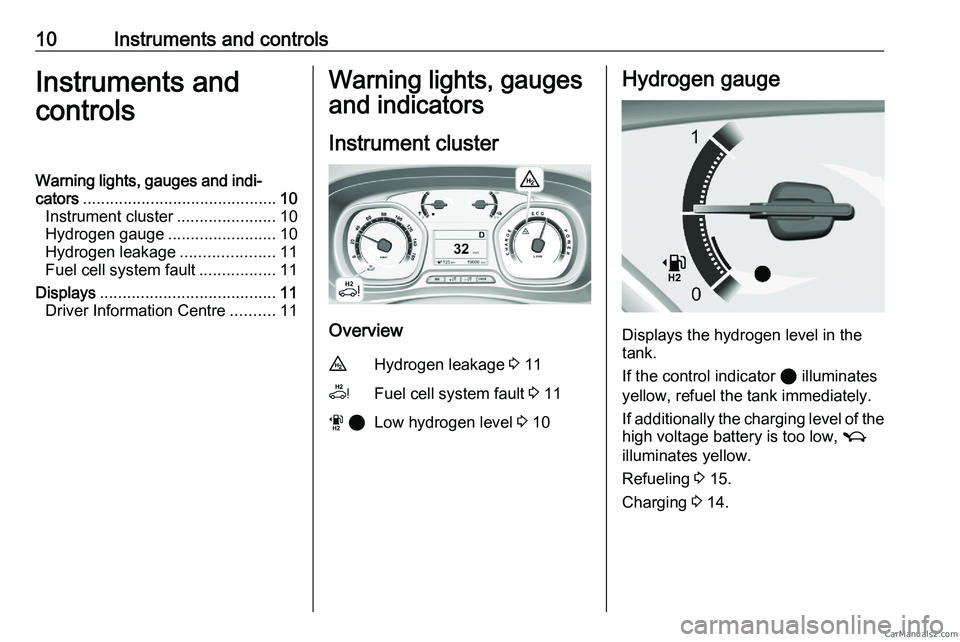
Instrument cluster Overview
u
Hydrogen leakage 3 11
v Fuel cell system fault 3 11
w 2 Low hydrogen level 3
10 Hydrogen gauge
Displays the hydrogen level in the
tank.
If the control indicator 2 illuminates
yellow, refuel the tank immediately.
If
additionally the charging level of the
high voltage battery is too low, M
illuminates yellow.
Refueling 3 15.
Charging 3 14.CarM an uals 2 .c o m
Page 303 of 348
Instruments and controls 11
Hydrogen leakage
u illuminates red together with C
and a warning message is displayed
in the Driver Information Centre.
A hydrogen leak has been detected.
Do not park or transport the vehicle
indoors,
such as a garage or the like. 9
Warning Have the cause of the fault
remedied immediately by a
workshop. Fuel cell system fault
v and C are illuminated yellow
and a warning message is displayed
in the Driver Information Centre.
The range of the vehicle might be
reduced. In order to enable the
continuation of the journey, the high
voltage battery will be used.
Therefore, ensure that the charging
level
of the high voltage battery is high
enough.
Seek the assistance of a workshop.
Charging 3 14. Displays
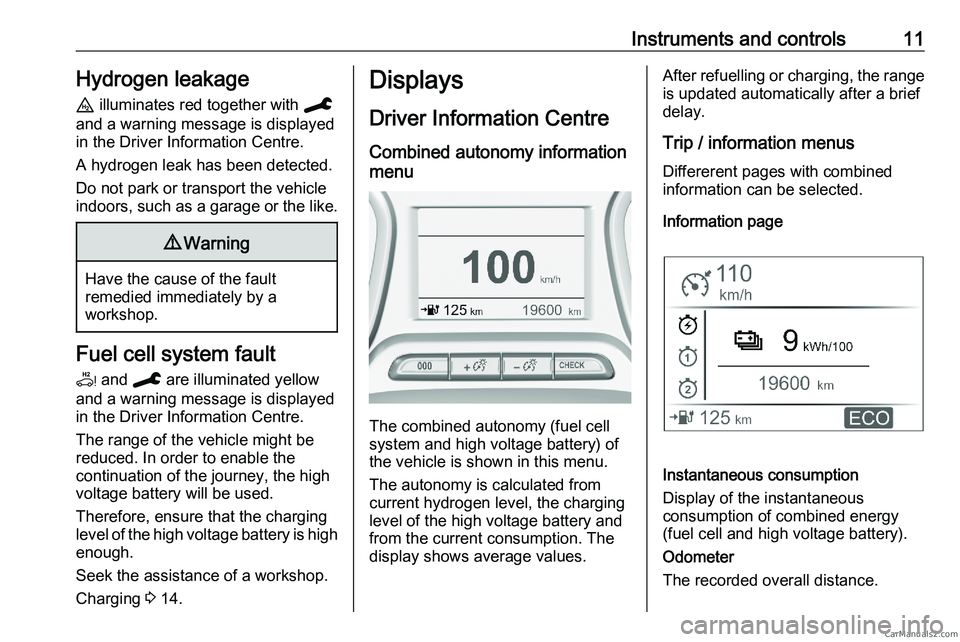
Driver Information Centre Combined autonomy information
menu The combined autonomy (fuel cell
system and high voltage battery) of
the vehicle is shown in this menu.
The autonomy is calculated from
current hydrogen level, the charging
level of the high voltage battery and
from the current consumption. The
display shows average values. After refuelling or charging, the range
is updated automatically after a brief
delay.
Trip / information menus
Differerent pages with combined
information can be selected.
Information page Instantaneous consumption
Display of the instantaneous
consumption of combined energy
(fuel cell and high voltage battery).
Odometer
The recorded overall distance.CarM an uals 2 .c o m
Page 304 of 348
12 Instruments and controls
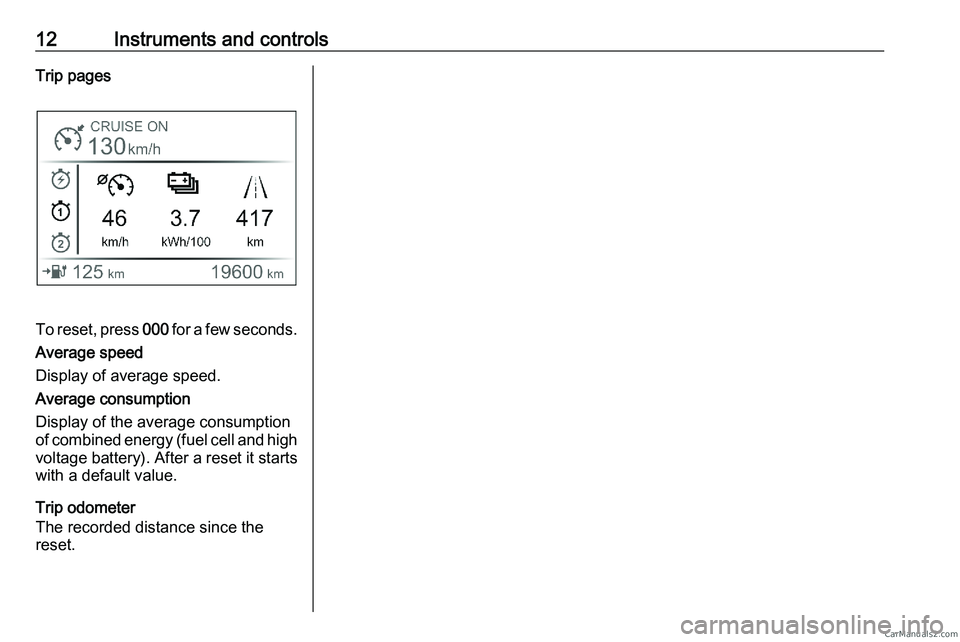
Trip pages To reset, press
000 for a few seconds.
Average speed
Display of average speed.
Average consumption
Display of the average consumption
of combined energy (fuel cell and high voltage battery). After a reset it starts
with a default value.
Trip odometer
The recorded distance since the
reset.CarM an uals 2 .c o m
Page 308 of 348
16 Driving and operating
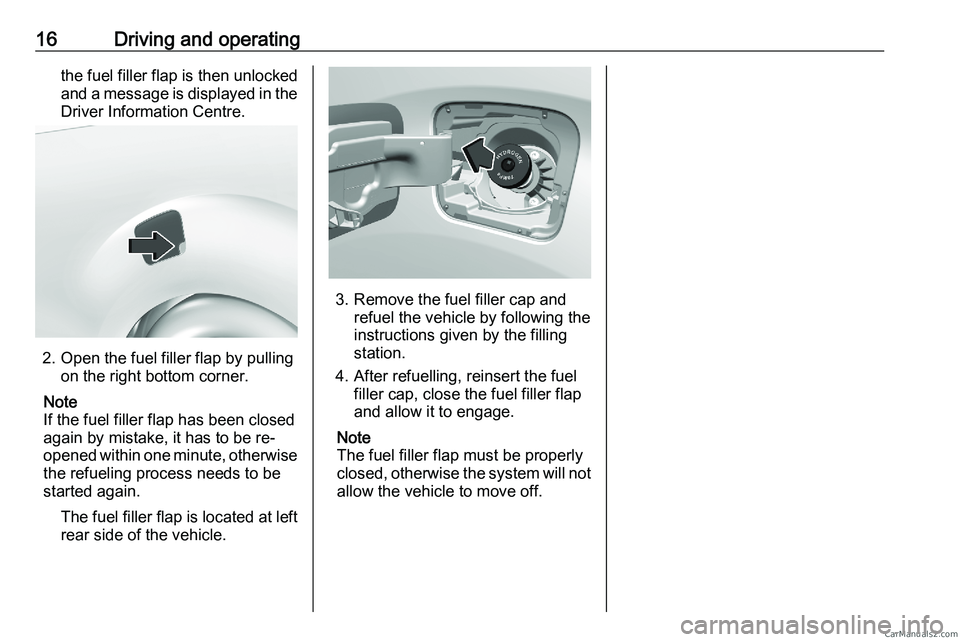
the fuel filler flap is then unlocked
and a message is displayed in the
Driver Information Centre. 2. Open the fuel filler flap by pulling
on the right bottom corner.
Note
If the fuel filler flap has been closed
again by mistake, it has to be re-
opened
within one minute, otherwise
the refueling process needs to be
started again.
The fuel filler flap is located at leftrear side of the vehicle. 3. Remove the fuel filler cap and
refuel the vehicle by following the
instructions given by the filling
station.
4.
After refuelling, reinsert the fuel
filler cap, close the fuel filler flap
and allow it to engage.
Note
The fuel filler flap must be properly
closed, otherwise the system will not allow the vehicle to move off.CarM an uals 2 .c o m