USB Peugeot Expert Tepee 2011 Owner's Manual
[x] Cancel search | Manufacturer: PEUGEOT, Model Year: 2011, Model line: Expert Tepee, Model: Peugeot Expert Tepee 2011Pages: 268, PDF Size: 9.78 MB
Page 156 of 268
9.4
01
2
8
16
18 17
71114 3
59
4 1512 13
61
10
FIRST STEPS
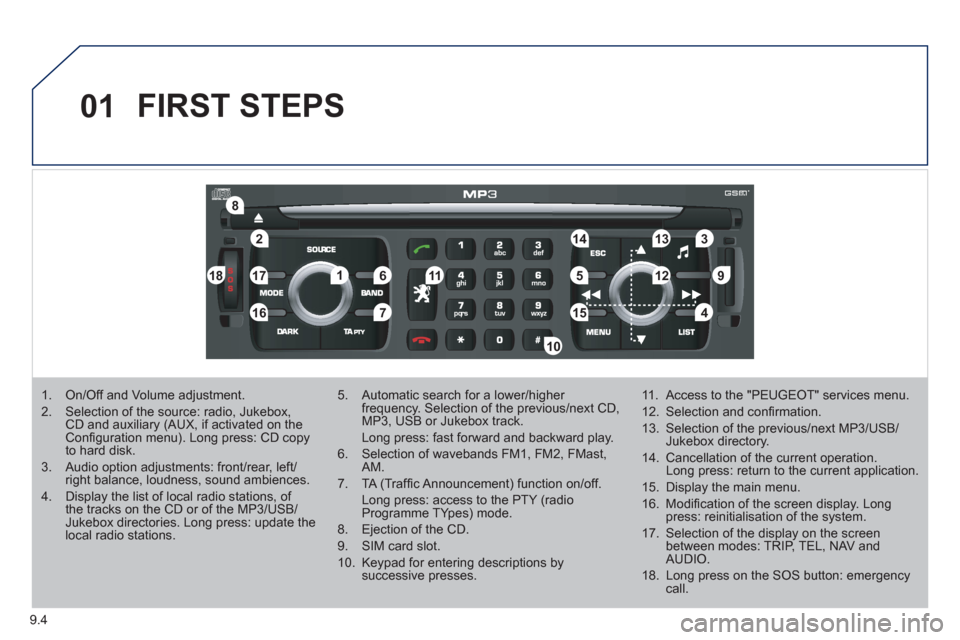
1. On/Off and Volume adjustment.
2. Selection of the source: radio, Jukebox, CD and auxiliary (AUX, if activated on the Confi guration menu). Long press: CD copyto hard disk.
3. Audio option adjustments: front/rear, left/right balance, loudness, sound ambiences.
4. Display the list of local radio stations, of the tracks on the CD or of the MP3/USB/Jukebox directories. Long press: update the local radio stations.
5. Automatic search for a lower/higher frequency. Selection of the previous/next CD, MP3, USB or Jukebox track.
Long press: fast forward and backward play.
6. Selection of wavebands FM1, FM2, FMast,AM.
7. TA (Traffi c Announcement) function on/off.
Long press: access to the PTY (radioProgramme TYpes) mode.
8. Ejection of the CD.
9. SIM card slot.
10. Keypad for entering descriptions by successive presses.
11. Access to the "PEUGEOT" services menu.
12. Selection and confi rmation.
13. Selection of the previous/next MP3/USB/Jukebox directory.
14. Cancellation of the current operation. Long press: return to the current application.
15. Display the main menu.
16. Modifi cation of the screen display. Longpress: reinitialisation of the system.
17. Selection of the display on the screen between modes: TRIP, TEL, NAV and AUDIO.
18. Long press on the SOS button: emergency call.
Page 157 of 268
9.5
02VOICE COMMANDS AND STEERING MOUNTED CONTROLS
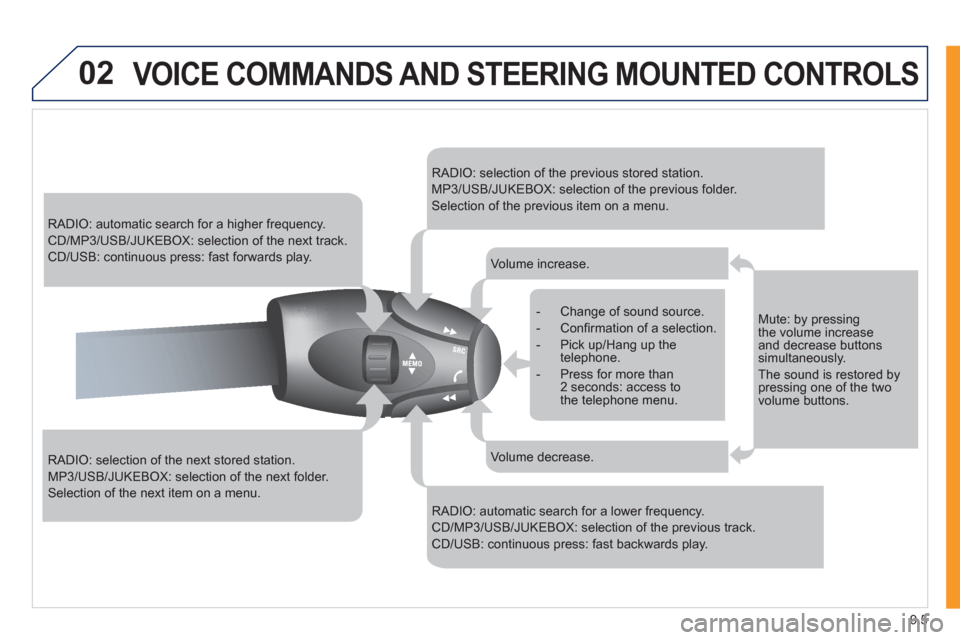
RADIO: automatic search for a higher frequency.
CD/MP3/USB/JUKEBOX: selection of the next track.
CD/USB: continuous press: fast forwards play.
RADIO: selection of the next stored station.
MP3/USB/JUKEBOX: selection of the next folder.
Selection of the next item on a menu.
RADIO: selection of the previous stored station.
MP3/USB/JUKEBOX: selection of the previous folder.
Selection of the previous item on a menu.
RADIO: automatic search for a lower frequency.
CD/MP3/USB/JUKEBOX: selection of the previous track.
CD/USB: continuous press: fast backwards play.
- Change of sound source.
- Confi rmation of a selection.
- Pick up/Hang up the telephone.
- Press for more than2 seconds: access tothe telephone menu.
Volume increase.
Volume decrease.
Mute: by pressing the volume increaseand decrease buttons simultaneously.
The sound is restored bypressing one of the twovolume buttons.
Page 158 of 268
9.6
02
1
2
VOICE COMMANDS
VOICE COMMANDS AND STEERING MOUNTED CONTROLS
DISPLAYING THE LIST AND USING THEM
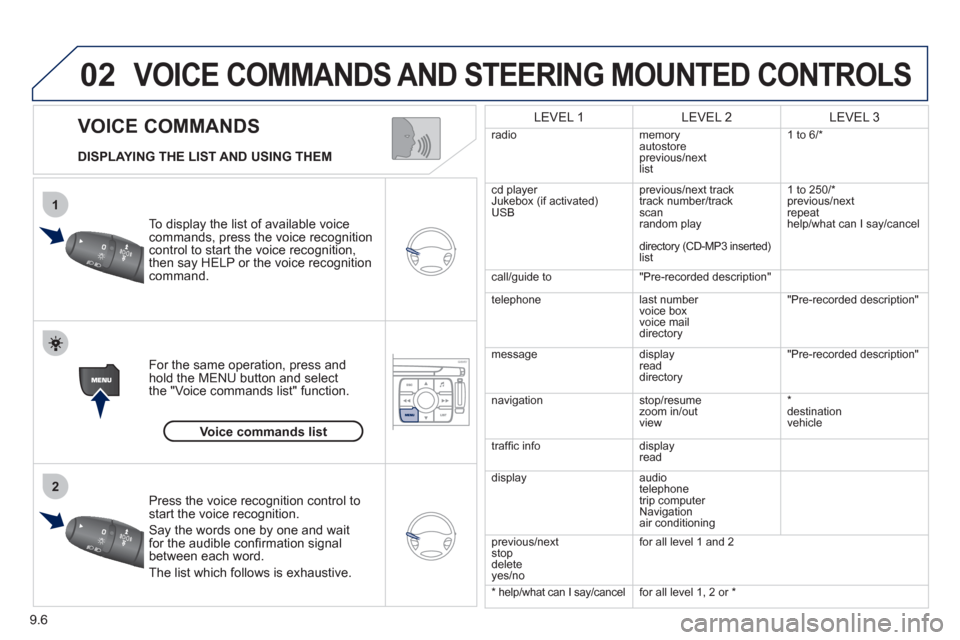
To display the list o
f available voice commands, press the voice recognition control to start the voice recognition,
then say HELP or the voice recognition command.
For the same operation, press and
hold the MENU button and select
the "Voice commands list" function.
Press the voice recognition control tostart the voice recognition.
Say the words one by one and wait for the audible confi rmation signal between each word.
Th
e list which follows is exhaustive.
LEVEL 1LEVEL 2LEVEL 3
radio memoryautostore
previous/next
li
st 1 to
6/*
cd player
Jukebox (if activated) USBprevious/next track
track number/track scan
random play
directory
(CD-MP3 inserted)list 1 to 250/*
previous
/next
repeat
help/what can I sa
y/cancel
call/
guide to"Pre-recorded description"
telephone l
ast number
voice box
voice mail directory
"Pre-recorded description"
messagedisplay
readdirectory
"Pre-recorded description"
nav
igation stop/resume
zoom in/out
vi
ew *
destination
vehicle
traffi c info display
read
displa
yaudio
telephone
trip computer
Navigation
air conditioning
previous/next
s
top
delete yes/no f
or all level 1 and 2
* help/what can I say/cancelfor all level 1, 2 or *
Voice commands list
Page 162 of 268
9.10
03SCREEN AND MAIN MENU
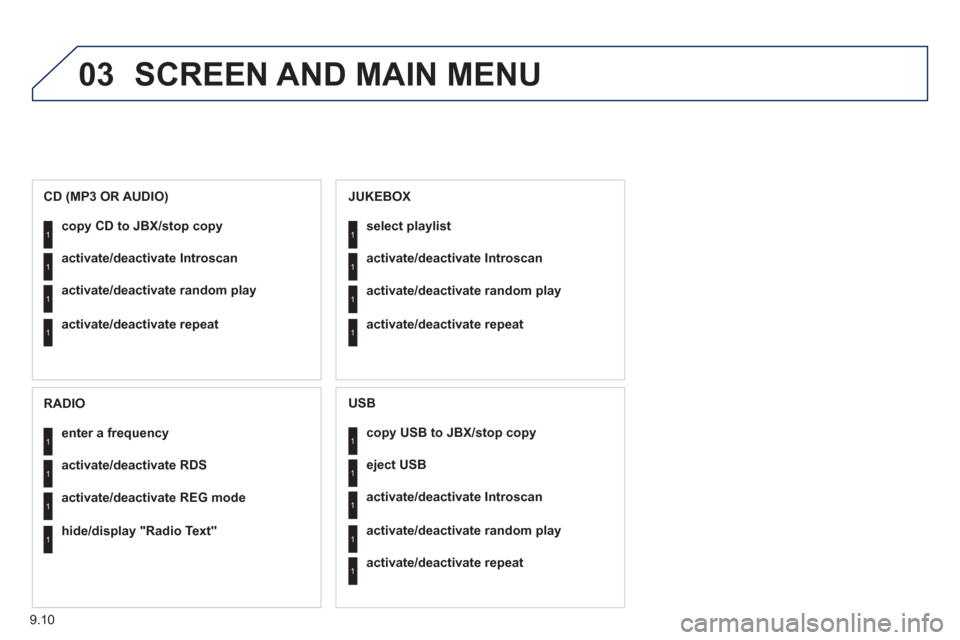
copy USB to JBX/stop copy1
1
1
1
eject USB
activate/deactivate Introscan
activate/deactivate random play
1activate/deactivate repeat
USB
copy CD to JBX/stop copy1
1
1
1
activate/deactivate Introscan
activate/deactivate random play
activate/deactivate repeat
CD (MP3 OR AUDIO)
se
lect playlist1
1
1
1
activate/deactivate Introscan
activate/deactivate random play
activate/deactivate repeat
JUKEBOX
enter a frequency1
1
1
1
activate/deactivate RDS
activate/deactivate REG mode
hide/display "Radio Text"
RADIO
Page 168 of 268
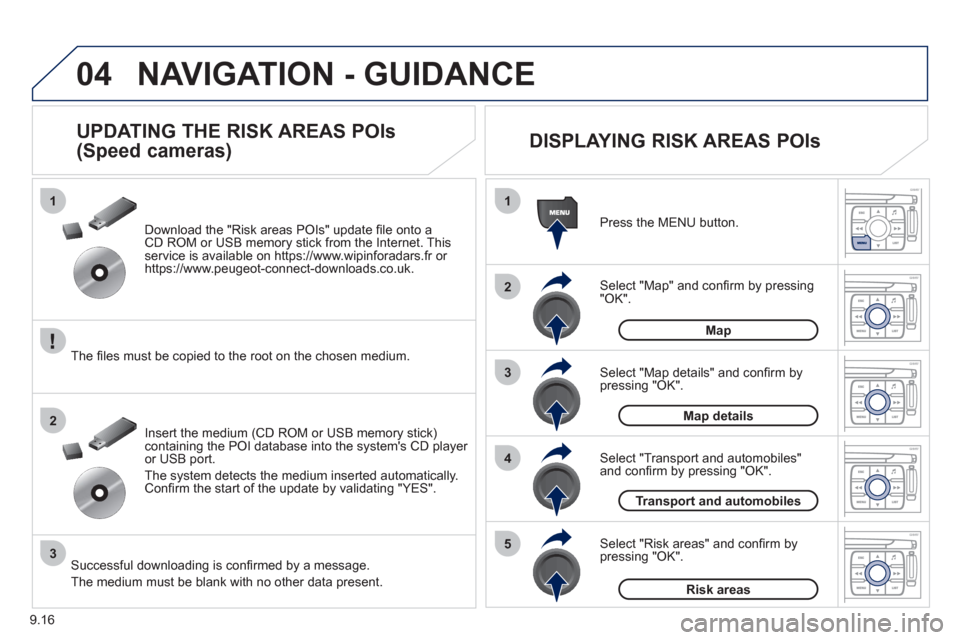
9.16
04
1
2
3
5
4
1
2
3
NAVIGATION - GUIDANCE
Select "Map" and confi rm by pressing"OK". Press the MEN
U button.
Select "Transport and automobiles"and confi rm by pressing "OK". Select "Map details" and confi rm b
y
pressing "OK". Download the "Risk areas P
OIs" update fi le onto aCD ROM or USB memory stick from the Internet. This service is available on https://www.wipinforadars.fr or
https://www.peugeot-connect-downloads.co.uk.
UPDATING THE RISK AREAS POIs
(Speed cameras)
DISPLAYING RISK AREAS POIs
Select "Risk areas" and confi rm by
pressing "OK".
Map
Map details
Transport and automobiles
Risk areas The fi les must be co
pied to the root on the chosen medium.
Insert the medium
(CD ROM or USB memory stick)containing the POI database into the system's CD player
or USB port.
The s
ystem detects the medium inserted automatically.Confi rm the start of the update by validating "YES".
Successful downloading is confi rmed by a message.
The medium must be blank with no other data present.
Page 177 of 268
9.25
06
1
2
1
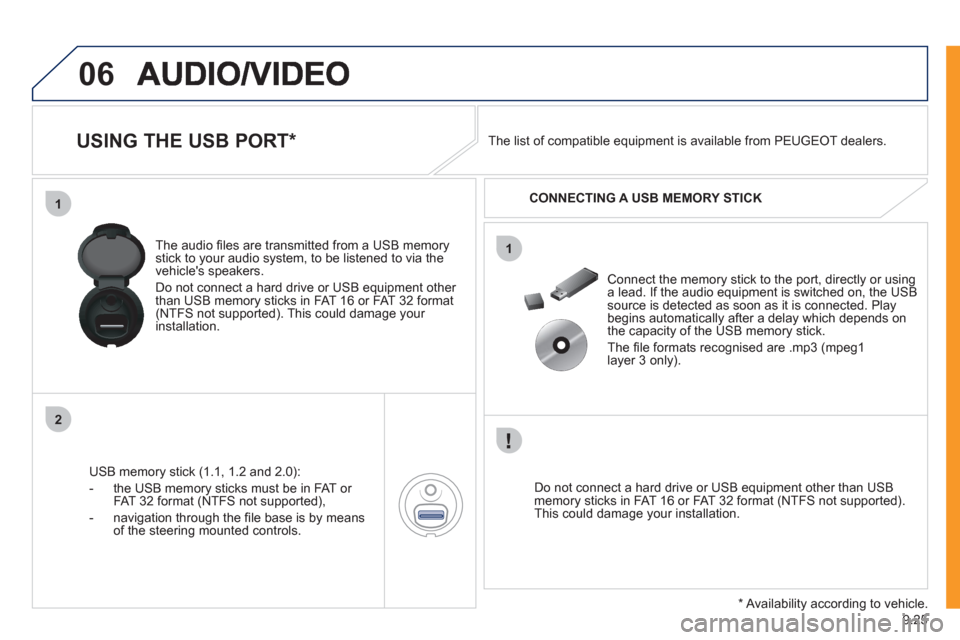
USING THE USB PORT *
USB memory stick (1.1, 1.2 and 2.0):
- the U
SB memory sticks must be in FAT or
FAT 32 format (NTFS not supported),
- navi
gation through the fi le base is by means of the steering mounted controls. The audio
fi les are transmitted from a USB memorystick to your audio system, to be listened to via the
vehicle's speakers.
Do not connect a hard drive or USB e
quipment other
than USB memory sticks in FAT 16 or FAT 32 format (NTFS not supported). This could damage your installation.
Do not connect a hard drive or USB e
quipment other than USB memory sticks in FAT 16 or FAT 32 format (NTFS not supported).This could damage your installation.
Connect the memory stick to the port, directly or using a lead. If the audio equipment is switched on, the USB source is detected as soon as it is connected. Play
begins automatically after a delay which depends on
the capacity of the USB memory stick.
The fi le formats reco
gnised are .mp3 (mpeg1
layer 3 only). The list of compatible equipment is available from PEUGE
OT dealers.
CONNECTING A U
SB MEMORY STICK
*
Availability according to vehicle.
Page 178 of 268
9.26
06
1
2
4
3
5
1
2
3
AUDIO/VIDEO
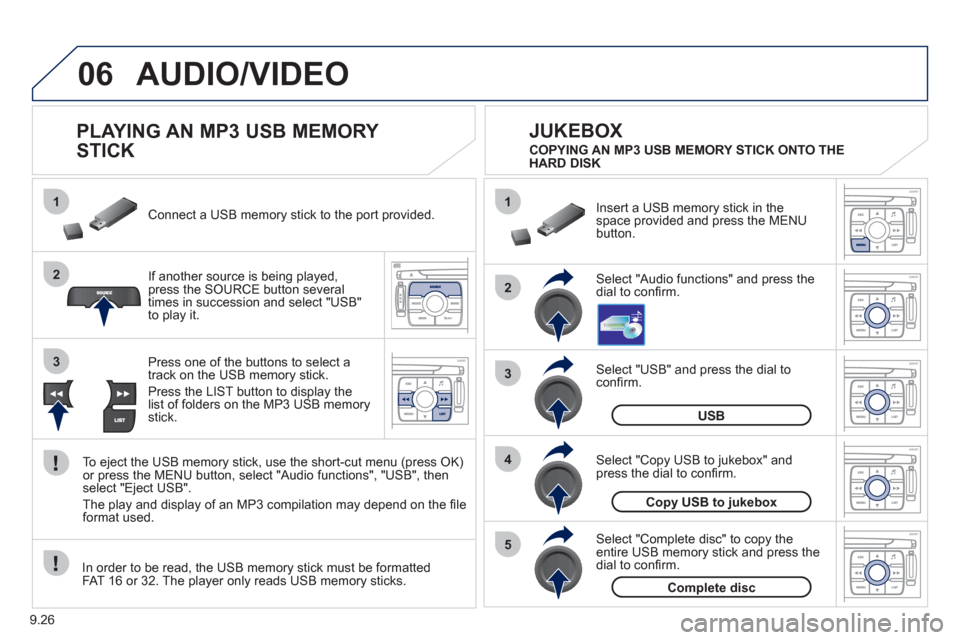
PLAYING AN MP3 USB MEMORY
STICK
If another source is being played,press the SOURCE button several
times in succession and select "USB"
to play it. Connect a USB memor
y stick to the port provided.
To e
ject the USB memory stick, use the short-cut menu (press OK)or press the MENU button, select "Audio functions", "USB", then
select "Eject USB".
The pla
y and display of an MP3 compilation may depend on the fi le
format used.
Select "USB" and press the dial toconfi rm.
Insert a U
SB memory stick in thespace provided and press the MENUbutton.
JUKEBOX
USB
Select "Complete disc" to copy theentire USB memory stick and press thedial to confi rm.
Complete disc
Select "Copy USB to jukebox" andpress the dial to confi rm.
Copy USB to jukebox
Select "Audio functions" and press the dial to confi rm.
Pr
ess one of the buttons to select atrack on the USB memory stick.
Press the LIST button to displa
y the list of folders on the MP3 USB memorystick. COPYING AN MP3 USB MEMORY STICK ONTO THE
HARD DISK
In order to be read, the USB memor
y stick must be formatted
FAT 16 or 32. The player only reads USB memory sticks.
Page 193 of 268
9.41
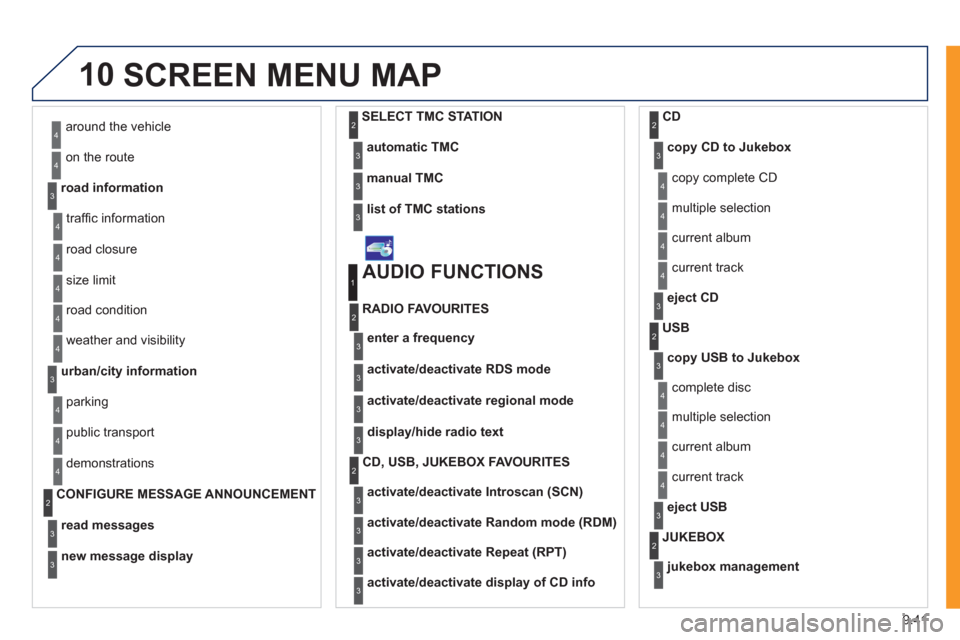
10SCREEN MENU MAP
around the vehicle
on the route
road information
4
4
3
traffi c information
r
oad closure
size limit
r
oad condition
4
4
4
4
weather and visibility
urban/city information
4
3
parking
public transport
demonstrations
4
4
4
read messages3
new message display3
CONFIGURE MESSAGE ANNOUNCEMENT2
automatic TMC3
manual TMC3
list of TMC stations3
SELECT TMC STATION2
AUDIO FUNCTIONS
enter a frequency
RADIO FAVOURITES
1
2
3
activate/deactivate RDS mode3
activate/deactivate regional mode3
display/hide radio text3
activate/deactivate Introscan (SCN)
CD, USB, JUKEBOX FAVOURITES 2
3
activate/deactivate Random mode (RDM)3
activate/deactivate Repeat (RPT)3
activate/deactivate display of CD info3
copy CD to Jukebox CD
cop
y complete CD
multiple selection
current album
4
3
2
4
4
current track4
eject CD3
copy USB to Jukebox
USB
com
plete disc
multiple selection
current album
4
3
2
4
4
current track4
eject USB3
jukebox management
JUKEBOX2
3
Page 235 of 268
9.83
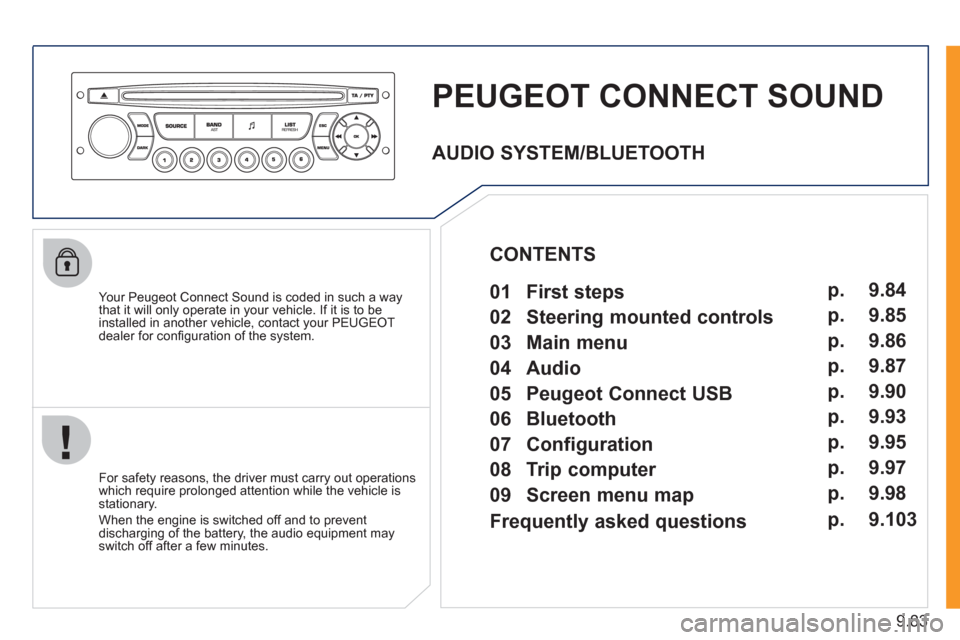
PEUGEOT CONNECT SOUND
Your Peugeot Connect Sound is coded in such a way
that it will only operate in your vehicle. If it is to be
installed in another vehicle, contact your PEUGEOT
dealer for confi guration of the system.
For safet
y reasons, the driver must carry out operations
which require prolonged attention while the vehicle is stationary.
When the en
gine is switched off and to prevent
discharging of the battery, the audio equipment mayswitch off after a few minutes.
AUDIO SYSTEM/BLUETOOTH
01 First steps
02 Steering mounted controls
03 Main menu
04 Audio
05 Peugeot Connect USB
06 Bluetooth
07 Configuration
08 Trip computer
09 Screen menu map p.
p.
p.
p.
p.
p.
p.
p.
p. 9.84
9.85
9.86
9.87
9.90
9.93
9.95
9.97
9.98
CONTENTS
Frequently asked questions p. 9.103
Page 236 of 268
9.84
01
1
22
10101111
133144155
33445566778899
122
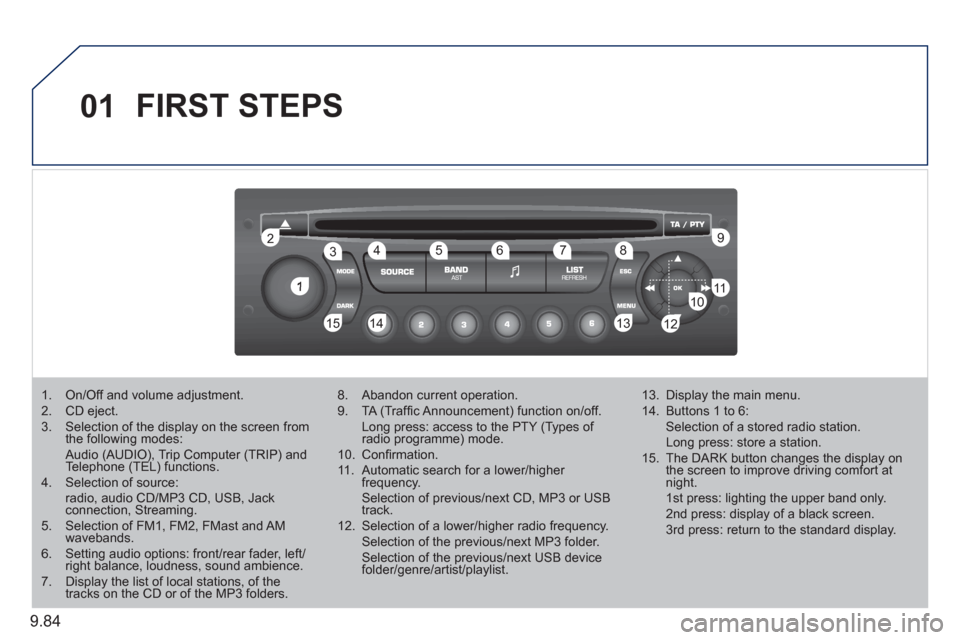
FIRST STEPS
1. On/Off and volume adjustment. 2. CD eject. 3. Selection of the display on the screen from the following modes: Audio (AUDIO), Trip Computer (TRIP) and Telephone (TEL) functions. 4. Selection of source: radio, audio CD/MP3 CD, USB, Jackconnection, Streaming. 5. Selection of FM1, FM2, FMast and AMwavebands.6. Setting audio options: front/rear fader, left/right balance, loudness, sound ambience.7. Display the list of local stations, of thetracks on the CD or of the MP3 folders.
8. Abandon current operation.
9. TA (Traffi c Announcement) function on/off. Long press: access to the PTY (Types of radio programme) mode.g
10. Confi rmation.
11. Automatic search for a lower/higher frequency. Selection of previous/next CD, MP3 or USB track.
12. Selection of a lower/higher radio frequency. Selection of the previous/next MP3 folder. Selection of the previous/next USB devicefolder/genre/artist/playlist.
13. Display the main menu.
14. Buttons 1 to 6: Selection of a stored radio station. Long press: store a station.
15. The DARK button changes the display on the screen to improve driving comfort at night. 1st press: lighting the upper band only. 2nd press: display of a black screen. 3rd press: return to the standard display.