bluetooth PEUGEOT LANDTREK 2023 User Guide
[x] Cancel search | Manufacturer: PEUGEOT, Model Year: 2023, Model line: LANDTREK, Model: PEUGEOT LANDTREK 2023Pages: 164, PDF Size: 6.1 MB
Page 148 of 164
146
Peugeot Connect 10" Touchscreen
On connecting the USB cable, the
CarPlay® function deactivates the
system's Bluetooth® mode.
The "CarPlay " function requires the use of
a compatible smartphone and compatible
applications.
Connect the USB cable. The smartphone
charges when connected by the USB
cable.
A message appears on the smartphone.
Read it and then confirm with the " Authorise"
button.
Press "CarPlay" to display the CarPlay®
interface.
MirrorLinkTM smartphone
connection
Depending on country.
The "MirrorLinkTM" function requires the
use of a compatible smartphone and
compatible
applications.
Check the compatibility of the telephone on
the Brand's website (services).
When connecting a smartphone to the
system, we recommend enabling
Bluetooth
® on the smartphone.Connect the USB cable. The smartphone
charges when connected by the USB
cable.
Press "MirrorLinkTM" to start the
application in the system.
Depending on the smartphone, it may be
necessary to activate the "MirrorLink
TM"
function.
During the procedure, several screen
pages relating to certain features are
displayed.
Accept to start and complete the connection.
Once the connection is established, a page is
displayed, showing the applications already
downloaded to the smartphone that are
compatible with MirrorLink
TM technology.
Access to the menus for the system is possible
at any time using the dedicated buttons.
There may be a pause before applications become available,
depending on the quality of the network.
Android Auto smartphone connection
Depending on country.
Install the "Android Auto" application on
the smartphone via "Google Play".
The "Android Auto" function requires the use
of a compatible smartphone and compatible
applications.
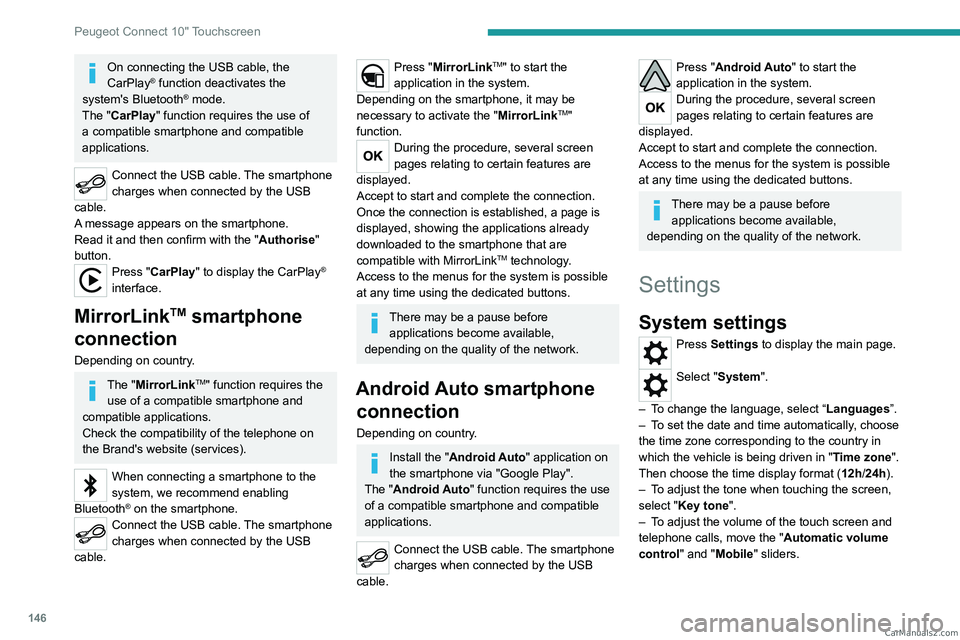
Connect the USB cable. The smartphone
charges when connected by the USB
cable.
Press "Android Auto" to start the
application in the system.
During the procedure, several screen
pages relating to certain features are
displayed.
Accept to start and complete the connection.
Access to the menus for the system is possible
at any time using the dedicated buttons.
There may be a pause before applications become available,
depending on the quality of the network.
Settings
System settings
Press Settings to display the main page.
Select "System".
–
T
o change the language, select “ Languages”.
–
T
o set the date and time automatically, choose
the time zone corresponding to the country in
which the vehicle is being driven in " Time zone".
Then choose the time display format ( 12h/24h).
–
T
o adjust the tone when touching the screen,
select "Key tone".
–
T
o adjust the volume of the touch screen and
telephone calls, move the " Automatic volume
control" and "Mobile " sliders. CarM an uals 2 .c o m
Page 149 of 164
147
Peugeot Connect 10" Touchscreen
11Display
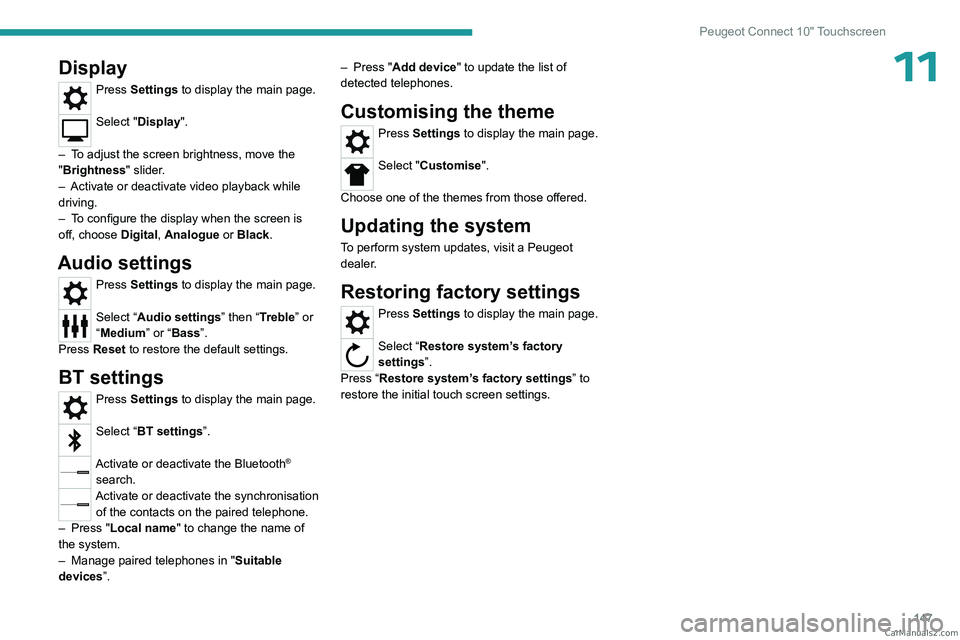
Press Settings to display the main page.
Select "Display".
–
T
o adjust the screen brightness, move the
"Brightness" slider.
–
Activate or deactivate video playback while
driving.
–
T
o configure the display when the screen is
off, choose Digital, Analogue or Black.
Audio settings
Press Settings to display the main page.
Select “Audio settings” then “Treble” or
“Medium” or “Bass”.
Press Reset to restore the default settings.
BT settings
Press Settings to display the main page.
Select “BT settings”.
Activate or deactivate the Bluetooth®
search.
Activate or deactivate the synchronisation of the contacts on the paired telephone.
–
Press "
Local name" to change the name of
the system.
–
Manage paired telephones in " Suitable
devices
”. –
Press "
Add device" to update the list of
detected telephones.
Customising the theme
Press Settings to display the main page.
Select "Customise".
Choose one of the themes from those offered.
Updating the system
To perform system updates, visit a Peugeot
dealer.
Restoring factory settings
Press Settings to display the main page.
Select “Restore system’s factory
settings”.
Press “Restore system’s factory settings” to
restore the initial touch screen settings. CarM an uals 2 .c o m
Page 153 of 164
151
Alphabetical index
360° camera 89
A
ABS 54
Accessories
53
AdBlue®
14, 103
AdBlue® tank
104
Additive, Diesel
101
Adjusting headlamp beam height
49
Adjusting headlamps
49
Adjusting head restraints
30
Adjusting seat
30–31
Adjusting the air distribution
39
Adjusting the air flow
39
Adjusting the date
17, 147
Adjusting the headlamp beam height
49
Adjusting the height and reach
of the steering wheel
32
Adjusting the seat angle
31
Adjusting the seat belt height
58
Adjusting the temperature
39
Adjusting the time
17, 147
Advice on care and maintenance
111
Advice on driving
6, 66–67
Airbags
59–61, 63
Airbags, curtain
60–61
Airbags, front
60–61, 64
Airbags, lateral
60–61
Air conditioning
36, 38, 39
Air conditioning, automatic
40
Air conditioning, dual-zone automatic 38–40
Air conditioning, manual
37, 40
Air intake
39
Air vents
36
Alarm
27
Anti-lock braking system (ABS)
54
Antitheft / Immobiliser
21
Area, loading
45
Armrest, front
42
Armrest, rear
43
Assistance, emergency braking
54
Audio streaming (Bluetooth)
139
B
Battery 106
Battery, 12 V
100, 106, 124–128
Battery, charging
124, 127
Battery, remote control
24–25
Bench seat, folding
35
BlueHDi
14, 100, 115
Bluetooth (hands-free)
139–140
Bluetooth (telephone)
145
Bodywork
11 2
Bonnet
96–97
Brake discs
102
Brake lamps
123
Brakes
101–102
Braking assistance system
54
Bulbs
121
Bulbs (changing)
120, 123
C
Capacity, fuel tank 94
Cap, fuel filler
94
Care of the bodywork
11 2
Central locking
21, 23
Changing a bulb
120, 123
Changing a fuse
124
Changing a wheel
115–117
Changing a wiper blade
51
Changing the remote control battery
24
Changing to free-wheeling
111
Checking the levels
98–100
Checks
97–98, 100–103
Checks, routine
100–102, 105
Child lock
65
Children
59, 64
Children (safety)
65
Child seats
59, 62–63
Child seats, ISOFIX
64
Cigar lighter
41
Cleaning (advice)
110–113
Cleaning the engine throttle housing
11 0
Closing the boot
22
Closing the doors
22–23, 25–26
Closing the tailgate
26
Configuration, vehicle
17–19
Connection, Android Auto
146
Connection, Apple CarPlay
145
Connection, Bluetooth
140, 145
Connection, MirrorLink
146
Connectivity
145 CarM an uals 2 .c o m