navigation system Peugeot Partner 2011 Owner's Manual - RHD (UK, Australia)
[x] Cancel search | Manufacturer: PEUGEOT, Model Year: 2011, Model line: Partner, Model: Peugeot Partner 2011Pages: 200, PDF Size: 7.41 MB
Page 102 of 200
100
Equipment
Anti-theft alarm, window
etching, fi rst aid kit, high
visibility vest, front and rear
parking sensors, warning
triangle, security bolts for alloy
wheels
Front seat covers compatible
with airbags, bench, rubber
mats, carpet mats, snow chains,
blind, tailgate bicycle carrier, ...
Audio equipment, hands-free
kit, speakers, CD changer,
satellite navigation system,
USB Box, Video kit, ... To prevent the mat from becoming
caught under the pedals:
- ensure that the mat and its fi xings
are positioned correctly,
- never fi t one mat on top of another.
Regardless of the audio and telematic
equipment offered on the market,
the technical constraints associated
with the fi tting of equipment of these
families of products mean that the
special features of the equipment and
its compatibility with the capacities of
the your vehicle's standard equipment
must be taken into account. Please
contact a PEUGEOT dealer for
more information before fi tting such
equipment.
Maximum weights on bars
- Roof rack: 120 Kg.
- Transverse bars on roof: 100 Kg.
- Transverse bars on longitudinal
bars: 75 Kg.
Installation of radiocommunication
transmitters
Before installing accessory
radiocommunication transmitters with
an external aerial on your vehicle, you
are advised to contact a representative
of the PEUGEOT marque.
The PEUGEOT dealer network will
inform you of the specifi cations
(frequency band, maximum output
power, aerial position, specifi c
installation conditions) of the
transmitters which can be fi tted, in
accordance with the Motor Vehicle
Electromagnetic Compatibility Directive
(2004/104/CE).
Front mud fl aps, rear mud
fl aps, 15/17 inch alloy wheels,
wheelarch trim, leather steering
wheel, ...
Screenwash, interior and
exterior cleaning and
maintenance products,
replacement bulbs, ...
The fi tting of electrical equipment
or accessories which are not
recommended by Automobiles
PEUGEOT may result in the failure
of your vehicle's electronic system.
Please note this specifi c warning. You
are advised to contact a representative
of the Marque to be shown the range
of recommended equipment and
accessories.
Depending on the country in which
the vehicle is sold or operated, it is
compulsory to have a high visibility
safety jacket, warning triangle and
replacement bulbs available in the
vehicle.
"Active Fleet Data" Telematic unit
Connected directly to the heart of the
vehicle (multiplexed network: "Full CAN"),
the telematic unit, by means of a "ready to
use" service, permits the sending in real
time of information such as:
- distance travelled,
- distance remaining before the next
service,
- warnings and faults (oil level,
coolant level, oil temperature,
coolant temperature, etc...).
This enables "Fleet" managers
to optimise the monitoring and
management of their professional
vehicles.
According to country, contact
a PEUGEOT dealer for further
information.
Page 139 of 200
9.3
The Peugeot Connect Navigation is protected in such away that it will only operate in your vehicle. If it is to be
installed in another vehicle, contact a PEUGEOT dealer for confi guration of the system.
Certain functions described in this handbook will
become available during the year.
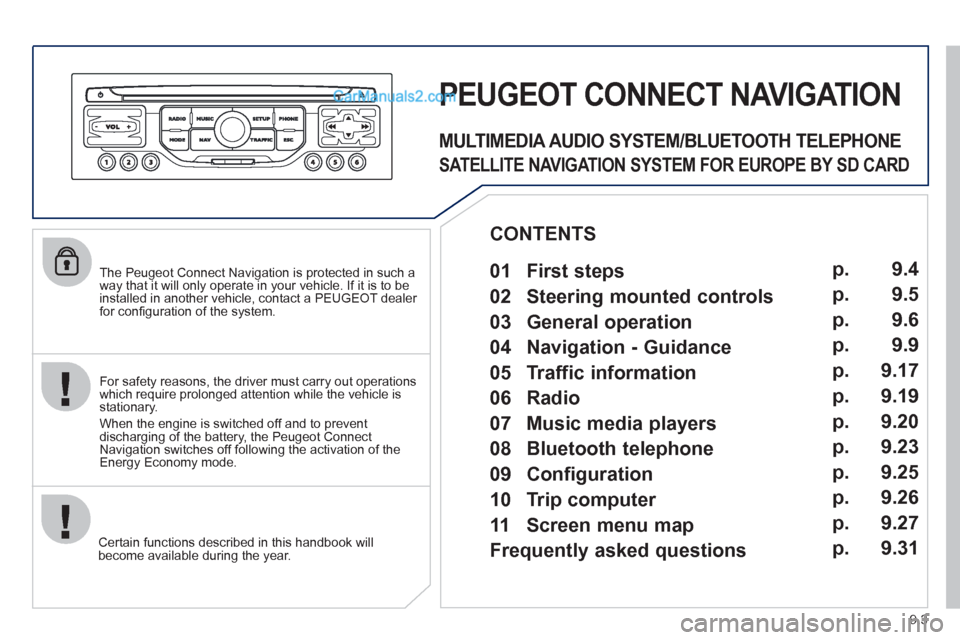
PEUGEOT CONNECT NAVIGATION
For safety reasons, the driver must carry out operations which require prolonged attention while the vehicle is stationary.
When the en
gine is switched off and to prevent
discharging of the battery, the Peugeot Connect
Navigation switches off following the activation of the Energy Economy mode.
MULTIMEDIA AUDIO SYSTEM/BLUETOOTH TELEPHONE
SATELLITE NAVIGATION SYSTEM FOR EUROPE BY SD CARD
01 First steps
CONTENTS
02 Steering mounted controls
03 General operation
04 Navigation - Guidance
05 Traffic information
06 Radio
07 Music media players
08 Bluetooth telephone
09 Configuration
10 Trip computer p.
p.
p.
p.
p.
p.
p.
p.
p.
p.
11 Screen menu map
Frequently asked questions p.
p. 9.4
9.5
9.6
9.9
9.17
9.19
9.20
9.23
9.25
9.26
9.27
9.31
Page 140 of 200
01
11
55
101
22
334466
131
111
99
144155
77881212161
9.4
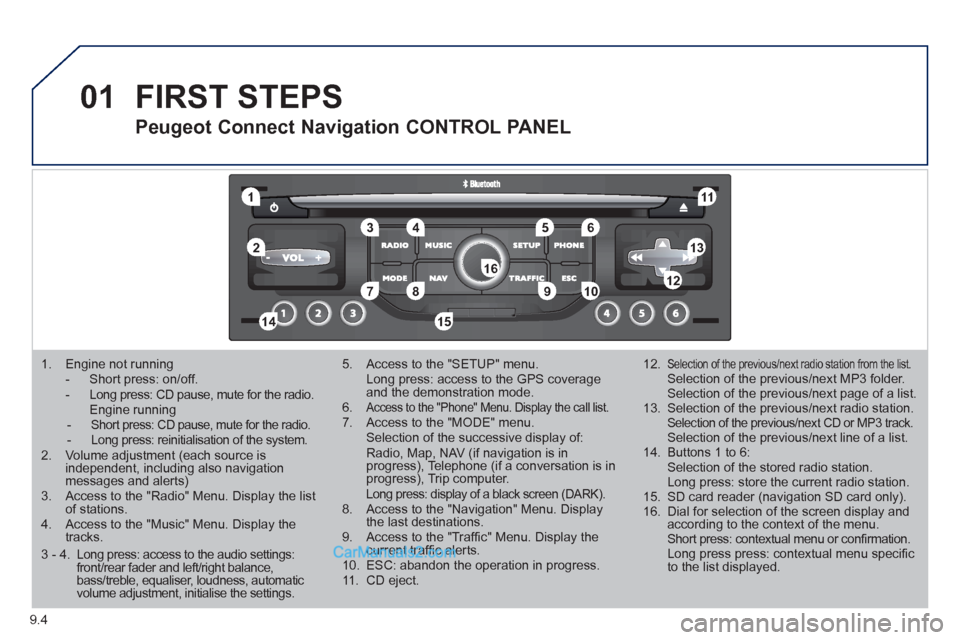
1. Engine not running
- Short press: on/off. - Long press: CD pause, mute for the radio. Engine running - Short press: CD pause, mute for the radio. - Long press: reinitialisation of the system.2. Volume adjustment (each source is independent, including also navigation messages and alerts)3. Access to the "Radio" Menu. Display the list of stations. 4. Access to the "Music" Menu. Display thetracks.
5. Access to the "SETUP" menu. Long press: access to the GPS coverage and the demonstration mode.6.Access to the "Phone" Menu. Display the call list. 7. Access to the "MODE" menu. Selection of the successive display of:Radio, Map, NAV (if navigation is inprogress), Telephone (if a conversation is inprogress), Trip computer. Long press: display of a black screen (DARK). 8. Access to the "Navigation" Menu. Display the last destinations.9. Access to the "Traffi c" Menu. Display thecurrent traffi c alerts. 10. ESC: abandon the operation in progress. 11. CD eject.
12.Selection of the previous/next radio station from the list. Selection of the previous/next MP3 folder. Selection of the previous/next page of a list.
13. Selection of the previous/next radio station. Selection of the previous/next CD or MP3 track. Selection of the previous/next line of a list.
14. Buttons 1 to 6: Selection of the stored radio station. Long press: store the current radio station.
15. SD card reader (navigation SD card only).
16. Dial for selection of the screen display andaccording to the context of the menu. Short press: contextual menu or confi rmation. Long press press: contextual menu specifi c to the list displayed.
FIRST STEPS
Peugeot Connect Navigation CONTROL PANEL
3 - 4. Long press: access to the audio settings: front/rear fader and left/right balance, bass/treble, equaliser, loudness, automatic volume adjustment, initialise the settings.
Page 142 of 200
03
9.6
GENERAL OPERATION
For a detailed global view of the menus available, refer to the"Screen menu map" section.
Press the M
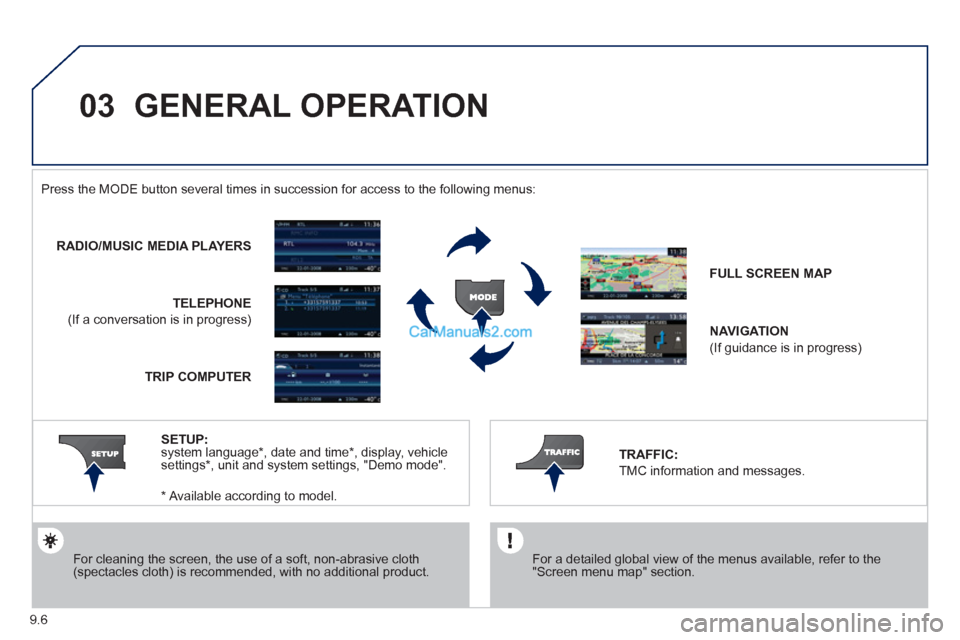
ODE button several times in succession for access to the following menus:
For cleaning the screen, the use of a soft, non-abrasive cloth (spectacles cloth) is recommended, with no additional product.
RADIO/MUSIC MEDIA PLAYERS
TELEPHONE
(If a conversation is in progress)
FULL SCREEN MA
P
NAVIGATION
(If guidance is in progress)
SETUP
: system language * , date and time * , display, vehiclesettings * , unit and system settings, "Demo mode". TRAFFIC:
TMC information and messages.
* Available accordin
g to model. TRIP COMPUTE
R
Page 148 of 200
04
4
3
2
1
7
6
5
9.12
NAVIGATION - GUIDANCE
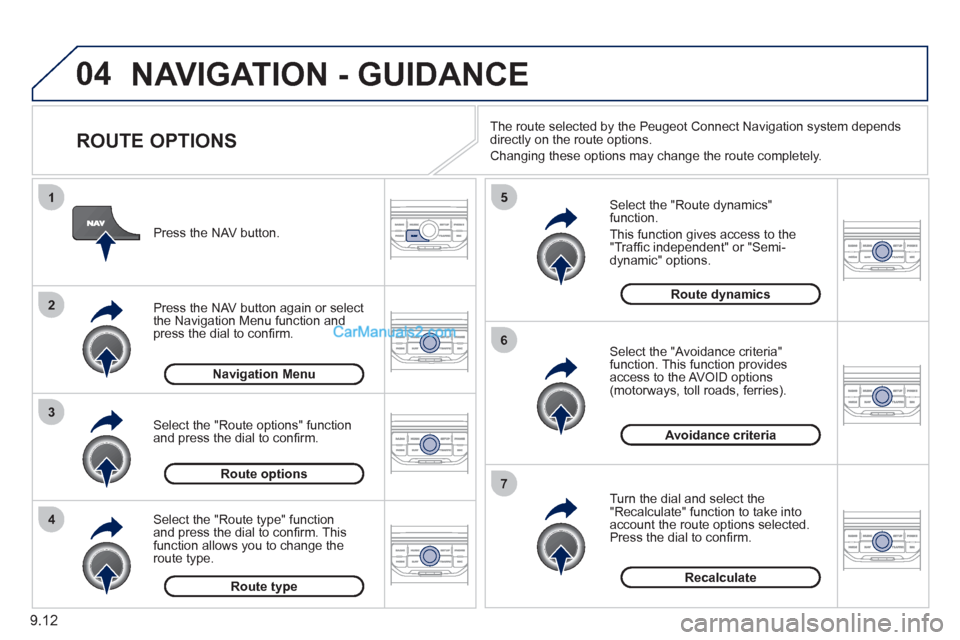
ROUTE OPTIONS
Select the "Route dynamics"function.
This
function gives access to the "Traffi c independent" or "Semi-
dynamic" options.
Select the "Avoidance criteria"function. This function provides
access to the AVOID options (motorways, toll roads, ferries).
T
urn the dial and select the "Recalculate" function to take intoaccount the route options selected.
Press the dial to confi rm. Pr
ess the NAV button.
Press the NAV button a
gain or select
the Navigation Menu function andpress the dial to confi rm.
Select the "Route type" functionand press the dial to confi rm. Thisfunction allows you to change theroute type.
Select the "Route options" functionand press the dial to confi rm.
Recalculate
Avoidance criteria
Route dynamics
Route type
Route options
Navigation MenuThe route selected b
y the Peugeot Connect Navigation system depends
directly on the route options.
Chan
ging these options may change the route completely.
Page 153 of 200
05
2 1
3
4
5
9.17
TRAFFIC INFORMATION
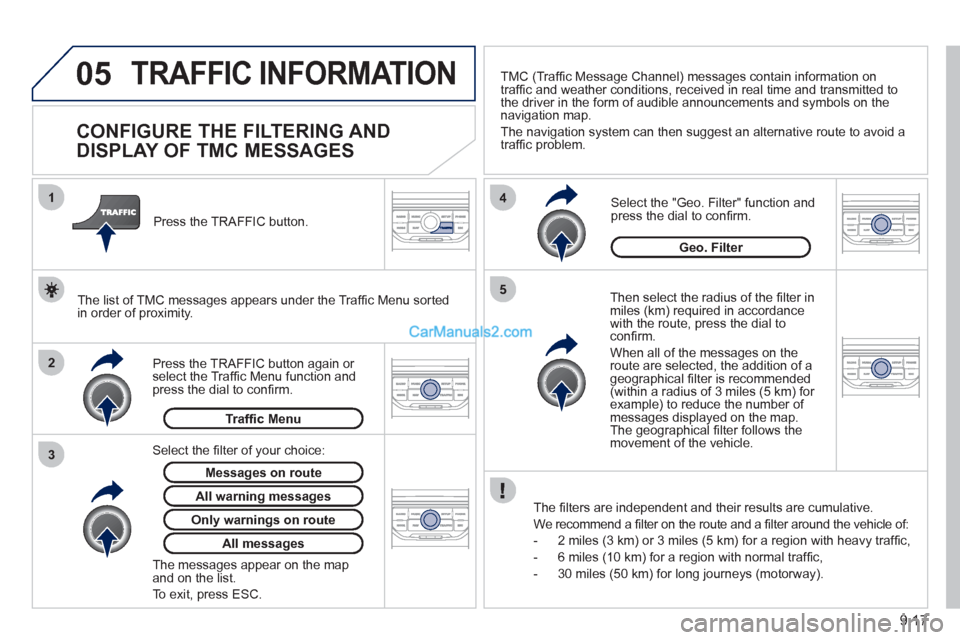
CONFIGURE THE FILTERING AND
DISPLAY OF TMC MESSAGES
Then select the radius of the fi lter in miles (km) required in accordance
with the route, press the dial to confi rm.
When all of the messa
ges on the route are selected, the addition of ageographical fi lter is recommended(within a radius of 3 miles (5 km) for example) to reduce the number of messages displayed on the map.The geographical fi lter follows the movement of the vehicle.
The
fi lters are independent and their results are cumulative.
W
e recommend a fi lter on the route and a fi lter around the vehicle of:
- 2 miles
(3 km) or 3 miles (5 km) for a region with heavy traffi c,
- 6 miles
(10 km) for a region with normal traffi c,
- 30 miles
(50 km) for long journeys (motorway).
Press the TRAFFI
C button again or select the Traffi c Menu function andpress the dial to confi rm. Press the TRAFFI
C button.
TM
C (Traffi c Message Channel) messages contain information on
traffi c and weather conditions, received in real time and transmitted to
the driver in the form of audible announcements and symbols on thenavigation map.
The navi
gation system can then suggest an alternative route to avoid a
traffi c problem.
Select the "Geo. Filter" function and press the dial to confi rm.
Messages on route
The list of TMC messages appears under the Traffi c Menu sorted
in order of proximity.
All warnin
g messages
Traffi c Menu
Select the fi lter of
your choice:
Onl
y warnings on route
All messages
The messages appear on the map and on the list.
To exit, press E
SC.
Geo. Filter
Page 159 of 200
08
1
2
3
2 1 4
9.23
*
The services available depend on the network, the SIM card and the compatibility
of the Bluetooth telephone used. Check the telephone manual and with your
network provider for details of the services available to you. A list of mobile
telephones with the best level of compatibility is available from the dealer network.
BLUETOOTH TELEPHONE
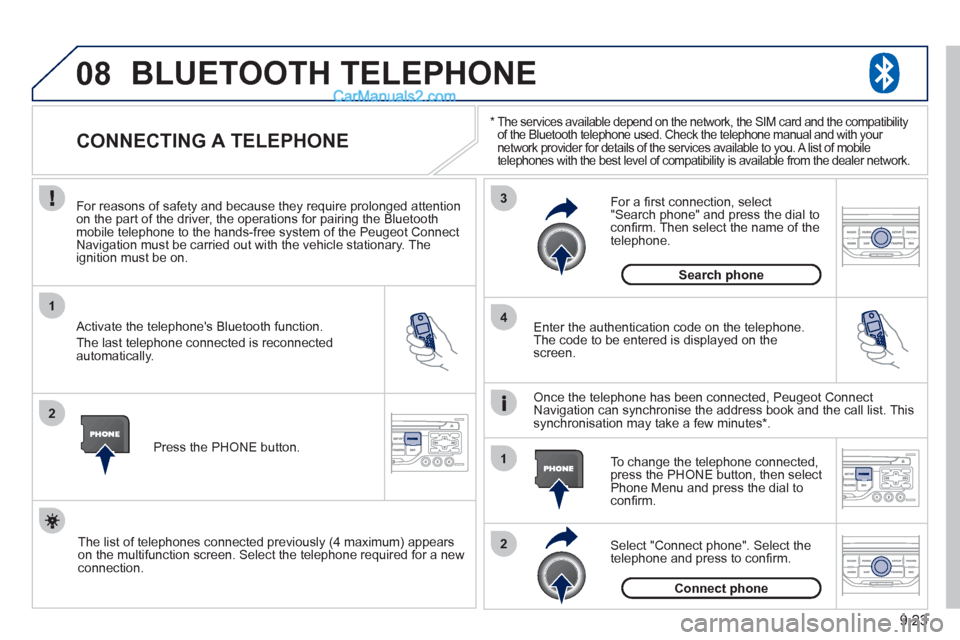
CONNECTING A TELEPHONE
For reasons of safety and because they require prolonged attentionon the part of the driver, the operations for pairing the Bluetooth mobile telephone to the hands-free system of the Peugeot ConnectNavigation must be carried out with the vehicle stationary. Theignition must be on.
Activate the telephone's Bluetooth
function.
The last telephone connected is reconnected
automaticall
y. Enter the authentication code on the tele
phone.
The code to be entered is displayed on thescreen.
To change the telephone connected, press the PHONE button, then select Phone Menu and press the dial toconfi rm.
Once the telephone has been connected, Peugeot Connect
Navigation can synchronise the address book and the call list. This
s
ynchronisation may take a few minutes * .
Select "Connect phone". Select the
telephone and press to confi rm. The list o
f telephones connected previously (4 maximum) appears
on the multifunction screen. Select the telephone required for a newconnection.Press the PH
ONE button.
For a
fi rst connection, select"Search phone" and press the dial to confi rm. Then select the name of thetelephone.
Search
phone
Connect phone
Page 162 of 200
10
1
9.26
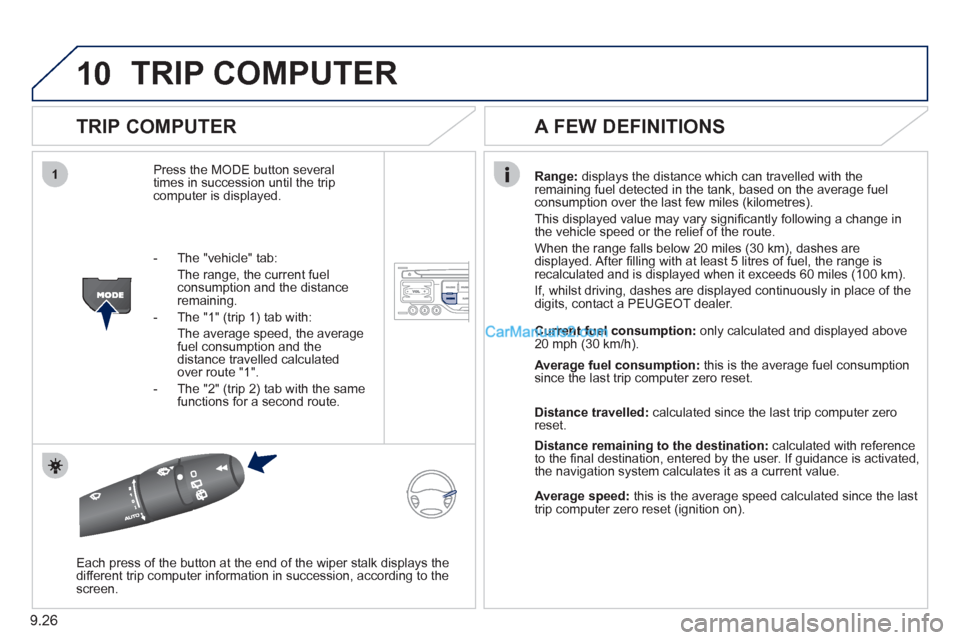
TRIP COMPUTER
TRIP COMPUTER
Press the MODE button several
times in succession until the tripcomputer is displayed.
Range: displays the distance which can travelled with the
remaining fuel detected in the tank, based on the average fuelconsumption over the last few miles (kilometres).
This displa
yed value may vary signifi cantly following a change in
the vehicle speed or the relief of the route.
When the range
falls below 20 miles (30 km), dashes are
displayed. After fi lling with at least 5 litres of fuel, the range is
recalculated and is displayed when it exceeds 60 miles (100 km).
If, whilst drivin
g, dashes are displayed continuously in place of the
digits, contact a PEUGEOT dealer.
Each press o
f the button at the end of the wiper stalk displays the
different trip computer information in succession, according to thescreen.
A FEW DEFINITIONS
- The "vehicle" tab:
The ran
ge, the current fuel consumption and the distance
remaining.
- The "1"
(trip 1) tab with:
The average speed, the average fuel consumption and thedistance travelled calculated over route "1".
- The "2"
(trip 2) tab with the same
functions for a second route.Current fuel consum
ption:only calculated and displayed above
20 mph (30 km/h).
Average fuel consumption: this is the average fuel consumption
since the last trip computer zero reset.
Distance travelled: calculated since the last trip computer zero
reset.
Distance remaining to the destination:calculated with referenceto the fi nal destination, entered by the user. If guidance is activated,
the navigation system calculates it as a current value.
Average speed:this is the average speed calculated since the last
trip computer zero reset (ignition on).
Page 169 of 200
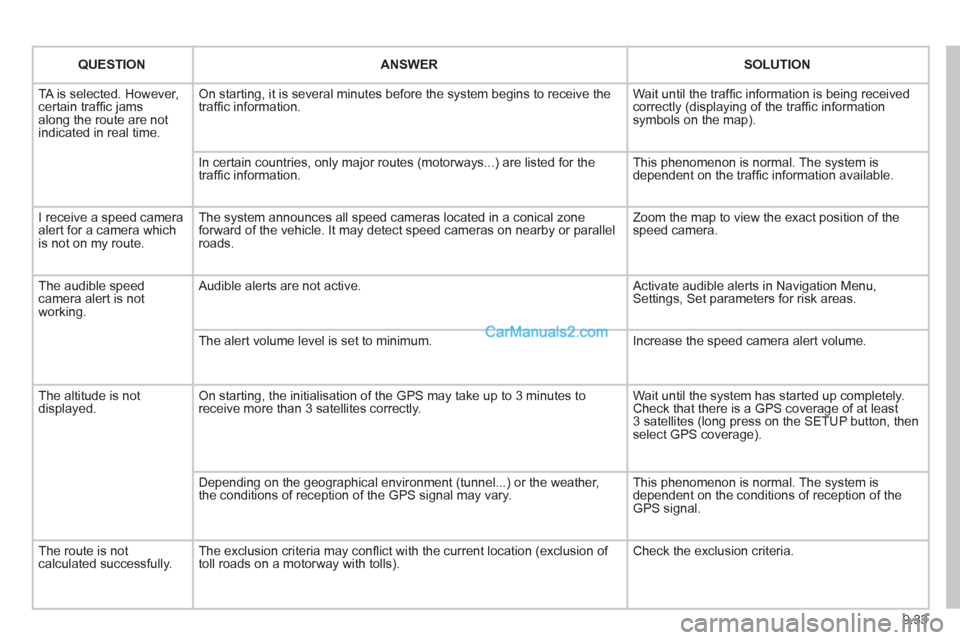
9.33
QUESTIONANSWER SOLUTION
TA is selected. However, certain traffi c jams
along the route are not
indicated in real time.
On starting, it is several minutes before the system begins to receive the
traffi c information. Wait until the traffi c information is being received correctly (displaying of the traffi c information symbols on the map).
In certain countries, onl
y major routes (motorways...) are listed for the
traffi c information. This phenomenon is normal. The system is
dependent on the traffi c information available.
I receive a speed camera
alert for a camera which
is not on my route.The s
ystem announces all speed cameras located in a conical zoneforward of the vehicle. It may detect speed cameras on nearby or parallel roads. Zoom the map to view the exact position o
f thespeed camera.
The audible speedcamera alert is not
working.
Audible alerts are not active. Activate audible alerts in Navigation Menu, Settings, Set parameters for risk areas.
Th
e alert volume level is set to minimum. Increase the speed camera alert volume.
The altitude is not displayed. On starting, the initialisation of the GPS may take up to 3 minutes toreceive more than 3 satellites correctly. Wait until the system has started up completely. Check that there is a GPS coverage of at least
3 satellites (long press on the SETUP button, then select GPS coverage).
Dependin
g on the geographical environment (tunnel...) or the weather,
the conditions of reception of the GPS signal may vary. This phenomenon is normal. The system is
dependent on the conditions of reception of the
GPS si
gnal.
Th
e route is notcalculated successfully.The exclusion criteria may confl ict with the current location (exclusion of
toll roads on a motorway with tolls). Check the exclusion criteria.
Page 170 of 200
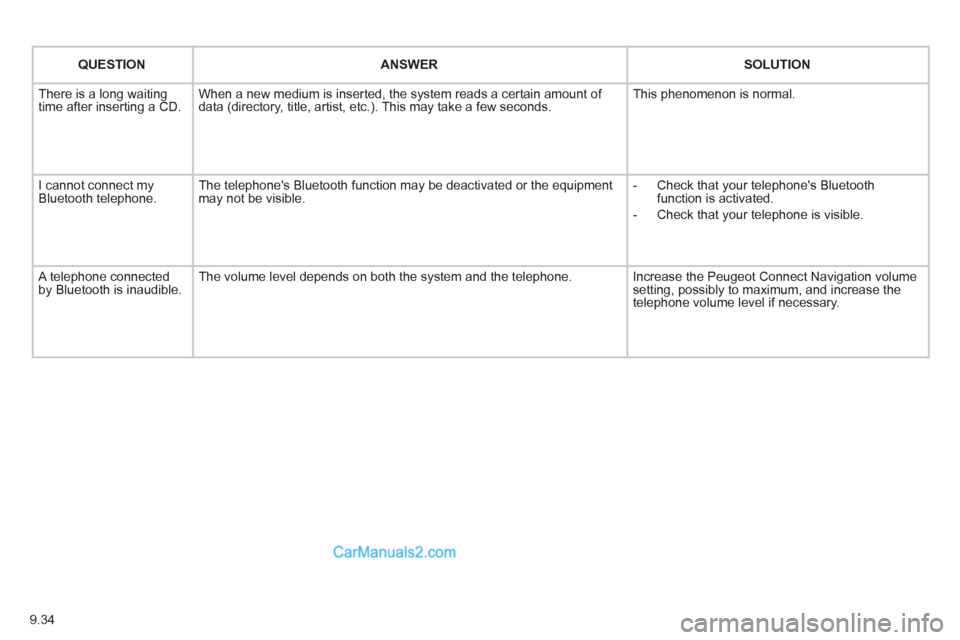
9.34
QUESTIONANSWER SOLUTION
There is a long waiting
time after inserting a CD. When a new medium is inserted, the system reads a certain amount of
data (directory, title, artist, etc.). This may take a few seconds. This phenomenon is normal.
I cannot connect myBluetooth telephone.The telephone's Bluetooth function may be deactivated or the equipment
may not be visible.
- Check that your telephone's Bluetoothfunction is activated.
-
Check that your telephone is visible.
A telephone connected by Bluetooth is inaudible.The volume level depends on both the system and the telephone. Increase the Peugeot Connect Navigation volume setting, possibly to maximum, and increase the
telephone volume level if necessary.