screen Peugeot Partner 2013 Manual PDF
[x] Cancel search | Manufacturer: PEUGEOT, Model Year: 2013, Model line: Partner, Model: Peugeot Partner 2013Pages: 236, PDF Size: 9.04 MB
Page 216 of 236
9.74
06
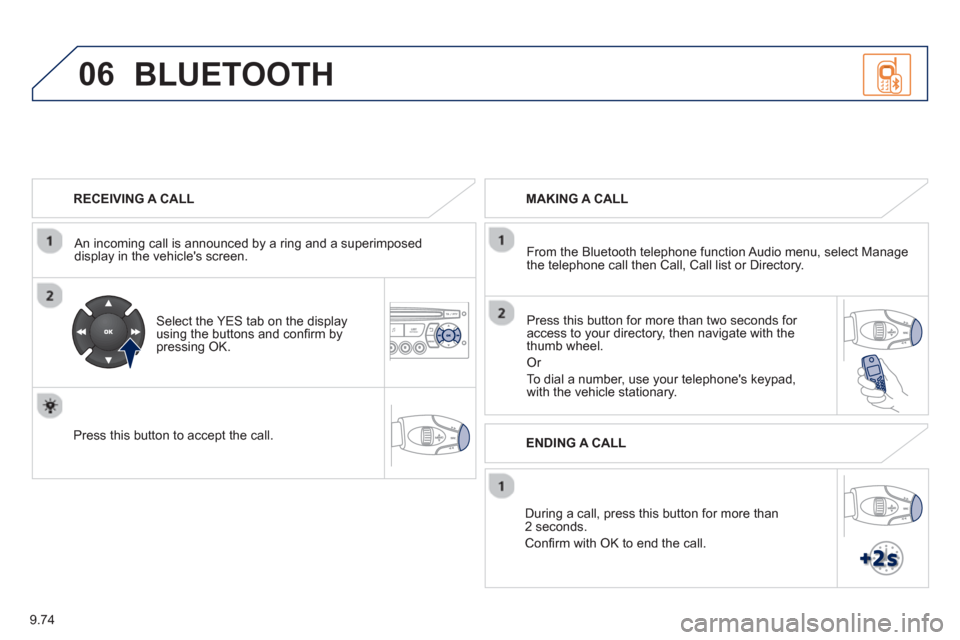
RECEIVING A CALL
An incomin
g call is announced by a ring and a superimposed
display in the vehicle's screen.
Select the YES tab on the display
using the buttons and confi rm bypressing OK.
Press this button to acce
pt the call.
MAKING A CALL
From the Bluetooth telephone
function Audio menu, select Manage
the telephone call then Call, Call list or Directory.
Pr
ess this button for more than two seconds for
access to your directory, then navigate with the
thumb wheel.
Or
To dial a number, use your telephone's keypad,with the vehicle stationary.
Durin
g a call, press this button for more than2 seconds.
Confi rm with OK to end the call.
BLUETOOTH
ENDING A CALL
Page 217 of 236
9.75
06
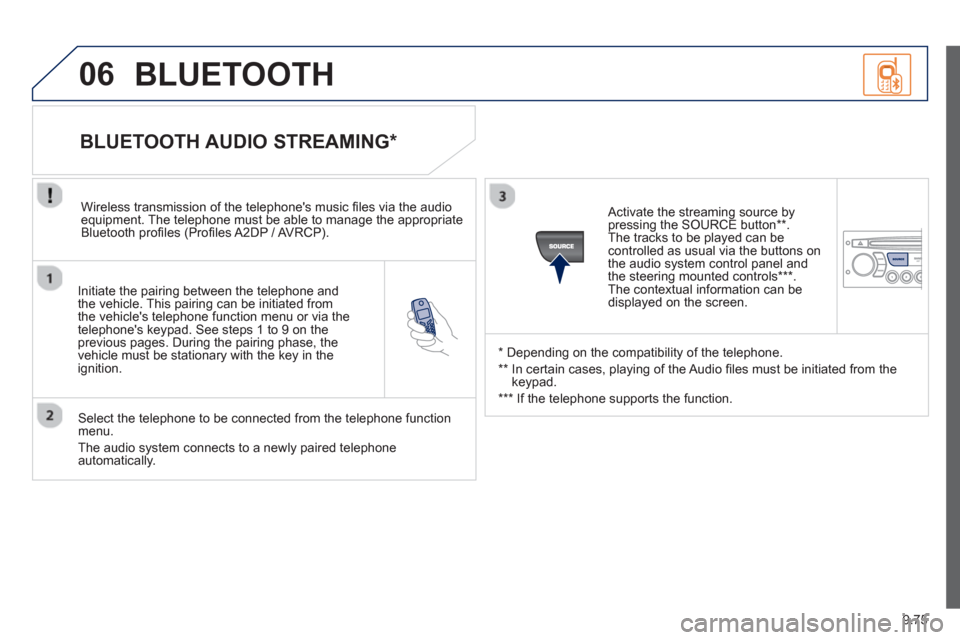
Initiate the pairing between the telephone and
the vehicle. This pairing can be initiated from
the vehicle's telephone function menu or via the
telephone's ke
ypad. See steps 1 to 9 on theprevious pages. During the pairing phase, the
vehicle must be stationary with the key in the
i
gnition.
Select the telephone to be connected from the telephone functionmenu.
The audio s
ystem connects to a newly paired telephone automatically.
BLUETOOTH AUDIO STREAMING *
Wireless transmission of the telephone's music fi les via the audioequipment. The telephone must be able to manage the appropriate
Bluetooth profi les (Profi les A2DP / AVRCP).
*
Depending on the compatibility of the telephone.
**
In certain cases, playing of the Audio fi les must be initiated from the
keypad.
*** If the tele
phone supports the function.
Activate the streaming source by
pressin
g the SOURCE button ** .
The tracks to be played can becontrolled as usual via the buttons on
the audio system control panel and
the steering mounted controls *** .
The contextual information can bedisplayed on the screen.
BLUETOOTH
Page 218 of 236
9.76
07 CONFIGURATION
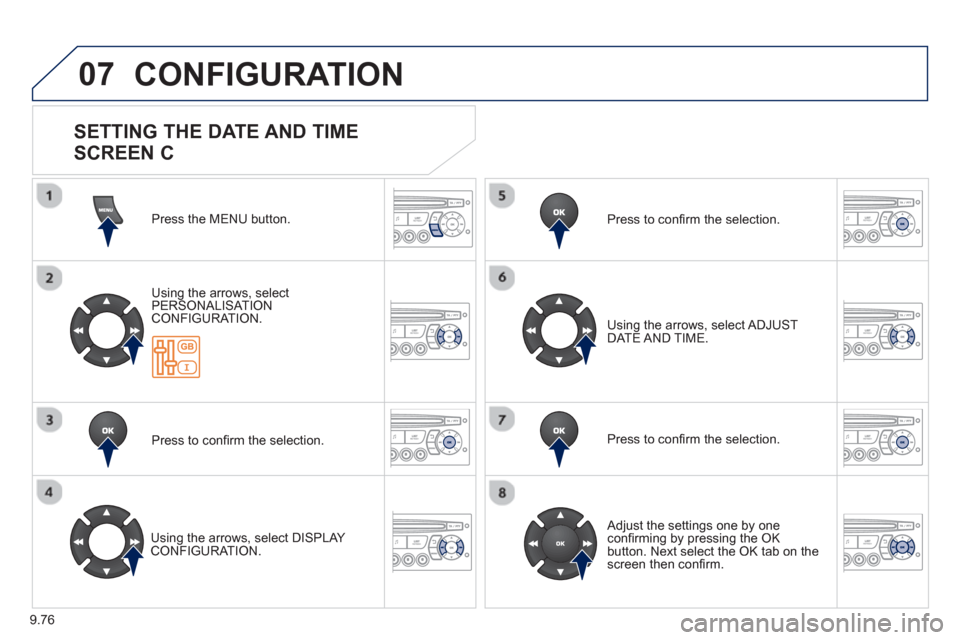
Press the MENU button.
Usin
g the arrows, select
PERSONALISAT ION CONFIGURATION.
Pr
ess to confi rm the selection.
Usin
g the arrows, select DISPLAY CONFIGURATION. Pr
ess to confi rm the selection.
Pr
ess to confi rm the selection. Usin
g the arrows, select ADJUST DATE AND TIME.
Adjust the settings one by one confi rming by pressing the OKbutton. Next select the OK tab on thescreen then confi rm.
SETTING THE DATE AND TIME
SCREEN C
Page 219 of 236
9.77
08
13
TRIP COMPUTER
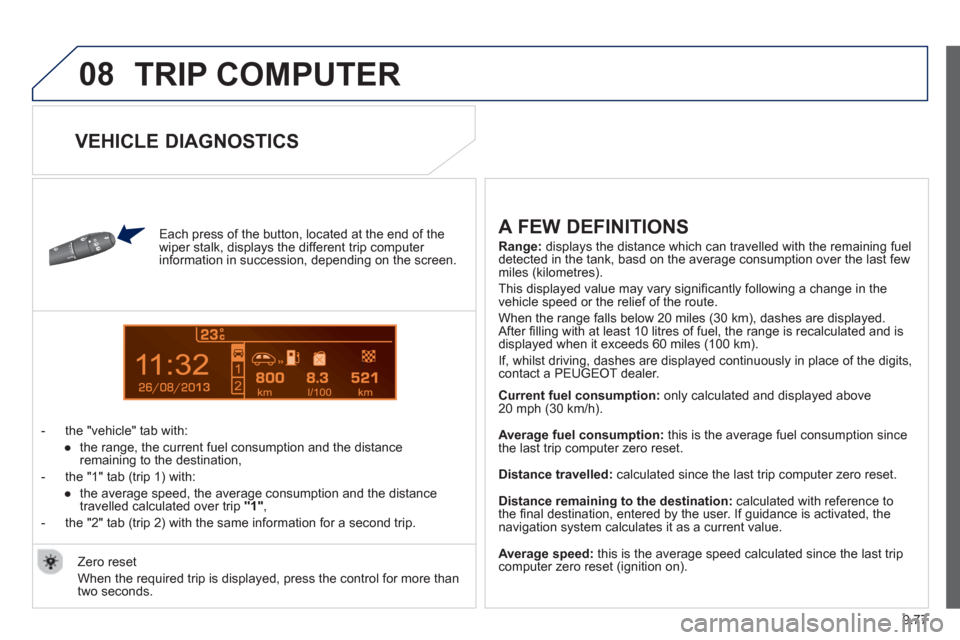
Each press of the button, located at the end of the
wiper stalk, displays the different trip computer
information in succession, depending on the screen.
- t
he "vehicle" tab with:
●
the ran
ge, the current fuel consumption and the distance
remaining to the destination,
- the "1" tab
(trip 1) with:
●
the avera
ge speed, the average consumption and the distance
travelled calculated over trip "1"
,
- the "2" tab
(trip 2) with the same information for a second trip.
A FEW DEFINITIONS
Range:displays the distance which can travelled with the remaining fuel
detected in the tank, basd on the average consumption over the last few miles (kilometres).
This displa
yed value may vary signifi cantly following a change in the
vehicle speed or the relief of the route.
When the ran
ge falls below 20 miles (30 km), dashes are displayed.After fi lling with at least 10 litres of fuel, the range is recalculated and is
displayed when it exceeds 60 miles (100 km).
I
f, whilst driving, dashes are displayed continuously in place of the digits, contact a PEUGEOT dealer.
Current fuel consumption
: only calculated and displayed above
20 mph (30 km/h).
Avera
ge fuel consumption: this is the average fuel consumption since
the last trip computer zero reset.
Distance travelled:calculated since the last trip computer zero reset.
Distance remaining to the destination: calculated with reference to
the fi nal destination, entered by the user. If guidance is activated, thenavigation system calculates it as a current value.
Average speed:
this is the average speed calculated since the last tripcomputer zero reset (ignition on). Zero reset
When the required trip is displa
yed, press the control for more than
two seconds.
VEHICLE DIAGNOSTICS
Page 220 of 236
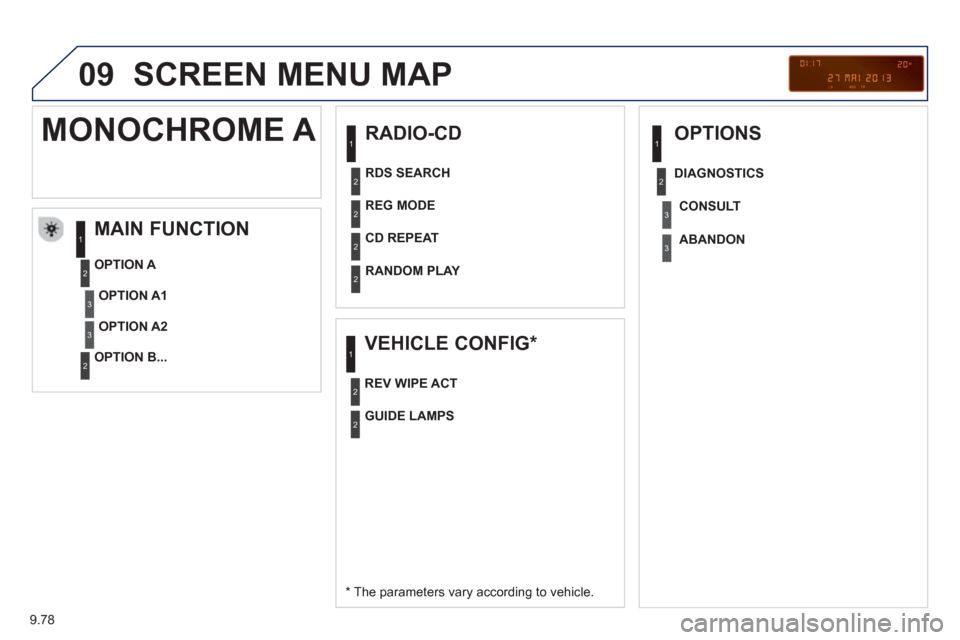
9.78
09 SCREEN MENU MAP
RADIO-CD
MAIN FUNCTION
* The parameters vary according to vehicle.
OPTION
A
OPTION B...
MONOCHROME A
OPTION A1
OPTION A2
REG MODE
CD REPEAT
RANDOM PLAY
VEHICLE CONFIG *
REV WIPE ACT
OPTIONS
GUIDE LAMPS
DIAGNO
STICS
RDS SEARCH
CONSUL
T
ABANDON
1
2
3
3
1
2
2
2
21
2
3
2
3
1
2
2
Page 221 of 236
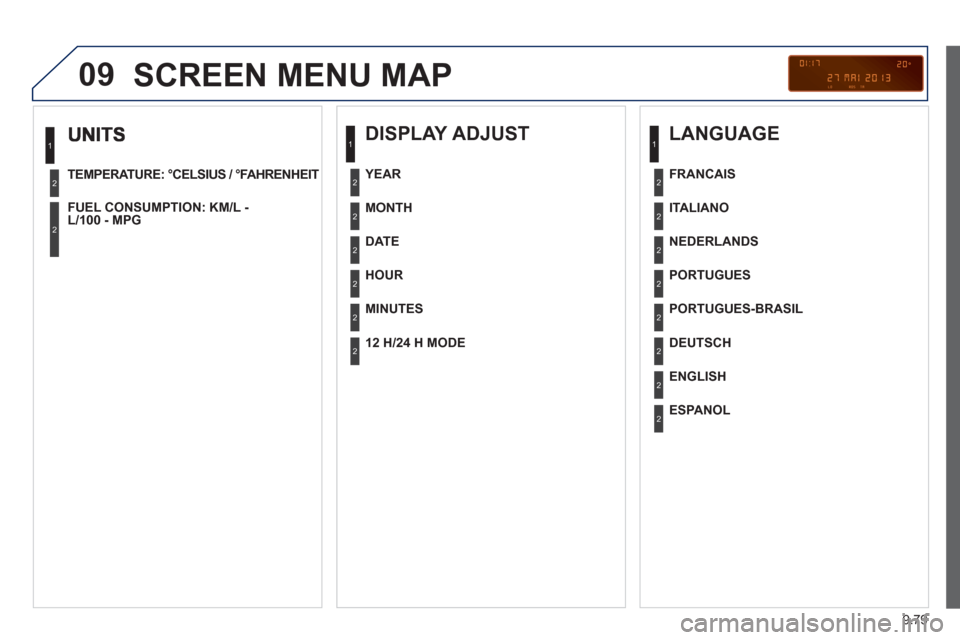
9.79
09
TEMPERATURE: °CELSIUS / °FAHRENHEIT
FUEL CON
SUMPTION: KM/L -L/100 - MPG
1
2
2
SCREEN MENU MAP
DISPLAY ADJUST
MONTH
DATE
HOUR
MINUTES
YEAR
12 H/24 H MODE
LANGUAGE
ITALIANO
NEDERLANDS
PORTUGUES
PORTUGUES-BRASIL
FRANCAIS
DEUTSCH
ENGLISH
ESPANOL
1
2
2
2
2
2
2
1
2
2
2
2
2
2
2
2
Page 222 of 236
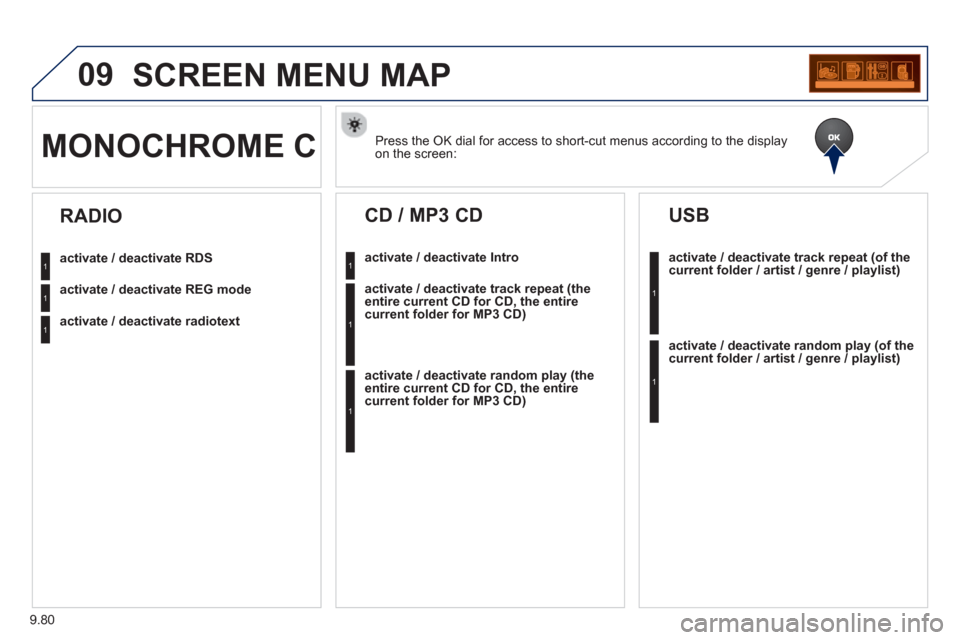
9.80
09SCREEN MENU MAP
Press the OK dial for access to short-cut menus according to the displayon the screen: MONOCHROME C
activate / deactivate RDS
activate / deactivate REG mode
activate / deactivate radiotext
RADIO
activate / deactivate Intro
CD / MP3 CD
activate / deactivate track repeat (the
entire current CD for CD, the entire
current folder for MP3 CD)
activate / deactivate random play (the
entire current CD for CD, the entire
current folder for MP3 CD)
activate / deactivate track repeat (of the current folder / artist / genre / playlist)
USB
activate / deactivate random play(of thecurrent folder / artist / genre / playlist)
1
1
1
1
1
1
1
1
Page 223 of 236
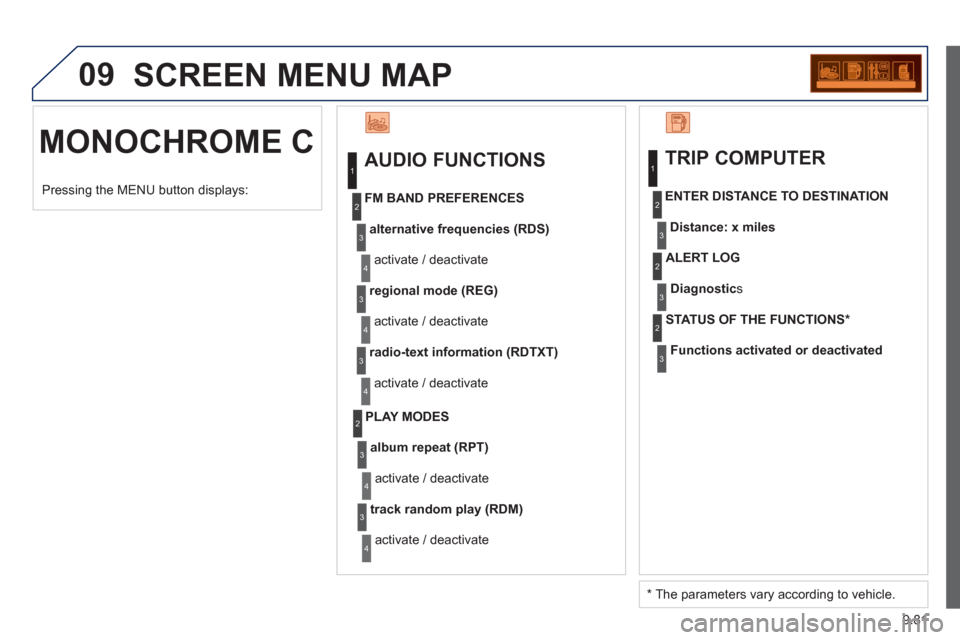
9.81
09 SCREEN MENU MAP
MONOCHROME C
AUDIO FUNCTIONS
alternative frequencies (RDS)
activate / deactivate
FM BAND PREFERENCE
S
regional mode (REG)
activate / deactivate
radio-text information (RDTXT)
activate / deactivate
1
2
3
4
3
4
3
4
PLAY MODES
album repeat (RPT)
activate / deactivate
track random play
(RDM)
activate / deactivate
2
3
4
3
4
TRIP COMPUTER
Distance: x miles ENTER DI
STANCE TO DESTINATION
Diagnostic s
ALERT LOG
Functions activated or deactivated
STAT US OF THE FUNCTIONS *
1
2
3
3
2
3
2
Pressing the MENU button displays:
*
The parameters vary according to vehicle.
Page 224 of 236
9.82
09SCREEN MENU MAP
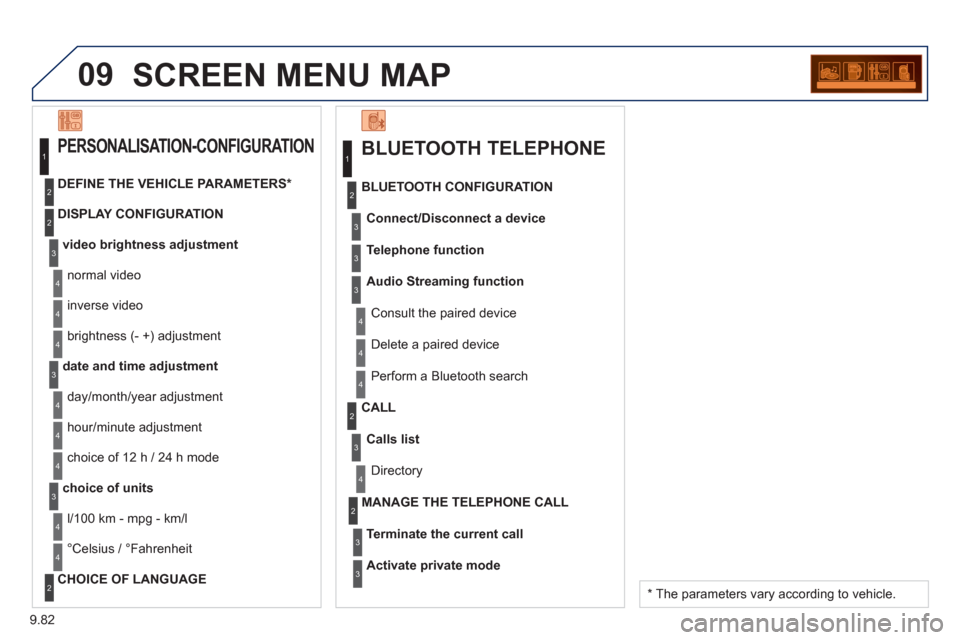
BLUETOOTH TELEPHONE
Connect/Disconnect a device
Consult the paired device BLUETOOTH CONFIGURATION
Telephone function
Audio Streamin
g function
Delete a
paired device
P
erform a Bluetooth search
Calls lis
t
CALL
Directory
Terminate the current call MANAGE THE TELEPHONE CALL
Activate private mod
e
1
2
3
3
3
4
4
4
2
3
4
2
3
3
video brightness adjustment
DISPLAY CONFIGURATION DEFINE THE VEHICLE PARAMETERS *
PERSONALISATION-CONFIGURATION
normal video
inverse video
bri
ghtness (- +) adjustment
date and time adjustment
day/month/year adjustment
hour
/minute adjustment
choice of 12 h / 24 h mode
choice of units
l/100 km - mp
g - km/l
°
Celsius / °Fahrenheit
CHOICE OF LANGUAGE
1
2
4
3
2
4
4
3
4
4
2
3
4
4
4
*
The parameters vary according to vehicle.
Page 225 of 236
9.83
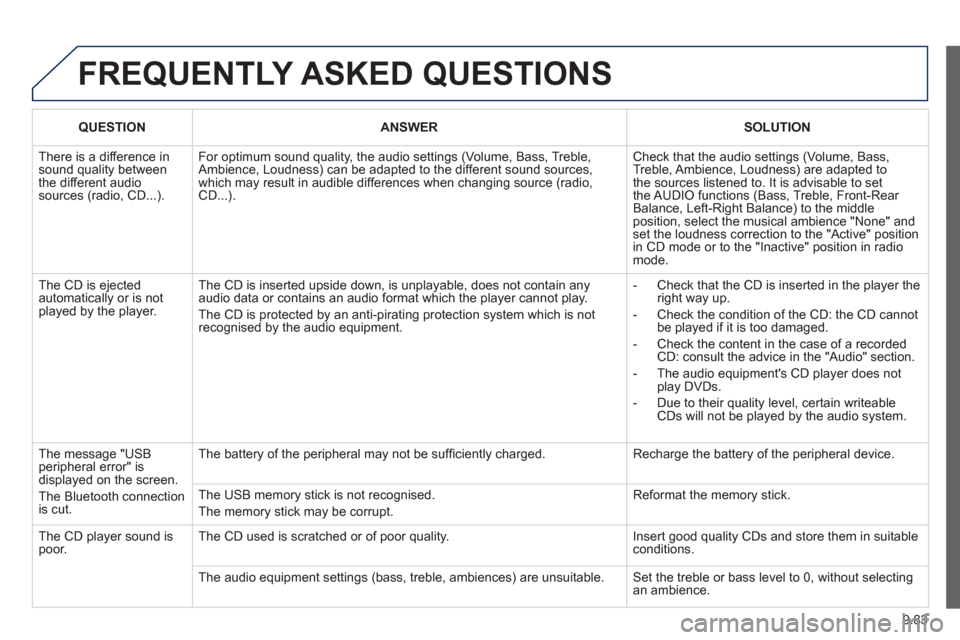
FREQUENTLY ASKED QUESTIONS
QUESTIONANSWERSOLUTION
There is a difference in sound quality betweenthe different audiosources (radio, CD...).
For optimum sound quality, the audio settings (Volume, Bass, Treble, Ambience, Loudness) can be adapted to the different sound sources,which may result in audible differences when changing source (radio,CD...).
Check that the audio settings (Volume, Bass, Treble, Ambience, Loudness) are adapted tothe sources listened to. It is advisable to setthe AUDIO functions (Bass, Treble, Front-Rear Balance, Left-Right Balance) to the middle position, select the musical ambience "None" and set the loudness correction to the "Active" position in CD mode or to the "Inactive" position in radio mode.
The CD is ejected automatically or is not played by the player.
The CD is inserted upside down, is unplayable, does not contain any audio data or contains an audio format which the player cannot play.
The CD is protected by an anti-pirating protection system which is not recognised by the audio equipment.
- Check that the CD is inserted in the player the right way up.
- Check the condition of the CD: the CD cannot be played if it is too damaged.
- Check the content in the case of a recordedCD: consult the advice in the "Audio" section.
- The audio equipment's CD player does notplay DVDs.
- Due to their quality level, certain writeableCDs will not be played by the audio system.
The message "USB peripheral error" isdisplayed on the screen.
The Bluetooth connectionis cut.
The battery of the peripheral may not be suffi ciently charged.
Recharge the battery of the peripheral device.
The USB memory stick is not recognised.
The memory stick may be corrupt.
Reformat the memory stick.
The CD player sound ispoor.The CD used is scratched or of poor quality.
Insert good quality CDs and store them in suitable conditions.
The audio equipment settings (bass, treble, ambiences) are unsuitable. Set the treble or bass level to 0, without selectingan ambience.