Instrument panel Peugeot Partner 2019 User Guide
[x] Cancel search | Manufacturer: PEUGEOT, Model Year: 2019, Model line: Partner, Model: Peugeot Partner 2019Pages: 312, PDF Size: 9.56 MB
Page 27 of 312
25
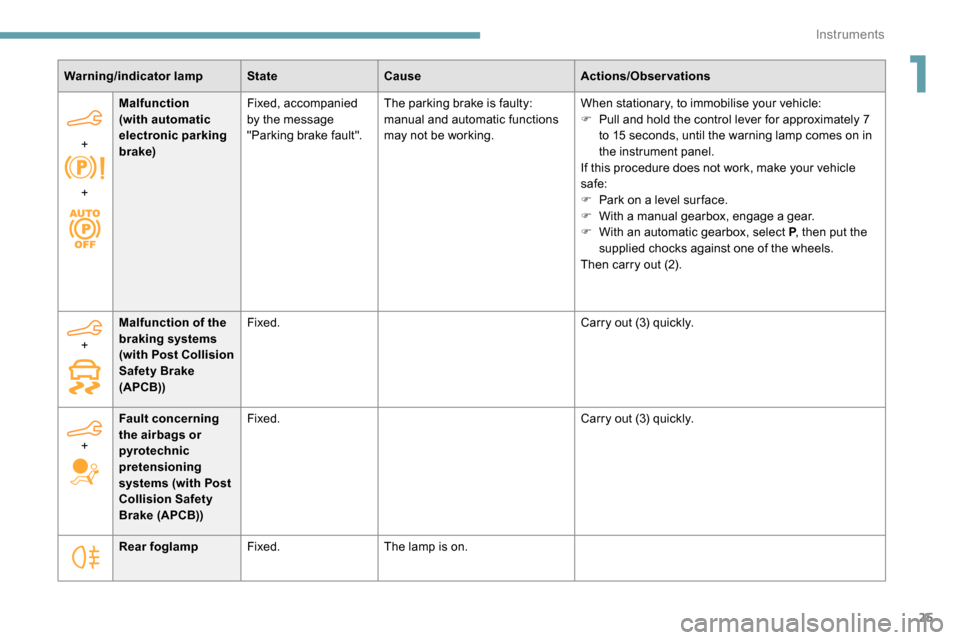
Warning/indicator lampStateCause Actions/Observations
+
+ Malfunction
(with automatic
electronic parking
brake)
Fixed, accompanied
by the message
"Parking brake fault".
The parking brake is faulty:
manual and automatic functions
may not be working. When stationary, to immobilise your vehicle:
F
P
ull and hold the control lever for approximately 7
to 15
seconds, until the warning lamp comes on in
the instrument panel.
If this procedure does not work, make your vehicle
safe:
F
P
ark on a level sur face.
F
W
ith a manual gearbox, engage a gear.
F
W
ith an automatic gearbox, select P, then put the
supplied chocks against one of the wheels.
Then carry out (2).
Rear foglamp Fixed. The lamp is on.
+
Malfunction of the
braking systems
(with Post Collision
Safety Brake
(APCB)) Fixed.
Carry out (3) quickly.
+ Fault concerning
the airbags or
pyrotechnic
pretensioning
systems (with Post
Collision Safety
Brake (APCB)) Fixed.
Carry out (3) quickly.
1
Instruments
Page 30 of 312
28
Indicators
Service indicator
The ser vice indicator is displayed on the
instrument panel. Depending on the vehicle
version:
-
t
he distance recorder display line indicates
the distance remaining before the next
ser vice is due, or the distance travelled
since it was due preceded by the sign “-”.
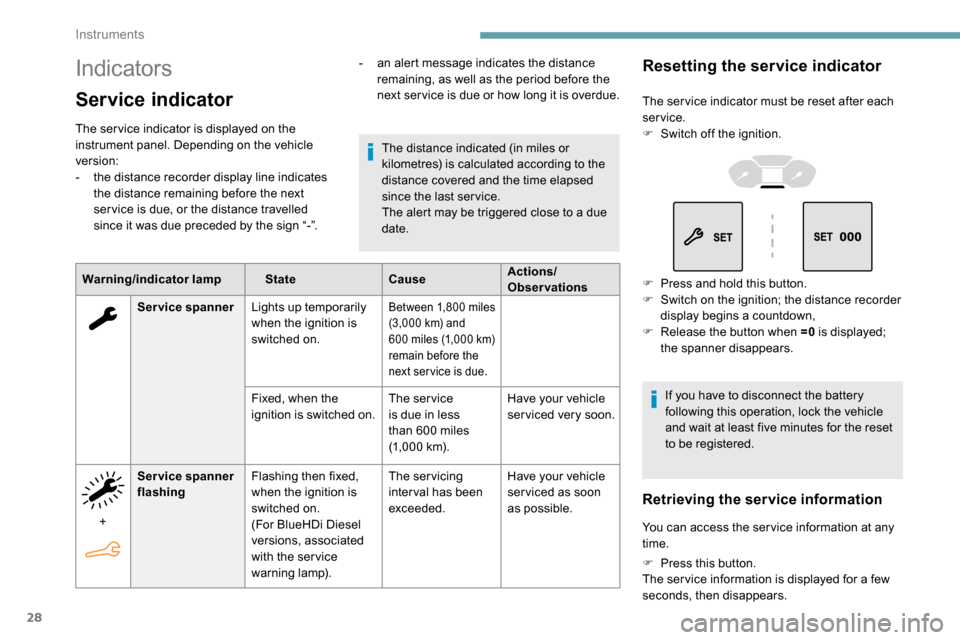
Warning/indicator lamp StateCauseActions/
Observations
The distance indicated (in miles or
kilometres) is calculated according to the
distance covered and the time elapsed
since the last ser vice.
The alert may be triggered close to a due
date.
Service spanner Lights up temporarily
when the ignition is
switched on.
Between 1,800 miles
( 3,000 km) and
600
miles (1,000 km)
remain before the
next ser vice is due.
Fixed, when the
ignition is switched on. The service
is due in less
than 600
miles
(1,000
km).Have your vehicle
serviced very soon.
+ Service spanner
flashing
Flashing then fixed,
when the ignition is
switched on.
(For BlueHDi Diesel
versions, associated
with the ser vice
warning lamp). The servicing
inter val has been
exceeded.
Have your vehicle
ser viced as soon
as possible.
-
a
n alert message indicates the distance
remaining, as well as the period before the
next ser vice is due or how long it is overdue.
Resetting the service indicator
The ser vice indicator must be reset after each
service.
F
S
witch off the ignition.
F
P
ress and hold this button.
F
S
witch on the ignition; the distance recorder
display begins a countdown,
F
R
elease the button when =0 is displayed;
the spanner disappears.
If you have to disconnect the battery
following this operation, lock the vehicle
and wait at least five minutes for the reset
to be registered.
Retrieving the service information
You can access the ser vice information at any
time.
F
P
ress this button.
The ser vice information is displayed for a few
seconds, then disappears.
Instruments
Page 31 of 312
29
Instrument panel display screen
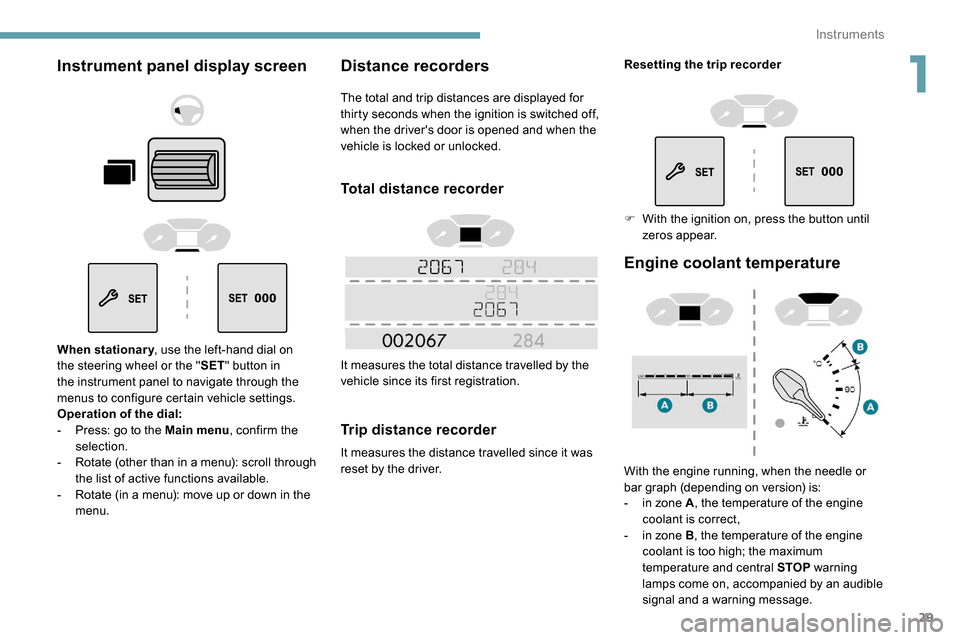
When stationary, use the left-hand dial on
the steering wheel or the " SET" button in
the instrument panel to navigate through the
menus to configure certain vehicle settings.
Operation of the dial:
-
P
ress: go to the Main menu , confirm the
selection.
-
R
otate (other than in a menu): scroll through
the list of active functions available.
-
R
otate (in a menu): move up or down in the
menu.
Distance recorders
The total and trip distances are displayed for
thirty seconds when the ignition is switched off,
when the driver's door is opened and when the
vehicle is locked or unlocked.
Total distance recorder
It measures the total distance travelled by the
vehicle since its first registration.
Trip distance recorder
It measures the distance travelled since it was
reset by the driver.
Engine coolant temperature
With the engine running, when the needle or
bar graph (depending on version) is:
-
i
n zone A , the temperature of the engine
coolant is correct,
-
i
n zone B , the temperature of the engine
coolant is too high; the maximum
temperature and central STOP warning
lamps come on, accompanied by an audible
signal and a warning message.
Resetting the trip recorder
F
W
ith the ignition on, press the button until
zeros appear.
1
Instruments
Page 32 of 312
30
You must stop as soon as it is safe to do so.
Wait a few minutes before switching off the
engine.
Contact a PEUGEOT dealer or a qualified
workshop.
Checking
After driving for a few minutes, the temperature
and pressure in the cooling system increase.
To top up the level:
F
w
ait at least one hour for the engine to cool,
F
u
nscrew the cap by two turns to allow the
pressure to drop,
F
w
hen the pressure has dropped, remove the
cap,
F
t
op up the level to the "MA X" mark.
For more information on Checking levels ,
refer to the corresponding section.
Be aware of the risk of scalding when
topping up the coolant. Do not fill above
the maximum level (indicated on the
reservoir).
Engine oil level indicator
On versions fitted with an electric oil level
indicator, the state of the engine oil level is
displayed in the instrument panel for a few
seconds when the ignition is switched on, at
the same time as the ser vicing information.The level read will only be correct if
the vehicle is on level ground and the
engine has been stopped for more than
30
minutes.
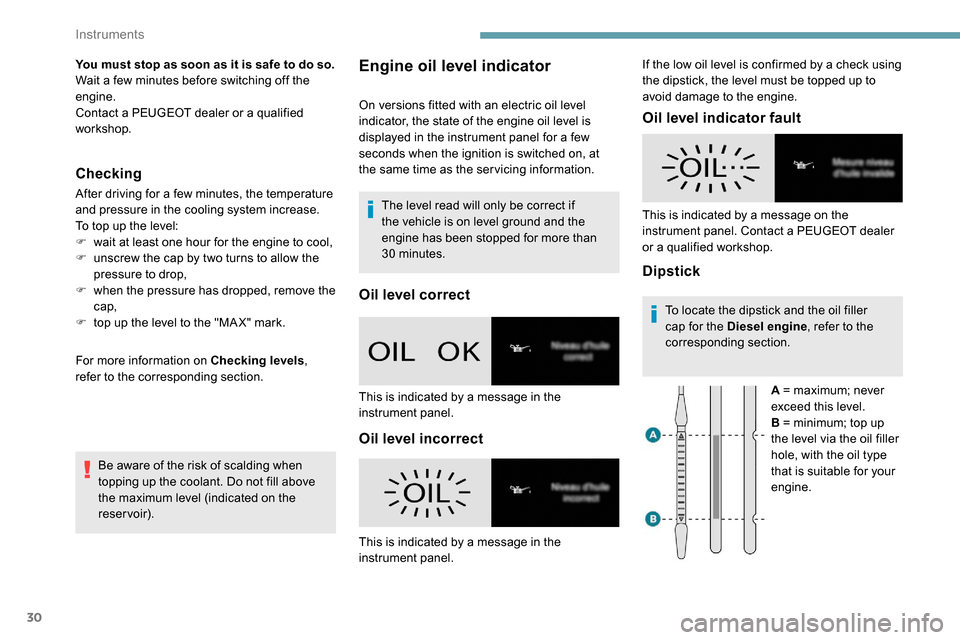
Oil level correct
Oil level incorrect Oil level indicator fault
DipstickTo locate the dipstick and the oil filler
cap for the Diesel engine
, refer to the
corresponding section.
A = maximum; never
exceed this level.
B = minimum; top up
the level via the oil filler
hole, with the oil type
that is suitable for your
engine.
This is indicated by a message in the
instrument panel.
This is indicated by a message in the
instrument panel. This is indicated by a message on the
instrument panel. Contact a PEUGEOT dealer
or a qualified workshop. If the low oil level is confirmed by a check using
the dipstick, the level must be topped up to
avoid damage to the engine.
Instruments
Page 35 of 312
33
Lighting dimmer
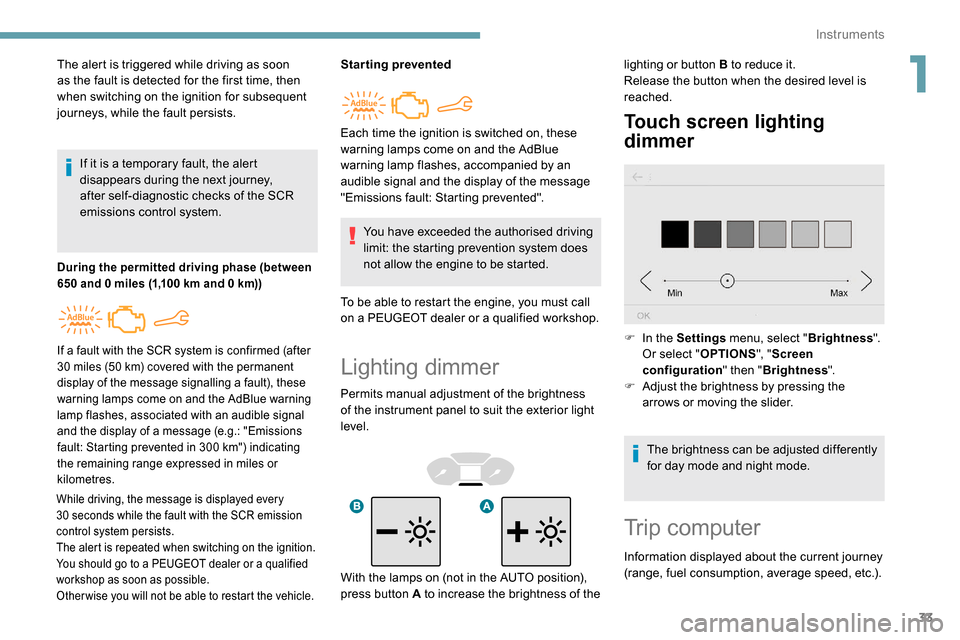
Permits manual adjustment of the brightness
of the instrument panel to suit the exterior light
level.
Touch screen lighting
dimmer
The alert is triggered while driving as soon
as the fault is detected for the first time, then
when switching on the ignition for subsequent
journeys, while the fault persists.If it is a temporary fault, the alert
disappears during the next journey,
after self-diagnostic checks of the SCR
emissions control system.
During the permitted driving phase (between
650 and 0 miles (1,100 km and 0 km))
While driving, the message is displayed every
30 seconds while the fault with the SCR emission
control system persists.
The alert is repeated when switching on the ignition.
You should go to a PEUGEOT dealer or a qualified
workshop as soon as possible.
Other wise you will not be able to restart the vehicle.
Starting prevented
You have exceeded the authorised driving
limit: the starting prevention system does
not allow the engine to be started.
To be able to restart the engine, you must call
on a PEUGEOT dealer or a qualified workshop.
If a fault with the SCR system is confirmed (after
30 miles (50 km) covered with the permanent
display of the message signalling a fault), these
warning lamps come on and the AdBlue warning
lamp flashes, associated with an audible signal
and the display of a message (e.g.: "Emissions
fault: Starting prevented in 300
km") indicating
the remaining range expressed in miles or
kilometres.
Each time the ignition is switched on, these
warning lamps come on and the AdBlue
warning lamp flashes, accompanied by an
audible signal and the display of the message
"Emissions fault: Starting prevented". lighting or button B to reduce it.
Release the button when the desired level is
reached.
F
I
n the Settings menu, select " Brightness".
Or select " OPTIONS", "Screen
configuration " then "Brightness ".
F
A
djust the brightness by pressing the
arrows or moving the slider.
The brightness can be adjusted differently
for day mode and night mode.
Trip computer
Information displayed about the current journey
(range, fuel consumption, average speed, etc.).
With the lamps on (not in the AUTO position),
press button A to increase the brightness of the
1
Instruments
Page 37 of 312
35
Distance travelled
(miles or km)Calculated since the last trip
computer reset.
Stop & Start time counter
(minutes/seconds or hours/minutes)
If your vehicle is fitted with Stop & Start, a time
counter calculates the time spent in STOP mode
during a journey.
It resets to zero every time the ignition is switched on.
Setting the time and date
Without audio system
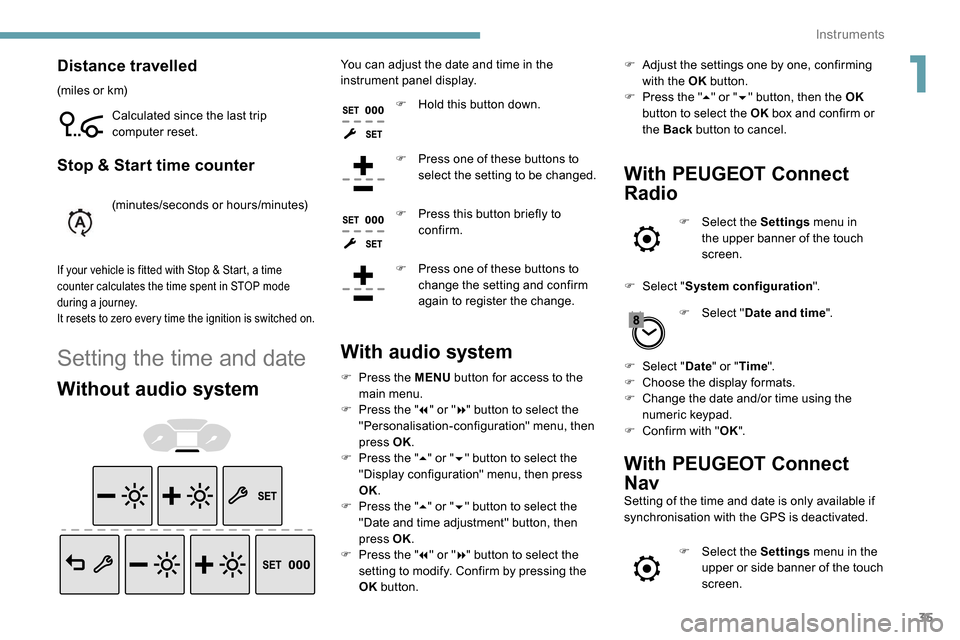
You can adjust the date and time in the
instrument panel display.F
H
old this button down.
F
P
ress one of these buttons to
select the setting to be changed.
F
P
ress this button briefly to
confirm.
F
P
ress one of these buttons to
change the setting and confirm
again to register the change.
With audio system
F Press the MENU button for access to the
main menu.
F
P
ress the " 7" or " 8" button to select the
"Personalisation-configuration" menu, then
press OK.
F
P
ress the " 5" or " 6" button to select the
"Display configuration" menu, then press
OK.
F
P
ress the " 5" or " 6" button to select the
"Date and time adjustment" button, then
press OK.
F
P
ress the " 7" or " 8" button to select the
setting to modify. Confirm by pressing the
OK button. F
A
djust the settings one by one, confirming
with the OK button.
F
P
ress the "
5" or " 6" button, then the OK
button to select the OK box and confirm or
the Back button to cancel.
With PEUGEOT Connect
Radio
F Select the Settings menu in
the upper banner of the touch
screen.
F
Sel
ect " System configuration ".
F
Sel
ect "Date and time ".
F
Sel
ect " Date " or "Time ".
F
C
hoose the display formats.
F
C
hange the date and/or time using the
numeric keypad.
F
C
onfirm with " OK".
With PEUGEOT Connect
Nav
Setting of the time and date is only available if
synchronisation with the GPS is deactivated.
F
Sel
ect the Settings menu in the
upper or side banner of the touch
screen.
1
Instruments
Page 47 of 312
45
If your vehicle has an alarm, it will not be
deactivated/activated on unlocking/locking
the vehicle.
Opening a door will trigger the alarm,
which can be stopped by switching the
ignition on.
To deadlock the vehicle, turn the key again
within five seconds of locking.
Locking of one part of the vehicle
(front passenger door/sliding
side door/side-hinged doors)
Changing the battery
If the battery is flat, you will be
informed by lighting of this warning
lamp in the instrument panel, an
audible signal and a message in the
screen.
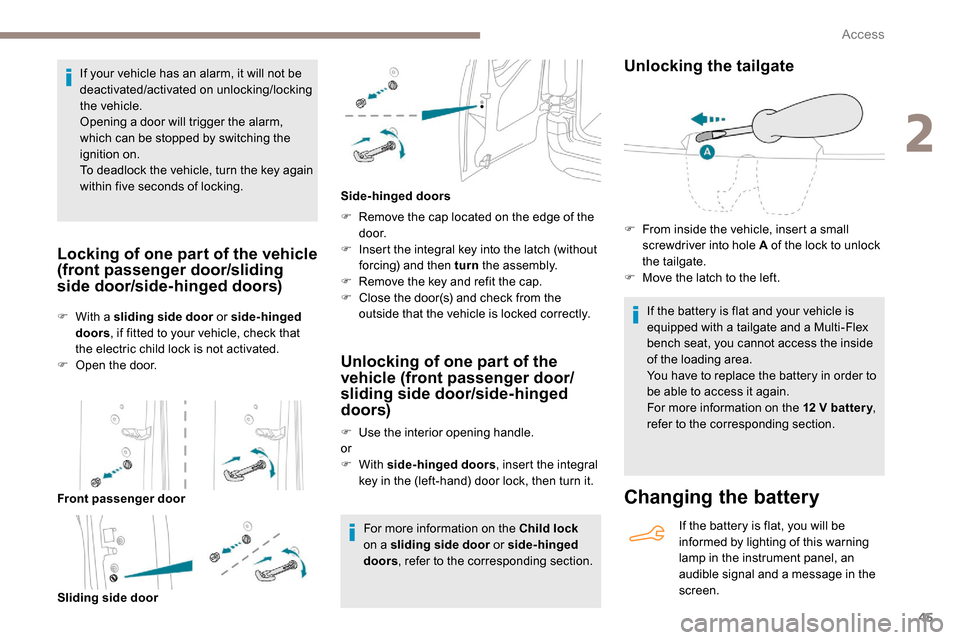
F
W
ith a sliding side door
or side-hinged
doors , if fitted to your vehicle, check that
the electric child lock is not activated.
F
O
pen the door.
Front passenger door Sliding side door F
R
emove the cap located on the edge of the
d o o r.
F
I
nsert the integral key into the latch (without
forcing) and then turn the assembly.
F
R
emove the key and refit the cap.
F
C
lose the door(s) and check from the
outside that the vehicle is locked correctly.
Side-hinged doors
Unlocking of one part of the
vehicle (front passenger door/
sliding side door/side-hinged
doors)
F Use the interior opening handle.
or
F
With side-hinged doors , insert the integral
key in the (left-hand) door lock, then turn it.
For more information on the Child lock
on a sliding side door or side-hinged
doors , refer to the corresponding section.
Unlocking the tailgate
If the battery is flat and your vehicle is
equipped with a tailgate and a Multi-Flex
bench seat, you cannot access the inside
of the loading area.
You have to replace the battery in order to
be able to access it again.
For more information on the 12
V batter y,
refer to the corresponding section.
F
F
rom inside the vehicle, insert a small
screwdriver into hole A of the lock to unlock
the tailgate.
F
M
ove the latch to the left.
2
Access
Page 51 of 312
49
This button is unavailable if the vehicle
has been locked or deadlocked from
outside (using the key, the remote control
or the Keyless Entry and Starting,
according to equipment) or if any of the
doors are still open.
Manual mode
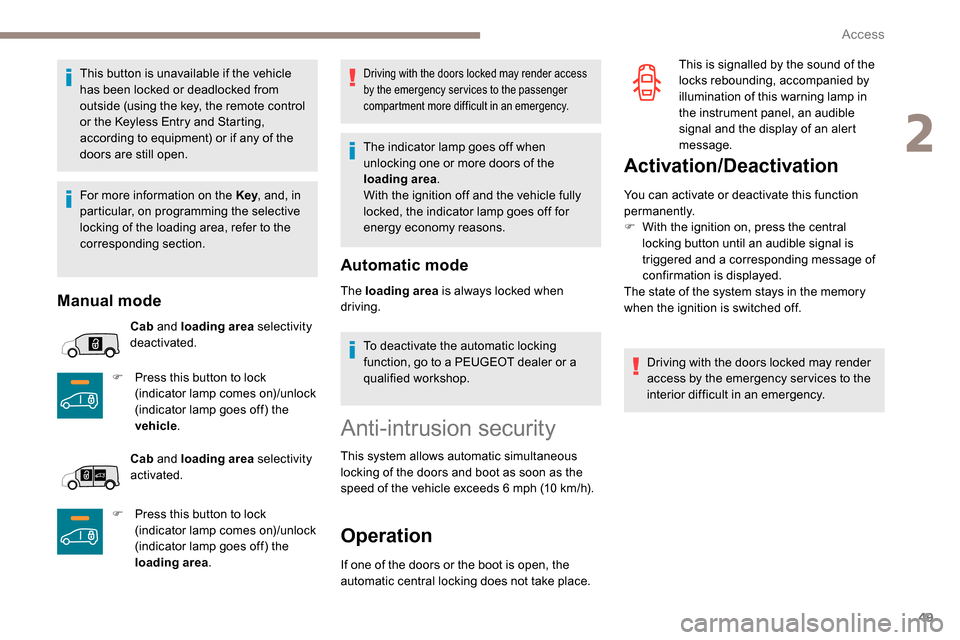
Cab and loading area selectivity
deactivated.
F
P
ress this button to lock
(indicator lamp comes on)/unlock
(indicator lamp goes off) the
vehicle .
Cab and loading area selectivity
activated.
F
P
ress this button to lock
(indicator lamp comes on)/unlock
(indicator lamp goes off) the
loading area .
Driving with the doors locked may render access
by the emergency services to the passenger
compartment more difficult in an emergency.
The indicator lamp goes off when
unlocking one or more doors of the
loading area.
With the ignition off and the vehicle fully
locked, the indicator lamp goes off for
energy economy reasons.
Automatic mode
The loading area is always locked when
driving.
To deactivate the automatic locking
function, go to a PEUGEOT dealer or a
qualified workshop.
Anti-intrusion security
This system allows automatic simultaneous
locking of the doors and boot as soon as the
speed of the vehicle exceeds 6 mph (10 km/h).
Operation
If one of the doors or the boot is open, the
automatic central locking does not take place.
Activation/Deactivation
You can activate or deactivate this function
permanently.
F
W
ith the ignition on, press the central
locking button until an audible signal is
triggered and a corresponding message of
confirmation is displayed.
The state of the system stays in the memory
when the ignition is switched off.
Driving with the doors locked may render
access by the emergency services to the
interior difficult in an emergency. This is signalled by the sound of the
locks rebounding, accompanied by
illumination of this warning lamp in
the instrument panel, an audible
signal and the display of an alert
message.
For more information on the Key , and, in
particular, on programming the selective
locking of the loading area, refer to the
corresponding section.
2
Access
Page 61 of 312
59
Front seats
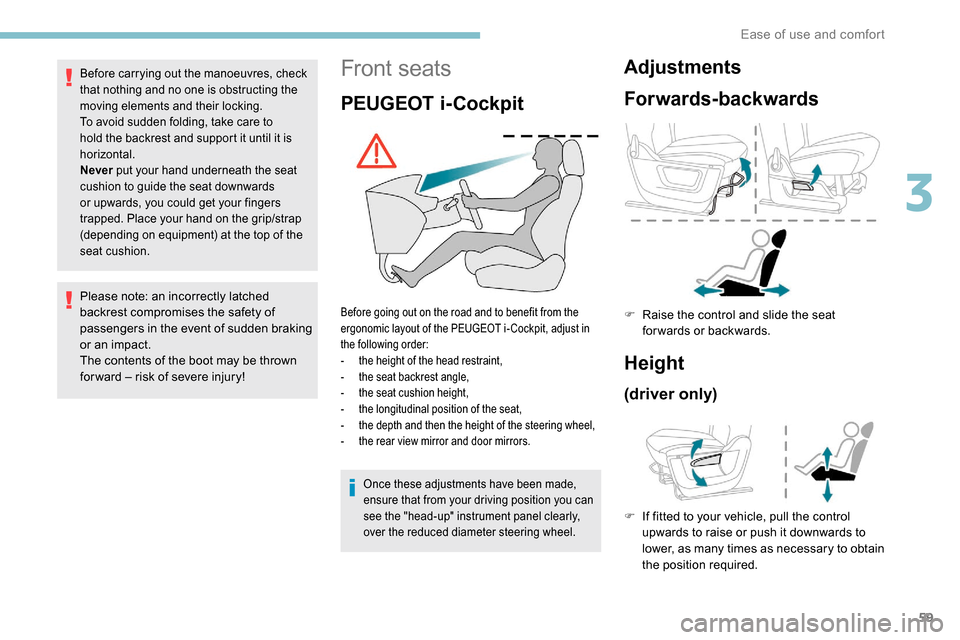
PEUGEOT i-Cockpit
Before going out on the road and to benefit from the
ergonomic layout of the PEUGEOT i- Cockpit, adjust in
the following order:
-
t
he height of the head restraint,
-
t
he seat backrest angle,
-
t
he seat cushion height,
-
t
he longitudinal position of the seat,
-
t
he depth and then the height of the steering wheel,
-
t
he rear view mirror and door mirrors.
Before carrying out the manoeuvres, check
that nothing and no one is obstructing the
moving elements and their locking.
To avoid sudden folding, take care to
hold the backrest and support it until it is
horizontal.
Never put your hand underneath the seat
cushion to guide the seat downwards
or upwards, you could get your fingers
trapped. Place your hand on the grip/strap
(depending on equipment) at the top of the
seat cushion.
Please note: an incorrectly latched
backrest compromises the safety of
passengers in the event of sudden braking
or an impact.
The contents of the boot may be thrown
for ward – risk of severe injury!
Adjustments
Forwards-backwards
Height
(driver only)
F If fitted to your vehicle, pull the control upwards to raise or push it downwards to
lower, as many times as necessary to obtain
the position required.
F
Ra
ise the control and slide the seat
forwards or backwards.
Once these adjustments have been made,
ensure that from your driving position you can
see the "head-up" instrument panel clearly,
over the reduced diameter steering wheel.
3
Ease of use and comfort
Page 89 of 312
87
on if rain is detected, at the same time as
automatic operation of the windscreen wipers.
As soon as the brightness returns to a
sufficient level or after the windscreen wipers
are switched off, the lamps are switched off
automatically.
F
T
urn the ring to the " AUTO" position.
Activation of the function is accompanied by
the display of a message.
F
T
urn the ring to another position .
Deactivation of the function is accompanied
by the display of a message.
Malfunction
In the event of a malfunction of the
sunshine sensor, the lighting comes
on, this warning lamp is displayed in
the instrument panel accompanied by
an audible signal and/or a message.
Contact a PEUGEOT dealer or a qualified
workshop. In fog or snow, the sunshine sensor may
detect sufficient light. In this case, the
lighting will not come on automatically.
Do not cover the sunshine sensor, located
on the dashboard or at the top of the
windscreen behind the rear view mirror
(depending on equipment); the associated
functions would no longer be controlled.
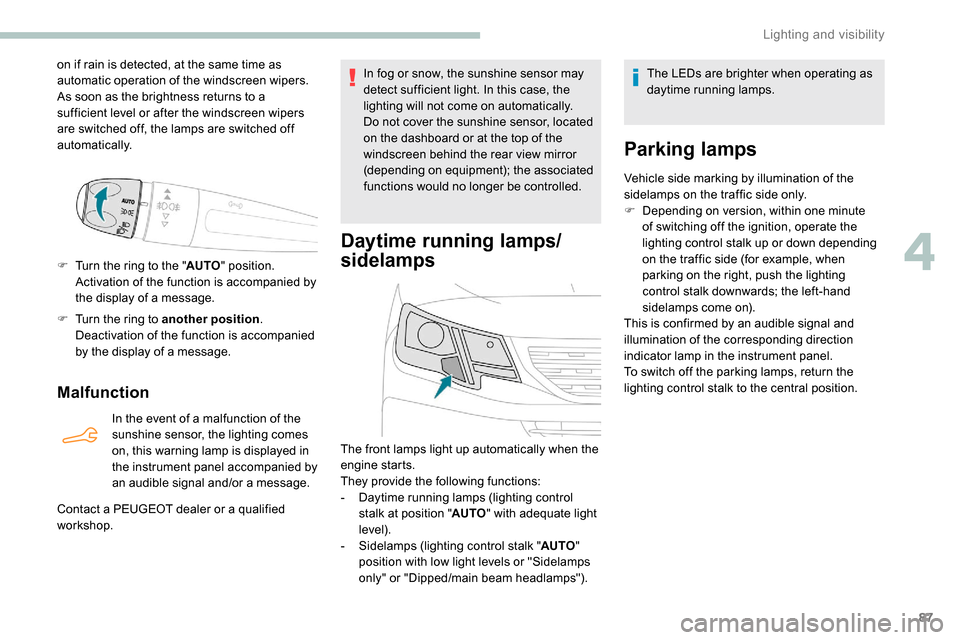
Daytime running lamps/
sidelamps
The front lamps light up automatically when the
engine starts.
They provide the following functions:
-
D
aytime running lamps (lighting control
stalk at position " AUTO" with adequate light
level).
-
S
idelamps (lighting control stalk " AUTO"
position with low light levels or "Sidelamps
only" or "Dipped/main beam headlamps"). The LEDs are brighter when operating as
daytime running lamps.
Parking lamps
Vehicle side marking by illumination of the
sidelamps on the traffic side only.
F
D
epending on version, within one minute
of switching off the ignition, operate the
lighting control stalk up or down depending
on the traffic side (for example, when
parking on the right, push the lighting
control stalk downwards; the left-hand
sidelamps come on).
This is confirmed by an audible signal and
illumination of the corresponding direction
indicator lamp in the instrument panel.
To switch off the parking lamps, return the
lighting control stalk to the central position.
4
Lighting and visibility