Screen Peugeot Partner 2019 User Guide
[x] Cancel search | Manufacturer: PEUGEOT, Model Year: 2019, Model line: Partner, Model: Peugeot Partner 2019Pages: 312, PDF Size: 9.56 MB
Page 31 of 312
29
Instrument panel display screen
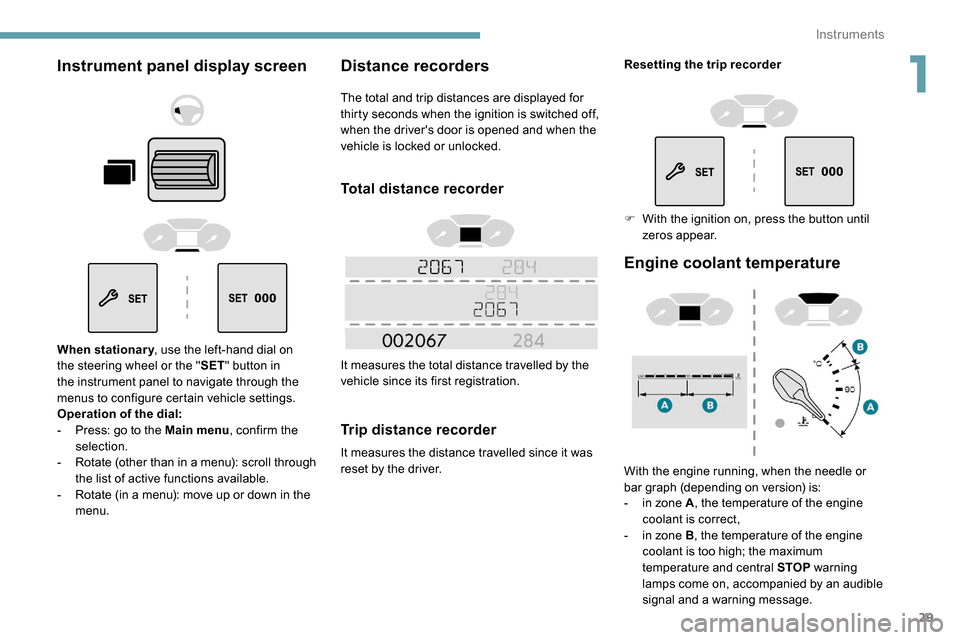
When stationary, use the left-hand dial on
the steering wheel or the " SET" button in
the instrument panel to navigate through the
menus to configure certain vehicle settings.
Operation of the dial:
-
P
ress: go to the Main menu , confirm the
selection.
-
R
otate (other than in a menu): scroll through
the list of active functions available.
-
R
otate (in a menu): move up or down in the
menu.
Distance recorders
The total and trip distances are displayed for
thirty seconds when the ignition is switched off,
when the driver's door is opened and when the
vehicle is locked or unlocked.
Total distance recorder
It measures the total distance travelled by the
vehicle since its first registration.
Trip distance recorder
It measures the distance travelled since it was
reset by the driver.
Engine coolant temperature
With the engine running, when the needle or
bar graph (depending on version) is:
-
i
n zone A , the temperature of the engine
coolant is correct,
-
i
n zone B , the temperature of the engine
coolant is too high; the maximum
temperature and central STOP warning
lamps come on, accompanied by an audible
signal and a warning message.
Resetting the trip recorder
F
W
ith the ignition on, press the button until
zeros appear.
1
Instruments
Page 35 of 312
33
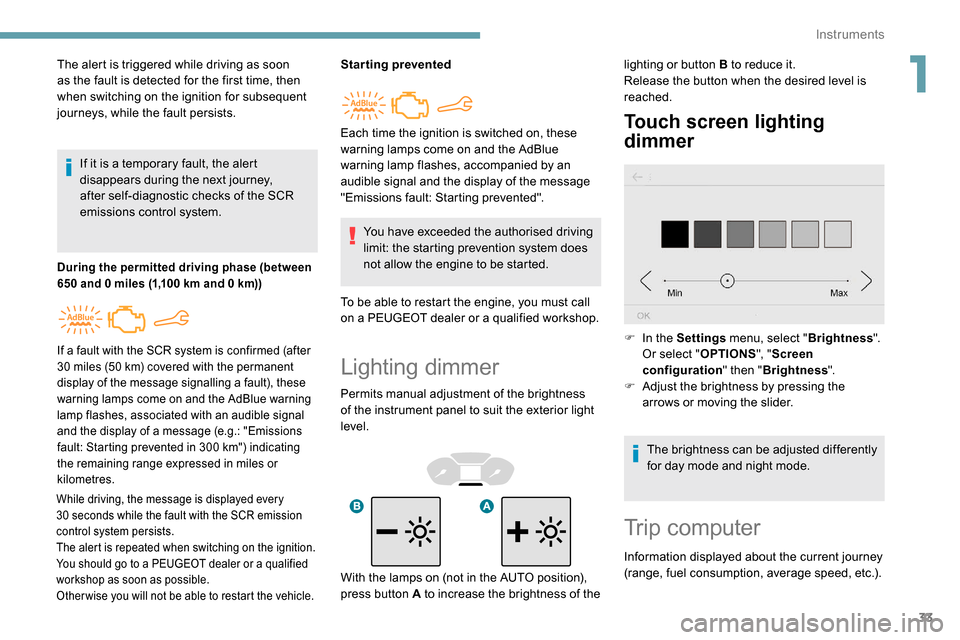
Lighting dimmer
Permits manual adjustment of the brightness
of the instrument panel to suit the exterior light
level.
Touch screen lighting
dimmer
The alert is triggered while driving as soon
as the fault is detected for the first time, then
when switching on the ignition for subsequent
journeys, while the fault persists.If it is a temporary fault, the alert
disappears during the next journey,
after self-diagnostic checks of the SCR
emissions control system.
During the permitted driving phase (between
650 and 0 miles (1,100 km and 0 km))
While driving, the message is displayed every
30 seconds while the fault with the SCR emission
control system persists.
The alert is repeated when switching on the ignition.
You should go to a PEUGEOT dealer or a qualified
workshop as soon as possible.
Other wise you will not be able to restart the vehicle.
Starting prevented
You have exceeded the authorised driving
limit: the starting prevention system does
not allow the engine to be started.
To be able to restart the engine, you must call
on a PEUGEOT dealer or a qualified workshop.
If a fault with the SCR system is confirmed (after
30 miles (50 km) covered with the permanent
display of the message signalling a fault), these
warning lamps come on and the AdBlue warning
lamp flashes, associated with an audible signal
and the display of a message (e.g.: "Emissions
fault: Starting prevented in 300
km") indicating
the remaining range expressed in miles or
kilometres.
Each time the ignition is switched on, these
warning lamps come on and the AdBlue
warning lamp flashes, accompanied by an
audible signal and the display of the message
"Emissions fault: Starting prevented". lighting or button B to reduce it.
Release the button when the desired level is
reached.
F
I
n the Settings menu, select " Brightness".
Or select " OPTIONS", "Screen
configuration " then "Brightness ".
F
A
djust the brightness by pressing the
arrows or moving the slider.
The brightness can be adjusted differently
for day mode and night mode.
Trip computer
Information displayed about the current journey
(range, fuel consumption, average speed, etc.).
With the lamps on (not in the AUTO position),
press button A to increase the brightness of the
1
Instruments
Page 37 of 312
35
Distance travelled
(miles or km)Calculated since the last trip
computer reset.
Stop & Start time counter
(minutes/seconds or hours/minutes)
If your vehicle is fitted with Stop & Start, a time
counter calculates the time spent in STOP mode
during a journey.
It resets to zero every time the ignition is switched on.
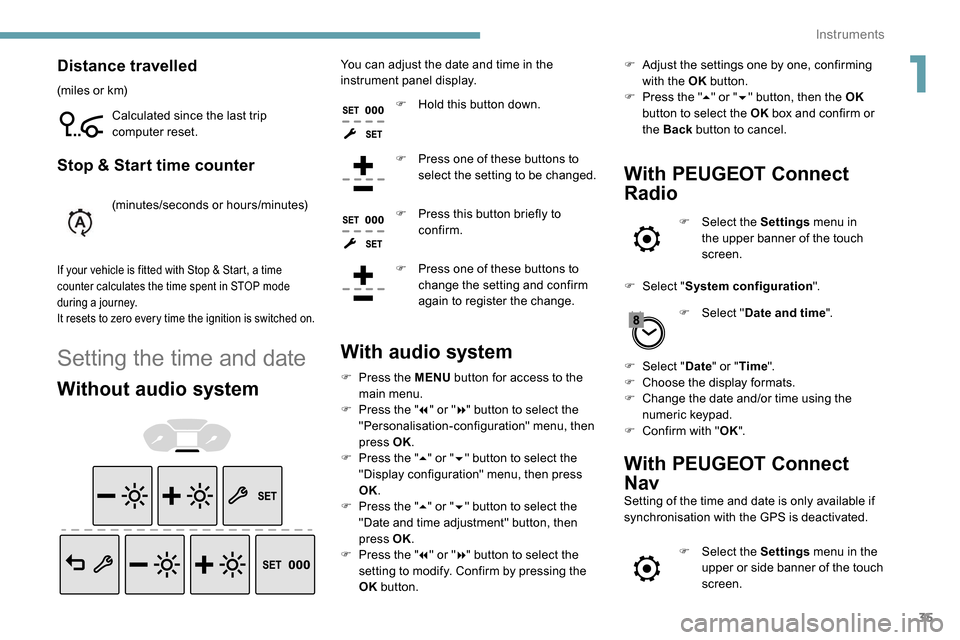
Setting the time and date
Without audio system
You can adjust the date and time in the
instrument panel display.F
H
old this button down.
F
P
ress one of these buttons to
select the setting to be changed.
F
P
ress this button briefly to
confirm.
F
P
ress one of these buttons to
change the setting and confirm
again to register the change.
With audio system
F Press the MENU button for access to the
main menu.
F
P
ress the " 7" or " 8" button to select the
"Personalisation-configuration" menu, then
press OK.
F
P
ress the " 5" or " 6" button to select the
"Display configuration" menu, then press
OK.
F
P
ress the " 5" or " 6" button to select the
"Date and time adjustment" button, then
press OK.
F
P
ress the " 7" or " 8" button to select the
setting to modify. Confirm by pressing the
OK button. F
A
djust the settings one by one, confirming
with the OK button.
F
P
ress the "
5" or " 6" button, then the OK
button to select the OK box and confirm or
the Back button to cancel.
With PEUGEOT Connect
Radio
F Select the Settings menu in
the upper banner of the touch
screen.
F
Sel
ect " System configuration ".
F
Sel
ect "Date and time ".
F
Sel
ect " Date " or "Time ".
F
C
hoose the display formats.
F
C
hange the date and/or time using the
numeric keypad.
F
C
onfirm with " OK".
With PEUGEOT Connect
Nav
Setting of the time and date is only available if
synchronisation with the GPS is deactivated.
F
Sel
ect the Settings menu in the
upper or side banner of the touch
screen.
1
Instruments
Page 41 of 312
39
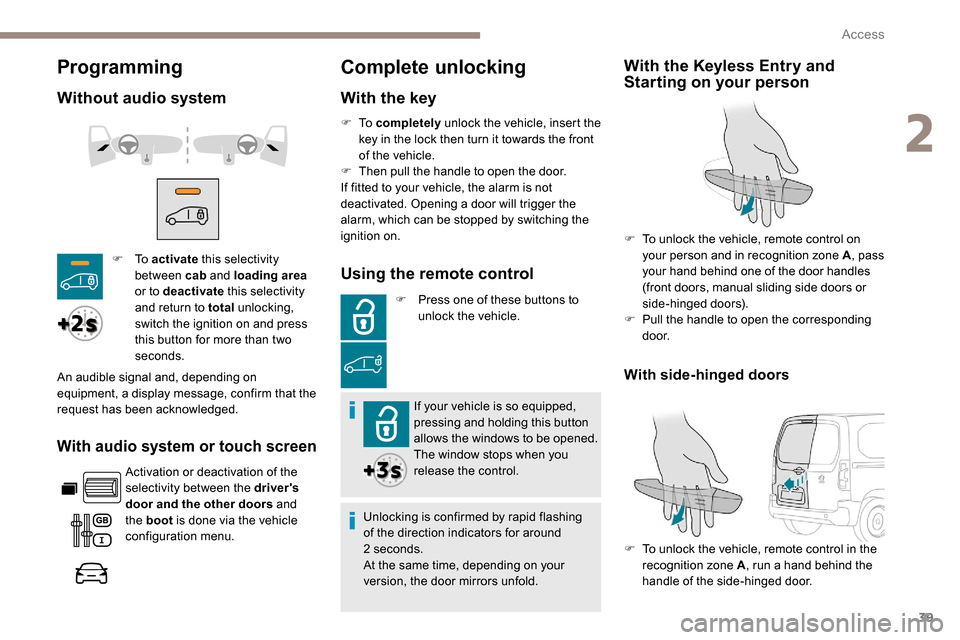
Programming
Without audio system
With audio system or touch screen
Activation or deactivation of the
selectivity between the driver's
door and the other doors and
the boot is done via the vehicle
configuration menu.
Complete unlocking
With the key
F To activate this selectivity
between cab and loading area
or to deactivate this selectivity
and return to total unlocking,
switch the ignition on and press
this button for more than two
seconds.
An audible signal and, depending on
equipment, a display message, confirm that the
request has been acknowledged. F
To
completely unlock the vehicle, insert the
key in the lock then turn it towards the front
of the vehicle.
F
T
hen pull the handle to open the door.
If fitted to your vehicle, the alarm is not
deactivated. Opening a door will trigger the
alarm, which can be stopped by switching the
ignition on.Using the remote control
F Press one of these buttons to unlock the vehicle.
If your vehicle is so equipped,
pressing and holding this button
allows the windows to be opened.
The window stops when you
release the control.
Unlocking is confirmed by rapid flashing
of the direction indicators for around
2
seconds.
At the same time, depending on your
version, the door mirrors unfold.
With the Keyless Entry and
Starting on your person
F To unlock the vehicle, remote control on your person and in recognition zone A , pass
your hand behind one of the door handles
(front doors, manual sliding side doors or
side-hinged doors).
F
P
ull the handle to open the corresponding
d o o r.
F
T
o unlock the vehicle, remote control in the
recognition zone A , run a hand behind the
handle of the side-hinged door.
With side-hinged doors
2
Access
Page 46 of 312
44
Locating your vehicle
This function allows you to identify your vehicle
from a distance, particularly in poor light. Your
vehicle must have been locked for more than
five seconds.
Remote operation of lighting
A short press of the button allows
you to switch on the lighting from a
distance (lighting the sidelamps, the
dipped beam headlamps and number
plate lamps).
A second press on this button before
the end of the timed period cancels
the remote lighting. F
P
ress this button.
This will switch on the courtesy lamps and the
direction indicators will flash for around ten
seconds.
Anti-theft protection
Electronic immobiliser
The remote control contains an electronic chip
which has a special code. When the ignition is
switched on, this code must be recognised in
order for starting to be possible. F
T
o deadlock the vehicle, press the control
again within five seconds .
In the event of a fault, you are
informed by illumination of this
warning lamp, an audible signal and
a message in the screen.
The vehicle will not start; contact a PEUGEOT
dealer as soon as possible. A few seconds after switching off the ignition,
this system locks the engine control system,
therefore preventing the engine from being
started in the event of a break-in.
Back-up control(s)
If the battery is flat, attempt to lock /unlock the
vehicle as usual. If this does not work, use the
mechanical systems described below.
Also use these systems to mechanically lock /
unlock the doors in the event of:
-
c
entral locking system failure,
-
r
emote control battery discharged,
-
r
emote control fault,
-
v
ehicle in an area subject to strong
electromagnetic interference.
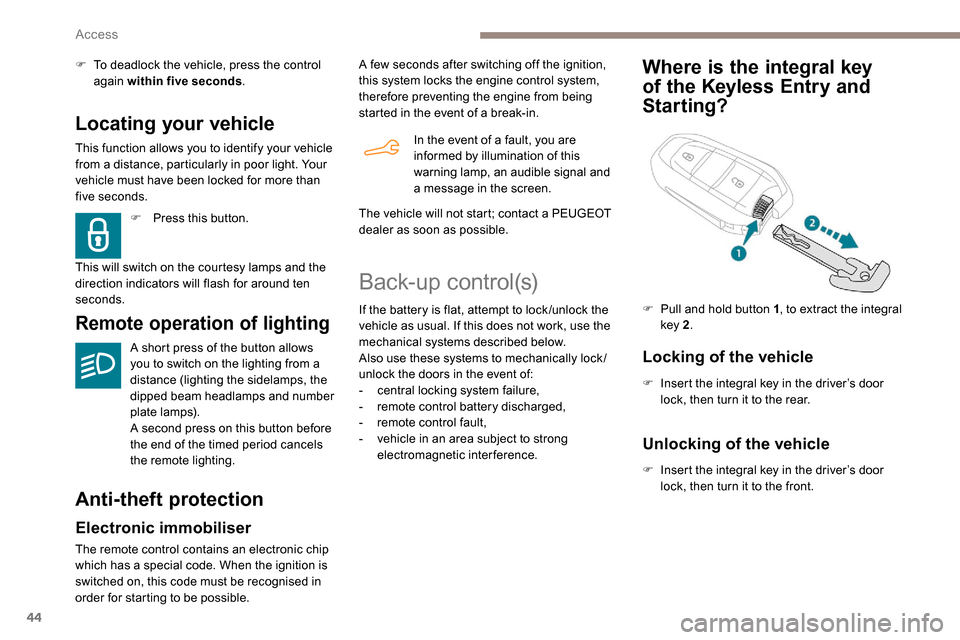
Where is the integral key
of the
K
eyless Entry and
Starting?
Locking of the vehicle
F Insert the integral key in the driver’s door
lock, then turn it to the rear.
F
P
ull and hold button 1
, to extract the integral
key 2 .
Unlocking of the vehicle
F Insert the integral key in the driver’s door
lock, then turn it to the front.
Access
Page 47 of 312
45
If your vehicle has an alarm, it will not be
deactivated/activated on unlocking/locking
the vehicle.
Opening a door will trigger the alarm,
which can be stopped by switching the
ignition on.
To deadlock the vehicle, turn the key again
within five seconds of locking.
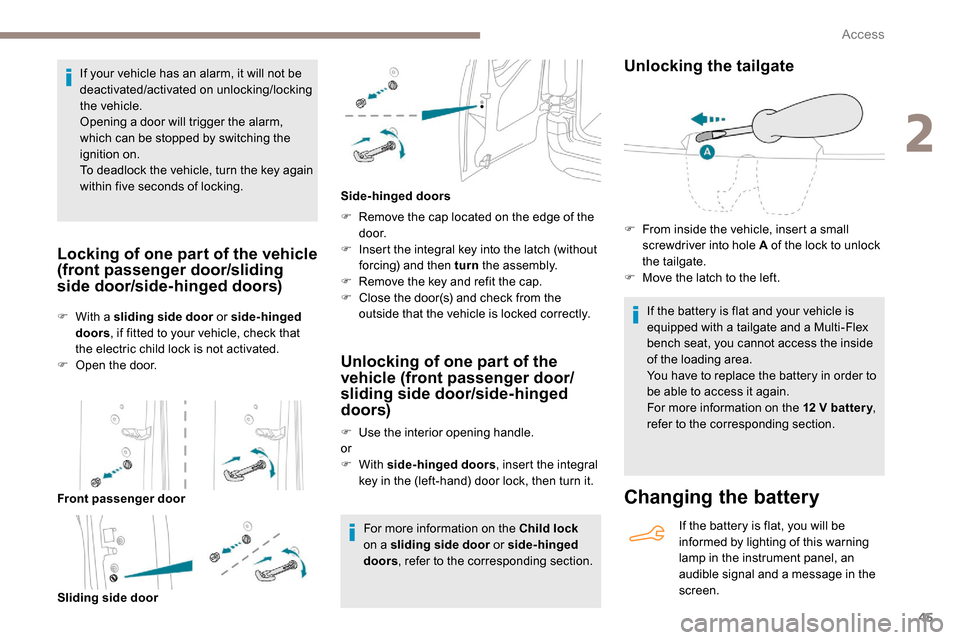
Locking of one part of the vehicle
(front passenger door/sliding
side door/side-hinged doors)
Changing the battery
If the battery is flat, you will be
informed by lighting of this warning
lamp in the instrument panel, an
audible signal and a message in the
screen.
F
W
ith a sliding side door
or side-hinged
doors , if fitted to your vehicle, check that
the electric child lock is not activated.
F
O
pen the door.
Front passenger door Sliding side door F
R
emove the cap located on the edge of the
d o o r.
F
I
nsert the integral key into the latch (without
forcing) and then turn the assembly.
F
R
emove the key and refit the cap.
F
C
lose the door(s) and check from the
outside that the vehicle is locked correctly.
Side-hinged doors
Unlocking of one part of the
vehicle (front passenger door/
sliding side door/side-hinged
doors)
F Use the interior opening handle.
or
F
With side-hinged doors , insert the integral
key in the (left-hand) door lock, then turn it.
For more information on the Child lock
on a sliding side door or side-hinged
doors , refer to the corresponding section.
Unlocking the tailgate
If the battery is flat and your vehicle is
equipped with a tailgate and a Multi-Flex
bench seat, you cannot access the inside
of the loading area.
You have to replace the battery in order to
be able to access it again.
For more information on the 12
V batter y,
refer to the corresponding section.
F
F
rom inside the vehicle, insert a small
screwdriver into hole A of the lock to unlock
the tailgate.
F
M
ove the latch to the left.
2
Access
Page 52 of 312
50
Carrying long or voluminous objects
If you want to drive with the boot open, you
should press the central locking button
to lock the doors. Other wise, every time
the speed of the vehicle exceeds 6 mph
(10
km/h), the locks will rebound and the
alerts mentioned above will appear.
Pressing the central locking button
unlocks the vehicle.
Above 6
mph (10 km/h), this unlocking is
te m p o r a r y.
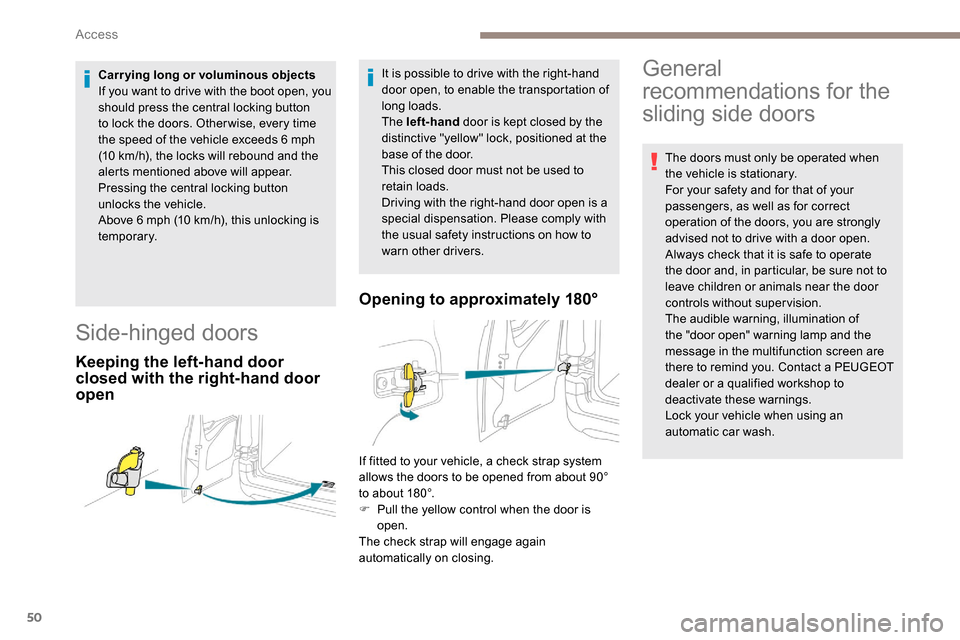
Side-hinged doors
Keeping the left-hand door
closed with the right-hand door
open Opening to approximately 180°
It is possible to drive with the right-hand
door open, to enable the transportation of
long loads.
The left-hand
door is kept closed by the
distinctive "yellow" lock, positioned at the
base of the door.
This closed door must not be used to
retain loads.
Driving with the right-hand door open is a
special dispensation. Please comply with
the usual safety instructions on how to
warn other drivers.General
recommendations for the
sliding side doors
The doors must only be operated when
the vehicle is stationary.
For your safety and for that of your
passengers, as well as for correct
operation of the doors, you are strongly
advised not to drive with a door open.
Always check that it is safe to operate
the door and, in particular, be sure not to
leave children or animals near the door
controls without supervision.
The audible warning, illumination of
the "door open" warning lamp and the
message in the multifunction screen are
there to remind you. Contact a PEUGEOT
dealer or a qualified workshop to
deactivate these warnings.
Lock your vehicle when using an
automatic car wash.
If fitted to your vehicle, a check strap system
allows the doors to be opened from about 90°
to about 180°.
F
P
ull the yellow control when the door is
open.
The check strap will engage again
automatically on closing.
Access
Page 60 of 312
58
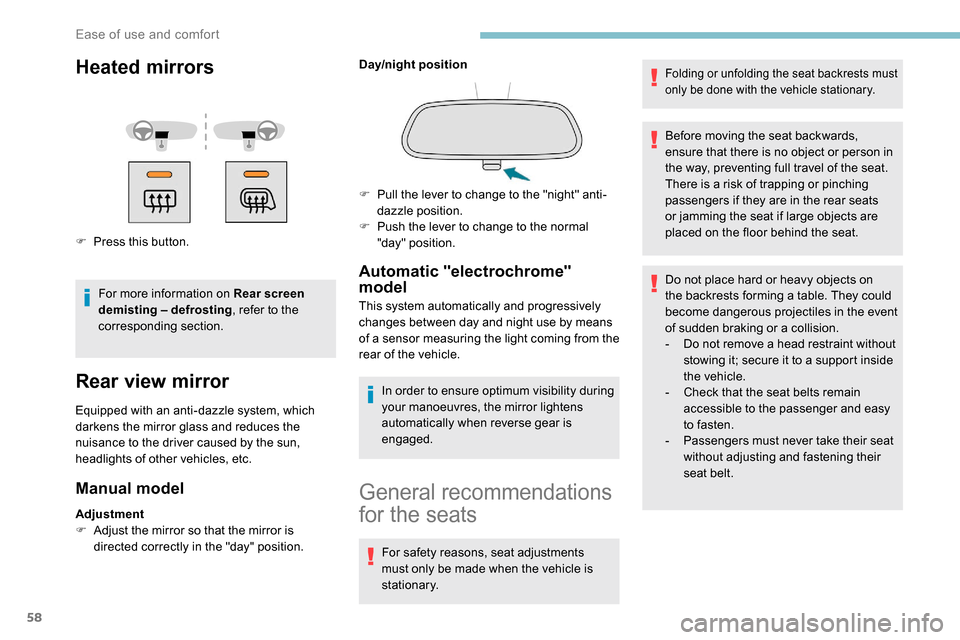
Heated mirrors
F Press this button.For more information on Rear screen
demisting – defrosting , refer to the
corresponding section.
Rear view mirror
Equipped with an anti-dazzle system, which
darkens the mirror glass and reduces the
nuisance to the driver caused by the sun,
headlights of other vehicles, etc.
Manual model
Adjustment
F A djust the mirror so that the mirror is
directed correctly in the "day" position. Day/night position
Automatic "electrochrome"
model
This system automatically and progressively
changes between day and night use by means
of a sensor measuring the light coming from the
rear of the vehicle.
In order to ensure optimum visibility during
your manoeuvres, the mirror lightens
automatically when reverse gear is
engaged.
F
P
ull the lever to change to the "night" anti-
dazzle position.
F
P
ush the lever to change to the normal
"day" position.
General recommendations
for the seats
For safety reasons, seat adjustments
must only be made when the vehicle is
stationary.
Folding or unfolding the seat backrests must
only be done with the vehicle stationary.
Before moving the seat backwards,
ensure that there is no object or person in
the way, preventing full travel of the seat.
There is a risk of trapping or pinching
passengers if they are in the rear seats
or jamming the seat if large objects are
placed on the floor behind the seat.
Do not place hard or heavy objects on
the backrests forming a table. They could
become dangerous projectiles in the event
of sudden braking or a collision.
-
D
o not remove a head restraint without
stowing it; secure it to a support inside
the vehicle.
-
C
heck that the seat belts remain
accessible to the passenger and easy
to fasten.
-
P
assengers must never take their seat
without adjusting and fastening their
seat belt.
Ease of use and comfort
Page 67 of 312
65
Refitting
To refit the mat on the driver's side:
F p osition the mat correctly,
F
r
eattach the fixings by pressing,
F
c
heck that the mat is secured correctly.
To avoid any risk of jamming the pedals:
-
o
nly use mats which are suited to the
fixings already present in the vehicle;
these fixings must be used.
-
n
ever place one mat on top of another.
The use of mats not approved by
PEUGEOT may inter fere with access to
the pedals and hinder the operation of the
cruise control/speed limiter.
The mats approved by PEUGEOT have
two fixings located below the seat.
Overhead storage unit
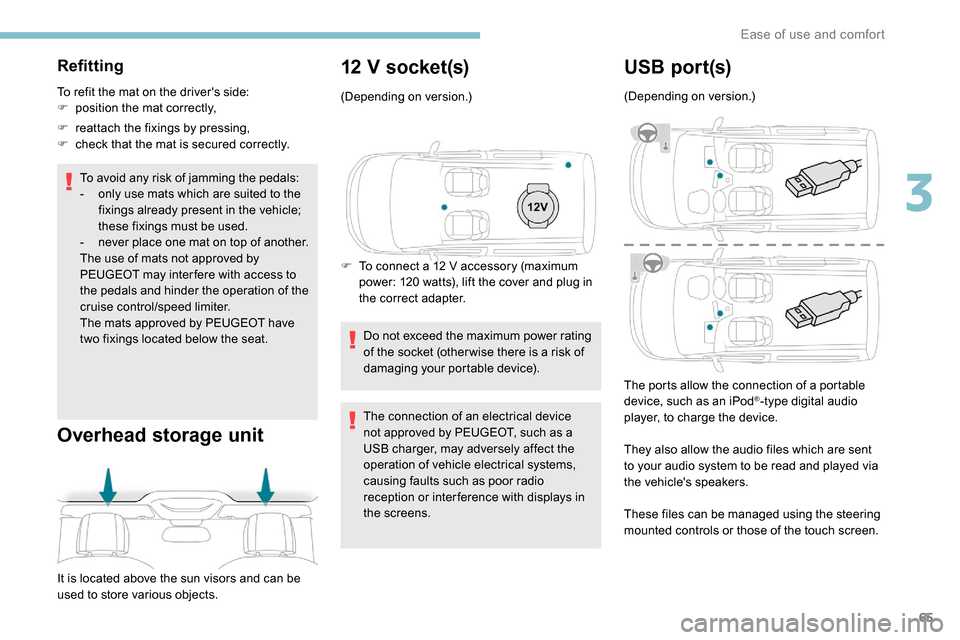
It is located above the sun visors and can be
used to store various objects.
12 V socket(s)
(Depending on version.)
F
T
o connect a 12 V accessory (maximum
power: 120 watts), lift the cover and plug in
the correct adapter.
Do not exceed the maximum power rating
of the socket (other wise there is a risk of
damaging your portable device).
The connection of an electrical device
not approved by PEUGEOT, such as a
USB charger, may adversely affect the
operation of vehicle electrical systems,
causing faults such as poor radio
reception or inter ference with displays in
the screens.
USB por t(s)
(Depending on version.)
The ports allow the connection of a portable
device, such as an iPod
®-type digital audio
player, to charge the device.
They also allow the audio files which are sent
to your audio system to be read and played via
the vehicle's speakers.
These files can be managed using the steering
mounted controls or those of the touch screen.
3
Ease of use and comfort
Page 68 of 312
66
AC 220V
50Hz120W
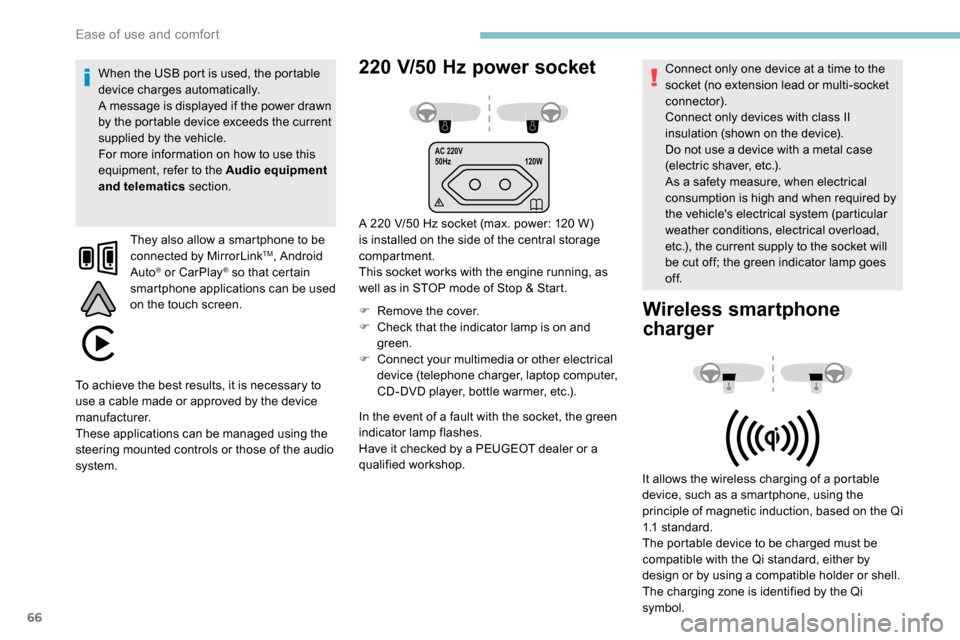
220 V/50 Hz power socket
A 220 V/50 Hz socket (max. power: 120 W)
i s installed on the side of the central storage
compartment.
This socket works with the engine running, as
well as in STOP mode of Stop & Start.
F
R
emove the cover.
F
C
heck that the indicator lamp is on and
green.
F
C
onnect your multimedia or other electrical
device (telephone charger, laptop computer,
CD-DVD player, bottle warmer, etc.).
When the USB port is used, the portable
device charges automatically.
A message is displayed if the power drawn
by the portable device exceeds the current
supplied by the vehicle.
For more information on how to use this
equipment, refer to the Audio equipment
and telematics
section.
They also allow a smartphone to be
connected by MirrorLink
TM, Android
Auto® or CarPlay® so that certain
smartphone applications can be used
on the touch screen.
In the event of a fault with the socket, the green
indicator lamp flashes.
Have it checked by a PEUGEOT dealer or a
qualified workshop. Connect only one device at a time to the
socket (no extension lead or multi-socket
connector).
Connect only devices with class II
insulation (shown on the device).
Do not use a device with a metal case
(electric shaver, etc.).
As a safety measure, when electrical
consumption is high and when required by
the vehicle's electrical system (particular
weather conditions, electrical overload,
etc.), the current supply to the socket will
be cut off; the green indicator lamp goes
of f.
Wireless smartphone
charger
It allows the wireless charging of a portable
device, such as a smartphone, using the
principle of magnetic induction, based on the Qi
1.1 standard.
The portable device to be charged must be
compatible with the Qi standard, either by
design or by using a compatible holder or shell.
The charging zone is identified by the Qi
symbol.
To achieve the best results, it is necessary to
use a cable made or approved by the device
manufacturer.
These applications can be managed using the
steering mounted controls or those of the audio
system.
Ease of use and comfort