Level Peugeot Partner 2019 Owner's Guide
[x] Cancel search | Manufacturer: PEUGEOT, Model Year: 2019, Model line: Partner, Model: Peugeot Partner 2019Pages: 312, PDF Size: 9.56 MB
Page 89 of 312
87
on if rain is detected, at the same time as
automatic operation of the windscreen wipers.
As soon as the brightness returns to a
sufficient level or after the windscreen wipers
are switched off, the lamps are switched off
automatically.
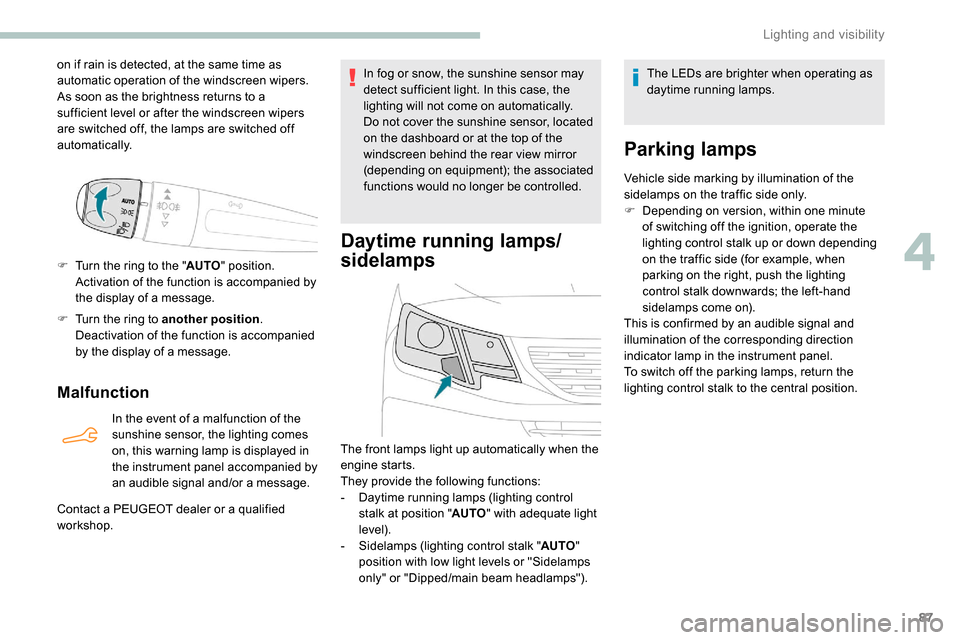
F
T
urn the ring to the " AUTO" position.
Activation of the function is accompanied by
the display of a message.
F
T
urn the ring to another position .
Deactivation of the function is accompanied
by the display of a message.
Malfunction
In the event of a malfunction of the
sunshine sensor, the lighting comes
on, this warning lamp is displayed in
the instrument panel accompanied by
an audible signal and/or a message.
Contact a PEUGEOT dealer or a qualified
workshop. In fog or snow, the sunshine sensor may
detect sufficient light. In this case, the
lighting will not come on automatically.
Do not cover the sunshine sensor, located
on the dashboard or at the top of the
windscreen behind the rear view mirror
(depending on equipment); the associated
functions would no longer be controlled.
Daytime running lamps/
sidelamps
The front lamps light up automatically when the
engine starts.
They provide the following functions:
-
D
aytime running lamps (lighting control
stalk at position " AUTO" with adequate light
level).
-
S
idelamps (lighting control stalk " AUTO"
position with low light levels or "Sidelamps
only" or "Dipped/main beam headlamps"). The LEDs are brighter when operating as
daytime running lamps.
Parking lamps
Vehicle side marking by illumination of the
sidelamps on the traffic side only.
F
D
epending on version, within one minute
of switching off the ignition, operate the
lighting control stalk up or down depending
on the traffic side (for example, when
parking on the right, push the lighting
control stalk downwards; the left-hand
sidelamps come on).
This is confirmed by an audible signal and
illumination of the corresponding direction
indicator lamp in the instrument panel.
To switch off the parking lamps, return the
lighting control stalk to the central position.
4
Lighting and visibility
Page 91 of 312
89
Activation/Deactivation
Activation and deactivation are
done via the vehicle configuration
menu.When deactivated, the lighting system changes
to "automatic illumination of headlamps" mode.
The state of the system stays in the memory
when switching off the ignition.
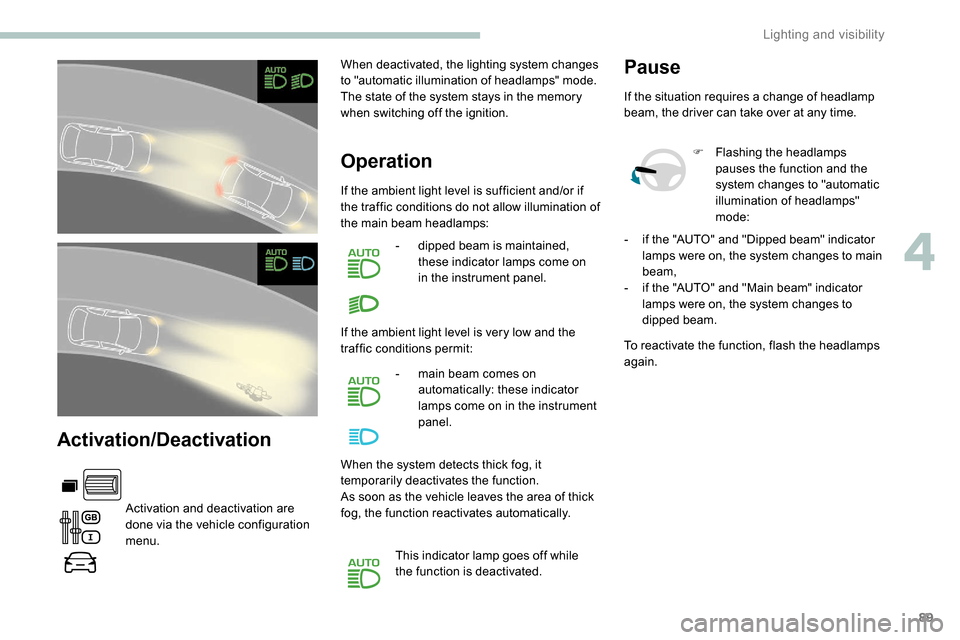
Operation
If the ambient light level is sufficient and/or if
the traffic conditions do not allow illumination of
the main beam headlamps:
-
d
ipped beam is maintained,
these indicator lamps come on
in the instrument panel.
If the ambient light level is very low and the
traffic conditions permit: -
m
ain beam comes on
automatically: these indicator
lamps come on in the instrument
panel.
When the system detects thick fog, it
temporarily deactivates the function.
As soon as the vehicle leaves the area of thick
fog, the function reactivates automatically.
This indicator lamp goes off while
the function is deactivated.
Pause
If the situation requires a change of headlamp
beam, the driver can take over at any time. F
F
lashing the headlamps
pauses the function and the
system changes to "automatic
illumination of headlamps"
mode:
To reactivate the function, flash the headlamps
again. -
i
f the "AUTO" and "Dipped beam" indicator
lamps were on, the system changes to main
beam,
-
i
f the "AUTO" and "Main beam" indicator
lamps were on, the system changes to
dipped beam.
4
Lighting and visibility
Page 103 of 312
101
The trailer stability assist system
offers increased safety in normal
driving conditions, provided that the
recommendations on towing a trailer are
obser ved. It must not encourage the driver
to take additional risks, such as towing
a trailer in adverse operating conditions
(overloading, failure to obser ve the trailer
nose weight, worn or under-inflated tyres,
faulty braking system, etc.) or drive at too
high a speed.
In certain cases, the swaying of the trailer
may not be detected by the ESC system,
particularly with a light trailer.
When driving on slippery or poor sur faces,
the system may not be able to prevent
sudden swaying of the trailer.
Advanced Grip Control
Special patented traction control system which
improves driveability on snow, mud and sand.
This system, the operation of which has been
optimised for each situation, allows you to
manoeuvre in most conditions of poor grip
(encountered during passenger vehicle use).Associated with all-season M+S (Mud and
Snow) tyres, this system offers a compromise
between safety, grip and driveability.
The accelerator pedal should be pressed
sufficiently to allow the system to use the power
of the engine. Operation at high engine speeds
is completely normal.
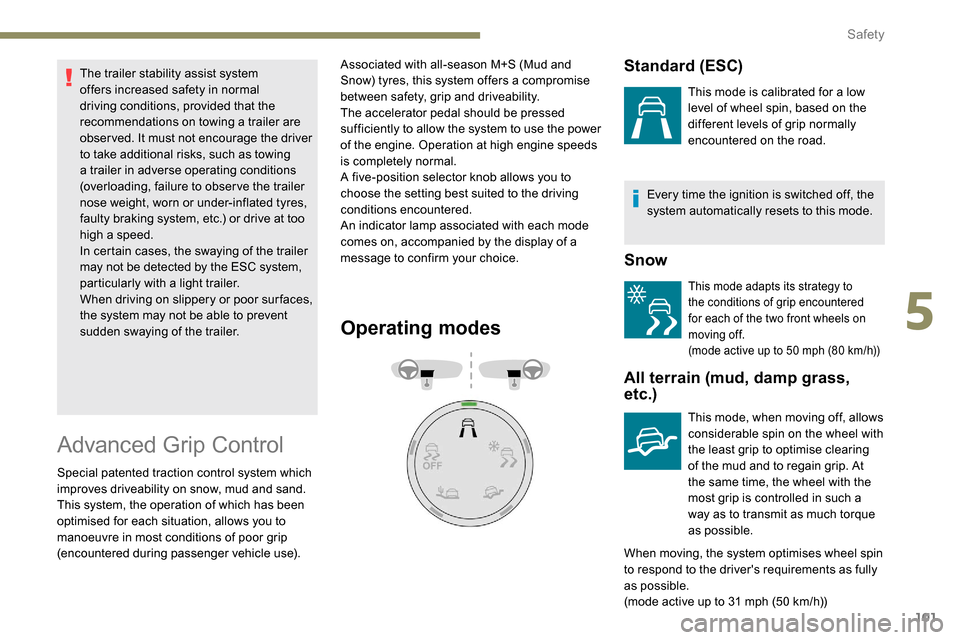
A five-position selector knob allows you to
choose the setting best suited to the driving
conditions encountered.
An indicator lamp associated with each mode
comes on, accompanied by the display of a
message to confirm your choice.
Operating modes
Every time the ignition is switched off, the
system automatically resets to this mode.
Snow
This mode adapts its strategy to
the conditions of grip encountered
for each of the two front wheels on
moving off.
(mode active up to 50
mph (80 km/h))
All terrain (mud, damp grass,
etc.)
This mode, when moving off, allows
considerable spin on the wheel with
the least grip to optimise clearing
of the mud and to regain grip. At
the same time, the wheel with the
most grip is controlled in such a
way as to transmit as much torque
as possible.
When moving, the system optimises wheel spin
to respond to the driver's requirements as fully
as possible.
(mode active up to 31
mph (50 km/h))
Standard (ESC)
This mode is calibrated for a low
level of wheel spin, based on the
different levels of grip normally
encountered on the road.
5
Safety
Page 115 of 312
113
Advice
An incorrectly installed child seat
compromises the child's safety in the
event of an accident.
Ensure that there is no seat belt or seat
belt buckle under the child seat, as this
could destabilise it.
Remember to fasten the seat belts or the
child seat harnesses keeping the slack
relative to the child's body to a minimum,
even for short journeys.
When installing a child seat using the seat
belt, ensure that the seat belt is tightened
correctly on the child seat and that it
secures the child seat firmly on the seat
of your vehicle. If your passenger seat is
adjustable, move it forwards if necessary.
The head restraint must be removed
before installing a child seat with a
backrest on a passenger seat.
Ensure that the head restraint is stored or
attached securely to prevent it from being
thrown around the vehicle in the event
of sharp braking. Refit the head restraint
once the child seat has been removed.Children in the front
Deactivate the front passenger airbag
when a rear ward facing child seat is
installed on the front passenger seat.
Otherwise, the child would risk being
seriously injured or killed if the airbag
were deployed.Installing a booster seat
The chest part of the seat belt must be
positioned on the child's shoulder without
touching the neck.
Ensure that the lap part of the seat belt
passes correctly over the child's thighs.
We recommend using a booster seat with
a backrest equipped with a belt guide at
shoulder level.
Additional protections
To prevent accidental opening of the doors
and rear windows, use the child lock.
Take care not to open the rear windows by
more than one third.
To protect young children from the rays
of the sun, fit side blinds on the rear
windows.
As a safety precaution, do not leave:
-
a c
hild or children alone and
unattended in a vehicle,
-
a c
hild or an animal in a vehicle
which is exposed to the sun, with the
windows closed,
-
t
he keys within reach of children inside
the vehicle.
Children in the rear
In the rear seats, always leave sufficient
space between the front seat and:
-
a r
ear ward facing child seat,
-
t
he child's feet for a child seat fitted
forward facing.
To do this, move the front seat for wards
and, if necessary, move its backrest into
the upright position.
For optimal installation of the forward
facing child seat, verify that its backrest is
as close as possible to the backrest of the
vehicle seat, if possible in contact with it.
5
Safety
Page 123 of 312
121
In the event of a fault, you are
informed by illumination of this
warning lamp, an audible signal and
a message in the screen.
A few seconds after switching off the ignition,
this system locks the engine control system,
therefore preventing the engine from being
started in the event of a break-in.
The vehicle will not start; contact a PEUGEOT
dealer as soon as possible.
Manual parking brake
Application
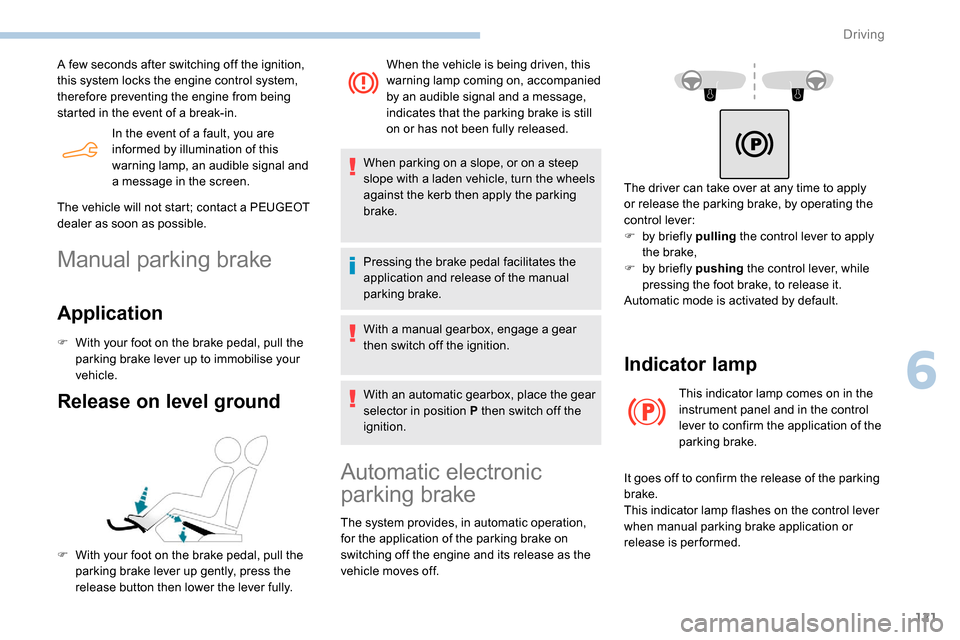
F With your foot on the brake pedal, pull the
parking brake lever up to immobilise your
vehicle.
Release on level ground
F With your foot on the brake pedal, pull the parking brake lever up gently, press the
release button then lower the lever fully. When the vehicle is being driven, this
warning lamp coming on, accompanied
by an audible signal and a message,
indicates that the parking brake is still
on or has not been fully released.
When parking on a slope, or on a steep
slope with a laden vehicle, turn the wheels
against the kerb then apply the parking
brake.
Pressing the brake pedal facilitates the
application and release of the manual
parking brake.
With a manual gearbox, engage a gear
then switch off the ignition.
With an automatic gearbox, place the gear
selector in position P then switch off the
ignition.
Automatic electronic
parking brake
The system provides, in automatic operation,
for the application of the parking brake on
switching off the engine and its release as the
vehicle moves off. The driver can take over at any time to apply
or release the parking brake, by operating the
control lever:
F
b
y briefly pulling
the control lever to apply
the brake,
F
b
y briefly pushing
the control lever, while
pressing the foot brake, to release it.
Automatic mode is activated by default.
Indicator lamp
This indicator lamp comes on in the
instrument panel and in the control
lever to confirm the application of the
parking brake.
It goes off to confirm the release of the parking
brake.
This indicator lamp flashes on the control lever
when manual parking brake application or
release is performed.
6
Driving
Page 132 of 312
130
To reduce fuel consumption when
stationary for long periods with the
engine running (traffic jam, etc.), position
the selector on N and apply the parking
brake.
Gear efficiency indicator
(Depending on engine.)
This system reduces fuel consumption by
recommending the most appropriate gear.
Operation
Depending on the driving situation and your
vehicle's equipment, the system may advise
you to skip one or more gears. You can
follow this indication without engaging the
intermediate gears.
Gear shift recommendations must not be
considered as compulsory. In fact, the road
layout, the traffic density and safety remain the
deciding factors when choosing the best gear.
The driver therefore remains responsible for
deciding whether or not to follow the indications
issued by the system.
This function cannot be deactivated.With an automatic gearbox, the system is
only active in manual operation.
The information appears in the
instrument panel, in the form of an
ascending or descending arrow and
the recommended gear.
The system adapts its gear shift
recommendation according to the driving
conditions (slope, load, etc.) and the
driver’s requirements (power, acceleration,
braking, etc.).
The system never suggests:
-
e
ngaging first gear,
-
enga
ging reverse.
Stop & Start
The Stop & Start system puts the engine
t emporarily into standby – STOP mode – during
stops in traffic (red lights, traffic jams, etc.). The
engine restarts automatically – START mode –
as soon as you want to move off.
The restart takes place instantly, quickly and
silently.
Per fect for urban use, the Stop & Start system
reduces fuel consumption and exhaust
emissions as well as the noise level when
stationary.
Going into engine STOP
mode
For your convenience during parking
manoeuvres, STOP mode is not available
for a few seconds after coming out of
reverse gear.
The Stop & Start does not affect the
functionality of the vehicle, such as for
example, braking, power steering, etc.
A slight delay between the vehicle
stopping and the engine cutting out may
be noticed.
Never refuel with the engine in STOP
mode; you must switch off the ignition.
When the vehicle speed is below 2 mph
( 3 km/h) or the vehicle is stationary
(depending on engine), this indicator lamp
comes on in the instrument panel and the
engine goes into standby automatically:
- With a manual gearbox , when you put the
gearbox into neutral and release the clutch
pedal.
-
W
ith an automatic gearbox , when you
press the brake pedal or put the gear
selector in position N .
Driving
Page 153 of 312
151
Operating conditions and
limits
The ESC system must not be faulty.
The DSC/ASR systems must not be
deactivated.
All passenger seat belts must be fastened.
Driving at a steady speed on roads with few
bends is required.The system is automatically deactivated
after the use of certain "space-saver"
type spare wheels is detected (smaller
diameter).
The system is automatically deactivated
after detection of a fault with the brake
pedal switch or with at least two brake
lamps. After an impact, the function automatically
stops operating. Contact a PEUGEOT
dealer or a qualified workshop to have the
system checked.
Distance Alert
It warns the driver if his vehicle is at risk of
collision with the vehicle in front or a pedestrian
present in his traffic lane.
In the following cases, deactivating the system
via the vehicle's configuration menu is advised:
-
t
owing a trailer,
-
c
arrying long objects on roof bars or roof
rack,
-
w
ith snow chains fitted,
-
b
efore using an automatic car wash, with
the engine running,
-
b
efore placing the vehicle on a rolling road
in a workshop,
-
t
owed vehicle, engine running,
-
f
ollowing an impact to the windscreen close
to the detection camera. It is possible that warnings are not given,
are given too late or seem unjustified.
Consequently, always stay in control of
your vehicle and be prepared to react at
any time to avoid an accident.
The current threshold can
be modified via the vehicle
configuration menu.
You can select one of three pre-defined
thresholds:
- "
Distant ",
- "
Normal ",
- "
Close ".
The last threshold selected is memorised when
the ignition is switched off.
Operation
Depending on the degree of risk of collision
detected by the system and the alert threshold
chosen by the driver, different levels of
alert can be triggered and displayed in the
instrument panel.
They take account of the vehicle dynamics, the
speed of your vehicle and the one in front, the
environmental conditions, the operation of the
vehicle (cornering, actions on the pedals, etc.)
to trigger the alert at the best moment.
Modifying the alert trigger
threshold
This threshold determines how you wish to be
warned of the presence of a vehicle moving
or stationary in front of you, or a pedestrian
present in your traffic lane. Level 1 (orange)
: visual alert only,
signalling to you that the vehicle in
front is very close.
The message " Vehicle close" is
displayed.
6
Driving
Page 154 of 312
152
Where the speed of your vehicle is too
high approaching another vehicle, the first
level of alert may not be displayed: the
level 2 alert may be displayed directly.
Important: the level 1 alert is never
displayed for a stationary obstacle or
when the " Close" trigger threshold has
been selected.
Intelligent emergency
braking assistance
If the driver brakes, but not sufficiently to avoid
a collision, this system will supplement the
braking, within the limits of the laws of physics.
This assistance will only be provided if you
press the brake pedal.
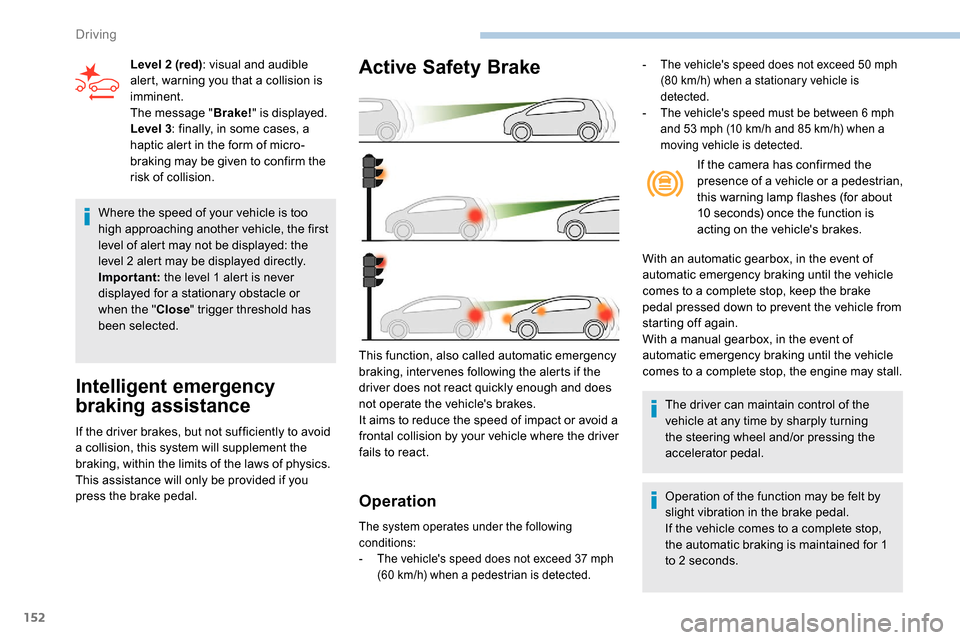
Active Safety Brake
Operation
The system operates under the following
conditions:
-
T
he vehicle's speed does not exceed 37 mph
(60
km/h) when a pedestrian is detected.
This function, also called automatic emergency
braking, inter venes following the alerts if the
driver does not react quickly enough and does
not operate the vehicle's brakes.
It aims to reduce the speed of impact or avoid a
frontal collision by your vehicle where the driver
fails to react.
Level 2 (red)
: visual and audible
alert, warning you that a collision is
imminent.
The message " Brake!" is displayed.
Level 3 : finally, in some cases, a
haptic alert in the form of micro-
braking may be given to confirm the
risk of collision. If the camera has confirmed the
presence of a vehicle or a pedestrian,
this warning lamp flashes (for about
10 seconds) once the function is
acting on the vehicle's brakes.
With an automatic gearbox, in the event of
automatic emergency braking until the vehicle
comes to a complete stop, keep the brake
pedal pressed down to prevent the vehicle from
starting off again.
With a manual gearbox, in the event of
automatic emergency braking until the vehicle
comes to a complete stop, the engine may stall.
The driver can maintain control of the
vehicle at any time by sharply turning
the steering wheel and/or pressing the
accelerator pedal.
Operation of the function may be felt by
slight vibration in the brake pedal.
If the vehicle comes to a complete stop,
the automatic braking is maintained for 1
to 2
seconds.
- The vehicle's speed does not exceed 50 mph
(80 km/h) when a stationary vehicle is
detected.
-
T
he vehicle's speed must be between 6 mph
and 53
mph (10 km/h and 85 km/h) when a
moving vehicle is detected.
Driving
Page 161 of 312
159
Fatigue detection system
Take a break as soon as you feel tired or at
least every two hours.
These systems cannot in any circumstances
replace the need for vigilance on the part of
the driver who must remain in control of their
decisions. It is never the intention of these
systems to keep the driver awake or to prevent
the driver from falling asleep at the wheel.
It is the driver’s responsibility to stop if feeling
tired.
Activation/Deactivation
The function is activated or
deactivated via the vehicle
configuration menu.
The state of the system stays in the memory
when the ignition is switched off.
Driver Attention Warning
The system triggers an alert as soon
as it detects that the driver has not
taken a break after two hours of driving
at a speed above 40
mph (65 km/h).
This alert is issued via the display of a
message encouraging you to take a break,
accompanied by an audible signal.
If the driver does not follow this advice, the
alert is repeated hourly until the vehicle is
stopped.
The system resets itself if one of the following
conditions is met:
-
e
ngine running, the vehicle has been
stationary for more than 15
minutes,
-
t
he ignition has been switched off for a few
minutes,
-
t
he driver's seat belt is unfastened and their
door is opened.
As soon as the speed of the vehicle drops
below 40
mph (65 km/h), the system goes
into standby.
The driving time is counted again once the
speed is above 40
mph (65 km/h).
Driver Attention Alert
Depending on version, the "Driver Attention
Warning" system is combined with the "Driver
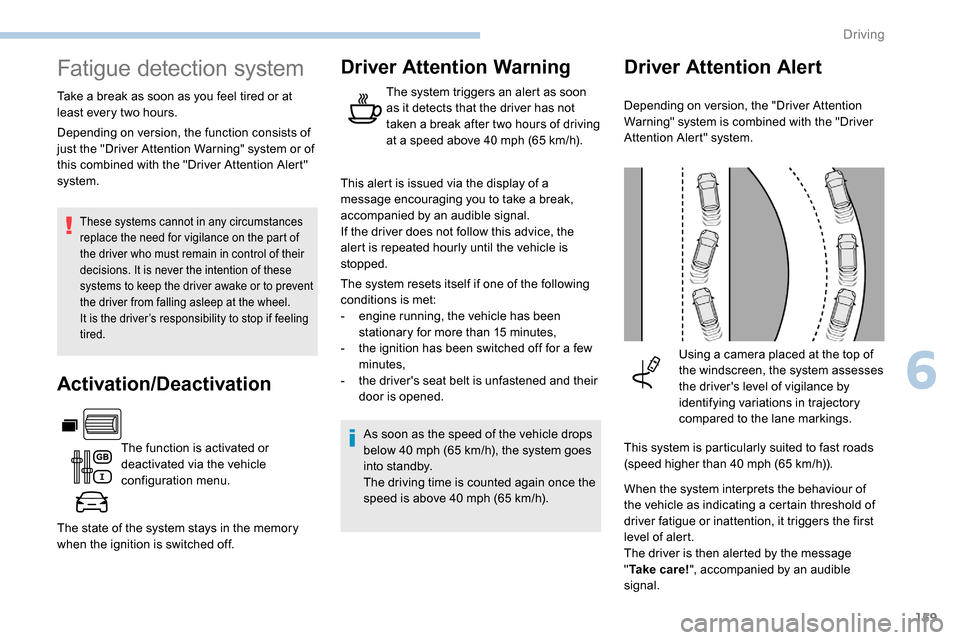
Attention Alert" system.Using a camera placed at the top of
the windscreen, the system assesses
the driver's level of vigilance by
identifying variations in trajectory
compared to the lane markings.
This system is particularly suited to fast roads
(speed higher than 40
mph (65 km/h)).
When the system interprets the behaviour of
the vehicle as indicating a certain threshold of
driver fatigue or inattention, it triggers the first
level of alert.
The driver is then alerted by the message
" Ta k e c a r e ! ", accompanied by an audible
signal.
Depending on version, the function consists of
just the "Driver Attention Warning" system or of
this combined with the "Driver Attention Alert"
system.
6
Driving
Page 162 of 312
160
After three first level alerts, the system triggers
a further alert with the message "Dangerous
driving: take a break ", accompanied by a
more pronounced audible signal.
In certain driving conditions (poor road
sur face or strong winds), the system may
give alerts irrespective of the driver's level
of vigilance.
The following situations may interfere with
the operation of the system or prevent it
from working:
-
p
oor visibility (inadequate lighting of
the roadway, falling snow, heavy rain,
dense fog, etc.),
-
d
azzle (headlamps of an oncoming
vehicle, low sun, reflections on a damp
road, leaving a tunnel, alternating
shade and light, etc.),
-
w
indscreen area located in front of the
camera: dirty, misted, frost-covered,
snow-covered, damaged or covered by
a s t i c ke r,
-
lan
e markings absent, worn, concealed
(snow, mud) or multiple (roadworks,
e t c .),
-
c
lose to the vehicle ahead (lane
markings not detected),
-
r
oads that are narrow, winding, etc. Clean the windscreen regularly,
particularly the area in front of the camera.
The internal sur face of the windscreen can
also become misted around the camera.
In humid and cold weather, demist the
windscreen regularly.
Do not allow snow to accumulate on the
bonnet or roof of the vehicle as this could
obstruct the detection camera.
Parking sensors
This function is a manoeuvring aid which
cannot, in any circumstances, replace the
need for vigilance on the part of the driver.
The driver must remain attentive and stay
in control of their vehicle.
They must always check the vehicle’s
surroundings before undertaking a
manoeuvre.
During the entire manoeuvre, the driver
must ensure that the space remains clear.
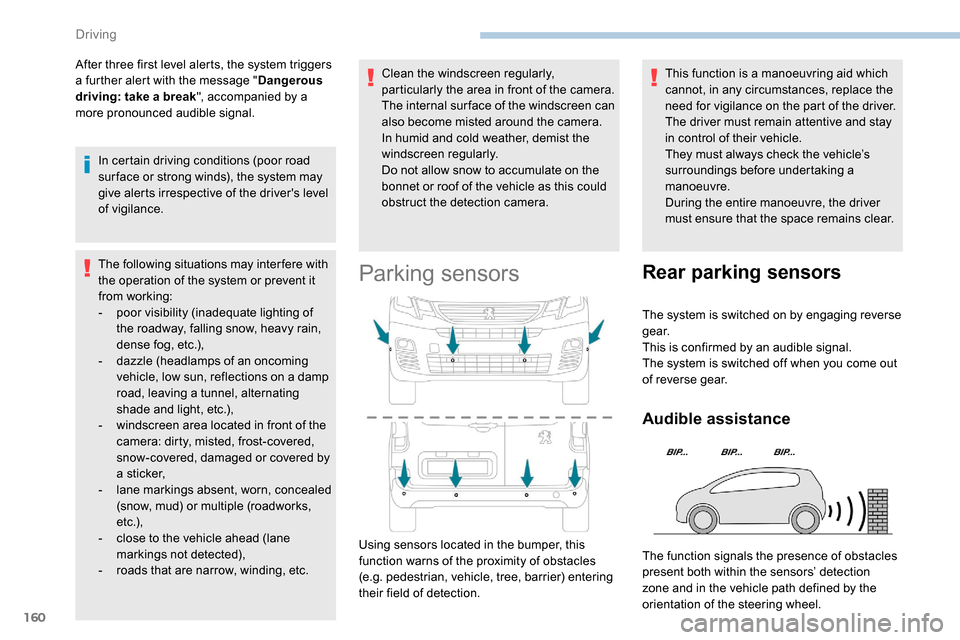
Using sensors located in the bumper, this
function warns of the proximity of obstacles
(e.g. pedestrian, vehicle, tree, barrier) entering
their field of detection.
Rear parking sensors
The system is switched on by engaging reverse
g e a r.
This is confirmed by an audible signal.
The system is switched off when you come out
of reverse gear.
Audible assistance
The function signals the presence of obstacles
present both within the sensors’ detection
zone and in the vehicle path defined by the
orientation of the steering wheel.
Driving