steering Peugeot Partner Tepee 2011 Service Manual
[x] Cancel search | Manufacturer: PEUGEOT, Model Year: 2011, Model line: Partner Tepee, Model: Peugeot Partner Tepee 2011Pages: 232, PDF Size: 7.4 MB
Page 205 of 232
9.37
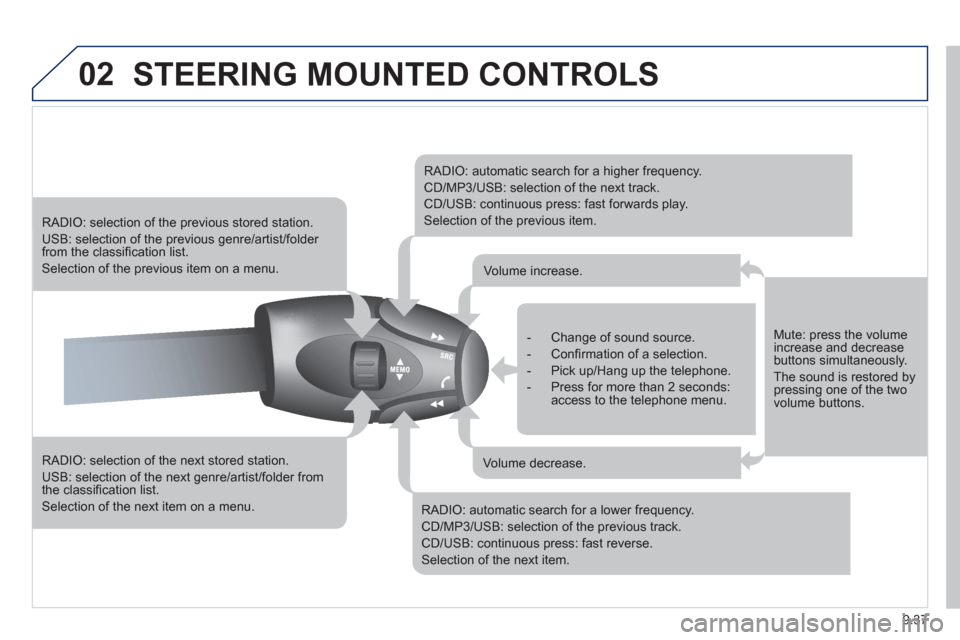
02STEERING MOUNTED CONTROLS
RADIO: selection of the next stored station.
USB: selection of the next genre/artist/folder from the classifi cation list.
Selection of the next item on a menu.
RADIO: selection of the previous stored station.
USB: selection of the previous genre/artist/folder from the classifi cation list.
Selection of the previous item on a menu.
RADIO: automatic search for a higher frequency.
CD/MP3/USB: selection of the next track.
CD/USB: continuous press: fast forwards play.
Selection of the previous item.
RADIO: automatic search for a lower frequency.
CD/MP3/USB: selection of the previous track.
CD/USB: continuous press: fast reverse.
Selection of the next item.
- Change of sound source.
- Confi rmation of a selection.
- Pick up/Hang up the telephone.
- Press for more than 2 seconds:access to the telephone menu.
Volume increase.
Volume decrease.
Mute: press the volumeincrease and decreasebuttons simultaneously.
The sound is restored by pressing one of the two volume buttons.
Page 210 of 232
9.42
05
1
1
2
3
PEUGEOT CONNECT USB
The system puts together playlists (temporary memory) createdover a period which depends on the capacity of the USB device.
The other sources are available durin
g this time.
The pla
ylists are updated each time the ignition is switched off or each time a USB memory stick is connected.
When connectin
g for the fi rst time, the classifi cation suggested
is by folder. When you reconnect, the classifi cation selected
previously is retained.
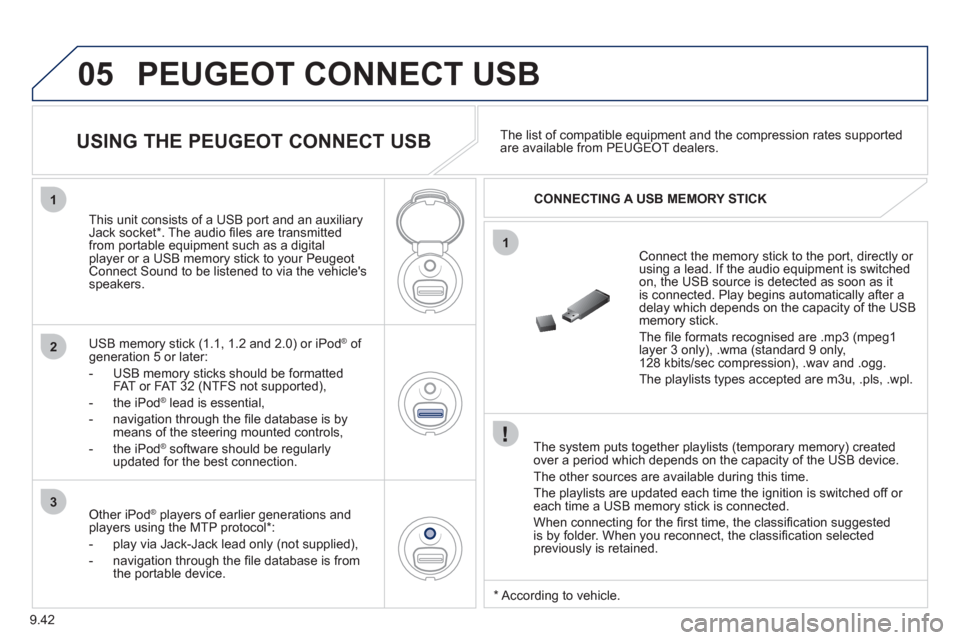
Connect the memory stick to the port, directly or using a lead. If the audio equipment is switched
on, the USB source is detected as soon as it
is connected. Play begins automatically after a
delay which depends on the capacity of the USB memory stick.
The fi le formats reco
gnised are .mp3 (mpeg1 layer 3 only), .wma (standard 9 only,128 kbits/sec compression), .wav and .ogg.
The playlists types accepted are m
3u, .pls, .wpl.
This unit consists of a USB port and an auxiliar
yJack socket *
. The audio fi les are transmittedfrom portable equipment such as a digitalplayer or a USB memory stick to your PeugeotConnect Sound to be listened to via the vehicle'sspeakers.
U
SB memory stick (1.1, 1.2 and 2.0) or iPod Æof generation 5 or later:
- USB memor
y sticks should be formattedFAT or FAT 32 (NTFS not supported),
- t
he iPodÆ
lead is essential, Æ
- navigation through the fi le database is bymeans of the steering mounted controls,
- th
e iPodÆ
software should be regularlyÆ
updated for the best connection.The list o
f compatible equipment and the compression rates supported are available from PEUGEOT dealers.
USING THE PEUGEOT CONNECT USB
CONNECTING A USB MEMORY STICK
Other iPod®
players of earlier generations and®
players using the MTP protocol * :
- pla
y via Jack-Jack lead only (not supplied),
- navi
gation through the fi le database is from
the portable device.
* Accordin
g to vehicle.
Page 214 of 232
9.46
06
2
1
2
2
3
RECEIVING A CALL
display on the multifunction screen.Initiate the pairing between the telephone and
the vehicle. This pairing can be initiated from
the vehicle's telephone function menu or via the
telephone's keypad. See steps 1 to 10 on the
previous pages. During the pairing phase, the vehicle
must be stationary with the key in the ignition.
Select the tele
phone to be connected from the telephone function
menu.
The audio s
ystem connects to a newly paired telephone automatically.
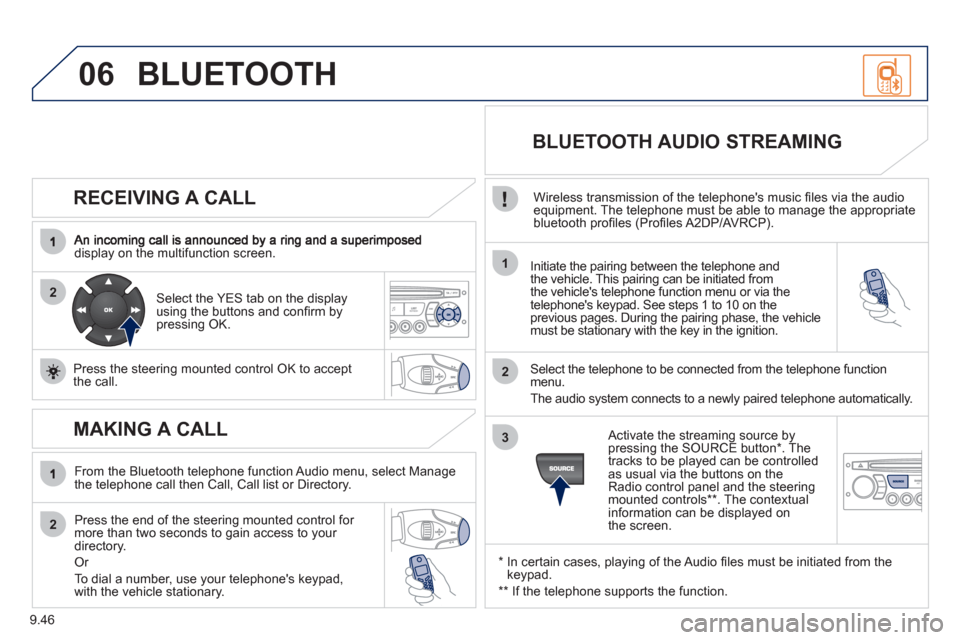
Select the YES tab on the display
using the buttons and confi rm bypressing OK.
Press the steerin
g mounted control OK to accept
the call.
BLUETOOTH AUDIO STREAMING
Wireless transmission of the telephone's music fi les via the audio equipment. The telephone must be able to manage the appropriate
bluetooth profi les (Profi les A2DP/AVRCP).
*
In certain cases, playing of the Audio fi les must be initiated from the keypad.
** If the tele
phone supports the function.
Activate the streamin
g source by
pressing the SOURCE button * . The
tracks to be played can be controlled as usual via the buttons on theRadio control panel and the steering
mounted controls ** . The contextual
information can be displayed on
the screen.
BLUETOOTH
MAKING A CALL
From the Bluetooth telephone function Audio menu, select Manage
the telephone call then Call, Call list or Directory.
Press the end o
f the steering mounted control for more than two seconds to gain access to your
directory.
Or
To dial a number, use
your telephone's keypad,with the vehicle stationary.
Page 226 of 232
168
Instruments and controls
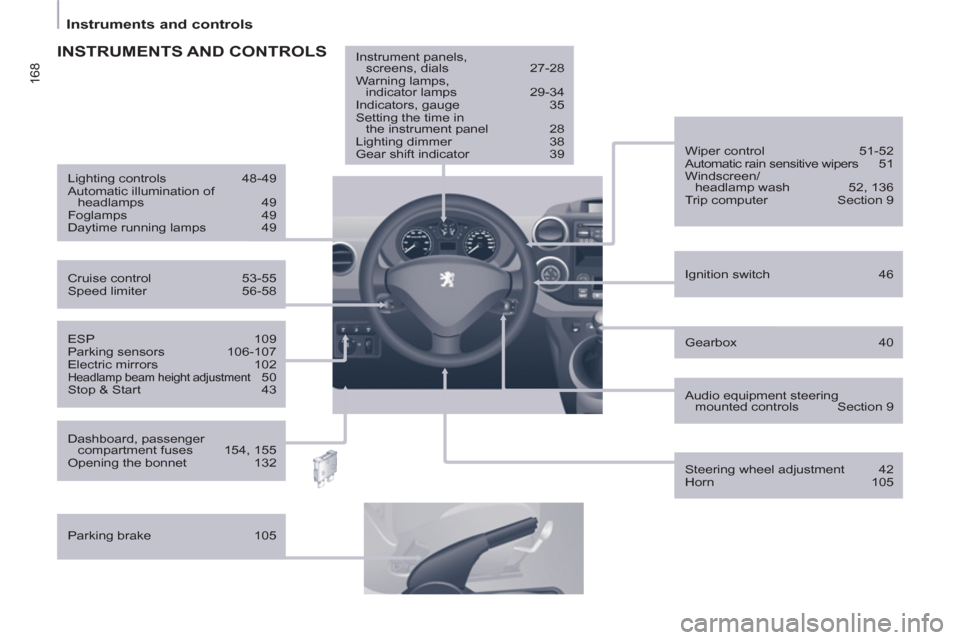
Gearbox 40
ESP 109
Parking sensors 106-107
Electric mirrors 102
Headlamp beam height adjustment 50
Stop & Start 43
Ignition switch 46
Wiper control 51-52
Automatic rain sensitive wipers 51
Windscreen/
headlamp wash 52, 136
Trip computer Section 9
Cruise control 53-55
Speed limiter 56-58
Lighting controls 48-49
Automatic illumination of
headlamps 49
Foglamps 49
Daytime running lamps 49
INSTRUMENTS AND CONTROLS
Dashboard, passenger
compartment fuses 154, 155
Opening the bonnet 132
Parking brake 105
Instrument panels,
screens, dials 27-28
Warning lamps,
indicator lamps 29-34
Indicators, gauge 35
Setting the time in
the instrument panel 28
Lighting dimmer 38
Gear shift indicator 39
Audio equipment steering
mounted controls Section 9
Steering wheel adjustment 42
Horn 105
Page 229 of 232
171
Technical data - Maintenance
VISUAL SEARCH
10
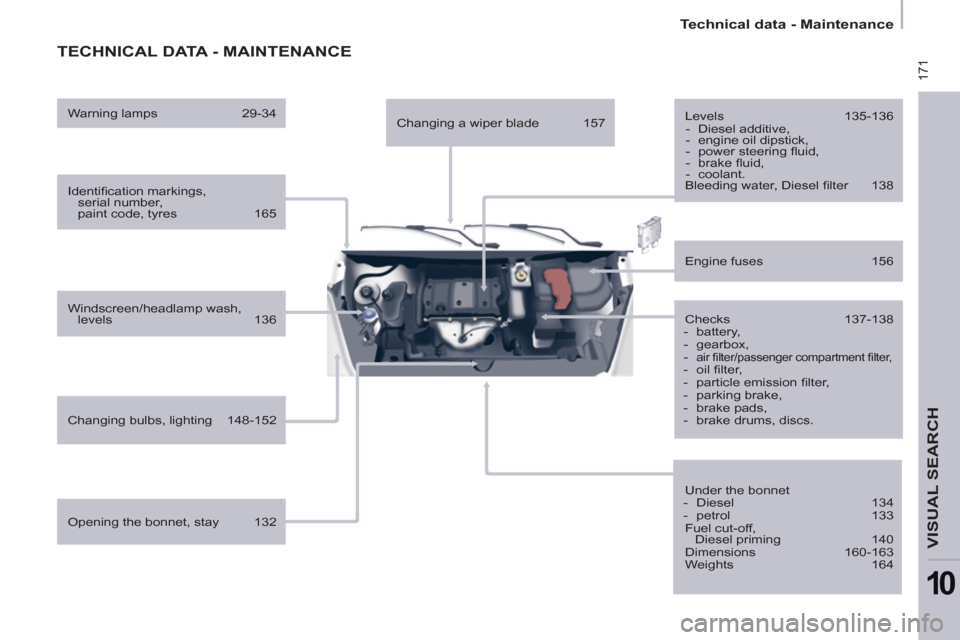
TECHNICAL DATA - MAINTENANCE
Identifi cation markings,
serial number,
paint code, tyres 165
Windscreen/headlamp wash,
levels 136
Changing bulbs, lighting 148-152
Checks 137-138
- battery,
- gearbox,
-
air fi lter/passenger compartment fi lter,
- oil fi lter,
- particle emission fi lter,
- parking brake,
- brake pads,
- brake drums, discs.
Engine fuses 156
Under the bonnet
- Diesel 134
- petrol 133
Fuel cut-off,
Diesel priming 140
Dimensions 160-163
Weights 164
Opening the bonnet, stay 132
Levels 135-136
- Diesel additive,
- engine oil dipstick,
- power steering fl uid,
- brake fl uid,
- coolant.
Bleeding water, Diesel fi lter 138
Warning lamps 29-34
Changing a wiper blade 157